A Wiki That Knows
Where It Is Being
Used: Insights
from Potential Users
Maria Plummer
New Jersey Institute of Technology
Linda Plotnick
New Jersey Institute of Technology
Starr Roxanne Hiltz
New Jersey Institute of Technology
Quentin Jones
New Jersey Institute of Technology
Acknowledgments
This research is partially supported by grants from the National Science Foundation: NSF-CISE 0454081, NSF 0534520, NSF 0534520, NSF 0534520 and NSF 0547427. The opinions expressed are those of the authors and not necessarily of the NSF. We are thankful to the many students who conducted and transcribed the interviews in Study 1 and Study 2. Eunhee Kim played an important role in the coding and analysis of Study 1. We are also grateful to the SmartCampus development team, especially Richard Schuler and Nathaniel Laws, who designed and built CampusWiki and provided scenarios and mockups for the studies.
Abstract
With the advent of extensive wireless networks that blanket physically compact urban enclaves such as office complexes, shopping centers, or university campuses, it is possible to create software applications that provide location-based mobile/ online services. One such application is CampusWiki, which integrates location information into a wiki structure. In the design science research reported in this paper, we employed a form of “action research” in which we engaged users as participants in an iterative process of designing and evaluating CampusWiki. Two qualitative studies were undertaken early in the design process in which semi-structured interviews were used to assess potential users’ reactions to CampusWiki. Through this research, the designers were able to assess whether their intentions matched the mental models of potential users of the application. The results showed that although many of the perceived benefits were as designed by the developers, a misunderstanding of the location-aware feature led users to unanticipated concerns and expectations. These findings are important in guiding designers and implementers on the desirable and possibly undesirable features of such systems.
ACM Categories: C.2.5, D.4.7, H.1.2, H.3.4, H.3.5 Keywords: Wiki, Location Awareness, Web 2.0, Internet
Introduction
Location-aware systems can be deployed in many useful ways; e.g., finding out where your children are, or determining the nearest Chinese restaurant. However, incidents such as the strike staged by New York City taxi drivers on September 5, 2007, to protest the mandatory installation of GPS devices in taxicabs demonstrate that there are individuals who have concerns about the use of these systems and, in some cases, are willing to go to extreme lengths to oppose them.
research approach to assessing users’ reactions to CampusWiki, a location-aware wiki being developed as part of a research initiative called SmartCampus. This initiative is aimed at converting an urban university campus into a living laboratory for location-aware community systems.
The SmartCampus research initiative has the explicit objective of increasing the size and density of the social networks of its applications’ users within a specific community, such as a university campus. Thus it fits within Kurt Lewin’s (1946) initial conception of action research as combining theory generation with attempting to change a social system as a result of the researchers’ acting within it (DeLuca et al., 2008). Action research uses data feedback in a cyclical process aimed at an increased understanding, and generally is conducted in multiple cycles of a five-step process of diagnosing a problem, planning an action, taking the action, evaluating the results, and specifying lessons learned for the next cycle (DeLuca et al., 2008). The core “action” in this project is the iterative design and evaluation of a set of location-aware communication applications. Two iterations of the evaluation of CampusWiki are described in this paper.
The first evaluation, Study 1, (see Kim et al., 2007) was done at the beginning of the design phase after the software applications were conceptualized but before a prototype was available. This study examined all of the then proposed applications for SmartCampus. The second evaluation, Study 2, (see Plummer et al., 2007) was done after a prototype of CampusWiki was developed and examined users’ reactions to this application only. Our methodology aimed at finding relatively quick and inexpensive techniques to obtain iterative rounds of feedback in an action research project, including an initial use of scenarios to elicit feedback from prospective users before a prototype was even available.
A location-aware wiki is a relatively new application. Prior literature on this type of application has focused primarily on the technological challenges (Schuler et al., 2007). There is a need to explore users’ perceptions of the usefulness of, and concerns about, this type of technology. Understanding users’ perspectives can guide development efforts in this nascent field in order to maximize acceptance.
Research on the design space of location-aware community systems in SmartCampus is based on the “People to People to Place” (“P3”) theoretical framework (described below). A key design issue, as
illustrated later in our results, is to find an acceptable balance between the convenience of being able to obtain location-based information about people, places and events nearby, and privacy concerns. The remainder of this paper begins with an overview of the design space and problems: wikis, their uses and appeal, followed by a discussion of wikis with location specific information, potential benefits, and issues of adding location-awareness. A description of the SmartCampus project in general and the conceptual framework that forms the basis of its systems designs as well as an overview of CampusWiki are then presented. These sections thus constitute a description of how we diagnosed the design problems and planned and undertook the action of designing a location-aware wiki as one of a suite of applications to support community-building. Our adaptation of the action research methodology is then briefly described. Study 1 and Study 2 are described separately, followed by a discussion of the implications of the results of the two studies. We end with a discussion of limitations of the studies; planned future research; and summary and conclusions about “lessons learned.”
Wikis as a Location-Aware Community System Wikis and Their Uses. A wiki is defined as comprising “a set of linked web pages, created through the incremental development by a group of collaborating users, and the software used to manage these pages” (Wagner, 2004, p. 269).
In general, the IS literature focuses primarily on the two contexts within which wikis are used:
(1) As a shared knowledge repository for virtual communities: Wikipedia is probably the best known example of such a repository. Another example of a virtual community wiki site is www.fluwiki.com, highlighted in Palen et al. (2007), which provides vital information to local communities in preparing for and coping with an influenza pandemic.
(2) As a depository for shared artifacts and knowledge management within an organization:
to common issues and shared problems are found, posted and discussed.”
(3) Since their introduction in the mid 1990s, wikis have been gaining widespread adoption for a number of reasons, including the following: • Cost effectiveness: A variety of wiki engines
are readily available as open source software (Raman, 2006).
• Low barriers to making contributions: There is no need for registration or for knowledge of web publishing technology (Gaved et al., 2006).
• Ease of use: Generally it is believed that wikis are relatively easy to use (Raman, 2006; Wagner, 2004).
• Knowledge management capabilities: Wikis can assist in fulfilling knowledge management needs such as ad-hoc knowledge creation, ease of finding required knowledge, dynamic update of knowledge, and quality assurance through quick error recovery (Wagner, 2004).
• Accessibility on multiple devices: Only a web browser is necessary to create or edit content. For PDAs and cellular phones, there are mobile browser technologies that can capture and display almost any web content.
Wikis with Location Specific Information
Prior research has explored the addition of semantic web (Berners-Lee et al.,, 2001) features to wikis in order to enhance the retrieval of more relevant pages. Innovative semantic wikis that include the attribute of location in their pages include MapWiki, Scipionus.com, Milwiki, and Open Guides.
MapWiki overlays markers identifying specific locations on a shared map (Teranishi et al., 2006). Similar to wiki pages, these markers are created and edited by any user. The site www.scipionus.com, with an interface similar to that of MapWiki, is noted by Palen et al. (2007) in their discussion of the use of community-managed web sites in supporting grassroots efforts in preparing for, responding to, and recovering after a disaster. Milwiki, described in Brännström and Märtenson (2006), is designed primarily for use in the context of command and
control in which knowledge of the actual physical positions of the objects of interest is crucial to good situational awareness. Milwiki embeds maps in its pages similar to the manner in which pictures are inserted. This facilitates geo-referencing in which connections are made between wiki content and geographic locations. Open Guides comprise “a network of wiki based community guides each dedicated to coverage of a particular city, town or geographical area” (Gaved et al. 2006, p. 120). These community guides are usually integrated with GoogleMaps and are intended to support hybrid communities that combine online and face-to-face interactions within specific localities.
Adding Location-Awareness to Wikis
The addition of “location” as a metadata attribute to a wiki’s structure facilitates the retrieval of more relevant content in searches in which a specific location is included in the query statement. However, this is not the only reason for adding location specific data to wikis. The true advantage of adding such data is realized when wikis integrate into their functionality the ability to estimate users’ current location with technologies such as WiFi, Bluetooth, and GPS. That is, the wiki is location-aware.
Once a particular user’s current location is known to the wiki, this location can be factored into determining relevance and ordering of a list of pages (or contents) displayed to the user in the results of a search made by that user. Also, as the user moves from one location to another, the display of the wiki can be automatically adapted to reflect the changes in location. The following are three examples of benefits that can be realized with the addition of location-aware capabilities to wikis.
(1) Ubiquitous Recommendations
be used to make an appropriate recommendation. For instance, if a content-based analysis suggests that a user is interested in foreign films, then a location-aware wiki with this built-in functionality can display prominently, or provide easy access to, a wiki page of a nearby theatre that shows foreign films. A collaborative filtering algorithm can take this type of recommendation one step further and rank all the foreign film theatres according to the ratings given by users.
(2) Possible Improvement in trust in the wiki’s content
As noted in the following section, trust in the content of wikis is usually a concern of users. With information about the location from which a user makes an entry, other users might trust the content of that entry more than if no such information were available. For instance, if a wiki shows that a disaster related report was entered by an individual who was at the scene of that disaster, then others would probably consider this report to be more credible than an account from a user with no associated location information.
(3) Community Support
As noted earlier, wikis are often deployed as systems that encourage through collaborative editing the formation of communities of practice (Goodwin-Jones, 2003). With location-aware capabilities added, context is enriched that can increase visibility of proximal community members and events of potential interest, thus encouraging social interaction.
Developing and implementing a location-aware wiki in order to realize its potential benefits is a design challenge, especially given user concerns about trust and privacy. Two aspects of trust need to be considered: (1) The technology’s principle of openness permits anyone to edit the information published in a wiki, hence there is always the question of whether its content can be trusted. It is argued, however, that with very large wiki communities, members are constantly correcting mistakes; and (2) As noted by the implementers of one of the earliest location-aware systems, Active Badge, users must trust that information about
their location will not be misused by the administration or those in authority (Harper, 1995).
Privacy pertains to the ability to maintain control over the dissemination of information about oneself or one’s establishment. For instance, any individual can create a page about another person and enter inaccurate details or disclose personal information on that page. Similarly, pages about a business can be created by competitors and disparaging remarks can be entered on those pages.
An Overview of SmartCampus and CampusWiki Location-aware Community System Design Space. The SmartCampus applications, including CampusWiki, are designed within the context of the People-to-People-to-Places (P3) Conceptual System Framework (Jones et al., 2004). This framework aims to characterize systematically the design space of location-aware community systems, identify key challenges, and suggest important research opportunities. It does this by categorizing user interface approaches into eight basic design techniques.
As shown in Table 1, the framework organizes the design space of location-aware “community” systems into a matrix of different types of system techniques. The rows of the framework distinguish between four different approaches to “situating” the interaction environment with regards to physical space (spatial foci). These are, in turn grouped into:
People-centered techniques where the focal point is either (1) the user’s geographic location, or (2) the user’s location relative to other people and objects in the environment.
Place-centered techniques where the focal point is either (1) on user activities in a particular physical location, or (2) online interpersonal interaction in spaces that match/represent physical location.
Table 1: P3-System Design Space Framework - Techniques and Representative Services [modified from Jones et al., 2004]
Design Techniques Synchronous Communication or Location-awareness Asynchronous Communication or Location-awareness
Absolute user location
(1) Uses peoples’ current locations Service Example: Where is Prof X now?
(2) Uses peoples’ location histories
Service Example: Did X go to the seminar last Monday?
Peo
p
le-cen
ter
ed
Co-location / proximity
(3) Uses peoples’ real-time co-location Service Example: Who is nearby?
(4) Uses peoples’ history of co-location Service Example: Did X attend my class last week?
Use of physical
places
(5) Uses online representation of peoples’ current use of physical spaces Service Example: How crowded is the library now?
(6) Uses history of peoples’ use of physical spaces
Service Example: Does this place tend to be busy at specific times?
Place-c
en
ter
e
d
Matching virtual places
(7) Uses synchronous online interaction spaces related to physical location Service Example: How do people describe the activities happening here now?
(8) Uses asynchronous online interaction spaces related to physical location
Service Example: What have people said about activities that occur here or services offered?
SmartCampus
By building and leveraging a model of a compact community and its social spaces, it is theorized that P3-services can be particularly useful in creating and maintaining a stronger sense of community in urban enclaves, such as downtown university campuses, Chinatowns, business campuses, or a museum complex (Jones et al., 2006). We are testing this proposition at the New Jersey Institute of Technology (NJIT) through the SmartCampus location-aware community system test-bed, which is designed to serve as a dispersed laboratory for the study of P3 services in terms of social connectivity, co-ordination, and privacy.
When complete, the SmartCampus test-bed will consist of thousands of individuals with mobile locatable computing devices (primarily PDA cell phones) running a suite of P3-services covering the entire design space. To reach this end point, the first phase of our efforts focused on developing core cyberinfrastructure for a seamless indoor/outdoor multibuilding/floor location system and generating rich data about the campus environment. CampusWiki was developed and deployed within this context, with the aim of providing a fun and useful mechanism for our user community to collectively describe places (rooms, buildings, dining
areas, individuals’ hangout spots, etc.) around campus.
CampusWiki
capability of the wiki to display pages of entities for which the associated location is in physical proximity to the user’s current location. The “nearby” filter is usable only within the campus wireless network. Otherwise, a message indicating that the feature is not available is displayed.
CampusWiki was designed to provide location-aware services for students and faculty using their own laptops/notebook/tablet PCs or web-enabled cell phones without need for any specialized hardware or software. It utilizes a fairly crude method to locate a user and contextualize information (the wireless access point to which users are connected, with a precision typically of half a building floor). Other SmartCampus applications utilize device tracking systems that provide room level accuracy. Note that CampusWiki “knows” the rough location of a device (floor and building) that is accessing it, but does not necessarily know the identity of the user and does not disclose a user’s current location to other users without the user in question voluntarily editing the wiki. This was a deliberate design choice for protecting user privacy: the system “knows” but does not “tell” others about a real time location. Therefore we adopted a basic
design principle that users must feel that they are in control of the dissemination of information about their location and identity, when they make a contribution. However, the feature of user locatability appeared to blur the distinction between context-aware presentation and user tracking in the minds of many study subjects. This issue will be explored further in the discussion of the results of the studies. Figure 1 shows the home page of CampusWiki that is very similar to the version used for the studies. More details about the design of CampusWiki, including its “light weight” ratings feature designed to encourage active participation from users, is found in Schuler et al. (2007).
The Action Research Approach
The SmartCampus initiative falls within the realm of design science, which seeks “to extend the boundaries of human and organizational capabilities by creating new and innovative artifacts” (Hevner et al., 2004, p.75). The design science process is very iterative; as feedback is obtained from users, the design specifications, prototype and eventually the operational system are changed.
Because the software applications are a “moving target” and because it is important to obtain substantial input about user requirements as part of the design specifications before even a prototype is available, most traditional quantitative research techniques used in Information Systems research are not appropriate. Instead, a form of “action research,” like the “soft systems methodology” described by Checkland (1981), is used to obtain iterative rounds of mostly qualitative input into the evolving design. Qualitative methods are most suited to obtaining an understanding of the interaction of people, organizations, and technology with applications, such as those in SmartCampus, that aim to change the very nature of communication and social interaction within an organization (Klein and Myers, 1999). Action research has been described as a post-positivist research method that is “empirical, yet interpretive… experimental, yet multivariate… and observational, yet interventionist” (Baskerville and Wood-Harper, 1996, p. 236; see also DeLuca et al., 2008).
Five typical, iteratively repeating phases have been identified for introducing scientific rigor into action research (Susman and Evered, 1978; Baskerville and Wood-Harper, 1996; Lindgren et al., 2004): diagnosing; action planning; action taking; evaluating; and specifying learning. In the diagnosing phase, the situation is analyzed and problems that may be aided by information technology are identified. In our case, published student surveys highlighted problems such as lack of social life and a poor sense of community on campus. The administration of the university, including the President, supported the SmartCampus initiative to try to improve this situation. In action planning, desired forms of social interaction on campus were envisioned and initial design specifications and scenarios were developed for software applications with location-aware mobile capabilities that could achieve these goals while protecting privacy. The large set of interviews with prospective users (Study 1) was conducted at the end of the first iteration of this phase in order to obtain feedback on these design specifications. Action taking involved developing an initial prototype from the revised design based on the feedback obtained in Study 1. The second smaller study of users (Study 2) took place at the end of the first iteration of this phase.
The evaluation phases aimed to determine if the desired effects were achieved, in the sense of whether the artifact created is likely to be adopted and used by the members of the organization in
such a way as to obtain the desired objectives. “In the evaluation phase, participants are interviewed, and the data are summarized and analyzed” (DeLuca et al., 2008, p. 54). Thus, semi-structured interviews in which prospective users or early users of prototypes talk about the software artifacts in their own words are used as the empirical basis of evaluation. The objective is not to draw a sample that is representative of some (as yet unknown) body of users, but rather to obtain an in-depth assessment from small numbers of representatives of different categories of prospective users, to iteratively assess reactions to an evolving artifact. For example, Lindgren et al. (2004) interviewed 24 users in their first evaluation phase, and 34 in their second evaluation phase, in their study of a new type of competence management information system. Our two evaluation iterations (Study 1 and Study 2, described below), similarly used interviews with prospective users, analyzed with a grounded theory approach for identifying themes and concepts of design interest.
The specifying learning phase is where lessons learned from iterations are documented. This occurs during each iteration as research results are used to inform designers for the next phase of design. The design implications section of this paper sums up what we learned in terms of their design implications, and the summary and conclusions include our plans for the next phases of the project.
Evaluation Study 1: Users’ Reactions
Based on Scenarios and Mock-Ups
This study was conducted at a time when no prototype of the SmartCampus systems was available to present to research participants. Our aim was therefore not to test core usability concerns but rather to derive a general understanding of the perceptions and concerns of potential users.
Method
meant that the interviewers modified their questions to explore further what the interviewees said.
The interviewers in this study were NJIT students registered in two courses: Qualitative Research, and Computers and Society. Prior to conducting the interviews, these interviewers completed two training programs: (1) an online course in the protection of human subjects offered by the US Department of Health and Human Services Office for Human Research Protection, and (2) a face-to-face lesson on conducting semi-structured interviews. To enhance consistency and reliability between interviews, the actual interview guide for the study was used in the training on conducting semi-structured interviews.
The Interview Guide. The interview guide included a brief description of the SmartCampus project and the applications proposed for development in this project. This guide also presented brief scenarios to illustrate the capabilities of each of these applications. Each scenario was followed by a series of questions aimed at determining the respondents’ interest in using the described applications as well as determining their views on potential uses, their concerns and possible reasons for not wanting to use the proposed applications. Figure 2 presents the scenario used in explaining some of the planned functions of CampusWiki (which was then referred to as NJIT Wiki). The interview guide also included questions on the respondents’ current use of mobile wireless devices, their attitudes towards them, and their general background (age, ethnicity, residence, degree program and year).
Data Analysis. The interviews conducted were transcribed by the interviewers, and a content analysis of the transcripts was performed by two coders using NVivo®, a software application that supports content analysis. The content analysis involved coding of transcripts, which was done in accordance with the responsive interviewing model described in Rubin and Rubin (2005). Specifically, the guidelines for “looking for concepts in your own interviews” (Rubin and Rubin, 2005, pp. 210–216) were followed.
In the responsive interviewing coding process, a coding scheme of topics, themes or concepts is used to systematically label “data units” or “blocks of information” in the transcripts based on their content and meaning. This makes it possible to retrieve and examine all at once data units across all interviews. A data unit, which is referred to as a “reference” in NVivo® 7.0 and in this paper, can be as small as a phrase or can extend over several paragraphs. It is possible to have more than one data unit in a single interview refer to the same theme. Also, an interview may not necessarily have data units referring to all the themes in the coding scheme. A data unit can relate to a single or to multiple themes. For instance, the following data unit refers to two themes under “concerns,” “privacy,” and “credibility of data.”
Having other people being able to edit your information is a little weird to me… Or at least it should say ‘this part was edited by the actual person’ and then there’s another part where anybody can write whatever they want. It would be important to know what people put up themselves and what other people say.
Figure 2. Scenarios illustrating the use of CampusWiki
CampusWiki (then known as NJIT Wiki) Scenario
Joe, a sophomore Information Systems major, needs to use a computer lab to complete a class assignment. He is in GITC and the NJIT Wiki recommends he use a lab on the 4th floor. Even though there is a lab on the same floor where he is located, the NJIT Wiki shows that, that lab received a poor rating due to being overcrowded and having outdated equipment. Joe goes to the lab on the 4th floor.
A. Benefits/Anticipated use- Do you think you would like to use the SmartCampus Wiki? (If yes, what do you think you would use it for? If not, why not? )
Consistent with the responsive interviewing model, the coders jointly developed an initial coding scheme in which the names for the main categories of themes were derived from the main topics in the interview guide (e.g., “Perceived benefits” and “Perceived concerns” about CampusWiki). They then added to this scheme labels for subcategories based on themes and concepts that were most apparent in a preliminary examination of the content of the transcripts. Labels added included “Credibility of data” under the main category “Perceived concerns” and “Being informed about events” under “Perceived benefits.” The use of an initial coding scheme, or “start list,” followed by “searching for constructs grounded in the data” is also consistent with the Front-end-loaded Grounded Theory Method (FGTM) recommended for action research by DeLuca et al. (2008, p. 55, 56). With this initial coding scheme in mind, the coders read the transcripts more carefully in order to identify data units that referred to a theme or concept in the coding scheme. Data units and their corresponding themes in the coding scheme were identified by reading each paragraph, sentence, and phrase in search of the answer to the repeated questions: "What is this about? What is being referenced here?"
An “other” subcategory was maintained for each main category or topic. Every time a few new interviews were coded, the data units associated with this subcategory were examined to see if references were made to a more subtle theme or concept that should be given its own label/code rather than being subsumed under “other.” In order to improve coding reliability, the coders coded the first few transcripts together and discussed the discrepancies they had in interpretation. These discussions set the guidelines for the rest of the coding. The remainder of the transcripts was coded independently, with exchange of information about the addition of new subcategories that were emerging from the data. At the end of the coding process, the total number of references or data units in all the interviews that corresponded to each theme was determined.
Subjects. The potential users who participated in this study were not randomly selected, but instead, a quota sampling technique was used in which each interviewer was required to include the following in the set of three or four subjects that he/she interviewed: a campus resident, a commuter, an undergraduate, a graduate, a male student, a female student, and a faculty or staff member. Of course, one subject could satisfy more than one of the said
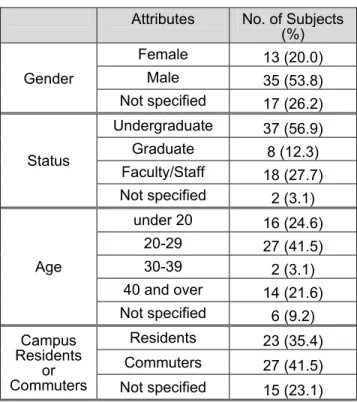
criteria. The objective was to make sure that different types of subjects, in terms of characteristics that we thought might affect reactions to the software, were included. A total of 65 subjects were interviewed. The demographic distribution of the subjects is presented in Table 2.
Table 2: Demographic Distribution - Study 1 Attributes No. of Subjects
(%) Female 13 (20.0)
Male 35 (53.8)
Gender
Not specified 17 (26.2) Undergraduate 37 (56.9) Graduate 8 (12.3) Faculty/Staff 18 (27.7) Status
Not specified 2 (3.1) under 20 16 (24.6)
20-29 27 (41.5)
30-39 2 (3.1)
40 and over 14 (21.6) Age
Not specified 6 (9.2) Residents 23 (35.4) Commuters 27 (41.5) Campus
Residents or
Commuters Not specified 15 (23.1)
Although the sample was not randomly selected, some aspects of it were representative of the composition of the NJIT campus community; for instance, about 20% of the NJIT population is female. However, undergraduates, faculty, and staff were over-represented, while graduate students were under-represented.
Results
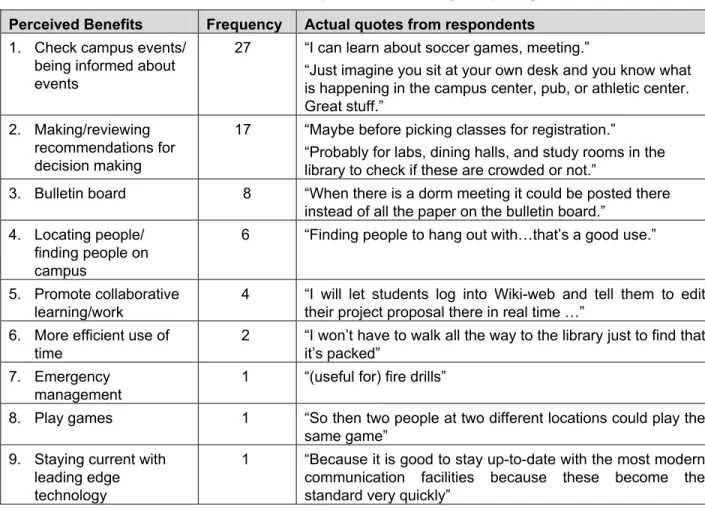
Benefitsthe most frequently cited benefit was to check for or be informed about campus events. A student noted, “There have been numerous occasions when I just walk by an event and I have wondered what it is. So if I find it (on CampusWiki), I could have access to that information right there.”
CampusWiki’s benefits of making and reviewing recommendations for decision making, using it as a bulletin board, and promoting collaborative work and learning were also frequently cited. The ratings and comments on the wiki were seen as useful for making decisions about where to eat, what courses to take, and which lab had the equipment needed. Also frequently mentioned was checking to see if a place is crowded or not. As one participant remarked, “(to see) whether there are any computers left in the library.” Of course, the wiki’s content is not automatically updated to reflect the current status of a location and so a user within that location would have to post such status information for it to be available. The wiki was seen to have bulletin board capabilities so that, for example,
meeting notices could be posted. Collaborative work potential was mentioned both by students and professors as a benefit. A professor described a scenario in which she had the students prepare a document on the wiki during class so that she could edit it while the students were still in class.
Interestingly, one often-mentioned benefit seen for CampusWiki, “finding people on campus,” was based upon a misconception of the location-aware capability of the application. While the location-aware capability detects the current locale of a user using the campus wireless network, that information is only used to determine which pages are associated with “nearby” locations as specified by the authors of these pages at the time they were created. Users of the wiki are not informed of where other users are in real-time. (In another SmartCampus application, CampusMesh, one’s designated “buddies” can see each other’s location in real-time; this may be one of the reasons for the confusion).
Table 3. Perceived Benefits of CampusWiki Ranked by Frequency of References Perceived Benefits Frequency Actual quotes from respondents
1. Check campus events/ being informed about events
27 “I can learn about soccer games, meeting.”
“Just imagine you sit at your own desk and you know what is happening in the campus center, pub, or athletic center. Great stuff.”
2. Making/reviewing recommendations for decision making
17 “Maybe before picking classes for registration.” “Probably for labs, dining halls, and study rooms in the library to check if these are crowded or not.”
3. Bulletin board 8 “When there is a dorm meeting it could be posted there instead of all the paper on the bulletin board.”
4. Locating people/ finding people on campus
6 “Finding people to hang out with…that’s a good use.”
5. Promote collaborative learning/work
4 “I will let students log into Wiki-web and tell them to edit their project proposal there in real time …”
6. More efficient use of time
2 “I won’t have to walk all the way to the library just to find that it’s packed”
7. Emergency management
1 “(useful for) fire drills”
8. Play games 1 “So then two people at two different locations could play the same game”
9. Staying current with leading edge technology
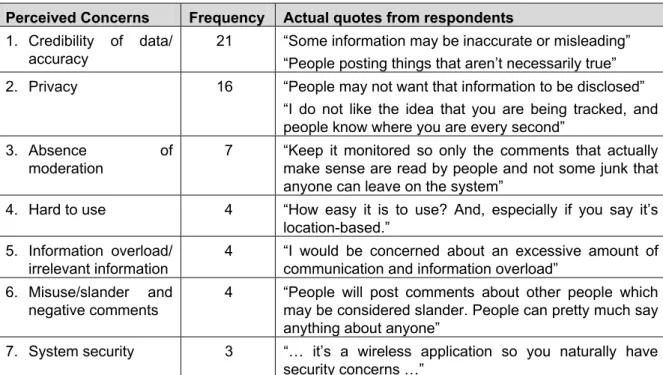
Table 4. Perceived Concerns of CampusWiki Ranked by Frequency of References Perceived Concerns Frequency Actual quotes from respondents
1. Credibility of data/ accuracy
21 “Some information may be inaccurate or misleading” “People posting things that aren’t necessarily true” 2. Privacy 16 “People may not want that information to be disclosed”
“I do not like the idea that you are being tracked, and people know where you are every second”
3. Absence of
moderation
7 “Keep it monitored so only the comments that actually make sense are read by people and not some junk that anyone can leave on the system”
4. Hard to use 4 “How easy it is to use? And, especially if you say it’s location-based.”
5. Information overload/ irrelevant information
4 “I would be concerned about an excessive amount of communication and information overload”
6. Misuse/slander and negative comments
4 “People will post comments about other people which may be considered slander. People can pretty much say anything about anyone”
7. System security 3 “… it’s a wireless application so you naturally have security concerns …”
Concerns
While many benefits were perceived by the subjects, they also raised concerns about using CampusWiki. A total of 59 references were coded for concerns about CampusWiki. Table 4 shows, by the frequency with which they are mentioned, the concerns held by the participants.
Privacy and credibility of data were two concerns about CampusWiki that were mentioned frequently. Respondents were concerned that the information posted on the wiki might not be accurate. One subject was concerned that there would be “people posting things that aren’t necessarily true” on the wiki.
Privacy concerns about CampusWiki, for the most part, followed one of two themes. Participants were concerned that private information might be posted on the wiki. A subject noted, “People may not want that information to be disclosed.” Also of concern, albeit based upon a misconception, was the location-aware functionality of the wiki. Participants mistakenly believed that the wiki would track their current location and display this as well as identifying information to other users. “It discloses where you are when you’re on the system posting about things,” one subject lamented. While the location of an individual who edits a page is posted
in the history of changes made to that page, the identity of that individual is not revealed. The threat of stalking was mentioned with some frequency, albeit a perception of a threat that is unlikely because it is based on that misconception about the location-aware functionality of the wiki. The wiki, as described above, specifies the time and place at which an entry is made. However, it does not disclose the identity of the user making that entry or the current location of users.
Anticipated Use
Interviewees were asked, “Do you think you would use the SmartCampus Wiki?” Table 5 shows that an overwhelming majority (73.8%) of the interviewees thought they would use CampusWiki. This suggests that privacy and other concerns may not necessarily lead to a decision to not adopt such a system.
Table 5. Anticipated Use of CampusWiki Response No. of Subjects (%)
Yes 48 (73.8)
No 8 (12.3)
Not sure 6 (9.2)
Evaluation Study 2: Users’ Reactions
Based on an Exploration of a Prototype
The feedback from Study 1 about users’ desired features and concerns was used to modify the initial design and create a working prototype of CampusWiki, with which it was possible to explore reactions after actual use. In action research terminology, the feedback in the form of results summarized above led to the actions of modifying the design specifications to respond to prospective users’ concerns, and then implementing an operative prototype. Although the use of scenarios to assess users’ reaction is informative, scenarios are limited in their ability to describe comprehensively the functionality of the system. It was therefore prudent to follow Study 1 with an examination of perceptions after the actual use of a prototype to verify whether or not the kinds of anticipated benefits and concerns expressed as a result of the scenarios still applied.
The initial release of CampusWiki was targeted towards the student population. Therefore, the sample in Study 2 was selected from that target user group.
Method
Participants’ views on the first working prototype of CampusWiki were elicited through a two step process: a hands-on exploration/tour of the application, followed by a semi-structured interview. Students in a graduate Qualitative Research Methods course planned and conducted the guided tour and interviews under the supervision of the study director (Hiltz). As in Study 1, the responsive interviewing technique (Rubin and Rubin, 2005) was used. Described below are: (1) the guides for exploring the application and for conducting the interviews; (2) the subjects who participated in the study; (3) the actual system exploration and interview session; and (4) the data analysis.
Application Exploration and Interview Guides. Scripts to guide the exploration of the application and the interview session with each participant were developed collaboratively and iteratively by the six interviewers who were divided into two teams. The same script was used by both teams for the guided tour. This script included a general overview of the study, the SmartCampus project, and the CampusWiki application and directed participants in performing the following tasks: (1) navigating the
site; (2) editing, rating, and participating in a discussion; and (3) creating a web page. The participants were also encouraged to explore the site after the fixed tour and before their interview. The comments of the users while learning to use the system to do the prescribed tasks were recorded; thus the study incorporated a form of protocol analysis or thinking aloud, (Boren and Ramey, 2000) but with a more conversational approach. Desktop and laptop wireless computers were used in this study. Because the procedure was very time consuming (about one hour per subject for the recorded guided tour and interview) and thus very labor intensive to transcribe and analyze, and because this was a follow-up study designed primarily to determine if reactions to the prototype would be similar to reactions to the scenarios about an “imaginary” system, only a small number of subjects could be included. It should be noted that studies using protocol analysis usually have small numbers of subjects.
The main topics in the interview guides used by the two teams were the same except that a few questions were worded slightly differently. Because of the adaptive nature of responsive interviewing, slight differences in the wording of questions in the guide should not have impacted the validity of the study. The guides were designed to capture from participants their overall impressions of CampusWiki, their specific views on its usability, its usefulness to them personally and to the campus community as a whole, their concerns relating to privacy, location-awareness and anonymity, and their intentions to use it. The guides also included questions relating to the participants’ experiences with wikis and wireless devices, their places of residence (i.e. on campus or off-campus), and demographic attributes such as age, degree program and department.
including Computer Science, Information Systems, Mathematical Sciences, Civil and Environmental Engineering, and Industrial and Manufacturing Engineering. The eight male and four female participants, ranging in age from 18 to 50 years old, reflected the composition of the student body. However, the 11 commuters and the one campus resident under-represented resident students. System Exploration and Interview Process. During the system exploration, the participants were required to perform the specific tasks described in the script. However, they were also free to make comments, ask questions, and explore other aspects of the system that were not covered in the script. The entire process was recorded and transcripts were prepared from the recordings. Usability issues observed during the system exploration were used to refine the interface. However, these issues are not of central interest in this paper and are therefore not discussed here.
The twelve system explorations and interviews were done in two phases. On completion of the first phase in which six interviews were conducted, a review of the study design was performed. As suggested by the responsive interviewing model, the study design should be “flexible and adaptive… the interviewer must be able to change course based on what he or she learns” (Rubin and Rubin, 2005, p. 36). The only notable modification based on the review was the clarification of the description of the location-aware feature in the system tour and interview guides. The participants appeared to have misunderstood this feature and thought that it showed the location of other individuals using the system in real time.
Data Analysis
The same content analysis procedure described for Study 1 was followed for Study 2. Two coders examined jointly the transcripts in order to extract prominent and interesting themes that emerged from the subjects’ comments and reactions during the guided tour of the system and their responses during the interview. The main coding categories of themes corresponded with the logic of the questions in the guide. The actual themes in each category were identified by perusing the transcripts. For example,
some of the themes in the category relating to “Perceived concerns” were based on users’ responses to the following question: “Do you think there are any special issues regarding this site?” The identified themes were used as the basis for coding the transcripts using QSR Nvivo®, the same software used in Study 1. After all the transcripts were coded, the number of data units or references made to each theme was tallied.
Results
Presented here are the themes that emerged under the two predominant topics of the discourse that took place during the guided tours and interviews: perceived benefits and concerns. Also, the findings relating to anticipated use are discussed briefly. Perceived Benefits. The participants in this study were asked what benefits, if any, they thought CampusWiki might have. Table 6 lists the identified perceived benefits ranked in order of the frequency with which they were mentioned. Examples of quotes from respondents corresponding to each benefit are also included in this table.
Many of the perceived benefits noted in Study 1 were also mentioned in Study 2 (e.g. locating people, checking campus events, making /reviewing recommendations for decision making and promoting collaborative learning). However, in Study 2 other benefits such as expanding social networks, and planning events were also perceived.
Table 6: Perceived Benefits Ranked by Frequency of References Perceived Benefits Frequency Actual quotes from respondents 1. Locating people/finding people
on campus
8 “If you’re all online and you log on the wiki and you’re like, ‘Oh look, that person’s online too’.”
2. Check campus events/being informed about events
7 “Events. You can see what is going on, on the campus.” 3. Making /Reviewing
recommendations for decision making
7 “If I wanted to join RHA and I went to the RHA website they’re going to say all nice things about themselves because they made their own website. But, if I was to look here and people were saying ‘Don’t go, it’s a waste of time’ or ‘it’s actually great,’ it would help me decide.” 4. Promote collaborative
learning/work
5 “…even other students could answer questions from one another, you know it doesn’t necessarily mean that you have to bother the teacher.”
“Everyone’s a resource, you know?” 5. Finding interesting places 5 “you can find a lot of places” 6. Expanding social networks 4 “I can know about more people” 7. Other benefits
• Improving sense of community
• Creating and participating in
• Planning events
3 or fewer “I was not on campus when I did my undergraduate... My wife though was a campus resident… She had much more sense of community with the school. I didn’t have any sense of belonging to it… If you are living on campus, I can see some of that [referring to the information on CampusWiki] being useful
“If there is something you want to discuss, you can post a message and ask people to comment on it”
“Based on the comments about places, I can plan for my events better”
Table 7: Perceived Concerns Ranked by Frequency of References Perceived Concerns Frequency Actual quotes from respondents
1. Privacy 10 “This has limitations, right? It’s not going to be like ‘Oh, where’s Lee? He’s in the restroom but he has his PDA on?’”
“Having other people being able to edit your information is a little weird to me”
2. Credibilty/ misuse/ slander 10 “Maybe someone can rate randomly”
“This would have to be monitored because not everybody quite follows the rules, you know”
3. Other concerns • System security • Upset status quo • Confusion about use
3 times or fewer
“So, anybody can – from the outside world can – edit this too”
“Will this eliminate our personal websites? Are they going to make everything into a wiki?”
The concerns expressed in both studies were very similar. Credibility of data, privacy, misuse, and system security were of concern to both groups of subjects. Validity of data ranked as the number one concern in Study 1. However, in Study 2, it was mentioned less frequently than other concerns. Privacy, on the hand, was seen as an important issue by both groups.
Anticipated Use.The subjects were asked, “Do you think you will use CampusWiki during this semester?” or “Do you think you are likely to use this site?” Over 80% (10 out of 12, slightly higher than the rate obtained in Study 1) gave a positive response. Some subjects volunteered specific reasons for which they would use the wiki. For instance, one said, “Yeah, I think it would be really good to advertise events on here… I can imagine it would be fun in class too” and another stated, “Probably yeah, because the information that’s in njit.edu, a lot is not updated…. So, yeah I’ll probably use it.” These encouraging reactions suggest that with very little exposure to the wiki, participants were able to appreciate its benefits and were probably able to make a determination that these benefits outweighed their concerns.
Limitations of Studies
Studies 1 and 2 were both extremely valuable in obtaining rich qualitative information on potential users’ perceptions of the proposed SmartCampus applications within a short period of time. It is important to note, however, that the methods used in eliciting such valuable information were not without flaws and constraints. For instance, because of resource constraints combined with the need for timely feedback to developers, not all transcripts were coded by both coders. Rather, the coders worked together only until they achieved almost complete agreement on coding categories and on coding of a specific interview. After that, the transcripts were divided so that each coder worked on half of the remaining transcripts. Thus, we cannot measure inter-coder reliability. If one’s objective were to measure frequency of each response category accurately, a much larger and more representative sample of users would have to be drawn, and multiple coders used for each interview. Such a procedure would not provide the timely feedback needed for an action research paradigm, however.
At the time of Study 1, it was not possible to use prototypes to enable users to experience the functionalities of the applications, and therefore a printed copy of the proposed main interface as well as scenarios were used by the interviewers to describe the system. The use of the scenarios could have given respondents a very narrow perspective of the system capabilities. Consequently, several of the responses were directly related to the scenario given. This limitation was partially addressed in Study 2 in which subjects explored a prototype of CampusWiki.
Lessons Learned: Design Implications
CampusWiki was envisioned as an asynchronous, place-centered, community building P3-System that could be used by students connecting to the university network through laptop computers in a wide variety of campus settings. The main anticipated benefit for users was the provision of location-aware information regarding places and events around the campus. A secondary aim of the application was to encourage the generation of labels, descriptions and ratings of places around the campus. Both Study 1 and Study 2 found the perceived benefits of using CampusWiki to be those intended by the designers. Further, these benefits were identified after being given a very brief description of this system (Study 1) or after a brief exposure to an early prototype (Study 2). It is noteworthy that similar themes emerged from user reactions gathered based on a verbal description and scenarios, versus a hands-on guided use of an early prototype.
Our findings highlight that the original CampusWiki approach to information presentation was confusing, as it mixed people-centric and place-centric features together into a single user interface. While users could comprehend location-aware asynchronous “place-centered” information (e.g. you are currently located near laboratory X, and here is a description of this laboratory written last month), they could not easily grasp the notion of location-aware asynchronous “people-centered” information (e.g. you are currently located near where Professor Y has an office). The results of the study can be seen as suggesting that the mixing of people-centered and place-centered information, as described in the P3 system framework (see Table 1), into a single wiki user interface would be problematic for users. In other words, preserving privacy by not showing current location of users while, at the same time, providing some extent of location-awareness capabilities proved to be a challenge. A proposed alternative design could consistently utilize location-awareness for place-centered presentation of information. To clarify, rather than listing people that utilize nearby places as a location-aware feature, present places and some names of users of those places. People centered information could then be obtained but it would clearly not be current location-awareness. In short, the “People” category should not be listed under “Nearby” in Figure 1.
To address the concerns of credibility of data and having personal information being edited by anyone, some of the best practices of well-established wikis such as Wikipedia can be adopted. For instance, a feature that allows individuals to be notified when changes are made to pages of their choice (including their personal pages) could be implemented. With this feature, individuals with interest in a particular page can promptly correct inaccurate information and possibly inform the administrator of the input of malicious content to web pages. There may also be a need to impose some light constraints such as programmed “validators” proposed by Di Iorio and Zacchiroli (2006) for enhancing accuracy and clarity of wiki content. With regard to the issue of security, users are assured that only individuals who are able to log into the campus network can use CampusWiki, which means that a University Computing ID and password are required for identification and authentication. This restriction is justifiable because the value that might be added by individuals outside of the community is not foreseen to be extremely significant.
Summary and Conclusions
This paper described location-aware wikis that have the ability to determine the location of their users and to factor that information into customizing their display to suit each individual user. The benefits of adding location specific information to wikis and the added advantages of including a location-aware feature were discussed. The paper then focused on two system evaluation studies conducted using an adaptation of the action research approach, of a specific location-aware wiki, CampusWiki, in which users’ impressions of that wiki were elicited through semi-structured interviews.
The main conclusion of these studies was that after a brief scenario-based description of CampusWiki (Study 1) or an explanation as well as a brief exposure to a prototype of this wiki (Study 2), potential users were able to identify almost immediately the benefits that the wiki was designed to achieve. The potential users also expressed some of the concerns anticipated by the implementers. However, there was a major misunderstanding of the location-aware feature of the wiki, and this misunderstanding was more evident in the second study in which participants actually explored a prototype of the system. Some participants were of the mistaken view that the wiki tracked users’ location in real time and that it was possible to view the current location of others who are logged-in to the wiki. This occurred even though they had filled in a home page for themselves providing a single, “static” location. Hence the benefit most cited, “locating people,” and the concern mentioned most frequently, “privacy,” related to this misconception. A lesson learned from this misunderstanding is that when designing a place-centered application, statically and permanently associating a person with a place can be easily misunderstood by users of the system who perceive it as a dynamic, person-centered functionality.
In general, the results of these studies can help to guide designers and implementers of this type of system in terms of the functionality desired (and not desired) by users, and also in terms of the documentation and guidance to be provided to users to shape their perceptions of and adoption of such systems.
References
Basilico, J. and Hofmann, T. (2004) “Unifying Collaborative and Content-based Filtering”, Proceedings, Twenty-First International Conference on Machine Learning (ICML ), pp. 65-72.
Baskerville, R.L. and Wood-Harper, A.T. (1996) “A Critical Perspective on Action Research as a Method for Information Systems Research,” Journal of Information Technology, 11, pp. 235-246.
Berners-Lee T, Hendler J., and Lassila O. (2001) “The Semantic Web” Scientific American, 284:5, pp. 34-43.
Boren, M.T. and Ramey, J. (2000) “Thinking Aloud: Reconciling theory and practice.” IEEE
Transactions on Professional Communication, 43:3, pp. 261- 278.
Brännström M. and Mǻrtenson C. (2006) “Enhancing Situational Awareness by Exploiting Wiki Technology,” Proceedings of Conference on Civil-Military Cooperation (CIMI) 2006.
Checkland, P. (1981) “Systems Thinking, Systems Practice,” Chicheser UK: Wiley. Di Iorio A. and Zacchiroli S. (2006) “Constrained
Wiki: An Oxymoron?” WikiSym06, August 2006, Odense, Denmark, pp. 89-97.
DeLuca, D., Gallivan, J.J., and Kock, N. (2008) “Furthering Information Systems Action Research: A Post-Positivist Synthesis of Four Dialectics,” Journal of the Association for Information Systems, 9:2, pp. 48-72.
Gaved M., Heath T., and Eisenstadt M. (2006) “Wikis of Locality: Insights from the Open Guides,” WikiSym ’06, August 2006, Odense, Denmark, pp. 119 -125.
Godwin-Jones, R. (2003) “Blogs and Wikis: Environments for On-line Collaboration, Language Learning & Technology,” 7:2, pp. 12-16.
Harper, R.H.R. (1995) “Why people do and do not wear active badges: A case study,” Journal of Computer Supported Cooperative Work, 4:4, pp. 297-318.
Hevner, A.R., March, S.T., Park, J., and Ram, S. (2004) “Design Science in Information System Research,” MIS Quarterly, 28:1, pp. 75- 105.
Jones, Q., Grandhi, S.A., Terveen, L., and Whittaker, S. (2004) “People-to-People-to-Geographic Places: The P3 Framework for Location-Based Community Systems,” Journal of Computer Supported Cooperative Work, 13:4, pp. 249-282.
Jones, Q., Amento, B., Borcea, C., Hiltz, S.R., and Manikopoulos, C. (2006) “Urban Enclave Location-aware Social Computing,” Proceedings of Internet Research 7.0: Internet Convergences, Brisbane, Australia, 2006.
Kim, E., Plummer, M., Hiltz, S.R., and Jones, Q. (2007) “Perceived Benefits and Concerns of Prospective Users of the SmartCampus Location-Aware Community System Test-bed,” Proceedings of the 40th Hawaii International Conferences of the System Sciences, 2007. Washington D.C., IEEE Computer Society, CD ROM.
Klein, H.K. and Myers, M.D. (1999) “A Set of Principles for Conducting and Evaluating Interpretive Field Studies in Information Systems,” MIS Quarterly, 23:1, pp. 67-94. Leuf, B. and Cunningham, W. (2001) “The Wiki
Way: Collaboration and Sharing on the Internet,” Addison Wesley, Reading, Massachusetts.
Lewin, K. (1946) “Action Research and Minority Problems,” Journal of Social Issues, 2, pp. 34-46.
Lindgren, R., Henfridsson, O., and Schultze, U. (2004) “Design Principles for Competence Management Systems: A Synthesis of an Action Research Study.” MIS Quarterly, 28:3, pp. 435-472.
McDonald D.W. (2003) “Ubiquitous recommendation Systems,” Computer, 36:10, pp. 111–112.
Palen, L., Hiltz, S.R., and Liu S.B. (2007) “Online Forums Supporting Grassroots participation in Emergency Preparedness and Response”, Communication of the ACM, 50:3, pp. 54-58. Plummer M., Plotnick L, Hiltz S.R. and Jones Q.
Raman, M. (2006) “Wiki Technology as a ‘Free’ Collaborative Tool within an Organizational Setting,” Information Systems Management, 23:4, pp. 59-66.
Rubin, H.J. and Rubin, I.S. (2005) “Qualitative Interviewing: The Art of Hearing Data,” SAGE Publications Inc, Thousand Oaks, California. Schuler, A.R.P., Laws, N., Bajaj, S., Grandhi,
S.A., and Jones, Q. (2007) “Finding Your Way with CampusWiki: A Location-Aware Wiki,” in Proceedings of CHI 2007, April 28– May 3, 2007, San Jose, California.
Spiekermann, S., Grossklags, J., and Berendt B. (2001) “privacy in 2nd Generation E-commerce: Privacy Preferences Versus Actual Behavior,” Proceedings of ACM Conference on Electronic Commerce, Tampa, Florida, October 2001, pp. 38-46. Susman, G. and Evered. R. (1978) An
Assessment of the Scientific Merits of Action Research, Administrative Science Quarterly, 23, pp. 582- 603.
Teranishi Y. Kamahara J., and Shimojo S. (2006) “MapWiki: A Map-based Content Sharing System for Distributed Location-dependent Information” Journal of Computers, 1:3, pp. 13-19.
Wagner, C. (2004) “WIKI: A Technology for Conversational Knowledge Management and Group Collaboration,” Communications of the Association for Information Systems, 13, pp. 265-289.
About the Authors
Maria Plummer is a PhD candidate in the Information Systems Department, New Jersey
Institute of Technology. Her primary research focuses on the use of emergent technologies in e-recruitment, and on recruiters’ and applicants’ perceptions of new features included in recruitment web sites. Her other research interests include social network analysis, and the application and impact of social networking software.
Linda Plotnick is a PhD candidate in the Information Systems Department, New Jersey Institute of Technology. Her dissertation examines leadership issues in partially distributed teams that are engaged in software development. She also conducts research in the Emergency Management domain with special interest in public warning and in mitigating threat rigidity
Starr Roxanne Hiltz, whose work focuses on “human centered” information systems, is currently Distinguished Professor Emerita, NJIT and the 2008-2009 Fulbright/ University of Salzburg Distinguished Chair in Communications and Media. Her research interests include virtual teams and online communities, Asynchronous Learning Networks, Emergency Response Information Systems, Pervasive Computing, and the applications and impacts of “social computing” (“Web 2.0”) systems. Http://is.njit.edu/hiltz
![Table 1: P3-System Design Space Framework - Techniques and Representative Services [modified from Jones et al., 2004]](https://thumb-us.123doks.com/thumbv2/123dok_es/5692884.134911/5.918.73.840.148.574/table-design-space-framework-techniques-representative-services-modified.webp)