Fulfilling the Needs of a Metadata Creator
and Analyst
An Investigation of RDF Browsing and Visualization
Tools
Shah Khusro, A. Min Tjoa
Institute for Software Technology and Interactive Systems Vienna University of Technology, Vienna, Austria.
{khusro, tjoa,}@ifs.tuwien.ac.at
Abstract. The realization of Semantic Web vision is based on the creation and use of semantic web content which needs software tools both for semantic web developers and end users. Over the past few years, semantic web software tools like ontology editors and triple storage systems have emerged and are growing in maturity with time. While working on a large triple dataset during the course of a research aiming at a life-long “semantic” repository of personal information, besides other semantic web tools, we used several RDF browsing and visualization tools for analyzing our data. This analysis included ensuring the correctness of the data, conformance of instance data to the ontology, finding patterns and trails in the data, cross-checking and evaluating inferred data, etc. We found that many of the features needed by a metadata creator and analyst are missing from these tools. This paper presents an investigation of the tools that are used for browsing and visualizing RDF datasets. It first identifies the browsing and visualization features required by a semantic web developer and a metadata creator and analyst and then based on those features evaluates the most common RDF browsing and visualization tools available till date. We conclude this paper with recommendations for requirements to be fulfilled for future semantic web browsing and visualization.
1 Introduction and Background
machine-oriented content representation does not lend itself for presentation in a human-readable way. Over the past few years several applications have attempted to solve this problem by using different representation paradigms. These tools attempt to provide support to Semantic Web users, developers and metadata analysts with varying degrees of abstraction and usability [5].
At the Institute of Software Technology and Interactive Systems, Vienna University of Technology, Vienna, Austria, we are working on a research project called SemanticLife [6] which aims at a life-long “semantic” repository of personal information. Our system is based on semantic web technologies like OWL and RDF. In our research we have been using several semantic web tools for different tasks like ontology engineering and RDF storage. We are making use of several ontologies, some existing and others developed for our own domain. We also used several RDF browsing and visualization tools which are briefly introduced in section 4. Though we see a considerable growth in the development and maturity of semantic web tools but still there is a long way to achieve a position that the relational database theory and tools enjoy. While working with these tools and several ontologies and instance data from different sources with sometime unknown structure, we strongly felt the need for a better RDF browsing and visualization tool.
This paper gives a survey of existing RDF browsing and visualization tools and concludes with recommendations for a future tool which could prove more useful and effective for a metadata creator and analyst. Section 2 identifies the needs of a metadata creator and analyst. Section 3 presents the evaluation framework that we have employed for our comparison. Section 4 gives a brief description of RDF browsing and visualization tools selected for our survey. Section 5 provides the comparison of the basic and more technical features of the tools. Section 6 lists some recommendations for a future tool and Sections 7 finally concludes this paper.
2 The Needs of a Metadata Creator and Analyst
Producer and Consumer of semantic web data are the two important roles of people and most of the research and development emphasis is on their support. The aim of this paper is to identify another role related to the Producer and his/her needs; that of a metadata creator and analyst. Semantic web developers and people working with metadata always need to have their data visualized in different ways. Their browsing and visualization needs are different from those of the end users; some are listed below [7]:
• To produce good-quality RDF and to cover the limited expertise in defining ontologies, creating and converting existing XML-based metadata into RDF.
• To rapidly test and visualize a dataset and to understand if there are mistakes in the model as well as spelling mistakes in the namespaces and URIs.
• To get a mental model of an unfamiliar dataset and the related ontologies.
• To have a sense of the density of connectivity of a particular dataset.
• To discover the parts of a dataset having special graph-theoretical properties and therefore might 'stand out' as having some latent meaning that might get otherwise unnoticed.
• To have the ability to drill down from global view to local information at the resource level.
Semantic web development tools like ontology editors, triple storage systems, and semantic web toolkits seldom address these needs. Tools targeted towards the end user allow browsing the semantic web content if available and otherwise extract it from existing documents. Triple storage systems also provide some browsing and visualization features like Sesame Explore Mode and Kowari web interface, but do not show more than a list of triples. Moreover, ontology editors also provide some browsing and visualization features but they mostly show and edit the ontology structure rather than intelligent browsing of the ontology instances [8].
3 Evaluation Framework of RDF Browsing and Visualization
Tools
A general evaluation framework used to compare RDF browsing and visualization tools comprises of the following four criteria:
3.1 Supported RDF Representation Formats
Import/Export Formats
An RDF graph can be serialized in several different formats including RDF/XML, Notation-3, N-Triples, and TriX. The most known serialization format is RDF/XML which is an XML representation of RDF graph in terms of XML Information Set and Namespaces. N3 is a shorthand non-XML serialization of RDF, designed with human-readability in mind. N-Triples is a line-based, plain text format and was designed to be a fixed subset of N3, hence all tools which currently work with N3 can seamlessly work with it too. TriX (Triples in XML) is a serialization for named graphs and is an attempt to provide a highly normalized and consistent XML representation of RDF model.
For an RDF tool to be effective and useful it should support as many of these formats as possible. As “common understanding” and “shared knowledge” lie at the heart of semantic web, this enables a metadata creator and analyst to use existing ontologies and data encoded in any format and also to map between different formats.
Accessing Data in a Triple Store
Integration of Inference Capabilities
Ideally, an RDF visualization tool should allow a range of inference engines or reasoners to be plugged into it. Such engines are used to derive additional RDF assertions which are entailed from some base RDF together with any optional ontology information and the axioms and rules associated with the reasoner. This inferred data may be utilized by the visualization tool for providing an integrated interface for browsing the data. The global part of this integrated interface may group resources based on their type and the class hierarchies. The local interface may utilize inferred information such as resource and class labels and comments for a more user friendly view of the data.
Merging Input Files
RDF data is usually dispersed across different files and data sources, and instance data is usually created separate from the ontology. A tool is more useful and effective if it can read data from several data sources to merge and show a unified display.
3.2 Display Features
Display Interface
Browsing a document repository is simple as it usually consists of a small number of large chunks of information, with few explicit relationships. The situation is exactly opposite with RDF data which consists of many small chunks of information with many explicit relationships among them. An RDF browsing tool may provide a Global view of these many relationships, or a Local view to concentrate on a single piece of information, or an Integrated view to combine these two [9].
An analyst usually needs to identify emerging structures within the relationships in an RDF dataset. This is achieved by a Global interfaces which emphasizes global structure by providing large scale views of RDF data. An RDF browser that generates graph-based views of RDF statements gives some information about the underlying structure, in particular with some grouping performed by its layout algorithm. More advance interfaces may use grouping, ordering, or prioritizing information to provide global views. Data in global interfaces may be grouped based on the user search or resource types and concept hierarchies obtained through inference.
In contrast to global interfaces, a Local view provides richer details for a particular information item. Users and analysts usually need information at this level of specificity. Local interfaces can have hyperlinks to each other, providing users with navigation through the entire repository. Sesame’s Explore Mode [10] and Kowari’s [11] Web Interface provide a browser like interface to RDF. Selecting a URI in this interface shows all RDF statements with that URI as subject, predicate, or object, thus making RDF browsable. But the current view is always limited to the immediate vicinity of the current resource and no underlying structure is visible [9].
Sharing Presentation Knowledge
The two major issues in displaying RDF data are the specification of content selection and the content formatting and styling which are addressed by each tool in a different and ad hoc way. This makes it difficult to share and reuse this presentation knowledge across applications. The need to use a shared display vocabulary for presenting RDF content and sharing presentation knowledge has been recognized in the Semantic Web community. Fresnel [12] is an attempt to address this issue and its core modules are currently implemented in various types of applications [13,14].
Presentation Paradigm
Displaying RDF data in a user-friendly manner is a problem addressed by various types of applications using different representation paradigms. Some tools represent RDF models as node-link diagrams explicitly showing their graph structure [14,15]. Other tools use nested box layouts or table-like layouts for displaying properties of RDF resources with varying levels of details [13]. Another approach combines these paradigms and extends them with specialized user interface widgets [16].
Editing Features
These may vary from simple triple editing to more advanced features like resource linking and annotation. Usually other systems like ontology editors are used for this purpose but a browsing tool with these features available proves more effective.
Graph Statistics
This is an important feature always needed by metadata analysts and is required to be implemented by a browsing tool. These vary from general graph statistics to more advanced features like in-degree, out-degree, clustering coefficient and other graph theoretical properties.
3.3 Scalability Issues
Maximum Dataset Size
One of the most import features to measure the scalability of a tool is the size of input RDF file or the maximum number of statements in a model or nodes in a graph. For demonstration purposes the size of input data is usually very small (within a megabyte or a graph with less than a thousand nodes). But a working RDF dataset may be in hundreds of megabytes with millions of statements which, if a tool is unable to load, will compel the analyst to split it up and thus lose its global view. Hence a more effective tool should allow a user to work with much bigger models.
Visual Scalability
global interface. Visual scalability is lost if a text-based tool cannot visualize global structures and there is little difference between global and local views.
Extension Mechanism
A static tool with no extension mechanism may be useful for sometime but becomes useless as the changing trends and emerging technologies are not accommodated. Plugins are a general concept that allows extra functionally to be dropped into a tool, usually by simply adding files to a directory. Plugins are very loosely coupled to the base tool, and can thus be added very easily without modifying the tool itself. Plugin architecture provides an organized way for independent groups of people to add new behavior to an application without having to modify it.
3.4 Search, Query and Filtering
Selection and Filtering
This gives a user the ability to select sections of an RDF graph based on some criteria. This selection may be based on global or local filters. Global filters like rdf:type, rdfs:domain, and rdfs:range are applied to the whole graph independent of its domain. Local filters are domain-specific and include namespaces, specific properties and classes, and generally resources and URI's. Selection and Filtering allows the not-so-technical user to browse and analyze the model.
Support for RDF Query Language
Usually more fine-grained control over data selection and filtering is needed which is provided by an RDF query language. Several RDF query languages have been developed each with its own features and expressiveness but SPARQL [17] has been recently adopted as the standard RDF query language. To use this feature, though the analyst should be aware of the query language syntax but it also gives him a total control over the data.
Full Text Graph Search and Full Text Document Search
Sometime the exact name of a resource or the exact contents of a literal are not known in advance or the resources or literals with a common text pattern need to be filtered out. Full text graph search if available enables a user to search for keywords and text patterns inside resource names and literals contents. Sometime the URI references in an RDF model point to text-based documents stored locally or available on remote systems. Such a search, if available, checks the contents of these documents for any match.
4 Description of RDF Browsing and Visualization Tools
4.1 Drive RDF Browser and W3C’s RDF Validation Service
graph summary, and errors and warnings, if any. Similar to Drive is the W3C RDF Validation Service [19] which provides a hyperlinked list of triples with errors and warnings, if any, and optionally a graph-based view of the validated statements.
4.2 Ontopia Omnigator
Omnigator [20] is a generic application built on top of the Ontopia Navigator Framework that allows users to load and browse any conforming topic map. Designed primarily as a teaching aid to help newcomers understand the topic map concepts, it is now an extremely useful tool for debugging topic maps and for building demo applications. Some of the features in the Omnigator 8 include plug-ins for performing querying, filtering, full text search, the ability to display class hierarchies (in both text and graphics modes), better stylesheets, RDF to Topic Map mapping, and an improved statistics printer.
4.3 SIMILE RDF Browsing Tools (Welkin, Longwell, Knowle)
The SIMILE project, jointly developed by the W3C, HP, and MIT, is working to make it easier to browse diverse collections of metadata and, more generally, to find the way around in the Semantic Web. SIMILE’s domain specific and end-user friendly Longwell [13] and domain independent and RDF-savvy friendly Welkin [7] and Knowle [13] are proving very useful in different application areas. Suitable for end-users, Longwell is a faceted browser that displays only the metadata fields that are configured to be 'facets' and hides the presence of the underlying RDF model. Knowle which is shipped as part of the Longwell distribution is a node-focused graph navigation browser that is targeted at people who want to see or debug the underlying RDF model. Longwell and Knowle work together to provide a user-friendly Web-based front-end to RDF. As Longwell requires a thorough understanding of the structure of the data being examined and it is hard to get a global overview of an RDF model, thus Welkin was created by the SIMILE team to summarize and to give a quick mental model of the data being manipulated. Designed for metadata analysts, Welkin is a graph based tool that provides global view and cluster characteristics of its data.
4.4 IsaViz
4.5 RDF Gravity
RDF Gravity [15] from Salzburg Research is a graph visualization tool for RDF/OWL datasets of moderate sizes. Though only a graph visualization tool, RDF Gravity has a rich set of features that can satisfy several of the needs of a metadata creator and analyst. These include graph visualization and navigation features, local, global and custom filters, full text search, and RDQL [21] queries.
4.6 SWOOP and Protégé
SWOOP [22] and Protégé [23] are ontology development toolkits that provide an integrated environment to build and edit ontologies, check for errors and inconsistencies, browse multiple ontologies, and share and reuse existing data by establishing mappings among different ontological entities. Both are based on plugin design with some very useful plugins. Protégé is a desktop application whereas SWOOP is hypermedia inspired web based tool, and is more light weight. SWOOP and Protégé though basically ontology development tools can be used for visualizing small RDF datasets but their visualization capabilities are limited and we are not including them in our survey.
4.7 Fresnel Display Vocabulary
Fresnel [12] is an RDF vocabulary which aims to model information about how to present Semantic Web content (i.e., what content to show, and how to show it) as presentation knowledge that can be exchanged and reused between browsers and other applications. Fresnel presentation knowledge is based on two fundamental concepts: lenses which specify the properties and ordering of RDF resources to be displayed, and formats which indicate how to format the content selected by lenses. Content selection is supported by using URIs, SPARQL, or its own language called Fresnel Selector Language [24]. The upcoming versions of Longwell and IsaViz will support Fresnel and some other tools claim to support its core features.
5 Comparison of RDF Browsing and Visualization Tools
Following is a comparison of the tools against the evaluation framework adopted in section 3. These tools were briefly introduced in section 4 and here their more technical features are evaluated from the view point of a metadata creator and analyst.
needs several configurations steps. Omnigator can also access data available on its native Ontopia Knowledge Server. IsaViz can browse and edit data in a Sesame triple store by using a plugin. All of the tools support reading data from several RDF files, merge the resulting graphs, and provide a unified display. Longwell utilizes its built-in inference mechanism for providing a more friendly display but none of the tools have the option of integrating an external inference engine. Longwell is not domain independent and the dataset needs to be prepared before browsing. Table 1 provides a summary of these features.
Table 1. Triple data format related features of RDF browsing and visualization tools
Import Format Export Format Triple Store Access File Merging
Inference Support
RDF Gravity RDF/XML RDF/XML No Yes No
Drive RDF RDF/XML RDF/XML, HTML No Yes No
Longwell RDF/XML, N3, N-Triple
RDF/XML, N3, N-Triple
Jena, Joseki, 3Store, Kowari, Sesame
Yes Built-in
Welkin Turtle/N3, RDF/XML
RDF/XML, No Yes No
IsaViz RDF/XML, N3, N-Triple
RDF/XML, N3, N-Triple, SVG, PNG
Through Plugin for Sesame
Yes No
Omnigator XTM, LTM, HyTM, RDF
XTM, HTM, HyTM, CXTM, RDF
OKS only Yes No
Table 2 shows an overview of the display features of the RDF browsing and visualization tools. Text-based representation, in general, cannot nicely depict the structure of a large amount of data but is very effective for data mining, i.e., posing targeted queries once the required structure is known. Moreover, text-based displays are not effective for data “understanding”, i.e., making sense of a large dataset of unknown global structure. Gravity, Welkin, and IsaViz provide graph-based displays consisting of node-link diagrams whereas Drive, Longwell, and Omnigator are text-based. Omnigator can also display a graph output by using its Vizigator plugin. Only Longwell and Omnigator provide an integrated interface consisting of a global view and the details of a selected item. All of the graphical browsers provide a general global view of the data with no grouping and clustering of similar items. Gravity and IsaViz use several visual cues (shape, color, size, and shading) together to visualize similar items. The development releases (alpha versions) of Longwell and IsaViz have support for Fresnel Display Vocabulary. Graph statistics are not available in Gravity, IsaViz and Longwell; Omnigator provides some useful statistics on the graph, whereas Welkin is capable of showing more advanced graph-theoretical properties. Graph editing features are only available in IsaViz which is basically an RDF graphical editor and browser. Other editors like Protégé can also be used for browsing RDF datasets but these display information in a hierarchical way which makes it difficult to grasp the inherent graph structure.
output of IsaViz, though not better than Gravity, is much better than Welkin mainly because of its zoomable user interface. Omnigator has plugin architecture and can be extended very easily. Longwell also provides the facility of extension.
Table 2. Display features of RDF browsing and visualization tools
Display Interface
Presentation Paradigm
Graph Editing
Support for Fresnel Voc.
Graph Statistics
RDF Gravity Global Graph No No No
Drive RDF Local HTML Very Poor No Simple
Longwell Integrated HTML No Yes (2.0) No
Welkin Global Graph No No More Advanced
IsaViz Global Graph Yes Yes (3.0) No Omnigator Integrated HTML, Graphical
support
[image:10.612.139.483.132.221.2]Yes No Advanced
Table 3. RDF browsing tools’ scalability factors
Max. Dataset Size Visual Scalability Extension Mechanism RDF Gravity Limited (<1000 statements or Approx.
1 MB of RDF)
Limited No
Drive RDF Limited (<1000 statements or Approx. 2 MB of RDF)
Poor for relatively large graphs
No
Longwell High (>500,000 statements) High Yes Welkin Limited (<1000 statements or Approx.
1 MB of RDF)
Limited No
IsaViz Limited (<1000 statements or Approx. 1 MB of RDF)
Limited No
Omnigator High (up to 100,000 TAOs) Fairly high in text mode Plugins
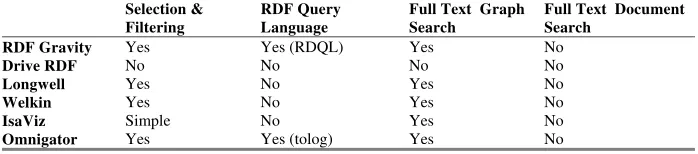
Table 4 is a listing of searching, querying, and filtering facilities available in the RDF visualization tools that we investigated. Selection and filtering features available in Longwell and Omnigator are based on ontological concepts like classes, properties, resource types, etc. A Gravity user can apply local and global filters and can hide selected graph elements. Similarly, IsaViz also provides simple selection and activation/deactivation of nodes, links, and regions. For fine-grained control RDF gravity provides support for RDQL and Omnigator supports its own topic map query language, tolog. Full text search of graph elements is available in almost all of the tools and none can create full text indexes of the documents annotated by the underlying RDF model.
Table 4. Search, query, and filtering facilities in RDF browsing and visualization tools
Selection &
Filtering
RDF Query Language
Full Text Graph Search
Full Text Document Search
RDF Gravity Yes Yes (RDQL) Yes No
Drive RDF No No No No
Longwell Yes No Yes No
Welkin Yes No Yes No
IsaViz Simple No Yes No
[image:10.612.136.490.240.348.2] [image:10.612.139.488.495.572.2]6 Recommendations
The following recommendations for future effective and useful tools can be deduced from our investigation:
• Import/export support for common RDF serialization formats like RDF/XML, N3, N-Triple, TriX, etc. and extendable to other upcoming formats
• Support for reading from multiple data sources to provide a unified display
• Possibility of connecting to a triple store over common protocols
• Support for both graphical and textual display of information
• The option of simple and more advanced graph statistics
• An integrated display interface consisting of both local and global views
• Built-in support for basic reasoning and possibility of plugging in external inference engines
• Global and local filters for simple selection and browsing
• Support for SPARQL RDF query language
• Full text graph and annotated documents search
• Use of visual cues for highlighting similar items
• Support for Fresnel Display Vocabulary
• Support for data in the range of millions of triples
• Tool extension by a plugin mechanism
The maximum support for these features in the future releases of semantic web browsers or development toolkits will enable metadata creators and analysts to better perform their tasks.
7 Conclusions
In this paper we presented and compared a set of tools for the browsing and visualization of Semantic Web data expressed in RDF from the point of view of a metadata creator and analyst. All of tools that we investigated provide source validation, have support for RDF/XML as its import/export format, have the facility of merging different RDF files, and have limited scalability in terms of maximum number of triples that could be loaded.
All graphical tools have very limited visual scalability and most of them use a single display representation, and very few have promised to provide support in their coming releases for Fresnel display vocabulary. Moreover, most of the tools have searching and filtering facilities but at different levels of granularity, few have the option of Full text search, none has support for SPARQL, and none can build full text indexes for RDF annotated documents. Few tools provide the facility of accessing data in triple stores and none of the tools allows the integration of external inference engines.
References
1. T. Berners-Lee, J. Hendler, and O. Lassila. The Semantic Web. In: Scientific American, May, 2001.
2. W3C: Resource description framework (RDF): Concepts and Abstract Syntax (2004), http://www.w3.org/TR/rdf-concepts/
3. M. Biezunski and S. Newcomb (Editors): ISO/IEC 13250 Topic Maps.1999. See http://www.y12.doe.gov/sgml/sc34/document/0129.pdf
4. S. Pepper and G. Moore. XML topic maps (XTM) 1.0. Xtm specification. http://www.topicmaps.org/xtm/1.0/. (2001)
5. D. Quan and D. Karger. How to Make a Semantic Web Browser. In: Proceedings of the
13th International Conference on World Wide Web. pp 255–265 (2004).
6. M. Ahmed et al. SemanticLife – A Framework for Managing Information of a Human Lifetime. In: The Sixth International Conference on Information Integration and Web-based Applications and Services, 27-29th September, (2004)
7. SIMILE: Welkin (2004-2005) http://simile.mit.edu/welkin/
8. R. Albertoni, A. Bertone, and M. De Martino. Semantic Web and Information Visualization. In: 1st Italian Semantic Web Workshop, 10th December 2004, Ancona, Italy 9. L. Rutledge, J. van Ossenbruggen, and L. Hardman. Making RDF Presentable: Selection, Structure and Surfability for the Semantic Web. In: Proceedings of the 14th international conference on World Wide Web. (2005)
10. J. Broekstra, A. Kampman, and F. Harmelen. Sesame: A Generic Architecture for Storing and Querying RDF and RDF Schema. In: International Semantic Web Conference 2002: 54-68
11. Kowari Metastore: http://www.kowari.org/
12. C. Bizer, R. Lee, E. Pietriga. Fresnel - Display Vocabulary for RDF (2005). http://www.w3.org/2005/04/fresnel-info/manual-20050726/
13. SIMILE: Longwell RDF Browser (2003-2005) http://simile.mit.edu/longwell/
14. W3C: IsaViz: A Visual Authoring Tool for RDF (2001-2005) http://www.w3.org/2001/11/IsaViz/
15. S. Goyal S and W. Rupert. RDF Gravity (RDF Graph Visualization Tool). Salzburg Research, Austria. http://semweb.salzburgresearch.at/apps/rdf-gravity/
16.Mc.Schraefel and D. Smith. The Evolving mSpace Plateform: Leveraging the Semantic Web on the Trail of the Memex. In: 16th ACM Conference on Hypertext and Hypermedia.
(2005).
17.E. Prud’hommeaux and A. Seaborne (2005) SPARQL Query Language for RDF http://www.w3.org/TR/rdf-sparql-query/.
18. R. Singh. Drive: An RDF Parser for .NET. (2002) http://www.driverdf.org/
19. E. Prud’hommeaux and R. Lee. W3C RDF Validation Service. http://www.w3.org/RDF/Validator/
20. Ontopia Omnigator: http:///www.ontopia.net/omnigator/
21.A. Seaborne. RDQL – RDF Data Query Language, part of the Jena RDF Toolkit, HPLabs Semantic Web activity, http://hpl.hp.com/semweb/ , W3C Working Draft, http://www.w3.org/Submission/2004/SUBM-RDQL-20040109 (2005)
22. A. Kalyanpur, B. Parsia, and J. Hendler. A Tool for Working with Web Ontologies. In: Proceedings of Extreme Markup Languages (2004).
23. J. Gennari et al. The evolution of Protégé-2000: An environment for knowledge-based systems development. In: International Journal of Human-Computer Studies, 58(1):89–123. (2003)