Get Closer to Activate It! An Educational Tool for
People with Multiple Disabilities
Filip Bojanovic1 , Cristina Manresa-Yee1, Maria José Abásolo2,3, Martin Larrea4 and Cecilia Sanz2
1 University of Balearic Islands, Palma, Spain
2 III LIDI, Facultad de Informática, Universidad Nacional de La Plata, La Plata, Argentina 3 Comisión de Investigaciones Cientificas de la Pcia. de Bs. As, La Plata, Argentina
4 Universidad Nacional del Sur, Bahía Blanca, Argentina
[email protected], [email protected], [email protected],
[email protected], [email protected]
Abstract. This paper presents an interactive system which offers multimodal feedback to users with severe to profound disabilities to improve their relationship with the environment allowing them to control it. The system is based on the information provided by a distance sensor connected to an Arduino board. The distance information is based on the position of the user’s hand, and it is then passed to six different action/reaction applications which offer motivation and engage users to train intentional motor movements of their upper body limbs and to improve their relationship with the environment.
Keywords: human-computer interaction; multimodal system; severe and profound impairments; motivational feedback, Arduino
1 Introduction
People with multiple disabilities have an intellectual disability and additionally, they may have other impairments such as visual, hearing or movement impairments. Further, they can present difficulties in understanding, communication or behaviour. Consequently, they have limited functionality and slow development processes and they need permanent supports in all areas of development [1].
People in this group may often present limited interactions with the surrounding world due to their physical and cognitive skills. Technology can play an important role for them both to increase the chances of relationship with the surrounding environment and to help them develop their independence.
In this work, we present an educational support, an interactive system addressed to users with these conditions that allows them to acquire a level of autonomy in interacting with the immediate environment by offering them the control over the environmental stimulation. We are working closely with a center for users with cerebral palsy, where there are people with this profile attending. In this case, therapists wanted to:
• Reduce their isolation.
• Control the interaction with the surrounding world. • Achieve their active participation in the task.
• Suppress the self-stimulation by offering them external stimulation.
In previous works, in order to approach these aims, we designed and evaluated a motion-based interface that used computer vision techniques to detect the body movements. The user was captured by a webcam and the system tracked a colored band on the wrist of the user, which in turn triggered meaningful outcomes from the system (music, images, videos and so on) [2]. Then, we included a vibrotactile interface attach to the user’s arm to encourage its motion [3, 4]. In these works, the controlled movement was lifting up the arm, but another interesting movement to work is the extension of the arm to get objects on a table or from a person. One solution would be to place a webcam perpendicular to the extension of the arm or to try and detect the different size of hand when getting closer or farther to a webcam facing the user [5]. The use of a sensor such as Microsoft Kinect in this specific context is not effective, because many users use wheelchairs or prams, and the computation of the depth of the arm is not effective as the background is too close [2]. There are other existing works which offer users control of the environmental stimulation by means of diverse devices such as microswitches [6], tangible user interfaces (TUI) [7] or gesture based systems [8].
In this work, we present a system that is comprised by a distance sensor and a set of action/reaction applications which trigger motivational audiovisual effects to engage the users and achieve their active participation in the proposed activities. The interactive system is addressed to users with physical and cognitive limitations and it aims at allowing users to acquire a level of autonomy in controlling the environment stimulation.
The paper is structured as follows: Section 2 describes the system, both hardware and software. The evaluation of the system is presented in Section 3. Finally, in the last section, we summarize the findings and discuss their implications.
2 The system
The interactive system is based on an Arduino board and an ultrasonic distance sensor that enable us to control the distance of the user’s hand in order to trigger different feedback from the multimodal applications depending on the distance.
2.1 The hardware prototype
pulse input and an echo pulse output. The ultrasonic sensor uses a sonar to measure the distance to an object. This sensor has two parts: echo and trig. One emits ultrasonic waves, while the other receives them. Then, the distance is calculated by timing how long it takes for an ultrasonic wave sent out by the emitter to bounce to the object and come back to the receiver.
[image:3.595.250.355.242.322.2]Initially, to adapt it to our target group who does not count with a wide range of physical mobility, we decided to limit the movement range from 0 to 50 cm.
Fig. 1. Ultrasonic Ranging Module HC-SR04 [10]
2.2 The multimodal applications
The interactive system comprises the following six applications that trigger visual and audio effects:
− Volume control
− Growing rays
− Moving balls (horizontally) − Moving squares (vertically) − Changing colors
− Zoom in-out image
These applications try to engage the user in the use of the system to work educational aims. The applications are selected and executed from a common home window.
The multimodal applications were developed using an open source programming language and integrated development environment, called Processing [11] which counts with a convenient library to handle easily the communication with the Arduino board. Further, we used Minim as an audio library [12], which is a Java audio library designed to be used with Processing.
The applications have to include motivational material for the users because it is an important factor to engage users to use the system and to help them to concentrate on the task [13, 14]. Therefore, applications have to be configurable regarding the audio or images to play or show. Further, the applications contain dynamic and colorful shapes, to get the user’s attention and focus.
Volume control
Volume Control application is addressed to users with vision impairments (as the visual content is not relevant), but also users who have hearing impairments can benefit of this application as this exercise can help them to practice and develop their listening.
The therapist can choose the file that will be used in the application to adapt the audio to the preferences of the user. The file can be in mp3, wav, aiff, au or snd, as these are very popular formats. In this case, the visual shown on the screen is not important, but we can set an image, so the background does not stay blank.
By moving the hand towards the ultrasonic sensor, the volume will change from low to high, as we reward more positively the effort of extending the arm which requires a greater effort from the user. If the arm is further than 50 cm, the volume will remain at the lowest volume level.
Moving Balls (horizontal)
The purpose of this application is for children to play with speed. There are five balls that are starting from different points on the screen and they just move horizontally increasing or decreasing their speed.
Users should notice that the colorful balls are going faster or slower from the left side to the right side of the screen as they move closer or further to the distance sensor.
Growing Rays
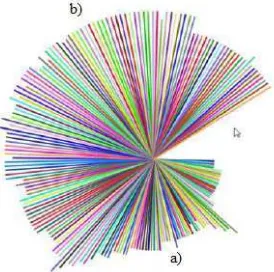
This application presents colorful and dynamic visuals on the screen depending on the distance of the user. The growing rays’ application draws colorful multicolor lines in a form of a circle, with shorter or longer length depending on the distance of the user’s hand: when the user is closer to the sensor, the application draws shorter lines than when the hand is moving away from it (See Fig. 2).
[image:4.595.230.367.506.642.2]When the circle is completed, the screen refreshes and the previous set of lines is removed, so we can have new circle of lines without overlays.
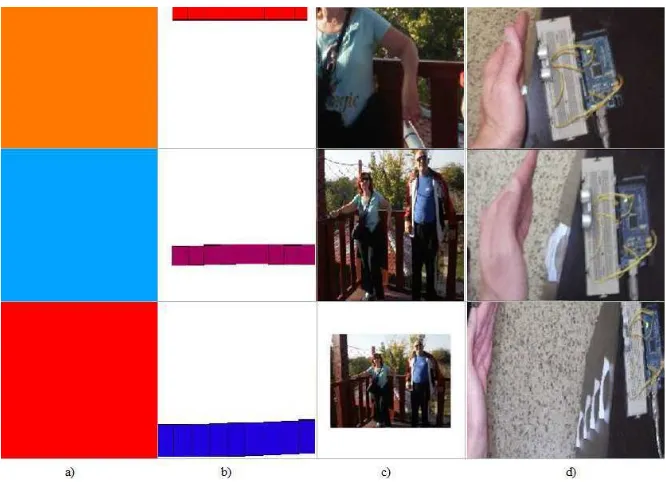
Fig. 3. a) Changing colors. b) Moving squares c) Zoom in/out image d) the hand’s distance regarding the sensor.
Changing Colors
When children recognize colors they are noticing, matching, sorting, and labeling the characteristics of objects in the world around them. Recognizing colors is a skill that is often difficult for children because it is necessary to know the color words, as well as to identify the abstract characteristic of color [15].
The application with changing colors can help children to recognize different colors. By moving closer to and further away the distance sensor, different colors go appearing (see Fig. 3a and 3d). The therapist can play with the user making them stop in a certain color or just let them enjoy the different visuals.
Moving Squares (vertical)
The application is similar to the Moving Balls application, but the movement is done in the vertical axis. Ten squares start in the upper zone of the screen and while the user moves his or her hand away from the sensor, the squares go growing and moving down changing their color (see Fig. 3b and 3d). The therapist should help the user notice the colors and the shape as well as the position of the squares.
Zoom in/out image
zoomed in and as he or she is moving away, the image goes zooming out (see Fig. 3c and 3d).
The use of images as motivational material can make users more willing to actively participate in the task, therefore, the image can be configurable. Images should show people related to the user or his or her preferences: family, friends, class mates, animals or local environment.
3 Evaluation
We wanted to test the robustness and usability of the system before working with the end-users, as a non-usable system could repel users from future uses. Usability is defined as “the extent to which a product can be used by specified users to achieve specified goals with effectiveness, efficiency, and satisfaction in a specified context of use” [16].
Five users (three females, two male) without disabilities were selected whose ages ranged from 24 to 25 and they were informed about the purpose of the study. Sessions were video-recorded for their posterior analysis.
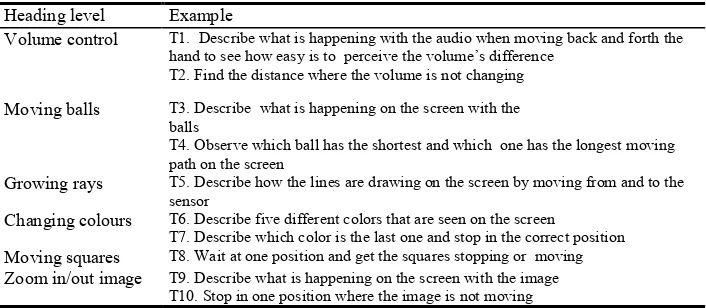
[image:6.595.122.475.476.630.2]The procedure of the test was first to introduce all exercises, then execute one by one each application and carry out simple tasks, finally, users assessed the functionality of the application from 0 to 5. Tasks are very simple, but they represent the kind of tasks therapists would do later with the end-users. Probably, some of the users will not be able to communicate orally, but they may have signals or sounds for Yes and No, so, the therapist should guide the session asking simple questions in a way users can understand them.
Table 1. Evaluation tasks
Heading level Example
Volume control T1. Describe what is happening with the audio when moving back and forth the hand to see how easy is to perceive the volume’s difference
T2. Find the distance where the volume is not changing
Moving balls T3. Describe what is happening on the screen with the balls
T4. Observe which ball has the shortest and which one has the longest moving path on the screen
Growing rays T5. Describe how the lines are drawing on the screen by moving from and to the sensor
Changing colours T6. Describe five different colors that are seen on the screen T7. Describe which color is the last one and stop in the correct position
Moving squares T8. Wait at one position and get the squares stopping or moving
Zoom in/out image T9. Describe what is happening on the screen with the image T10. Stop in one position where the image is not moving
When asking the users about the functionality of the activities and taking into account the users’ target group, they all highlighted the importance of these tasks, by answering with a 4 or 5 in the questionnaire.
4 Discussion and Conclusions
In this work we have describe an interactive system that serves as an educational tool for users with severe impairments. The system is comprised by a distance sensor and a set of action/reaction applications which trigger motivational audiovisual effects to engage the users and achieve his or her active participation in the activities. These applications are dynamic and mix color, motion, and different shapes. Further, the system offers control to the user in an implicit manner. The user is not aware of the presence of a computer and they are interacting with the system in a natural way by means of the body motion.
We have presented a set of tasks as an example of what can the therapist do, but depending on the user, the therapist can give other instructions (e.g. in the Changing color application, the user can be instructed to stop in a certain color).
We remark considerations taken into account in the design of the applications: - The positive feedback has to be very motivational and meaningful for the
users.
- The user has to be aware of the feedback returned by the system. - The system has to be robust and respond promptly to the user’s actions. - The system has to be configurable.
Future work will include usability tests with end-users to validate the system. Further, other activities can be implemented to enrich the set of applications. It would be also interesting to see in future experiments, when the user is competent with the system, how he or she works alone with the system without the help of a therapist.
Acknowledgments
This work is supported partially by the project TIN12-35427 granted by the Spanish MINECO, FEDER funding and FRIVIG A1/037910/11 granted by MAEC-AECID.
References
1. Soro-Camats, E., Rosell, C., Basil, C.: El alumnado con pluridiscapacidad: características, evaluación y necesidades educativas. In: Soro-Camats, E., Basil, C., and Rosell, C. (eds.) Pluridiscapacidad y contextos de intervención. pp. 5–32. Universitat de Barcelona (2012). 2. Manresa Yee, C., Muntaner, J.J., Arellano, D.: A Motion-based Interface to Control
3. Manresa-Yee, C., Morrison, A., Larsen, J. V, Varona, J.: A Vibrotactile Interface to Motivate Movement for Children with Severe to Profound Disabilities. In: Proceedings of the XV International Conference on Human Computer Interaction. pp. 10:1–10:4. ACM, New York, NY, USA (2014).
4. Manresa-Yee, C., Morrison, A., Muntaner, J.J.: First Insights with a Vibrotactile Interface for Children with Multiple Disabilities. In: Proceedings of the 33rd Annual ACM Conference Extended Abstracts on Human Factors in Computing Systems. pp. 905–910. ACM, New York, NY, USA (2015).
5. Manresa-Yee, C., Varona, J., Mas, R., Perales, F.J.: Hand Tracking and Gesture Recognition for Human-Computer Interaction . Electron. Lett. Comput. Vis. Image Anal. 5, 96–104 (2005).
6. Lancioni, G.E., Singh, N.N., O’Reilly, M.F., Oliva, D.: Using a hand-tap response with a vibration microswitch with students with multiple disabilities. Behav. Cogn. Psychother. 30, 237–241 (2002).
7. Lancioni, G.E., O’Reilly, M.F., Singh, N.N., Sigafoos, J., Oliva, D., Severini, L.: Enabling two persons with multiple disabilities to access environmental stimuli and ask for social contact through microswitches and a VOCA. Res. Dev. Disabil. 29, 21–28 (2008).
8. Mauri, C., Solanas, A., Granollers, T.: Nonformal Interactive Therapeutic Multisensory Environment for People With Cerebral Palsy. Int. J. Hum. Comput. Interact. 28, 202–2012 (2012).
9. Arduino, http://www.arduino.cc/.
10. Micropic: Ultrasonic Ranging Module HC-SR04, http://www.micropik.com/PDF/HCSR04.pdf.
11. Processing, https://processing.org/. 12. Minim, https://github.com/ddf/Minim.
13. Manresa-Yee, C., Ponsa, P., Salinas, I., Perales, F.J., Negre, F., Varona, J.: Observing the use of an input device for rehabilitation purposes. Behav. Inf. Technol. . 33, 271–282 (2014).
14. Hattie J., Timperley, H.: The power of feedback. Rev. Educ. Res. 77, 81–112 (2007). 15. O’Hanlon, C.G., Roberson, D.: Learning in context: linguistic and attentional constraints on
children’s color term learning. J Exp Child Psychol. 94, 275–300 (2006).
![Fig. 1. Ultrasonic Ranging Module HC-SR04 [10]](https://thumb-us.123doks.com/thumbv2/123dok_es/4809565.65860/3.595.250.355.242.322/fig-ultrasonic-ranging-module-hc-sr.webp)