Abstract— This paper presents an electroencephalographic (EEG) P300-based brain-computer interface (BCI) Internet browser. The system uses the “odd-ball” row-col paradigm for generating the P300 evoked potentials on the scalp of the user, which are immediately processed and translated into web browser commands. There were previous approaches for controlling a BCI web browser. However, to the best of our knowledge, none of them was focused on an assistive context, failing to test their applications with a suitable number of end users. In addition, all of them were synchronous applications, where it was necessary to introduce a “read-mode” command in order to avoid a continuous command selection. Thus, the aim of this study is twofold: (i) to test our web browser with a population of multiple sclerosis (MS) patients in order to assess the usefulness of our proposal to meet their daily communication needs; and (ii) to overcome the aforementioned limitation by adding a threshold that discerns between control and non-control states, allowing the user to calmly read the web page without undesirable selections. The browser was tested with sixteen MS patients and five healthy volunteers. Both quantitative and qualitative metrics were obtained. MS participants reached an average accuracy of 84.14%, whereas 95.75% was achieved by control subjects. Results show that MS patients can successfully control the BCI web browser, improving their personal autonomy.
Index Terms—Brain-computer interfaces, P300 event-related potentials, electroencephalography, web browser, multiple sclerosis, asynchronous control.
I. INTRODUCTION
HEapplication of Brain-Computer Interface (BCI) can improve the quality of life of those who have a disability that limits their ability to communicate, such as neurodegenerative diseases, traumatic brain injuries, Guillain Barré syndromes, degenerative muscle disorders, and other diseases that impair the neural pathways that control muscles
This work was partially supported by the projects TEC2014-53196-R from ‘Ministerio de Economía y Competitividad’ (MINECO) and FEDER and VA037U16 from ‘Consejería de Educación de la Junta de Castilla y León’. V. Martínez-Cagigal was in receipt of a ‘Promoción de Empleo Joven e Implantación de la Garantía Juvenil en I+D+I’ grant from MINECO and the University of Valladolid. The authors are part of the Biomedical Engineering Group, E.T.S.I. Telecomunicación, University of Valladolid, Spain (e-mail addresses: [email protected], [email protected], [email protected], [email protected]).
or even the muscles themselves [1]–[4]. BCI applications establish a communication system between the brain and the environment, translating the user’s intentions into device control commands. Even though there are a variety of methods for monitoring brain activity, electroencephalography (EEG) is commonly used due to its non-invasive nature. The electric potentials are recorded by means of placing several electrodes on the scalp [3], [4].
People who suffer multiple sclerosis (MS) are potential users of this kind of applications. MS is considered the most common autoimmune disorder that affects the central nervous system [5]. Twenty years after onset, up to 60% of the patients experience motor disability [5]. Although most people with MS have a normal or near-normal life expectancy, in rare cases, the disease can be terminal. MS is primarily an inflammatory disorder that leads to damage the myelin of brain and spinal cord nerve cells [6]. This damage disrupts the ability of those neurons to communicate, resulting in a wide range of symptoms, including motor skill problems, cognitive deficit, or even psychiatric disorders [6].
MS patients could benefit from this technology for reducing their dependence. Due to its advance over the last few decades, Internet has caused a profound effect on people’s lives, becoming a global means of daily communication. However, web browsers are designed for healthy users, intended to be used with a keyboard and a mouse, but not with a small number of input signals [7]. Therefore, it seems suitable to make the Internet accessible for those whose ability to communicate is restricted, in order to increase their autonomy, and thus their quality of life.
There had been previously developed several attempts for controlling web browsers with BCI applications. The first ones used either slow cortical potentials (SCPs) or sensory-motor rhythms (SMR) as control mechanisms and were based on dichotomous approaches, using binary decision trees for selecting or rejecting commands [8], [9]. Besides the slowness of the aforementioned approach, those browsers needed a supervisor who adjusted several parameters (e.g., reading speed, length of the reading pause, address book entries, etc.) [8], [9]. In addition, both SCPs and SMR are endogenous signals, and it was necessary a long time so that the user learnt how to control its own EEG activity [8]–[10]. A few years later, Mugler et al [11] overcame the selection
An Asynchronous P300-Based Brain-Computer
Interface Web Browser for Severely Disabled
People
Víctor Martínez-Cagigal, Javier Gomez-Pilar,
Student Member, IEEE
, Daniel Álvarez, and Roberto
Hornero,
Senior Member, IEEE
slowness of the dichotomous approach developing a BCI browser controlled via P300 evoked potentials based on the “odd-ball” paradigm [12]. These potentials are produced in response to infrequent and particularly significant visual, auditory, or somatosensory stimuli about 300 ms after its elicitation [3]. Hence, training time was reduced because of their exogenous nature and the number of input signals drastically increased [11], [13]. In addition, page links were tagged with an alphanumeric code and any link could be selected by entering the corresponding code with the selection matrix [11]. Sirvent Blasco et al [13] also used P300 evoked potentials as a control mechanism. However, instead of using the page tagging approach, one of the selection matrices was intended to work as a virtual mouse, whose commands allowed the user to move the cursor a variety of discrete pixel distances [13]. Nevertheless, P300-based web browsers were synchronous processes and thus, it was needed to introduce several “read mode” commands for avoiding a continuous selection of items when the user wanted to calmly read the webpage, resulting in a rigid navigation [11], [13]. For a truly free surfing, however, the synchronous mode is impractical because the system will deliver a selection even if the user is not paying attention to the stimulation [14]. The latest BCI web browser was developed by Yu et al [15]. The work was based on a two-dimensional BCI mouse that used SMR imagery and P300 potentials for controlling the horizontal and vertical movements, respectively. As stated above, its main limitation lied in the long required training time for learning to control the SMR activity.
The purpose of this study is twofold: (i) to design, develop and test a P300-based BCI web browser with a population of MS patients in order to assess the usefulness of our proposal to meet their daily communication needs; and (ii) to provide the BCI web browser with an asynchronous approach in order to
overcome the aforementioned limitations, by setting up a threshold which determines if the user is paying attention to the stimulation (control state) or, otherwise, is ignoring it (non-control state).
II. SUBJECTS AND METHODS
A. Subjects
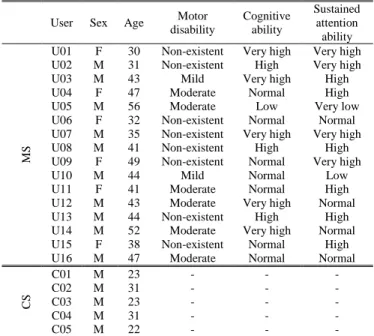
Sixteen MS patients (mean age 42.06 ± 7.47 years; 10 males, 6 females) and five healthy control subjects (CS) (mean age 26.00 ± 4.58 years; 5 males) were included in this study. MS participants were patients from the National Reference Centre on Disability and Dependence, located in León (Spain). The study was approved by the local ethics committee and all subjects gave their informed consent for participating in the study. Table I summarizes the demographic and clinical characteristics of all participants.
B. Description of the BCI Internet Browser
The application is composed of three different stages: data acquisition, EEG processing stage, and web surfing stage. As shown in Fig. 1, data acquisition records the EEG signal and delivers it to the EEG processing phase. This stage controls the presentation of the stimuli and determines the selected command, which is delivered to the web surfing stage, responsible for interpreting the order and displaying the desired feedback.
1) Data Acquisition
The first stage records and pre-processes the EEG signals using a spatial and temporal filtering. Those signals were recorded using 8 active electrodes placed on Fz, Cz, Pz, P3, P4, PO7, PO8 and Oz, according to the International 10–20 System [16] distribution, using a FPz electrode as a ground and referencing the system to the earlobe. This distribution is
Fig. 1. Structure of the BCI web browser. Three different stages compose the proposed system: data acquisition, EEG processing and web surfing.
TABLEI
DEMOGRAPHIC AND CLINICAL CHARACTERISTICS OF THE PARTICIPANTS
User Sex Age Motor disability
Cognitive ability
Sustained attention ability
MS
U01 F 30 Non-existent Very high Very high U02 M 31 Non-existent High Very high
U03 M 43 Mild Very high High
U04 F 47 Moderate Normal High
U05 M 56 Moderate Low Very low U06 F 32 Non-existent Normal Normal U07 M 35 Non-existent Very high Very high U08 M 41 Non-existent High High U09 F 49 Non-existent Normal Very high
U10 M 44 Mild Normal Low
U11 F 41 Moderate Normal High
U12 M 43 Moderate Very high Normal U13 M 44 Non-existent High High U14 M 52 Moderate Very high Normal U15 F 38 Non-existent Normal High U16 M 47 Moderate Normal Normal
CS
C01 M 23 - - -
C02 M 31 - - -
C03 M 23 - - -
C04 M 31 - - -
C05 M 22 - - -
commonly used to record P300 potentials, mainly generated over the parietal cortex [17]–[19]. Electrodes were connected to a g.USBamp amplifier (g.Tec, Guger Technologies, Austria) with a sampling frequency of 256 Hz. Band-pass (0.1 Hz to 60 Hz) and notch (50 Hz power interference) filters were applied. In order to reduce the noise inside the recording, a common average reference (CAR) spatial filter was also applied. BCI2000 software [20], [21] was used to control the presentation of the stimuli, record and save data on a laptop (Intel Core i7 2.40 GHz, 8 GB RAM, Windows 8.1). The selection matrices and the browser were displayed on an additional panoramic monitor (23’’ screen) adjacent to the laptop.
2) EEG Processing Stage
The second stage, implemented in C++, processes the EEG signal received from the data acquisition. To this end, the system evokes the P300 potentials by means of the aforementioned “odd-ball” paradigm. In this paradigm, a target infrequent stimulus, which has to be attended, is presented among other more frequent background stimuli that have to be ignored [3], [12]. When the user receives the target stimulus, a P300 evoked potential appears on the parietal cortex about 300 ms later. It has been widely documented that the amplitude of the P300 varies directly with the relevance of the eliciting events and inversely with the appearance probability of the target stimulus [3], [12]. Specifically, we have used an application of the “odd-ball” paradigm known as row-col paradigm, whose stimuli are visual: matrix rows and columns are randomly flashed [22]. When the target’s row or column are illuminated, a P300 potential is generated, used for figuring out what the desired command is [3], [11]–[13], [15]. More specifically, each random stimulus lasts for 62.5 ms and then the screen remains unvarying for 125–250 ms [19].
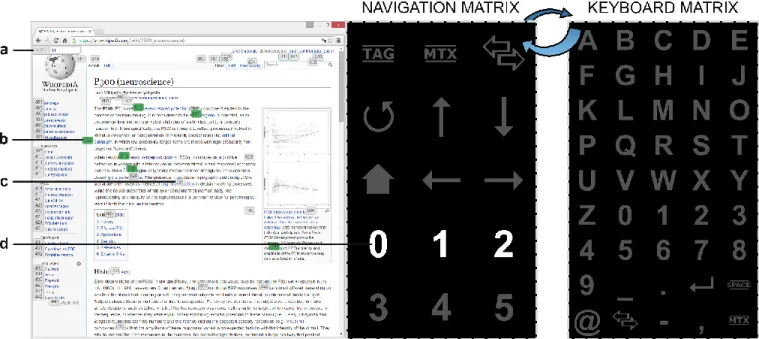
The application displays the browser on the left side of the screen and a selection row-col paradigm based matrix on the right side. Specifically, Google Chrome was selected as the target browser because it allows developers to comfortably program extensions (i.e., small software programs that can modify and enhance the functionalities of the browser). In order to provide a free and complete navigation, many commands are needed. Due to the large number of commands, the application uses alternatively two different matrices intended for different purposes (Fig. 2). “Navigation matrix” is the default one. Its small size (53) allows the user to quickly select the commands and thus, it is intended for web browsing. Hence, it contains navigation commands, such as scrolls, home page, reload, history forward and backward, among others. The other one is called the “keyboard matrix” (95), which is intended to write e-mails or fill out forms. For this reason, it contains all the alphanumeric characters and a variety of symbols commonly used on the Internet.
Once all the rows and columns have been flashed, it is needed to extract the most relevant features of the EEG signal. Because of the high sampling rate of the recordings relative to the low frequency of the P300 response, a dimensionality reduction for removing redundant features is beneficial for the real-time classification [23]. In this case, a subsampling of 20 Hz over an 800 ms window from the stimulus onset is applied [13], [19]. Therefore, each stimulus is considered a vector f of 128 features: 16 samples (20 Hz · 0.8 s) 8 channels. As a result, the feature matrix of each character epoch would be
T
Tm T T
f f f
x 1 , 2,..., , with
m
(
N
r
N
c)
N
s (sum of rowsand columns number of sequences).
The feature matrix is the input of the classification phase, which aims to determine the command the user wants to select. A linear classifier is used to determine whether there is
a P300 potential in each stimulus or not. In this study, we used a step-wise linear discriminant analysis (SWLDA), a linear classifier that projects the data simultaneously minimizing the within-class covariance and maximizing the between-class covariance [24]. In addition, the algorithm selects the most suitable features to be included in a multiple discriminant model, optimized for each user, reducing the dimensionality of the projection weight vector
w
. However, this solution and least-square regression are equivalent for binary classification tasks [23]. The step-wise method decides to add or to remove a feature from the model by means of a combination of forward selection (add if p–value < pin) and backward elimination (remove if p–value > pout) steps, respectively [17], [23]. Therefore, significant differences (p–value < 0.05) between models with and without the current evaluated feature are assessed to determine whether it provides discriminative information to the model or not. In this case, the discriminant function was restricted to contain a maximum of 60 features [13], [17]–[19], [23], and the selection/elimination criteria was set up as pin 0.10 and pout0.15, commonly applied in P300-based BCI studies [17], [19], [23], [25], [26]. Once the optimum weight vectorw
is computed, under the assumptionthat noise is normally distributed with equal covariances for both classes, the output of SWLDA is a log-likelihood ratio to belong to the positive class (i.e., presence of P300) [27]. This ratio is computed as the Euclidean distance between the projected data and the projected mean of the positive class, as follows:
, , ,x w μ1 w
l (1)
where
w
denotes the weight vector, x the feature matrix andμ
1 the mean of the positive class. In order to predict theselected item, it is necessary to turn the m1
l vector into a matrix PNrNc that indicates the probability of selecting
each cell. Thus, for each matrix item pi, the average of the log-likelihood scores of all the stimuli that belong to the same row and column is computed, as indicated in equation (2). Once the matrix P is calculated, the predicted item is the one that provides the maximum probability, pchar max(P).
r c N N
i row i s
i l
N p
1 col 2
1
(2)
As stated above, row-col paradigm based selection matrices are synchronous processes. This means that the system will deliver a selection whether the user is paying attention to the stimulation (i.e., control state) or not (i.e., non-control state) [14], [18]. In this study, we have developed an asynchronous approach by placing a threshold (T) that is intended to
distinguish between both states. When enough control and non-control state registers are recorded, the probability of the predicted item for each character epoch (pchar) is stored and labeled. In other words, two vectors are created by concatenating the predicted item probabilities for each character, which corresponds to control and non-control selections. Due to the absence of attention, non-control
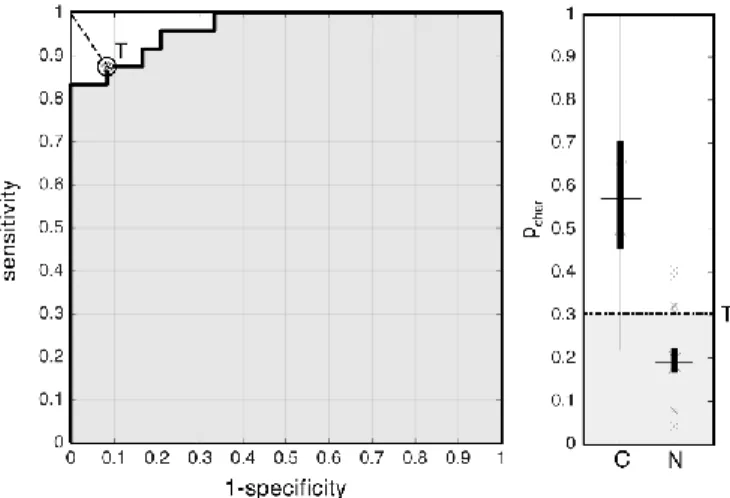
probabilities are expected to be smaller than control ones and thus, it is expected that a constant threshold could discern between both states. Therefore, control and non-control vectors are fed as two different classes into a receiver operating characteristic (ROC) curve, a graphical plot that illustrates the performance of a binary classifier system as its discrimination threshold varies. The curve is created by plotting the true positive rate (i.e., sensibility) against the false positive rate (i.e., 1-specificity) for a set of threshold values. The custom threshold value for each user is chosen offline (i.e., before the evaluation sessions) as the point that fulfills the maximization of the sensitivity and specificity pair, looking for the best performance when distinguishing non-control and non-control states, as shown in Fig. 3. Then, in online evaluation sessions, the probability of each new predicted item
char
p is compared with the threshold value T: if pchar T, the selection is classified as control state; if pchar T, the selection is classified as non-control state. Finally, if the user intention is classified as a control state selection, it is delivered to the web surfing stage. Otherwise, the system considers it as a warning and asks the user for trying to select the command again.
3) Web Surfing Stage
The third and final stage was implemented in JavaScript as a Google Chrome extension. It is intended to receive and translate the user selections into browser commands and return a suitable feedback (Fig. 2).
Firstly, the extension calculates how many nodes are on the current web page, where a node is any kind of clickable object, such as links, buttons or forms, among others. Then, those nodes are coded with the minimum number of digits using numbers from 0 to 5. As can be seen in Fig. 2, those numbers are included in the navigation matrix in order to increase the manageability of the application. Additionally, the “TAG” toggle controls the displaying of those codifications in form of tags allocated close to each link.
Thus, any link on the page can be executed by introducing its coding only using the navigation matrix [11]. Moreover, the application avoids the insertion of an additional “return” key to confirm the selection by automatically executing the link provided that the user has selected the needed number of characters, increasing the web surfing speed.
Feedback is provided to the user in several ways. On the one hand, when tag displaying is enabled, the extension initializes a buffer on the upper left corner of the screen that indicates what numbers were previously selected. In case of a selection error, user can remove the last selection with the left arrow command. On the other hand, potential selections (i.e., selections whose coding starts with the previously selected numbers) are highlighted in green, as shown in Fig. 2.
C. Evaluation Procedure
During the assessment, all participants were sat down on a comfortable chair or on their own wheelchair, in front of a panoramic screen. Each user carried out four different sessions: two calibration sessions (Cal-I and Cal-II) and two evaluation sessions (Eval-I and Eval-II).
1) Calibration Sessions
The first calibration session was divided in two parts: classifier optimization and threshold calibration. Classifier optimization approximately lasted 24 min, and it was divided in 4 trials of 6 items (i.e., words composed of six characters). Users were asked for sequentially paying attention to those items while the matrix was flashing. Fifteen sequences were used (i.e., each row and column was illuminated 15 times in a single trial), so each desired character was highlighted 30 times. In order to keep the attention on the task, users were recommended to count how many times the target item was being flashed. In this initial session, only the keyboard matrix was displayed. Then, SWLDA was performed for assigning the optimum weights and number of sequences for each user. This custom classifier was used during the rest of the assessment.
Threshold calibration was composed of 8 trials with 6 items: half of those trials were intended to record the control state and the rest of them the non-control state. Navigation matrix was used in order to reduce the task time. Due to the variation on the optimum number of sequences for each user, the duration of this task differed between users (average trial duration, ME 3:12 ± 1:08 min, CS 2:58 ± 0:51 min). Control state was recorded with the same procedure as the classifier optimization: asking the users for focusing their attention on specific series of commands. However, non-control state recordings followed a different procedure. A wide text was displayed on the left of the screen while navigation matrix was flashing. Users were asked to ignore the stimuli and read the text.
The second calibration session was only composed of another threshold calibration. That was necessary because the amplitude and latency of the P300 potentials usually vary between sessions, owing to the variation of the cap position on the scalp, user attention, attitude, among others [28].
Therefore, recording the intensity of control and non-control state potentials in two different days increases the robustness of the asynchronous threshold customized for each user. The final threshold value was calculated as the average of both optimal thresholds.
Whether a user did not reach a minimum of 70% classification accuracy in the first calibration session, the classifier calibration was repeated in the second one. If after both sessions the user could not obtain more than 70% accuracy, considered as the minimum rate for experiment a satisfactory performance, the user was discarded of the assessment [11], [19]. This case occurred three times in the MS subject group.
2) Evaluation Sessions
Both evaluation sessions were intended to assess the quality of the web browser by means of setting different tasks. Nonetheless, threshold was not applied in the first one in order to determine if there is an improvement when it is applied (i.e., in the second one).
The first evaluation session was made up of five different tasks that required the use of the web browser. The four first ones were intended to assess the control state and the last one was only intended to assess the non-control state behavior. As pointed out earlier, tasks duration varied between users due to the optimal number of sequences for each one. However, a mean average time and its standard deviation are provided. The evaluation tasks were the following
:
1) Link selection. Users had to scroll up and down a Wikipedia page and select one link (6 items, MS 4:01 ± 1:31 min, CS 2:33 ± 0:24 min).
2) Google searching. Users had to select the Google search form, write “BCI” inside it and select “ENTER” for running the search (8 items, MS 6:00 ± 1:28 min, CS 4:28 ± 1:03 min).
3) Publishing a tweet. Users had to select the Twitter form, write a two-character tweet and send it (6 items, MS 4:13 ± 1:19 min, CS 2:38 ± 0:31 min).
4) Writing an e-mail. Users had to read an inbox mail and reply it (13 items, MS 8:18 ± 3:31 min, CS 6:18 ± 2:13 min).
5) Passive reading. Users had to read a piece of news while ignoring the stimuli (10 items, MS 5:17 ± 1:56 min, CS 4:17 ± 0:45 min).
The second evaluation session was intended to assess the behavior of the web browser when threshold is enabled. It was made up of three slightly different tasks that involve the use of control and non-control states, alternating web page reading and web surfing:
1) Reading and link selection. Users had to scroll a Wikipedia page, read the information and select one link (8 items, MS 4:44 ± 1:08 min, CS 4:18 ± 1:44 min).
2) Publishing a tweet. Same procedure as Eval-I (6 items, MS 3:44 ± 1:00 min, CS 3:25 ± 1:28 min).
2:20 ± 0:55 min, CS 1:58 ± 0:35 min).
The number of steps and the time needed to accomplish those tasks was recorded, as well as the mistakes and selections needed for solve them. With this information, a quantitative testing was performed, obtaining the users’ accuracies and the false negative rate (FNR) for each task, defined as the ratio of false negatives (i.e., correct selection classified as non-state selection) to the total number of selections.
Also, a qualitative testing was performed in order to acquire a more accurate evaluation of the BCI web browser. At the end of the last session, users were asked for fulfilling a questionnaire. The survey consisted on 20 items to be ranked in a 7-point Likert scale that assessed the browser interface, its speed, the difficulty for selecting a command, the duration of sessions, users’ motivation, their expectations and their previous experience with BCI applications, among others. Additionally, one open-ended question allowed users to make personal suggestions for further improvement.
III. RESULTS
A. Quantitative Analysis
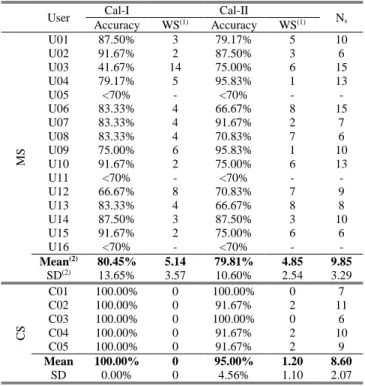
The results of the copy-spelling calibration sessions are presented in Table II. The optimum number of sequences, the number of committed errors and calibration sessions accuracies for each user are shown. Accuracy is defined as the ratio of the number of correct selections in control state mode to the number of all performed selections, taking into account all the extra-selections made to correct the wrong ones. As can be seen, three MS patients could not obtain a minimum of 70% classifier accuracy and thus, they were removed from subsequent assessment. Also, as could be expected, CS users obtained a higher accuracy and a lower number of sequences than MS patients.
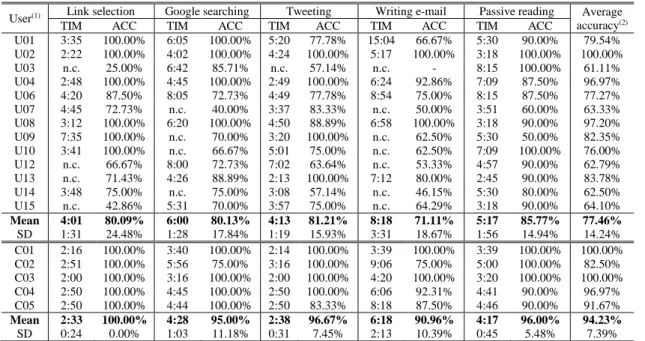
Tables III and IV show the results of the evaluation tasks. For each task, the duration and the accuracy are presented. In addition, Table IV also indicates the FNR for each user and task. At the end of both tables, average session accuracy is shown for further comparison of the system behavior when threshold is disabled (Eval-I) or enabled (Eval-II).
B. Qualitative Analysis
Satisfaction questionnaire results are shown in Table V. It is noteworthy to mention that, in general, participants were quite satisfied with the BCI browser. All positive statements were rated above the mean value (4, neutral) and almost all negative ones were rated below it. As can be seen, the exceptions were the statements 3 and 13.
The third statement was intended to evaluate the speed of the browser. Some MS patients indicated that, in their opinion, it took much too long to surf the Internet with the BCI browser. In the thirteenth statement, both groups of users declared to be slightly happy that the assessment sessions were over.
Regarding the open-ended question, MS patients suggested increasing the command selection speed, adding a tab key
command, trying to make the flashing less annoying, planning shorter sessions or trying to reduce the minimum number of sequences. CS users added that the number of symbols could be increased, for instance, by using other nested matrix. Also, they pointed out that sometimes they unintentionally focused their sight on adjacent cells.
IV. DISCUSSION
The application was assessed by sixteen MS patients and five CS users in four different days: two calibration and two evaluation sessions. Calibration sessions were intended to calculate the optimal SWLDA weights, number of sequences and threshold for each user, whereas evaluation sessions were intended to assess the BCI web browser completing different tasks. Moreover, a qualitative analysis was made giving a satisfaction questionnaire to the users.
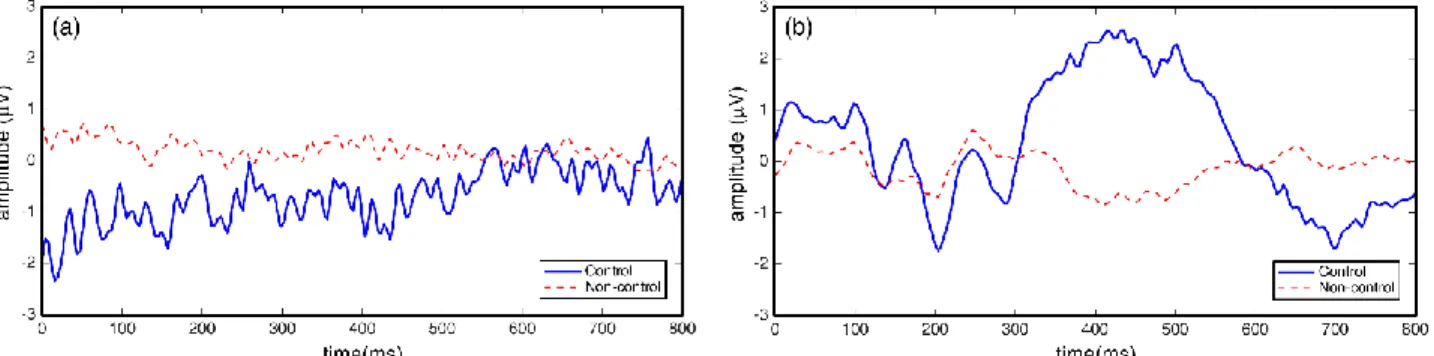
As aforementioned above, three MS subjects were removed from the assessment due to their low classifier accuracy (<70%). This might be because their P300 evoked potentials were too attenuated and/or their latency was too variable. In addition, users could not be able to hold the attention while stimuli were presented. It is not surprising with regard to the U05 user owing to his lack of sustained attention capability, as shown in Table I. However, the clinical characteristics of users U11 and U16 do not show an apparent reason for this behavior. Fig. 4 shows two P300 potentials recorded in the Pz electrode for control and non-control states. It can be noticed that the P300 potentials of this kind of users were quite noisy
TABLEII
COPY-SPELLING CALIBRATION SESSIONS RESULTS
User Cal-I Cal-II Ns
Accuracy WS(1) Accuracy WS(1)
MS
U01 87.50% 3 79.17% 5 10
U02 91.67% 2 87.50% 3 6
U03 41.67% 14 75.00% 6 15
U04 79.17% 5 95.83% 1 13
U05 <70% - <70% - -
U06 83.33% 4 66.67% 8 15
U07 83.33% 4 91.67% 2 7
U08 83.33% 4 70.83% 7 6
U09 75.00% 6 95.83% 1 10
U10 91.67% 2 75.00% 6 13
U11 <70% - <70% - -
U12 66.67% 8 70.83% 7 9
U13 83.33% 4 66.67% 8 8
U14 87.50% 3 87.50% 3 10
U15 91.67% 2 75.00% 6 6
U16 <70% - <70% - -
Mean(2) 80.45% 5.14 79.81% 4.85 9.85
SD(2) 13.65% 3.57 10.60% 2.54 3.29
CS
C01 100.00% 0 100.00% 0 7
C02 100.00% 0 91.67% 2 11
C03 100.00% 0 100.00% 0 6
C04 100.00% 0 91.67% 2 10
C05 100.00% 0 91.67% 2 9
Mean 100.00% 0 95.00% 1.20 8.60
SD 0.00% 0 4.56% 1.10 2.07
CS: control subjects, MS: multiple sclerosis patients, WS: wrong selections, Ns: Optimal number of sequences for each subject.
(1) Each session was composed of a total number of 24 selections. (2) Mean and SD were calculated regardless of the discarded users (i.e.,
and almost undetectable due to their low amplitude, which would explain the poor performance of their classifier.
CS users obtained higher calibration accuracy than MS patients in both sessions. Furthermore, their optimal number of sequences was lower than MS patients, so their browser surfing speed was higher. This is reflected in the questionnaire, specifically in the third statement, where CS
users stated that it does not take too long to surf the Internet with the BCI browser, whereas MS patients requested a higher speed.
Regarding the first evaluation session, although all CS users could finish all tasks, it is worthy to note that not all MS patients were able to finish them. As expected due to its large number of minimal sequences, the fourth task, writing an e-mail, ended up as the most difficult one for both type of users, reaching the lower local accuracies (CS 90.96%, MS 71.11%). In contrast, link selection and publishing a tweet tasks were the easiest ones for CS and MS users, respectively. Average accuracies show that CS users got a better control of the browser (accuracy of 94.23%) than MS patients (accuracy of 77.46%). Nonetheless, even though some MS patients could not finish the tasks, five MS patients obtained average accuracies greater than 80%, and one of them (user U02) reached a perfect accuracy in all tasks (average accuracy of 100.00%). In the case of CS users, all of them obtained average accuracies greater than 80%, and two of them, C01 and C03, reached a perfect control of the browser (average accuracy of 100.00%).
In relation to the assessment of the threshold in Eval-I passive reading task, both type of users reached high accuracies (CS 96.00%, MS 85.77%). In fact, three CS users and three MS patients obtained a perfect accuracy, which a priori suggest that the use of threshold could improve the BCI browser performance.
In the second evaluation session, eight MS patients obtained average accuracies greater than 80%, and one of them (user U04) reached a perfect control of the browser. CS users achieved accuracies greater than 80% and 2 of them (users C03 and C05) obtained a perfect performance. Regarding the FNR, threshold causes an average of 4.61% ± 8.71% and
TABLEIV
ASSESSMENT RESULTS FOR THE SECOND EVALUATION SESSION
User(1) Reading & Link Tweeting Active reading Average
Accuracy TIM FNR ACC TIM FNR ACC TIM FNR ACC
U01 6:05 0,30 92.31% n.c. 0,00 44.44% 1:45 0,00 100.00% 76.92% U02 4:02 0,25 91.67% 2:31 0,13 85.71% 2:48 0,00 100.00% 92.00% U03 n.c. 0,13 100.00% n.c. 0,13 62.50% 2:39 0,00 100.00% 85.00% U04 3:50 0,00 100.00% 2:48 0,00 100.00% 1:53 0,00 100.00% 100.00% U06 5:42 0,00 77.78% 3:45 0,00 85.71% 4:30 0,00 85.71% 82.61% U07 n.c. 0,40 100.00% 3:21 0,22 88.89% 1:29 0,00 100.00% 95.65% U08 3:22 0,00 70.00% 3:42 0,09 81.82% 2:08 0,00 75.00% 76.00% U09 n.c. 0,17 83.33% n.c. 0,36 92.86% n.c. 0,00 75.00% 86.67% U10 n.c. 0,08 63.64% n.c. 0,14 71.43% n.c. 0,00 75.00% 68.18% U12 n.c. 0,17 33.33% n.c. 0,00 75.00% n.c. 0,33 83.33% 72.00% U13 5:24 0,33 91.67% 5:24 0,20 100.00% 1:54 0,00 100.00% 96.30% U14 n.c. 0,18 72.73% 4:37 0,00 100.00% 1:56 0,00 100.00% 87.50% U15 n.c. 0,07 85.71% n.c. 0,56 66.67% n.c. 0,00 75.00% 75.00% Mean 4:44 0,16 81.71% 3:44 0,14 81.16% 2:20 0,03 83.93% 84.14% SD 1:08 0,13 18.78% 1:00 0,17 16.69% 0:55 0,09 11.77% 10.08% C01 2:58 0,00 100.00% 2:17 0,00 83.33% 1:29 0,00 100.00% 94.44% C02 7:02 0,23 92.31% 5:20 0,10 100.00% 2:44 0,00 60.00% 89.29% C03 2:40 0,00 100.00% 2:04 0,00 100.00% 1:20 0,00 100.00% 100.00% C04 4:32 0,00 100.00% 4:36 0,25 87.50% 2:20 0,00 100.00% 95.00% C05 4:18 0,11 100.00% 2:48 0,00 100.00% 1:55 0,00 100.00% 100.00% Mean 4:18 0,07 98.46% 3:25 0,07 94.17% 1:58 0,00 92.00% 95.75% SD 1:44 0,10 3.44% 1:28 0,11 8.12% 0:35 0,00 17.89% 4.48%
MS patients indicated as Uxx, control subjects indicated as Cxx; “TIM” indicates the task duration; “ACC” indicates the task accuracy for each user; “FNR” indicates the false negative rate, defined as the ratio of false negatives to the total of number of selections; and “n.c.” (not completed) means that the user could not finish the task and thus, the task duration is not defined.
(1)MS patients U05, U11 and U16 were removed from the assessment
because they could not obtain a minimum of 70% calibration accuracy.
TABLEIII
ASSESSMENT RESULTS FOR THE FIRST EVALUATION SESSION
User(1) Link selection Google searching Tweeting Writing e-mail Passive reading Average
accuracy(2)
TIM ACC TIM ACC TIM ACC TIM ACC TIM ACC
U01 3:35 100.00% 6:05 100.00% 5:20 77.78% 15:04 66.67% 5:30 90.00% 79.54% U02 2:22 100.00% 4:02 100.00% 4:24 100.00% 5:17 100.00% 3:18 100.00% 100.00% U03 n.c. 25.00% 6:42 85.71% n.c. 57.14% n.c. - 8:15 100.00% 61.11% U04 2:48 100.00% 4:45 100.00% 2:49 100.00% 6:24 92.86% 7:09 87.50% 96.97% U06 4:20 87.50% 8:05 72.73% 4:49 77.78% 8:54 75.00% 8:15 87.50% 77.27% U07 4:45 72.73% n.c. 40.00% 3:37 83.33% n.c. 50.00% 3:51 60.00% 63.33% U08 3:12 100.00% 6:20 100.00% 4:50 88.89% 6:58 100.00% 3:18 90.00% 97.20% U09 7:35 100.00% n.c. 70.00% 3:20 100.00% n.c. 62.50% 5:30 50.00% 82.35% U10 3:41 100.00% n.c. 66.67% 5:01 75.00% n.c. 62.50% 7:09 100.00% 76.00% U12 n.c. 66.67% 8:00 72.73% 7:02 63.64% n.c. 53.33% 4:57 90.00% 62.79% U13 n.c. 71.43% 4:26 88.89% 2:13 100.00% 7:12 80.00% 2:45 90.00% 83.78% U14 3:48 75.00% n.c. 75.00% 3:08 57.14% n.c. 46.15% 5:30 80.00% 62.50% U15 n.c. 42.86% 5:31 70.00% 3:57 75.00% n.c. 64.29% 3:18 90.00% 64.10%
Mean 4:01 80.09% 6:00 80.13% 4:13 81.21% 8:18 71.11% 5:17 85.77% 77.46%
SD 1:31 24.48% 1:28 17.84% 1:19 15.93% 3:31 18.67% 1:56 14.94% 14.24% C01 2:16 100.00% 3:40 100.00% 2:14 100.00% 3:39 100.00% 3:39 100.00% 100.00% C02 2:51 100.00% 5:56 75.00% 3:16 100.00% 9:06 75.00% 5:00 100.00% 82.50% C03 2:00 100.00% 3:16 100.00% 2:00 100.00% 4:20 100.00% 3:20 100.00% 100.00% C04 2:50 100.00% 4:45 100.00% 2:50 100.00% 6:06 92.31% 4:41 90.00% 96.97% C05 2:50 100.00% 4:44 100.00% 2:50 83.33% 8:18 87.50% 4:46 90.00% 91.67%
Mean 2:33 100.00% 4:28 95.00% 2:38 96.67% 6:18 90.96% 4:17 96.00% 94.23%
SD 0:24 0.00% 1:03 11.18% 0:31 7.45% 2:13 10.39% 0:45 5.48% 7.39%
MS patients indicated as Uxx, control subjects indicated as Cxx, “TIM” indicates the task duration, “ACC” indicates the task accuracy for each user, and “n.c.” (not completed) means that the user could not finish the task and thus, the task duration is not defined.
10.87% ± 14.33% of false negative errors to the total number of selections for CS and MS subjects, respectively. In addition, average accuracies of the second evaluation session (threshold enabled) are higher (CS 95.75%, MS 84.14%) than the obtained in the first one (CS 94.23%, MS 77.46%). However, it is noteworthy to mention that the improvement in terms of accuracy for CS subjects between both evaluation sessions is not significantly higher (Wilcoxon signed–rank test, p–value = 0.63), probably because of their small number
of overall errors. Therefore, the threshold avoided less uncertain selections for CS subjects than for MS ones. It suggests that, on subjects with full physical and cognitive capabilities, the introduction of the control state threshold does not provide an improvement in terms of accuracy, although it may provide a less demanding control. Regarding MS patients, there is an improvement of 6.68% between both sessions, although it does not provide a significant difference (Wilcoxon Signed–rank Test, p–value = 0.11). Nonetheless,
despite these advantages, a bad optimized threshold can lead to an increased required time to finish the proposed task due to false negative errors. This fact is clearly present in subject C02, who reached a perfect accuracy in the shared publishing
a tweet task in both sessions. The required time for finishing
the task was increased in the second one, since a 10% of the total selections were false negatives. This problem is caused by the inability of the threshold to follow the nonstationary changes of the EEG, which compromises a tradeoff between browser speed and selection accuracy. However, MS patients results reinforce the fact that the BCI browser performance is improved when the threshold is enabled, allowing end users to avoid selection mistakes when the intensity of their P300 potentials is not high enough for being considered as a strong deliberate selection.
Even though we are comparing the evaluation sessions in overall terms in order to assess the possible improvements when threshold is enabled, only one task (publishing a tweet) is strictly the same in both sessions. Due to the absence of threshold in the first session, none of the tasks involved the use of non-control state. Owing to the fact that the asynchrony management is one of the main contributions of the paper, we decided to slightly vary the first session tasks in order to involve changes between both states. For this reason, although the tasks are almost the same in both sessions, two of the second session tasks require commutations between the states, which increases the number of minimum selections and thus, the time to accomplish the tasks. Only one task remains
TABLEV
QUESTIONNAIRE RESULTS FOR THE POST-STUDY ASSESSMENT OF THE BCIWEB BROWSER
Statement CS MS
Mean SD Mean SD
1 I am not used to surf the Internet 1.2 0.4 3.2 2.3
2 I have found interesting to use the BCI web browser 6.4 0.5 6.2 0.9 3 In my opinion, it takes much too long to surf the Internet with the BCI browser 4.0 1.0 4.8 0.9 4 My expectations for the browser were completely met 6.4 0.5 5.7 1.2
5 I was bored during the assessment sessions 2.8 1.3 2.7 2.0
6 I can imagine myself using this browser in my daily life 3.4 1.1 4.6 1.7 7 I became impatient during the assessment sessions 2.2 0.8 2.8 1.8
8 I found the assessment sessions entertaining 5.2 0.4 5.4 1.2
9 It was stressful to concentrate when it was required 2.0 1.0 2.9 1.7 10 I would gladly carry out more testing sessions with the BCI browser 6.6 0.5 5.6 1.2
11 The assessment sessions made me feel tired 2.8 1.8 3.0 1.9
12 User interface is intuitive and easy to understand 5.4 2.1 5.9 1.3 13 I am happy that the assessment sessions are over 4.6 0.9 4.2 1.9 14 I found it easy to select “keyboard matrix” commands 4.6 1.7 5.3 1.3 15 I found it difficult to select “navigation matrix” commands 2.4 1.1 2.5 1.3
16 I like computers and information technologies 6.0 1.0 4.9 2.4
17 Flickering stimuli are annoying 1.8 0.8 3.7 2.1
18 I would love to participate in other similar studies 6.0 1.0 5.2 1.5 19 The duration of the assessment sessions was too long 3.0 1.0 2.4 1.4
CS: control subjects, MS: multiple sclerosis patients.
Each statement was rated on a 7-point Likert scale where 0 means “strongly disagree”, 4 means “neutral” and 7 means “strongly agree”.
unaltered, which is intended to be used for comparing the web browser performance when threshold is either enabled or disabled.
In fact, results from the shared task show a clear distinction between CS and MS users. In case of CS users, accuracy decreases from the first session (96.67% ± 7.45%) to the second one (94.17% ± 8.12%). As expected, the slightly higher amount of errors and the 7% rate of false negatives lead to an increase of the mean required time to accomplish the task (from 2:38 ± 0:31 min to 3:25 ± 1:28 min). Regarding the MS patients, accuracy remains practically the same (from 81.21% ± 15.93% to 81.16% ± 16.69%), although the required time decreases (from 4:13 ± 1:19 min to 3:44 ± 1:00 min). In addition, only a 14% of errors were false negatives. This behavior is caused by an increase of the number of users that could not finish the task, likely due to the intersession variability of the EEG, which cannot be followed by the constant threshold. Those nonstationary changes of the EEG are emphasized as more sessions are carried out without updating the custom classifier of each user and actually constitute one of the main limitations of the current BCI systems [29], [30].
Regarding the qualitative analysis results, as aforementioned, participants were quite satisfied with the BCI browser. However, thirteenth statement results show that the users were slightly happy that the assessment sessions were over. This fact reveals that its participation on the study implied an effort, which is an important aspect to take into consideration when the contents and duration of the sessions are planned. Nevertheless, it is worth to note that users were willing to participate in further studies. As previously stated, for MS patients, the item with the lowest rating was the speed. However, browser speed is directly related to classifier accuracy, which is calculated in the calibration sessions. A more robust classifier, either using a more sophisticated training algorithms or having more training samples, could obtain higher calibration accuracy. Thus, it could reduce the optimal number of sequences in order to experience a faster navigation. This issue does not appear in CS users, probably because their number of sequences was lower and they committed fewer mistakes than MS patients. In contrast, the top-rated aspect was the application interface, due to its simplicity and user-friendliness.
Users also pointed out that, sometimes, they unintentionally focused their attention on adjacent cells. This issue is known as the adjacency-distraction problem and is inherent in the row-col paradigm [22]. As its name suggests, adjacent non-target flashes distract users and cause selection errors, which are commonly found in adjacent cells or in those that belong to the target’s row and column. Specifically, the percentage of this kind of selection errors out of the total number of errors are 100% (out of 14 errors) and 87.57% (out of 141 errors) for CS and MS users, respectively. The probabilities of randomly selecting one of those cells in the navigation and keyboard matrices are 44.66%–66.66% and 28.88%–35.55% (depending on the position of the target cell), respectively. Therefore, it is clear that most errors are due to this problem. A possible solution to the adjacency-distraction problem is to use the checkerboard paradigm, which solves both this and the double-flash problem [22].
Table VI shows a comparison between previous BCI browsers and our present study. Besides the fact that P300 evoked potentials and node tagging makes the proposed browser faster and more self-sufficient than other previous approaches [8], [9], the main advantage is the asynchrony management. In this study, a control state threshold was implemented, avoiding the use of a constant supervision or a rigid “read command” [8], [9], [11], [13]. This approach allows users to calmly experiment a free surfing navigation while the system continuously detects the users’ intentions based on their attention. It is noteworthy to mention that strictly speaking, due to the nature of the “odd-ball” paradigm, the application actually remains synchronous. The use of this control state threshold removes undesired selections when the user is ignoring the stimuli, but it does not avoid synchronous selections, owing to the fact that the matrices keep flashing. Nevertheless, it is common to classify applications that use control state detection strategies as “asynchronous BCIs”, which is a widely used term in the BCI literature [14], [18], [31]–[33]. This strategy makes the control smoother and probably less demanding, which is an advantage for end users who are suffering from physical limitations. In addition, our approach was tested with a bigger patient database than previous studies [8], [9], [11], whereas our CS subject pool is limited in comparison with [11] and [14]. However, CS subjects are not potential users of this kind of applications and
TABLEVI
COMPARISON BETWEEN PREVIOUS BCIBROWSERS AND PRESENT STUDY
Browser
Year Control signal Type of signal Functionalities Assessment
Author Ref Link Selection Asynchrony approach Subjects Average accuracy
Karim et al [8] 2006 SCPs Endogenous Dichotomous tree Supervision 1 ALS 80.00%
Bensch et al [10] 2007 SCPs or SMR Endogenous Dichotomous tree Supervision 4 ALS -
2 CS -
Mugler et al [11] 2010 P300 Exogenous Node tagging Read mode 3 ALS 72.00%
10 CS 93.40%
Blasco et al [13] 2012 P300 Exogenous Cursor Read mode 4 CS 93.00%
Yu et al [14] 2012 P300 and SMR Both types Cursor Not needed 7 CS 93.21%
Present study 2016 P300 Exogenous Node tagging Control state threshold
16 5
MS CS
84.14% 95.75%
thus, their results cannot be generalized to any disease. Regarding the web browser performance, the differences in the accuracies obtained by CS users and MS patients suggest that the reason lies on the symptoms of the disease. For the MS patients, it has been observed a highly variable classifier performance during the sessions. Nevertheless, previous studies stated that P300-based BCI systems can be controlled by severely disabled people, regardless of their degree of disability [1], [2], [19], [28]. As can be seen, notwithstanding its lower performance compared to CS subjects, MS patients average accuracy (84.14%) is higher than the ones reported in the previous approaches tested by ALS patients [8], [11], [13]. Significant differences are found between our work and the accuracies provided by Mugler et al [11] when using a Mann– Whitney U–Test (p–value = 0.0193). However, although care
must be taken owing to the differences between both diseases, accuracies show a higher overall performance for the disabled subject population in comparison with other previous studies. Additionally, the cognitive disability that commonly appears in MS patients is rarely presented on ALS patients, since their neurologic damage is generally focused on motor neurons. For this reason, it is suggested to test the BCI web browser with ALS patients as a future line of research in order to get a better comparison between both diseases. Similarly, CS users average accuracy (95.75%) is also slightly higher than those reported in previous approaches [11], [13], [15], although it is not significantly different (Mann–Whitney U–Test, p–value >
0.05). These results reveal that the use of a threshold for discerning between control and non-control states could be a useful contribution for further asynchronous BCI P300-based systems. In addition, a control state threshold appears to be a more comfortable solution for users than a “read mode” command, because it eliminates the need for being attentive to select a command when the user wants to rest or to read a web page.
Even though these results show that our BCI web browser has successfully allowed severely disabled people to experiment a truly free Internet surfing, we can point out some limitations. As previously indicated, the major drawback of this kind of applications is the classifier performance variability between sessions and users. Reducing this variability and increasing the classification accuracy by using more suitable processing techniques in both feature extraction and selection could improve the robustness of the system [29], [30]. In addition, control state threshold is calculated directly over the SWLDA scores and thus, it depends on the classifier performance of each user. Using algorithms that are not dependent on the classifier, such as residual steady-state visually evoked potentials, could improve the application performance [14], [18], [31]. Another limitation is the impossibility to alternate between lower case and capital letters, essential for fulfilling user and password forms, and it should be a further improvement. To conclude, although we have included a significant amount of symbols, an additional nested matrix with extra symbols (e.g., tab key, ampersand, slashes, brackets, etc.) would contribute to access any web page in the address bar.
V. CONCLUSIONS
An asynchronous P300-based BCI web browser has been designed, developed and evaluated. The system processes the EEG signal of the users, and P300 potentials are elicited using a visual “odd-ball” row-col paradigm composed of two different matrices, which contains navigation and keyboard commands. Those commands are sent to a Google Chrome extension, which traduces them and gives visual feedback to the users. The browser has been tested with five CS users and sixteen MS patients. Results show that our BCI web browser can successfully meet their daily communication needs, allowing end users to surf the Internet in an intuitive way. In addition, the average accuracies achieved by CS and MS users (95.75% and 84.14%, respectively) are higher than that reported in previous approaches. In fact, significant differences have been found (p–value = 0.0193) between our
results and the accuracies reported in previous studies for disabled subjects. However, care must be taken owing to the fact that end users suffered from different diseases. Therefore, control state threshold appears to be an appropriate solution for developing further asynchronous BCI systems.
REFERENCES
[1] A. Kübler and N. Birbaumer, “Brain–computer interfaces and communication in paralysis: Extinction of goal directed thinking in completely paralysed patients?,” Clin. Neurophysiol., vol. 119, no. 11, pp. 2658–2666, 2008.
[2] A. Kübler, F. Nijboer, and N. Birbaumer, “Brain-Computer Interfaces for communication and motor control — perspectives on clinical application,” in Toward brain-Computer Interfacing, 1st ed., MA: The MIT Press, pp. 373–391, 2007.
[3] J. R. Wolpaw, N. Birbaumer, D. J. McFarland, G. Pfurtscheller, and T. M. Vaughan, “Brain-computer interfaces for communication and control,” Clin. Neurophysiol., vol. 113, no. 6, pp. 767–91, 2002. [4] J. R. Wolpaw, N. Birbaumer, W. J. Heetderks, D. J. McFarland, P.
H. Peckham, G. Schalk, E. Donchin, L. A. Quatrano, C. J. Robinson, and T. M. Vaughan, “Brain-computer interface technology: a review of the first international meeting,” IEEE Trans. Rehabil. Eng., vol. 8, no. 2, pp. 164–173, 2000.
[5] World Health Organization, “Atlas: Multiple sclerosis resources in the world,” Vasa, 2008.
[6] A. Compston and A. Coles, “Multiple sclerosis,” Lancet, vol. 372, no. 9648, pp. 1502–1517, 2008.
[7] J. Mankoff, A. Dey, U. Batra, and M. Moore, “Web accessibility for low bandwidth input,” Proc. fifth Int. ACM Conf. Assist. Technol., no. 9, pp. 17–24, 2002.
[8] A. A. Karim, T. Hinterberger, J. Richter, J. Mellinger, N. Neumann, H. Flor, A. Kubler, and N. Birbaumer, “Neural Internet: Web Surfing with Brain Potentials for the Completely Paralyzed,”
Neurorehabil. Neural Repair, vol. 20, no. 4, pp. 508–515, 2006. [9] M. Bensch, A. a Karim, J. Mellinger, T. Hinterberger, M.
Tangermann, M. Bogdan, W. Rosenstiel, and N. Birbaumer, “Nessi: An EEG-Controlled Web Browser for Severely Paralyzed Patients.,” Comput. Intell. Neurosci., vol. 2007, p. 71863, 2007. [10] T. Hinterberger, S. Schmidt, N. Neumann, J. Mellinger, B.
Blankertz, G. Curio, and N. Birbaumer, “Brain-computer communication and slow cortical potentials,” IEEE Trans. Biomed. Eng., vol. 51, no. 6, pp. 1011–1018, 2004.
[11] E. M. Mugler, C. a. Ruf, S. Halder, M. Bensch, and A. Kübler, “Design and implementation of a P300-based brain-computer interface for controlling an internet browser,” IEEE Trans. Neural Syst. Rehabil. Eng., vol. 18, no. 6, pp. 599–609, 2010.
[12] L. A. Farwell and E. Donchin, “Talking off the top of your head: toward a mental prosthesis utilizing event-related brain potentials,”
Electroencephalogr. Clin. Neurophysiol., vol. 70, no. 6, pp. 510– 523, 1988.
evoked potential-based brain–machine interface applications to assist disabled people,” Expert Syst. Appl., vol. 39, no. 9, pp. 7908– 7918, 2012.
[14] A. Pinegger, J. Faller, S. Halder, S. C. Wriessnegger, and G. R. Müller-Putz, “Control or non-control state: that is the question! An asynchronous visual P300-based BCI approach.,” J. Neural Eng., vol. 12, no. 1, p. 014001, 2015.
[15] T. Yu, Y. Li, J. Long, and Z. Gu, “Surfing the internet with a BCI mouse,” J. Neural Eng., vol. 9, no. 3, p. 036012, 2012.
[16] H. H. Jasper, “The ten twenty electrode system of the international federation,” Electroencephalogr. Clin. Neurophysiol., vol. 10, pp. 371–375, 1958.
[17] D. J. Krusienski, E. W. Sellers, F. Cabestaing, S. Bayoudh, D. J. McFarland, T. M. Vaughan, and J. R. Wolpaw, “A comparison of classification techniques for the P300 Speller.,” J. Neural Eng., vol. 3, no. 4, pp. 299–305, 2006.
[18] F. Aloise, F. Schettini, P. Aricò, F. Leotta, S. Salinari, D. Mattia, F. Babiloni, and F. Cincotti, “P300-based brain–computer interface for environmental control: an asynchronous approach,” J. Neural Eng., vol. 8, no. 2, p. 025025, 2011.
[19] R. Corralejo, L. F. Nicolás-Alonso, D. Álvarez, and R. Hornero, “A P300-based brain–computer interface aimed at operating electronic devices at home for severely disabled people,” Med. Biol. Eng. Comput., vol. 52, no. 10, pp. 861–872, 2014.
[20] G. Schalk, D. J. McFarland, T. Hinterberger, N. Birbaumer, and J. R. Wolpaw, “BCI2000: A general-purpose brain-computer interface (BCI) system,” IEEE Trans. Biomed. Eng., vol. 51, no. 6, pp. 1034– 1043, 2004.
[21] G. Schalk and J. Mellinger, A Practical Guide to Brain–Computer Interfacing with BCI2000, 1st ed. London: Springer, 2010. [22] G. Townsend, B. K. LaPallo, C. B. Boulay, D. J. Krusienski, G. E.
Frye, C. K. Hauser, N. E. Schwartz, T. M. Vaughan, J. R. Wolpaw, and E. W. Sellers, “A novel P300-based brain-computer interface stimulus presentation paradigm: Moving beyond rows and columns,” Clin. Neurophysiol., vol. 121, no. 7, pp. 1109–1120, 2010.
[23] D. J. Krusienski, E. W. Sellers, D. J. McFarland, T. M. Vaughan, and J. R. Wolpaw, “Toward enhanced P300 speller performance,” J. Neurosci. Methods, vol. 167, no. 1, pp. 15–21, 2008.
[24] F. Keinosuke, “Introduction to statistical pattern recognition,” Acad. Press Inc, 1990.
[25] E. W. Sellers and E. Donchin, “A P300-based brain-computer interface: Initial tests by ALS patients,” Clin. Neurophysiol., vol. 117, no. 3, pp. 538–548, 2006.
[26] E. W. Sellers, D. J. Krusienski, D. J. McFarland, T. M. Vaughan, and J. R. Wolpaw, “A P300 event-related potential brain-computer interface (BCI): the effects of matrix size and inter stimulus interval on performance.,” Biol. Psychol., vol. 73, no. 3, pp. 242–52, 2006. [27] I. Narsky and F. C. Porter, Statistical analysis techniques in particle
physics: Fits, density estimation and supervised learning. John Wiley & Sons, 2013.
[28] T. W. Picton, “The P300 wave of the human event-related potential,” J. Clin. Neurophysiol., vol. 9, no. 4, pp. 456–479, 1992. [29] P. Shenoy, M. Krauledat, B. Blankertz, R. P. N. Rao, and K.-R.
Müller, “Towards adaptive classification for BCI.,” J. Neural Eng., vol. 3, no. 1, pp. R13–R23, 2006.
[30] L. F. Nicolas-Alonso, R. Corralejo, J. Gomez-Pilar, D. Álvarez, and R. Hornero, “Adaptive semi-supervised classification to reduce intersession non-stationarity in multiclass motor imagery-based brain–computer interfaces,” Neurocomputing, vol. 159, pp. 186– 196, 2015.
[31] H. Zhang, C. Guan, and C. Wang, “Asynchronous P300-based brain-computer interfaces: a computational approach with statistical models.,” IEEE Trans. Biomed. Eng., vol. 55, no. 6, pp. 1754–63, 2008.
[32] R. C. Panicker, S. Puthusserypady, A. P. Pryana, and Y. Sun, “Asynchronous P300 BCI: SSVEP-based control state detection,”
Eur. Signal Process. Conf., vol. 58, no. 6, pp. 934–938, 2010. [33] J. Pan, Y. Li, R. Zhang, Z. Gu, and F. Li, “Discrimination between
control and idle states in asynchronous SSVEP-based brain switches: A pseudo-key-based approach,” IEEE Trans. Neural Syst. Rehabil. Eng., vol. 21, no. 3, pp. 435–443, 2013.
Víctor Martínez-Cagigal was born in
Valladolid, Spain, in 1992. He received the B.S. degree in telecommunications engineering in 2014 and the M.S. degree in ICT researching in 2015, both from the University of Valladolid, where he is currently working toward the Ph.D. degree at the Biomedical Engineering Group. His current research interests include biomedical signal processing applied to brain-computer interfaces and development of assistive applications.
Javier Gomez-Pilar (S’15) was born in
Alicante, Spain, in 1983. He received the M.S. degree in telecommunication engineering, in 2012, from the University of Valladolid, where he is currently working toward the Ph.D. degree at the Biomedical Engineering Group.
His research interests include multivariate analysis and pattern recognition of biomedical signals. His work focuses on the development of novel methodologies aimed at obtaining biomarkers of neural disorders, as well as on the Complex Network Theory for assessing neural connectivity.
Daniel Álvarez was born in Bembibre,
Spain, in 1978. He received the M.S. degree in telecommunication engineering and the Ph.D. degree from the University of Valladolid, in 2005 and 2011, respectively.
Since 2005, he is a member of the Biomedical Engineering Group. He is currently a Researcher in the Río Hortega University Hospital. His research interests include multivariate analysis and pattern recognition of biomedical signals. His work focuses on the development of novel methodologies aimed at assisting in the diagnosis of sleep disorders, as well as on the design of new assistive tools based on brain-computer interfaces for disabled/dependent people.
Roberto Hornero (M’04–SM’11) was
born in Plasencia, Spain, in 1972. He received the M.S. degree in telecommunication engineering and the Ph.D. degree from the University of Valladolid, in 1995 and 1998, respectively.