
Automated processes and intelligent tools in CG media production
256
0
0
Texto completo
(2) ii.
(3) A Lorena.. iii.
(4)
(5) Acknowledgements I would like to thank Josep Blat and Alun Evans for their help and guidance. To Santi Fort and Marcelo Dematei who believed in me and expanded my understanding of media. Many thanks to all the companies I worked with and the incredible teams I had the luck to join. Special mentions are Javier Agenjo, Joan Abadia, Helge Mathee, Vincenzo Leombruno, Lluis Casals, Bor Arroyo, Hannes Ricklefs, Jordi Cardus, Javier Mansilla and Jared Auty; thanks mates. I would like to thank all my friends who have always been extremely supportive and helped me in the hard times when I was not able to join the party. Many thanks to Lydia who helped me to manage all the bureaucracy, even after leaving Barcelona. A big chunk of this happened because of her. Finally, I would like to thank Lorena and my families in Bari and Durango. You all understood how much help I needed to go through this and were with me all the time.. v.
(6)
(7) Abstract Modern media production heavily relies on computer generated content, such as 3D animations and digital visual effects. Those complex assets populate videogames, films, television, mobile devices and the Internet, but their creation is still a complex task requiring a lot of human intervention, and with non standard complex workflows, which are prone to errors, and demand more production effort. The thesis contributes in two main areas of computer generated content: the oldest research is geared towards the automation of rigging, of emotional facial expression and emotional movements; and towards semi-automated generation of clips; in the most recent research, based on extensive work with the industry, the thesis defines a generic computer generated media production workflow, including production processes and a sample pipeline, and starting from this workflow, approaches to automate the most critical steps are shown and discussed with both scientific and industry eyes. In summary, this thesis contributes with a series of algorithms and tools that are “aware” of the pipeline, and assist the user in the production process, thus: intelligent tools.. vii.
(8) Resum La producció moderna dels mitjans descansa de forma important sobre continguts generats per ordinador, tals com animacions 3D, i efectes visuals digitals. Aquests actius complexos poblen videojocs, pel·lícules, televisió, dispositius mòbils i internet, però crear-los encara és una feina complexa, que requereix molta intervenció humana, té un flux de treball complex i no estàndard, procliu als errors, i demana un esforç important. Aquesta tesi contribueix en dues àrees de contingut generat per ordinador: la investigació inicial es dirigeix a l’automatització del “rigging”, de l’expressió facial emocional i de moviments expressius, i de la generació semiautomàtica de “clips”; a la investigació més recent, basada en un treball extens amb la indústria, la tesi defineix un flux genèric de producció de mitjans generats per ordinador, inclosos processos de producció i un model de “pipeline”, i, a partir d’aquest flux, es mostren i es discuteixen unes aproximacions a l’automatització dels passos més crítics des d’una perspectiva tant industrial com acadèmica. En resum, la tesi contribueix amb un conjunt d’algorismes i eines “familiaritzats” amb el “pipeline”, que ajuden l’usuari en el procés de producció, és a dir, eines intel·ligents.. viii.
(9) Resumen La producción moderna de los medios descansa de forma importante en contenidos generados por ordenador, tales como animaciones 3D, y efectos visuales digitales. Estos activos complejos pueblan los videojuegos, películas, televisión, dispositivos móviles e internet, pero crearlos es aún una faena compleja, que demanda mucha intervención humana, implica un flujo de trabajo complejo no estándar, proclive a errores, y exige un esfuerzo importante. Esta tesi contribuye en dos áreas de contenido generado mediante ordenador: la investigación inicial se dirige a la automatización del “rigging”, de la expresión facial emocional i de movimientos expresivos, i de la generación semiautomática de “clips”; en la investigación más reciente, basada en un trabajo extenso en la industria, la tesis define un flujo genérico de producción de medios generados mediante ordenador, incluyendo procesos de producción y un modelo de “pipeline”, y, a partir de este flujp, se muestran y discuten unas aproximaciones a la automatización de los pasos más críticos desde una perspectiva tanto industrial como académica. En resumen, la tesis contribuye con un conjunto de algoritmos y herramientas “familiarizados” con el “pipeline”, que ayudan al usuario en el proceso de producción, es decir, unas herramientas inteligentes.. ix.
(10) Contents. Abstract.. ......................................................................................... vii Resum..... ....................................................................................... viii Resumen. ......................................................................................... ix Contents.. ...........................................................................................x List of figures ..................................................................................xv List of tables ................................................................................ xxvi 1.. 2.. INTRODUCTION ...................................................................1 1.1.. Production and asset management for efficient pipeline and workflows in CGI media: where is my data and where am I? .........................................................................2. 1.2.. Full production tracking: intelligent pixels, rendering and management .................................................................4. 1.3.. Creative automation: make it move ....................................6. 1.4.. Fully automated animation production: the quest for the magic button! ................................................................9. 1.5.. Summary ...........................................................................11. 1.6.. References .........................................................................12. PRODUCTION AND ASSET MANAGEMENT FOR EFFICIENT PIPELINE AND WORKFLOWS IN CGI MEDIA ...................................................................................17 2.1.. Existing techniques, technologies and tools .....................19. 2.2.. Abstract production workflow formulation ......................26. 2.3.. Detailed CG workflow description ...................................27. a). The pre-production stage .............................................. 29. b). The production stage .................................................... 33.
(11) 3.. 4.. c). The post-production stage ............................................ 48. d). Integration in a generic film production workflow ...... 50. 2.4.. Specialized production workflows ....................................51. 2.5.. Data flow strategies ..........................................................53. 2.6.. Task management .............................................................53. 2.7.. Tying all together ..............................................................55. 2.8.. Conclusions .......................................................................57. 2.9.. References .........................................................................58. FULL PRODUCTION TRACKING: INTELLIGENT PIXELS, RENDERING AND MANAGEMENT .................61 3.1.. Intelligent rendering of dailies: automation, layering and reuse of rendered assets..............................................64. a). Introduction .................................................................. 64. b). Design overview ........................................................... 65. c). Conclusions and future work ....................................... 66. d). References .................................................................... 67. 3.2.. Full tracking dailies ..........................................................68. a). RVGun ......................................................................... 68. b). Evaluation..................................................................... 70. 3.3.. The digital production pinboard .......................................73. a). Design........................................................................... 74. b). Evaluation..................................................................... 77. 3.4.. Render-embedded production tracking .............................78. a). Method ......................................................................... 79. 3.5.. Conclusions .......................................................................82. 3.6.. References .........................................................................83. CREATIVE AUTOMATION: MAKE IT MOVE ................85 4.1.. A reusable model for emotional biped walk-cycle animation with implicit retargeting...................................88 xi.
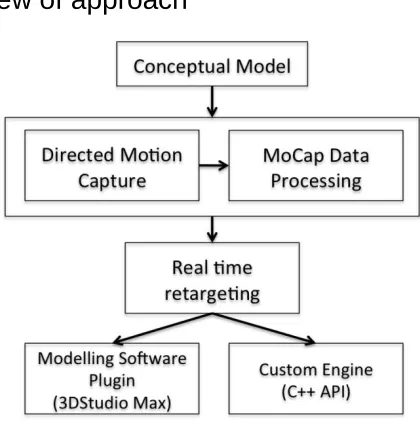
(12) a). Introduction .................................................................. 89. b). Related work ................................................................ 91. c). Overview of approach .................................................. 92. d). Conceptual model ......................................................... 93. e). Implicit retargeting of data ........................................... 97. f). Discussion and future work ........................................... 100. g). References .................................................................. 101. 4.2.. The MASKLE: automatic weighting for facial animation ........................................................................102. a). Introduction ................................................................ 103. b). Related work .............................................................. 104. c). Maskle overview ........................................................ 105. d). Automatic fitting ........................................................ 107. e). Weight transfer ........................................................... 111. f). Evaluation ...................................................................... 112. g). Discussion and future work ........................................ 114. h). References .................................................................. 117. 4.3.. A synthetic model for automatic and real-time facial expression animation ......................................................119. a). Introduction and background ..................................... 119. b). Related work .............................................................. 122. c). Contribution ............................................................... 125. d). A synthetic model for expression representation ....... 125. e). Muscle groups of the model ....................................... 130. f). Interpolation formula ..................................................... 131. g). Evaluation................................................................... 132. h). Conclusions and future work ..................................... 137. i). References ...................................................................... 139. j). An emotional interface for the synthetic model ............. 141. k). Evaluation of the interface ......................................... 146. xii.
(13) 4.4.. Industrial evaluation of the Maskle (4.2) and the facial expression animation system (4.3)..................................148. a). Industrial evaluation of the Maskle ............................ 148. b) Industrial evaluation of the facial expression animation system .................................................................. 150 4.5. 5.. References .......................................................................152. FULLY AUTOMATED ANIMATION PRODUCTION: THE QUEST FOR THE MAGIC BUTTON! ......................155 5.1.. Assisted animated production creation and programme generation........................................................................159. a). Introduction ................................................................ 159. b). Related work .............................................................. 161. c). Workflow overview.................................................... 162. d). The programme editor ................................................ 167. e). Output ......................................................................... 172. f). Use cases ........................................................................ 173. g). Conclusions and future work ..................................... 178. h). References .................................................................. 179. i). Integrating emotional work ............................................ 180. 5.2.. Domain specific sign language animation for virtual characters ........................................................................181. a). Introduction ................................................................ 181. b). Related work .............................................................. 183. c). Methodology .............................................................. 184. d). Borja: sports reporter .................................................. 190. e). Results and conclusions ............................................. 195. f). References ...................................................................... 197. 5.3.. Measuring the facial expressivity impact in virtual characters for sign language communication ..................198. a). Introduction ................................................................ 199. b). Facial expressions in question types .......................... 199 xiii.
(14) c). Experiment ................................................................. 200. d). Data processing and results ........................................ 204. e). Conclusions ................................................................ 205. f). References ...................................................................... 206. g) Evaluation design for the international sign system virtual signer ......................................................................... 206 5.4. 6.. References .......................................................................207. CONCLUSIONS ..................................................................209. BIBLIOGRAPHY .........................................................................217. xiv.
(15) List of figures. Fig. 2.1.1. A graph representing a possible VFX pipeline from the book Production Pipeline Fundamentals for Film and Games [Dunlop, 2014], pp. 28................................................... Fig. 2.1.2. Shotgun enables users and production coordinators to review tasks by user................ Fig. 2.1.3. In Shotgun the different stages of production are accessible through a excel-like data sheet. Each stage is represented by a column, while shots are described in rows. This information can be edited.................................................... Fig. 2.1.4. Tactic provides an advanced UI to build production workflows and pipelines as dependency graphs.......................................... Fig. 2.1.5. The relationship across the tables of the database can be specified through a dependency graph in Tactic............................. Fig. 2.1.6. For each shot displayed as a row, Tactic shows the different production stages in editable columns.............................................. Fig. 2.3.1. Diagram showing the overall processes involved in modern CGI media production. In both feature animation and VFX production, there are three main stages, pre-production, production and post-production....................... Fig. 2.3.2. The figure shows the sub-stages involved in the pre-production stage. Through Assets Definition all the required assets for the production are defined. Then, all of the following sub-stages produce data that is then used in the following production and postproduction stages to guide the artist work........ xv. 20 21. 22. 23. 23. 24. 28. 28.
(16) Fig. 2.3.3. Art Design for a character from the Noa&Max series. (a) orthographic view; (b) model sheet to describe facial poses; (c) model sheet for body poses; (d) a drawing showing the character in context..................... Fig. 2.3.4. Design for two elements from the Noa&Max series. (a) design of a backpack; (b) design of the elements of a sofa for an environment (sofa, pillows, blanket)..................................... Fig. 2.3.5. Color script for the film The Incredibles (Brad Bird, 2004). The complete film is depicted in different panels showing the main colour scheme for each sequence.................... Fig. 2.3.6. Storyboard for one shot of the short-film No Pets Allowed. The panel describes a change of the camera lens: a zoom-out (in red)........... Fig. 2.3.7. Diagram of the various processes involved in the production stage. Some processes are required (e.g. rigging) and others are optional (e.g. techanim)................................................. Fig. 2.3.8. The schematic representation of the data flow and logic involved in the Blocking Modeling process described in the text. At any iteration of the process, the result can be delivered as a new version; thus, the model is evaluated prior to its storage and registration in the database. Errors can be fixed or delivery can still be approved with issues............................ Fig. 2.3.9. The modeling refinement process starts from a blocking model and aims at adding more detail on the geometry and produce other necessary data as the UV maps used for texture mapping and the target geometry to be used for blend shapes and pose space deformation....................................................... xvi. 30. 31. 31. 32. 34. 36. 37.
(17) Fig. 2.3.10. The layout rig is the first (and required) controllable version of a geometry.................. Fig. 2.3.11. The simple rigging process aims at creating a skeletal structure to deform the geometry. The skeletal deformation is controlled by setting skin weights on the skinning deformer and by driving the deform skeleton through a control skeleton that implements features such as stretch and squash, bending and twisting. Other deformation is also obtained by controlling the target models from the refinement modeling process through a controlling system that can be driven by controllers or by configurations of the deformation skeleton (pose space deformation).................................................... Fig. 2.3.12. The advanced rig is obtained by adding advanced simulation solutions over the simple rig. Simulation can aim at producing realistic behaviours such as volume preservation, wrinkles and muscle dynamics.. Fig. 2.3.13. In layout the rigged assets are placed in the three-dimensional scene to match the indications from the script and the director. The camera is also set in the layout process; position, orientation, focal length, aspect ratio, focus distance and shutter angle are key factors that determine the shot and its render.. Fig. 2.3.14. In the blocking of animation, the transformations from layout are merged with more detailed keyframes. By merging layers of animation from different processes it is possible to make the workflow nondestructive........................................................ Fig. 2.3.15. The animation refinement modifies the blocking animation by changing the set of keyframes (keyframes can be deleted, added or changed in value and time) and creating animation curves that define the interpolation between two keyframes................................... xvii. 39. 40. 41. 42. 43. 44.
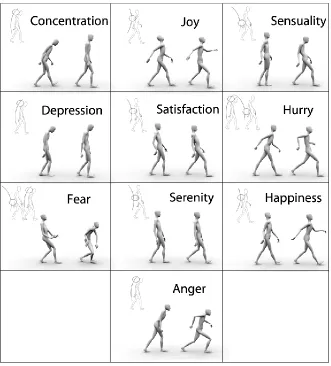
(18) Fig. 2.3.16. Postproduction is made of three consecutive processes, where the second one (relight) is optional............................................................ Fig. 2.3.17. The film production workflow incorporates further aspects that are not directly related to CG media. These (e.g. live action shooting) are the processes that constitute the Film Production stage, while the production and post-production stages related to CG seen in the two previous sections are merged to form the Film Post-Production stage........................ Fig. 2.4.1. The workflow seen in section 2.3 can be split into two graphs, depending on the desired final outcome. The Asset creation graph (top) follows the processes required to build an asset to be used in a shot. The Shot creation graph (down) describes the interaction of processes to complete an animated shot.......... Fig. 2.4.2. As two graphs can run concurrently in different departments, it is important to remark that they can plug into each other to enable artists to work at different levels of the production, avoiding delays caused by waiting for pipeline completion. In the figure, dashed lines represent interactions of processes across two workflows...................... Fig. 2.7.1. Graph showing the integration and interaction between workflows, pipelines, DAM and DPM systems.................................. Fig. 3.1.1. In this graph, two animated characters (bob and jim) need to be previewed with a certain camera. Version 6 of bob is new and will be rendered, while version 5 of jim was already rendered with the desired camera and will be reused. The render of bob is assetized for further use......................................................... xviii. 49. 51. 51. 52. 56. 65.
(19) Fig.3.2.1. A screenshot of the RVGun interface (left upper corner). The user is presented with a list of possible choices that are suited to his/her tasks in the production. The available options are appropriate to the user task thanks to the production management system, helping the user reduce time and possible mistakes........................................................... Fig. 3.2.2. The quicktime video is created with a slate that summarizes the main information about the daily........................................................... Fig. 3.2.3. After all the fields are filled and the user submits the work, the asset management system registers the entry. This is now accessible from the production management system (in this case Shotgun).......................... Fig. 3.3.1. With the Digital Pinboard each panel in a sequence can describe multiple properties. One key feature is the ability to specify the 3D assets that have to appear in the shot and define their typology: character (CHR), prop (PRP) and set (SET)........................................ Fig. 3.3.2. A complete sequence can be described as a set of panels. Each shot is described by one or multiple panels that contain all the relevant information for the pipeline and the artists. This information includes description of the shot, camera description, the list of assets, sounds, actions and dialogues. The panel also shows the status and the feedback for the shot Fig. 3.3.3. The active (left) area of the pinboard is the one that contains the active assets. The other region (lighter gray) can be used to experiment with data, waiting for it to be enabled.............................................................. xix. 69. 70. 70. 75. 76. 77.
(20) Fig. 3.4.1. A schematic view representing the flow of data to embed tracking and reviewing assets in rendered pixels. The tracking data (assets’ identification code) is managed from and into the database thanks to the DAMS and DPMS, then it is fed to the three-dimensional and bidimensional authoring softwares so that it can be embedded in the rendering process. This embedded data can be accessed through a tool designed to review frames and query the database to gather the information related to the tracking data of selected pixels. Finally, the information can be reviewed and modified so that the database gets updated with the required changes................................ Fig. 3.4.2. A custom tool can be used to define the assets in a shot and the required tasks for its completion. This information is stored in the DAMS and DPMS to be used later in the pipeline........................................................... Fig. 3.4.3. A shot animated in Autodesk Maya. The contents were loaded through a pipeline that generated a pass per each asset, encoding the asset’s DAMS code......................................... Fig. 3.4.4. This figure shows a rendered frame from the shot, open in my prototype review tool. When clicking on a pixel, the tool extracts the code of the asset depicted in the selected pixel and retrieves all the relative production data from the DAMS and DPMS..................................... Fig. 4.1.1. Diagrammatical overview of the system architecture...................................................... Fig. 4.1.2. The four poses of our model. The circle represents the apparent centre of gravity – the area of the body that is leading the character while walking. The associated curve shows how the spine is curved in each pose................................................................... xx. 78. 80. 80. 81 92. 94.
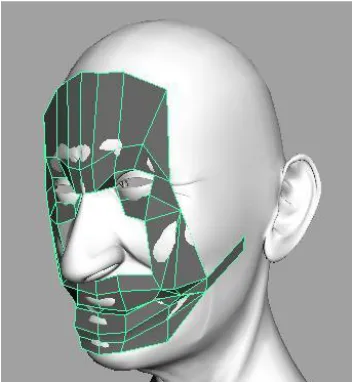
(21) Fig. 4.1.3. Still images of real motion capture data, grouped by emotion. Of the two shaded characters in each cell of the table, the one on the right is representing data from the female actress while the character on the left is the male actor. In the upper left corner of each cell is the equivalent pose from the conceptual model (see Figure 4.1.2)................ Fig. 4.1.4. Screenshots of the results of the plugin developed for Autodesk 3D Studio Max. (a), (b) and (b) show a standard walk animation applied to characters of different dimensions. (d), (e) and (f) show the same characters with the ‘Sad’ emotion blended in. In (c) and (f), the characters hip joint has been scaled artificially to three times the width, yet the retargeting still works perfectly....................... Fig. 4.2.1. View of the Maskle system post-initialisation step................................................................... Fig. 4.2.2. Final position of the Maskle for weight transfer............................................................. Fig. 4.2.3. Sample weight profiles for one bone of a manually-weighted face (blue line) and automatically weighted face (red dashed line). Figure (a) shows the results for the Maskle, Figure (b) for the envelope algorithm. The envelope algorithm shows a much greater level of noise and erroneous calculations...................................................... Fig. 4.2.4. Visual differences between Maskle-weighted and envelope-weighted faces, comparing a simple expression created by moving the bones of the rig. (a) shows the unanimated face; (b) shows the expression applied to the Maskle-weighted face; (c) shows the same expression applied to the envelope-weighted face.................................................................... xxi. 96. 99 108 110. 116. 116.
(22) Fig. 4.2.5. Example of expressions successfully created using the Maskle on a cartoon character with pronounced features. (a) is the unanimated face, (b) and (c) are expressions created after the Maskle has weighted the face.................... Fig. 4.2.6. Examples of expressions created on 3D models animated using the Maskle (images © Merja Nieminen, Crucible Studio / University of Art and Design Helsinki 2008..................... Fig. 4.3.1. Sub-cutaneous muscles................................... Fig. 4.3.2. Superville’s schemes....................................... Fig. 4.3.3. Plasencia’s schemes........................................ Fig. 4.3.4. Our model’s schemes...................................... Fig. 4.3.5. The points of action and movements proposed by our model.................................... Fig. 4.3.6. Whissell’s activation(vertical axis) evaluation(horizontal) space............................ Fig. 4.3.7. Table of viewer’s test results........................... Fig. 4.3.8. Viewer’s test results dispersion graph............. Fig. 4.3.9. Per-expression results obtained with the viewer test evaluation. The bars in the chart represent ratios of matching emotional expressions recognized. Red colour indicates recognition rate for exact expression, while yellow represents the ratio of recognition as the closest emotion in the whissell wheel........ Fig. 4.3.10. Our defined wheel for Activation (vertical axis) and Evaluation (horizontal).................... Fig. 4.3.11. Screenshot of interface as a Maya plug-in.... Fig. 4.3.12. Screenshot of a standalone interface controlling a character's face in real-time........ Fig. 4.3.13. Chart showing overview of evaluation results............................................................... Fig. 5.1.1. Programme Editor and real-time preview window............................................................ Fig. 5.1.2. 3D Studio Max direct export to the framework........................................................ Fig. 5.1.3. Basic programme structure.............................. Fig. 5.1.4. Camera and audio components added to programme description.................................... Fig. 5.1.5. Addition of character "Bruce" to the scene..... xxii. 117. 117 122 123 124 127 131 134 135 135. 136 142 145 145 147 160 166 169 169 171.
(23) Fig. 5.1.6. Tracks with two characters and several components added to the scene....................... Fig. 5.1.7. Sam the virtual weatherman............................ Fig. 5.1.8. Sam explaining today's weather...................... Fig. 5.1.9. Virtual stock market presenter......................... Fig. 5.1.10 Manolo the virtual bar-tender......................... Fig. 5.1.11. Programme Generator Server. On the left the user can specify some characteristics, including text to utter, on the right the resulting video is displayed............................. Fig. 5.1.12. Screenshots of the emotional interface (section 4.3.10) working in the Programme Editor. The emotional interface is interpolating the shapes described in the synthetic model for facial expression (section 4.3). (a) shows disgust (approximately activation -0.9, evaluation 0.1). (b) shows happiness (approximately activation 0.6, evaluation 0.3)................................................. Fig. 5.2.1. The animation system receives an XML file that contains the description of the clips that has to be concatenated in order to build the complete animation. Depending on whether it's a pre-made phrase, a number or a word, the system retrieves and merges the appropriate animated clips to build the signed contents............................................................ Fig. 5.2.2. Screenshot of a signing expert (prelingually deaf) with virtual character overlay................. Fig. 5.2.3. The flow of information through the different processes that create an animation clip from input................................................................. Fig. 5.2.4. Figure shows how blending can be made between two clips. Left: interpolating from last frame of Clip A to first frame of Clip B; or Right: cross fading from Clip A to Clip B... xxiii. 172 174 175 175 176. 177. 180. 186 187. 189. 190.
(24) Fig. 5.2.5. Art design for Borja. Design includes different clothing for different weather conditions. The design shows a sporty style for the character to make it closer to the sailing world, bigger eyes to empathize with audience and big hands to make signs more readable through streaming videos.................. Fig. 5.2.6. Scheme of the news generation system........... Fig. 5.2.7. Webpage of the Spanish National Radio showing Borja's videos for the Barcelona World Race...................................................... Fig. 5.2.8. Screenshot of Borja in action.......................... Fig. 5.2.9. Screenshot of RTVE ranking page showing Borja popularity............................................... Fig. 5.2.10. Chart showing the 15.8% greater in popularity of Borja’s videos over all other Barcelona World Race multimedia. Also shown in the Standard Deviation bar............... Fig. 5.3.1. Two stills of a real person signing two types of questions, “yes/no” (left) and “wh-?” (right)............................................................... Fig. 5.3.2. Snapshot of the web interface (based on Flash). The buttons are placed below. “Abierta” and “Si/No”, translated to English, mean “Wh-?” and “Yes/No”............................ Fig. 5.3.3. Two stills of a RS signing “what” in LSC, one with coherent facial expression (left) and another with incoherent facial expression (right)............................................................... Fig. 5.3.4. A real signer and an animated character signing............................................................. Fig. 5.3.5. Time ratio averages and standard error for correct distinction of questions in coherent and incoherent cases for RS(a) and VS(b). Distinction correctness of questions in coherent and incoherent cases for RS(c) and VS(d)................................................................ xxiv. 192 193. 194 195 195. 196. 200. 202. 203 203. 205.
(25) Fig. 5.3.6. Time ratio averages’ comparison between RS with coherent facial expression, RS with incoherent facial expression, VS with coherent facial expression and VS with incoherent facial expression............................. xxv. 205.
(26) List of tables. Table 3.2.1. Timing details for the operations required to register a daily on a task with Shotgun. The times varied a lot across the users but it is interesting to notice that they spent similar time (104 seconds in average) in “others” actions which were not required......................................................... 71 Table 3.2.2. Mistakes (denoted by the symbol ✘) occurred when using Shotgun to register daily. Tags were almost omitted and the file location is wrong in 2 cases out of five. Having a wrong file location is a big issue in production as supervisors would review the wrong daily, could generate confusion and will finally require to repeat the 71 process.......................................................... Table 3.2.3. In RVGun the times spent in the various processes are reduced. Most of the time is spent in generating and uploading the video and the thumbnail, which in this system, is not performed by the user. The time taken to write the tags is very low as the system already provides a set of default tags for the selected task.................................................. 72 Table 3.2.4. All processes produced the expected results 72 (✓) with RVGun.......................................... Table 3.3.1. Table of relevant properties for different 75 types of assets............................................... Table 4.1.1. The four poses of the model, and examples of associated emotions.................................. 94 Table 4.2.1. The mean differences between manually weighted faces and automatically weighted faces. A sample of each model is shown in Figures 4.2.4, 4.2.5 and 4.2.6....................... 114 Table 4.3.1. The poses proposed, modelled on two different character’s faces............................. 128 Table 4.3.2. Some proposed facial expressions................ 129 xxvi.
(27) Table 4.3.3. Set of experimental interpolation values between facial poses..................................... Table 4.3.4. Comparison of our synthetic model with the animated 3D scans of Wallraven et al., measured in percentage of viewer recognition. * indicates a mean value of corresponding emotions from our model. The table shows that the expressions obtained with our synthetic model are as believable as the ones obtained with a 3D scan of a real human’s face and expression.. Table 4.3.5. Extreme poses of the face, and the Activation-Evaluation values assigned to them. See Table 4.3.4 for interpolation values............................................................ Table 4.3.6. Interpolation values for the poses described in table 4.3.5................................................. Table 4.4.1. Evaluation results of the use of the MASKLE in a professional production context (extracted from SALERO deliverable D9.6.3: Third Phase Experimental Productions and Evaluation Report, p. 35)................................................ Table 4.4.2. Feedback received from artists using the Synthetic model for facial expression to create the installation Alan01 (Extracted from SALERO deliverable D9.6.3: Third Phase Experimental Productions and Evaluation Report, p. 56)............................. Table 5.3.1. List of questions used in the experiment (translated to English from Catalan). The questions are divided in two groups, depending on the type of question................. xxvii. 130. 137. 143 144. 149. 151. 201.
(28) xxviii.
(29) 1. INTRODUCTION This thesis is focused on CG (Computer Graphics) media. More specifically, it presents a series of contributions mainly intended to improve the management and automation of some key processes. Chapter 2 presents a (novel) formalization of workflows and pipelines in CG media. Chapter 3 presents some improvements in workflows, which are based on the concepts presented in the previous chapter. Chapter 4 presents some solutions to aid and automate the animation and rigging of virtual characters. Chapter 5 focuses on automating the complete production process of short animation TV and web programmes by making use of pre-made clips and templates. The research contained in chapters 4 and 5 is older than that of the earlier chapters. It was mainly framed in the context of European projects in collaboration with industry. The research presented in chapters 2 and 3 is more recent and draws on my experience in different media companies (the most recent one being the Moving Picture Company, MPC) and productions. This separation between recent industrial and previous academic research is a direct result of a shift in the understanding of which production aspects are crucial for automation. When the work in the thesis began, there was indication that the most important aspect was to automate some facets of creative tools. The goal was to to reduce the time invested in non creative (thus automatable) processes and enable new formats to be rapidly delivered on new media supports, such as the web and mobile devices. The automation of complex processes, as the ones described in chapter 5, unfortunately comes at the expense of creative flexibility, thus the work in chapter 4 was aiming at providing ways to reintroduce this creative flexibility, mainly focusing on virtual characters. While working with companies and industrial research partners to integrate automated solutions, it became evident that any automated or intelligent process requires an infrastructural foundation that enables the proper storage and management of production data (e.g., human resources, assets and tasks). This way, the focus of interest turned into pipelines, workflows, digital asset management (DAM) 1.
(30) and digital production management (DPM), as these were identified as being at the core of the required foundation. Studying this issue as described in chapter 2, proved that the more advanced the infrastructure is, the harder it becomes to access and manage the data. Even though it also revealed the opportunity for further advances. In fact, in chapter 3 I describe how this management can be performed efficiently, while empowering the tools with all the benefits of a proper infrastructure. As some of the contents have already been published or are written for submission, they are presented in a way that follows closely the original paper. Thus, related references are included as a subsection. All references for new contents are listed at the end of every chapter. At the end of the document, a list of the complete bibliography is provided. This thesis is then structured to reproduce a bottom-up perspective on my journey and the order of chapters represents the order of execution that each issue and work should be addressed from an industrial perspective. Next, I outline the contributions in each chapter, and discuss the relevance of each of them in more detail.. 1.1. Production and asset management for efficient pipeline and workflows in CGI media: where is my data and where am I? In chapter 2 I introduce key concepts of the workflows and pipelines for digital media, more especially focused on CG media. The chapter makes a more formal presentation of the concepts than those existing so far in the scarce literature available on the topic. The presentation is geared towards enhancing the efficiency and robustness of the pipeline, and the concepts are the basis for the pipeline innovations I present in chapter 3. In recent years, international media companies have been all looking at workflows and pipelines as one of their biggest challenges for the future, these words being used without a very precise meaning or conceptualization. That workflows and pipelines are key challenges is currently confirmed by a lot of activities that 2.
(31) demonstrate the increasing interest by the academia and the industry to advance in solving the issues under those concepts. Recently, books appeared which were written by recognised members of the best animation, game and visual effects companies in the media industry [Polson, 2014][Dunlop, 2014]. The academic interest has also grown, with journals now focusing on such type of issues like the Journal of Digital Asset Management [Journal of Digital Media Management, 2015], with special panels as Global VFX Pipelines [SIGGRAPH, 2015][Chung, 2011] hosted by SIGGRAPH and technical talks in conferences like SIGGRAPH [Johnson et al., 2014][Meeres-Young, 2010]. On the other hand commercial solutions have proliferated, providing media companies with ways to define and manage their workflows and pipelines. There is yet little formal work on how to design workflows and pipelines for CGI media production, as shown in the state of the art discussed in chapter 2, which discusses academic, commercial, and the internal media industry solutions, at least from the information available. Furthermore, there is little evidence of the benefits that would come from doing so. The prototypical solution I introduce in chapter 2 defines the concepts supporting workflows and pipelines. It provides an integrated approach that merges the concepts of workflow and pipeline to improve the management and traceability of production. This is not a standard approach in the industry or research works, discussed in the state of the art, and could be published in the future. Besides being a novel approach, it has significant potential as demonstrated by several different innovative proposals to increase productivity and robustness across several production processes described and discussed in chapter 3. In this sense, chapter 3 demonstrates the first steps in validating the novel approach, and, at the same time it is one of the first evidences that formalizing workflows and pipelines as in our approach leads to benefits.. 3.
(32) 1.2. Full production tracking: intelligent pixels, rendering and management On the basis of the approach of chapter 2, chapter 3 introduces and discusses 4 different innovative production systems that take advantage of those engineered pipelines, workflows, production and asset management systems. Because the data is properly registered and managed, it is possible to connect different systems, sharing such data or even build newer systems to show, edit and control the data. The work described was carried out in different companies and was strictly related to the production needs of the moment. The evaluation of these works is thus directly related to their use in production, the improvement of the overall productivity and facilitating the workflow for production coordinators and artists. The first contribution improves the quality of the daily renders and reduces the time required to compute them, was undertaken at the Moving Picture Company (MPC) and has been recently published [Romeo et al. 2015]. Romeo, M., Auty, J. & Fagnou, D. (2015). Intelligent rendering of dailies: automation, layering and reuse of rendered assets. Proceedings of the 12th European Conference on Visual Media Production (CVMP '15). ACM, New York, article 15. The system, called Renderflow, integrates the company Asset Management System and workflows into one centralized solution. This way, all assets from a shot can be rendered using state of the art renderers (e.g. Mental Ray or RenderMan) and, most importantly, the resulting renders can be assetized for later reuse, which is a key feature of the system. Renderflow uses a compositing technique that merges together different images by sorting their pixels by their distance (or depth) from the camera. This makes it possible to render each asset on a separate layer and compose it at a later stage. This way, each layer gets assetized and can be reused if no changes are made to the assets contained in the layer. If shots with many complex assets are considered (numbers can go up to 200 and above), the changes on one single asset will 4.
(33) result into a new high quality render being produced very rapidly on the basis of the proposed solution. The second contribution integrates the Digital Production Management System into a media player. This way, artists can easily bind videos and images to their tasks or assigned assets, as navigating the DPM when assets and tasks are very large, as it is usually the case, becomes tedious for the artists. On the other hand, the number of tasks and assets also impacts on the amount of dailies (videos or image sequences) created, complicating the browsing and access of the data. The prototype introduced was designed at StudioNest in 2010 to overcome these problems. The system integrates Autodesk Shotgun [Shotgun, 2015], RV [RV, 2015] and the studio pipeline to give artists easy and personalized access to the relevant information and was named RVGun. The system attracted a very positive interest of both software companies (Shotgun and Tweak Software) which were recently bought by Autodesk. The validity of the tool is further supported by the ReviewTool developed by MPC which was published later [Fagnou et al. 2013], and which is based on the same ideas. This software uses the same approach and extends it further by also providing a pipeline-based editing User Interface (UI), which enables users to see shots in different contexts. Contexts can vary from simple editing cuts to the different stages of the different departments. The UI is a key aspect of the third contribution, discussed next. The third contribution is a production tool, the Production Pinboard, that integrates the ideas of production management, preproduction and digital pinboards. Production management commonly happens through Excel-like tables, and it is hard to browse information rapidly without filtering the data. Unfortunately filtering the data reduces the context. Moreover, data sheets do not present information in a way that is visually meaningful. The Production Pinboard is a new way to access pre-production data. Through the software it is possible to define shots and assets, arrange them in meaningful ways and visually navigate and edit the data without losing context. The work was undertaken during 2014, at Bee and Birds animation studio in Barcelona. It was not extensively tested in production due to the closure of the studio but its development was informally evaluated and driven by the person who is now Layout lead at MPC. 5.
(34) The fourth contribution is a method that enables Asset Management data to be embedded in rendered images. Three-dimensional scenes are described by a live hierarchical structure (or scene graph) [SIGGRAPH2013 USD Presentation, 2013, Brutzman & Daly, 2007]; because of this, it is easy to add metadata to tag different parts of the scene in the Digital Asset Management System (DAMS). Unfortunately, images commonly have a flat structure that does not allow to hierarchically cluster pixels, making it impossible to properly add per-asset metadata. As a result, once a frame is rendered, it is impossible to retrieve the asset that was used to render a certain pixel and its data. I propose a method that encodes a link to the DAMS entry of each asset rendered in a pixel of an image. By generating an extra pass that writes the asset code ID in the image, it is then possible to query a pixel to get the ID and retrieve all the asset information from the DAMS and task information from the DPM. I developed this technique in 2014 and I am currently designing an evaluation strategy prior to its publication.. 1.3. Creative automation: make it move Chapter 4 deals with research contributions towards finding solutions to aid and automate the animation and rigging of virtual characters, one of the many processes within the context of CG production. I outline and discuss three contributions next. The first contribution is related to automated full body animation, and focuses specifically on tweaking walk cycle animations. This research is oriented to find ways to automatically modify and apply walk-cycle animations to various bipedal characters of any proportion to represent their emotional state through motion. Our research contributes by creating a model for emotional character walking, and defining a series of proportional variables, whose values are based on motion capture, which can be changed to create different emotional walk cycles. As we avoid values in world coordinates and work solely with proportions, the system implicitly retargets the data to any biped body shape, regardless of the size and structure of the skeleton. The results were presented in. 6.
(35) Articulated Motion and Deformable Objects (AMDO) 2010 [Romeo et al., 2010]. Romeo, M., Dematei, M., Bonequi, J., Evans, A. & Blat, J. (2010). A reusable model for emotional biped walk-cycle animation with implicit retargeting. Proceedings of the 6th international conference on Articulated motion and deformable objects. Springer-Verlang, Berlin, pp 270-279. The previous approaches which are most similar to our research, in a sense, are Densley and Willis [Densley & Willis, 1997] and Meredith and Maddock [Meredith & Maddock, 2005]. Our approach combines their philosophies but underpins it with a more formal and focused theoretical background. We tackle the issue of walk-cycle animation inspiring us in traditional character animation techniques, applied within a modern computing and mathematical framework. The second contribution, the Maskle, is an automated facial rigging system whose main purpose is to provide a simple but functional deformation system for the face, making possible to reduce the time spent by artists for the rigging task and ensure that the facial rig is coherent across characters, enabling reuse and automation. The work, published in the International Conference on Computer Graphics Theory and Applications (GRAPP 2009) [Evans, 2009], is based on the encoding of deformation parameters (eg. linear skinning weights) on a low resolution face template for future reuse. Evans, A., Romeo, M., Dematei, M. & Blat, J. (2009). The Maskle: Automatic Weighting for Facial Animation. International Conference on Computer Graphics Theory and Applications (GRAPP). In fact, thanks to dedicated tools and a fitting algorithm, the template is easy to setup onto diverse faces and the deformation parameters can then be automatically transferred to make them animatable. This idea was gestated as a solution to enable future automation of characters’ faces; having a standardized facial rig, makes it possible to define techniques and algorithms for its animation and reuse. The work was evaluated in three experimental 7.
(36) productions within the SALERO European project, showing productivity benefits [Third Phase Experimental Productions and Evaluation Report SALERO 2009], up to 80%, and no tangible difference in qualitative comparison. The system proved well suited to provide a working facial rig for humanoid faces and it was the only available tool of this kind at that moment. Commercial products do not incorporate yet any similar tool/technique and the skinning algorithms have unfortunately not improved either, making the Maskle a still relevant contribution today. The third contribution is a Synthetic Model for Facial Expression. At the time, a lot of the productions of the industrial partners in the research projects undertaken lacked facial expressivity; the main motivations were: . Characters are difficult to setup to express emotions through the face;. . Animation of the expressivity of the face is hard to automate;. . The complexity of facial rigs to provide characters with expressivity limits the frame-rate of realtime applications and requires higher processing times for off-line productions.. Our approach is based on a simple set of five facial shapes, plus the articulated deformation produced by the jaw bone, which we show that can be combined together to represent a wide range of emotions. These combinations are arranged into a Whissell wheel [Whissell, 1989][Plutchnick & Kellerman, 2015] (alternatively known as bidimensional valence-arousal emotional model) to easily set and interpolate different emotional facial expressions. This solved the barriers for facial emotional animation indicated above. The quality of the resulting facial expressions was evaluated through an online survey, which showed that most of the obtained emotions were easy to understand across three different countries. The work was also used and evaluated in an experimental production [Tuomola et al., 2009, Alan01, 2010], receiving a mixed response from the artists working on it, finding it useful and easy to 8.
(37) use, but not flexible enough at times. On the other hand, 96% of the spectators visiting the installation who took part in a survey, rated the quality of facial animation as excellent, enlarging the positive results of the online survey mentioned above. The work was not published at the time, but the new trends in realtime online 3D graphics [Evans et al., 2014] and the renewed interest in modeling emotional expressivity for virtual characters [Hyde et al., 2014][Faita et al., 2015] may set the ground for a publication.. 1.4. Fully automated animation production: the quest for the magic button! Chapter 5 focuses on automating the complete production process of short animation TV and web programs by making use of premade clips and templates. This approach was used to generate web content, multimedia messages, and short TV programmes for a period of more than five years. The automation can be extended from the creation of the contents, to the creation of the rendered result. In the chapter I present two research works that have successfully been used to automatically produce media contents for the web, for multimedia messages and television. The first contribution is Automated template-based production. Automating the complete production process had been seldom addressed in CG production, although more work exists on video editing, as discussed in the state of the art analyzed in chapter 5, the key factors to reduce the production time are the simplification of the three-dimensional assets and animation creation, plus the acceleration of the rendering and editing processes. The solution proposed addresses these issues through a system inspired by videogame technology, i.e. creating real-time 3D graphics based on GPU use. The system can blend animation clips together, apply appropriate transformations on 3D geometries, shade and render them in real-time. The system can also apply audio on rendered videos, which can be processed to automatically synchronize the 9.
(38) facial animation and the audio. These features were all integrated within the GTI (Grup de Tecnologies Interactives, Universitat Pompeu Fabra) framework, a collection of Open Source libraries for different aspects of real-time interactive 3D graphics, which could be scripted. Another aspect to be taken into account is how the animations and other contents have to be selected and combined to provide a narrative context to the produced media. In fact, a lot of time can be spent in defining the narrative of a video and deciding which assets better communicate the intended message. In this case we provided a template-based system that enabled production companies to prepare templates that can be fed with live data to properly choose the contents which are suitable, to generate and display the 3D animations. These templates could be prototyped through an interactive system branded Programme Editor that enables non-technical users to access all the features of the GTI framework. The system can preview videos of the contents selected by the user, set the variables that drive the logic behind their automated selection and finally render a video or store a template. The system uses PVML, our own variant of SMIL. This work was published in Advances in Computer Entertainment (ACE), 2009 [Abadia et al., 2009] and is the result of a few years of development, where I contributed in different ways by driving the changes to its overall design and interface to accommodate real production requirements, iteratively testing the system, and championing its adoption in different projects. Abadia, J., Evans, A., Ganzales, E., Gonzales, S., Soto, D., Fort, S., Romeo, M. & Blat, J. (2009). Assisted Animated Production Creation and Programme Generation. ACM Advances in Computer Entertainment Technology. ACM, New York, pp. 207-214. The second contribution is Automatic generation of Sign Language, a specific area which has attracted a lot of research, that of Sign Language (such as the different European projects ViSiCAST, eSIGN, CogViSys, Dicta-Sign). Our research mainly focuses on the automatic generation of sign language videos with virtual characters. As a system, its approach is similar to that of the Programme Editor, using templates. The domain is specific as the system generates signed sport news, based on heterogeneous raw 10.
(39) data collected from multiple sources. This system was created to provide accessible news to the deaf audience of the Barcelona World Race sailing regatta around the world and the resulting videos were video streamed in the Spanish National Radio (RNE) website. There are different levels of evaluation of its results. Two of them are relevant for the system evaluation: . The system was successful in producing automatically animation clips, being able to run publicly during the event;. . The textual transcript of the automatically generated news was checked by RNE journalists who did not suggest any changes, proving the soundness of the news generator. More importantly, in terms of sign language understandability, and complex animation;. . There was an indirect proof that the sign language was understandable in terms of the popularity of the videos in the web site.. The research was presented in GRAPP 2014 [Romeo et al, 2014]. Romeo, M., Evans, A., Pacheco, D. & Blat, J. (2014). Specific Sign Language Animation for Virtual Characters. GRAPP 2014 - Proceedings of the 9th International Conference on Computer Graphics Theory and Applications. SciTePress, pp. 487-494. We also propose a more direct, detailed evaluation of the Sign Language which our systems were able to generate, specifically in terms of the understandability related to the facial expressivity, and discuss the limitations and further work.. 1.5. Summary In summary, this thesis presents several contributions to the automation of CG media generation, some of them in specific production aspects, and some in the improvement of workflows and pipelines. The evaluation is based on a mix of lab-based, and 11.
(40) production based strategies, while some of the evaluation in deeper and broader aspects is still ongoing.. 1.6. References 3DS Max, computer software. (2015). Available from: <http://www.autodesk.com/products/3ds-max>. [13 December 2015]. Abadia, J., Evans, A., Gonzales, E., Gonzales, S., Soto, D., Fort, S., Romeo, M., Blat, J.: Assisted animated production creation and programme generation, Proceedings of the International Conference on Advances in Computer Entertainment Technology, 207-214, ACM, 2009. Alan01. (2010). Available from: <http://mlab.taik.fi/alanonline/#>. [13 December 2015]. Brutzman, D. & Daly L. (2007). X3D: Extensible 3D Graphics for Web Authors, Morgan Kaufmann Publishers Inc. San Francisco. Chung, H. J. (2011). ’Global Visual Effects Pipelines: An Interview with Hannes Ricklefs’, Media Fields Journal, no. 10. Densley, D. & Willis, P. (1997). Emotional Posturing: A Method Towards Achieving Emotional Figure Animation. IEEE Computer Animation 1997 . IEEE Computer Society, Washington DC, pp 814. Dunlop, R. (2014). Production Pipeline Fundamentals for Film and Games, Focal Press, New York. Evans, A., Romeo, M., Dematei, M. & Blat, J. (2009). The Maskle: Automatic Weighting for Facial Animation. International Conference on Computer Graphics Theory and Applications (GRAPP).. 12.
(41) Evans, A., Romeo, M., Bahrehmand, A., Agenjo, J. & Blat, J. (2014). 3D graphics on the web: A survey. Computers and Graphics. vol. 41, no. 0, pp. 43-61. Fagnou, D., Cameron C., & Valdez, A. (2013). ReviewTool: a database-driven visual effects editing application. ACM SIGGRAPH 2013 Talks, ACM, New York, article 28. Faita, C., Vanni, F., Lorenzini, C., Carrozzino, M., Tanca, C. & Bergamasco, M. (2015). Perception of Basic Emotions from Facial Expressions of Dynamic Virtual Avatars, Lecture Notes in Computer Science. Springer International Publishing, Switzerland, vol. 9254, pp. 409-419. Hyde, J., Kiesler, S., Hodgins, J. K. & Carter E. J. (2014). Conversing with Children: Cartoon and Video People Elicit Similar Conversational Behaviors. Proceedings of the SIGCHI Conference on Human Factors in Computing Systems. ACM, New York, pp. 1787-1786. Johnson, C., Tobiska, J., Tomlinson, J., Van de Bosh, N. & Whaley, W. (2014). A framework for global visual effects production pipelines. ACM SIGGRAPH 2014 Talks, ACM, New York, article 57. Journal of Digital Media Management. (2015). Available from: <http://www.henrystewartpublications.com/jdmm>. [13, December, 2015]. Kennaway, J. R., Glauert, J. R. W., Zwitserlood, I. (2007). Providing signed content on the Internet by synthesized animation. ACM Transactions on Computer-Human Interaction (TOCHI), vol. 14, no. 3, Art. 15, pp 1-29. Meeres-Young, G., Ricklefs, H. & Tovell, R. (2010). Managing thousands of assets for the prince of persia city of Alamut. Proceedings of ACM SIGGRAPH 2010 talks. Meredith. M. & Maddock, S. (2005). Adapting Motion Capture Data Using Weighted Real-Time Inverse Kinematics. ACM Computer in Entertainment, vol. 3, no. 1 pp. 5-5. 13.
(42) Plutchnik R. & Kellerman H. (2015), The Measurement of Emotions, Emotion: Theory, Research and Experience, vol. 4, pp. 113-129. Polson B. (2014). CG pipeline design patterns. Proceedings of the Fourth Symposium on Digital Production, pp. 29-29. Romeo, M., Dematei, M., Bonequi, J., Evans, A. & Blat, J. (2010). A reusable model for emotional biped walk-cycle animation with implicit retargeting. Proceedings of the 6th international conference on Articulated motion and deformable objects. Springer-Verlang, Berlin, pp 270-279. Romeo, M., Evans, A., Pacheco, D. & Blat, J. (2014): Specific Sign Language Animation for Virtual Characters, GRAPP 2014 Proceedings of the 9th International Conference on Computer Graphics Theory and Applications, 487-494, SciTePress. Romeo, M., Auty, J. & Fagnou, D. (2015). Intelligent rendering of dailies: automation, layering and reuse of rendered assets. Proceedings of the 12th European Conference on Visual Media Production (CVMP '15). ACM, New York, article 15 RV, computer software. (2015). Available from: <http://www.tweaksoftware.com/products/rv>. [13 December 2015]. Shotgun, computer software. (2015). Available from: <http://www.autodesk.com/products/shotgun>. [13 December 2015]. SIGGRAPH2013 USD Presentation. (2013). Available from: <http://graphics.pixar.com/usd/s2013_presentation.html>. [13 December 2015]. SIGGRAPH 2015, Global VFX Pipelines. (2015). Available from: <http://s2015.siggraph.org/attendees/birds-feather/sessions/globalvfx-pipelines>. [13, December, 2015]. Salero: Semantic AudiovisuaL Entertainment Reusable Objects. (2006). Available from: <http://www.salero.eu>. [13 December 2015]. 14.
(43) Third Phase Experimental Productions and Evaluation Report SALERO. (2009). Available from: </http://salero.eu/en/resources/deliverables.html>. [13 December 2015]. Tuomola, M. L., Korpilahti, T., Pesonen, J., Singh, A., Villa, R., Punitha, P., Feng, Y. & Jose, J. M. (2009). Concept, content and the convict. Proceedings of the 17th ACM international conference on Multimedia, ACM, New York, pp. 1063-1072. Whissell C. M. (1989). The Dictionary of Affect in Language.. 15.
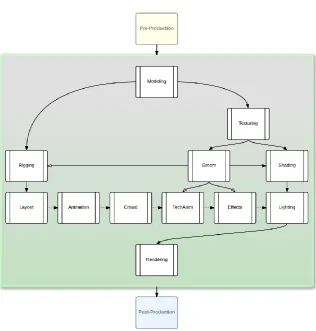
(44) 16.
(45) 2. PRODUCTION AND ASSET MANAGEMENT FOR EFFICIENT PIPELINE AND WORKFLOWS IN CGI MEDIA In this chapter I introduce key concepts of the workflows and pipelines for digital media, more especially focused on CG (Computer Graphics) media. This chapter makes a more formal presentation of the concepts than those existing so far in the scarce literature, and is geared towards enhancing the efficiency and robustness of the pipeline. The concepts are needed for the pipeline innovations I present in the following chapter. The complexity of modern media production has grown a lot in many industries, including film, commercial, television and game companies. This complexity directly translates into large numbers of assets to be created and managed through all the production processes. The creation of assets requires several production stages to happen in different departments and by many collaborating individuals (artists and technicians). At each stage, a varying number of versions may be produced, until one version is considered the suitable candidate. The creation of an asset is thus made of different processes; these may be sequential (one process may be used as the starting point for the next stage) or parallel (two processes are used together to create certain aspects of the asset). Furthermore, the creation of an asset may require the creation of other assets, and consequently assets may be made of other assets (e.g., the characters in a shot or the textures on a character). The processes have to be designed and combined to efficiently separate tasks across departments and enable them to work in parallel on different aspects of the production. This requires a production workflow to be engineered in conjunction with all the production stakeholders. The production processes can generate a large amount of data that represent the various versions of the desired result and the finalized result. How to properly manage, bundle and make this data accessible is still an open question and there still is a struggle to engineer an efficient pipeline.. 17.
(46) During my research I had the opportunity to work and discuss with a few international companies and found that the productivity issues they were facing were mostly referred to a lack of workflow or pipelines. That workflows and pipelines are key challenges is now confirmed by a lot of activities that demonstrate the increasing interest by the academia and the industry to advance in solving these problems. Recently, books appeared which were written by recognized members of the best animation, game and visual effects (VFX) companies in the media industry [Polson, 2014] [Dunlop, 2014]. The academic interest has also grown, with journals now focusing on issues like Digital Asset Management [Journal of Digital Media Management, 2015], special panels as Global VFX Pipelines [SIGGRAPH, 2015] [Chung, 2010] hosted by SIGGRAPH and technical talks in conferences like SIGGRAPH [Johnson et al. 2014] [Meeres-Young 2010]. Finally there is a proliferation of commercial solutions to provide companies with ways to define and manage their workflows and pipelines. While the conversation is currently focusing in understanding their importance, there is yet little formal work on how to design workflows and pipelines for CGI media production. Moreover, the relation between workflow, pipeline, DAM and DPM systems is even less clear in the industry. Because of this, various situations may be currently found in the industry. The vast majority of production companies does not adopt any of these technologies, relying on naming conventions and intricate folder structures to try to keep data organized and searchable. Other companies have some kind of workflow or pipeline, but they still heavily rely on manual management of files and folders. Fewer have already integrated a DPM system to help artists and managers to track production tasks. Finally, there is an extremely limited number of companies that are also using a DAM system but still have not developed any integration across these four technologies. This chapter proposes a formalization and a subsequent integration strategy. Besides supporting the research contributions presented in chapter 3, the content of chapter 2 has been written with the aim of being a valuable source of information for companies willing to move toward a more robust and productive production environment. In this chapter I describe a prototypical solution that defines the concepts supporting workflows and pipelines. The resulting idea is 18.
(47) one of an integrated approach that merges the concepts of workflow and pipeline to improve the management and traceability of production. This is not a standard approach in the industry or research works and has significant potential as illustrated by several different novel proposals described and discussed in the following chapter. In fact, in this chapter I set the foundation to chapter 3 where I will present a series of tools and systems that aim to increase productivity and robustness across several production processes. The content of this chapter allows to envision chapters 4 and 5 into the right production perspective as well. In the following section, the related work from different sources is presented. Then I introduce different concepts related to workflows and define the pipeline for a subset of it. I finally introduce more advanced concepts to help understanding task management, data flow and interaction across pipelines, workflow, DAM and DPM systems. I am aiming at submitting the contents of this chapter for publication in the Journal of Digital Asset Management [Journal of Digital Media Management, 2015], which has already published related work from industry leaders.. 2.1. Existing techniques, technologies and tools Production and asset management, as well as media pipelines and workflows are of big interest in the industry and are recently receiving growing interest in the literature, with publications in books and conferences. In this section I present solutions and studies, including a review of existing tools and interviews to relevant members of production companies. In the recently published book Production Pipeline Fundamentals for Film and Games [Dunlop, 2014] several experts from the videogame and VFX industry share their knowledge and lessons learnt about media pipelines. The book (page 25) defines the Pipeline as “the glue that holds together the work of each artist involved in a production” and, while the workflow concept is not clearly defined, it is mentioned across the book to highlight the 19.
(48) importance of functionally tying it to the pipeline. It also provides some examples of pipelines for games and VFX (figure 2.1.1), which show the highly complex interaction between different aspects of production.. Figure 2.1.1: A graph representing a possible VFX pipeline from the book Production Pipeline Fundamentals for Film and Games [Dunlop, 2014], pp. 28.. In an interview [Chung, 2011], Hannes Ricklefs, currently Head of Software at the Moving Picture Company, commented about his “Global Visual Effects Pipeline” panel at Siggraph: “Asset management, automation and workflows are some of the last remaining challenges within the VFX industry”. While the benefits of automating the pipeline through DAM and DPM systems have not been measured and no methodologies still exist for this purpose, some authors have described possible scenarios. Dittmer [Dittmer, 2012] describes how a DAM can be used to automate the workflow and use the status of job tasks to drive the visibility and accessibility of information by users. This is very important as a media production may suffer from a pollution of assets, files, folders and tasks and the user may find it difficult to navigate if no intelligent filtering is performed to let him/her see what only matters, in his/her own production context. Thanks to the acknowledgement of this need, in the last decade software companies have been starting to develop tools designed to provide artists and media production companies an intuitive approach to the management of production and assets. The first 20.
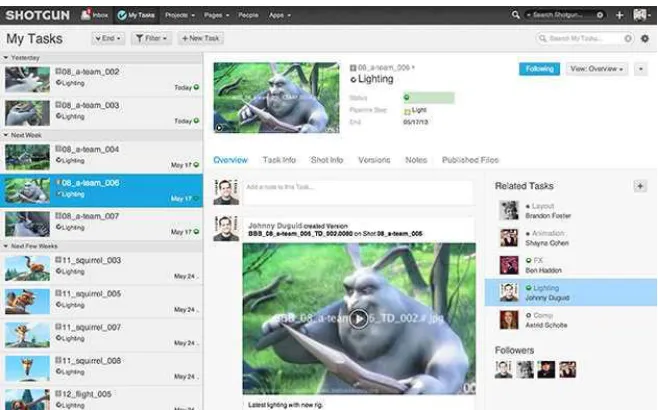
(49) successful incarnation of this idea was Alienbrain [Alienbrain, 2015], which at the beginning of the 2000 provided a versioning system for assets and a visual interface for artists to use. However, Alienbrain is not popular in the industry nowadays, thus I will briefly describe the two most relevant products today: Shotgun and Tactic. Shotgun. Shotgun [Shotgun, 2015] is probably the most famous product of its kind. It mostly focuses on production tracking, building its strength on the creation and managing of production tasks. Assets are managed as results of the work performed on the tasks and can be versioned while progressing through completion. The Shotgun system registers every interaction on a log. The log, more than being a simple record of the transactions, can also be used to trigger specific automated processes. It is in fact possible to track all the activity by every user on every task (figure 2.1.2) and, depending on this, perform predefined actions. For example, one simple automation could be the dispatch of an email to the supervisors when a new version is ready for review, but more complex behaviours can be performed. In fact, thanks to its Python API, it is possible to execute other tools (e.g., generating a geometric cache of an animated character whenever an animation is approved).. Figure 2.1.2: Shotgun enables users and production coordinators to review tasks by user.. 21.
Figure
+7



Documento similar
In the previous sections we have shown how astronomical alignments and solar hierophanies – with a common interest in the solstices − were substantiated in the
Consistent with the improvement in the rationality and transparency of public spending, this work relates two main research areas: Defence Economics and Analysis of
Analysis of the production processes in the sugar plant CACSA and Camilo Cienfuegos was carried out using the developed tools.. The scheduling model was applied to each one of the
The current research proposes a structural equation model between Mediterranean Diet adherence, emotional intelligence and the practice of physical activity in adolescents in the
For a short explanation of why the committee made these recommendations and how they might affect practice, see the rationale and impact section on identifying children and young
These are two of the main research questions in the main lines of work of the Research and Learning of Media and Communications Management group of
changes in: the production processes of television, especially content production and management; the communication platforms and techniques; the professional
In the “big picture” perspective of the recent years that we have described in Brazil, Spain, Portugal and Puerto Rico there are some similarities and important differences,
