JUST-IN-TIME eTRAINING
APPLIED TO EMERGENCY MEDICAL SERVICES
F.J. Vico
1, V. Canteli
1, D. Lobo
1, J.D. Fernández
1, C. Bandera
2,
A. García-Linares
3, R. Rivas
4, M. Rosen
5& B. Schlegel
51 GEB, Universidad de Málaga, Spain - {fjv,vcanteli,dlobo,josedavid}@geb.uma.es 2 BanDeMar Networks, Inc. , NJ (USA) - [email protected]
3 iSOFT Sanidad, S.A., Spain - [email protected] 4 CITIC, Spain - [email protected]
5 UMDNJ-School of Public Health, NJ (USA ) - {mrosen,schlegba}@umdnj.edu
Keywords: eTraining, EMS, mobile technologies, intelligent systems.
Abstract
While the applications of just-in-time training are more and more spread, the ubiquitous mobile technology has not found practical uses of this training strategy. As an original example of services for healthcare, we present in this work an application of eTraining that makes use of mobile telephones to transmit medical and on-site information content to emergency medical personnel that attend and emergency. The state-of-the-art in related technologies, overall architecture, and functioning of JITTER (for Just-In-Time Training for Emergency Responders) is described in this work.
1 Introduction
The need to provide continued and just-in-time training (JITT) to Emergency Medical Personnel (EMP) is well recognized. EMP provide pre-hospital acute care to patients needed by the emergency response organization during an emergency incident. Since EMP deal with many different types of health emergencies, it is almost impossible to be prepared for all the situations. This is even more evident in medical residents during their training period.
Attributes of the learning modules in the JITT scheme include the following:
1. Each learning module is delivered on-demand to any conventional multimedia cell phone over existing service provider infrastructures.
2. To increase retention and address different learning styles, learning modules will incorporate audio, video, interactive simulations, graphics, animation, and assessment. Media is designed for the user interface of multimedia cell phones.
3. Each learner is presented with a selection of learning modules tailored to the specific characteristics of the incident.
4. The content for the learning modules will be derived from a centralized system.
5. Learning modules are also available to the learner outside the context of an emergency (for example, during a daily commute or when waiting in a long line).
JITT places great importance on the integration of this novel training resource into emergency centers, and on maximizing overall ergonomics to prevent the JITT system from being a distraction in an already stressful scenario. It also focuses on the system’s ubiquity and interoperability with all wireless service providers, which is prerequisite to the system reaching its full commercial potential.
JITT or on-demand learning is becoming an important tool for performance improvement in the global rapidly-changing workforce [5,6]. Worldwide economic, social, and technological changes are necessitating changes in how training and education are delivered [3,10]. Recent developments in cellular telephone technology and infrastructure offer new opportunities for distance learning that are only beginning to be explored. As an example, the wireless application developer VOCEL has partnered with the Princeton Review to begin offering Scholastic Aptitude Test (SAT) preparation over cellular telephones [11]. VOCEL is also working on delivery language training over cellular telephones [12].
as-of-yet unproven adoption, hence their incentives for clients to periodically upgrade their cell phones.
A telecommunications industry trend favorable to JITT is the subcontracting of software development by cell phone manufacturers. This trend began at the turn of the century and is now a firmly rooted industry practice because the complexity of device software has grown beyond the in-house software expertise of these hardware-oriented manufacturers. Consequently, cell phone operating systems and software development platforms are dominated by only the few successful companies to survive the outsourcing competition. This has promoted a similar “look-and-feel” among these devices just as computers from different PC manufacturers have similar “look-and-feel.”
The work presented here seeks to remedy current training shortfalls by providing JITT through mobile telephones by exploiting recent advances in distance learning, mobile communications devices and service infrastructure [1]. In addition to the classroom training that EMP may receive, EMP on route to an incident site staging area or command post will have access to information about the emergency incident and focused learning modules (<5 minutes per module) specific to the medical emergency.
2 Description of the technology
Health training is still not fully utilizing advances in distance learning technologies and these new learning paradigms. The system described here, Just-In-Time Training for Emergency Responders (JITTER), offers an opportunity to put health training on the cutting edge. Although the technologies for delivering the training are new, the learning theory and fundamentals behind the approach are proven. JITT is consistent with adult learning theory described by Knowles [4]. Adults learn best when they must cope effectively with real-life situations and apply what they have learned to immediate tasks that must be performed. Providing incident specific training to EMP as they respond to an incident fits these adult learning principles.
Distance learning is also not new and started as correspondence courses in the 1800s. Distance learning is defined as when instructors and learners are separated in both time and/or space and communication between instructors and learners is mediated by some type of technology. Distance learning’s main advantage is its ability to liberate learners from geographical and time restraints. This allows learners greater flexibility in choosing when and where they learn. These advantages are especially important for adult learners who often have busy schedules due to the demands of work and other responsibilities.
Hundreds of studies have been done to measure the effectiveness of distance learning as compared to traditional
face-to-face learning [2,8,9]. These studies in general demonstrate no significant difference in student performance between distance learning and face-to-face settings. As summarized by Clark, "The best current evidence is that media are mere vehicles that deliver instruction but do not influence student achievement any more than the truck that delivers our groceries causes changes in our nutrition" [2 p. 445]. Because of the large number of studies supporting no significant difference, Moore and Kearsley consider media effectiveness research studies no longer worth pursuing [7]. They stated, “For any group of students, the environment in which learning occurs and the medium of communication between teacher and learner are not significant as predictors of achievement” (p. 65). Moore and Thompson concluded the following [8]: “The evidence that can be gathered from the literature points overwhelmingly to the conclusion that teaching and studying at a distance, especially that which uses interactive electronic telecommunications media, is effective when effectiveness is measured by the achievement of learning, by the attitudes of students and teachers, and by return-on-investment. (p. 59)”
The users of legacy, current, and foreseeable cell phones can experience audiovisual content as multimedia messages. Conceptually, a multimedia message is a slide show that sequentially displays slides on the receiving phone; each slide consists of an image, audio narration, and/or text. In PowerPoint, content developers can use a simple slide master, custom animations, and slide transition to storyboard a multimedia message in both space and time, and then convert the storyboard into a multimedia message file (*.MMS) with COTS tools
this, which differ in the interface from the content provider (in this case, JITTEIS) to the service provider. For example, JITTEIS could have a direct Internet link to the messaging servers, but this would require a very close, expensive, and high maintenance business relationship between the two providers.
The simplest procedure (in terms of business relationship, revenue model, and maintenance) to placing a multimedia message in a cell phone’s messaging server is for JITTEIS to use the MM1 protocol and appear to service providers as simply another cell phone sending and receiving multimedia messages. The service provider then uses its own mechanism to deliver these messages to the recipients indicated in the message. The processing of a message by the service provider is relatively straightforward when the recipient is a subscriber of that provider; when the recipient is a subscriber of a different service provider, the message is conveyed via a provider-to-provider interface that places additional restrictions on the information conveyed.
Multimedia messaging is included in base voice plans, unlike microbrowser operation that typically requires the user to pay an additional data plan supplement. The user’s procedure for viewing a multimedia message is a function of phone configuration, and differs by manufacturer and service provider. The phone first presents the user with an audible and visible alert indicating that the user has a new message. At that point, the message inbox of the cell phone will contain a brief summary of the message, such as the message’s sender and subject, and the user must select it to view the complete message contents. Depending on the phone’s configuration, the media objects of the multimedia message are downloaded at the same time the message summary, or they are downloaded when the summary is selected in the inbox. In either case, clicking on the message summary in the inbox displays the message contents. Also depending on the phone’s configuration (in this case, that of the multimedia message reader), the user may have to manually advance from one slide to the next, or the phone will automatically advance through all the slides using the timing information specified in the SMIL file.
JITTEIS multimedia messages authoring practices need to ensure compatibility with the broadest range of mobile devices. The entire multimedia message is downloaded prior to its viewing. Course rendering is thus independent of interruptions in signal bandwidth, but the phone’s configuration limits the maximum size of the message. The content author must thus allocate spatiotemporal resolution judiciously.
If a cell phone supports a richer set of content parameters (e.g., video, larger screen size) and can provide the JITTEIS server with its user agent profile, then the content can be tailored for a better audiovisual experience and/or downloaded
wirelessly in less time with more efficient compression. Unfortunately, under the MM1 protocol, the profile is sent to the service provider’s WAP gateway, whose IP address is encoded in the phone (CDMA) or SIM card (GSM), and not to the originator of the multimedia message. It is not realistic to expect the cell phone user to change the gateway address to that of JITTEIS server, as this requires considerable technical literacy and the final configuration would interfere with the sending and receiving of the user’s non-JITTEIS multimedia messages.
3 System design and functioning
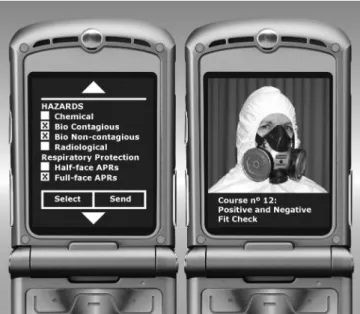
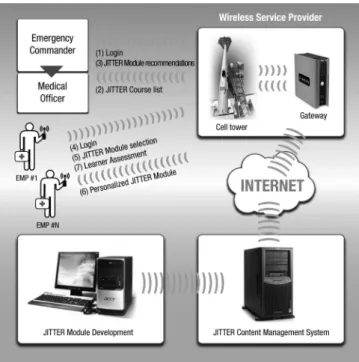
JITTER’s system architecture operates according to the scheme in Figure 2: (1) training content are designed and formatted for cell phone user interfaces (Figure 1); (2) the resulting learning modules are archived in a learning content management system (LCMS), that also maintains information about the emergency and the EMP involved in it; (3) through the emergency center, information is entered into the system, and learning modules specific to the emergency, selected from a scrollable list of available modules (Figure 1), are distributed among the EMP. Likewise, EMP assigned to an emergency can call the LCMS (which identifies the caller and the type of cell phone), select the type of emergency to which s/he is assigned, and view incident-specific data and the modules selected by the emergency center. If the emergency center had not the opportunity to recommend modules prior to the arrival of the EMP, all the modules will still be available. The LCMS also classifies module content by the cell phone features required to display it, and delivers only the content that the learner’s cell phone can handle (e.g., if the cell phone cannot display video, then the LCMS instead transmits pictures). In this fashion, the EMP receive modules tailored to the particular emergency, personnel, and equipment.
Figure 2. System architecture: organization of the different agents in distributing JITTER eTraining modules.
The information and training provided by JITTER is designed to address the questions and needs of EMP prior to their arrival at the scene. EMP rarely have training related to specific emergencies or their training is not recent enough to be recallable. JITTER is only intended to serve as an informational and training bridge to the face-to-face training and procedures that will be provided to EMP at the scene. This will result in briefer health training at the scene.
Information in the JITTER is organized into three components: (1) Emergency Information, (2) Emergency Training, and (3) Authentication. The Emergency Information component contains real-time information unique to the emergency. The Emergency Training component consists of easily assimilated multimedia training modules on important occupational and safety issues related to the agent(s) involved in the emergency incident. The Authentication component contains a minimal (three column) profile of EMP, with names and associated cell phone numbers and training. The emergency management system or emergency command system refers to the system that defines the roles and responsibilities to be assumed by responders and the standard operating procedures to be used in the management and direction of emergencies and other functions.
Initialization
In the event of an emergency, the emergency center determines the need for specialized equipment and EMP to respond to the incident, will connect by cellular phone or computer via the Internet to a secure JITTER web page and enter the text
information showed in Table 1 into the Emergency Information component of the system.
The Emergency Information System (EIS) can be continually updated as conditions or information changes. This is critical to proper response because emergencies often evolve quickly. An important capability of JITTER is that whenever any of its EIS is updated (e.g., staging area location, recommended training modules, etc.), JITTER can automatically alert each authenticated EMP by sending a text message with the update to his/her cell phone.
• Emergency Incident Code
• Emergency Incident Scene Location
• Description of Emergency Incident
• EMP Required
• Emergency Command Center Location
• Staging Area Location(s)
• Contact Information
• Credentials Required
• Special Alert Information
• Training modules specific to the incident
Table 1: Text information relative to an incident.
The emergency center would finally contact the EMP giving them the emergency code and the JITTER telephone number to call.
Authentication
The purpose of the final verbal name verification is to prevent the accidental EMP misidentification through the use of shared telephones. It is important to note that even the longest permutation of an authentication process can be completed in less than 30 seconds using just one’s voice (no key pressing).
Training
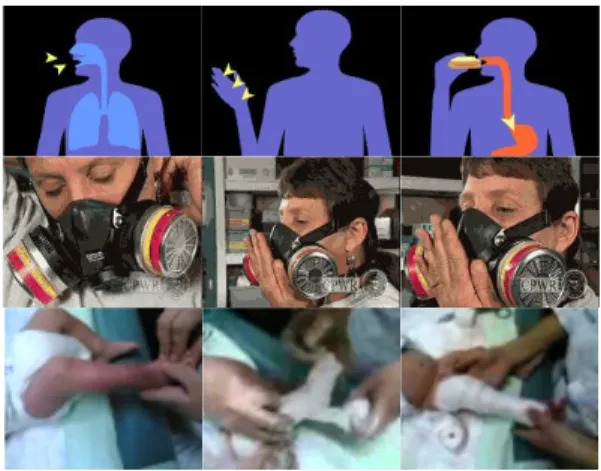
Once JITTER grants access to the EMP, the EMP can access the EIS outlined earlier in the languages entered into the system either as text and/or computer generated voice. Each training module will be a multimedia presentation (predominantly video) lasting no more than five minutes about the specific health procedures neededfor the emergency (see examples in Figure 3). The EMP will also have the option of taking training modules preselected for the incident, or any of the modules in JITTER in any of the language(s) available in the system. It would be necessary for EMP to have a cellular telephone with text messaging and web browsing capability to access JITTER as designed. Most EMP are expected to have cellular telephones since approximately 61% of the United States population currently uses wireless telephone service projecting to increase to 75% of the population by 2010.
Figure 3. Excerpt from JITTER modules
4 Conclusions and future directions
JITTER is a complex and technologically advanced system that implements JITT for medical emergencies and provides an important service for healthcare.
Cooperation among different EMS using JITTER would dramatically increase the multimedia content available to the medical community. The authors expect that the first tests, carried out in the USA and Spain, will raise the interest of the heath systems of many European and American countries. This application of mobile technology will serve as a testbed for intelligent systems that manage in real-time the delivery
of content modules and on-site information, as well as the general distribution of resources to attend medical emergencies.
Acknowledgements
This work has been funded by the FIT-350100-2006-400 PROFIT project of the Spanish Ministerio de Industria,
Turismo y Comercio, American NSF grant DMI-0239180,
NIEHS (National Institute for Environmental Health Sciences) grant 1R41ES014793-01, BanDeMar Networks, Inc., the healthcare company iSOFT Sanidad, S.A., and the CITIC Technology Centre.
References
[1] C. Bandera, M. Marsico. “Rich media streaming for just-in-time training of first responders”,
Proceedings of the 2005 SPIE Defense and Security
Symposium, 28 Mar 2005.
[2] R. E. Clark. “Reconsidering research on learning from media”, Review of Educational Research, 53, no. 4, 445-459, (1983).
[3] G. Dhanarajan. “Delivery of training programs: Changing design”. UNESCO - UNEVOC
International Conference in Adelaide, Australia,
(1998).
[4] M. Knowles. “The making of an adult educator: An autobiographical journey”, San Francisco, Jossey-Bass, (1989).
[5] C. Lee, R. Zemke. “No time to train”. Training, 32, no. 11, pp. 29-37, (1995).
[6] J. Levy. “The knowledge warriors”. Training and
Development, 58, no. 2, pp. 46-51, (2004).
[7] M. G. Moore, G. Kearsley. “Distance education: A systems view”, New York: Wadsworth Publishing Company, (1996).
[8] M. G. Moore, M. M. Thompson. “The effects of distance learning”, (Rev. ed., ACSDE Research Monograph 15). University Park, PA: American Center for the Study of Distance Education, The Pennsylvania State University, (1997).
[10] Technology Administration. “Visions 2020: Transforming education and training through advanced technologies”, Washington, DC, U.S. Department of Commerce, (2002).
(http://www.technology.gov/reports/TechPolicy/202
0Visions.pdf )
[11] http://ir.princetonreview.com/ReleaseDetail.cfm? ReleaseID=165733