SOLUCIÓN PRUEBA DE HABILIDADES PRACTICAS CCNA
PRESENTADO
MARIEN PATRICIA CAICEDO LOPEZ
DIPLOMADO DE PROFUNDIZACIÓN CISCO
UNIVERSIDAD NACIONAL ABIERTA Y A DISTANCIA UNAD PROGRAMA DE INGENIERIA EN SISTEMA OPCION DE GRADO.
SOLUCIÓN PRUEBA DE HABILIDADES PRACTICAS CCNA
PRESENTADO
MARIEN PATRICIA CAICEDO LOPEZ
DIPLOMADO DE PROFUNDIZACIÓN CISCO
DIRECTOR JUAN CARLOS VEGA
TUTOR
JOSE IGNACIO CARDONA
UNIVERSIDAD NACIONAL ABIERTA Y A DISTANCIA UNAD PROGRAMA DE INGENIERIA EN SISTEMA OPCION DE GRADO.
PÁGINA DE ACEPTACIÓN
____________________________________
____________________________________
____________________________________
____________________________________
PRESIDENTE
JURADO
JURADO
DEDICATORIA
Quiero dedicar este logro inicialmente al DIOS DE LA VIDA Y EL AMOR, por siempre a ver estado ahí, por darme esa fortaleza que necesitaba para poder cumplir con este objetivo, que me perdone por las tantas veces que quise tirar la toalla y no seguir con este proyecto tan vital para mi vida y toda mi familia. Gracias DIOS PADRE, DIOS HIJO Y DIOS ESPIRITU SANTO, por darme esta oportunidad.
A MI MADRE
Gracias Octa y Maria Luisa, cuantas veces me vieron triste y siempre tuvieron esa capacidad para atenderme, soportarme, apoyarme, mil gracias madres mías, las amo mucho, con todo mi corazón. A DIOS le doy gracias por tenerlas a mi lado.
MIS HERMANOS
Que hubiera sido mi vida sin ustedes dos hermanos de mi alma, gracias por el apoyo y acompañamiento que siempre me brindaron, espero que estén orgullosos de mí, perdonen mis afanes, mis tristezas, mis incomodidades, DIOS ME LOS BENDIGA, por todo el esfuerzo que hicieron en apoyarme.
A MI AMIGA
AGRADECIMIENTOS
Quiero darle gracias a DIOS, por darme la oportunidad de culminar este ciclo de mi vida, con unos excelentes formadores que supieron orientarme y colaborarme en los momentos que más los necesite, gracias señor tutor, gracias señor director, por esa disposición que siempre demostraron para fortalecer mi proceso
TABLA DE CONTENIDO
INTRODUCCIÓN
Objetivos --- Escenario 1
1. Configuración de basica ___________________________10
2. Configuración del enrutamiento---18
3. Deshabilitar la propagación del protocolo RIP---29
4. Verificación del protocolo RIP---30
5. Configurar encapsulamiento y autenticación PPP---37
6. Configuración de PAT.---39
7. Configuración del servicio DHCP ---42
ESCENARIO 2 1. Configurar el direccionamiento IP acorde con la topología de red para cada uno de los dispositivos que forman parte del escenario.---46
2. Configurar el protocolo de enrutamiento OSPFv2 bajo los siguientes criterios.--- 52
3. Configurar VLANs, Puertos troncales, puertos de acceso, encapsulamiento, Inter-VLAN Routing y Seguridad en los Switches acorde a la topología de red establecida.---62
4. En el Switch 3 deshabilitar DNS lookup---63
5. Asignar direcciones IP a los Switches acorde a los lineamientos--- 63
6. Desactivar todas las interfaces que no sean utilizadas en el esquema de red---64
7. Implement DHCP and NAT for IPv4---64
8. Configurar R1 como servidor DHCP para las VLANs 30 y 40---64.
9. Reservar las primeras 30 direcciones IP de las VLAN 30 y 40 para configuraciones estáticas---64
10. Configurar NAT en R2 para permitir que los host puedan salir a internet---65
11. Configurar al menos dos listas de acceso de tipo estándar a su criterio en para restringir o permitir tráfico desde R1 o R3 hacia R2.---65
12. Configurar al menos dos listas de acceso de tipo extendido o nombradas a su criterio en para restringir o permitir tráfico desde R1 o R3 hacia R2.----65
13. Verificar procesos de comunicación y redireccionamiento de tráfico en los routers mediante el uso de Ping y Traceroute.---66
CONCLUSIONES---70
REFERENCIAS BIBLIOGRAFÍA---71
INTRODUCCION
Cada día es de gran importancia estar comunicados, conectados, relacionándonos, utilizando medios que nos permitan que la información o datos se desplacen continuamente de un lugar a otro de forma instantánea, sea en cuestión de segundos o menos que un segundo. Debido a lo cual una de las maneras de comunicación entre un número determinado de computadoras es por medio de la conexión de equipos a una red LAN, la cual nos facilitará, mediante el cableado y un dispositivo, distribuyendo la información a diferentes puntos o equipos que se encuentren repartidos en un sitio determinado.
OBJETIVOS GENERALES
Con este trabajo el tutor busca que apliquemos implemente todos los conocimientos de conectividad, configuración de los switch y lista de control de acceso entre otros.
OBJETIVOS GENERALES
✓ Realizar el direccionamiento IP de cada uno de los equipos que conforman la red.
✓ Cumplir a cabalidad con la topología propuesta en la guía para el desarrollo de la actividad.
✓ Configurar el protocolo de enrutamiento OSPF
✓ Aplicar todos los conocimientos adquiridos en la configuración del escenario 1.
Escenario 1
Una empresa posee sucursales distribuidas en las ciudades de Bogotá y Medellín, en donde el estudiante será el administrador de la red, el cual deberá configurar e interconectar entre sí cada uno de los dispositivos que forman parte del escenario, acorde con los lineamientos establecidos para el direccionamiento IP, protocolos de enrutamiento y demás aspectos que forman parte de la topología de red.
DESARROLLO DE LOS ESCENARIOS PUNTO UNO
NOMBRES DE LOS EQUIPOS Router>enable
Router#configure terminal
Enter configuration commands, one per line. End with CNTL/Z. Router(config)#hostname Medellin2
Medellin2(config)#line console 0
Medellin2(config-line)#password marien Medellin2(config-line)#login
Medellin2(config-line)#exit
Medellin2(config)#enable password marien
Configuración interface
User Access Verification
Password:
Medellin2>enable Password:
Medellin2#configure terminal
Enter configuration commands, one per line. End with CNTL/Z. Medellin2(config)#interface fastEthernet 0/0
Medellin2(config-if)#ip address 172.29.4.1 255.255.255.128 Medellin2(config-if)#no shutdown
Medellin2(config-if)#
%LINK-5-CHANGED: Interface FastEthernet0/0, changed state to up
%LINEPROTO-5-UPDOWN: Line protocol on Interface FastEthernet0/0, changed state to up
Medellin2(config)#interface serial 0/0/0
Medellin2(config-if)#ip address 172.29.6.1 255.255.255.252 Medellin2(config-if)#no shutdown
Medellin2(config-if)#
%LINK-5-CHANGED: Interface Serial0/0/0, changed state to up Medellin2(config-if)#
Medellin2(config-if)#interface serial 0/0/1
Medellin2(config-if)#
%LINK-5-CHANGED: Interface Serial0/0/1, changed state to up
Medellin2(config-if)#
Medellin2#enable
Medellin2#copy run start
Destination filename [startup-config]? Building configuration...
[OK]
Medellin2#
Router>enable
Router#configure terminal
Enter configuration commands, one per line. End with CNTL/Z. Router(config)#hostname Medellin3
Medellin3(config)#line console 0
Medellin3(config-line)#password marien Medellin3(config-line)#login
Medellin3(config-line)#exit
Medellin3(config)#enable secret marien Medellin3(config)#interface fastethernet 0/0
Medellin3(config-if)#ip address 172.29.4.129 255.255.255.128 Medellin3(config-if)#no shutdown
Medellin3(config-if)#
%LINK-5-CHANGED: Interface FastEthernet0/0, changed state to up
%LINEPROTO-5-UPDOWN: Line protocol on Interface FastEthernet0/0, changed state to up
Medellin3(config-if)#
Medellin3(config-if)#interface serial 0/0/1
%LINEPROTO-5-UPDOWN: Line protocol on Interface Serial0/0/1 Medellin3(config-if)#interface serial 0/0/0
Medellin3(config-if)#ip address 172.29.6.9 255.255.255.252 Medellin3(config-if)#no shutdown
Medellin3(config-if)#
%LINK-5-CHANGED: Interface Serial0/0/0, changed state to up
%LINEPROTO-5-UPDOWN: Line protocol on Interface Serial0/0/0, changed state to up
Medellin3(config-if)#ip address 172.29.6.13 255.255.255.252 Medellin3(config-if)#no shutdown
Medellin3(config-if)#
%LINK-5-CHANGED: Interface Serial0/1/1, changed state to up
Medellin3(config-if)#exit Medellin3#copy run start
Destination filename [startup-config]? Building configuration...
[OK]
Router>enable
Router#configure terminal
Enter configuration commands, one per line. End with CNTL/Z. Router(config)#hostname Medellin1
Medellin1(config)#line console 0
Medellin1(config-line)#password marien Medellin1(config-line)#login
Medellin1(config-line)#exit
Medellin1(config)#enable password marien Medellin1(config)#exit
Medellin1#
%SYS-5-CONFIG_I: Configured from console by console
Medellin1(config)#interface serial 0/0/1
Medellin1(config-if)#ip address 172.29.6.1 255.255.255.252 Medellin1(config-if)#no shutdown
Medellin1(config-if)#
%LINK-5-CHANGED: Interface Serial0/0/1, changed state to up
Medellin1(config-if)#
%LINEPROTO-5-UPDOWN: Line protocol on Interface Serial0/0/1, changed state to up
Medellin1(config-if)#
Medellin1(config-if)#interface serial 0/0/0
Medellin1(config-if)#ip address 209.17.220.1 255.255.255.252 Medellin1(config-if)#no shutdown
Medellin1(config-if)#interface serial 0/0/1
Medellin1(config-if)#ip address 172.29.6.2 255.255.255.252 Medellin1(config-if)#no shutdown
Medellin1(config-if)#interface serial 0/1/0
Medellin1(config-if)#ip address 172.29.6.10 255.255.255.252 Medellin1(config-if)#no shutdown
Medellin1(config-if)#
%LINK-5-CHANGED: Interface Serial0/1/0, changed state to up
%LINEPROTO-5-UPDOWN: Line protocol on Interface Serial0/1/0, changed state to up
Medellin1(config-if)#
Medellin1(config-if)#interface serial 0/1/1
Medellin1(config-if)#ip address 172.29.6.14 255.255.255.252 Medellin1(config-if)#no shutdown
Medellin1(config-if)#
%LINK-5-CHANGED: Interface Serial0/1/1, changed state to up Medellin1(config-if)#
Medellin1(config-if)#exit Medellin1(config)#exit Medellin1#
%SYS-5-CONFIG_I: Configured from console by console
Medellin1#copy run start
Destination filename [startup-config]? Building configuration...
[OK]
Medellin1#
Router#configure terminal
Enter configuration commands, one per line. End with CNTL/Z. Router(config)#hostname ISP
ISP(config)#enable password marien ISP(config)#enable secret marien
The enable secret you have chosen is the same as your enable password. This is not recommended. Re-enter the enable secret.
ISP(config-line)#exit
ISP(config)#interface serial 0/0/1
ISP(config-if)#ip address 209.17.220.5 255.255.255.252 ISP(config-if)#no shutdown
ISP(config-if)#interface serial 0/0/0
ISP(config-if)#ip address 209.17.220.1 255.255.255.252 ISP(config-if)#no shutdown
ISP(config-if)#
%LINK-5-CHANGED: Interface Serial0/0/0, changed state to up
ISP(config-if)#
ISP#copy run start
Destination filename [startup-config]? Building configuration...
[OK] ISP#
Router>enable
Router#configure terminal
Enter configuration commands, one per line. End with CNTL/Z. Router(config)#hostname Bogota1
Bogota1(config)#line console 0
Bogota1(config-line)#password marien Bogota1(config-line)#login
Bogota1(config-line)#enable password marien Bogota1(config)#interface serial 0/1/1
Bogota1(config-if)#ip address 172.29.3.5 255.255.255.252 Bogota1(config-if)#no shutdown
Bogota1(config-if)#
%LINK-5-CHANGED: Interface Serial0/1/1, changed state to up
Bogota1(config-if)#
Bogota1(config-if)#interface serial 0/0/1
Bogota1(config-if)#ip address 172.29.3.1 255.255.255.252 Bogota1(config-if)#no shutdown
Bogota1(config-if)#
%LINK-5-CHANGED: Interface Serial0/0/1, changed state to up
Bogota1(config-if)#
Bogota1(config-if)#ip address 209.17.220.6 255.255.255.252 Bogota1(config-if)#no shutdown
Bogota1(config-if)#
%LINK-5-CHANGED: Interface Serial0/0/0, changed state to up
Bogota1(config-if)#
Bogota1(config-if)#interface serial 0/1/0
Bogota1(config-if)#ip address 172.29.3.9 255.255.255.252 Bogota1(config-if)#no shutdown
%LINK-5-CHANGED: Interface Serial0/1/0, changed state to down Bogota1(config-if)#
Bogota1(config-if)#exit Bogota1(config)#exit Bogota1#
%SYS-5-CONFIG_I: Configured from console by console
Bogota1#copy run start
Destination filename [startup-config]? Building configuration...
[OK] Bogota1#
outer>enable
Router#configure terminal
Enter configuration commands, one per line. End with CNTL/Z. Router(config)#hostname Bogota2
Bogota2(config)#line console 0
Bogota2(config-line)#password marien Bogota2(config-line)#login
Bogota2(config-line)#enable password marien Bogota2(config)#interface fastEthernet 0/0
Bogota2(config-if)#ip address 172.29.0.1 255.255.255.0 Bogota2(config-if)#no shutdown
Bogota2(config-if)#
%LINK-5-CHANGED: Interface FastEthernet0/0, changed state to up
%LINEPROTO-5-UPDOWN: Line protocol on Interface FastEthernet0/0, changed state to up
Bogota2(config-if)#interface serial 0/1/0
Bogota2(config-if)#ip address 172.29.3.13 255.2555.255.252 ^
% Invalid input detected at '^' marker.
Bogota2(config-if)#ip address 172.29.3.13 255.255.255.252 Bogota2(config-if)#no shutdown
%LINK-5-CHANGED: Interface Serial0/1/0, changed state to down Bogota2(config-if)#
Bogota2(config-if)#interface serial 0/0/0
Bogota2(config-if)#ip address 172.29.3.2 255.255.255.252 Bogota2(config-if)#no shutdown
Bogota2(config-if)#
%LINK-5-CHANGED: Interface Serial0/0/0, changed state to up
Bogota2(config-if)#
Bogota2(config-if)#
%LINEPROTO-5-UPDOWN: Line protocol on Interface Serial0/0/0, changed state to up
Bogota2(config-if)#interface serial 0/0/1
Bogota2(config-if)#ip address 172.29.3.6 255.255.255.252 Bogota2(config-if)#no shutdown
Bogota2(config-if)#
%LINK-5-CHANGED: Interface Serial0/0/1, changed state to up
Bogota2(config-if)#
Bogota2(config-if)#exit Bogota2(config)#exit Bogota2#
%SYS-5-CONFIG_I: Configured from console by console
Bogota2#copy run start
Destination filename [startup-config]? Building configuration...
[OK] Bogota2#
Router#configure terminal
Enter configuration commands, one per line. End with CNTL/Z. Router(config)#hostname Bogota3
Bogota3(config)#line console 0
Bogota3(config-line)#password marien Bogota3(config-line)#login
Bogota3(config-line)#enable password marien Bogota3(config)#interface fast
Bogota3(config)#interface fastEthernet 0/0
Bogota3(config-if)#ip address 172.29.1.2 255.255.255.0 Bogota3(config-if)#no shutdown
Bogota3(config-if)#
%LINK-5-CHANGED: Interface FastEthernet0/0, changed state to up
%LINEPROTO-5-UPDOWN: Line protocol on Interface FastEthernet0/0, changed state to up
Bogota3(config-if)#
Bogota3(config-if)#interface serial 0/0/1
Bogota3(config-if)#ip address 172.29.3.14 255.255.255.252 Bogota3(config-if)#no shutdown
Bogota3(config-if)#
%LINK-5-CHANGED: Interface Serial0/0/1, changed state to up
Bogota3(config-if)#
Bogota3(config-if)#interface serial 0/0/0
Bogota3(config-if)#ip address 172.29.3.10 255.255.255.252 Bogota3(config-if)#no shutdown
Bogota3(config-if)#
%LINK-5-CHANGED: Interface Serial0/0/0, changed state to up Bogota3(config-if)#
Bogota3(config-if)#exit Bogota3(config)#exit Bogota3#
%SYS-5-CONFIG_I: Configured from console by console Bogota3#copy run start
Destination filename [startup-config]? Building configuration...
PARTE 1: CONFIGURACIÓN DEL ENRUTAMIENTO
a. Configurar el enrutamiento en la red usando el protocolo RIP versión 2, declare la red principal, desactive la sumarización automática.
Luego de haber realizado la configuración básica del router se pasa a realizar la configuración del enrutamiento con el protocolo rip versión 2.
Medellin1(config)#router rip
Medellin1(config-router)#version 2
Medellin1(config-router)#network 172.29.6.0 Medellin1(config-router)#network 172.29.6.8 Medellin1(config-router)#network 172.29.6.12 Medellin1(config-router)#network 209.17.220.0
Medellin1(config-router)#passive-interface serial 0/0/0 Medellin1(config-router)#no auto-summary
Medellin1(config-router)#exit
Medellin2(config)#router rip
Medellin2(config-router)#network 172.29.4.0 Medellin2(config-router)#network 172.29.6.0 Medellin2(config-router)#network 172.29.6.4
Medellin2(config-router)#passive-interface fastEthernet 0/0 Medellin2(config-router)#no auto-summary
Medellin2(config-router)#exit Medellin3(config)#router rip
Medellin3(config-router)#network 172.29.4.128 Medellin3(config-router)#network 172.29.6.4 Medellin3(config-router)#network 172.29.6.8 Medellin3(config-router)#network 172.29.6.12
Medellin3(config-router)#passive-interface fastEthernet 0/0 Medellin3(config-router)#no auto-summary
Medellin3(config-router)#exit
Bogota1(config)#router rip
Bogota1(config-router)#version 2
Bogota1(config-router)#network 172.29.3.0 Bogota1(config-router)#network 172.29.3.4 Bogota1(config-router)#network 172.29.3.8 Bogota1(config-router)#network 209.17.220.4
Bogota1(config-router)#passive-interface serial 0/0/0 Bogota1(config-router)#no auto-summary
Bogota1(config-router)#exit Bogota2(config)#router rip Bogota2(config-router)#version 2
Bogota2(config-router)#network 172.29.3.8 Bogota2(config-router)#network 172.29.3.12
Bogota2(config-router)#passive-interface fastEthernet 0/0 Bogota2(config-router)#no auto-summary
Bogota2(config-router)#exit Bogota3(config)#router rip
Bogota3(config-router)#version 2
Bogota3(config-router)#network 172.29.0.0 Bogota3(config-router)#network 172.29.3.0 Bogota3(config-router)#network 172.29.3.4 Bogota3(config-router)#network 172.29.3.12
Bogota3(config-router)#passive-interface fastEthernet 0/0 Bogota2(config-router)#no auto-summary
Bogota2(config-router)#exit Bogota2(config)#
b. Los routers Bogota1 y Medellín deberán añadir a su configuración de enrutamiento una ruta por defecto hacia el ISP y, a su vez, redistribuirla dentro de las publicaciones de RIP.
Bogota1>enable Password:
Bogota1#configure terminal
Enter configuration commands, one per line. End with CNTL/Z. Bogota1(config)#ip route 0.0.0.0 0.0.0.0 serial 0/0/0
Bogota1(config-router)#redistribute static Bogota1(config)#router rip
Bogota1(config-router)#default-information originate Bogota1(config-router)#do wr
Building configuration... [OK]
Medellin1>enable Password:
Medellin1#configure terminal
Enter configuration commands, one per line. End with CNTL/Z. Medellin1(config)#ip route 0.0.0.0 0.0.0.0 serial 0/0/0
Medellin1(config)#router rip
Medellin1(config-router)# redistribute static
Medellin1(config-router)#default-information originate Medellin1(config-router)#do wr
Building configuration... [OK]
c. El router ISP deberá tener una ruta estática dirigida hacia cada red interna de Bogotá y Medellín para el caso se sumarizan las subredes de cada uno a /22.
ISP>enable
ISP#configure terminal
Enter configuration commands, one per line. End with CNTL/Z. ISP(config)#ip route 172.29.0.0 255.255.0.0 serial 0/0/1
ISP(config)#do wr Building configuration... [OK]
ISP(config)#exit ISP#
ISP#show ip route
Gateway of last resort is not set
S 172.29.0.0/16 is directly connected, Serial0/0/0 is directly connected, Serial0/0/1
209.17.220.0/30 is subnetted, 2 subnets
Parte 2: Tabla de Enrutamiento.
a. Verificar la tabla de enrutamiento en cada uno de los routers para comprobar las redes y sus rutas.
ROUTER MEDELLÍN1
Medellin1>show ip route
Codes: C - connected, S - static, I - IGRP, R - RIP, M - mobile, B - BGP D - EIGRP, EX - EIGRP external, O - OSPF, IA - OSPF inter area N1 - OSPF NSSA external type 1, N2 - OSPF NSSA external type 2 E1 - OSPF external type 1, E2 - OSPF external type 2, E - EGP i - IS-IS, L1 - IS-IS level-1, L2 - IS-IS level-2, ia - IS-IS inter area * - candidate default, U - per-user static route, o - ODR
P - periodic downloaded static route
Gateway of last resort is not set
172.29.0.0/16 is variably subnetted, 6 subnets, 2 masks R 172.29.4.0/25 [120/1] via 172.29.6.1, 00:00:07, Serial0/0/1 R 172.29.4.128/25 [120/1] via 172.29.6.9, 00:00:21, Serial0/1/0 [120/1] via 172.29.6.13, 00:00:21, Serial0/1/1
C 172.29.6.0/30 is directly connected, Serial0/0/1
R 172.29.6.4/30 [120/1] via 172.29.6.9, 00:00:21, Serial0/1/0 [120/1] via 172.29.6.1, 00:00:07, Serial0/0/1
[120/1] via 172.29.6.13, 00:00:21, Serial0/1/1 C 172.29.6.8/30 is directly connected, Serial0/1/0
C 172.29.6.12/30 is directly connected, Serial0/1/1
ROUTER MEDELLIN2
Medellin2>show ip route
Codes: C - connected, S - static, I - IGRP, R - RIP, M - mobile, B - BGP D - EIGRP, EX - EIGRP external, O - OSPF, IA - OSPF inter area N1 - OSPF NSSA external type 1, N2 - OSPF NSSA external type 2 E1 - OSPF external type 1, E2 - OSPF external type 2, E - EGP i - IS-IS, L1 - IS-IS level-1, L2 - IS-IS level-2, ia - IS-IS inter area * - candidate default, U - per-user static route, o - ODR
P - periodic downloaded static route
Gateway of last resort is 172.29.6.2 to network 0.0.0.0
S 172.29.4.128/25 [1/0] via 172.29.6.4
C 172.29.6.0/30 is directly connected, Serial0/0/0 C 172.29.6.4/30 is directly connected, Serial0/0/1
R 172.29.6.8/30 [120/1] via 172.29.6.2, 00:00:10, Serial0/0/0 [120/1] via 172.29.6.6, 00:00:18, Serial0/0/1
R 172.29.6.12/30 [120/1] via 172.29.6.2, 00:00:10, Serial0/0/0 [120/1] via 172.29.6.6, 00:00:18, Serial0/0/1
R* 0.0.0.0/0 [120/1] via 172.29.6.2, 00:00:10, Serial0/0/0
ROUTER MEDELLIN3
Medellin3>show ip route
Codes: C - connected, S - static, I - IGRP, R - RIP, M - mobile, B - BGP D - EIGRP, EX - EIGRP external, O - OSPF, IA - OSPF inter area N1 - OSPF NSSA external type 1, N2 - OSPF NSSA external type 2 E1 - OSPF external type 1, E2 - OSPF external type 2, E - EGP i - IS-IS, L1 - IS-IS level-1, L2 - IS-IS level-2, ia - IS-IS inter area * - candidate default, U - per-user static route, o - ODR
P - periodic downloaded static route
Gateway of last resort is 172.29.6.10 to network 0.0.0.0
172.29.0.0/16 is variably subnetted, 6 subnets, 2 masks S 172.29.4.0/25 [1/0] via 172.29.6.4
C 172.29.4.128/25 is directly connected, FastEthernet0/0 R 172.29.6.0/30 [120/1] via 172.29.6.10, 00:00:04, Serial0/0/0 [120/1] via 172.29.6.5, 00:00:08, Serial0/0/1
[120/1] via 172.29.6.14, 00:00:04, Serial0/1/1 C 172.29.6.4/30 is directly connected, Serial0/0/1 C 172.29.6.8/30 is directly connected, Serial0/0/0 C 172.29.6.12/30 is directly connected, Serial0/1/1
R* 0.0.0.0/0 [120/1] via 172.29.6.10, 00:00:04, Serial0/0/0 [120/1] via 172.29.6.14, 00:00:04, Serial0/1/1
Medellin3>
ROUTER BOGOTA1
Bogota1>show ip route
Codes: C - connected, S - static, I - IGRP, R - RIP, M - mobile, B - BGP D - EIGRP, EX - EIGRP external, O - OSPF, IA - OSPF inter area N1 - OSPF NSSA external type 1, N2 - OSPF NSSA external type 2 E1 - OSPF external type 1, E2 - OSPF external type 2, E - EGP i - IS-IS, L1 - IS-IS level-1, L2 - IS-IS level-2, ia - IS-IS inter area * - candidate default, U - per-user static route, o - ODR
Gateway of last resort is 0.0.0.0 to network 0.0.0.0
172.29.0.0/16 is variably subnetted, 6 subnets, 2 masks R 172.29.0.0/24 [120/1] via 172.29.3.2, 00:00:10, Serial0/0/1 [120/1] via 172.29.3.6, 00:00:10, Serial0/1/1
R 172.29.1.0/24 [120/1] via 172.29.3.10, 00:00:13, Serial0/1/0 C 172.29.3.0/30 is directly connected, Serial0/0/1
C 172.29.3.4/30 is directly connected, Serial0/1/1 C 172.29.3.8/30 is directly connected, Serial0/1/0
R 172.29.3.12/30 [120/1] via 172.29.3.10, 00:00:13, Serial0/1/0 209.17.220.0/24 is variably subnetted, 2 subnets, 2 masks C 209.17.220.4/30 is directly connected, Serial0/0/0
C 209.17.220.6/32 is directly connected, Serial0/0/0 S* 0.0.0.0/0 is directly connected, Serial0/0/0
[1/0] via 209.17.220.6
ROUTER BOGOTA2
Bogota1>show ip route
Codes: C - connected, S - static, I - IGRP, R - RIP, M - mobile, B - BGP D - EIGRP, EX - EIGRP external, O - OSPF, IA - OSPF inter area N1 - OSPF NSSA external type 1, N2 - OSPF NSSA external type 2 E1 - OSPF external type 1, E2 - OSPF external type 2, E - EGP i - IS-IS, L1 - IS-IS level-1, L2 - IS-IS level-2, ia - IS-IS inter area * - candidate default, U - per-user static route, o - ODR
P - periodic downloaded static route
Gateway of last resort is 0.0.0.0 to network 0.0.0.0
172.29.0.0/16 is variably subnetted, 6 subnets, 2 masks R 172.29.0.0/24 [120/1] via 172.29.3.2, 00:00:10, Serial0/0/1 [120/1] via 172.29.3.6, 00:00:10, Serial0/1/1
R 172.29.1.0/24 [120/1] via 172.29.3.10, 00:00:13, Serial0/1/0 C 172.29.3.0/30 is directly connected, Serial0/0/1
C 172.29.3.4/30 is directly connected, Serial0/1/1 C 172.29.3.8/30 is directly connected, Serial0/1/0
R 172.29.3.12/30 [120/1] via 172.29.3.10, 00:00:13, Serial0/1/0 209.17.220.0/24 is variably subnetted, 2 subnets, 2 masks C 209.17.220.4/30 is directly connected, Serial0/0/0
C 209.17.220.6/32 is directly connected, Serial0/0/0 S* 0.0.0.0/0 is directly connected, Serial0/0/0
ROUTER BOGOTA3
Bogota3>show ip route
Codes: C - connected, S - static, I - IGRP, R - RIP, M - mobile, B - BGP D - EIGRP, EX - EIGRP external, O - OSPF, IA - OSPF inter area N1 - OSPF NSSA external type 1, N2 - OSPF NSSA external type 2 E1 - OSPF external type 1, E2 - OSPF external type 2, E - EGP i - IS-IS, L1 - IS-IS level-1, L2 - IS-IS level-2, ia - IS-IS inter area * - candidate default, U - per-user static route, o - ODR
P - periodic downloaded static route
Gateway of last resort is 172.29.3.1 to network 0.0.0.0
172.29.0.0/16 is variably subnetted, 6 subnets, 2 masks C 172.29.0.0/24 is directly connected, FastEthernet0/0 S 172.29.1.0/24 [1/0] via 172.29.3.12
C 172.29.3.0/30 is directly connected, Serial0/0/0 C 172.29.3.4/30 is directly connected, Serial0/0/1
R 172.29.3.8/30 [120/1] via 172.29.3.1, 00:00:26, Serial0/0/0 [120/1] via 172.29.3.5, 00:00:26, Serial0/0/1
R 172.29.3.12/30 [120/2] via 172.29.3.1, 00:00:26, Serial0/0/0 [120/2] via 172.29.3.5, 00:00:26, Serial0/0/1
209.17.220.0/30 is subnetted, 1 subnets
R 209.17.220.4 [120/1] via 172.29.3.1, 00:00:26, Serial0/0/0 [120/1] via 172.29.3.5, 00:00:26, Serial0/0/1
b. Obsérvese en los routers Bogotá1 y Medellín1 cierta similitud por su ubicación, por tener dos enlaces de conexión hacia otro router y por la ruta por defecto que manejan.
Bogota3>show ip route
Gateway of last resort is 172.29.3.9 to network 0.0.0.0
172.29.0.0/16 is variably subnetted, 6 subnets, 2 masks R 172.29.0.0/24 [120/2] via 172.29.3.9, 00:00:15, Serial0/0/0 C 172.29.1.0/24 is directly connected, FastEthernet0/0 R 172.29.3.0/30 [120/1] vía 172.29.3.9, 00:00:15, Serial0/0/0 R 172.29.3.4/30 [120/1] vía 172.29.3.9, 00:00:15, Serial0/0/0 C 172.29.3.8/30 is directly connected, Serial0/0/0
C 172.29.3.12/30 is directly connected, Serial0/0/1 209.17.220.0/30 is subnetted, 1 subnets
R 209.17.220.4 [120/1] via 172.29.3.9, 00:00:15, Serial0/0/0 R* 0.0.0.0/0 [120/1] via 172.29.3.9, 00:00:15, Serial0/0/0
Medellin1>show ip route
172.29.0.0/16 is variably subnetted, 6 subnets, 2 masks R 172.29.4.0/25 [120/1] via 172.29.6.1, 00:00:11, Serial0/0/1 R 172.29.4.128/25 [120/1] via 172.29.6.9, 00:00:04, Serial0/1/0 [120/1] via 172.29.6.13, 00:00:04, Serial0/1/1
C 172.29.6.0/30 is directly connected, Serial0/0/1
R 172.29.6.4/30 [120/1] via 172.29.6.9, 00:00:04, Serial0/1/0 [120/1] via 172.29.6.1, 00:00:11, Serial0/0/1
[120/1] via 172.29.6.13, 00:00:04, Serial0/1/1 C 172.29.6.8/30 is directly connected, Serial0/1/0 C 172.29.6.12/30 is directly connected, Serial0/1/1
c. Los routers Medellín2 y Bogotá2 también presentan redes conectadas directamente y recibidas mediante RIP.
d. Las tablas de los routers restantes deben permitir visualizar rutas redundantes para el caso de la ruta por defecto.
Bogota1>show ip route
Codes: C - connected, S - static, I - IGRP, R - RIP, M - mobile, B - BGP D - EIGRP, EX - EIGRP external, O - OSPF, IA - OSPF inter area N1 - OSPF NSSA external type 1, N2 - OSPF NSSA external type 2 E1 - OSPF external type 1, E2 - OSPF external type 2, E - EGP i - IS-IS, L1 - IS-IS level-1, L2 - IS-IS level-2, ia - IS-IS inter area * - candidate default, U - per-user static route, o - ODR
P - periodic downloaded static route
Gateway of last resort is 0.0.0.0 to network 0.0.0.0
172.29.0.0/16 is variably subnetted, 6 subnets, 2 masks R 172.29.0.0/24 [120/1] via 172.29.3.2, 00:00:10, Serial0/0/1 [120/1] via 172.29.3.6, 00:00:10, Serial0/1/1
R 172.29.1.0/24 [120/1] via 172.29.3.10, 00:00:13, Serial0/1/0 C 172.29.3.0/30 is directly connected, Serial0/0/1
C 172.29.3.4/30 is directly connected, Serial0/1/1 C 172.29.3.8/30 is directly connected, Serial0/1/0
R 172.29.3.12/30 [120/1] via 172.29.3.10, 00:00:13, Serial0/1/0 209.17.220.0/24 is variably subnetted, 2 subnets, 2 masks C 209.17.220.4/30 is directly connected, Serial0/0/0
C 209.17.220.6/32 is directly connected, Serial0/0/0 S* 0.0.0.0/0 is directly connected, Serial0/0/0
[1/0] via 209.17.220.6
Bogota3>show ip route
Codes: C - connected, S - static, I - IGRP, R - RIP, M - mobile, B - BGP D - EIGRP, EX - EIGRP external, O - OSPF, IA - OSPF inter area N1 - OSPF NSSA external type 1, N2 - OSPF NSSA external type 2 E1 - OSPF external type 1, E2 - OSPF external type 2, E - EGP i - IS-IS, L1 - IS-IS level-1, L2 - IS-IS level-2, ia - IS-IS inter area * - candidate default, U - per-user static route, o - ODR
P - periodic downloaded static route
Gateway of last resort is 172.29.3.1 to network 0.0.0.0
172.29.0.0/16 is variably subnetted, 6 subnets, 2 masks C 172.29.0.0/24 is directly connected, FastEthernet0/0 S 172.29.1.0/24 [1/0] via 172.29.3.12
C 172.29.3.0/30 is directly connected, Serial0/0/0 C 172.29.3.4/30 is directly connected, Serial0/0/1
[120/1] via 172.29.3.5, 00:00:26, Serial0/0/1
R 172.29.3.12/30 [120/2] via 172.29.3.1, 00:00:26, Serial0/0/0 [120/2] via 172.29.3.5, 00:00:26, Serial0/0/1
209.17.220.0/30 is subnetted, 1 subnets
R 209.17.220.4 [120/1] via 172.29.3.1, 00:00:26, Serial0/0/0 [120/1] via 172.29.3.5, 00:00:26, Serial0/0/1
Bogota3>
Medellin3>show ip route
Codes: C - connected, S - static, I - IGRP, R - RIP, M - mobile, B - BGP D - EIGRP, EX - EIGRP external, O - OSPF, IA - OSPF inter area N1 - OSPF NSSA external type 1, N2 - OSPF NSSA external type 2 E1 - OSPF external type 1, E2 - OSPF external type 2, E - EGP i - IS-IS, L1 - IS-IS level-1, L2 - IS-IS level-2, ia - IS-IS inter area * - candidate default, U - per-user static route, o - ODR
P - periodic downloaded static route
Gateway of last resort is 172.29.6.10 to network 0.0.0.0
172.29.0.0/16 is variably subnetted, 6 subnets, 2 masks S 172.29.4.0/25 [1/0] via 172.29.6.4
C 172.29.4.128/25 is directly connected, FastEthernet0/0 R 172.29.6.0/30 [120/1] via 172.29.6.10, 00:00:11, Serial0/0/0 [120/1] via 172.29.6.5, 00:00:26, Serial0/0/1
[120/1] via 172.29.6.14, 00:00:11, Serial0/1/1 C 172.29.6.4/30 is directly connected, Serial0/0/1 C 172.29.6.8/30 is directly connected, Serial0/0/0 C 172.29.6.12/30 is directly connected, Serial0/1/1
R* 0.0.0.0/0 [120/1] via 172.29.6.10, 00:00:11, Serial0/0/0 [120/1] via 172.29.6.14, 00:00:11, Serial0/1/1 User Access Verification
Password:
Medellin3>show ip route
Gateway of last resort is 172.29.6.10 to network 0.0.0.0
172.29.0.0/16 is variably subnetted, 6 subnets, 2 masks S 172.29.4.0/25 [1/0] via 172.29.6.4
C 172.29.4.128/25 is directly connected, FastEthernet0/0 R 172.29.6.0/30 [120/1] via 172.29.6.10, 00:00:05, Serial0/0/0 [120/1] via 172.29.6.14, 00:00:05, Serial0/1/1
C 172.29.6.8/30 is directly connected, Serial0/0/0 C 172.29.6.12/30 is directly connected, Serial0/1/1 209.17.220.0/30 is subnetted, 1 subnets
R 209.17.220.0 [120/1] via 172.29.6.10, 00:00:05, Serial0/0/0 [120/1] via 172.29.6.14, 00:00:05, Serial0/1/1
R* 0.0.0.0/0 [120/1] via 172.29.6.10, 00:00:05, Serial0/0/0 0/1] via 172.29.6.5, 00:00:07, Serial0/0/1
C 172.29.6.4/30 is directly connected, Serial0/0/1 C 172.29.6.8/30 is directly connected, Serial0/0/0 C 172.29.6.12/30 is directly connected, Serial0/1/1 209.17.220.0/30 is subnetted, 1 subnets
R 209.17.220.0 [120/1] via 172.29.6.10, 00:00:05, Serial0/0/0 [120/1] via 172.29.6.14, 00:00:05, Serial0/1/1
R* 0.0.0.0/0 [120/1] via 172.29.6.10, 00:00:05, Serial0/0/0 [120/1] via 172.29.6.14, 00:00:05, Serial0/1/1
e. El router ISP solo debe indicar sus rutas estáticas adicionales a las directamente conectadas.
ISP>show ip route
Codes: C - connected, S - static, I - IGRP, R - RIP, M - mobile, B - BGP D - EIGRP, EX - EIGRP external, O - OSPF, IA - OSPF inter area N1 - OSPF NSSA external type 1, N2 - OSPF NSSA external type 2 E1 - OSPF external type 1, E2 - OSPF external type 2, E - EGP i - IS-IS, L1 - IS-IS level-1, L2 - IS-IS level-2, ia - IS-IS inter area * - candidate default, U - per-user static route, o - ODR
P - periodic downloaded static route
Gateway of last resort is not set
S 172.29.0.0/16 is directly connected, Serial0/0/0 is directly connected, Serial0/0/1
209.17.220.0/30 is subnetted, 2 subnets
C 209.17.220.0 is directly connected, Serial0/0/1 //Estas son las redes directamente conectadas
C 209.17.220.4 is directly connected, Serial0/0/0 //Estas son las redes directamente conectadas
Parte 3: Deshabilitar la propagación del protocolo RIP.
a. Para no propagar las publicaciones por interfaces que no lo requieran se debe deshabilitar la propagación del protocolo RIP, en la siguiente tabla se indican las interfaces de cada router que no necesitan desactivación.
Medellin1(config)#router rip
Medellin1(config-router)#no network 172.29.6.8 Medellin1(config-router)#exit
Medellin1(config)#
Medellin2(config)#router rip
Medellin2(config-router)#no network 172.29.4.0 Medellin2(config-router)#exit
Medellin2(config)#
Medellin3(config)#router rip
Medellin3(config-router)#no network 172.29.0.0 Medellin3(config-router)#exit
Medellin3(config)#
Bogota2(config)#router rip
Bogota2(config-router)#no network 172.29.1.0 Bogota2(config-router)#exit
Bogota2(config)#
Bogota3(config)#router rip
Parte 4: Verificación del protocolo RIP.
a. Verificar y documentar las opciones de enrutamiento configuradas en los routers, como el passive interface para la conexión hacia el ISP, la versión de RIP y las interfaces que participan de la publicación entre otros datos.
Medellin1>show ip protocols Routing Protocol is "rip"
Sending updates every 30 seconds, next due in 8 seconds Invalid after 180 seconds, hold down 180, flushed after 240 Outgoing update filter list for all interfaces is not set
Incoming update filter list for all interfaces is not set Redistributing: rip, static
Default version control: send version 2, receive 2 Interface Send Recv Triggered RIP Key-chain Serial0/1/0 2 2
Serial0/0/1 2 2 Serial0/1/1 2 2
Automatic network summarization is not in effect Maximum path: 4
Routing for Networks: 172.29.0.0
209.17.220.0
Passive Interface(s): Serial0/0/0
Routing Information Sources: Gateway Distance Last Update 172.29.6.1 120 00:00:05
172.29.6.9 120 00:00:17 172.29.6.13 120 00:00:17 Distance: (default is 120)
Medellin2>show ip protocols Routing Protocol is "rip"
Sending updates every 30 seconds, next due in 12 seconds Invalid after 180 seconds, hold down 180, flushed after 240 Outgoing update filter list for all interfaces is not set
Incoming update filter list for all interfaces is not set Redistributing: rip
Default version control: send version 2, receive 2 Interface Send Recv Triggered RIP Key-chain Serial0/0/0 2 2
Serial0/0/1 2 2
Routing for Networks: 172.29.0.0
Passive Interface(s): FastEthernet0/0
Routing Information Sources: Gateway Distance Last Update 172.29.6.2 120 00:00:00
172.29.6.6 120 00:00:00 Distance: (default is 120)
Medellin3>show ip protocols Routing Protocol is "rip"
Sending updates every 30 seconds, next due in 2 seconds Invalid after 180 seconds, hold down 180, flushed after 240 Outgoing update filter list for all interfaces is not set
Incoming update filter list for all interfaces is not set Redistributing: rip
Default version control: send version 2, receive 2 Interface Send Recv Triggered RIP Key-chain Serial0/0/1 2 2
Serial0/0/0 2 2 Serial0/1/1 2 2
Automatic network summarization is not in effect Maximum path: 4
Routing for Networks: 172.29.0.0
Passive Interface(s): FastEthernet0/0
Routing Information Sources: Gateway Distance Last Update 172.29.6.10 120 00:00:26 172.29.6.14 120 00:00:26 172.29.6.5 120 00:00:13 Distance: (default is 120)
Bogota1>show ip protocols Routing Protocol is "rip"
Sending updates every 30 seconds, next due in 11 seconds Invalid after 180 seconds, hold down 180, flushed after 240 Outgoing update filter list for all interfaces is not set
Incoming update filter list for all interfaces is not set Redistributing: rip, static
Serial0/1/1 2 2 Serial0/1/0 2 2
Automatic network summarization is not in effect Maximum path: 4
Routing for Networks: 172.29.0.0
209.17.220.0
Passive Interface(s): Serial0/0/0
Routing Information Sources: Gateway Distance Last Update 172.29.3.2 120 00:00:10
172.29.3.6 120 00:00:10 172.29.3.10 120 00:00:05 Distance: (default is 120)
Bogota2>show ip protocols Routing Protocol is "rip"
Sending updates every 30 seconds, next due in 7 seconds Invalid after 180 seconds, hold down 180, flushed after 240 Outgoing update filter list for all interfaces is not set
Incoming update filter list for all interfaces is not set Redistributing: rip
Default version control: send version 2, receive 2 Interface Send Recv Triggered RIP Key-chain Serial0/0/1 2 2
Serial0/0/0 2 2
Automatic network summarization is not in effect Maximum path: 4
Routing for Networks: 172.29.0.0
Passive Interface(s): FastEthernet0/0
Routing Information Sources: Gateway Distance Last Update 172.29.3.9 120 00:00:03
Distance: (default is 120)
Bogota3>show ip protocols Routing Protocol is "rip"
Sending updates every 30 seconds, next due in 25 seconds Invalid after 180 seconds, hold down 180, flushed after 240 Outgoing update filter list for all interfaces is not set
Default version control: send version 2, receive 2 Interface Send Recv Triggered RIP Key-chain Serial0/0/0 2 2
Serial0/0/1 2 2
Automatic network summarization is not in effect Maximum path: 4
Routing for Networks: 172.29.0.0
Passive Interface(s): FastEthernet0/0
Routing Information Sources: Gateway Distance Last Update 172.29.3.1 120 00:00:06
172.29.3.5 120 00:00:06 Distance: (default is 120)
b. Verificar y documentar la base de datos de RIP de cada router, donde se informa de manera detallada de todas las rutas hacia cada red.
Medellin1#show ip rip database 172.29.4.0/25 auto-summary 172.29.4.0/25
[1] via 172.29.6.1, 00:00:06, Serial0/0/1 172.29.4.128/25 auto-summary
172.29.4.128/25
[1] via 172.29.6.9, 00:00:15, Serial0/1/0 [1] via 172.29.6.13, 00:00:15, Serial0/1/1 172.29.6.0/30 auto-summary
172.29.6.0/30 directly connected, Serial0/0/1 172.29.6.4/30 auto-summary
172.29.6.4/30
[1] via 172.29.6.1, 00:00:06, Serial0/0/1 [1] via 172.29.6.9, 00:00:15, Serial0/1/0 [1] via 172.29.6.13, 00:00:15, Serial0/1/1
172.29.6.8/30 auto-summary
172.29.6.8/30 directly connected, Serial0/1/0 172.29.6.12/30 auto-summary
172.29.6.12/30 directly connected, Serial0/1/1 209.17.220.0/30 auto-summary
209.17.220.0/30 directly connected, Serial0/0/0 Medellin1#
Medellin2#show ip rip database 172.29.4.0/25 auto-summary
172.29.4.0/25 directly connected, FastEthernet0/0 172.29.4.128/25 auto-summary
[1] via 172.29.6.6, 00:00:10, Serial0/0/1 172.29.6.0/30 auto-summary
172.29.6.0/30 directly connected, Serial0/0/0 172.29.6.4/30 auto-summary
172.29.6.4/30 directly connected, Serial0/0/1 172.29.6.8/30 auto-summary
172.29.6.8/30
[1] via 172.29.6.2, 00:00:05, Serial0/0/0 [1] via 172.29.6.6, 00:00:10, Serial0/0/1 172.29.6.12/30 auto-summary
172.29.6.12/30
[1] via 172.29.6.2, 00:00:05, Serial0/0/0 [1] via 172.29.6.6, 00:00:10, Serial0/0/1 209.17.220.0/30 auto-summary
209.17.220.0/30
[1] via 172.29.6.2, 00:00:05, Serial0/0/0 Medellin2#
Medellin3#show ip rip database 172.29.4.0/25 auto-summary 172.29.4.0/25
[1] via 172.29.6.5, 00:00:11, Serial0/0/1 172.29.4.128/25 auto-summary
172.29.4.128/25 directly connected, FastEthernet0/0 172.29.6.0/30 auto-summary
172.29.6.0/30
[1] via 172.29.6.10, 00:00:18, Serial0/0/0 [1] via 172.29.6.14, 00:00:18, Serial0/1/1 [1] via 172.29.6.5, 00:00:11, Serial0/0/1
172.29.6.4/30 auto-summary
172.29.6.4/30 directly connected, Serial0/0/1 172.29.6.8/30 auto-summary
172.29.6.8/30 directly connected, Serial0/0/0 172.29.6.12/30 auto-summary
172.29.6.12/30 directly connected, Serial0/1/1 209.17.220.0/30 auto-summary
209.17.220.0/30
[1] via 172.29.6.10, 00:00:18, Serial0/0/0 [1] via 172.29.6.14, 00:00:18, Serial0/1/1
User Access Verification
Password:
Bogota1>enable Password:
[1] via 172.29.3.6, 00:00:23, Serial0/1/1 [1] via 172.29.3.2, 00:00:23, Serial0/0/1 172.29.1.0/24 auto-summary
172.29.1.0/24
[1] via 172.29.3.10, 00:00:11, Serial0/1/0 172.29.3.0/30 auto-summary
172.29.3.0/30 directly connected, Serial0/0/1 172.29.3.4/30 auto-summary
172.29.3.4/30 directly connected, Serial0/1/1 172.29.3.8/30 auto-summary
172.29.3.8/30 directly connected, Serial0/1/0 172.29.3.12/30 auto-summary
172.29.3.12/30
[1] via 172.29.3.6, 00:00:23, Serial0/1/1 [1] via 172.29.3.2, 00:00:23, Serial0/0/1 [1] via 172.29.3.10, 00:00:11, Serial0/1/0
209.17.220.4/30 auto-summary
209.17.220.4/30 directly connected, Serial0/0/0
Bogota2#show ip rip database 0.0.0.0/0 auto-summary
0.0.0.0/0
[1] via 172.29.3.9, 00:00:25, Serial0/0/0 172.29.0.0/24 auto-summary
172.29.0.0/24
[2] via 172.29.3.9, 00:00:25, Serial0/0/0 172.29.1.0/24 auto-summary
172.29.1.0/24 directly connected, FastEthernet0/0 172.29.3.0/30 auto-summary
172.29.3.0/30
[1] via 172.29.3.9, 00:00:25, Serial0/0/0 172.29.3.4/30 auto-summary
172.29.3.4/30
[1] via 172.29.3.9, 00:00:25, Serial0/0/0 172.29.3.8/30 auto-summary
172.29.3.8/30 directly connected, Serial0/0/0 172.29.3.12/30 auto-summary
172.29.3.12/30 directly connected, Serial0/0/1 209.17.220.4/30 auto-summary
209.17.220.4/30
[1] via 172.29.3.9, 00:00:25, Serial0/0/0 Bogota2#
Bogota3#show ip rip database 0.0.0.0/0 auto-summary
[1] via 172.29.3.1, 00:00:18, Serial0/0/0 [1] via 172.29.3.5, 00:00:18, Serial0/0/1 172.29.0.0/24 auto-summary
172.29.0.0/24 directly connected, FastEthernet0/0 172.29.1.0/24 auto-summary
172.29.1.0/24
[2] via 172.29.3.1, 00:00:18, Serial0/0/0 [2] via 172.29.3.5, 00:00:18, Serial0/0/1 172.29.3.0/30 auto-summary
172.29.3.0/30 directly connected, Serial0/0/0 172.29.3.4/30 auto-summary
172.29.3.4/30 directly connected, Serial0/0/1 172.29.3.8/30 auto-summary
172.29.3.8/30
[1] via 172.29.3.1, 00:00:18, Serial0/0/0 [1] via 172.29.3.5, 00:00:18, Serial0/0/1 172.29.3.12/30 auto-summary
172.29.3.12/30
[2] via 172.29.3.1, 00:00:18, Serial0/0/0 [2] via 172.29.3.5, 00:00:18, Serial0/0/1 209.17.220.4/30 auto-summary
209.17.220.4/30
Parte 5: Configurar encapsulamiento y autenticación PPP.
a. Según la topología se requiere que el enlace Medellín1 con ISP sea configurado con autenticación PAT.
Medellin1>enable Password:
Medellin1#configure terminal
Enter configuration commands, one per line. End with CNTL/Z. Medellin1(config)#username ISP password marien
Medellin1(config)#interface serial 0/0/1 Medellin1(config-if)#interface serial 0/0/0
Medellin1(config-if)#ip address 209.17.220.1 255.255.255.252 Medellin1(config-if)#encapsulation ppp
Medellin1(config-if)#
%LINEPROTO-5-UPDOWN: Line protocol on Interface Serial0/0/0, changed state to down
Medellin1(config-if)#ppp pap sent-
Medellin1(config-if)#ppp pap sent-username ISP pas
Medellin1(config-if)#ppp pap sent-username ISP password marien
PPP: Warning: You have chosen a username/password combination that is valid for CHAP. This is a potential security hole.
Medellin1(config-if)#ppp pap sent-username ISP password % Incomplete command.
Medellin1(config-if)#ppp pap sent-username ISP password marien
PPP: Warning: You have chosen a username/password combination that is valid for CHAP. This is a potential security hole.
Medellin1(config-if)#
b. El enlace Bogotá1 con ISP se debe configurar con autenticación CHAT.
User Access Verification
Password:
Bogota1>enable Password:
Bogota1#configure terminal
Enter configuration commands, one per line. End with CNTL/Z. Bogota1(config)#username ISP password marien
Bogota1(config)#interface serial 0/0/0
Bogota1(config-if)#ip address 209.17.220.5 255.255.255.252 Bogota1(config-if)#encapsulation ppp
Bogota1(config-if)#
%LINEPROTO-5-UPDOWN: Line protocol on Interface Serial0/0/0, changed state to down
Bogota1(config-if)#ppp
Bogota1(config-if)#ppp authentication chap Bogota1(config-if)#exit
ISP>enable
ISP#configure terminal
Enter configuration commands, one per line. End with CNTL/Z. ISP(config)#username Bogota1 password marien
ISP(config)#interface serial 0/0/0
ISP(config-if)#ip address 209.17.220.6 255.255.255.252 ISP(config-if)#encapsulation ppp
ISP(config-if)#
%LINEPROTO-5-UPDOWN: Line protocol on Interface Serial0/0/0, changed state to up
Parte 6: Configuración de PAT
a. En la topología, si se activa NAT en cada equipo de salida (Bogotá1 y Medellín1), los router internos de una ciudad no podrán llegar hasta los routers internos en el otro extremo, sólo existirá comunicación hasta los routers Bogotá1, ISP y Medellín1.
Medellin1>enable Password:
Medellin1#configure t
Enter configuration commands, one per line. End with CNTL/Z.
Medellin1(config)#ip nat inside source list 1 interface Serial0/1/1 overload Medellin1(config)#access-list 1 permit 172.29.0.0 0.0.3.255
Medellin1(config)#interface Serial0/0/0 Medellin1(config-if)#ip nat outside Medellin1(config-if)#
Medellin1(config-if)#int s0/0/1 Medellin1(config-if)#ip nat inside Medellin1(config-if)#int s0/1/0 Medellin1(config-if)#ip nat inside Medellin1(config-if)#int s0/1/1 Medellin1(config-if)#ip nat inside Medellin1(config-if)#exit
Medellin1(config)#exit
b. Para verificar la correcta configuración procedemos a realzar un ping entre router ISP a la PC2.
c. Después de verificar lo indicado en el paso anterior proceda a configurar el NAT en el router Medellín1. Compruebe que la traducción de direcciones indique las interfaces de entrada y de salida. Al realizar una prueba de ping, la dirección debe ser traducida automáticamente a la dirección de la interfaz serial 0/1/0 del router Medellín1, cómo diferente puerto.
Vlan1 unassigned YES unset administratively down down Bogota1#show ip nat translations
Pro Inside global Inside local Outside local Outside global --- 209.17.220.5 172.29.3.2 --- ---
Bogota1#show ip nat translations
Pro Inside global Inside local Outside local Outside global --- 209.17.220.5 172.29.3.2 --- ---
Bogota1#
d. Proceda a configurar el NAT en el router Bogotá1. Compruebe que la traducción de direcciones indique las interfaces de entrada y de salida. Al realizar una prueba de ping, la dirección debe ser traducida automáticamente a la dirección de la interfaz serial 0/1/0 del router Bogotá1, cómo diferente puerto.
User Access Verification
Password:
Bogota1>enable Password:
Bogota1#configure terminal
Enter configuration commands, one per line. End with CNTL/Z. Bogota1(config)#interface serial 0/0/0
Bogota1(config-if)#ip address 209.17.220.5 255.255.255.252 Bogota1(config-if)#ip nat inside
Bogota1(config-if)#interface serial0/0/1
Bogota1(config-if)#ip address 172.29.3.1 255.255.255.252 Bogota1(config-if)#ip nat inside
Bogota1(config-if)#interface serial 0/0/0
Bogota1(config-if)#ip address 209.17.220.5 255.255.255.252 Bogota1(config-if)#ip nat outside
Bogota1(config-if)#interface serial 0/1/0
Bogota1(config-if)#ip address 172.29.3.9 255.255.255.252 Bogota1(config-if)#ip nat inside
Bogota1(config-if)#interface serial 0/1/1
Bogota1(config-if)#ip address 172.29.3.5 255.255.255.252 Bogota1(config-if)#ip nat inside
Bogota1(config-if)#do wr Building configuration... [OK]
Parte 7: Configuración del servicio DHCP.
a. Configurar la red Medellín2 y Medellín3 donde el router Medellín 2 debe ser el servidor DHCP para ambas redes LAN.
Medellin2>enable Password:
Medellin2#configure terminal
Enter configuration commands, one per line. End with CNTL/Z. Medellin2(config)#int
Medellin2(config)#interface fas
Medellin2(config)#interface fastEthernet 0/0
Medellin2(config-if)#ip address 172.29.4.1 255.255.255.128 Medellin2(config-if)#no shutdown
Medellin2(config-if)#exit
Medellin2(config)#ip dhcp pool Med2
Medellin2(dhcp-config)#network 172.29.4.0 255.255.255.128 Medellin2(dhcp-config)#default-router 172.29.4.1
Medellin2(dhcp-config)#exit Medellin2(config)#do wr Building configuration... [OK]
Medellin2(config)#interface serial 0/0/1
Medellin2(config-if)#ip address 172.29.6.5 255.255.255.252 Medellin2(config-if)#no shutdown
Medellin2(config-if)#exit
Medellin2(config)#ip dhcp pool Med2
Medellin2(dhcp-config)#network 172.29.6.4 255.255.255.252 Medellin2(dhcp-config)#default-router 172.29.6.5
Medellin2(dhcp-config)#exit Medellin2(config)#do wr Building configuration... [OK]
Medellin2(config)#
b. El router Medellín3 deberá habilitar el paso de los mensajes broadcast hacia la IP del router Medellín2.
User Access Verification Password:
Medellin3>enable Password:
Password:
Medellin3#configure t
Enter configuration commands, one per line. End with CNTL/Z. Medellin3(config)#interface GigabitEthernet0/0
%Invalid interface type and number Medellin3(config)#int fa0/0
Medellin3(config-if)#ip address 172.29.4.129 255.255.255.128 Medellin3(config-if)#ip helper-address 172.29.6.5
Medellin3(config-if)#duplex auto Medellin3(config-if)#speed auto Medellin3(config-if)#
c. Configurar la red Bogotá2 y Bogotá3 donde el router Medellín2 debe ser el servidor DHCP para ambas redes Lan.
User Access Verification Password:
Bogota2>enable Password:
Bogota2#configure terminal
Enter configuration commands, one per line. End with CNTL/Z. Bogota2(config)#ip dhcp pool Bogota2
Bogota2(dhcp-config)#ip def Bogota2(dhcp-config)#de
Bogota2(dhcp-config)#network 172.29.0.0 255.255.255.0 Bogota2(dhcp-config)#defa
Bogota2(dhcp-config)#default-router 172.29.0.1 Bogota2(dhcp-config)#exit
Bogota2(config)#d Bogota2(config)#do Bogota2(config)#do wr Building configuration... [OK]
Bogota2(config)#
d. Configure el router Bogotá1 para que habilite el paso de los mensajes Broadcast hacia la IP del router Bogotá2.
User Access Verification Password:
Bogota2#configure t
Enter configuration commands, one per line. End with CNTL/Z. Bogota2(config)#interface Serial0/1/1
Bogota2(config-if)#ip address 209.17.220.5 255.255.255.252 Bogota2(config-if)#encapsulation ppp
Bogota2(config-if)#ppp authentication chap Bogota2(config-if)#ip nat outside
Bogota2(config-if)#
CONFIGURAR EL DIRECCIONAMIENTO IP ACORDE CON LA TOPOLOGÍA DE RED PARA CADA UNO DE LOS DISPOSITIVOS QUE FORMAN PARTE DEL
ESCENARIO
CONFIGURACION BOGOTA (R1)
Router>enable Password:
Router#configure t
Enter configuration commands, one per line. End with CNTL/Z. Router(config)#hostname Router
Router(config)#no ip domain-lookup Router(config)#
Router(config)#enable secret class Router(config)#line con 0
Router(config-line)#password cisco Router(config-line)#login
Router(config-line)#logging synchronous Router(config-line)#exit
Router(config)#line vty 0 4
Router(config-line)#password cisco Router(config-line)#login
Router(config-line)#logging synchronous Router(config-line)#exit
Router(config)#service password-encryption
Router(config)#banner motd #Prohibido el acceso a personal no autorizado# Router(config)#interface s0/0/0
Router(config-if)#ip address 172.31.21.1 255.255.255.252 Router(config-if)#clock rate 128000
Router(config-if)#no shutdown Router(config-if)#exit
Router(config)#ip route 0.0.0.0 0.0.0.0 s0/0/0 Router(config)#int g0/1.30
Router (config-subif)#description Administracion LAN R1(config-subif)#encapsulation dot1q 30
Router (config-subif)# ip address 192.168.30.1 255.255.255.0
Router(config-subif)#int g0/1.40
Router(config-subif)#description Mercadeo LAN Router(config-subif)# encapsulation dot1q 40
Router(config-subif)# ip address 192.168.40.1 255.255.255.0 Router(config-subif)#int g0/1.200
Router(config)#int g0/0
Router (config-if)#
%LINK-5-CHANGED: Interface GigabitEthernet0/0, changed state to up %LINK-5-CHANGED: Interface GigabitEthernet0/0.30, changed state to up %LINK-5-CHANGED: Interface GigabitEthernet0/0.40, changed state to up %LINK-5-CHANGED: Interface GigabitEthernet0/0.200, changed state to up
CONFIGURACION MIAMI (R2)
Router(config)#hostname MIAMI MIAMI(config)#no ip domain-lookup MIAMI(config)#enable secret class MIAMI(config)#line con 0
MIAMI(config-line)#password cisco MIAMI(config-line)#login
MIAMI(config-line)#logging synchronous MIAMI(config-line)#exit
MIAMI(config)#line vty 0 4
MIAMI(config-line)#password cisco MIAMI(config-line)#login
MIAMI(config-line)#logging synchronous MIAMI(config-line)#exit
MIAMI(config)#service password-encryption
MIAMI(config)#banner motd #prohibido el acceso a personal no autorizado#
MIAMI(config)#interface s0/0/1
MIAMI(config-if)#ip address 172.31.21.2 255.255.255.252 MIAMI(config-if)#no shutdown
MIAMI(config-if)#interface s0/0/0
MIAMI(config-if)#ip address 172.31.23.1 255.255.255.252 MIAMI(config-if)#clock rate 128000
MIAMI(config-if)#no shutdown MIAMI(config-if)#interface g0/0
MIAMI (config-if)#ip address 209.165.200.225 255.255.255.248 MIAMI(config-if)#no shutdown
“Configuración de interface g0/1, asignación de IP según le corresponde” MIAMI(config-if)#interface g0/1
MIAMI(config-if)#ip address 10.10.10.1 255.255.255.0 MIAMI (config-if)#no shutdown
MIAMI(config-if)#exit
MIAMI(config)# ip route 0.0.0.0 0.0.0.0 g0/0
MIAMI(config)#router ospf 1
MIAMI(config-router)#router-id 5.5.5.5
MIAMI(config-router)#network 172.31.23.0 0.0.0.3 area MIAMI(config-router)#passive-interface g0/1
MIAMI(config-if)#bandwidth 256
MIAMI(config-if)#int s0/0/1 R2(config-if)#bandwidth 256 MIAMI(config-if)#int s0/0/0
MIAMI(config-if)#ip ospf cost 9500
MIAMI(config)#ip nat inside source static 10.10.10.10 209.165.200.229 MIAMI(config-if)#no shutdown
“Configuración de interface g0/0”
MIAMI(config)#int g0/0
MIAMI(config-if)#ip nat outside R2(config-if)#ip nat outside MIAMI(config-if)#int g0/1 R2(config-if)#ip nat inside
MIAMI(config)#access-list 1 permit 192.168.30.0 0.0.0.255 MIAMI(config)#access-list 1 permit 192.168.33.0 0.0.0.255 MIAMI(config)#access-list 1 permit 192.168.4.0 0.0.3.255
MIAMI(config)#ip nat pool INTERNET 209.165.200.230 209.165.200.248 MIAMI(config)#ip nat inside source list 1 pool INTERNET
MIAMI(config-if)#no shutdown
CONFIGURACION BUENOS_AIRES (R3)
Router(config)#hostname Buenos_Aires Buenos_Aires(config)#no ip domain-lookup Buenos_Aires (config)#enable secret class Buenos_Aires (config)#line con 0
Buenos_Aires (config-line)#password cisco Buenos_Aires (config-line)#login
Buenos_Aires (config-line)#logging synchronous Buenos_Aires (config-line)#exit
Buenos_Aires (config)#line vty 0 4
Buenos_Aires (config-line)#password cisco Buenos_Aires (config-line)#login
Buenos_Aires (config-line)#logging synchronous Buenos_Aires (config-line)#exit
Buenos_Aires (config)#service password-encryption
Buenos_Aires (config)#banner motd #Prohibido el acceso a personal no autorizado#
Buenos_Aires(config)#
Buenos_Aires(config)#interface s0/0/1
Buenos_Aires(config-if)#ip address 172.31.23.2 255.255.255.252 Buenos_Aires(config-if)#no shutdown
Buenos_Aires(config-if)#interface loopback 4 Buenos_Aires(config-if)#
Buenos_Aires(config-if)#ip addres 192.168.4.1 255.255.255.0 Buenos_Aires(config-if)#no shutdown
Buenos_Aires(config-if)#interface loopback 5 Buenos_Aires(config-if)#
Buenos_Aires (config-if)#ip addres 192.168.5.1 255.255.255.0 Buenos_Aires (config-if)#no shutdown
Buenos_Aires(config-if)#interface loopback 6 Buenos_Aires(config-if)#
Buenos_Aires(config-if)#ip addres 192.168.6.1 255.255.255.0 Buenos_Aires(config-if)#no shutdown
Buenos_Aires(config-if)#ip route 0.0.0.0 0.0.0.0 s0/0/1 Buenos_Aires(config-if)#exit
Buenos_Aires(config)#
Buenos_Aires(config)#router ospf 1
Buenos_Aires(config-router)#router-id 8.8.8.8 Buenos_Aires(config-router)#passive-interface g0/1 Buenos_Aires(config-router)#int s0/0/1
Buenos_Aires(config-if)#bandwidth 256 Buenos_Aires (config-if)#ip ospf cost 9500
CONFIGURACION SWITCH (S1)
Switch#configure t
Enter configuration commands, one per line. End with CNTL/Z. S1(config)#hostname S1
S1(config)#no ip domain-lookup S1(config)#enable secret class S1(config)#line con 0
S1(config-line)#password cisco S1(config-line)#login
S1(config-line)#logging synchronous S1(config-line)#exit
S1(config)#line vty 0 4
S1(config-line)#password cisco S1(config-line)#login
S1(config-line)#logging synchronous S1(config-line)#exit
S1(config)#service password-encryption
S1(config)#banner motd #Prohibido el acceso a personal no autorizado# S1(config)#
S1(config)#vlan 30
S1(config)#vlan 40
S1(config-vlan)#name Mercadeo S1(config)#vlan 200
S1(config-vlan)#name Mantenimiento S1(config-vlan)#int vlan 200
S1(config-if)#ip address 192.168.99.2 255.255.255.0 S1(config-if)#no shut
S1(config-if)#exit
S1(config)#ip default-gateway 192.168.99.1 S1(config)#int f0/3
S1(config-if)#switchport mode trunk
S1(config-if)#switchport trunk native vlan 1
S1(config-if)#int rango fa0/1-2, fa0/4, fa0/6-24, g1/1-2 S1(config)#int fa0/6
S1(config-if)#switchport mode Access S1(config-if)#switchport Access vlan 30
S1(config-if)#int rango fa0/1-2, fa0/4, fa0/7-24, g1/1-2 S1(config-if-range)#shutdown
S1(config)#int vlan 200 S1(config-if)#
%LINK-5-CHANGED: Interface Vlan200, changed state to up
%LINEPROTO-5-UPDOWN: Line protocol on Interface Vlan200, changed state to up
CONFIGURACION SWITCH (S3)
Switch#configure t
Enter configuration commands, one per line. End with CNTL/Z. S3 (config)#hostname S3
S3 (config)#no ip domain-lookup S3 (config)#enable secret class S3 (config)#line con 0
S3 (config-line)#password cisco S3 (config-line)#login
S3 (config-line)#logging synchronous S3 (config-line)#exit
S3 (config)#line vty 0 4
S1(config-line)#password cisco S3 (config-line)#login
S3 (config-line)#logging synchronous S3 (config-line)#exit
S3 (config)#service password-encryption
S3 (config)#banner motd #Prohibido el acceso a personal no autorizado# S3(config)#exit
S3(config-vlan)#name Administracion S3(config-vlan)#vlan 40
S3(config-vlan)#name mercadeo S3(config-vlan)#vlan 200
S3(config-vlan)#name Mantenimiento S3(config-vlan)#exit
S3(config)#int vlan 200 S3(config-if)#
%LINK-5-CHANGED: Interface Vlan200, changed state to up
%LINEPROTO-5-UPDOWN: Line protocol on Interface Vlan200, changed state to up
S3 (config-if)#ip address 192.168.99.3 255.255.255.0 S3 (config-if)#no shut
S3 (config-if)#exit
S3 (config)#ip default-gateway 192.168.99.1 S3 (config)#int f0/3
S3 (config-if)#switchport mode trunk S3 (config-if)#switchport trunk vlan 1
S3 (config-if)#int rango fa0/1-2, fa0/4-24, g1/1-2 S3 (config)#int fa0/18
S3 (config-if)#switchport mode Access S3 (config-if)#switchport Access vlan 40
CONFIGURAR EL PROTOCOLO DE ENRUTAMIENTO OSPFV2 BAJO LOS SIGUIENTES CRITERIOS:
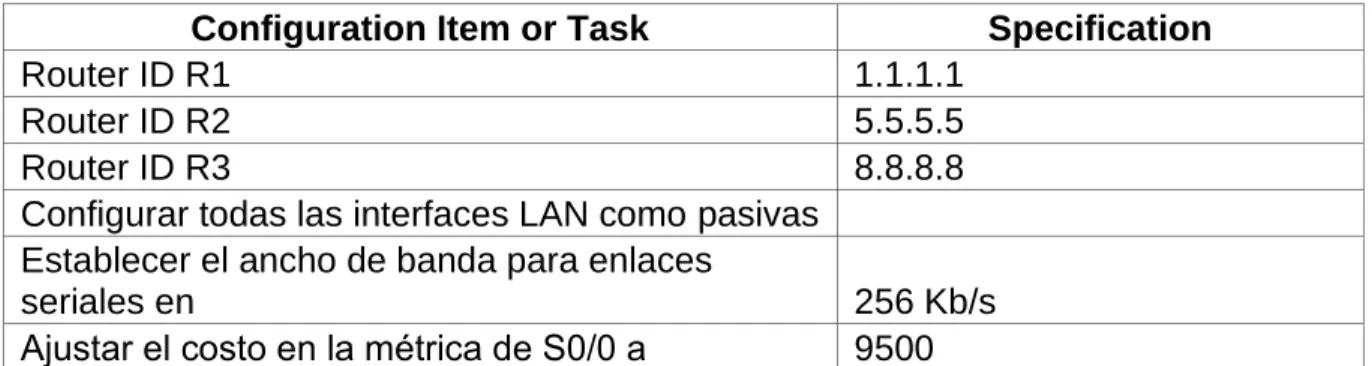
Tabla 1: OSPFv2 area 0
Configuration Item or Task Specification
Router ID R1 1.1.1.1
Router ID R2 5.5.5.5
Router ID R3 8.8.8.8
Configurar todas las interfaces LAN como pasivas Establecer el ancho de banda para enlaces
seriales en 256 Kb/s
Ajustar el costo en la métrica de S0/0 a 9500
CONFIGURACION DE ENRUTAMIENTO OSPFV2 BOGOTÁ (R1)
Router(config)#router ospf 1
Router(config-router)#router-id 1.1.1.1
Router(config-router)#network 172.31.21.0 0.0.0.3 area 0 Router (config-router)#network 192.168.30.0 0.0.0.255 area 0 Router(config-router)#network 192.168.40.0 0.0.0.255 area 0 Router(config-router)#network 192.168.200.0 0.0.0.255 area 0 Router(config-router)#passive-interface g0/0.30
Router(config-router)#passive-interface g0/0.40 Router(config-router)#passive-interface g0/0.200 Router(config-router)#exit
Router(config)#int s0/0/0
Router(config-if)#bandwidth 256 Router(config-if)#ip ospf cost 9500 Router(config-if)#exit
Router(config)#ip dhcp excluded-address 192.168.30.1 192.168.30.30 Router(config)#ip dhcp excluded-address 192.168.40.1 192.168.40.30 Router(config)#ip dhcp pool ADMINISTRACION
Router(dhcp-config)#dns-server 10.10.10.11
Router(dhcp-config)#domain-name ccna-unad.com ^
% Invalid input detected at '^' marker.
Router(dhcp-config)#default-router 192.168.30.1
Router(dhcp-config)#network 192.168.30.0 255.255.255.0 Router(dhcp-config)#ip dhcp pool MERCADEO
Router(dhcp-config)#dns-server 10.10.10.11
Router(dhcp-config)#domain-name ccna-unad.com ^
% Invalid input detected at '^' marker.
Router (dhcp-config)#network 192.168.40.0 255.255.255.0
CONFIGURACION DE ENRUTAMIENTO OSPFV2 MIAMI (R2)
MIAMI(config)#router ospf 1
MIAMI(config-router)#router-id 5.5.5.5
MIAMI(config-router)#network 172.31.21.0 0.0.0.3 area 0 MIAMI(config-router)#network 172.31.23.0 0.0.0.3 area MIAMI(config-router)#passive-interface g0/1
MIAMI(config-if)#bandwidth 256
MIAMI(config-if)#int s0/0/1 R2(config-if)#bandwidth 256 MIAMI(config-if)#int s0/0/0
MIAMI(config-if)#ip ospf cost 9500
MIAMI(config)#ip nat inside source static 10.10.10.10 209.165.200.229 MIAMI(config-if)#no shutdown
CONFIGURACION DE ENRUTAMIENTO OSPFV2 BUENOS_AIRES (R3) Buenos_Aires(config)#router ospf 1
Buenos_Aires(config-router)#router-id 8.8.8.8
Buenos_Aires(config-router)#network 172.31.23.0 0.0.0.3 area 0 Buenos_Aires(config-router)#
00:05:10: %OSPF-5-ADJCHG: Process 1, Nbr 5.5.5.5 on Serial0/0/1 from LOADING to FULL, Loading Done
Buenos_Aires(config-router)#network 192.168.4.0 0.0.3.255 area 0 Buenos_Aires(config-router)#passive-interface lo4
Buenos_Aires(config-router)#passive-interface lo5 Buenos_Aires(config-router)#passive-interface lo6 Buenos_Aires(config-router)#exit
VERIFICAR INFORMACIÓN DE OSPF
• Visualizar tablas de enrutamiento y routers conectados por OSPFv2
VISUALIZAR LISTA RESUMIDA DE INTERFACES POR OSPF EN DONDE SE ILUSTRE EL COSTO DE CADA INTERFACE.
Interfaces por ospf router (r1)
Password:
Router>enable Password:
Router#show ip ospf interface
GigabitEthernet0/0.40 is up, line protocol is up Internet address is 192.168.40.1/24, Area 0
Process ID 1, Router ID 1.1.1.1, Network Type BROADCAST, Cost: 1 Transmit Delay is 1 sec, State DR, Priority 1
Designated Router (ID) 1.1.1.1, Interface address 192.168.40.1 No backup designated router on this network
Timer intervals configured, Hello 10, Dead 40, Wait 40, Retransmit 5 No Hellos (Passive interface)
Index 1/1, flood queue length 0 Next 0x0(0)/0x0(0)
Last flood scan length is 1, maximum is 1
Last flood scan time is 0 msec, maximum is 0 msec Neighbor Count is 0, Adjacent neighbor count is 0 Suppress hello for 0 neighbor(s)
Serial0/0/0 is up, line protocol is up
Internet address is 172.31.21.1/30, Area 0
Process ID 1, Router ID 1.1.1.1, Network Type POINT-TO-POINT, Cost: 9500 Transmit Delay is 1 sec, State POINT-TO-POINT, Priority 0
No designated router on this network
No backup designated router on this network
Timer intervals configured, Hello 10, Dead 40, Wait 40, Retransmit 5 Hello due in 00:00:01
Index 2/2, flood queue length 0 Next 0x0(0)/0x0(0)
Last flood scan length is 1, maximum is 1
Last flood scan time is 0 msec, maximum is 0 msec Neighbor Count is 1 , Adjacent neighbor count is 1 Adjacent with neighbor 5.5.5.5
Suppress hello for 0 neighbor(s) Router#
INTERFACES POR OSPF MIAMI (R2)
Password:
Miami>enable Password:
Miami#show ip ospf interface
GigabitEthernet0/1 is up, line protocol is up Internet address is 10.10.10.1/24, Area 0
Process ID 1, Router ID 5.5.5.5, Network Type BROADCAST, Cost: 1 Transmit Delay is 1 sec, State DR, Priority 1
Designated Router (ID) 5.5.5.5, Interface address 10.10.10.1 No backup designated router on this network
Timer intervals configured, Hello 10, Dead 40, Wait 40, Retransmit 5 No Hellos (Passive interface)
Index 1/1, flood queue length 0 Next 0x0(0)/0x0(0)
Last flood scan length is 1, maximum is 1
Last flood scan time is 0 msec, maximum is 0 msec Neighbor Count is 0, Adjacent neighbor count is 0 Suppress hello for 0 neighbor(s)
Serial0/0/0 is up, line protocol is up
Internet address is 172.31.23.1/30, Area 0
Process ID 1, Router ID 5.5.5.5, Network Type POINT-TO-POINT, Cost: 9500 Transmit Delay is 1 sec, State POINT-TO-POINT, Priority 0
No designated router on this network
No backup designated router on this network
Timer intervals configured, Hello 10, Dead 40, Wait 40, Retransmit 5 Hello due in 00:00:08
Index 2/2, flood queue length 0 Next 0x0(0)/0x0(0)
Last flood scan length is 1, maximum is 1
Last flood scan time is 0 msec, maximum is 0 msec Neighbor Count is 1 , Adjacent neighbor count is 1 Adjacent with neighbor 8.8.8.8
Suppress hello for 0 neighbor(s) Serial0/0/1 is up, line protocol is up
Internet address is 172.31.21.2/30, Area 0
Process ID 1, Router ID 5.5.5.5, Network Type POINT-TO-POINT, Cost: 390 Transmit Delay is 1 sec, State POINT-TO-POINT, Priority 0
No designated router on this network
No backup designated router on this network