This is the accepted version of the manuscript. The final publication is available at
Computers & Education 109 (2017) 233-252
Using Virtual Learning Environments in
bricolage
mode for
orchestrating learning situations across physical and virtual spaces
Juan A. Muñoz-Cristóbal
*,a, Vanesa Gallego-Lema
b, Higinio F. Arribas-Cubero
b,
Alejandra Martínez-Monés
c, Juan I. Asensio-Pérez
aa
School of Telecommunications Engineering, Universidad de Valladolid, Paseo de
Belén, 15, 47011 Valladolid, Spain
b
Faculty of Education and Social Work, Universidad de Valladolid, Paseo de Belén 1,
47011, Valladolid, Spain
c
School of Computer Science, Universidad de Valladolid, Paseo de Belén, 15, 47011
Valladolid, Spain
ABSTRACT
Teachers usually implement their pedagogical ideas in Virtual Learning Environments (VLEs) in a continuous refinement approach also known as “bricolage”. Recently, different proposals have enabled the ubiquitous access to VLEs, thus extending the bricolage mode of operation to other learning spaces. However, such proposals tend to present several limitations for teachers to orchestrate learning situations conducted across different physical and virtual spaces. This paper presents an evaluation study that involved the across-spaces usage of Moodle in bricolage mode and learning buckets (configurable containers of learning artifacts) in multiple learning situations spanning five months in a course on Physical Education in the Natural Environment for pre-service teachers. The study followed a responsive evaluation model, in which we conducted an
anticipatory data reduction using an existing orchestration framework (called “5+3 aspects”) for structuring data gathering and analysis. The results showed that learning buckets helped the teachers in the multiple aspects of orchestration, overcoming the limitations of alternative approaches in some specific orchestration aspects: helping the involved teachers to connect different physical and physical spaces, while supporting technologies and activities of their everyday practice, and transferring part of the orchestration load from teachers to students. The results also suggested lines of future improvement, including the awareness of outdoor activities.
Keywords
Authoring tools and methods; cooperative/collaborative learning; distributed learning environments; public spaces and computing; virtual reality
1
Introduction
During the last decades, technology has gradually entered the classrooms, generating complex ecologies of technological and social resources (Luckin, 2008). Moreover, advances in mobile devices (e.g., in tablets and smart phones) are connecting the different physical and virtual spaces1 where learning can take place, such as classrooms, Virtual Learning Environments (VLEs, Keller, 2005), websites, homes, museums, the street, parks, forests, etc. (Delgado Kloos, Hernández-Leo, & Asensio-Pérez, 2012; Sharples, Sanchez, Milrad, & Vavoula, 2009). Augmented Reality (AR), a technology that enables the combination of physical and virtual objects in a physical environment (Azuma et al., 2001), can help make seamless such connections between physical and virtual spaces (Billinghurst & Duenser, 2012; Muñoz-Cristóbal et al., 2014). For instance, virtual learning artifacts (e.g., a Google Docs2
*
Corresponding author. E-mail: [email protected]
document describing a type of tree) created in a specific space (e.g., using a VLE in the classroom) can be accessed from other physical spaces (e.g., using AR in a park by means of geoposition or AR markers). However, the potential benefits for learning of these ubiquitous learning environments (Dyson, Litchfield,
1 We consider a “space” as the dimensional environment in which objects and events occur, and in which
they have relative position and direction (Harrison & Dourish, 1996). This definition is not limited to the physical world and also considers virtual (computerized) environments (Ciolfi, 2004).
2
Lawrence, Raban, & Leijdekkers, 2009; Li, Zheng, Ogata, & Yano, 2004) fade due to the difficulties that teachers face for coordinating the learning situations conducted in such environments.
The coordination of authentic learning situations carried out in technology-enabled educational environments has been a topic of interest during the last years in the Technology Enhanced Learning (TEL) and the Computer Supported Collaborative Learning (CSCL) research communities (Dillenbourg, Järvelä, & Fischer, 2009; Roschelle, Dimitriadis, & Hoppe, 2013). Multiple researchers have addressed those coordination issues, clustered under the umbrella of the orchestration metaphor (see e.g.,
Dillenbourg & Jermann, 2010; Hernández-Leo et al., 2012; Niramitranon, Sharples, Greenhalgh, & Lin, 2010; Sharples & Anastopoulou, 2012; Slotta, Tissenbaum, & Lui, 2013). Some of these difficulties are related to the design of the learning situations, the regulation of the flexibility offered to the students, the pragmatic constraints of the teachers, or the alignment of the different resources in order to achieve the learning goals (Prieto, Dlab, Gutiérrez, Abdulwahed, & Balid, 2011).
Several authors have proposed systems that can help teachers orchestrate learning situations that may involve multiple physical and virtual spaces (see e.g., Delgado Kloos et al., 2012). Since one of the first problems that teachers face to carry out such kind of situations is the creation of the situation itself, several proposals enable teachers to create such situations by means of authoring tools different from the technological setting in which the learning situation will be enacted (see e.g., Kaddouci, Peter, Vantroys, & Laporte, 2010; Klopfer et al., 2011; Muñoz-Cristóbal et al., 2014; Niramitranon et al., 2010; Ternier, Klemke, Kalz, van Ulzen, & Specht, 2012). However, the inclusion of supplementary authoring tools adds a new technological element in the already complex ecology of resources of classrooms (Alharbi, Athauda, & Chiong, 2014). Depending on the educational context, the teacher pedagogical approach, and the intended goal, the benefits of additional authoring tools may or may not be worth their extra
complexity. For instance, they can be valuable for teachers interested in reusing and sharing their designs (Britain, 2004) or in creating complex collaborative learning situations (Hernández-Leo et al., 2006). On the other hand, authoring tools could be not worth for teachers who use a VLE to accompany their face-to-face class, building their courses week by week, and redesigning the plan continuously (Berggren et al., 2005).
An alternative to provide teachers with new authoring tools is enabling them to implement their pedagogical ideas (i.e., create learning situations, their activities and resources) directly in the
technological settings that they use in their everyday practice, as it happens with VLEs (e.g., Moodle3; Dougiamas & Taylor, 2003). This alternative is also known as the bricolage (or bricoleur) approach (Berggren et al., 2005). VLEs have been used during years following the bricolage approach in face-to-face and blended learning (Keller, 2005). However, they have been traditionally isolated from mobile devices (Casany et al., 2012), preventing their use in ubiquitous learning environments that include other physical spaces beyond the usual ones in blended learning (typically the classroom and home). Several approaches have proposed solutions to allow the ubiquitous access to VLEs by means of mobile devices (see e.g., Casany et al., 2012; Glahn & Specht, 2010; Martin et al., 2009; Santamarina, Moreno-Ger, Torrente, & Manjón, 2010; Trifonova & Ronchetti, 2004). Nevertheless, these works tend to present limitations that may affect negatively certain orchestration aspects: i) most approaches have a limited, if any, capability to regulate the degree of flexibility offered to the students, which may be necessary in some pedagogical approaches (Hannafin & Land, 1997; Zimmerman, 1990), especially in ubiquitous learning environments, which may demand a sharing of the orchestration load with the students (Sharples, 2013); ii) usually, the proposals do not allow the integrated use of technologies commonly employed by teachers (e.g., common VLEs or Web 2.0 tools), which may hamper their embedding in teachers’ current practice (Cuendet, Bonnard, Do-Lenh, & Dillenbourg, 2013; Prieto, Wen, Caballero, & Dillenbourg, 2014); iii) also, several of these proposals do not implement mechanisms to be aware of the context in which learning takes place, which is an important factor in the seamless combination of different learning spaces (Li et al., 2004; Milrad et al., 2013).
The research question that we tackle in this paper is how technology can help teachers orchestrate their learning situations conducted across different physical and virtual spaces while using a VLE in bricolage mode. An alternative approach that can help overcome the limitations discussed in the previous paragraph for the use of VLE in bricolage mode is the use of learning buckets in VLEs. A learning bucket (Muñoz-Cristóbal et al., 2013) is a virtual container of learning artifacts (e.g., web pages, widgets, instances of Web 2.0 tools) that are generated/accessed across different physical and virtual spaces. Teachers can
3
configure a learning bucket with constraints, defining what is possible to do within it (e.g., which tools can be used). The learning bucket notion has been implemented in the Bucket-Server, a system that integrates learning buckets into multiple technologies, such as VLEs and mobile AR clients. Once a learning bucket is configured by the teacher and embedded in a VLE course, a link between the VLE and other learning spaces (physical, 3DVW, etc.) is established, thus opening the path towards the
orchestration of across-spaces learning situations.
In order to explore the aforementioned research question we have conducted an evaluation study in which two teachers used the Bucket-Server integrated with Moodle to carry out multiple across-spaces learning situations during the semester of a course on Physical Education in the Natural Environment for pre-service teachers. The evaluation of the orchestration support provided by the learning buckets is the main contribution of this paper.
The rest of the document is structured as follows. The next section summarizes different approaches in the literature that may help teachers orchestrate learning situations across spaces using VLEs in bricolage mode. Section 3 describes the learning bucket notion and the Bucket-Server system. Section 4 details the evaluation carried out, and finally, the main conclusions are summarized in Section 5.
2
Approaches using VLEs in bricolage mode and limitations for the
orchestration of learning situations conducted across physical and virtual
spaces
Since there are several conceptualizations of the orchestration metaphor, Prieto, Dlab, Gutiérrez, Abdulwahed, and Balid (2011) proposed the 5+3 aspects orchestration framework, which tries to encompass the multiple aspects that the different authors associate with orchestration. Table 1
summarizes such aspects. We have used this framework in order to characterize orchestration during the research work presented in this paper.
Table 1. Different aspects in which the 5+3 aspects framework (Prieto et al., 2011) characterizes orchestration Orchestration aspect Description
Design This aspect is related to the planning of the learning activities and the tools used to enact them. It includes the conceptualization of learning designs, but also their implementation (setting up of the situation in the technological environment) Management This aspect deals with the regulation of the learning activities, and involves issues
related to the management of the class, time, tools, artifacts and groups Adaptation This aspect is related to the capability of changing the design to both the local
context of the classroom and the emergent events during the enactment of the learning activities
Awareness This aspect deals with being aware of what happens in a learning situation Roles of the teacher and
other actors
This aspect refers to the role that the different actors (teachers and students) take in the orchestration
Pragmatism This aspect deals with making TEL research results available to average (as opposed to TEL-expert) teachers, fitting with the constraints of the authentic settings of their everyday teaching practice
Alignment This aspect is related to the coordination of the elements to be orchestrated (learning activities at various social levels, spaces, tools and scaffoldings used) in order to attain the learning goals
Theories This aspect has to do with the theories and models used to orchestrate learning
There has been substantial research during the last years proposing solutions for using a VLE in bricolage mode and helping in the orchestration of across-spaces learning situations:
environment is nQuire (Herodotou, Villasclaras-Fernández, & Sharples, 2014; Mulholland et al., 2012), which enables a flexible creation and enactment of inquiries which are configurable by the students. During the inquiry, the students can collect data of different types, to be analyzed afterwards in the web environment. Mikroyannidis et al. (2013) propose weSpot, an inquiry based web learning environment that can be personalized by the students. The weSpot system integrates external tools such as widgets and Web 2.0 tools, and enables the collection of data (picture, video, audio, text and numeric) by means of a mobile app.
All these approaches help teachers in different aspects of orchestration, such in the design and management of learning situations. However, these approaches are new learning environments (i.e., new VLEs) proposed by the researchers, forcing teachers to learn how to use such (usually non-trivial) systems, which may also diverge from the institutional VLEs. In addition, the aforementioned learning environments are focused on specific pedagogies (inquiry-based learning), forcing teachers willing to include other methodologies in their practice to use multiple systems (Niramitranon et al., 2010). Also, most of the described approaches provide students with a quite restricted set of tools to use, usually internal to the VLE, not enabling them to employ other tools commonly used in
education, such as those of the Web 2.0 (Casany et al., 2012). Moreover, all the approaches introduce typically new mobile clients to be used in physical spaces, instead of employing existing
technologies (e.g., popular AR apps; Grubert, Langlotz, & Grasset, 2011) that the teachers could choose to use. These limitations affect negatively the pragmatism orchestration aspect. A way of adjusting to the teachers’ everyday practice is enabling them to use the tools that are regularly part of this practice (e.g., due to pedagogical or institutional decisions; Cuendet et al., 2013; Prieto et al., 2014). In order to achieve it, the systems proposed for helping teachers orchestrate learning situations could enable them to employ existing technologies focused on different spaces which may have being already used by the teachers, such as existing VLEs (Keller, 2005), Web 2.0 tools (Conole & Alevizou, 2010), or AR apps (Wu, Lee, Chang, & Liang, 2013).
• Other authors, instead of creating new web learning environments,propose solutions for combining existing VLEs and activities in other physical and virtual spaces. Many researchers have explored how to allow access to the VLE resources using mobile devices (Casany et al., 2012; Glahn & Specht, 2010; Zhang et al., 2010). Also, Santamarina et al. (2010) propose a general model to integrate portable game devices (mobile phones, PDAs, portable game consoles, etc.) with existing VLEs such as Moodle. Their approach enables the integration of mobile games as any other activity in a course within the VLE. Another interesting approach is the architecture proposed by Conde, García-Peñalvo, Alier, Mayol, and Fernández-Llamas (2014) for integrating Personal Learning Environments (PLEs) with VLEs, enabling also the access to different activities and tools from mobile devices. A slightly different approach is the work carried out by Hernández-Leo et al. (2012) integrating their Signal Orchestration System (SOS) with Moodle (León Font, 2014). The SOS system enables the generation of signals (e.g., lights) from devices that can be worn by the students or be attached to specific resources or locations of the physical space. The signals indicate
orchestration aspects of the collaborative learning flow (such as information related to group formation). Finally, Looi and Toh (2014) explored the orchestration implications of using, in a primary school during an academic year (Zhang et al., 2010), a mobile learning environment
(GoKnow MLE) composed of a mobile application and a website. The activities took place mainly in the classroom, with some of them conducted also at the students’ homes.
• There are also authors proposing solutions that connect the different learning spaces including context-awareness features. Trifonova and Ronchetti (2004) propose a general architecture for integrating VLEs and mobile devices of multiple types, considering the capability of detecting the context of the mobile devices (e.g., with the information of their sensors, such as the location). A similar approach is the one proposed by Glahn and Specht (2010): a theoretical system’s architecture aimed to extend Moodle to different types of devices. The architecture includes some context-awareness capabilities: tracking the location of users, and enabling the access to specific Moodle resources from pre-defined “contexts” (physical regions delimited with geographical coordinates, and globally configured in Moodle). M2Learn is a framework to create mobile context-aware
applications (e.g., capable of detecting location using multiple sensors, such as GPS or RFID reader) and integrate them with VLEs, such as Moodle (Martin et al., 2009). Another approach is the one by Milrad, Kohen-Vacs, Vogel, Ronen, and Kurti (2011). It integrates CeLS (a VLE and authoring tool) and MoCoLeS (a system to enable the enactment of collaboration scripts using mobile devices). Designs created with CeLS may include activities carried out within CeLS itself, using, e.g., desktop computers, as well as outdoor activities supported by mobile devices. The same research group explores the use of contextualized learning objects, by means of a mobile app (LnuGuide) connected with Moodle (Sotsenko, Jansen, & Milrad, 2014).
Nevertheless, despite the aid provided by these approaches to different orchestration aspects, they have a scarce flexibility in what the students are able to do during the enactment. Thus, they are mostly restricted to the features of the VLE (in which most of the resources to use are predefined by the teacher). In addition, when flexibility is offered to students (as is the case of some VLE features such as the file uploading), the means provided to the teacher for controlling such flexibility are scant. These limitations affect negatively the roles of the teacher and other actors orchestration aspect. Traditionally, the orchestration load has been mostly tackled by the teachers, but in some occasions, it could be worth sharing it with the students. That can be the case of student-centered approaches, in which students take an active role, and teachers provide them with autonomy to be responsible for their own learning process (Hannafin & Land, 1997; Zimmerman, 1990). Also, such sharing of the orchestration load can be interesting in some ubiquitous learning environments, where the activities are conducted in multiple physical and virtual spaces in which the orchestration can be very complicated for a teacher (Muñoz-Cristóbal et al., 2013; Sharples, 2013). A way of sharing the orchestration load with the students is giving them flexibility in what they are able to do during the enactment, instead of predefining what they have to do. In addition, it is important to maintain a certain degree of guidance and structuring in the learning process, providing the required scaffolding for carrying out the learning activities that comply with the pedagogical intentions of the teacher (Dillenbourg & Tchounikine, 2007; Weinberger, Kollar, Dimitriadis, Mäkitalo-Siegl, & Fischer, 2009). Therefore, a teacher-controlled flexibility for students would be desirable in orchestration solutions (Dillenbourg et al., 2009).
As shown above, all the reviewed approaches enable the use of VLEs in bricolage mode, and help teachers orchestrate learning situations that may involve different physical and virtual spaces. However, despite the aid provided by the reviewed approaches to orchestration, they have typically a limited support in three of the orchestration aspects enumerated in Table 1, more concretely, regarding pragmatism, alignment and roles of the teacher and other actors. This limited support is important in learning scenarios that involve activities in different physical and virtual spaces. Table 2 summarizes these identified limitations, and how the different approaches are affected by them. As far as we know, none of the approaches has proposed solutions for overcoming all three limitations (see Table 2). Therefore, there is a need for alternative proposals aimed to help teachers orchestrate their across spaces learning situations, emphasizing such three orchestration aspects affected by the limitations (roles of the teacher and other actors, pragmatism, alignment). In the following section we describe the learning buckets, an approach that can help in this line.
Table 2. Support provided by the different approaches to the identified limitations in orchestration aspects (Y=Overcomes the limitation; N=Does not overcome the limitation; L=Provides a limited/partial support;
Limitations in orchestration of across-spaces learning situations (Cah ill e t a l. , 2 0 1 0 ) (C as any e t a l. , 20 12) (C onde e t a l. , 20 14) (G la hn & S pe cht , 20 10) (L eón F on t, 20 14) (L inn e t a l. , 20 03) (M ar tin e t a l. , 2 0 0 9 ) (M ikr oya n ni d is e t a l. , 20 13) (M ilr ad e t a l. , 2 0 1 1 ) (M ul h ol la nd e t a l. , 2 01 2) (S an tam ar in a et al ., 2 0 1 0 ) (S ot se nk o e t a l. , 2 01 4) (T ri fon ova & R onc he tt i, 20 04) (Z ha ng e t a l. , 20 10)
Pragmatism: Integrated use of technologies commonly used in current
educational practice (e.g., common VLEs and Web 2.0 tools) N Y Y L L N Y L N N L L Y L
Alignment: Seamless combination, using context-awareness, of the
different spaces involved N N N T N N T T Y L N Y Y N
Roles of the teacher and other actors: Teacher-controlled flexibility of
the students to manage learning artifacts during the enactment L N L N N Y N Y N Y N N N Y
3
Notion of learning bucket and Bucket-Server system
A learning bucket (Muñoz-Cristóbal et al., 2013) is a conceptual proposal to help teachers orchestrate learning situations that involve multiple physical and virtual spaces. A learning bucket is a configurable container of learning artifacts of multiple types (e.g., 3D models, web pages, artifacts generated with Web 2.0 tools such as Google Docs documents, etc.). A bucket can be embedded in multiple existing
technologies conceived for their use in specific spaces (e.g., VLEs in web spaces, AR apps in physical spaces) and its learning artifacts can be positioned4
Figure 1
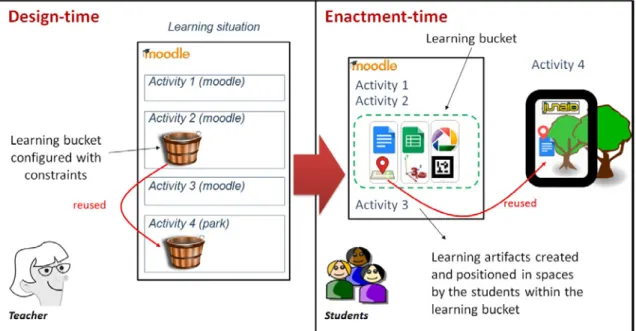
in multiple physical and virtual spaces using several positioning types (geographical coordinates, markers, etc.). At design time, teachers can include learning buckets in activities of a learning situation, and configure such buckets with constraints for restricting what the students will be able to do within the buckets during the enactment (e.g., tools to use, permissions, positioning types, etc.). In the case of VLEs used following a bricolage approach, the teachers can create learning buckets from their usual VLE, including them in activities of a VLE course, like any other resource. Afterwards, during the enactment, the students are able to use the bucket, under the constraints configured by the teacher, to create and position artifacts of multiple types. Since the learning bucket can be embedded in multiple software applications focused on different spaces, the artifacts created in a space (e.g., in a web space using a VLE) could be accessed afterwards from other spaces where the artifacts are positioned (e.g., from a physical space using an AR app), thus enabling across-spaces learning situations. illustrates the notion of learning bucket, showing an example in which a teacher defines at design time a learning situation in a Moodle course, including a learning bucket (configured with constraints) in an activity, and reusing the learning bucket in another activity. As also shown in Figure 1, at enactment time, the students use the learning bucket from within the Moodle course to create and position learning artifacts. One of the learning artifacts (a Google Docs document describing a type of tree) is accessed in a subsequent activity from a park using an AR app.
4
Figure 1. Example of the use of a learning bucket
Using learning buckets, the teachers can include flexibility in what the students are able to do with learning artifacts during the enactment. Thus, the learning buckets enable students, for instance, to take technological decisions (e.g., regarding the tools used to create the artifacts), contextual decisions (e.g., related to the location and time for creating and accessing artifacts), and arbitrary decisions (e.g., the number of artifacts to create). Such flexibility is included even when the teachers use a learning environment that does not provide natively such flexibility, i.e., that requires the resources and tools to use to be predefined (and sometimes created) by the teacher in advance. Including such flexibility can help teachers share the orchestration load with students. The constraints configured in the bucket limit the flexibility, allowing the teachers to regulate the balance between guidance and freedom (Dillenbourg & Tchounikine, 2007).
The learning bucket notion has been implemented in the Bucket-Server system, which by means of an Application Programming Interface (API) enables its integration with different applications (see Figure 2, top). By using the API, the applications can create and manage buckets and their artifacts. As shown in Figure 2 (top), multiple artifact providers could be integrated with the Bucket-Server, thus allowing the use of their artifacts within buckets.
Figure 2. Schema of the integration of the Bucket-Server with applications and artifacts providers (top), and schema of the implemented prototype (bottom)
and Mediawiki5) and four AR apps (Junaio6, Layar7, Mixare8 and any common QR code reader) (Butchart, 2011; Grubert et al., 2011). In addition, the prototype is integrated with more than twenty existing artifact providers, including several Web 2.0 tools (e.g., Google Docs, Google Slides9, Picasa10
Figure 3
, etc.) and widgets (e.g., chat, forum, whiteboard, etc.). shows screenshots of learning buckets embedded in Moodle and Junaio, illustrating also some of the positioning types implemented in the prototype: geographical location and AR markers (the prototype allows also the positioning of artifacts in physical spaces with QR codes). The use of AR and these positioning types enable some
context-awareness capabilities, such as context-awareness regarding time, position, device, activities performed, and user information. Such capabilities enable the creation of and access to contextualized learning artifacts, thus helping achieve a seamless connection between the different physical and virtual spaces.
Figure 3. Screenshots of learning buckets embedded in Moodle (top-left) and Junaio (top-right and bottom). The screenshots were taken during the evaluation described in Section 4 and correspond to two learning buckets: A first one containing geopositioned learning artifacts (top-left and top-right), and a second one containing learning artifacts
positioned in AR markers (bottom)
Table 3 summarizes the different Bucket-Server features that may aid teachers in each of the facets in which the 5+3 aspects framework (Prieto et al., 2011) categorizes orchestration. The Bucket-Server provides support to all the aspects considered in the framework, also in the three orchestration aspects (roles of the teacher and other actors, pragmatism and alignment) that were identified as the main limitations in existing approaches for the orchestration of learning situations conducted across different physical and virtual spaces (see Section 2). Therefore, it could be an alternative to such approaches for orchestrating ubiquitous environments. In the next section we evaluate the support provided by the Bucket-Server to the orchestration of several learning situations that involved multiple physical and virtual spaces, and the use of a VLE in bricolage mode.
5 http://www.mediawiki.org. Last access February 2017. 6
https://en.wikipedia.org/wiki/Junaio. Last access February 2017.
7 https://www.layar.com. Last access February 2017. 8 http://www.mixare.org. Last access February 2017.
9 http://www.google.com/slides/about/. Last access February 2017. 10
Table 3. Features of the Bucket-Server that may help in the different orchestration aspects of the 5+3 aspects framework (Prieto et al., 2011)
Orchestration aspect Feature
Design Use of the bricolage approach for creating, from within a VLE, learning situations involving multiple physical and virtual spaces
Management Embedding of buckets and artifacts in learning environments in different spaces, and automatic creation of artifacts of several types
Adaptation Possible changes in buckets before, during and after the enactment time Awareness Integrated view of bucket and artifacts in the VLE, which acts as a control panel
Roles of the teacher and other actors
Enabling a flexible and teacher-controlled management of learning artifacts during the enactment, thus sharing the orchestration load with the students Pragmatism Possible use of multiple existing tools (VLEs, mobile AR apps and artifact
providers such as Web 2.0 tools) that may fit with different teachers and institutions constraints (instead of limiting the technological support to one specific technology)
Alignment Integration of the several systems and artifacts in different physical and virtual spaces and creation/access to contextualized learning artifacts from such spaces
Theories Enabling a bricolage mode to coordinate the learning situations
4
Evaluation
This section describes the evaluation carried out to explore the research question that guides our work: how can technology help teachers orchestrate their learning situations conducted across different physical and virtual spaces while using a VLE in bricolage mode?
We have conducted the evaluation through a study with the two teachers of a course on Physical
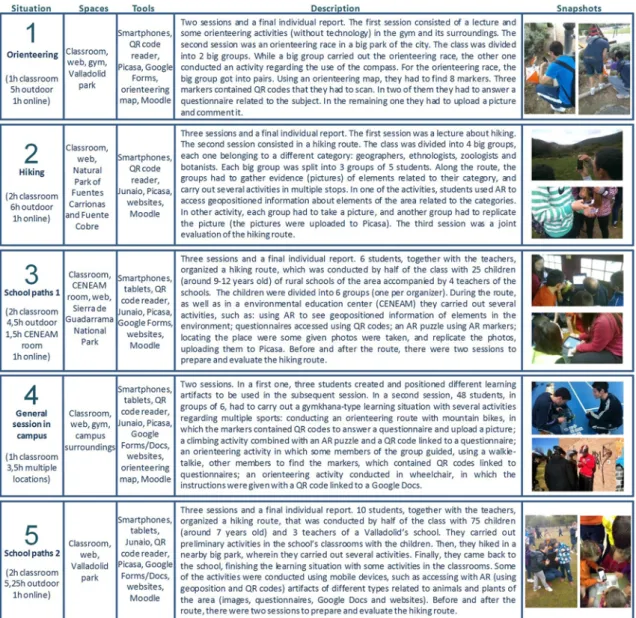
Figure 4. Learning situations carried out during the course on Physical Education in the Natural Environment
4.1
Method
alignment, see Section 2), we have evaluated the orchestration support provided by the learning buckets to all aspects of the framework. The interpretive nature of our research and the responsive evaluation followed underlie our aim of a holistic understanding of the complexity of the phenomena under study, in this case, the orchestration support provided by the learning buckets. This holistic approach led us to analyze all the orchestration aspects, as we think that with an evaluation focused on the three limiting aspects, relevant unexpected weaknesses in any of the other orchestration aspects could have passed unnoticed.
In the anticipatory data reduction process, we defined an issue as the main conceptual organizer of the evaluation process: how does the Bucket-Server help the participant teachers orchestrate their learning situations conducted across different physical and virtual spaces? Thus, we explored the orchestration support provided by the learning buckets by studying the use in authentic settings of the system implementing them: The Bucket-Server. We divided such issue, centered on orchestration, into eight more concrete topics to help us understand the different dimensions within the issue. These topics correspond to the eight facets by which the 5+3 aspects framework characterizes orchestration: design, management, adaptation, awareness, roles of the teacher and other actors, pragmatism, alignment and theories (see Table 1). In the same way, each topic was explored by means of various informative questions. The schema research question-issue-topics-informative questions (see Figure 5) guided also the data collection during the evaluation, which was carried out using a profuse set of data gathering techniques (see Table 4). During the data analysis, the aforementioned anticipatory data reduction schema was used as an initial category tree thus predetermining the initial set of codes to use a-priori (Miles & Huberman, 1994). Finally, the evaluation team interpreted the data and identified the findings.
Figure 5. Anticipatory data reduction schema showing research question (RQ), issue (I), topics (T) and informative questions (IQ). Topics related to orchestration aspects in which current approaches have limitations are marked in
bold font
Attending to the usual criteria of the interpretive perspective to ensure the quality of a research process, we have used different strategies to increase the credibility, transferability, dependability and
confirmability of our research (Cohen et al., 2007; Guba, 1981; Miles & Huberman, 1994; Shenton, 2004): prolonged engagement during five months of work with the teachers and persistent observation in the field; member checking, obtaining feedback from the informants about the data and the
a thick description of the phenomenon under scrutiny, reported in detail to the whole evaluation team; peer review within the evaluation team to avoid bias; triangulation of data sources, methods and researchers to crosscheck data and interpretations. The triangulation of researchers was conducted by involving in the evaluation team experienced researchers with distinct perspectives (i.e., with pedagogical or technological background). Such researchers participated conducting independent observations, which were compiled and discussed in a joint collaborative multimedia report for each session. The triangulation of methods involved the use of several data gathering techniques (see Table 4). The triangulation of data sources was carried out employing multiple data sources and informants, ensuring that each finding was corroborated by multiple pieces of evidence of different types. We have adopted a descriptive style to report the research and its results, with a detailed account of the context, participants and learning situation, as well as of the evaluation design and its implementation, including the data gathering techniques employed. Such detailed account is another strategy typically employed in interpretive research to achieve credibility and transferability of the results.
Table 4. Data gathering techniques Technique Description
Collection of participant-generated artifacts
[Art]
Collection of a diverse set of electronic artifacts generated by the teachers and the students (emails with the teachers, learning designs and products, evaluation report of the teachers of one school). Used to register the processes of design, implementation (setting up of the technological environment) and enactment as well as the use of the different systems.
Screen recording [Screen]
Recording of the actions conducted in the computer by the teachers as well as video and audio recordings of their actions out of the computer, during some implementation sessions. Used to understand the design and implementation processes.
Observation [Obs]
Naturalistic semi-structured observations during the initiation session, implementation sessions and enactment sessions involving learning buckets. The observations were guided by an anticipatory data reduction schema (see Figure 5), and conducted by up to six different observers. The data collected were chat messages, audio/video, pictures and observation notes. Used to register the actions, impressions and other emergent issues of the teachers and the students.
Questionnaire [Quest]
Web-based exploratory questionnaire. It was composed of open-ended and closed items (6-point scale [1=strongly disagree, 2=disagree, 3=somewhat disagree, 4=somewhat agree, 5=agree, 6=strongly agree] + don’t know/no answer). Used to get the initial opinions of the teachers over a wide range of matters before conducting the interview.
Interview [Int]
Semi-structured, face-to-face, one-to-one conversation with the teachers (recorded and transcribed). Used to capture the opinions of the teachers in depth, after an initial analysis of other data sources (e.g., observation data, questionnaire answers, etc).
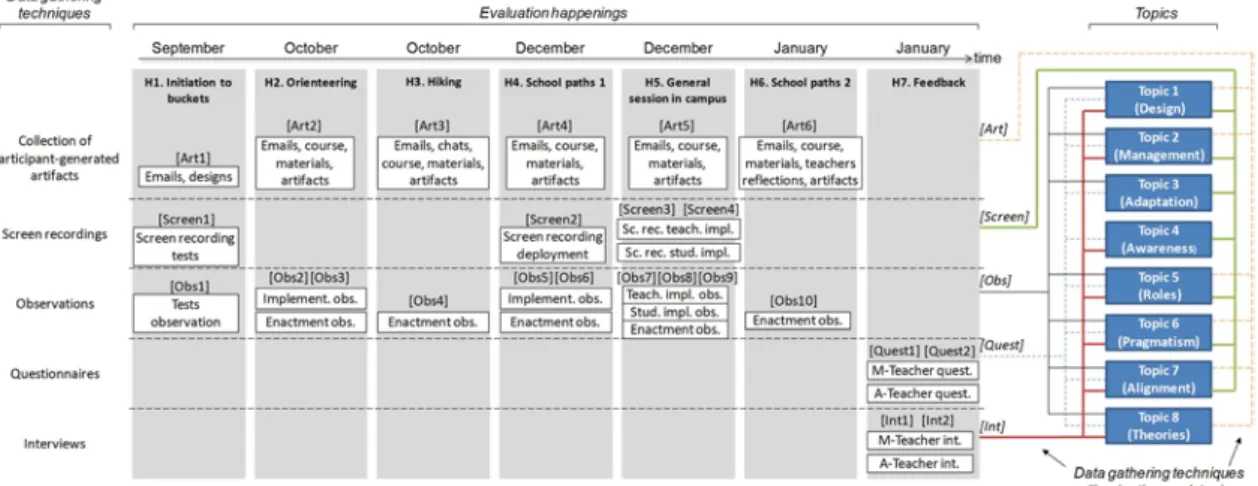
Figure 6 shows the evaluation process, which has been divided into happenings (evaluation events), including the different data gathering techniques employed, along with the labels used to refer to them throughout the text. During the first happening (H1 in Figure 6) in September 2013, the teachers started to design the learning situations of the course, building upon the activities carried out the previous years, and including the use of mobile devices to connect the physical locations with Moodle and other web resources. A member of the research team helped the teachers with their doubts regarding the
technological alternatives and affordability for implementing their ideas. Also, the researcher explained them how to create learning buckets from Moodle in a 1,5 hours session, in which the teachers finally created different buckets and artifacts within them. Afterwards, from October 2013 to January 2014, the teachers carried out several learning situations using learning buckets (see Figure 4). The integration of the Bucket-Server prototype with the University’s institutional Moodle would have led to hard logistic and managerial issues which would have impeded the use of the buckets in that course. Therefore, jointly, teachers and researchers decided to use the institutional Moodle in parallel with another Moodle
National Park, 130 Km south of Valladolid. In this occasion the main teacher was in charge of creating learning buckets and artifacts, with the help of an evaluator, to support different activities to be carried out during the route. Afterwards, in December, the fifth happening (H5) comprised three sessions: A first session in which the main teacher, with the help of the assistant teacher and sporadic support of an evaluator, created in Moodle a learning situation, which included learning buckets, for a general review of the different topics studied; a second session in which a group of students created and positioned learning artifacts within the buckets; and the final session, with the enactment of the learning situation with the whole class. The last learning situation (H6) was performed in January 2014, when the main teacher created, on his own and without any support, the necessary buckets the night before the enactment. Finally (H7), the teachers’ feedback was gathered using a web-based questionnaire and interviewing them.
Figure 6. Evaluation happenings, topics, and data gathering techniques (see Table 4) used during the evaluation
4.2
Results
This section describes the main findings obtained in the evaluation process, organized following the 5+3 aspects orchestration framework (see Table 1) used in the anticipatory data reduction process (see Figure 5). A summary of the main results is compiled in Table 5. The table indicates also the data sources that support the results (using the same labels as in Figure 6), and therefore, it exemplifies the triangulation process followed throughout this study. Due to space restrictions and for a better readability, only a selection of excerpts of these data sources is referred in Section 4.2, and included in the Appendix. As explained in Section 4.1, we evaluated the support provided by the learning buckets to all orchestration aspects, and not only to the three aspects in which we identified limitations of current approaches.
Table 5. Main results of the evaluation process. Topics related to orchestration aspects in which current approaches have limitations are marked in bold font
Orchestration
aspects Results Supporting data
Design The Bucket-Server enabled the teachers to implement, using a VLE such as Moodle in a bricolage approach, learning designs involving multiple physical and virtual spaces
Quest1-2, Int1-2, Art2-6, Screen2-4, Obs1-2, Obs5, Obs7, Obs10
Management The Bucket-Server helped manage, in an affordable time, the learning situations, by unifying in a single element of the VLE multiple learning artifacts generated with different tools and positioned in several spaces using a number of positioning types
Quest1-2, Int1-2, Art6, Screen1--4, Obs2, Obs7-10
Adaptation The Bucket-Server enabled teachers to make runtime changes in the learning buckets and their artifacts, but this capability was only used in Moodle (web space), and not in activities involving physical spaces (e.g., outdoors)
Quest1, Screen2-4, Obs1, Obs3, Obs5, Obs8
Awareness The Bucket-Server provided a unified runtime view of the artifacts created by the students, but the learning buckets were not used during the activities in physical spaces to monitor the students’ actions, and were scarcely used after the activities to review the students’ works
Roles of the teacher and other actors
The Bucket-Server enabled teachers to transfer part of the orchestration load to the students, but it required a previous training of the students, which also increased the teachers’ load
Quest1-2, Int1-2, Art5, Screen1, Screen3-4, Obs4, Obs6-9
Pragmatism The Bucker-Server supported the constraints of non-ICT expert teachers in authentic learning situations of their everyday practice, which involved a VLE of the same type than the one of their institution, common Web 2.0 tools, and multiple physical spaces.
Quest1-2, Int1-2, Art1-4, Art6, Screen1-4, Obs2-9
Alignment The Bucket-Server helped connect different physical and virtual spaces by enabling the creation of and access to positioned learning buckets and artifacts from the different spaces
Quest1-2, Int1-2, Art2-6, Screen2-3, Obs3-10
Theories The Bucket-Server changed the teachers’ previous way of organizing the learning situations, which they perceived as useful and expected. The pedagogical essence of the learning situations was not altered
Quest1-2, Int1-2, Art5, Obs7
4.2.1 Design
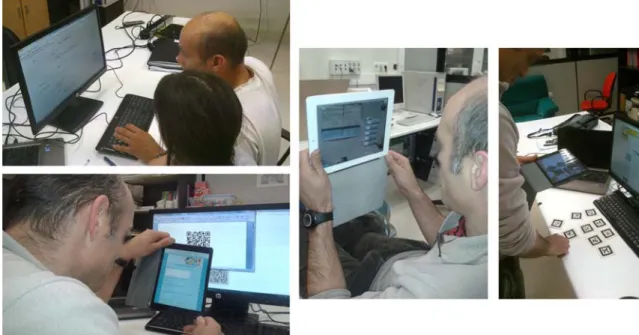
With respect to this aspect, the evaluation showed that the Bucket-Server enabled the teachers to implement, using a VLE such as Moodle in a bricolage approach, learning designs involving multiple physical and virtual spaces. The teachers implemented several designs which included learning artifacts of different types that were accessed from the web space of Moodle, and from multiple physical spaces using different positioning types, such as QR codes, AR markers and geographical coordinates (see, e.g., Figure 7, and [Quest1-2] in Table A.1 in Appendix). Table A.2 lists the different learning buckets and artifacts that were created by the teachers and the students.
Figure 7. The teachers during the evaluation, designing different activities using learning buckets: creating a learning bucket embedded in Moodle (left-top), and checking learning buckets’ artifacts positioned in QR codes (left-bottom),
geopositioned (middle), and positioned in AR markers (right)
activities with children in the natural environment) (see, e.g., [Obs7] and [Int2] in Table A.1). However, the need for external help decreased steadily throughout the course, being the teachers autonomous in the last learning situations (especially in the last one, see, e.g., [Art6] in Table A.1).
In addition, the use of the learning buckets and the rest of the new technologies by the teachers (mobile devices, QR codes, AR, etc.) had an impact in the design of how the students would reach the objectives, being the contents of the learning situations less affected. This alteration in the design was due to the new possibilities given by the learning buckets to enrich the learning situations, and was perceived as positive by the teachers. Another interesting fact is related to the approach used by the teachers to carry out the design tasks. They adopted a model based on continuous refinement, so that some design decisions were taken right before the activity started. The Bucket-Server showed to provide a good support to this design approach. Table A.1 shows some excerpts of evidence that illustrate the findings described.
4.2.2 Management
The evaluation showed evidence that the Bucket-Server helped manage the learning situations by unifying in a single element in the VLE multiple learning artifacts generated with different tools and positioned in several spaces using a number of positioning types (see [Int2] in Table A.3 in Appendix). The management also benefited from the learning bucket feature of showing a single view of the positions of the artifacts in the physical spaces (e.g., a list including all the markers, ready to be copied or printed) (see Figure 8, and [Screen2] in Table A.3). The teachers also recognized that the automatic creation of artifacts provided by the Bucket-Server was an advantage, allowing them to create instances of different external tools (e.g., Google Docs or Picasa) with a single click within the bucket (see [Screen1] and [Int1] in Table A.3). Regarding the time demanded by the Bucket-Server, the teachers acknowledged that the time devoted to implement the learning situations using buckets was affordable for them (see [Quest1-2] in Table A.3). This time was decreasing as the teachers used the buckets in different learning situations along the course (see Table A.4).
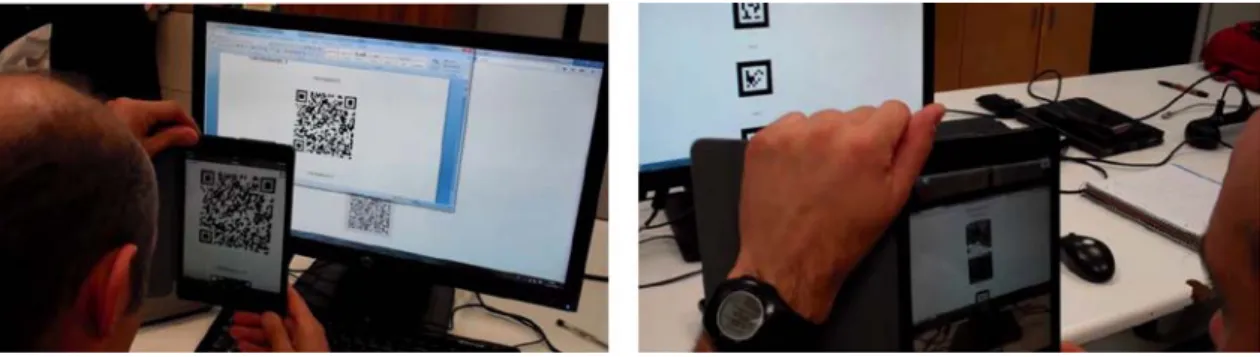
Figure 8. The main teacher during the evaluation, using two lists of markers generated by learning buckets: scanning a QR code from a list of markers pasted in a Word document (left); displaying the pieces of an AR-puzzle using the
Junaio AR browser (right)
A limitation for the management of the learning situation was that the Bucket-Server prototype did not include any adapter for questionnaire tools. Due to this fact, several questionnaires were created externally with Google Forms, and added to the buckets as web contents. It would have reduced the required time to implement learning situations and to review the students’ answers if the Bucket-Server prototype would have included a Google Forms adapter (see [Int1] in Table A.3). Also, the use of two Moodle installations was a disadvantage for the management, since teachers and students had to deal with two courses in different online locations. Table A.3 shows some excerpts of evidence that illustrate the findings described.
4.2.3 Adaptation
During the evaluation, the teachers recognized that the Bucket-Server enabled them to make changes at runtime in the learning buckets and in the artifacts within the buckets (see [Quest1-2]A in Table
conducted in physical spaces (e.g., in the natural environment), and therefore it was not possible to explore this kind of adaptation. Anyway, the teachers acknowledged that any runtime modification in activities conducted in the natural environment would have been extremely difficult to accomplish, due to the time restrictions, the large number of students, the characteristics of the physical spaces (e.g.,
mountains), and the rest of non-technological activities and materials used (see [Quest1-2]A in Table A.5).
Table A.5 shows selected excerpts of evidence that illustrate the findings described.
4.2.4 Awareness
During the evaluation study, the Bucket-Server provided a container with a unified runtime view to enable awareness of the artifacts created by the students (see, e.g., [Int2]A in Table A.6 in Appendix).
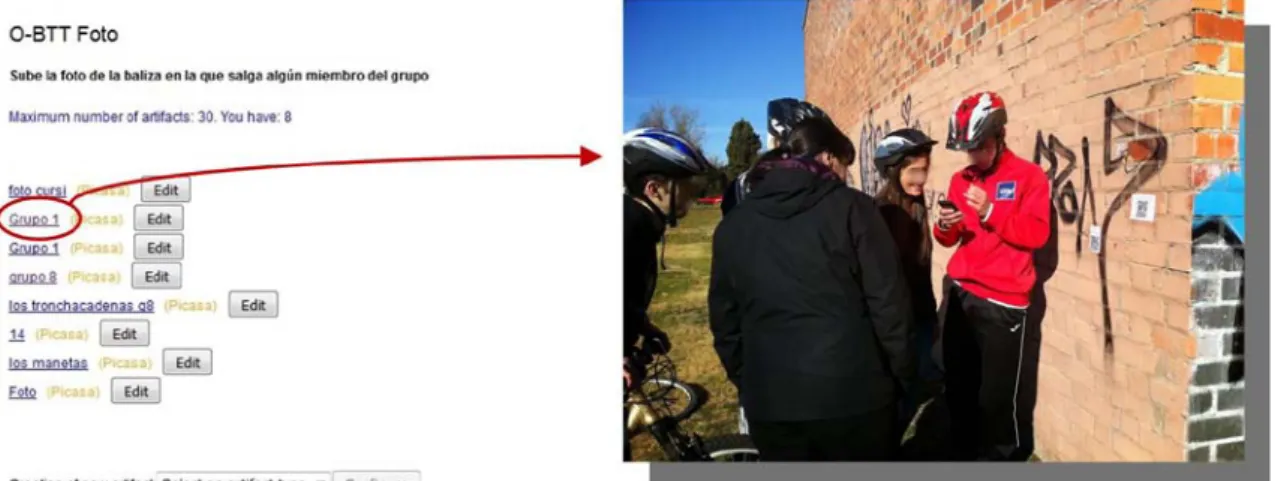
But due to the large number of students and the limited time available, the learning buckets were not used during the activities in physical spaces to monitor the students’ actions, and were scarcely used after the end of the activities to review the students’ work (see, e.g., [Int1] in Table A.6). The learning buckets were accessed mainly for final assessment purposes. There was an exception in some activities in which the teachers used the learning bucket as an awareness mechanism, requiring students to upload pictures in buckets in some specific locations, to verify that they had been there (see, e.g., Figure 9, and [Screen3] in Table A.6). The evaluation results indicate that the Bucket-Server prototype should be improved to enable a better use for awareness in activities conducted in physical spaces (e.g., including a global map view, with tracking features and times) (see, e.g., [Int2]B in Table A.6). Table A.6 shows some
selected excerpts of evidence that illustrate these findings.
Figure 9. Learning bucket containing pictures uploaded by the different groups of students when reaching a specific location (left), and one of the uploaded pictures (right), showing a group of students answering a questionnaire in
such location (questionnaire and learning bucket were accessed scanning the QR codes placed on the wall)
4.2.5 Roles of the teacher and other actors
Evaluation evidence shows that the Bucket-Server enabled the teachers to transfer part of the orchestration load to the students, but it required a previous training of the students, which also increased the teachers’ load (see, e.g., [Int1]A in Table A.7 in Appendix). This initial addition of work
load for the teacher showed to be an important factor to consider. In some activities, the instructions of the tasks were not clear for the students, and it required an extra time (mainly from the assistant teacher) during the activities to explain the students what to do (e.g., how to use the learning buckets). Therefore, an absence of an initial training in the instruments that may help share the orchestration load with the students can conclude in extra orchestration load for the teachers during the enactment, to guide the students.
In spite of this, the teachers perceived the learning bucket configurable constraints as a useful tool to control the degree of flexibility (and coercion) offered to students in the management of learning artifacts, and therefore, to regulate the transference of orchestration load to students (see, e.g., [Int1]B in Table
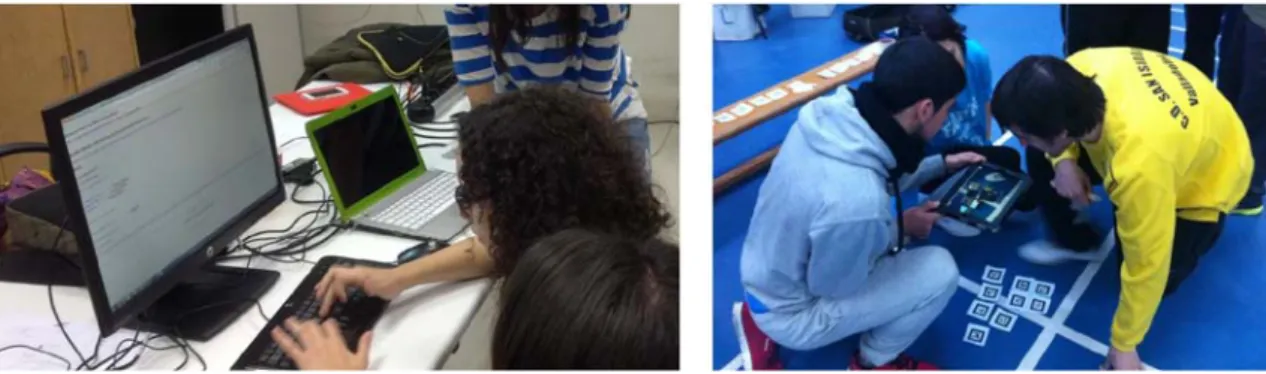
means of buckets and artifacts created by the teachers themselves (see Table A.2). Thus, the sharing of the orchestration load in most of the learning situations consisted in enabling students to create and upload pictures to buckets, except in the general session in campus, in which a group of students created artifacts of different types using learning buckets from within Moodle (see, e.g., Figure 10, and [Obs6] and [Obs8] in Table A.7).
Figure 10. A group of students using a learning bucket embedded in Moodle to upload the pieces of a puzzle and link them to AR markers (left); and another group of students using Junaio to visualize with AR the puzzle during an
activity in a gym
Similarly, according to the pedagogical methodology followed by the teachers (project-based learning), the learning buckets helped them during some activities to give responsibility to the students in the management of learning artifacts (see, e.g., [Quest1-2]A in Table A.7). This is illustrated in the School
paths learning situations (see Figure 4), in which the students managed the activities with the children, as well as in the aforementioned preparation of the General session in campus (see Figure 4 and Figure 10). Finally, it is not clear to what extent the learning buckets allowed students to take their own decisions about learning artifacts. When asked about this issue, the teachers gave different opinions (see, e.g., [Quest1-2]B in Table A.7). Both teachers acknowledged that the buckets allow students to take decisions.
However, the main teacher specified that the students did not take a lot of decisions in the learning situations actually conducted. He saw that the students did not reach a clear understanding of what was the usefulness of some of the tasks they did (see, e.g., [Int1-2] in Table A.7). Table A.7 shows some excerpts of evidence that illustrate the findings described.
4.2.6 Pragmatism
The evaluation showed that the Bucker-Server supported the constraints of non-ICT expert teachers in authentic learning situations of their everyday practice, which involved a VLE of the same type of the one of their institution, common Web 2.0 tools, and multiple physical spaces. The teachers perceived the learning buckets as an interesting and easy-to-use tool to organize positioned learning resources of multiple types, bringing learning everywhere. They also emphasized the contextual and interactivity capabilities of learning buckets, the integration with Moodle, and the adaptability of buckets to different methodologies and ICT tools (see, e.g., [Quest1-2]A in Table A.8 in Appendix).
During the learning situations, the teachers appropriated the learning buckets, being finally autonomous in their use (see, e.g., [Screen1] and [Int2] in Table A.8). The Bucket-Server did not restrict the range of applicability, although such range was extending as the teachers learned how to use the learning buckets. In the end, teachers were able to design and conduct multiple activities, with different social levels (individual, group, class), in several spaces, and using different pedagogies (see, e.g., [Quest1-2]B in
Table A.8). They perceived many possibilities in the use of learning buckets, acknowledging that they would use buckets again in their educational practice (see, e.g., [Int1]A,B in Table A.8).
AR markers, uploading pictures, etc.), implemented from Moodle following a bricolage approach (see, e.g., [Int1]B in Table A.8).
We detected different issues related to the usability of the prototype’s web-based user interface. Thus, some actions, terms used, as well as the possible creation of buckets inside other buckets showed to be confusing (see, e.g., [Quest1-2]A in Table A.8). Other problems detected were that the user interface
should include mechanisms to avoid repetitive operations, and that some HTML buttons were not compatible with old iOS and android versions (see, e.g., [Obs5] in Table A.8). Some other problems were solved during the study, such as concurrence and efficiency issues of the prototype that affected the delay of the pictures uploading and the time to load the user interface. In addition, in some activities there were students who did not have installed in their mobile phones the necessary apps, which caused some delay and confusion. There were also problems to scan QR codes and AR markers, related with the existing light in the physical environment, or with the surface on which they were placed (we detected problems with rounded surfaces).
A major issue in outdoor spaces was the lack of internet connectivity. Thus, the Bucket-Server should be improved to allow participants to work offline when the internet connection is not working (see, e.g., [Obs3] in Table A.8). Anyway, the need for a non-technological backup plan was always in the mind of the teachers, since a breakdown of the technology should not ruin a learning situation (sometimes entailing long trips). Also the weather (e.g., rain) is an important factor to consider when using
technology in outdoor locations (we used plastic bags to protect the tablets). Due to the responsive nature of the evaluation, many of the issues that arose during the learning situations where solved with the help of the researchers. Table A.8 shows some excerpts of evidence that illustrate the findings described.
4.2.7 Alignment
During the evaluation, the Bucket-Server helped connect the different physical and virtual spaces by enabling the creation of and access to positioned learning buckets and artifacts from the different learning spaces involved (see, e.g., [Int2] in Table A.9). Thus, artifacts created in a space could be accessed from another space. Furthermore, this flow of learning artifacts between spaces occurred in the two directions (see Figure 4 and Table A.2), from a physical space to a web one (e.g., collecting
geopositioned pictures uploaded to Picasa that were accessed afterwards from Moodle, see, e.g., Figure 9) and from a web space to a physical one (e.g., creating positioned artifacts in Moodle that were accessed using AR from physical locations, see e.g., Figure 10).
The evaluation showed also that the Bucket-Server enabled teachers and students to take advantage of some capabilities of the mobile devices. Thus, it enabled the extension of the VLE to multiple physical spaces due to the mobility provided by mobile devices. It also helped achieve collaborative work, by sharing a tablet between small groups of students. Finally, it enabled the participants to benefit from the sensors of mobile devices (e.g., GPS and camera), thus contextualizing the learning artifacts (see, e.g., [Obs10] in Table A.9). The teachers and students created artifacts using three different positioning types in physical spaces: geolocation, QR codes and AR markers (see Table A.2). The evaluation evidence showed also that such alignment of the different tools and spaces helped achieve the learning goals. This was mainly because the Bucket-Server enriched the learning situations enabling the inclusion of new activities that connected the spaces, encouraging contextual learning (see, e.g., [Quest1-2], and [Obs10] in Table A.9).
The evaluation showed as well some drawbacks related to the alignment orchestration aspect. The main teacher, although satisfied with the results, detected that the students just learned basic concepts regarding the use of the technology (e.g., AR and mobile devices), to replicate the activities carried out. However, they did not appropriate the possibilities that technology offers beyond the specific activities conducted (see, e.g., [Int1] in Table A.9). This led teachers to reflect about the number of activities performed (in some cases maybe too many activities), which should be kept in mind in subsequent years in order to achieve a more meaningful learning (see, e.g., [Obs7] in Table A.9)
coverage), which affected the continuity of the activities, as well as the focus and motivation of students and teachers (see, e.g., [Obs4] in Table A.9).
Finally, the use of two Moodle installations together with the short time available and the large number of students affected negatively the alignment orchestration aspect. The teachers did not have enough time for reflecting about the possibilities of learning buckets to connect even more the multiple activities that were conducted during the course in different spaces. Thus, several activities of the course were designed to be carried out in a single space (e.g., in the official Moodle), without using learning buckets to connect them with other related activities carried out in other spaces (e.g., physical spaces). Table A.9 shows some selected excerpts of evidence that illustrate the findings described.
4.2.8 Theories
In this aspect, we have explored whether the teachers were able to use the organizational and pedagogical approaches that they wanted to use, and how the inclusion of the Bucket-Server in their practice affected such approaches. During the evaluation we saw that even though the use of the Bucket-Server allowed teachers to follow their usual bricolage approach, they changed their way of organizing the learning situations (see, e.g., [Int1] in Table A.10). This was perceived as something expected by the teachers because the Bucket-Server enabled them to include new tools and devices. Moreover, they explained that they usually modify their organizational approaches, adapting them to different resources, activities or students (see, e.g., [Quest1-2]A and [Int1] in Table A.10). This change in the organizational approach was
perceived as useful by them, although the inclusion of the new technologies (e.g., mobile devices and AR) to enrich the learning situations demanded more effort than the usual (see, e.g., [Quest1-2]B,C in
Table A.10). The teachers also acknowledged that the pedagogical essence of the learning situations carried out the previous years was not altered, but enriched (see, e.g., [Art5] in Table A.10). They took special care of this fact, in order to avoid overloading the activities with technology and loosing the essence of the natural environment. The Bucket-Server enabled them to preserve such pedagogical basis and the spirit of performing learning activities in the natural environment. Table A.10 shows some selected excerpts of evidence that illustrate these findings.
5
Conclusions
The results of the evaluation show that the Bucket-Server system, and therefore, the underlying learning bucket conceptual proposal, helped the involved teachers in the multiple aspects of orchestration,
following a bricolage approach in the use of a VLE in several learning situations across different physical and virtual spaces. By using learning buckets, the teachers were able to: design and implement with Moodle multiple learning situations involving physical and virtual spaces; manage the different learning artifacts, dedicating an affordable time in all the process from design to enactment; adapt the designs modifying them when needed; be aware of the different artifacts created by the students; share part of the orchestration load with the students, who played an active role in the orchestration, with a teacher-controlled creation of their own artifacts; fit with the pragmatic constraints of the non-ICT expert teachers by enabling them to use a VLE of the same type than the one of their institution (Moodle) and common Web 2.0 tools; align the different spaces, resources and tools; and comply with the organizational and pedagogical theories of the teachers.
With respect to the three orchestration aspects that the learning buckets emphasize: pragmatism, alignment, and roles of the teacher and other actors, the evaluation showed evidence that, as far as we know, the learning buckets overcome the limitations for orchestration support of the alternative approaches that use a VLE in a bricolage mode in across-spaces learning situations. As described in Section 2, many approaches in the literature (e.g., WISE, Zydeco, nQuire or weSpot) preclude teachers from using the tools that are regularly part of their practice (e.g., their institutional VLE), which might affect negatively the pragmatism orchestration aspect. On the contrary, the learning buckets showed to be an effective and flexible solution that can be embedded in widespread VLEs such as Moodle,
limits the alignment orchestration aspect (see Section 2). As an alternative for overcoming such limitation, the evaluation showed that the learning buckets can be a simple instrument to connect the different physical and virtual spaces, by enabling the access from a space to contextualized artifacts created in another space. Finally, as we also described in Section 2, there are other approaches in the literature that include context-awareness features, but restrict the teacher-controlled flexibility offered to the students during the enactment (e.g., Glahn & Specht, 2010; Martin et al., 2009; Milrad et al., 2011; Sotsenko et al., 2014; Trifonova & Ronchetti, 2004), which affects negatively the roles of the teacher and other actors orchestration aspect. The evaluation carried out suggests that the learning buckets surpass this limitation: they enabled the students a flexible management of learning artifacts across-spaces; also, the configurable constraints of the learning buckets showed to be like an “equalizer”, able to “tune” the flexibility offered to the students, and therefore, the orchestration load over the different actors, enabling the teacher a controlled sharing of the load with the students. The positive results and feedback received from the teachers (they both used learning buckets in subsequent learning situations in various practicum and Bachelor theses, and the main teacher continued using the learning buckets on his own and without support the following years) encourage us to continue this line of research, aiming to explore how the support of the different orchestration aspects can be enhanced.
The evaluation presented in this paper illustrates also certain lessons learned, which might be useful for other researchers and practitioners in the TEL and CSCL fields focused on the orchestration of ubiquitous learning environments. A first practical strategy that can be interesting for other researchers is the evaluation approach followed in this paper, using the 5+3 aspects orchestration framework to structure the complexity of the field. Also, the research shows that technology, such as the Bucket-Server, can support teachers by helping them implement learning situations that involve activities in their usual VLE and in other physical spaces. Sometimes, the new possibilities offered by technology could cause that teachers alter their design, but these changes can be positive if the pedagogical essence is not altered. Anyway, trying to adapt the new technologies to the teachers design approach (e.g., bricolage versus additional authoring tools) is important in order to avoid disrupting the teachers’ usual way of working. Similarly, we found that changing the organization approaches of teachers when introducing an
innovation in their practice is not necessarily something negative, especially in teachers with tendency to innovation.
Another lesson learned was related to the effects of introducing technologies for sharing the teacher orchestration load with the students. This kind of technologies usually demands additional learning time from the students, who need to be trained by the teachers. These technologies might also demand a priori reflection, preparation, and planning tasks by the teachers. Such initial tasks imply additional
orchestration load for the teachers that should be taken into account to avoid overloading them during the enactment. Some practical strategies that could help teachers with these issues are to devote enough initial time to explain in detail to the students how to use the new technologies, the tasks to be conducted, the possible problems that the students could find, and how to solve them. Some of the problems can be anticipated by testing the technologies and simulating the activities under the same or similar conditions to those of the enactment. Other problems will emerge during the enactment. For instance, we learned that AR markers should be placed on flat surfaces and scanned with enough light, and that teachers should check in advance the mobile and internet coverage if they plan to use them.
We also detected during the evaluation that the introduction of technological innovations may imply a tendency to overwhelm students with many more additional activities, thus hampering the achievement of the actual learning goals. Practical strategies for teachers to avoid these problems would be to introduce gradually the activities that involve this kind of innovation, and to cater for explanations and practical examples about the possibilities of the new technologies.
In addition, during the research we also found that embedding the new technologies in the usual activities, methodologies and technologies of the teachers was important to foster teachers’ appropriation of the innovations. Once the teachers appropriated the new technologies, it was easier for them to propose innovative activities from a pedagogical point of view.
programmed. We plan to tackle these issues in upcoming research, especially to explore in more depth the possibilities of the learning bucket for sharing the orchestration load with students, including student-centered pedagogies. During the evaluation, the teachers followed a project-based learning pedagogical approach, thus giving responsibility to the students. The learning buckets helped give responsibility to the students in the management of learning artifacts, but only in few and specific activities. We need to further explore the use of learning buckets in student-center pedagogies to better understand the support provided to students for self-regulating their learning process. Further research is also needed to propose awareness instruments suitable for this kind of time-demanding and complex ubiquitous scenarios. Moreover, the awareness support provided in outdoor scenarios by the Bucket-Server showed to be inadequate for learning environments such as those studied. Other open issues to explore are the analysis of the use of learning buckets from the point of view of the students, their possible usage in different educational disciplines, and enabling different forms for users to utilize the technology in practice. Other lines of future work that are being already explored are the possible combination of the learning buckets with other orchestration systems (e.g., to complement the orchestration support of systems that employ learning design authoring tools), and their utilization as design tools as well as assessment and evaluation instruments in ubiquitous learning environments.
Acknowledgements
This research has been partially supported by the Spanish Ministry of Economy and Competitiveness (projects TIN2011-28308-C03-02 and TIN2014-53199-C3-2-R) and the Regional Government of Castilla y León (projects VA277U14 and VA082U16). The authors thank the involved teachers, students and schools, the CENEAM, as well as the rest of the GSIC/EMIC research team, and especially Henry Díaz-Chavarría, Iván M. Jorrín-Abellán and Sara L. Villagrá-Sobrino, for their ideas and support.
References
Alharbi, N. M., Athauda, R. I., & Chiong, R. (2014, November). A survey of CSCL script tools that support designing collaborative scenarios. Paper presented at the International Conference on Web and Open Access to Learning (ICWOAL), Dubai, United Arab Emirates.
Azuma, R., Baillot, Y., Behringer, R., Feiner, S., Julier, S., & MacIntyre, B. (2001). Recent advances in augmented reality. Computer Graphics and Applications, IEEE, 21(6), 34-47.
Berggren, A., Burgos, D., Fontana, J. M., Hinkelman, D., Hung, V., Hursh, A., & Tielemans, G. (2005). Practical and Pedagogical Issues for Teacher Adoption of IMS Learning Design Standards in Moodle LMS. Journal of Interactive Media in Education, 1.
Billinghurst, M., & Duenser, A. (2012). Augmented Reality in the classroom. Computer, 45(7), 56-63.
Britain, S. (2004). A Review of Learning Design: Concept, Specifications and Tools. A report for the JISC E-learning Pedagogy Programme: JISC.
Butchart, B. (2011). Augmented Reality for Smartphones Retrieved October 2016, from
Cahill, C., Kuhn, A., Schmoll, S., Pompe, A., & Quintana, C. (2010, June). Zydeco: Using Mobile and Web
Technologies to Support Seamless Inquiry Between Museum and School Contexts. Paper presented at the 9th International Conference on Interaction Design and Children, Barcelona, Spain.
Casany, M. J., Alier, M., Mayol, E., Piguillem, J., Galanis, N., García-Peñalvo, F. J., & Conde, M. Á. (2012). Moodbile: A Framework to Integrate m-Learning Applications with the LMS. Journal of Research and Practice in Information Technology, 44(2), 129-149.
Ciolfi, L. (2004). Understanding spaces as places: extending interaction design paradigms. Cognition, Technology and Work, 6(1), 37-40.
Cohen, L., Manion, L., & Morrison, K. (2007). Research methods in education. Abingdon, UK: Routledge.
Conde, M. Á., García-Peñalvo, F., Alier, M., Mayol, E., & Fernández-Llamas, C. (2014). Implementation and design of a service-based framework to integrate personal and institutional learning environments. Science of Computer Programming, 88, 41-53.
Conole, G., & Alevizou, P. (2010). A literature review of the use of Web 2.0 tools in Higher Education. Milton Keynes, UK: The Open University.
Cuendet, S., Bonnard, Q., Do-Lenh, S., & Dillenbourg, P. (2013). Designing augmented reality for the classroom. Computers & Education, 68, 557-569.