Introduction
Rodger Richey
Senior Applications Manager
This issue focuses on Electrical Fast Transients or EFT. EFT primarily affects applications that are connected to AC mains. EFT is fast transient signals that are coupled onto the AC mains by a variety of equipment (refer to the article “What is EFT?” in Issue 1 of this newsletter). This noise then travels the wiring in your house or building to potentially wreak havoc on your appliances, computers or anything else connected to the wall outlets. The articles in this issue will focus on how to minimize the effect of EFT on your circuit.
In case you missed the first two issues of the EMC newsletter, you can download them both from the Microchip website under Application Design Centers > Home Appliance Solutions, or Automotive Design Centers.
Microchip will be posting a new Design Center to our website that focuses on EMC Robustness. This Design Center will collect all the EMC related items available on the Microchip website in one place. This will include application notes, newsletters, web seminars, and so on. Did you know that Microchip has posted three EMC related web seminars? To find these archived seminars follow this link: http://techtrain.microchip.com/ webseminars/WebSemCListArch.aspx
These web seminars are the first in a series of seminars that will be presented over the next year. These first few cover the basics of EMC including an Introduction to Electromagnetic
Compatibility (EMC), What is Electrostatic Discharge (ESD)? and What are Electrical Fast Transients (EFT)? Look for new web seminars on PCB Layout, Transformerless Power Supply Design, and EMI Suppression among others.
If you would like to be placed on the distribution list for the EMC newsletter, we have combined our list with the list for the Microsolutions e-newsletter. This newsletter covers new product announcements for all types of Microchip products, tips & tricks for using Microchip devices, recently released application notes, to name a few. You can sign up for the mailing list at the following link: http://www.microchip.com/stellent/idcplg?IdcService= SS_GET_PAGE&nodeId=1421
We have received lots of feedback on these first few issues, especially on future topics. Some of these include detailed information on ground planes, high intensity radiated fields and lightning protection. If you have a topic you would like to see included in a future issue, please send an email to: [email protected].
The next issue of the EMC newsletter will focus on defensive software techniques to make your application more robust. Articles will include power-ups, detecting RAM corruption, using serial EEPROMs, using WDT, among others.
In This Issue
Know Your Transient Suppression Device... 2
Fixing Transients is Easy... 3
Managing Your Lifeline... 4
Interfacing to the Real World... 6
Low Cost Method to Improve EFT Performance... 8
Recommended Reading
Noise Reduction Techniques in Electronic Systems by Henry Ott, ISBN 0-471-85068-3
This book takes the reader step-by-step through the effect and mitigation of EMC problems in practical situations. It doesn't dwell on the math so it is very readable. It also includes a lot of practical examples, tips and "rules of thumb" to quickly educate the novice reader in "Design for EMC" techniques. A superb introductory book.
Tips and Tricks
Need to increase the input impedance of your circuit? This simple, zero-cost method increases the impedance and can significantly reduce EMC effects when coupled with protection devices. The step in the trace width causes an impedance mismatch. Signals encountering this mismatch will seek the lowest impedance path that will be through the protection device.
Know Your Transient Suppression Device
Rodger Richey
Senior Applications Manager
When improving the EFT performance of your application, resistors, ferrite beads and capacitors usually don’t provide the necessary level of suppression. The energy and speed of EFT signals are bigger and faster than these passive and extremely inexpensive components can handle.
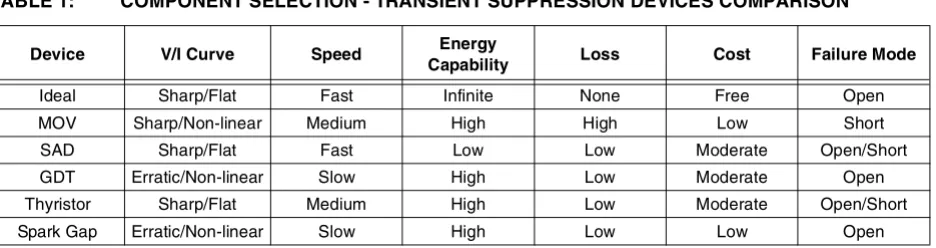
Most applications will use Metal Oxide Varistors (MOV), Silicon Avalanche Diodes (SAD), Gas Discharge Tubes (GDT), Thyristors or a Spark Gap. The difficulty is compar-ing these devices in terms of speed, energy dissipation and loss, and ultimately cost.
The following table shows the comparison of these devices. The MOV is the most commonly used device because it is less expensive and provides relatively good performance.
The first row in the table shows the ideal transient suppressor characteristics. I don’t know if such a device actually exists, but if you find one, let us know.
[image:2.612.68.536.254.378.2]Being aware of how transient suppression devices compare, and designing accordingly can contribute much to improving the EFT performance of your applications.
TABLE 1:
COMPONENT SELECTION - TRANSIENT SUPPRESSION DEVICES COMPARISON
Device V/I Curve Speed Energy
Capability Loss Cost Failure Mode
Ideal Sharp/Flat Fast Infinite None Free Open
MOV Sharp/Non-linear Medium High High Low Short
SAD Sharp/Flat Fast Low Low Moderate Open/Short
GDT Erratic/Non-linear Slow High Low Moderate Open
Thyristor Sharp/Flat Medium High Low Moderate Open/Short
Fixing Transients is Easy
Gaurang Kavaiya
Microcontroller Systems Group Manager
If you are like many of our customers who don’t mind adding a reasonable amount of cost to a product to make it more robust or quickly fix a transient issue, then this article is for you.
The power line entry point is a main source for electrical transients. The effective fixes highlighted in this article can help in quickly resolving the electrical transient problem. Most of these fixes involve creation of some kind of tran-sient suppressor, which can be categorized into two major categories:
1. Those that attenuate transients, thus preventing their propagation into the sensitive circuit. 2. Those that divert transients away from sensitive
loads, therefore limiting the residual voltages.
Transformer-based Power Supply
The transformer-based power supply is least susceptible to power line transients than a transformerless or SMPS type power supply. Use a low frequency (i.e., iron core) transformer. The transformer acts as a low-pass filter and suppresses most transients.
• Use a transient suppression device on the power entry point of the transformer. Table 1 in the article “Know Your Transient Suppression Device” in this issue shows the relative performance comparison of the devices.
• Use a line or voltage regulator with a transformer-based power supply.
Power Line Filter
A well-known fix is to use a power line filter. However, the common mistake of taking any filter from a shelf for use in a system is often made. The performance of any filter depends heavily on the impedance at its terminals. The four relevant impedances for a simple single-phase mains filter are:
• Differential mode at the mains side • Common mode at the mains side • Differential mode at the equipment side • Common mode at the equipment side
Select a filter that best matches the source and load impedances. The selected filter must be able to supply the peak current requirement of your system.
If you use a power line filter, install it at the power entry point in your system rather than placing it close to the board or component you are trying to protect (see Figure 1).
FIGURE 1: POWER LINE FILTER LOCATION
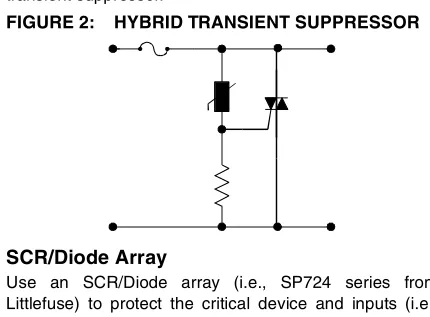
Hybrid Transient Suppressor
[image:3.612.330.548.124.447.2]Use a hybrid transient suppressor to achieve better tran-sient suppression. Figure 2 shows an example of a hybrid transient suppressor.
FIGURE 2: HYBRID TRANSIENT SUPPRESSOR
SCR/Diode Array
Use an SCR/Diode array (i.e., SP724 series from Littlefuse) to protect the critical device and inputs (i.e., microcontroller).
FIGURE 3: SCR/DIODE ARRAY
Zener Diode
Use a zener diode to limit the peak voltage at the device you are trying to protect. You can use two zener diodes in back-to-back opposite polarity, where the cathode of one zener diode is connected to the anode of another as a con-figuration to protect against AC transients (see Figure 4).
FIGURE 4: BACK-TO-BACK ZENER DIODES
Multi-layer Board
Use of a multi-layer board provides one or more surfaces dedicated to ground and power with the following benefits: • Minimizes loop area and signal return path
• Minimizes crosstalk
• May provide 10x to 100x performance improvement
These are some of the quick fixes you can use to address the Electrical Fast Transients issue. These fixes are generally well known, are easy to implement, and have worked for many who have implemented them.
POOR GOOD
FL FL
VDD
VSS I/O
VDD
VSS
[image:3.612.331.546.154.313.2]Managing Your Lifeline
Gaurang Kavaiya
Microcontroller Systems Group Manager
Every system in the world needs an energy source. The most common energy source for most systems is the mains outlet. This supply line is a lifeline for most of the system. However, this lifeline also brings the biggest threat to the system, Electrical Fast Transients (EFT). To improve susceptibility of the system, it is important to manage your lifeline. The article “Fixing Transients is Easy” in this issue discussed some quick ways to increase immunity by adding cost. This article will focus on some low- to no-cost ways to improve the immunity.
Transients can be symmetrical or asymmetrical. They can be of either polarity and may be coupled only on line, neutral or power earth, or, a combination of all three. Depending on the system, it may be sensitive to one coupling mode over another. Typically, the worst case for EFT is a system using a transformerless power supply or a Switch Mode Power Supply (SMPS). Let’s look at a few things you can do in either system
If you use a transformerless power supply, then the use of a transient suppressor is an absolute must. It’s very difficult to protect this kind of system without a transient suppressor. Refer to the article “Know Your Transient Suppression Device” in this issue for help in selecting the right type of suppressor. The PCB layout and location of a transient suppressor is equally important. Refer to “Tips and Tricks” in this issue for the layout/placement suggestion.
The next most important thing is power and ground planning. The emphasis is on the word planning. The first step in planning is to group the circuit components. Group them based on their noise sensitivity and impact of possible malfunction on the system. You also need to
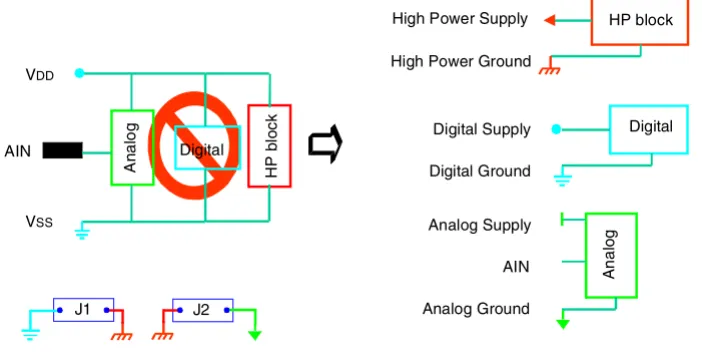
consider the input and outputs of the function block. If the component (i.e., TRIAC) is interfacing with power lines, it is also a possible source of noise (EFT pulses) and should be separated from other sensitive blocks. In a typical system, all components can be divided into three functional sub-blocks for power and ground (see Figure 1).
1. Analog Supply and Ground: The signal
conditioning circuit, op amps and stand-alone A/D fall into this category.
2. Digital Supply and Ground: The microcontroller,
external memory (i.e., serial EEPROM) and glue logic fall under this category.
3. High Power Supply and Ground: The power
control components such as Triac and relays fall under this category.
Use a separate schematic symbol for each group. This results in a different net name for each instance of VDD or VSS, providing isolation at the PCB layout level. It is necessary to merge various grounds to bring them to the same logic level to allow circuit operation. Merge them at a low impedance common point of reference (typically the voltage regulator or similar block in power supply). You can put in jumpers (see J1 and J2 in Figure 1) to create a schematic. In the PCB layout, place them next to a common point of reference and during assembly, use a shorting link on boards. If you do not want to put a shorting link, then route your whole board. Do a Design Rule Check (DRC) to make sure everything is okay. Turn off the DRC check and route the PCB trace for these jumpers. This will help in avoiding the use of a PCB jumper (shorting link). However, after this your DRC will show an error on VDD
[image:4.612.125.476.500.678.2]and VSS.
FIGURE 1: POWER SUPPLY PLANNING
VDD
VSS AIN
A
n
al
og
Digital
H
P
bl
oc
k
A
nal
o
g
Digital Digital Supply
Digital Ground
Analog Supply AIN Analog Ground
HP block High Power Supply
High Power Ground
The next step is the component placement. For help, you can refer to the article “The Art or Science of Component Placement” in Issue 2 of the EMC newsletter.
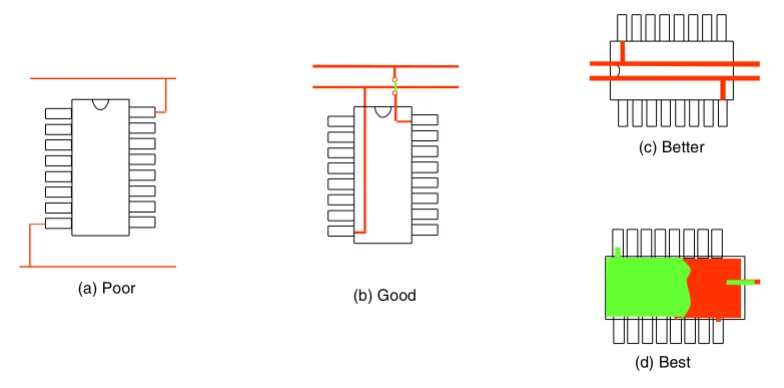
Now you are ready to begin routing your board. The first things you should route are your power and ground traces. Figure 2 explains various configurations to route power and ground traces and their relative rating.
The first routing example, type (a), is considered poor routing practice. This type of routing practice can result in big ground and power loops. The article “Every Loop is an Antenna, Like It or Not” in Issue 2 of this newsletter discusses the effect of loops in detail. Another issue with this configuration is the power and ground traces are skinny, increasing the impedance in ground and power lines.
In the second example, type (b), the power and ground traces are running in parallel. This helps in reducing the loop size. In this case, this parallel trace has some break to make a device connection. On a single-side board this results in one jumper on VDD. This may increase the inductance in the VDD line. If the decoupling capacitor is placed after this jumper, it may result in even better performance. The parallel ground and VDD traces have another advantage. This creates a PCB capacitor between VDD and ground (refer to “PCB Layout Fundamentals” in Issue 2 of this newsletter). This results in a continuous, good quality, low-ESR capacitor between VDD and ground. This can be an effective capacitor for a high-frequency signal.
Type (c) is similar to type (b); however, the device orienta-tion has been changed to avoid a break in the PCB capac-itor between VDD and ground. The thicker power traces also help in reducing the inductance further.
Types (a) to (c) are examples of a single-layer layout. Type (d) is an example of a two-layer design. On one layer, the area under the device is filled with ground and another layer is filled with power. This creates localized power planes under the device. This also increases the value of the PCB capacitor, increasing the usability of this good
quality capacitor to even lower frequencies (still quite high). This kind of localized plane is quite helpful if used with switching digital devices like microcontrollers. If you are using a single- or double-layer board design, you may not be able to use a power and ground plane. How-ever, try to find an opportunity to place a localized power/ ground plane. Fill all the blank space in the PCB with ground or power fill. Use ground fill more than the power fills. Try to maximize the PCB capacitor between VDD and ground by routing them as close as possible and by increasing the contact area. One important thing to remember is to make a low-impedance connection between the entire localized plane. If you place a plane, but if it is connected with a skinny trace to the rest of the circuit, then it may do more harm than good as the floating piece of copper may act as an antenna and pick up the noise.
In addition to this, there are a few other things that help in improving EFT performance at low- or no-cost. Although most of them deserve an article all their own, some of them are:
• Power supply decoupling: You must use a 0.1μF
ceramic capacitor for each power pin pair. The decoupling capacitor must be placed as close to the pins as possible. Try to add another capacitor in parallel to optimize the performance even further. Please experiment with the value of this parallel capacitor. Try a value in decade on both sides (High and Low) of 0.1μF.
• Layout of critical pins: Carefully route critical
signals and there return paths. Some of the critical signals are reset, interrupt etc.
• Reset pin: The reset pin is most likely the weakest
link on microcontroller if an unwanted reset is a sign of a problem in the system. Please refer to the device data sheet or related documents for suggestions.
[image:5.612.101.493.522.716.2]These and other improvements will be discussed in greater detail in upcoming issues.
FIGURE 2: POWER TRACES
(a) Poor (b) Good
(c) Better
Interfacing to the Real World
Gaurang Kavaiya
Microcontroller Systems Group Manager
The basic commonality between all embedded systems is that most of them need to communicate with the external world. The most common way of interfacing to the external world is to use some kind of connector. The system may have cables that connect to various objects, and theoreti-cally, everything works fine. However, in the ‘real world’, it is necessary to deal with some serious threats. One of them is Electrical Fast Transients (EFT).
When you run cables in your system they can either capacitively couple a noise, or can act as an antenna and pick up the noise. This EFT coupling mechanism is different than power line coupling.
The International Electrical Commission (IEC) 61000-4-4 standard has a section on EFT that deals with data I/O ports. It tries to address this requirement. The Microchip web seminar, “What is EFT?”, explains the testing style for this. If you have read the article “Fixing Transients is Easy” in this issue, then most of the fixes described there may not fix the data line EFT issue. The only applicable quick fix is the use of an SCR/Diode array on these signals. The article “Managing Your Lifeline” doesn’t explain any fixes for the data line EFT threat; however, this article will try to explain some low-cost ways to improve the data line EFT performance.
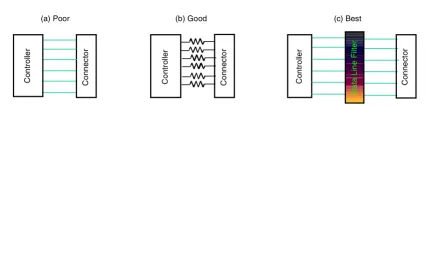
Figure 1 shows a few variants of such a connection. In the case of option (a), the external connection returns to the microcontroller directly. This kind of coupling introduces several issues.
• All of the noise picked up by the external cable is directly injected into an I/O pin. Assume that the cable picks up 10V of noise (quite common in a noisy environment) and the cable resistance is 1Ω. In this case, it will result into 10A of current into the I/O pin – enough to damage any device. In an actual system you may not see this much current, as noise is not a DC signal. Therefore, we need to look at AC proper-ties. The inductance of the cable and system tends to be higher, which limits the current. At the same time, AC peak voltage tends to be higher too. There-fore, in a normal condition, this injects a high amount of current into the pin (worst case is the input pin). If this high energy doesn’t damage the pin then it may upset the operation of the microcontroller. It may flip the status of some flip-flops or may disrupt the logic switching. The end-user may see this as a RAM or SFR corruption or misexecution of a particular instruction causing a system failure.
• This noise can couple back to power and ground lines through protection diodes on the microcontrol-ler. This will expand the damaging effect of the noise, as power and ground are common points for most of the circuit.
[image:6.612.83.513.436.708.2]Therefore, at a minimum, series resistors should be used (see option (b) in Figure 1) with all inputs (preferably with output too). This will limit the current that goes into the micro pin and limit its damaging effect.
FIGURE 1: INTERFACING TO THE REAL WORLD
The third option, (c), is the preferred way. One can imple-ment many variants of this configuration for varying degrees of performance. Let’s look at a few options. • Add a ferrite bead in series to option (b). This will help in reducing high-frequency noise. The ferrite bead selection is critical. Please look at the characterization graphs of the ferrite bead. Most beads offer very low resistance to a DC signal and a few 100 ohms at higher frequency. Select the bead that offers the highest impedance at the noise frequency. The EFT pulses tend to have a bandwidth of 100 MHz. Therefore, try to use a bead that has a useful impedance of around 20 MHz.
• The ferrite bead on its own isn’t that effective. Ideally, you should use a ferrite bead in conjunction with a capacitor to form a low-pass filter to filter out high-frequency noise. Use high-power ground for the capacitor. The common mistake is to use a digital ground for the capacitor and connect it directly to the microcontroller ground pin.
The previous circuit can be further enhanced by addition of one extra capacitor terminated to digital ground.
• Another possible variant of the above circuits does not use a ferrite bead at all. If you do not need a frequency dependant behavior of the bead, then you can replace it with a resistor. Replace the bead with a resistor in the above two variants.
To summarize, we’ve looked at a few examples of the circuits you can use to protect your inputs against transients, which offer various levels of protection. In most cases, one series resistor is enough to protect outputs. Select the right configuration depending on your environment. Initially, you may need to experiment with this configuration to find the best match for you. Hopefully, this will provide you with a smooth interface to the ‘real world’.
Cn I/O
Cn I/O
Cn I/O
Low Cost Method to Improve EFT Performance
Jon Charais
Applications Engineer
[image:8.612.207.510.192.431.2]There are many ways to improve the EFT performance of a design, but unfortunately, many of them are too expensive for a cost sensitive design, such as ferrite shielding, optoisolators, isolation transformer, and so on. An example of a low cost solution to improve your EFT performance can be seen in the following two figures.
FIGURE 1: ORIGINAL DESIGN
To start, we want to identify the noise source and make the physical distance between the noise source and the microcontroller as large as possible. In most applications, the microcontroller will be the most sensitive to an EFT event, but the same techniques discussed in this article can be applied to any other part of the design.
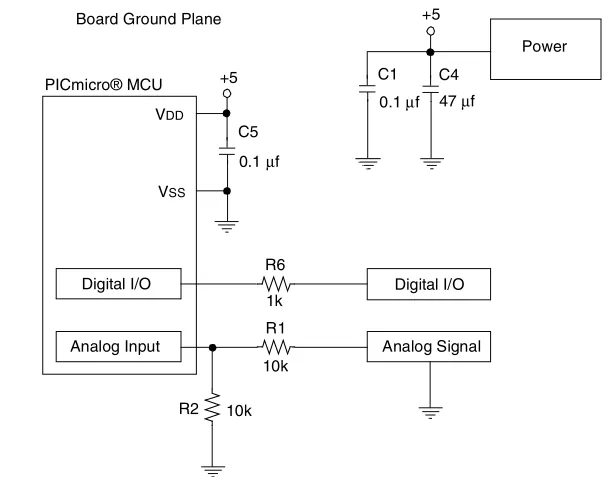
Next, we will create two ground planes: one for the microcontroller and one for the remainder of the board. The ground planes and 5-volt supplies are connected by RC filter networks. The resistors of these filter networks need to be sized according to the maximum allowable voltage difference between the +5 high-power supply and the +5 digital supply. In this design, I am allowing 50 mV of potential difference between the two 5-volt supplies. My current budget for the +5 digital supply is 5 mA. Under these conditions, I can have 10 ohms of resistance between the 5-volt supplies. The 10 ohms of resistance is split evenly between R4 and R5, because it is just as easy for an EFT event to propagate through the supply, as it is to propagate through the ground. Also, the physical placement of these resistors needs to be directly over the gap between the two ground planes. Placing the resistors in such a way forces the EFT event to pass through the resistors without the possibility of coupling around them.
With two ground planes and two 5-volt supplies you will need to pay special attention to how signals are connected to the microcontroller. In general, any signal that crosses over the boundary between the two ground planes must go through a series resistance. The physical placement of this resistor needs to be directly over the gap between the two ground planes. Once the signal passes through this series resistance, it must be referenced to the ground plane that the signal now resides on. The example below is for a digital I/O, but the same technique can also be applied to analog signals.
Example: On the board’s ground plane, the block labeled Digital I/O is a digital input which consists of a common emitter NPN transistor that is used to actuate a relay. The micro’s Digital I/O block is operating as an output. The base of this transistor is connected to the output of the microcontroller through the 1k ohm series resistor. In this case, the emitter of the NPN needs to be referenced to the Board ground. All other parts of the relay circuit need to be referenced to the Board supply and ground. Now, any EFT that occurs in this part of the circuitry has only one path back to the microcontroller and that is through the 1k ohm resistor.
Board Ground Plane
Power
Analog Signal Digital I/O
Analog Input Digital I/O PICmicro® MCU
Noise Source
VSS VDD
R2 10k 10k
R1 R6 1k C5 +5
+5
C1 C4
0.1μf 47μf
The last change made to the design is the splitting of the bulk capacitor so both 5-volt supplies will have some bulk capacitance. This will have very little effect on your EFT performance, but it is done instead for smoothing of the +5 digital supply.
[image:9.612.83.544.140.394.2]The changes to this design that affect the overall board’s cost are the addition of two resistors, a 0.1μF capacitor, and a bulk supply capacitor. These changes should cost approximately 1 to 10 cents depending on the volume, and should significantly improve the EFT performance of your application.
FIGURE 2: DESIGN MODIFIED FOR EFT
Analog Input Digital I/O PICmicro® MCU
VSS VDD
C5 +5 Digital
0.1μf
Micro Ground Plane Board Ground Plane
R2 10k
10k R1 R6 1k
Analog Signal Digital I/O
Noise Source Power +5 High-power
C1 C4
0.1μf 22μf
4.7 R5 R4 4.7 +5 Digital
C3 22μf
Information contained in this publication regarding device applications and the like is provided only for your convenience and may be superseded by updates. It is your responsibility to ensure that your application meets with your specifications. MICROCHIP MAKES NO REPRESENTATIONS OR WAR-RANTIES OF ANY KIND WHETHER EXPRESS OR IMPLIED, WRITTEN OR ORAL, STATUTORY OR OTHERWISE, RELATED TO THE INFORMATION, INCLUDING BUT NOT LIMITED TO ITS CONDITION, QUALITY, PERFORMANCE, MERCHANTABILITY OR FITNESS FOR PURPOSE.
Microchip disclaims all liability arising from this information and its use. Use of Microchip’s products as critical components in life support systems is not authorized except with express written approval by Microchip. No licenses are conveyed, implicitly or otherwise, under any Microchip intellectual property rights.
Trademarks
The Microchip name and logo, the Microchip logo, Accuron, dsPIC, KEELOQ, microID, MPLAB, PIC, PICmicro, PICSTART, PRO MATE, PowerSmart, rfPIC, and SmartShunt are registered trademarks of Microchip Technology Incorporated in the U.S.A. and other countries.
AmpLab, FilterLab, Migratable Memory, MXDEV, MXLAB, PICMASTER, SEEVAL, SmartSensor and The Embedded Control Solutions Company are registered trademarks of Microchip Technology Incorporated in the U.S.A.
Analog-for-the-Digital Age, Application Maestro, dsPICDEM, dsPICDEM.net, dsPICworks, ECAN, ECONOMONITOR, FanSense, FlexROM, fuzzyLAB, In-Circuit Serial Programming, ICSP, ICEPIC, MPASM, MPLIB, MPLINK, MPSIM, PICkit, PICDEM, PICDEM.net, PICLAB, PICtail, PowerCal, PowerInfo, PowerMate, PowerTool, rfLAB, rfPICDEM, Select Mode, Smart Serial, SmartTel, Total Endurance and WiperLock are trademarks of Microchip Technology Incorporated in the U.S.A. and other countries. SQTP is a service mark of Microchip Technology Incorporated in the U.S.A.
All other trademarks mentioned herein are property of their respective companies.
© 2005, Microchip Technology Incorporated, Printed in the U.S.A., All Rights Reserved.
Printed on recycled paper.
• Fixing Transients is Easy • Managing Your Lifeline • Interfacing to the Real World
• Low Cost Method to Improve EFT Performance
ISSUE 2, JANUARY 2005
• The Importance of Capacitance • PCB Layout Fundamentals
• The Art or Science of Component Placement • Every Loop is an Antenna, Like It or Not • Ground Planning Case Study
• PCB Design Techniques for High-speed Digital Systems
ISSUE 1, NOVEMBER 2004
AMERICAS
Corporate Office
2355 West Chandler Blvd. Chandler, AZ 85224-6199 Tel: 480-792-7200 Fax: 480-792-7277 Technical Support: http://support.microchip.com Web Address: www.microchip.com Atlanta Alpharetta, GA Tel: 770-640-0034 Fax: 770-640-0307 Boston Westborough, MA Tel: 774-760-0087 Fax: 774-760-0088 Chicago Itasca, IL Tel: 630-285-0071 Fax: 630-285-0075 Dallas Addison, TX Tel: 972-818-7423 Fax: 972-818-2924 Detroit
Farmington Hills, MI Tel: 248-538-2250 Fax: 248-538-2260 Kokomo Kokomo, IN Tel: 765-864-8360 Fax: 765-864-8387 Los Angeles
Mission Viejo, CA Tel: 949-462-9523 Fax: 949-462-9608
San Jose
Mountain View, CA Tel: 650-215-1444 Fax: 650-961-0286 Toronto Mississauga, Ontario, Canada Tel: 905-673-0699 Fax: 905-673-6509
ASIA/PACIFIC
Australia - Sydney
Tel: 61-2-9868-6733 Fax: 61-2-9868-6755
China - Beijing
Tel: 86-10-8528-2100 Fax: 86-10-8528-2104
China - Chengdu
Tel: 86-28-8676-6200 Fax: 86-28-8676-6599
China - Fuzhou
Tel: 86-591-8750-3506 Fax: 86-591-8750-3521
China - Hong Kong SAR
Tel: 852-2401-1200 Fax: 852-2401-3431
China - Shanghai
Tel: 86-21-5407-5533 Fax: 86-21-5407-5066
China - Shenyang
Tel: 86-24-2334-2829 Fax: 86-24-2334-2393
China - Shenzhen
Tel: 86-755-8203-2660 Fax: 86-755-8203-1760
China - Shunde
Tel: 86-757-2839-5507 Fax: 86-757-2839-5571
China - Qingdao
Tel: 86-532-502-7355 Fax: 86-532-502-7205
ASIA/PACIFIC
India - Bangalore
Tel: 91-80-2229-0061 Fax: 91-80-2229-0062
India - New Delhi
Tel: 91-11-5160-8631 Fax: 91-11-5160-8632
Japan - Kanagawa
Tel: 81-45-471- 6166 Fax: 81-45-471-6122
Korea - Seoul
Tel: 82-2-554-7200 Fax: 82-2-558-5932 or 82-2-558-5934
Singapore
Tel: 65-6334-8870 Fax: 65-6334-8850
Taiwan - Kaohsiung
Tel: 886-7-536-4818 Fax: 886-7-536-4803
Taiwan - Taipei
Tel: 886-2-2500-6610 Fax: 886-2-2508-0102
Taiwan - Hsinchu
Tel: 886-3-572-9526 Fax: 886-3-572-6459
EUROPE
Austria - Weis
Tel: 43-7242-2244-399 Fax: 43-7242-2244-393
Denmark - Ballerup
Tel: 45-4450-2828 Fax: 45-4485-2829
France - Massy
Tel: 33-1-69-53-63-20 Fax: 33-1-69-30-90-79
Germany - Ismaning
Tel: 49-89-627-144-0 Fax: 49-89-627-144-44
Italy - Milan
Tel: 39-0331-742611 Fax: 39-0331-466781
Netherlands - Drunen
Tel: 31-416-690399 Fax: 31-416-690340
England - Berkshire