
SETH: A Hierarchical, Agent based Architecture for Smart Spaces
56
0
0
Texto completo
(2) Departamento de Automática, Universidad de Alcalá, SPAIN. 1.
(3) Abstract The ultimate goal of any smart environment is to release users from the tasks they usually perform to achieve comfort, efficiency, and service personalization. To achieve this goal, we propose to use multiagent systems. In this report we describe the SETH architectur: a hierarchical, agent-based solution intended to be applicable to different smart space scenarios, ranging from small environments, like smart homes or smart offices, to large smart spaces like cities..
(4) Contents 1 Introduction. 3. 2 Related Work 2.1 Smart Environments and Software Agents 2.2 Context-aware systems . . . . . . . . . . . 2.3 Service Personalization in Smart Spaces . 2.4 Security Issues in Pervasive Computing .. . . . .. 5 5 6 6 7. 3 A Hierarchy of Smart Spaces 3.1 iEAP Devices . . . . . . . . . . . . . . . . . . . . . . . . . . . . . 3.2 iEAP Software Agents . . . . . . . . . . . . . . . . . . . . . . . .. 9 10 12. . . . .. . . . .. . . . .. . . . .. . . . .. . . . .. . . . .. . . . .. . . . .. . . . .. . . . .. . . . .. 4 Mobile agents for service personalization: the Personal Agent 14 5 Service Discovery and Access to Services 18 5.1 Service Discovery . . . . . . . . . . . . . . . . . . . . . . . . . . . 18 5.2 Access to services . . . . . . . . . . . . . . . . . . . . . . . . . . 20 6 User-system interaction: interface devices and agents. 22. 7 Personal Mobile Devices and Virtual Smart Spaces. 26. 8 Following the User throughout the Smart Spaces: Non-persistent Service Agents 31 9 Multiple users and shared services. 34. 10 Sensing the environment: the Context Agents 37 10.1 Context generation and context subscription . . . . . . . . . . . . 38 10.2 Context interpretation, aggregation and discovery . . . . . . . . . 39 11 Security architecture 11.1 Message authentication, confidentiality and integrity 11.2 Key Distribution and User Personal Devices . . . . . 11.3 User, Device and Agent Authentication . . . . . . . 11.4 Authorization and delegation . . . . . . . . . . . . . 11.5 Handling agent mobility . . . . . . . . . . . . . . . . 12 Conclusions and future work. . . . . .. . . . . .. . . . . .. . . . . .. . . . . .. . . . . .. . . . . .. 42 43 44 45 46 48 49. 1.
(5) Bibliography. 51. 2.
(6) Chapter 1. Introduction Our research focuses on using agents to automate routine tasks usually performed by users, in order to provide them with both more comfort and efficiency at home, in organizations and institutions. The main line of research in our group is to identify tasks usually performed by humans which may be automated and to develop agent-based systems to automate them. Most of the tasks performed by humans involve some sort of interaction with the environment, both to personalize it and to access the different services and resources available. Therefore,one of the main lines of research in agent technology is using software agents to automate environment personalization, so that users are released from the routine tasks they should perform otherwise to change their environment to suit their preferences and to access the available services. The goal we seek is a smart environment, able to adapt itself to the user needs and to provide customized interfaces to the services available at each moment. To achieve this goal, we use multi-agent systems, as they have been revealed as a good technology for the development of distributed, autonomous, and intelligent systems. In our previous work [1, 2] we designed and implemented an agent-based software architecture for smart homes. We are now extending this architecture to make it applicable to other environments as well. In particular, we have developed a hierarchical, modular architecture, which we call SETH (Smart EnvironmenT Hierarchy). The architecture can be deployed in layers, which allows to create complex smart environments by combining, for instance, a certain number of smart rooms to create a smart building and a certain number of smart buildings and smart outdoor spaces to create a smart city. The rest of this paper is organized as follows. Chapter 2 recalls the most relevant previous works our research is related to. Chapter 3 outlines our architecture for smart spaces, describes the application scenario and summarizes the different devices and software agents present in the system. The following chapters cover the different subsystems of the SETH architecture. Chapter 4 covers personal agents, showing the role they play in service personalization and how they are used to achieve that personalization. Service discovery and access to services is detailed in chapter 5. Interface services are an important subset of services and chapter 6 is dedicated to cover them. Chapter 8 describes the usage of mobility and non-persistent service agents to allow services to “follow” the user through different spaces. Context agents and context management 3.
(7) are widely discussed in chapter 10. Finally, the security architecture for the SETH system is outlined in chapter 11. The last chapter summarizes our main contributions and sheds light on some future research.. 4.
(8) Chapter 2. Related Work Our work is based on a number of previous findings from other authors on different fields like software agents, smart environments, context-aware systems, service personalization and security in pervasive computing . In this chapter we provide a brief outline of each field, discussing both its objectives and the state of different research lines.. 2.1. Smart Environments and Software Agents. We can define a smart environment as one that is able to acquire and apply knowledge about its inhabitants and their surroundings in order to adapt to the inhabitants and meet the goals of comfort and efficiency [3]. These goals are normally directed to adapt the environment to the user preferences, to increase the performance of the user in his day-to-day tasks, and to optimize the energy consumption of the systems involved. To meet these goals, a smart environment system is based on a set of devices which gather information about the environment -sensors- and a set of devices able to actuate over the environment to change its conditions -effectors-. The system will process the data collected by the sensors and, according to the predefined set of goals-, will use the effectors to alter the user environment. How the system decides the necessary actions depending on the information provided by the sensors is the key problem in domotics, as it requires analyzing data from several different sources distributed throughout the entire house, and coordinating equally heterogeneous effectors. These considerations lead to requirements of distributed data mining, autonomy and intelligence that suggest the use of software agents to develop this kind of system. There are different definitions for software agents. From the viewpoint of design and technology, we can define a software agent as a self-contained program capable of controlling its own decision making and acting, based on its perception of its environment, in pursuit of one or more objectives [4]. From a functional, user’s perspective, a software agent can be seen as a software entity to which tasks can be delegated [5]. This last definition, though simpler, suggests more clearly how this technology can serve the problem of intelligent automation of the environment. A multiagent system provides a distributed and flexible framework and communication and negotiation mechanisms among. 5.
(9) its components that allows them to make complex decisions in an effective and efficient way.. 2.2. Context-aware systems. One of the key features of smart spaces is their ability to adapt themselves to the preferences, desires and needs of their inhabitants. To achieve this ability, smart spaces must be able to acquire knowledge about the inhabitants and their surroundings. The information upon which this knowledge is built is called context [6]. Context information in smart environments is usually gathered through the use of heterogeneous sensors distributed throughout the entire space. Furthermore, information must be processed in real time, so that the systems may react to changes in the environment in a timely fashion. Existing systems cover different domains such as tourist guides [7], indoor information systems [8], and smart environments, e.g. The Essex intelligent dormitory, iDorm [Hagras et al 2004][9]; The Gator Tech Smart House [10]; and the MavHome [11]. These types of systems gather contextual information through sensors placed in the environment, the information is reasoned, and actions are taken to automate features of the environment. Thereby it is necesary to make a decision before taking an action, and this requires an efficient context management. There are two ways to allow it [12]: context models and contextual ontologies. Context models provide access to contextual information similar to a database, whereas contextual ontologies represent knowledge about context.. 2.3. Service Personalization in Smart Spaces. There are vastly different lines of research regarding smart environments and service personalization. Our work is closely related to those involving potentially large environments such as workplace buildings and cities, those involving hierarchical arrangement of smart spaces, and those taking advantage of multiagent systems. Both the i-Room [13] and Gaia [14] present smart office application scenarios. i-Room focuses on human computer interaction (HCI) in a single interactive meeting room. Gaia defines Active Spaces as physical spaces coordinated by a responsive context-based infrastructure. This infrastructure is made available to service applications by means of an operating system (Gaia OS), which provides context and event management services to running programs. As a future work, the Gaia team plan to federate Gaia Services to aggregate different active spaces. Cooltown [15] uses the technologies behind the Web to provide pervasive nomadic computing in urban environments. In Cooltown, interest places and resources are tagged with URLs or other identifiers that can be retrieved by users’ personal devices by means of bar codes, RFIDs or IR transceivers. URLs may be used to access the different services related to their associated points of interest, and other identifiers (such as ISBN codes) may be resolved to URLs which link to the services related to the identified item. Resources are grouped in places, and for each defined place there is a place manager, which maintains directories of resources, acting both as a resolver for looking up resources in that place from their identifier and as a Web server providing information about. 6.
(10) resources. The Galaxy Service Model [16] is intended to provide a hierarchical service structure for a Smart Space Laboratory. Galaxy uses a set of smart devices, which are called u-Textures and Smart Furnitures. These devices may be aggregated to form a Smart Space Laboratory. The Galaxy Service Model allows to export services provided by the different smart devices to create applications, which can be composed into other applications, resulting in a multi-layered service composition. Service discovery is performed hierarchically. COBRA [17] takes advantage of multiagent systems to develop context-aware applications. It is based on a broker-centric architecture used to provide runtime support for context awareness in an Intelligent Meeting Room. In COBRA, the environment is divided in domains, and there is a broker for each domain, which is an autonomous agent that manages and controls the context model of the specific domain. Though COBRA brokers are intended mainly for context sharing, its centralized approach to management in each domain and the possibility of sharing context between domains through context federation is closely related to the approach we have taken in this work to develop our hierarchical architecture for smart spaces.. 2.4. Security Issues in Pervasive Computing. From a functional point of view, security is intended to assess the risks present on a given environment and to develop safeguards and countermeasures to protect the environment and its users from those risks [18]. Some of the key services security must provide are confidentiality and integrity of interchanged information, authentication of communicating parties, access control and key management. Confidentiality is the protection of information in the environment from unauthorised access. In smart spaces, the term information acquires a unique perspective [19]. The computer systems involved are potentially capable, as a whole, of sensing nearly every aspect of interactions between users and the environment or among users themselves, and all sensed information has the potential of being stored, transmitted, queried and replayed. In environments like smart offices, some of this information will need to be protected due to its business-related sensitivity, but a great deal of the information sensed by the system will be personal information about users. Therefore, apart from the confidentiality issues usually present in information systems, new confidentiality concerns raise regarding users privacy [20]. Even when the sensible information is protected using cryptographic mechanisms, in smart spaces there is the risk of traffic analysis to obtain some information, for example, when a device is being used. This risk is increased by the use of wireless technology. Integrity guarantees that only authorized parties are able to modify information in the environment, be it by alteration, repetition, removal or delay of stored information or messages between entities. Code integrity must be provided as well, specially in system where mobile code is allowed. As with confidentiality, protection of stored and transmitted information has been traditionally achieved through cryptographic means. Authentication of devices within the smart space can take advantage of existing approaches for computer and network security. Public or private key cryptography can be used to authenticate information interchanges between de-. 7.
(11) vices, taking into accout the considerations about resource limitations stated above. However, due to the largely decentralised and dynamic nature of smart spaces, key management is the main problem we encounter when dealing with authentication in these environments. Solutions that rely on connectivity to an authentication or revocation server, from Kerberos to public-key certificates, can only be applied to smart spaces where we can assume a hierarchical arrangement of principals, and where addition and removals of principals in the system may be controlled. In [21] such a centralised approach is applied to a smart home, and we will show later its aplicability to smart offices as well. In smart spaces where devices communicate through ad-hoc networks and where devices need to be added and removed easily secure transient associations are used to provide authentication in a distributed manner [22]. Access control intends to ensure that only authorised parties are allowed to perform security-sensitive actions. In smart office scenarios access control policies may become very complex, due to the different roles played by users in the office. One solution to model such scenarios is Role-based Access Control [23], or its extension to take into consideration evironmental information defining environmental roles [24]. Closely related to access control is delegation [25], which acquire special importance in scenarios like smart offices.. 8.
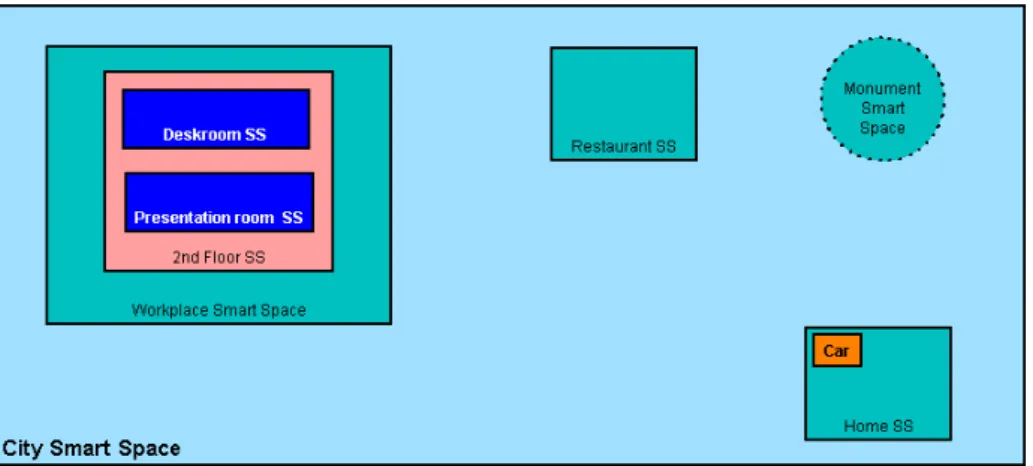
(12) Chapter 3. A Hierarchy of Smart Spaces Our architecture relies on the concept of smart spaces, which are specific, selfcontained locations within the environment. From a functional point of view, a given smart space A is characterized by a set of devices DA , a set of available services SA , and a given context CA . Smart spaces may be indoor or outdoor spaces, and they may be also static or mobile -e.g. a smart car-. Smart spaces (SSs) may be hierarchically arranged if the specific characteristics of the environment require so. For example, in a smart office we may have a Building Smart Space, which may also contain several Floor Smart Spaces, each one containing several smarts spaces related to deskrooms, corridors, elevators... This hierarchical approach allows us to provide different layers of services, context information, and security. In our demonstration scenario, which we will keep referring to through the rest of this document, we consider a city smart space, which contains three indoor smart spaces, home, restaurant and workplace, and an outdoor smart space monument. The workplace smart space contains the space secondF loor, which also contains the spaces deskroom and presentationRoom. We consider also a mobile smart space car. Figure 3.1 illustrates the hierarchy of smart spaces in the described scenario.. Figure 3.1: The iEAP application scenario. 9.
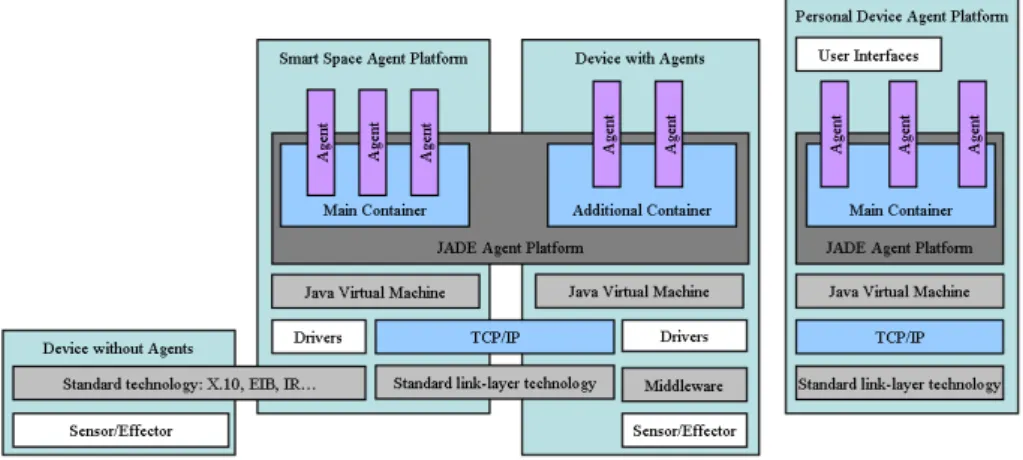
(13) Inheritance rules may be established in the hierarchy to govern which context information, services and devices are available to a given user or agent at a specific location. In general, given two smart spaces A and B so that B contains A -and we denote that as A ⊂ B-, a user located at A will see a set of available services S = SA ∪ SB→A where SB→A ⊂ SB is the subset of services of the smart space B which are available in the smart space A. In our demonstration scenario inheritance rules allow, for example, that users within the home space may access city-level services such as weather or traffic reports. Aggregation rules may also be established so that a smart space may export services to other spaces located at higher levels in the hierarchy. In general, given two smart spaces A and B so that A ⊂ B -, a user located at B will see a set of available services S = SB ∪ SB←A where SB←A ⊂ SA is the subset of services of the smart space A which are available in the smart space B. In our demonstration scenario aggregation rules allow, for example, that users within the cityspace may access reservation services provided by the restaurant space. Inheritance and aggregation rules may be combined to allow, for example, that users within the home space have access through inheritance to the reservation service which is provided at the restaurant space, but has been made available to users in the city space by means of aggregation.. 3.1. iEAP Devices. To meet its goals, the architecture relies on a set of devices distributed throughout the environment. According to the degree of autonomy and intelligence provided by the devices, mainly determined by its computational capacity to include agents, we can divide the devices we can find in a given iEAP smart space in four groups: Smart Space Agent Platform (SSAP). It contains the agent platform which supports the existence of all other agents in the smart space. It specifically hosts the general purpose service and system agents, that is, all those agents that actuate at a global level in the space, without being associated to a specific sensor or effector. Generally, the SSAP contains the higher level agents of the system. It also contains those agents used to control non-intelligent devices, that is, devices with not enough processing or storage resources to host their own agents. Every smart space in the iEAP must have its own SSAP. Devices with Agents. Sensors and effectors with a certain degree of autonomy, usually provided by agents running over an embedded Java virtual machine. Devices without Agents. Sensors and effectors without autonomy or intelligence, controlled from the SSAP. Identification Devices. Each user must carry a mobile device, which is used to identify the user to the system and determine user location within the smart environment. The functionality of this device is very similar to that of the Active Badge in [26]. Though it may be possible to provide certain services to anonymous and/or unlocated users, we will focus in this work in service. 10.
(14) Figure 3.2: The iEAP architecture personalisation, and thus we will assume the system is able to identify and locate its users. A description of our first implementation of an identification and location system based on Bluetooth technology is provided in [27]. Personal Devices. If the user wants to have access to personalised services within the space, he is encouraged to carry a handheld, mobile device -cell phone, PDA- which not only may provide the functionality of the indentification devices above, but also hosts the necessary agents to learn, maintain and try to satisfy user preferences, and to display the adequate interfaces to the available services when needed. Personal devices are intended to move through different smart spaces in the building and even through different buildings. To provide this degree of self-containment and mobility, the Personal Device generates a virtual smart space, which is placed in the hierarchy just below the smart space the user is located in. More about personal devices and virtual smart spaces can be found in chapter 7. Devices without Agents depend directly on the SSAP, and they are linked to it by means of standard communication technologies, like X.10 or EIB for typical smart home devices or IR for remotely controlled appliances. Devices with Agents, Personal Devices and the SSAP can communicate using TCP/IP. Though any link-level technologies can be used, we have a preference for wireless communication protocols -Bluetooth, WLAN...-. Fig. 3.2 shows the system architecture, where the different communication layers can be seen. The system has been developed over the open-source agent platform JADE1 . Using an already established agent platform releases us from the low-level tasks about agent life-cycle and message interchange. Using Java language ensures code portability to different machines. Furthermore, JADE complies to the specifications of FIPA 2 , which guarantees a certain degree of interoperability with other agent-based systems. Note that the JADE platform extends to all elements in the smart space containing agents, and those agents exist inside a container associated to each element. The SSAP hosts the main container of the platform. The personal devices have their own JADE agent platforms. Communications between different smart spaces, whether they are at the same 1 Java. Agent DEvelopment framework (http://jade.cselt.it) for Intelligent Physical Agents (http://www.fipa.org). 2 Foundation. 11.
(15) level in the hierarchy or not, are treated as inter-platform communications and are performed via TCP/IP.. 3.2. iEAP Software Agents. As we have stated before, our smart spaces rely on software agents to provide their functionality. We may find different kinds of software agents in a typical iEAP smart space: • Smart Space Coordination Agent (SSCA): Provides device and service discovery to all other users or agents in the smart space, and to SSCAs of other smart spaces. It resides in the SSAPs. • Device agents: They are the agents directly controlling the devices within the smart space. They provide a unified interface to devices, so that other agents in the system may use them regardless of specific hardware issues. They are usually attached to the devices themselves, outside of the SSAP. • System Agents: They reside in the SSAP, and add an additional layer of intelligence on top of the devices in the environment through control and coordination mechanisms, providing functionality directly related to building management and security. Security agents and context agents fall into this category. Context agents and context management are widely discussed in chapter 10. The security architecture for the iEAP system is presented in chapter 11. • Service Agents: These agents are intended to provide services directly to the user, and usually upon user’s request. They may rely on device agents, system agents or other service agents to provide their functionality. In the iEAP architecture, we distinguish two different classes of service agents: – Persistent Service Agents: These agents provide services directly related to each specific smart space, such as climatization, lighting, or interfaces to other services available in the space. Those services are usually required to be available at any moment to every user in the space, and so these agents are always active in the SSAP. – Non-persistent Service Agents. These agents provide services more related to the user, such as content access or unified messaging. They are created by the SSCA for each request of the service and destroyed once the use of the service has concluded. To allow these services to “follow” the user as he moves throughout the environment, these agents are able to move from one SSAP to another when user location changes. Service discovery and access to services is detailed in chapter 5. Interface services are an important subset of services and chapter 6 is dedicated to cover them. Chapter 8 describes the usage of mobility and nonpersistent service agents to allow services to “follow” the user through different spaces.. 12.
(16) • Personal Agents (PA): Personal agents are directly associated to users. Each personal agent learns its user preferences and tries to adapt the environment to suit those preferences. Personal agents may issue requests to system, service and device agents on behalf of their users, and they can even negotiate with other personal agents when different user preferences raise conflicts. Personal agents are the very representatives of users to the environment, and they play a key role to achieve the perception of “smartness” from the users.. 13.
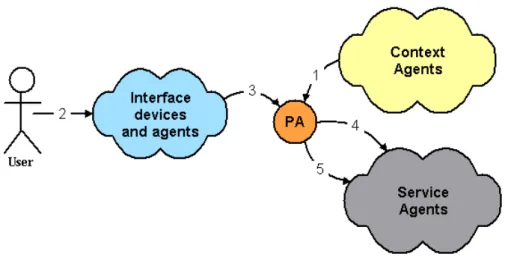
(17) Chapter 4. Mobile agents for service personalization: the Personal Agent The ultimate goal of any smart environment is to release users from the tasks they usually perform to achieve comfort and efficiency. We approach this problem by placing software agents between the users and the environment. In particular, in the iEAP system we use Personal Agents (PAs) as the final intermediaries between the users and the different available services. Any specific service request coming from the user is directed to the personal agent, which then forwards the request to the appropriate service agent. In this way, a personal agent is aware of the different service requests made by its associated users. This, along with the knowledge about the context of every specific request, allows the agent to learn user preferences by using automated learning techniques such as the classical apriori algorythm [28], and thus to anticipate her desires and try to satisfy them in advance by issuing automated service requests on behalf of the user. Interaction between the user and the service agent is usually performed through the use of context and interface agents. Figure 4.1 shows an example of such an interaction. Imagine a given user is in the presentationRoom space. This information is notified to the PA by the context agents (1). If the user acts over the light control panel to dim the lights (2), this action causes a message to be sent (3) to the user’s personal agent requesting the specific action -e.g. “dim the lights down to half intensity”-. The PA then forwards the request to the appropriate service agent (4), which finally performs the operation. Eventually, the personal agent may learn that its associated user always sets the lights to half intensity after turning on the projector, being able to anticipate this action in subsequent times by requesting the service automatically on behalf of the user (5). Detailed descriptions about the processes concerning service, interface and context agents are given in chapters 5, 6 and 10, respectively, so we will not cover them here. Personal agents are the agents responsible of enforcing user preferences, and they need to be contacted whenever their associated users request a service. This may produce a high amount of messages in an application scenario with 14.
(18) Figure 4.1: The Personal Agent as an intermediary between the user and the system a certain number of potential users and available services. Should the personal agents be static, there would be a significant increase of inter-platform communication and bandwith consumption when the user left the smart space where her personal agent resided. Taking this into account, personal agents in the iEAP architecture move from one smart space agent platform to another when required, thus effectively following user movements throughout the environment. Personal agents reside originally in a given smart space, which is called the PA’s home agent platform (HAP). A personal agent’s HAP is the SSAP which created the PA, and is usually associated to the user’s residence. The address of the personal agent of a given user is stored in her identification device, so that any SSCA can know where to locate the PA of any identified user. A personal agent is invited to move to a SSAP when a service that can be personalized to the user becomes active. This can be triggered by a direct intervention from the user -e.g. the user activate an interface panel- or be automatic -e.g. a user enters a smart space where lighting can be personalised-. Anyway, it is the user’s PA who makes the decision of moving to the inviting SSAP. The reasons because of which a personal agent may refuse to move to a SSAP can be diverse, ranging from knowledge that its associated user does not require personalisation for a given service -e.g. lighting- to security reasons -e.g. the inviting SSAP is not trusted-. If the PA accepts the invitation, it clones itself at its HAP to save current state and moves to the inviting SSAP, where it resumes execution and starts providing service personalization to its user. When the user leaves the smart space, the PA returns to its HAP, synchronizing any changes on the user model with the clone. Cloning is used to protect the integrity of the personal agent. Since a user may move through many smart spaces in the hierarchy tree, moving the PA back to its HAP whenever the user moves may be very inefficient. Instead, the personal agent leaves a SSAP only when its associated user requests personalised services in another SSAP or when she enters a smart space that is at the same level or higher in the hierarchy tree. Then the PA moves to the smart space the user has entered if it is not an ancestor of the agent’s HAP 15.
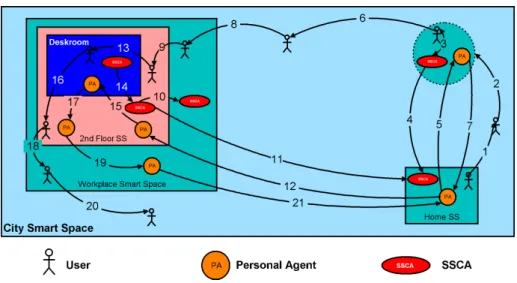
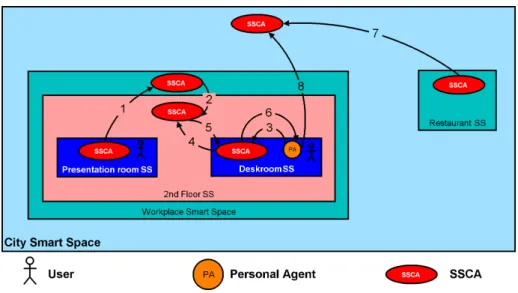
(19) Figure 4.2: Personal agent mobility in the hierarchy tree, otherwise it returns to the HAP. In the same way, the personal agent of an identified user is first searched for at the immediate upper level in the hierarchy tree. If it is not there, the next upper level is searched for, unless that level is an ancestor of the HAP. In that case, the PA is searched for at its HAP. Figure 4.2 illustrates personal agent mobility in our application scenario. Both the user Bob and its personal agent reside in the home smart space, which is also the home agent platform (HAP) of the PA. Bob now leaves his home and goes for a walk through the city (1). His personal agent notices Bob is not home, and performs any necessary actions in the home smart space accordingly -e.g. turn off the lights-, but stays at its HAP as long as Bob does not need any service. Now Bob approaches the monument smart space (2) and presses the button of an interface panel there. The SSCA at the monument (SSCAmonument ) identifies Bob through his ID device, and gains from this device the address of the personal agent (3). This address is of the form [email protected]. Since the monument is at monument.city (at the same level in the hierarchy than the HAP of the PA), SSCAmonument contacts SSCAhome (4) to request the PA to move to the monument smart space. The PA agent is cloned and then transferred to the monument SSAP (5), where it can attend Bob’s request. Bob now leaves the monument and heads towards his workplace (6). Bob is now at city level, which is higher in the hierarchy than the agent’s HAP, so the PA moves back to home (7), synchronizing any changes on the user model with the clone. When Bob enters his workplace building (8) he does not request any service, so there is no need for the personal agent to move from its HAP. First interaction with the system at the workplace is at the second floor, when he activates a interface panel there (9). This is again a request for a personalizable service (the user is requesting an interface which could be personalized), so SSCAsecondF loor tries to find Bob’s personal agent. Again, the address aquired from the ID device is [email protected], and the secondF loor is at secondFloor.workplace.city, so SSCAsecondF loor asks SSCAworkplace (10) and, since the PA is not there and the same hierarchy level than the HAP has 16.
(20) been reached, it finally asks SSCAhome (11), which confirms the presence of the personal agent in the HAP. As in the previous case, the PA migrates from its HAP to the secondF loor (12), where it can provide its user the presonalized services requested. Now Bob enters his deskroom (13). As the deskroom smart space is lower in the hierarchy (it is at deskroom.secondFloor.workplace.city) there is no need for the personal agent to move if Bob does not request a specific service. However, an automatic lighting personalization service is available at this space, and the SSCAdeskroom tries to find the PA to see if Bob may desire to have this service. Following the same strategy that in the previous cases, it first asks SSCAsecondF loor (14). The personal agent is in the secondF loor SSAP, so no more searches are needed and the PA moves to the deskroom SSAP (15). After some hours of work at his deskroom, Bob decides to go home. He leaves the deskroom (16) and the second floor (18), and his personal agent follows him (17 and 19, respectively), as, though he is no requesting any service, he is moving to upper levels in the hierarchy tree (secondfloor.workplace.city and workplace.city). When he lefts the workplace (20), the PA returns to the HAP (21), since the city smart space is higher in the hierarchy tree than the home. When Bob arrives home, he will find his personal agent there taking care of his preferences. For users not having their own personal agents (e.g. casual visitors to the city), the system can generate temporary PAs for them with a basic set of preferences, which can be then updated through configuration or experience as usual. For this to be feasible, there must be a Temporary PAs HAP, which is in charge of generating those agents, synchronizing the changes on them, and destroying them when they are no longer necessary. In our application scenario, this temporary HAP is at city level (with address visitors.city).. 17.
(21) Chapter 5. Service Discovery and Access to Services In the previous chapter, we have seen how Personal Agents move through the different SSAPs, following the movements of their associated users to provide personalized services at each location. But in order to provide this personalization, personal agents need to know which are the services available, and how to access them.. 5.1. Service Discovery. Service discovery functionality is provided by the Smart Space Coordination Agents (SSCAs). As the coordinator of a given smart space, an SSCA must be aware of all agents present in the space, and all the services they may provide. This is accomplished through a process of registration whenever a new agent or device is added to the smart space. The registration process takes advantage of the directory services provided by the FIPA DFs [29], and it is not detailed here. Let us assume that the SSCA knows all devices, agents and services available at its associated smart space. The address to the SSCA of a given smart space is provided by the context agents when the PA enters the associated SSAP, so let us also assume that the personal agent knows the addresses of all relevant SSCAs in the hierarchy. If not, it can always query the context agents for the SSCA of a given SSAP in the hierarchy tree. At any given time a personal agent can query the SSCA at its SSAP for a list of available services. Queries may be general or specific -i.e. request a list of all available services which meet certain characteristics-. The returned list of services includes the name of the service, the service agents that provide them, and the service description, which in turn contains the information needed by the PA to know how to access the service. As we stated in chapter 3, services may be inherited from higher levels in the hierarchy or aggregated from lower levels. Services may be inherited or aggregated at the SSCA level or at the personal agent level. Inheritance or aggregation at the SSCA level occurs when an SSCA is interested in providing a service available at another SSAP. In this case, the SSCA adds the service to its list of available services, providing the address to the agent who provide the 18.
(22) Figure 5.1: Inheritance, aggregation and service discovery service at the remote SSAP. In our application scenario, service inheritance at the SSCA level is provided automatically, that is, all SSCAs query regularly their upper level SSCAs to see which services are available for inheritance. Service aggregation is provided by a subscription mechanism. Lower level service agents subscribe to upper-level SSCAs to have their services made available to users at the upper levels of the hierarchy. In scenarios with many levels in the hierarchy, automatic inheritance and aggregation may result in huge lists of available services. We solve this by limiting automatic inheritance and aggregation to a small subset of services, and providing extended search services at the SSCAs only when specific service discovery queries yield void results -i.e. a given service is not found within the list of available services, and the search is propagated to selected SSCAs at higher and lower levels to see if the service may be provided at another SSAP-. Inheritance and aggregation of services at the personal agent level can be performed at any time by issuing direct queries from the PA to the corresponding SSCAs. We can see an example of service aggregation, service inheritance and service discovery for our application scenario in Figure 5.1. There is a user directory service at the presentationRoom smart space, which the corresponding SSCA (SSCApresentationRoom ) has had aggregated at workplace level (1). This user directory service is inherited by the SSCAsecondF loor to be provided at floor level (2). User Alice is in her deskroom, and her associated PA knows she has an appointment to have lunch with user Bob at the restaurant in an hour. The personal agent decides to notify Bob, but it does not know where he is, though based on the experience of another days he is probably at the presentation room. To confirm that, the PA queries the SSCAdeskroom for a directory service for the presentation room (3). SSCAdeskroom has not such service in its list, but it propagates the query up in the hierarchy (4), receives from SSCAsecondF loor (5) the information requested, and finally forwards it to the PA (6). After being able to locate Bob and remind him of the meeting, Alice personal agent decides to. 19.
(23) make a reservation in a restaurant. The SSCA at the restaurant has previously advertised its reservation service to SSCAcity (7), but none of the SSCAs of the building have inherited that service, nor are they willing to propagate service discovery requests for this kind of services (e.g. it may be against their business policy). So, perhaps after a series of unsuccessful searches at floor and workspace level, Alice’s personal agent will have to send its query directly to SSCAcity (8) to find the agents who are providing restaurant reservation services.. 5.2. Access to services. To access to a given service, a PA only need to send a request message to the agent providing that service. The service agent will then attemp to provide the service, usually by requesting actions to other service, system or device agents. However, the process may be slightly more complex depending on the kind of service requested. As we mentioned in Section 3.2, there are services directly related to each specific smart space, such as climatization, lighting, or interfaces which are required to be available at any moment to every user in the space, and so they are provided by persistent service agents. These agents are always active in the SSAP, and their addresses are specified in the service lists returned by the SSCA, so that any PA can request services directly to these agents at any time. However, there are other services, such as content access or unified messaging, which are more directly related to the user who requests them, and they are provided by non-persistent service agents, which are created for each specific request for the service and destroyed once the service has been provided. The SSCA uses a special address value in the list of available services to indicate which services are provided by non-persistent agents. If a PA wants to access a service provided by a non-persistent agent, it must first request the SSCA to create the agent. The non-persistent agent is created and its address returned to the PA, so that it can issue the service request as in the previous case. Figure 5.2 illustrates a typical service access case in the SETH system. User Alice enters the presentationRoom smart space. The personal agent arrives to the presentation room SSAP through one of the processes described in chapter 4. Context agents notify both the PA and SSCApresentationRoom of this event (1). The personal agent, knowing that its user is going to make presentation using a slideshow document, asks SSCApresentationRoom for an agent providing a presentation service (2). No such agent is persistently active in the SSAP, so SSCApresentationRoom creates an instance of a Non-persistent Presentation Service Agent (NPPSA) (3) and returns its address to the PA(4). The personal agent then contacts the NPPSA and requests it to present a slideshow of a given document stored in the computer at Alice’s deskroom (5). Then the NPPSA contacts SSCAdeskroom to learn who to ask for the document (6). He is given the address of a persistent File Transfer Service Agent (FTSA) (7), which the NPPSA contacts to request the file (8). The FTSA obtains the file from the device agent (DA) associated to the Alice’s desktop computer (9) and transfers it to the NPPSA (10). Finally, the NPPSA requests the device agent of the projector in the presentation room to display the slideshow presentation (11). Any typical interaction such as the described above may involve service discovery requests to different SSAPs, requests to service and device agents, and. 20.
(24) Figure 5.2: Access to services even access to resources within the user’s desktop computers. This flexibility of the interaction mechanism provided by agents greatly improve functionality of the smart space, but also raises some relevant security concerns that must be addressed in order to ensure there is no misuse of the provided infrastructure. An analysis of the security considerations in smart spaces and a proposal of a security architecture for the iEAP is provided in Chapter 11.. 21.
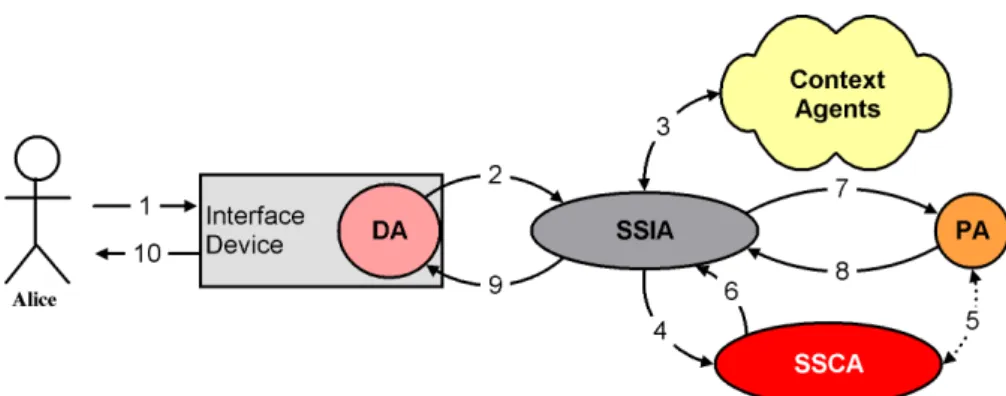
(25) Chapter 6. User-system interaction: interface devices and agents Ideally a smart space should be able to anticipate to the desires of its inhabitants and adapt the environment accordingly to suit their needs at every moment. However, the inherent complexity of human beliefs, desires and intentions makes this impossible to achieve completely in the real world. The preferences of a given user may be unknown to the system, for example, when it is the first time a user enters a given space. Even if the user preferences are known, they may change over time, or they may be affected momentarily by facts unknown to the system. Sooner or later the user will need something different than what the system thinks she needs, and there must be a way for the user to express that to the system. Furthermore, the system may need to communicate with the user, for example, to ask for details about how to provide a service or for a confirmation before automatically performing some sensitive action. Therefore, smart spaces cannot rely only in proactivity, but also need a certain degree of interactivity. In the iEAP architecture, this degree of interactivity is provided by the interface devices and agents. Any devices which may allow the user to interact with the system in any way can be used as interface devices. This includes devices able to show information to the user, like TV and computer screens or speakers, and devices which can be used by the user to give information to the system, like remote controls or keyboards. We can even imagine a light bulb used as an interface device, emitting flashes to notify a deaf user which is away from his computer about the reception of an email. As described in Chapter 3.2, devices are controlled by device agents (DA), which may reside in the devices themselves or in the SSAP. To provide the interface services through these devices, a Smart Space Interface Agent (SSIA) is always active in each SSAP. The SSIA receives the requests for interaction, formats the information accordingly with the devices or agents involved and forwards them to the approppriate destination. We can distinguish different classes of user-system interactions, depending on the initiator of the interaction and the kind of devices used as interfaces. The simplest user-system interactions are initiated by the system, as shown in Figure 6.1. An agent (usually the Personal Agent) wants to communicate with. 22.
(26) Figure 6.1: An agent requests to interact with the user through an interface the user, and requests the SSIA (1) to launch the interaction. The request must include the information to be shown and some formatting guidelines, along with any response requirements from the user. In the current implementation, interactions are specified using XML. As an option, the request may include also user preferences about interfaces, such as color schemas or resolution for image display or volume for acoustic interfaces. Based on the information and preferences received in the request, the SSIA chooses among all available devices the most suitable one -or ones, as there may be different devices for input and output or for different kinds of input and output- and constructs the approppriate interface based on the requirements placed by the requesting agent and the specific features of the device. Finally, it requests to the corresponding device agent to show or to acquire the corresponding information (2). The user may now use this device (3) to interact with the agent which originally requested the interface, and any interaction is passed back through the device agent (4) to the interface agent (5) and finally to the requesting agent (6). The process gets slightly more complex when it is the user who initiates the interaction. Such a case is illustrated in Figure 6.2. Imagine user Alice is in her deskroom and activates the interface panel there (1). The interaction is notified by the corresponding device agent to the SSIAdeskroom (2), which in turn, since the interface is a personalizable service, should notify Alice’s personal agent. This is not an immediate issue. First, provided the interface device is not biometric, the interface agent does not necessarily know that the user who has activated the panel is Alice. At most, it can query the context agents (3) to know which users are within the smart space. Let us asume for this case that there is only one user in the deskroom smart space, and that it has been correctly identified as Alice. Furthermore the SSIAdeskroom does not know the address of Alice’s PA. It then asks the SSCAdeskroom for it (4). The coordinator agent will eventually request the personal agent to move to the deskroom SSAP if it was not already there (5), and will return the address of the PA to the interface agent (6), which will finally be able to notify the personal agent (7). At this point, the PA knows that Alice has activated the interface panel, and may initiate a service discovery process as detailed in Chapter 5.1. Eventually, it will get a list of available services, filter and format it according to Alice’s preferences, and request the SSIAdeskroom (8) to show it to the user. Now the process is the same than in the previous case, with the reuest passing through the SSIA to the device agent (9) and finally to the user (10). When there are several users within the same space, the process described above may vary depending on the type of interface device being activated, the nature of the interaction and the policies associated to the involved users, services and smart spaces. Some devices can be considered as personal interface. 23.
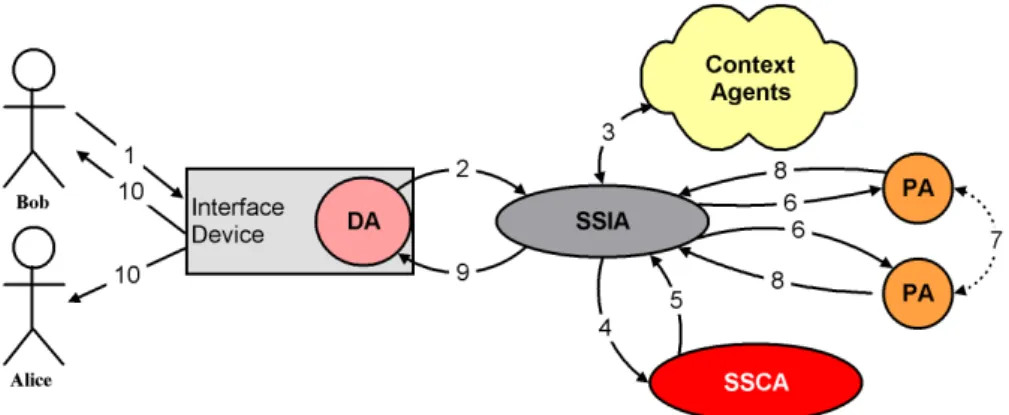
(27) Figure 6.2: A user activates an interface panel to see available services in a smart space devices under some circumstances, which mean that the interaction is restricted to a known user. Biometric devices, personal handheld devices like PDAs or cell phones or computer screens where a user has logged in are examples of devices where information shown may be assumed to be received only by the legitimate user, and where any input may be assumed to come from the legitimate user1 . Other devices such as public interface panels, remote controls or switches are considered shared interface devices, which means that there may be several users interacting with the system through these devices at a given time. An interaction using shared interface devices is shown in Figure 6.3. Suppose now that both Alice and Bob are in the deskroom. In this case it is Bob who activates the interface panel (1), but let us assume the system has no way to know which user did it. As in the previous case, the interaction is notified to the SSIAdeskroom (2), and it gets from the context agents the list of users within the smart space (3). As there are two users in the deskroom, the interface agent requests to the SSCAdeskroom the addresses of both personal agents (4 and 5) and notifies them (6) which, for the sake of simplicity, we will assume to be already in the deskroom SSAP. At this point any of the PAs could choose to ignore the notification (for instance, because it knows its associated user is typing at the keyboard and could not be the one who activated the panel). Let us assume that both agents consider that the interaction may have been initiated by their associated user, and they initiate the service discovery process. Each PA receives the list of available services and filters it taking into account the presence of the other user, which they know from the context agents. This allows the personal agents to enforce privacy and access rights of their associated users by omitting private services or setting further authentication requirements -e.g. passwords or biometric confirmation- to access sensitive services. This filtering process could even involve a negotiation between both PAs (7). Eventually, both personal agents will send an interface request to the SSIAdeskroom (8), which will construct a merged interface and request the interface device to show it (9). Since the device is shared, the interface shown will be available to both users (10). 1 Depending. on the nature of the interaction, such assumptions could not be made and further authentication and confirmation mechanisms should be required to ensure the legitimacy of the interaction.. 24.
(28) Figure 6.3: Shared interface devices. 25.
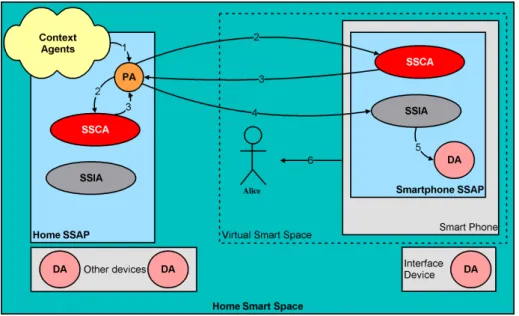
(29) Chapter 7. Personal Mobile Devices and Virtual Smart Spaces Mobile devices such as cell phones and PDAs already offer their users some kinds of service personalization, like phone directories, calculators, calendar management. But service personalization through personal mobile devices can be taken one step further. An iEAP Personal Device runs its own SSAP, hosting an SSCA and the necessary system, service and device agents to provide its functionality to its user. In this way, a personal device generates a virtual smart space, which overlaps to the smart space where the user is, augmenting the services provided by the environment. From an architectural point of view, this overlapping is straightforward. When the personal agent initiates a service discovery process for the smart space where the user is located in, it contacts also the personal device SSCA and construct the list of available services taking into account the services provided by the personal device. This allows not only to increase the number of services available to the user, but also to provide a higher degree of personalization, as personal mobile devices can usually be seen as personal interface devices for the purposes discussed in the previous chapter. Figure 7.1 shows a use case where a personal device is used to provide a personal interface. User Alice is at home, and has brought her personal device (a smart phone) with her. Her personal agent wants to show her the services available at the home smart space. Since the PA has been notified about the presence of the personal device by the context agents (1), it issues service discovery requests against both the SSCAhome and the SSCAsmartphone (2). When the response is received (3) the personal agent may decide to request an interface to either the SSIA of the home smart space (SSIAhome ) or to the one residing in the smart phone (SSIAsmartphone ). In this case, the PA decides that it is more appropriate to use a personal interface to show Alice the service list -for example, because there are other users at home-, and issues the request to the SSIAsmartphone (4), which processes it, construct the interface and requests the corresponding device agent to show it to Alice (5 and 6). In the previous example, the personal agent resides in the home SSAP, and may access the services provided at both the physical smart space where the user is and the virtual smart space created by the smartphone by contacting the. 26.
(30) Figure 7.1: Personal devices and virtual smart spaces appropriate SSCA and service agents in each case. However, the main benefit coming from the usage of personal mobile devices is the possibility of having the PA residing in the personal device SSAP, cause it greatly simplifies the process of personal agent mobility. If the personal device hosts the user’s PA, when she moves throughout the different smart spaces the personal agent actually moves with her while staying in the same SSAP (the personal device SSAP). This greatly enhances the process of personal agent discovery and mobility. To take advantage of the inherent mobility of personal devices, it is necessary to be able to identify and locate any personal device within a given smart space. This is achieved through a subset of context agents by using a personal device location system. This system is an extension of the one used in the iHAP [27] and we will not detail it here. Let us assume that, as long as the personal device has TCP/IP wireless connectivity, both the SSCA of the virtual smart space associated to the device and the SSCA of the physical space where the device is located are notified by the context agents about any changes in the location of the personal device. The PA associated to the owner of the personal device is notified as well. Personal agent mobility using personal devices follows the same rules described in chapter 4, taking into account that the virtual smart space generated by the device offers automatic service personalisation, and thus, whenever the user is in the proximity of the personal device, the PA will be invited to move to the device. The personal agent will usually accept the invitation and move, except if the physical space where the user is is the agent’s HAP. Once the PA is in the personal device SSAP, the user may move from one physical smart space to another and, as long as he brings his personal device with him, the personal agent will not need to move, since it is the virtual smart space created by the personal device which moves through the hierarchy tree, and context agents take care of notifying any interested agents -mainly the PA and the SSCAs- so. 27.
(31) that the different smart spaces can communicate with the PA seamlessly. Difficulties arise when the personal device loses TCP/IP connectivity, e.g. due to power-saving configurations, or when, once the PA is in the user’s personal device, the user moves to another smart space without bringing the personal device with him. In both cases, the user may identify to the new smart space and request a service. At this point, the SSCA needs to contact the user’s personal agent. The location process is analogous to that described in chapter 4: the personal agent of an identified user is first searched for at the immediate upper level in the hierarchy tree. If it is not there, the next upper level is searched for. Since SSCAs are notified whenever a personal device enters their associated SSAPs, they are aware of the last known location of the personal device and keep this information until the personal agent leaves their branch of the hierarchy tree. If the immediate upper node in the tree is an ancestor of the HAP, the PA is searched for at its HAP. This will usually happen when the device has lost TCP connectivity. In this case, the SSCA at the HAP will inform the requesting SSCA that the user’s PA should be in the user’s personal device. Then the SSCA may ask the user (through any interface device available) to turn on communications at the personal device, so that the personal agent can be contacted. If, after the process detailed above, the user’s PA is contacted, the PA may interact with the requesting SSAP from the user’s personal device or decide to move to the new SSAP. The PA will usually decide to move when the user is in another physical smart space than the device, or when the device is running out of battery. Should the PA decide to move from the personal device, it will clone before moving to protect agent integrity. If, after the process detailed above, the user’s personal agent is not contacted (e.g. the personal device has completely run out of battery), the interested SSCA can request the HAP to send another clone of the PA to the smart space where the user is. We can see some of the cases discussed above through the same example seen in chapter 4. In figure 7.2, let us assume as the starting point the end of the previous example, that is, Alice is at home, and her smartphone is showing her a list of available services. Now Alice and her smart phone leave the house (1), which is noticed by both SSCAs and the PA through the context agents. The personal agent then perform any necessary actions at the home smart space -e.g. turning off the lights, setting up the security alarm...-, clones itselfs and moves to the smartphone SSAP (2). There, it decides to update the list of available services, so it removes the services corresponding to the home smart space, asks the SSCAcity about any available services at city level (3), and requests the appropriate interface to be shown at the smartphone1 . When the user enters the monument smart space (4), context agents notify the PA’s and both SSCAs, so the personal agent can directly query the SSCAmonument for the list of available services (5) to update the list shown at the interface of the personal device. When Alice activates the interface panel at the monument, the SSCAmonument already knows that Alice’s PA is in her smartphone, and thus it is not necessary to contact the agent’s HAP. Let us suppose that, after Alice leaves the monument and heads towards 1 For. the sake of simplicity, we have omitted the interactions related to interface and service access through the example, and we show only the interactions related to service and agent discovery between the SSCAs and the PA.. 28.
(32) Figure 7.2: Using personal devices to enhance personal agent mobility her workplace (6), she stops using the smart phone to access available services and it enters a power saving mode, losing wireless TCP/IP connectivity. When Alice arrives at her workplace (7), the system cannot notice the presence of the personal device, nor can the personal device be aware of the new smart space the user is into. So when Alice enters the second floor and activates the interface panel there (8), the SSCAsecondF loor perform the usual search for Alice’s PA from the address gained through Alice’s ID device -say [email protected]), querying SSCAworkplace (9) and SSCAhome (10) for it. SSCAhome tells SSCAsecondf loor that Alice’s personal agent has moved into her personal device, and also adds any information needed to contact the smartphone SSAP. The SSCAsecondF loor can now use the interface panel to ask Alice to turn on wireless communications on her smartphone. When Alice does so (11), TCP connectivity with the smartphone SSAP is regained, and agents within the secondFloor SSAP can contact Alice’s PA as usual (12). Now suppose that Alice stays at the second floor without using her personal device and, unfortunately, the smartphone entered again its power saving mode. When Alice moves into the deskroom (13), SSCAdeskroom is not aware about the presence of the personal device, so it will run a search for the personal agent starting at SSCAsecondF loor (14), who will return the information gained from the HAP, so that SSCAdeskroom can learn how to contact the PA, have Alice turn on the communications on the smart phone (15) and proceed as usual (16). After some hours of work, Alice leaves the deskroom (17), the second floor (18) and the workplace (19), and carries the smartphone with her. When she arrives home (20), the PA returns to the HAP and synchronizes with its clone there (21). Modular and hierarchical design of the iEAP architecture allows using different strategies and levels of coupling between the personal agents, the personal devices, and the identification devices. In the scenario we have shown the PA moves to the personal device when it is needed, and can move out to its HAP or to another SSAP whenever it deems it appropriate. Furthermore, Alice carries 29.
(33) her own ID device independently from the personal device. However, we can think of a higly-coupled strategy where Alice ID device is her personal device, so that she is required to carry her personal device with her at any time to be properly identified by the system. We can even set the personal device as the personal agent’s HAP, so that the PA will never need to move out of the device. Of course, this strategy has its drawbacks too. If the personal device runs out of battery, the personal agent loses its HAP, which is not desirable. But it shows the high degree of flexibility provided by the architecture.. 30.
(34) Chapter 8. Following the User throughout the Smart Spaces: Non-persistent Service Agents As we saw in section 3.2, non-persistent service agents (NPSA) are created by the SSCAs to address specific service requests made by users, and cease to exist when they are no longer needed. These agents are highly coupled to the specific requests they’re associated to, and therefor to the specific users who made the requests. When a user who is accessing a service provided by an NPSA agent in a given smart space leaves this smart space, he is no longer accessing the service provided by the non-persistent service agent, and thus the agent could be terminated. This is not always the best strategy. The user could return to the smart space later and expect to resume access to the service, or even want to access to the same service in another space. Although the user (or the PA) could re-issue the request in the new space, this may not have always the desired effect. Some services, such as access to multimedia content, may be required to hold their state between successive requests, to prevent the user, for example, from having to scroll to the desired slide of a presentation or having to select the desired scene of a DVD whenever the user wants to resume the operation of the service. For this kind of services, the goal is the perception of the service being following the user movements throughout the different smart spaces. In our first implementation of an architecture for smart homes, the iHAP, we achieved this goal by making the service agent to return the service state information to the personal agent before stopping the service. Whenever the user entered a new space, the personal agent requested the service to the service agent there, providing the state information of the last run [2]. Although this is an effective strategy, it presents some limitations when dealing with multiple users and services. In the iEAP architecture, user follow-up through the different smart spaces is achieved in a more effective and natural way, by making the non-persistent service agents able to move between different SSAPs. This allows these service agents to actually follow the user, stopping service execution when the user leaves a space and resuming it at the same point when the user enters a new space. 31.
(35) Figure 8.1: Using mobile agents to make services “follow” the user When a given user leaves the smart space where he is accessing a service provided by an NPSA, the service agent asks the PA wether it wants it to follow the user to the next space or not. The personal agent may then request the NPSA to move, to terminate execution -e.g. the user no longer wants the service- or to wait there for further instructions -e.g. the user will return to the same space shortly-. If the non-persistent service agent is requested to move, it will attempt to perform the migration. The migration may not succeed due to several reasons. Perhaps the destination SSAP has no resources to host the agent, or may not allow the agent to move due to security concerns. If the attempt to move is unsuccessful, the NPSA will notify the PA and ask for further instructions. If it is successful, it will attempt to resume the service at the new SSAP. This may involve contacting other service and device agents, and may require even to wait for resources if, for example, the devices required to provide the service are being used by another users or agents. Figure 8.1 illustrates how non-persistent service agents can be used to make services “follow” a given user throughout the different smart spaces. User Alice is in her deskroom, having a video-conference provided by a non-persistant service agent (N P SAconf erence ) through a device agent on her desktop computer. She leaves her deskroom without closing the conference, but brings with her her smartphone (1), and the N P SAconf erence asks Alice’s personal agent whether it should move to the personal device or not (2). The response is affirmative, and so the N P SAconf erence moves to the smart phone (3), asks the SSCAsmartphone for the adresses of any device agents needed (4) and resumes service execution in the smart phone (5). Alice passes then through the secondFloor and workplace smart spaces (6) and, as the video-conference service is being provided by the virtual smart space created by the smart phone, there is no need for the N P SAconf erence to move to any of these spaces. When Alice enters her car (7), her PA decides that, for safety reasons, the service must be no longer 32.
(36) provided through the smartphone, and asks the N P SAconf erence (8) to try to move to the car SSAP. The non-persistent agent moves to the new platform (9) and asks the SSCAcar for the addreses of the agents it needs to provide the service (10). In this case, there is no agent able to display video, and thus the service is turned into an audio conference through the car speakers (11). Alice drives home while going on with the conversation (12). When she arrives home and leaves her car (13), the process repeats to move the video conference service back to the smartphone (14, 15, 16 and 17). When she finally enters the home smart space (18), the video conference moves seamlessly to the living room TV (19, 20, 21 and 22).. 33.
(37) Chapter 9. Multiple users and shared services Some services can be accessed by users other than the initial requester of the service. We call these shared services, and they include, among others, lighting, temperature regulation, or media content display through shared interface devices. Whenever a shared service is requested and going to be started, the personal agents associated to all users in the room are notified, so that they can act in consequence to adapt the shared service to the preferences of their users -e.g. by negotiating the final temperature of the space- or update the user profiles accordingly -e.g. adding a given movie to the list of favorites for a given user-. The agent in charge of the notification may be any of the service or device agents involved, depending on the specific case. Shared services like lighting and temperature control are often provided by persistent service agents. However, in the case of services provided by nonpersistent agents, additional issues arise. If there are several users in a smart space, and a given user requests a shared service provided by a non-persistent agent (NPSA), the agent is created to serve that specific request. If the user now leaves that space to enter another one, the NPSA should move to the new space, provided that the user wants the service to follow him, as detailed in chapter 8. However, if the non-persistent agent moves, the service would stop being accessible at the previous space, and this may not be always the desired effect. To address this issue, non-persistent agents who provide shared services may be dinamically associated to any other users in the space where the service is running, at request of the PA of each user1 . A NPSA will try to follow any associated user who leaves the smart space where it is running, but will clone before moving while there are associated users staying at the space. In this way, the service may ’follow’ any user leaving a given space while being still available to any users left. We can see an example of shared service handling in figure 9.1. Users Alice and Bob are in the deskroom and in the presentation room, respectively. Alice is watching a video provided by the non-persistent service agent N P SAvideo , through the device agent of her desktop computer DAcomputer . Bob, at the 1 Intervention of the user’s PA is required to avoid a service to be accidentally associated to a user which crosses a given space A momentarily while moving between spaces B and C.. 34.
(38) Figure 9.1: Multiple users and shared services same time is watching a live-conference provided by the agent N P SAconf erence through the device agent of the projector DAprojector . After a while, Alice leaves her deskroom without stopping the video, bringing her smartphone with her (1). The N P SAvideo contacts Alice’s personal agent (P AAlice ) and is told to move to the smartphone SSAP (2). Once the agent has been allowed to move, it contacts DAcomputer to stop the service (3) and moves (4). Once in the smartphone SSAP, it tries to resume the video service, but it is not allowed to do so by the SSCAsmartphone due to battery limitations (5), so it asks the PA what to do, and is told to keep waiting until there are more resources available to provide the service (6). The possibility of moving to the secondFloor SSAP is discarded, as there is no device agent there able to display the video. Alice then enters the presentation room, where Bob is watching the liveconference (7). As the live-conference service is being provided through the presentation room projector, it is considered a shared service, and P AAlice is notified about that when Alice enters the space (8). The personal agent decides not to take any action about it at the moment, and instead asks N P SAvideo to move to the presentationRoom SSAP (9). The non-persistent agent moves to the new platform (10) and asks the SSCApresentationRoom for the addresses of any device agents suitable to display the video (11), and learns the only agent with video display capabilities is DAprojector . When N P SAvideo requests this device agent to resume the video service, it finds out the device is busy (12), so it reports that to P AAlice and waits for further instructions (13). After some minutes of Alice being in the presentation room without taking any further action, P AAlice deduces she is watching the live-conference too, and thus asks N P SAconf erence to add Alice to its list of associated users (14). Now Bob decides to leave the presentation room, bringing with him his PDA (15). The N P SAconf erence contacts P ABob and is told to move to the pda SSAP (16). Since there is another user associated to the conference service in the presentation room (Alice), the N P SAconf erence clones before moving (17). 35.
(39) The clone in Bob’s personal device contacts the SSCApda for the addresses of any agents required (18) and resumes the conference service (19) -no battery problems here-. In the presentation room, the conference service has never been stopped and the N P SAconf erence clone keeps running normally. However, since Alice has two possible services to make use of the projector device, the PA decides to ask her through another interface -e.g. the smart phone interfacewhether she wants to keep watching the conference or switch to the video she was previously watching. Alice doesn’t even answer the prompt, so the conference service continues without interruption.. 36.
(40) Chapter 10. Sensing the environment: the Context Agents Software agents in the iEAP architecture are modelled as BDI agents, representing agent beliefs, desires and intentions as data structures which determine agent behaviour. The basis of the BDI model is that an agent has beliefs about the world and desires to fulfill, which lead it to formulate intentions to act. Context handling concerns the way beliefs are acquired and shared among agents. To map the functionality of the different software agents to their beliefs, desires and intentions we use the BDI-ASDP methodology [30]. From a design point of view, we see iEAP software agents as knowledge-based systems. Software agents have a facts database, where they store their beliefs about themselves and the world, a knowledge database which contains their desires and plans, and an inference engine, which continuously makes decisions about the agent beliefs and desires, triggering the specific agent intentions at each moment to fulfill the different goals. This can be seen in Figure 10.1. The inference engine of the software agents in the iEAP has been implemented using JESS [REF], which takes care of rule-based decision making. Agents knowledge database is comprised of JESS rules, which may be determined both at design time and at runtime (e.g. by means of automated learning techniques). Finally, our context handling architecture takes care of the adequate population of the facts database. For the rule-based decision making system to react accordingly to changes in the environment, agents need to be aware of changes in the facts which could eventually trigger any of their rules, and this ’fact awareness’ must be maintained in real time, so that system reactions occur in a timely fashion. To support this continuous update of the facts database, our context handling architecture relies on a dynamic subscription mechanism. This means that software agents know which information they may need at each moment, and subscribe to the aproppriate agent which generates or collects that information, so that they can be notified when relevant changes occur.. 37.
Figure
+7


Documento similar