Pedagogical Practices with Social Impact in the Computer
Science School of the National University of La Plata:
Interdisciplinary Articulation for the Development of a Digital
Communicator for Autistic Children
Claudia Queiruga, Ivana Harari and Jorge Rosso
LINTI (Laboratory of Research in New Information Technologies), Computer Science School, National University of La Plata, 50 and 120 (Second Floor), La Plata (1900), Argentina
{claudiaq, iharari, jrosso}@info.unlp.edu.ar
Abstract. The involvement of public universities in the solution of problems in society and the participation in the processes of social and production development of the country are goals of university education in Argentina. The use of ICTs as instruments that contribute to Independence, quality of life and inclusion of persons with disabilities is a topic of concern for many disciplines worldwide. This paper presents HERMES, a project involving the articulation of two subjects of the Computer Science School of the National University of La Plata –“Diseño Centrado en el Usuario”(“User-Centered Design”) and
“Laboratorio de Software” (“Software Laboratory”) and the civil organization CEDICA, a
referent in the province of Buenos Aires regarding the application of AAT (Animal-Assisted Activities) among people with disabilities (physical, cognitive, sensory, psychological and social). HERMES consists on the development of a digital communicator based on pictograms, available for tablets, aimed at children and teenagers with an Autism Spectrum Disorder (ASD) attending CEDICA. This project involves students and teachers of both subjects and CEDICA professionals, families, and children and teenagers with an ASD, in the process of design and development of the communicator. Currently, the first prototype of HERMES is under evaluation. We conclude that this type of initiatives tend to complement the academic training of students, promoting an open and integrating culture within the computer science community, accepting diversity in all contexts and contributing to the solution of the problems in its community.
Keywords: inclusion, autism, mobile applications, disabilities, education, Android, JAVA
1
Introduction
technology and its impact on the quality of life of the members of marginalized sectors of society and of persons with disabilities, but also extend and manifest themselves in multiple ways such as their incidence in the academic formation of the courses of the School.
In this context and with the goal of adding social responsibility in the pedagogical practices of the Computer Science School of the UNLP, we have undertaken the HERMES project. This project consists of the development of a digital communicator for children and teenagers with an Autistic Spectrum Disorder (ASD) who attend CEDICA1.
For the purpose of this project, two subjects of the last years of the B.S. in Computer Science and the B.S. in Systems had to work in an articulated manner – “Diseño Centrado en el Usuario” (“User-Centered Design”) and “Laboratorio de Software” (“Software Laboratory”). In a joint and interdisciplinary manner with CEDICA professionals, its design, development and testing was performed through practical and articulated activities, respecting adequate software development engineering software based on user-centered design, where usability and accessibility matters were dealt with from the initial stages of development (Garrett Jesse, 2011) (Lowdermilk Travis, 2013).
This paper presents the HERMES project: the context in which this proposal took place, the work to articulate both subjects of the Computer Science School courses and the results obtained from this experience analyzed from multiple perspectives: from the academic, from transference and also from the personal viewpoint. The involvement of students and teachers of the school in real projects with social impact and a common goal makes it a morally enriching learning experience, allows the training of future professionals that are competent, upright, caring and committed to the reality of their community and its diversity.
2
The Social as a Cross Axis in Strategic Lines of the Computer Science
School of the UNLP
The Computer Science School of the UNLP has been actively working on different extension, research and volunteering projects related to several topics, among them education, digital inclusion, environment and accessibility (Díaz Javier et al, 2012a). These projects were validated both by calls of the Ministry of Education of the Nation and by the UNLP itself and have as their goal to contribute to the solution of concrete problems coming from diverse sectors in society, put forth in most cases by social organizations and public institutions of the region. Among the projects that aim at linking university and community, we can mention, among others, “eBasura: reutilización tecnológica y concientización ambiental”2, “Informática Inclusiva”3, “Impulsando la Ley 26653 sobre Accesibilidad Web a escuelas técnicas”4, “Acercar la programación a la escuela secundaria”5(Javier et al, 2011) (Díaz Javier et al, 2012b) (Díaz Javier et al, 2014).
This policy carried out in theses years of continuous communication and interaction with the community has allowed for the creation of a strong bond between the School and society and has allowed the School to listen to its demands and transform them into concrete interventions. This process slowly adapted and extended and even evolved within the classroom space, affecting the pedagogical practices of the School and directly impacting the academic training of the students.
In this sense, 2014 saw the development of the HERMES project, a digital communicator aimed at persons with ASD, carried out together with CEDICA professionals and persons involved, specifically the children that would use it, their families, special tutors, therapists and other professionals. Carrying out the project required an interdisciplinary coordination and articulation process between the subjects of the School and CEDICA, for the purpose of its full
1 CEDICA: Centro de Equitación para Personas con Discapacidad http://www.cedica.org.ar/, https://www.facebook.com/cedica.equitacionparatodos
2 Official website of eBasura: http://e-basura.linti.unlp.edu.ar/
3 Official website of Informática Inclusiva: http://brechadigital.linti.unlp.edu.ar/ 4 Official website of Dirección de Accesibilidad: http://accesibilidad.linti.unlp.edu.ar/
development.
3
The HERMES Project
The HERMES Project arose from the bond between the Computer Science School and CEDICA since 2012, which has resulted in multiple projects of use of technology for treating issues related specifically to disabilities in children and adolescents. Together with CEDICA, the Computer Science School developed the first videogame on Equine-Assisted Activities and Therapies (a special type of Animal-Assisted Activities and Therapies, AAAT) called eQuino (Díaz Javier et al, 2013). Likewise, the Computer Science School, together with CEDICA, APADEA6 and Asociación Azul7 participated in multiple events such as the “Maratón de Desarrollo para la accesibilidad” (Marathon of Development for Accessibility) organized by the Accessibility Department of the Computer Scienec School and the “Accesibilidad y Universidad. Ideas para la Acción” (Accessibility and University. Ideas for Action) sessions organized by the Secretary of Institutional Relations of the UNLP. Both events took place on the International Day of Persons with Disabilities, on December 3, 2013 and 2014, respectively.
From this continuous and progressive bond with CEDICA and APADEA came a set of demands in relation to the use of technology to assist and foster the independent lives of persons with disabilities. One of the needs put forth was having a digital communicator that serves as a support tool for the communication between therapists/parents and children/students with an ASD attending CEDICA. Currently existing digital communicators are not always free, they cannot be customized as these users need, they must be installed in a dedicated device, they were not thought for our cultural environment, which may result in them using vocabulary and expressions that we do not use, and are generally unavailable for mobile devices such as tablets and smartphones. This makes most institutions continue to use the traditional communicator in the form of a folder with drawings or paper photographs that children carry with them at all times. These folders are usually organized into categories and, depending on the progress of the child, may contain a large amount of sheets. The greatest problem observed with this paper device is that with time the sheets may go missing, deteriorate, or break; moreover, it is impossible to associate the pictograms with sounds that may encourage speaking, and customizing them is more complex than in a current mobile device.
This analysis resulted in proposing HERMES, a digital communicator for tablets that encourages the communication of children with autism by means of representative pictogram that are translated by the program into auditory and textual expressions when selected. It is a simple piece of software that the children themselves can use to express desires, tastes and emotions they cannot express verbally.
The full realization of the device involved other features, such as configuring files and adapting voice, developing a desktop application for therapists or parents to connect to and access the activity log for the child’s tablet.
3.1
HERMES Features
The name HERMES refers to the homonymous god of Greek mythology who was characteristic for his ability to “communicate, announce, say, confront, and make clear with words”; he is the god that announced the messages from the gods, given his skills and eloquence.
HERMES is an Augmentative and Alternative Communication System (AACS) (Tamarit Javier, 1992). Augmentative systems allow us to “increase” the communication capabilities of persons who have impediments to achieve functional verbal communication. In cases in which verbal expression is not possible, these systems will substitute it by means of artificial speech, and are thus called “alternative” means of communication. Augmentative and Alternative
6 Sitio oficial de APADEA: http://apadea.org.ar/
Communication (ACC) is not incompatible but complementary with rehabilitation of natural speech. It includes multiple symbol systems that adapt to the needs of persons with very different ages, motor skills, cognitive skills and linguistic skills. These symbols can be graphic (photographs, drawings, pictograms, words or letters), or gestural (mimic, gestures). The first group requires the use of support technological devices or products.
The main goal of the HERMES project is to develop a Pictographic System of Communication that is easy to interpret for children and teenagers with an ASD that attend CEDICA. This system consists of two applications: the digital communicator application and the monitor application.
The digital communicator application is aimed at being used primarily by the child and to a lesser degree by the therapist who is in charge of customizing it to the needs of each child. Tablets are the idea device because they are easy to interact with (tactile interaction), to transport (small, light), and the size of the screen is adequate for display.
The monitor application is a desktop application for exclusive access of the parents, tutors or professional thatwish to receive notifications coming from the digital communicator application. Through the monitor application, users have access to the activity log that includes the expressions activated by the child. Thus, it is possible to detect repetitive behaviors, analyze the activities chosen and the moods associated with time and activities, which would allow parents to have instant knowledge of what the child expresses when in school or in therapy.
3.2
The Communicator Application
The communicator application works in a tablet and allows the child or teenager to communicate with their therapist, teacher or family member through a choice of pictograms. These pictograms are classified according to whether they express emotions, moods, bodily needs, feeding needs, games or other matters the child may want to express. Likewise, the pictograms have texts and audios associated in order to emphasize on orality and in the transmission of the message.
The communicator has a tutor profile that allows the therapist to adapt and adjust the content to the characteristics of each child.
The strategy and form of support chosen for interaction with the communicator will be through direct selection by touch. After the chosen symbol has been transmitted the therapist can help the child make a dependent sweep or exploration, presenting them with multiple possible actions if necessary.
There are galleries with predefined pictographic symbols to which new icons (photographs or JPG/PNG images) can be added by the tutor/therapist user by selecting them from the application configuration menu.
Interviews conducted with CEDICA therapist resulted in a decision to organize pictographic symbols into categories based on the function of the symbol, making it possible to configure the amount and size of the symbols displayed. Likewise, each symbol has an associated audio file that represents its meaning in oral form.
Pictograms have a time attribute associated to them (morning, noon, afternoon or night) that allows for dynamic generation of the communicator screen depending on the time of use. Thus, the application allows pictograms that will logically be used in a specific time of day to be easily found (e.g., the pictogram “Go to the park” will be kept in the morning or afternoon time frames, so the application will not propose it at night).
The tutor profile allows for the configuration of different pictogram galleries for each user, which makes it possible to switch the set for pictograms by selecting the gallery associated with each child that will use the communicator. In order to facilitate the construction of pictogram galleries, the communicator provides a default gallery and the possibility to build new ones from a copy of one of the existing galleries (the default gallery or an existing customized gallery).
In the first version of the communicator, the galleries are composed of four pictogram categories:
Animales (Animals) Emociones (Emotions) Alimentos (Foods)
The HERMES communicator is a native Android application developed in JAVA compatible with versions 2.2 onward. Android is an operating system for mobile devices based on the Linux kernel, a free of charge, free of use and multiplatform operating system core. Android is distributed under the free software license Apache version 2 or ASL 2.0 (Apache Software License).
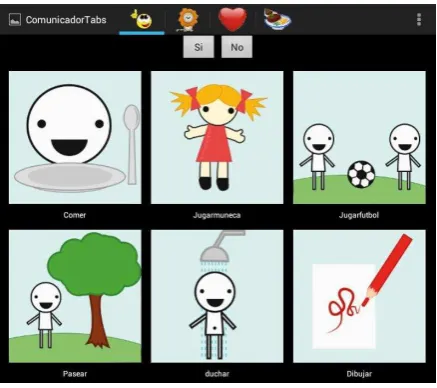
Fig. 1 shows the initial screen of the application with the pictograms in category “Acciones” (Actions) of the default gallery.
[image:5.595.196.415.328.522.2]The communicator is organized into 4 sections as seen in Fig. 1: “Acciones” (Actions), “Animales” (Animals), “Emociones” (Emotions) and “Alimentos” (Foods), presented in tabs which allow access by touch. The user can also switch between sections by sliding the screen towards the section they desire. This type of interaction is known as “swiping” in Android terminology. Each section has two buttons: “yes” and “no” that allow the therapist to continue the dialog once a pictogram is chose, e.g. if the child chooses “Pasear” (walk) the therapist may ask if they want to do it with a horse.
Fig. 1. List of images in the Acciones category
The available pictograms clearly represent the concept they wish to communicate, they are differentiable from each other and easy to understand. The attributes of a pictogram are as follows:
Image (PNG, JPG, GIF, TIF) Related audio (.mp3, optional) Descriptive text
Time (What time frame it belongs to) Category it belongs to
Gallery it belongs to
Once the child “touches” a pictogram, it is marked as selected and the associated audio is played, and a notification is sent to the monitor application to record the interaction.
3.3
Configuring the Communicator Application
The communicator application provides adaptation and configuration features that allow for configuring the tool according to the needs of the child. This feature is available to the therapist or professional.
menu that allows therapists to create and edit pictogram galleries that are suitable for each child, also allowing for the definition of general configuration parameters such as the IP of the monitor and the values of the time intervals that will be associated to the pictograms.
[image:6.595.124.484.183.338.2]Fig. 2 shows the gallery management screen from which it is possible to view existing galleries, edit them, delete them and create a new one.
Fig. 2. Gallery management screen
[image:6.595.165.447.413.655.2]As mentioned in section 3.2, new galleries are created from existing ones, thus facilitating the formation of pictograms seizing similarities among the galleries of different children. Fig. 3 shows the dialogue box for the creation of a new gallery in which the user is asked to name it and state from which gallery it will be generated (list of existing galleries).
Fig. 3. Dialogue box for the creation of a new gallery
By selecting a gallery in the gallery management screen it is possible to edit it: add pictograms, edit them (change the descriptive text, the time associated, the image and the category it belongs to) and delete them from that gallery.
Fig.4 shows the edition of a pictogram from the gallery being edited.
Agregar una nueva galería Eliminar una galería
Editar una galería
Listado de galerías
Nueva galería
Fig. 4. Pictogram Edition Screen
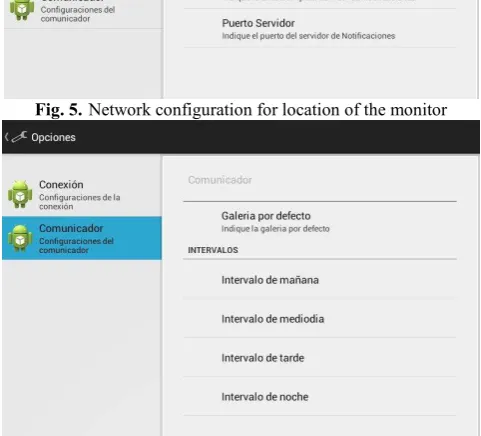
Regarding general configurations, the therapist can: define the location of the monitor application in the network (IP address and port) as shown in Fig. 5, and, as shown in Fig. 6, establish the default gallery (the gallery that the application will show when it starts) and define the time interval parameters (e.g., the time tomorrow will be from 7 AM to 12 PM).
Fig. 5. Network configuration for location of the monitor
Fig. 6. Establishment of default gallery and definition of time intervals
3.4
The Monitor Application
[image:7.595.184.425.442.660.2]means of filters and statistics.
Each notification sent includes the following information:
● Name of the gallery active at the time of sending the notification ● Category to which the chosen pictogram belongs
● Pictogram descriptive text ● Date
● Time
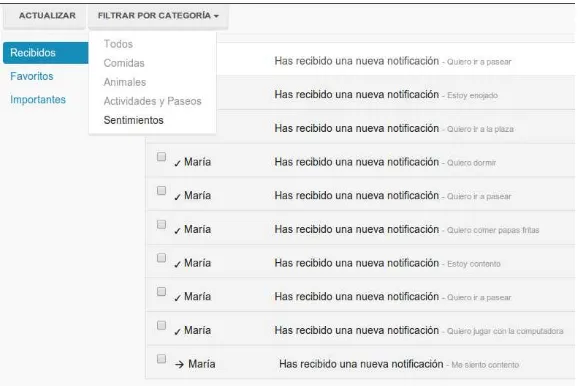
[image:8.595.162.451.231.424.2]The monitor is a desktop JAVA application. Fig. 7 shows the screen of the monitor with the notifications of the gallery called María filtered by the category Sentimientos (Feelings).
Fig. 7. Screen of the Monitor Application
Monitor notifications can be viewed in multiple ways and there are functionalities to: define labels, associate labels to notifications by date, by category, and by label and order them by multiple criteria. This information can be relevant to the therapist and allow them to detect patterns in behavior or taste and then apply these in the form of adjustments to therapy. It is possible to elaborate statistics from the information gathered by the monitor that can also be valuable to the professional.
4
Interdisciplinary Articulation for the Development of HERMES
The HERMES project was developed by means of an appropriate coordination and articulation between teachers and students of the “Diseño Centrado en el Usuario” and “Laboratorio de Software” subjects together with CEDICA professionals and the families of the children attending this institution. This pedagogical innovation involved the systematized tasks in Table 1.
Activity Actions In charge
Preliminary meetings in CEDICA
-Identification of the problem
-Identification of the implications and whether the discipline could work on these issues.
Teachers of both courses and CEDICA
professionals.
Interdisciplinary meetings -Analysis of the proposal -Organization of the practical applications
-Division of the work for each subject
Requirement analysis Surveys, interview, analysis of the information in CEDICA
Students of “Diseño Centrado en el Usuario”
Design Sketches, tests for their
adequacy with teachers, therapists and children attending
CEDICA.
Students of “Diseño Centrado en el Usuario” and a Digital Artist (a student of the Fine Arts School)
Prototype development -Study of the technology to be used
-Analysis of sketches -Understanding of the case -Development of the communicator and the monitor
Teachers and students of “Laboratorio de Software”
Testing the applications -Study of the adequacy of the pictograms and the interaction with them -Survey regarding changes, criticism and improvement suggestions
Teachers and students of “Laboratorio de Software” and CEDICA
[image:9.595.131.481.112.419.2]professionals.
Table 1. Synthesis of the activities
5
Results of the Experience
The experience was very positive for students and teachers of both subjects, who had the possibility of participating in an innovative technological development project, with real users and with the noble goal of contributing to an improvement in the quality of life of persons with disabilities.
As regards the prototype obtained, the HERMES project is currently being evaluated by therapists and the families of the children attending CEDICA, with satisfactory results. The evaluations conducted resulted in some proposals for the improvement of the communicator, which included:
Creating categories dynamically following the progress of each child.
Incorporating pictograms related to the equine therapy activities themselves as performed in CEDICA, in order to use the communicator during class.
Contextualizing the communicator so the child can use it at home, at CEDICA, at school, etc. The pictograms shown in each situation will change depending on where the child is.
6
Conclusions
The goal of the development of the HERMES project is to achieve a commitment of Computer Science School teachers and students to different projects that have social impact. These actions are ranked positively by the community because they contribute answers to real problems and are likewise relevant to the training of our students, as they constitute concrete actions with real applications.
help them become responsible citizens and generate in them competences that are heavily demanded in multiple sectors.
Lines of action in the Computer Science School, both in extension and in the pedagogical and academic area, such as the one that is the object of this paper, tend to complement academic training of the students, promoting an open and integrating culture within the computer science community, accepting diversity in all contexts. Computer scientists must be constituted as subjects capable of adjusting to the demands of society, taking consideration of the quality, social responsibility and ethics in their creations.
The competences specific to the computer science discipline must be taught in combination with the formation of a responsible being, aware of their role as developer of computing tools and applications, which must be within reach and in the service of the community as a whole and attending to local and regional demands.
References
Díaz Javier, Banchoff Tzancoff Claudia, Harari Viviana, Harari Ivana and Ambrosi (2011): “Accessibility,
digital divide and environment: strategies in the Informatics Faculty, National University of La Plata”, E -society 2011. Portugal.
Díaz Javier, Banchoff Tzancoff Claudia, Harari Viviana, Ambrosi Viviana, Harari Ivana and Raimundo Marcelo (2012a): “Improving University Education in Computer Science through Community Extension
and Volunteering Activities”. Innovations 2012, World Innovations in Engineering Education and
Research.
Díaz Javier, Harari Ivana, Ambrosi Viviana, Banchoff Tzancoff Claudia and Harari Viviana (2012b):
“Articulating two social based informatics projects”, International Conference on Information
Technologies 2012 (ICIT 2012) Saratov, Russia. June 2012.
Díaz Javier, Queiruga Claudia, Arce Tomás (2013): “e-Quino: an Interactive Videogame to Complement
Equine Therapy”. Proceedings of the 8th Immersive Education Summit (iED 2013, Boston MA. Boston: Immersive Education Initiative. ISSN 2325-4041.
Díaz Javier, Banchoff Tzancoff Claudia, Queiruga Claudia, Martín Eliana Sofía (2014): “Experiencias de la Facultad de Informática en la Enseñanza de Programación en Escuelas con Software Libre”, Proceedings of “Congreso Iberoamericano de Ciencia, Tecnología, Innovación yEducación”. Organized by Organization of Ibero-American States (OEI). ISBN 978-84-7666-210-6. Artículo 1426. Buenos Aires, Argentina, 12 - 14 November, 2014.
Garrett Jesse James (2011): “The Elements of User Experience: User-Centered Design for the Web and
Beyond, Second Edition”. Ed: New Riders
Lowdermilk Travis (2013): “User-Centered Design”. Ed: O’Reilly Media