DIPLOMADO CISCO CCNA1 Y CCNA2-UNAD OPCION DE GRADO
AUTOR
EDWIN GIOVANY PATIÑO CASTRILLÓN PRUEBA DE HABILIDADES PRÁCTICAS
DIPLOMADO ASESOR
JUAN CARLOS VESGA
UNIVERSIDAD NACIONAL ABIERTA Y A DISTANCIA
ESCUELA DE CIENCIAS BASICAS, TECNOLOGIA E INGENIERIA DIPLOMADO DE ESPECIALIZACION CISCO
INGENIERIA DE SISTEMAS CEAD PASTO
CONTENIDO
INTRODUCCIÓN ... 4
RESUMEN-PRUEBA DE HABILIDADES PRÁCTICAS CCNA ... 6
ESCENARIO PROPUESTO PARA LA PRUEBA DE HABILIDADES... 8
Escenario 1 ... 8
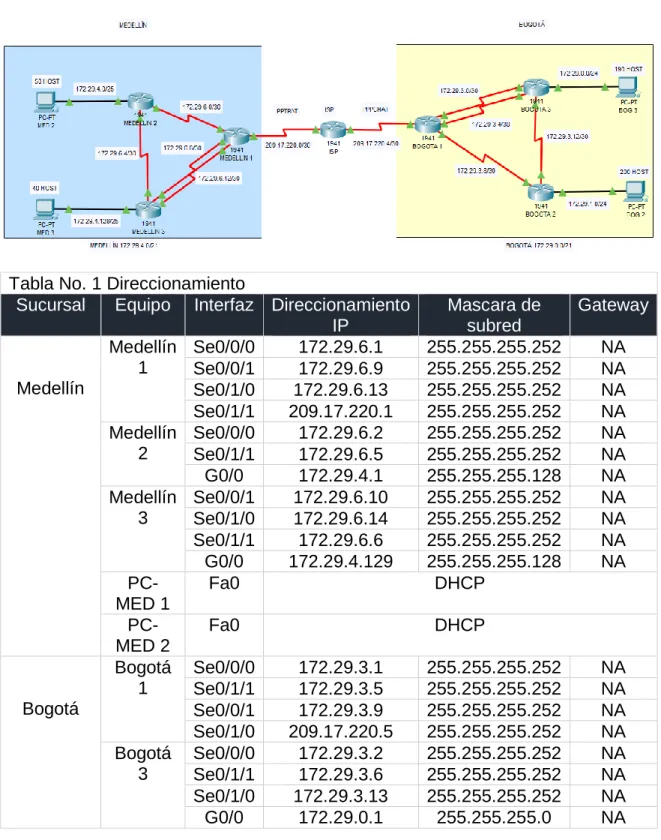
Topología de red ... 8
Conexión fisica de los equipos ... 9
Diagnóstico y configuracion de equipos ... 10
Parte 1: Configuración del enrutamiento ... 24
Parte 2: Tabla de enrutamiento... 27
Parte 3: Deshabilitar la propagación del protocolo RIP ... 37
Parte 4: Verificación del protocolo RIP ... 39
Parte 5: Configurar encapsulamiento y autenticación PPP ... 47
Parte 6: Configuración de PAT ... 51
Parte 7: Configuración del servicio DHCP ... 54
ESCENARIO PROPUESTO PARA LA PRUEBA DE HABILIDADES... 58
Escenario 2 ... 58
Topología de red ... 58
1. Direccionamiento IP ... 60
2. Protocolo de enrutamiento OSPFv2 ... 65
3. Configurar VLANs ... 73
4. En el Switch 3 deshabilitar DNS lookup ... 78
5. Asignar direcciones IP a los Switches acorde a los lineamientos ... 78
6. Desactivación de interfaces no utilizadas en el esquema de red ... 79
7. Implement DHCP and NAT for IPv4 ... 82
8. Configurar R1 como servidor DHCP para las VLANs 30 y 40 ... 82
9. Reservar las primeras 30 direcciones IP de las VLAN 30 y 40... 84
10. Configurar NAT en R2 ... 85
11. listas de acceso de tipo estándar ... 85
12. listas de acceso de tipo extendido ... 86
13. Verificar procesos de comunicación y redireccionamiento de tráfico ... 86
CONCLUSIONES ... 90
GLOSARIO ... 94
ANEXO
IMG-ESCENARIO 1 ... 8
Topología de red ... 8
Configurar el NAT-Medellín 1 ... 52
Configurar el NAT-Bogotá 1 ... 53
Router Medellín 2-Servidor DHCP BOG 2 ... 56
Router Medellín 2-Servidor DHCP BOG 3 ... 57
Router Bogotá 1 broadcast hacia la IP del router Bogotá2... 58
IMG-ESCENARIO 2 ... 59
Topología de red... 59
Configuracion IP, Gatewaty, DNS-PC Internet ... 65
DHCP - (PC-C) ... 84
DHCP - (PC-A) ... 85
Ping R1-R2 ... 87
Ping R1-R3 ... 87
Ping R3-R2 ... 87
Traceroute R1-R2 ... 88
Traceroute R1-R3 ... 88
Traceroute R2-R1 ... 88
Traceroute R2-R3 ... 89
Traceroute R3-R1 ... 89
INTRODUCCION
Las temáticas abordadas son es una parte importante de la experiencia de aprendizaje de las tecnologías de la información y comunicación que nos ayudan a desarrollar las aptitudes necesarias para planificar e implementar redes pequeñas que admitan una variedad de aplicaciones. A continuación, se presenta la configuración y el análisis de los principios básicos de routing y switching de una amplia variedad de dispositivos y tecnologías que facilitan la manera en la que las personas trabajan, viven, juegan y aprenden mediante comunicaciones de voz, vídeo y otros datos, además se explica cómo configurar y solucionar problemas en las ACL estándar IPv4 en un router Cisco como parte de una solución de seguridad. Se incluyen consejos, consideraciones, recomendaciones y pautas generales sobre cómo utilizar las ACL. Además, se explora la funcionalidad, la configuración y la resolución de problemas de DHCPv4 y de DHCPv6. Se analiza cómo se utiliza NAT combinada con el espacio de direcciones privadas para conservar y usar de forma más eficaz las direcciones IPv4, a fin de proporcionar acceso a Internet a las redes de todos los tamaños. Se explica las herramientas que pueden usar los administradores de redes para la detección, la administración y el mantenimiento de una amplia variedad de dispositivos y tecnologías que facilitan la manera en la que las personas trabajan, viven, juegan y aprenden mediante comunicaciones de voz, vídeo y otros datos. El objetivo es implementar los conceptos y tecnologías básicos de redes para dar solución a los estudios de caso correspondientes a la UNIDAD 4, donde se abarcan temas correspondientes a conceptos de listas de control de acceso, DHCP, NAT para IPv4; detección, administración y mantenimiento de equipos.
Desarrollar las aptitudes necesarias para planificar e implementar los conceptos y tecnologías básicas de redes informáticas (conceptos de routing, routing estático, routing dinámico, redes conmutadas, configuración del switch y VLAN´s, etc) para dar solución a los estudios de caso correspondientes, en relación a las redes computacionales que admiten una variedad de aplicaciones en relación a la arquitectura, los componentes y el funcionamiento de los routers, switches y dispositivos finales.
Configurar y verificar NAT para IPv4.
Configurar y solucionar los problemas de las VLAN y del routing entre VLAN.
Configurar y verificar el routing estático y el routing predeterminado.
Configurar, supervisar y solucionar los problemas de las ACL para IPv4.
Configurar y supervisar las redes mediante las herramientas de detección de dispositivos, administración y mantenimiento.
Configurar y solucionar los problemas de operaciones básicas de una red conmutada pequeña.
PRUEBA DE HABILIDADES PRÁCTICAS CCNA RESUMEN
La evaluación denominada “Prueba de habilidades prácticas”, forma parte de las actividades evaluativas del Diplomado de Profundización CCNA, y busca identificar el grado de desarrollo de competencias y habilidades que fueron adquiridas a lo largo del diplomado. Lo esencial es poner a prueba los niveles de comprensión y solución de problemas relacionados con diversos aspectos de Networking.
Para esta actividad, el estudiante dispone de cerca de dos semanas para realizar las tareas asignadas en cada uno de los dos (2) escenarios propuestos, acompañado de los respectivos procesos de documentación de la solución, correspondientes al registro de la configuración de cada uno de los dispositivos, la descripción detallada del paso a paso de cada una de las etapas realizadas durante su desarrollo, el registro de los procesos de verificación de conectividad mediante el uso de comandos ping, traceroute, show ip route, entre otros.
Teniendo en cuenta que la Prueba de habilidades está conformada por dos (2) escenarios, el estudiante deberá realizar el proceso de configuración de usando cualquiera de las siguientes herramientas: Packet Tracer o GNS3.
Es muy importante mencionar que esta actividad es de carácter INDIVIDUAL y OBLIGATORIA.
Toda evidencia de copy-paste o plagio (de la web o de otros informes) será penalizada con severidad.
Lineamientos para la elaboración del Informe
Finalmente, el informe a presentar deberá cumplir con las normas ICONTEC 1486 para la presentación de trabajos escritos e incluir los siguientes elementos en su contenido:
Portada
Tabla de contenido
Introducción
Desarrollo de los dos escenarios
aplicado (no incluir imágenes ni capturas de pantalla). Las imágenes o capturas de pantalla sólo serán usadas para evidenciar los resultados de comandos como ping, traceroute, show ip route, entre otros.
Conclusiones
Referencias Bibliográficas
El informe deberá estar acompañado de las respectivas evidencias de configuración de los dispositivos (Packet Tracer ó GNS3), las cuales generarán veracidad al trabajo realizado. El informe deberá ser entregado en el espacio creado para tal fin en el Campus Virtual de la UNAD.
IMPORTANTE: Teniendo en cuenta que este documento deberá ser entregado al final del curso en el Repositorio Institucional, acorde con los lineamientos institucionales para grado. El procedimiento será socializado al finalizar el curso.
DESCRIPCIÓN DE ESCENARIO PROPUESTO PARA LA PRUEBA DE HABILIDADES
Escenario 1
Una empresa posee sucursales distribuidas en las ciudades de Bogotá y Medellín, en donde el estudiante será el administrador de la red, el cual deberá configurar e interconectar entre sí cada uno de los dispositivos que forman parte del escenario, acorde con los lineamientos establecidos para el direccionamiento IP, protocolos de enrutamiento y demás aspectos que forman parte de la topología de red.
Topología de red
Este escenario plantea el uso de RIP como protocolo de enrutamiento, considerando que se tendran rutas por defecto redistribuidas; asimismo, habilitar el encapsulamiento PPP y su autenticación.
Los routers Bogota2 y medellin2 proporcionan el servicio DHCP a su propia red LAN y a los routers 3 de cada ciudad.
Debe configurar PPP en los enlaces hacia el ISP, con autenticación.
Como trabajo inicial se debe realizar lo siguiente.
Realizar la conexión fisica de los equipos con base en la topología de red.
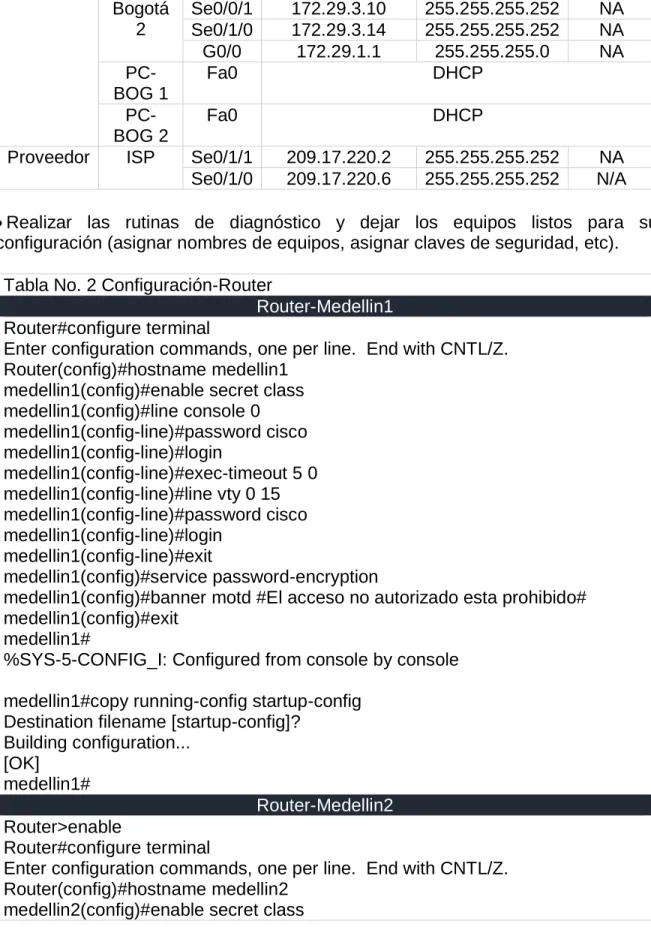
Tabla No. 1 Direccionamiento
Sucursal Equipo Interfaz Direccionamiento IP
Mascara de subred
Gateway
Medellín
Medellín 1
Se0/0/0 172.29.6.1 255.255.255.252 NA Se0/0/1 172.29.6.9 255.255.255.252 NA Se0/1/0 172.29.6.13 255.255.255.252 NA Se0/1/1 209.17.220.1 255.255.255.252 NA Medellín
2
Se0/0/0 172.29.6.2 255.255.255.252 NA Se0/1/1 172.29.6.5 255.255.255.252 NA G0/0 172.29.4.1 255.255.255.128 NA Medellín
3
Se0/0/1 172.29.6.10 255.255.255.252 NA Se0/1/0 172.29.6.14 255.255.255.252 NA Se0/1/1 172.29.6.6 255.255.255.252 NA G0/0 172.29.4.129 255.255.255.128 NA
PC-MED 1
Fa0 DHCP
PC-MED 2
Fa0 DHCP
Bogotá
Bogotá 1
Se0/0/0 172.29.3.1 255.255.255.252 NA Se0/1/1 172.29.3.5 255.255.255.252 NA Se0/0/1 172.29.3.9 255.255.255.252 NA Se0/1/0 209.17.220.5 255.255.255.252 NA Bogotá
3
Bogotá 2
Se0/0/1 172.29.3.10 255.255.255.252 NA Se0/1/0 172.29.3.14 255.255.255.252 NA G0/0 172.29.1.1 255.255.255.0 NA
PC-BOG 1
Fa0 DHCP
PC-BOG 2
Fa0 DHCP
Proveedor ISP Se0/1/1 209.17.220.2 255.255.255.252 NA Se0/1/0 209.17.220.6 255.255.255.252 N/A
Realizar las rutinas de diagnóstico y dejar los equipos listos para su configuración (asignar nombres de equipos, asignar claves de seguridad, etc).
Tabla No. 2 Configuración-Router
Router-Medellin1 Router#configure terminal
Enter configuration commands, one per line. End with CNTL/Z. Router(config)#hostname medellin1
medellin1(config)#enable secret class medellin1(config)#line console 0 medellin1(config-line)#password cisco medellin1(config-line)#login
medellin1(config-line)#exec-timeout 5 0 medellin1(config-line)#line vty 0 15 medellin1(config-line)#password cisco medellin1(config-line)#login
medellin1(config-line)#exit
medellin1(config)#service password-encryption
medellin1(config)#banner motd #El acceso no autorizado esta prohibido# medellin1(config)#exit
medellin1#
%SYS-5-CONFIG_I: Configured from console by console
medellin1#copy running-config startup-config Destination filename [startup-config]?
Building configuration... [OK]
medellin1#
Router-Medellin2 Router>enable
Router#configure terminal
Enter configuration commands, one per line. End with CNTL/Z. Router(config)#hostname medellin2
medellin2(config)#line console 0 medellin2(config-line)#password cisco medellin2(config-line)#login
medellin2(config-line)#exec-timeout 5 0 medellin2(config-line)#line vty 0 15 medellin2(config-line)#password cisco medellin2(config-line)#login
medellin2(config-line)#exit
medellin2(config)#service password-encryption
medellin2(config)#banner motd #El acceso no autorizado esta prohibido# medellin2(config)#exit
medellin2#
%SYS-5-CONFIG_I: Configured from console by console
medellin2#copy running-config startup-config Destination filename [startup-config]?
Building configuration... [OK]
medellin2#
Router-Medellin3 Router>enable
Router#configure terminal
Enter configuration commands, one per line. End with CNTL/Z. Router(config)#hostname medellin3
medellin3(config)#enable secret class medellin3(config)#line console 0 medellin3(config-line)#password cisco medellin3(config-line)#login
medellin3(config-line)#exec-timeout 5 0 medellin3(config-line)#line vty 0 15 medellin3(config-line)#password cisco medellin3(config-line)#login
medellin3(config-line)#exit
medellin3(config)#service password-encryption
medellin3(config)#banner motd #El acceso no autorizado esta prohibido# medellin3(config)#exit
medellin3#
%SYS-5-CONFIG_I: Configured from console by console
medellin3#copy running-config startup-config Destination filename [startup-config]?
Building configuration... [OK]
Router-ISP Router>enable
Router#configure terminal
Enter configuration commands, one per line. End with CNTL/Z. Router(config)#hostname ISP
ISP(config)#enable secret class ISP(config)#line console 0 ISP(config-line)#password cisco ISP(config-line)#login
ISP(config-line)#exec-timeout 5 0 ISP(config-line)#line vty 0 15 ISP(config-line)#password cisco ISP(config-line)#login
ISP(config-line)#exit
ISP(config)#service password-encryption
ISP(config)#banner motd #El acceso no autorizado esta prohibido# ISP(config)#exit
ISP#
%SYS-5-CONFIG_I: Configured from console by console
ISP#copy running-config startup-config Destination filename [startup-config]? Building configuration...
[OK] ISP#
Router-bogota1 Router>enable
Router#configure terminal
Enter configuration commands, one per line. End with CNTL/Z. Router(config)#hostname bogota1
bogota1(config)#enable secret class bogota1(config)#line console 0 bogota1(config-line)#password cisco bogota1(config-line)#login
bogota1(config-line)#exec-timeout 5 0 bogota1(config-line)#line vty 0 15 bogota1(config-line)#password cisco bogota1(config-line)#login
bogota1(config-line)#exit
bogota1(config)#service password-encryption
bogota1(config)#banner motd #El acceso no autorizado esta prohibido# bogota1(config)#exit
bogota1#
bogota1#copy running-config startup-config Destination filename [startup-config]? Building configuration...
[OK] bogota1#
Router-bogota2 Router>enable
Router#configure terminal
Enter configuration commands, one per line. End with CNTL/Z. Router(config)#hostname bogota2
bogota2(config)#enable secret class bogota2(config)#line console 0 bogota2(config-line)#password cisco bogota2(config-line)#login
bogota2(config-line)#exec-timeout 5 0 bogota2(config-line)#line vty 0 15 bogota2(config-line)#password cisco bogota2(config-line)#login
bogota2(config-line)#exit
bogota2(config)#service password-encryption
bogota2(config)#banner motd #El acceso no autorizado esta prohibido# bogota2(config)#exit
bogota2#
%SYS-5-CONFIG_I: Configured from console by console
bogota2#copy running-config startup-config Destination filename [startup-config]? Building configuration...
[OK] bogota2#
Router-bogota3 Router>enable
Router#configure terminal
Enter configuration commands, one per line. End with CNTL/Z. Router(config)#hostname bogota3
bogota3(config)#enable secret class bogota3(config)#line console 0 bogota3(config-line)#password cisco bogota3(config-line)#login
bogota3(config-line)#exit
bogota3(config)#service password-encryption
bogota3(config)#banner motd #El acceso no autorizado esta prohibido# bogota3(config)#exit
bogota3#
%SYS-5-CONFIG_I: Configured from console by console
bogota3#copy running-config startup-config Destination filename [startup-config]? Building configuration...
[OK] bogota3#
Tabla No. 3 Direccionamiento-Router
Router-Medellin1
Equipo Interfaz Direccionamiento IP
Mascara de subred
Gateway
Medellín 1
Se0/0/0 172.29.6.1 255.255.255.252 NA Se0/0/1 172.29.6.9 255.255.255.252 NA Se0/1/0 172.29.6.13 255.255.255.252 NA Se0/1/1 209.17.220.1 255.255.255.252 NA
medellin1-ISP medellin1>enable
Password:
medellin1#configure terminal
Enter configuration commands, one per line. End with CNTL/Z. medellin1(config)#interface serial 0/1/1
medellin1(config-if)#description ENLACE A ISP
medellin1(config-if)#ip address 209.17.220.1 255.255.255.252 medellin1(config-if)#clock rate 128000
medellin1(config-if)#no shutdown
%LINK-5-CHANGED: Interface Serial0/1/1, changed state to down medellin1(config-if)#
medellin1-medellin2 medellin1>enable
Password:
Enter configuration commands, one per line. End with CNTL/Z. medellin1(config)#interface serial 0/0/0
medellin1(config-if)#description ENLACE A MEDELLIN2 medellin1(config-if)#ip address 172.29.6.1 255.255.255.252 medellin1(config-if)#no shutdown
%LINK-5-CHANGED: Interface Serial0/0/0, changed state to down medellin1(config-if)#clock rate 128000
medellin1(config-if)#exit medellin1(config)#
medellin1-medellin3 enlace principal medellin1>enable
Password:
medellin1#configure terminal
Enter configuration commands, one per line. End with CNTL/Z. medellin1(config)#interface serial 0/1/0
medellin1(config-if)#ip address 172.29.6.13 255.255.255.252
medellin1(config-if)#description ENLACE PRINCIPAL A MEDELLIN3 medellin1(config-if)#no shutdown
%LINK-5-CHANGED: Interface Serial0/1/0, changed state to down medellin1(config-if)#
medellin1-medellin3 enlace secundario medellin1#configure terminal
Enter configuration commands, one per line. End with CNTL/Z. medellin1(config)#interface serial 0/0/1
medellin1(config-if)#ip address 172.29.6.9 255.255.255.252
medellin1(config-if)#description ENLACE SECUNDARIO A MEDELLIN3 medellin1(config-if)#no shutdown
%LINK-5-CHANGED: Interface Serial0/0/1, changed state to down medellin1(config-if)#
Router-medellin2
Equipo Interfaz Direccionamiento IP
Mascara de subred
Gateway
Medellín 2
Se0/0/0 172.29.6.2 255.255.255.252 NA Se0/1/1 172.29.6.5 255.255.255.252 NA G0/0 172.29.4.1 255.255.255.128 NA
Password:
medellin2#configure terminal
Enter configuration commands, one per line. End with CNTL/Z. medellin2(config)#interface serial 0/0/0
medellin2(config-if)#description ENLACE A MEDELLIN1 medellin2(config-if)#ip address 172.29.6.2 255.255.255.252 medellin2(config-if)#clock rate 128000
medellin2(config-if)#no shutdown
medellin2(config-if)#
%LINK-5-CHANGED: Interface Serial0/0/0, changed state to up
medellin2(config-if)#
%LINEPROTO-5-UPDOWN: Line protocol on Interface Serial0/0/0, changed state to up
medellin2(config-if)#exit
medellin2-medellin3 medellin2#configure terminal
Enter configuration commands, one per line. End with CNTL/Z. medellin2(config)#interface serial 0/1/1
medellin2(config-if)#description ENLACE A MEDELLIN3 medellin2(config-if)#ip address 172.29.6.5 255.255.255.252 medellin2(config-if)#clock rate 128000
medellin2(config-if)#no shutdown
%LINK-5-CHANGED: Interface Serial0/1/1, changed state to down medellin2(config-if)#
medellin2#
%SYS-5-CONFIG_I: Configured from console by console
medellin2#
medellin2-med2 (50 host) medellin2>enable
Password:
medellin2#configure terminal
Enter configuration commands, one per line. End with CNTL/Z. medellin2(config)#interface gigabitethernet 0/0
medellin2(config-if)#description ENLACE A LAN MEDELLIN 50 HOTS medellin2(config-if)#ip address 172.29.4.1 255.255.255.128
medellin2(config-if)#no shutdown
medellin2(config-if)#
%LINEPROTO-5-UPDOWN: Line protocol on Interface GigabitEthernet0/0, changed state to up
Router-Medellin3
Equipo Interfaz Direccionamiento IP
Mascara de subred
Gateway
Medellín 3
Se0/0/1 172.29.6.10 255.255.255.252 NA Se0/1/0 172.29.6.14 255.255.255.252 NA Se0/1/1 172.29.6.6 255.255.255.252 NA G0/0 172.29.4.129 255.255.255.128 NA
medellin3-medellin1 enlace principal medellin3>enable
Password:
medellin3#configure terminal
Enter configuration commands, one per line. End with CNTL/Z. medellin3(config)#interface serial 0/1/0
medellin3(config-if)#ip address 172.29.6.14 255.255.255.252
medellin3(config-if)#description ENLACE PRINCIPAL A MEDELLIN1 medellin3(config-if)#clock rate 128000
medellin3(config-if)#no shutdown
medellin3(config-if)#
%LINK-5-CHANGED: Interface Serial0/1/0, changed state to up
medellin3(config-if)#
%LINEPROTO-5-UPDOWN: Line protocol on Interface Serial0/1/0, changed state to up
medellin3(config-if)#
nedellin3-medellin1 enlace secundario medellin3(config)#interface serial 0/0/1
medellin3(config-if)#ip address 172.29.6.10 255.255.255.252
medellin3(config-if)#description ENLACE SECUNDARIO A MEDELLIN1 medellin3(config-if)#clock rate 128000
medellin3(config-if)#no shutdown
medellin3(config-if)#
%LINK-5-CHANGED: Interface Serial0/0/1, changed state to up
medellin3(config-if)#
nedellin3-medellin2 medellin3>enable
Password:
medellin3#configure terminal
Enter configuration commands, one per line. End with CNTL/Z. medellin3(config)#interface serial 0/1/1
medellin3(config-if)#ip address 172.29.6.6 255.255.255.252 medellin3(config-if)#description ENLACE A MEDELLIN2 medellin3(config-if)#clock rate 128000
This command applies only to DCE interfaces medellin3(config-if)#no shutdown
medellin3(config-if)#
%LINK-5-CHANGED: Interface Serial0/1/1, changed state to up
%LINEPROTO-5-UPDOWN: Line protocol on Interface Serial0/1/1, changed state to up
medellin2-med2 (40 host) medellin3>enable
Password:
medellin3#configure terminal
Enter configuration commands, one per line. End with CNTL/Z. medellin3(config)#interface gigabitethernet 0/0
medellin3(config-if)#description ENLACE A LAN MEDELLIN 40 HOTS medellin3(config-if)#ip address 172.29.4.129 255.255.255.128
medellin3(config-if)#no shutdown
medellin3(config-if)#
%LINK-5-CHANGED: Interface GigabitEthernet0/0, changed state to up
%LINEPROTO-5-UPDOWN: Line protocol on Interface GigabitEthernet0/0, changed state to up
medellin3(config-if)#
Router-ISP
Equipo Interfaz Direccionamiento IP
Mascara de subred
Gateway
ISP-medellin1 ISP>enable
Password:
ISP#configure terminal
Enter configuration commands, one per line. End with CNTL/Z. ISP(config)#interface serial 0/1/1
ISP(config-if)#description ENLACE A MEDELLIN1 ISP(config-if)#ip address 209.17.220.2 255.255.255.252 ISP(config-if)#clock rate 128000
ISP(config-if)#no shutdown
ISP(config-if)#
%LINK-5-CHANGED: Interface Serial0/1/1, changed state to up
ISP(config-if)#
%LINEPROTO-5-UPDOWN: Line protocol on Interface Serial0/1/1, changed state to up
ISP(config-if)#
ISP-bogota1 ISP>enable
Password:
ISP#configure terminal
Enter configuration commands, one per line. End with CNTL/Z. ISP(config)#interface serial 0/1/0
ISP(config-if)#description ENLACE A BOGOTA1
ISP(config-if)#ip address 209.17.220.6 255.255.255.252 ISP(config-if)#clock rate 128000
ISP(config-if)#no shutdown
%LINK-5-CHANGED: Interface Serial0/1/0, changed state to down ISP(config-if)#
Router-bogota1
Equipo Interfaz Direccionamiento IP
Mascara de subred
Gateway
Bogotá 1
bogota1-ISP bogota1>enable
Password:
bogota1#configure terminal
Enter configuration commands, one per line. End with CNTL/Z. bogota1(config)#interface serial 0/1/0
bogota1(config-if)#description ENLACE A ISP
bogota1(config-if)#ip address 209.17.220.5 255.255.255.252 bogota1(config-if)#clock rate 128000
bogota1(config-if)#no shutdown
bogota1(config-if)#
%LINK-5-CHANGED: Interface Serial0/1/0, changed state to up
bogota1(config-if)#
%LINEPROTO-5-UPDOWN: Line protocol on Interface Serial0/1/0, changed state to up
bogota1(config-if)#
bogota1-bogota2 enlace principal bogota1>enable
Password:
bogota1#configure terminal
Enter configuration commands, one per line. End with CNTL/Z. bogota1(config)#interface serial 0/0/0
bogota1(config-if)#description ENLACE PRINCIPAL A BOGOTA2 bogota1(config-if)#ip address 172.29.3.1 255.255.255.252
bogota1(config-if)#no shutdown
%LINK-5-CHANGED: Interface Serial0/0/0, changed state to down bogota1(config-if)#
bogota1-bogota2 enlace secundario bogota1>enable
Password:
bogota1#configure terminal
Enter configuration commands, one per line. End with CNTL/Z. bogota1(config)#interface serial 0/1/1
bogota1(config-if)#description ENLACE SECUNDARIO A BOGOTA2 bogota1(config-if)#ip address 172.29.3.5 255.255.255.252
bogota1(config-if)#no shutdown
%LINK-5-CHANGED: Interface Serial0/1/1, changed state to down bogota1(config-if)#
bogota1>enable Password:
bogota1#configure terminal
Enter configuration commands, one per line. End with CNTL/Z. bogota1(config)#interface serial 0/0/1
bogota1(config-if)#description ENLACE A BOGOTA3 bogota1(config-if)#ip address 172.29.3.9 255.255.255.252 bogota1(config-if)#no shutdown
%LINK-5-CHANGED: Interface Serial0/0/1, changed state to down bogota1(config-if)#
Router-bogota3
Equipo Interfaz Direccionamiento IP
Mascara de subred
Gateway
Bogotá 3
Se0/0/0 172.29.3.2 255.255.255.252 NA Se0/1/1 172.29.3.6 255.255.255.252 NA Se0/1/0 172.29.3.13 255.255.255.252 NA G0/0 172.29.0.1 255.255.255.0 NA
bogota3-bogota1 enlace principal bogota3>enable
Password:
bogota3#configure terminal
Enter configuration commands, one per line. End with CNTL/Z. bogota3(config)#interface serial 0/0/0
bogota3(config-if)#description ENLACE PRINCIPAL A BOGOTA1 bogota3(config-if)#ip address 172.29.3.2 255.255.255.252
bogota3(config-if)#clock rate 128000 bogota3(config-if)#no shutdown
bogota3(config-if)#
%LINK-5-CHANGED: Interface Serial0/0/0, changed state to up
Bogota3(config-if)#
%LINEPROTO-5-UPDOWN: Line protocol on Interface Serial0/0/0, changed state to up
bogota3-bogota1 enlace secundario bogota3>enable
Password:
bogota3#configure terminal
bogota3(config)#interface serial 0/1/1
bogota3(config-if)#description ENLACE SECUNDARIO A BOGOTA1 bogota3(config-if)#ip address 172.29.3.6 255.255.255.252
bogota3(config-if)#clock rate 128000 bogota3(config-if)#no shutdown
bogota3(config-if)#
%LINK-5-CHANGED: Interface Serial0/1/1, changed state to up
bogota3(config-if)#
%LINEPROTO-5-UPDOWN: Line protocol on Interface Serial0/1/1, changed state to up
bogota3(config-if)#
bogota3-bogota2 bogota3>enable
Password:
bogota3#configure terminal
Enter configuration commands, one per line. End with CNTL/Z. bogota3(config)#interface serial 0/1/0
bogota3(config-if)#description ENLACE A BOGOTA2
bogota3(config-if)#ip address 172.29.3.13 255.255.255.252 bogota3(config-if)#no shutdown
%LINK-5-CHANGED: Interface Serial0/1/0, changed state to down bogota3(config-if)#
Bogota3-bog3 (190 HOST) bogota3>enable
Password:
bogota3#configure terminal
Enter configuration commands, one per line. End with CNTL/Z. bogota3(config)#interface gigabitethernet 0/0
bogota3(config-if)#description ENLACE A LAN BOGOTA1 190 HOST bogota3(config-if)#ip address 172.29.0.1 255.255.255.0
bogota3(config-if)#no shutdown
bogota3(config-if)#
%LINK-5-CHANGED: Interface GigabitEthernet0/0, changed state to up
%LINEPROTO-5-UPDOWN: Line protocol on Interface GigabitEthernet0/0, changed state to up
Router-bogota2
Equipo Interfaz Direccionamiento IP
Mascara de subred
Gateway
Bogotá 2
Se0/0/1 172.29.3.10 255.255.255.252 NA Se0/1/0 172.29.3.14 255.255.255.252 NA G0/0 172.29.1.1 255.255.255.0 NA
bogota2-bogota1 bogota2>enable
Password:
bogota2#configure terminal
Enter configuration commands, one per line. End with CNTL/Z. bogota2(config)#interface serial 0/0/1
bogota2(config-if)#description ENLACE A BOGOTA1
bogota2(config-if)#ip address 172.29.3.10 255.255.255.252 bogota2(config-if)#clock rate 128000
bogota2(config-if)#no shutdown
bogota2(config-if)#
%LINK-5-CHANGED: Interface Serial0/0/1, changed state to up
bogota2(config-if)#
%LINEPROTO-5-UPDOWN: Line protocol on Interface Serial0/0/1, changed state to up
bogota2(config-if)#
bogota2-bogota3 bogota2>enable
Password:
bogota2#configure terminal
Enter configuration commands, one per line. End with CNTL/Z. bogota2(config)#interface serial 0/1/0
bogota2(config-if)#description ENLACE A BOGOTA3
bogota2(config-if)#ip address 172.29.3.14 255.255.255.252 bogota2(config-if)#clock rate 128000
bogota2(config-if)#no shutdown
bogota2(config-if)#
%LINK-5-CHANGED: Interface Serial0/1/0, changed state to up
%LINEPROTO-5-UPDOWN: Line protocol on Interface Serial0/1/0, changed state to up
bogota2(config-if)#
bogota2- bog2 (200 HOST) bogota2>enable
Password:
bogota2#configure terminal
Enter configuration commands, one per line. End with CNTL/Z. bogota2(config)#interface gigabitethernet 0/0
bogota2(config-if)#description ENLACE A LAN BOGOTA1 200 HOST bogota2(config-if)#ip address 172.29.1.1 255.255.255.0
bogota2(config-if)#no shutdown
bogota2(config-if)#
%LINK-5-CHANGED: Interface GigabitEthernet0/0, changed state to up
%LINEPROTO-5-UPDOWN: Line protocol on Interface GigabitEthernet0/0, changed state to up
bogota2(config-if)#
Configurar la topología de red, de acuerdo con las siguientes especificaciones.
Parte 1: Configuración del enrutamiento
a. Configurar el enrutamiento en la red usando el protocolo RIP versión 2, declare la red principal, desactive la sumarización automática.
Tabla No. 4 Configuración RIP versión 2-red principal- sumarización automática Router-medellin1
medellin1>enable Password:
medellin1#configure terminal
Enter configuration commands, one per line. End with CNTL/Z. medellin1(config)#router rip
medellin1(config-router)#version 2
medellin1(config-router)#no auto-summary medellin1(config-router)#network 172.29.6.0 medellin1(config-router)#network 172.29.6.12 medellin1(config-router)#
Router-medellin2 medellin2>enable
medellin2#configure terminal
Enter configuration commands, one per line. End with CNTL/Z. medellin2(config)#router rip
medellin2(config-router)#version 2
medellin2(config-router)#no auto-summary medellin2(config-router)#network 172.29.6.0 medellin2(config-router)#network 172.29.6.4 medellin2(config-router)#
Router-medellin3 medellin3>enable
Password:
medellin3#configure terminal
Enter configuration commands, one per line. End with CNTL/Z. medellin3(config)#router rip
medellin3(config-router)#version 2
medellin3(config-router)#no auto-summary medellin3(config-router)#network 172.29.6.4 medellin3(config-router)#network 172.29.6.12 medellin3(config-router)#
Router-bogota1 bogota1>enable
Password:
bogota1#configure terminal
Enter configuration commands, one per line. End with CNTL/Z. bogota1(config)#router rip
bogota1(config-router)#version 2
bogota1(config-router)#no auto-summary bogota1(config-router)#network 172.29.3.0 bogota1(config-router)#network 172.29.3.8 bogota1(config-router)#
Router-bogota2 bogota2>enable
Password:
bogota2#configure terminal
Enter configuration commands, one per line. End with CNTL/Z. bogota2(config)#router rip
bogota2(config-router)#version 2
bogota2(config-router)#no auto-summary bogota2(config-router)#network 172.29.3.8 bogota2(config-router)#network 172.29.3.12 bogota2(config-router)#
Router-bogota3 bogota3>enable
bogota3#configure terminal
Enter configuration commands, one per line. End with CNTL/Z. bogota3(config)#router rip
bogota3(config-router)#version 2
bogota3(config-router)#no auto-summary bogota3(config-router)#network 172.29.3.0 bogota3(config-router)#network 172.29.3.12 bogota3(config-router)#
b. Los routers Bogota1 y Medellín deberán añadir a su configuración de enrutamiento una ruta por defecto hacia el ISP y, a su vez, redistribuirla dentro de las publicaciones de RIP.
Tabla No. 5 Enrutamiento por defecto hacia el ISP- Redistribución por RIP Router-medellin1
medellin1>enable Password:
medellin1#configure terminal
Enter configuration commands, one per line. End with CNTL/Z. medellin1(config)#ip route 0.0.0.0 0.0.0.0 209.17.220.2
medellin1(config)#router rip
medellin1(config-router)#default-information originate medellin1(config-router)#
Router-bogota1 bogota1>enable
Password:
bogota1#configure terminal
Enter configuration commands, one per line. End with CNTL/Z. bogota1(config)#ip route 0.0.0.0 0.0.0.0 209.17.220.6
bogota1(config)#router rip
bogota1(config-router)#default-information originate bogota1(config-router)#
c. El router ISP deberá tener una ruta estática dirigida hacia cada red interna de Bogotá y Medellín para el caso se sumarizan las subredes de cada uno a /22.
Tabla No. 6 Ruta estática en ISP-Sumarización Router-ISP ISP>enable
Password:
ISP#configure terminal
ISP(config)#ip route 172.29.4.0 255.255.252.0 209.17.220.1 ISP(config)#ip route 172.29.0.0 255.255.252.0 209.17.220.5 ISP(config)#
Parte 2: Tabla de Enrutamiento.
a. Verificar la tabla de enrutamiento en cada uno de los routers para comprobar las redes y sus rutas.
Tabla No.7 Tabla de enrutamiento
Router-medellin1
medellin1>enable
Password:
medellin1#show ip route
Gateway of last resort is 209.17.220.2 to network 0.0.0.0 172.29.0.0/16 is variably subnetted, 9 subnets, 3 masks
R 172.29.4.0/25 [120/1] via 172.29.6.2, 00:00:13, Serial0/0/0 R 172.29.4.128/25 [120/1] via 172.29.6.10, 00:00:10, Serial0/0/1 [120/1] via 172.29.6.14, 00:00:10, Serial0/1/0
C 172.29.6.0/30 is directly connected, Serial0/0/0 L 172.29.6.1/32 is directly connected, Serial0/0/0
R 172.29.6.4/30 [120/1] via 172.29.6.10, 00:00:10, Serial0/0/1 [120/1] via 172.29.6.2, 00:00:13, Serial0/0/0
[120/1] via 172.29.6.14, 00:00:10, Serial0/1/0
C 172.29.6.8/30 is directly connected, Serial0/0/1 L 172.29.6.9/32 is directly connected, Serial0/0/1 C 172.29.6.12/30 is directly connected, Serial0/1/0 L 172.29.6.13/32 is directly connected, Serial0/1/0 209.17.220.0/24 is variably subnetted, 2 subnets, 2 masks C 209.17.220.0/30 is directly connected, Serial0/1/1 L 209.17.220.1/32 is directly connected, Serial0/1/1 S* 0.0.0.0/0 [1/0] via 209.17.220.2
Router-medellin2 medellin2>enable
Password:
medellin2#show ip route
Gateway of last resort is 172.29.6.1 to network 0.0.0.0
L 172.29.6.2/32 is directly connected, Serial0/0/0 C 172.29.6.4/30 is directly connected, Serial0/1/1 L 172.29.6.5/32 is directly connected, Serial0/1/1
R 172.29.6.8/30 [120/1] via 172.29.6.6, 00:00:18, Serial0/1/1 [120/1] via 172.29.6.1, 00:00:13, Serial0/0/0
R 172.29.6.12/30 [120/1] via 172.29.6.1, 00:00:13, Serial0/0/0 [120/1] via 172.29.6.6, 00:00:18, Serial0/1/1
R* 0.0.0.0/0 [120/1] via 172.29.6.1, 00:00:13, Serial0/0/0 Router-medellin3
medellin3>enable Password:
medellin3#show ip route
Gateway of last resort is 172.29.6.9 to network 0.0.0.0
172.29.0.0/16 is variably subnetted, 10 subnets, 3 masks
R 172.29.4.0/25 [120/1] via 172.29.6.5, 00:00:10, Serial0/1/1 C 172.29.4.128/25 is directly connected, GigabitEthernet0/0 L 172.29.4.129/32 is directly connected, GigabitEthernet0/0 R 172.29.6.0/30 [120/1] via 172.29.6.5, 00:00:10, Serial0/1/1 [120/1] via 172.29.6.9, 00:00:01, Serial0/0/1
[120/1] via 172.29.6.13, 00:00:01, Serial0/1/0
C 172.29.6.4/30 is directly connected, Serial0/1/1 L 172.29.6.6/32 is directly connected, Serial0/1/1 C 172.29.6.8/30 is directly connected, Serial0/0/1 L 172.29.6.10/32 is directly connected, Serial0/0/1 C 172.29.6.12/30 is directly connected, Serial0/1/0 L 172.29.6.14/32 is directly connected, Serial0/1/0 R* 0.0.0.0/0 [120/1] via 172.29.6.9, 00:00:01, Serial0/0/1 [120/1] via 172.29.6.13, 00:00:01, Serial0/1/0
Router-ISP ISP>enable
Password:
ISP#show ip route
Gateway of last resort is not set
172.29.0.0/22 is subnetted, 2 subnets S 172.29.0.0/22 [1/0] via 209.17.220.5 S 172.29.4.0/22 [1/0] via 209.17.220.1
L 209.17.220.6/32 is directly connected, Serial0/1/0 Router-bogota1 bogota1>enable
Password:
bogota1#show ip route
Gateway of last resort is 209.17.220.6 to network 0.0.0.0
172.29.0.0/16 is variably subnetted, 9 subnets, 3 masks
R 172.29.0.0/24 [120/1] via 172.29.3.2, 00:00:19, Serial0/0/0 [120/1] via 172.29.3.6, 00:00:19, Serial0/1/1
R 172.29.1.0/24 [120/1] via 172.29.3.10, 00:00:07, Serial0/0/1 C 172.29.3.0/30 is directly connected, Serial0/0/0
L 172.29.3.1/32 is directly connected, Serial0/0/0 C 172.29.3.4/30 is directly connected, Serial0/1/1 L 172.29.3.5/32 is directly connected, Serial0/1/1 C 172.29.3.8/30 is directly connected, Serial0/0/1 L 172.29.3.9/32 is directly connected, Serial0/0/1
R 172.29.3.12/30 [120/1] via 172.29.3.2, 00:00:19, Serial0/0/0 [120/1] via 172.29.3.6, 00:00:19, Serial0/1/1
[120/1] via 172.29.3.10, 00:00:07, Serial0/0/1
209.17.220.0/24 is variably subnetted, 2 subnets, 2 masks C 209.17.220.4/30 is directly connected, Serial0/1/0 L 209.17.220.5/32 is directly connected, Serial0/1/0 S* 0.0.0.0/0 [1/0] via 209.17.220.6
Router-bogota2 bogota2>enable
Password:
bogota2#show ip route
Gateway of last resort is 172.29.3.9 to network 0.0.0.0
172.29.0.0/16 is variably subnetted, 9 subnets, 3 masks
R 172.29.0.0/24 [120/1] via 172.29.3.13, 00:00:16, Serial0/1/0 C 172.29.1.0/24 is directly connected, GigabitEthernet0/0 L 172.29.1.1/32 is directly connected, GigabitEthernet0/0 R 172.29.3.0/30 [120/1] via 172.29.3.13, 00:00:16, Serial0/1/0 [120/1] via 172.29.3.9, 00:00:06, Serial0/0/1
R 172.29.3.4/30 [120/1] via 172.29.3.13, 00:00:16, Serial0/1/0 [120/1] via 172.29.3.9, 00:00:06, Serial0/0/1
R* 0.0.0.0/0 [120/1] via 172.29.3.9, 00:00:06, Serial0/0/1 Router-bogota3
bogota3>enable Password:
bogota3#show ip route
Gateway of last resort is 172.29.3.1 to network 0.0.0.0
172.29.0.0/16 is variably subnetted, 10 subnets, 3 masks C 172.29.0.0/24 is directly connected, GigabitEthernet0/0 L 172.29.0.1/32 is directly connected, GigabitEthernet0/0 R 172.29.1.0/24 [120/1] via 172.29.3.14, 00:00:17, Serial0/1/0 C 172.29.3.0/30 is directly connected, Serial0/0/0
L 172.29.3.2/32 is directly connected, Serial0/0/0 C 172.29.3.4/30 is directly connected, Serial0/1/1 L 172.29.3.6/32 is directly connected, Serial0/1/1
R 172.29.3.8/30 [120/1] via 172.29.3.1, 00:00:17, Serial0/0/0 [120/1] via 172.29.3.5, 00:00:17, Serial0/1/1
[120/1] via 172.29.3.14, 00:00:17, Serial0/1/0
C 172.29.3.12/30 is directly connected, Serial0/1/0 L 172.29.3.13/32 is directly connected, Serial0/1/0 R* 0.0.0.0/0 [120/1] via 172.29.3.1, 00:00:17, Serial0/0/0 [120/1] via 172.29.3.5, 00:00:17, Serial0/1/1
b. Verificar el balanceo de carga que presentan los routers.
Tabla No.8 Balanceo de carga en los routers Router-medellin1
medellin1>enable
Password:
medellin1#show ip route
Gateway of last resort is 209.17.220.2 to network 0.0.0.0 172.29.0.0/16 is variably subnetted, 9 subnets, 3 masks
R 172.29.4.0/25 [120/1] via 172.29.6.2, 00:00:13, Serial0/0/0 R 172.29.4.128/25 [120/1] via 172.29.6.10, 00:00:10, Serial0/0/1 [120/1] via 172.29.6.14, 00:00:10, Serial0/1/0 C 172.29.6.0/30 is directly connected, Serial0/0/0
L 172.29.6.1/32 is directly connected, Serial0/0/0
L 172.29.6.9/32 is directly connected, Serial0/0/1 C 172.29.6.12/30 is directly connected, Serial0/1/0 L 172.29.6.13/32 is directly connected, Serial0/1/0 209.17.220.0/24 is variably subnetted, 2 subnets, 2 masks C 209.17.220.0/30 is directly connected, Serial0/1/1 L 209.17.220.1/32 is directly connected, Serial0/1/1 S* 0.0.0.0/0 [1/0] via 209.17.220.2
Router-medellin2 medellin2>enable
Password:
medellin2#show ip route
Gateway of last resort is 172.29.6.1 to network 0.0.0.0
172.29.0.0/16 is variably subnetted, 9 subnets, 3 masks C 172.29.4.0/25 is directly connected, GigabitEthernet0/0 L 172.29.4.1/32 is directly connected, GigabitEthernet0/0 R 172.29.4.128/25 [120/1] via 172.29.6.6, 00:00:18, Serial0/1/1 C 172.29.6.0/30 is directly connected, Serial0/0/0
L 172.29.6.2/32 is directly connected, Serial0/0/0 C 172.29.6.4/30 is directly connected, Serial0/1/1 L 172.29.6.5/32 is directly connected, Serial0/1/1
R 172.29.6.8/30 [120/1] via 172.29.6.6, 00:00:18, Serial0/1/1 [120/1] via 172.29.6.1, 00:00:13, Serial0/0/0 R 172.29.6.12/30 [120/1] via 172.29.6.1, 00:00:13, Serial0/0/0 [120/1] via 172.29.6.6, 00:00:18, Serial0/1/1 R* 0.0.0.0/0 [120/1] via 172.29.6.1, 00:00:13, Serial0/0/0
Router-medellin3 medellin3>enable
Password:
medellin3#show ip route
Gateway of last resort is 172.29.6.9 to network 0.0.0.0
172.29.0.0/16 is variably subnetted, 10 subnets, 3 masks R 172.29.4.0/25 [120/1] via 172.29.6.5, 00:00:10, Serial0/1/1 C 172.29.4.128/25 is directly connected, GigabitEthernet0/0 L 172.29.4.129/32 is directly connected, GigabitEthernet0/0 R 172.29.6.0/30 [120/1] via 172.29.6.5, 00:00:10, Serial0/1/1 [120/1] via 172.29.6.9, 00:00:01, Serial0/0/1 [120/1] via 172.29.6.13, 00:00:01, Serial0/1/0 C 172.29.6.4/30 is directly connected, Serial0/1/1
L 172.29.6.10/32 is directly connected, Serial0/0/1 C 172.29.6.12/30 is directly connected, Serial0/1/0 L 172.29.6.14/32 is directly connected, Serial0/1/0 R* 0.0.0.0/0 [120/1] via 172.29.6.9, 00:00:01, Serial0/0/1 [120/1] via 172.29.6.13, 00:00:01, Serial0/1/0
Router-ISP ISP>enable
Password:
ISP#show ip route
Gateway of last resort is not set
172.29.0.0/22 is subnetted, 2 subnets S 172.29.0.0/22 [1/0] via 209.17.220.5 S 172.29.4.0/22 [1/0] via 209.17.220.1
209.17.220.0/24 is variably subnetted, 4 subnets, 2 masks C 209.17.220.0/30 is directly connected, Serial0/1/1
L 209.17.220.2/32 is directly connected, Serial0/1/1 C 209.17.220.4/30 is directly connected, Serial0/1/0 L 209.17.220.6/32 is directly connected, Serial0/1/0
Router-bogota1 bogota1>enable
Password:
bogota1#show ip route
Gateway of last resort is 209.17.220.6 to network 0.0.0.0
172.29.0.0/16 is variably subnetted, 9 subnets, 3 masks
R 172.29.0.0/24 [120/1] via 172.29.3.2, 00:00:19, Serial0/0/0 [120/1] via 172.29.3.6, 00:00:19, Serial0/1/1 R 172.29.1.0/24 [120/1] via 172.29.3.10, 00:00:07, Serial0/0/1 C 172.29.3.0/30 is directly connected, Serial0/0/0
L 172.29.3.1/32 is directly connected, Serial0/0/0 C 172.29.3.4/30 is directly connected, Serial0/1/1 L 172.29.3.5/32 is directly connected, Serial0/1/1 C 172.29.3.8/30 is directly connected, Serial0/0/1 L 172.29.3.9/32 is directly connected, Serial0/0/1
R 172.29.3.12/30 [120/1] via 172.29.3.2, 00:00:19, Serial0/0/0 [120/1] via 172.29.3.6, 00:00:19, Serial0/1/1 [120/1] via 172.29.3.10, 00:00:07, Serial0/0/1 209.17.220.0/24 is variably subnetted, 2 subnets, 2 masks
Router-bogota2 bogota2>enable
Password:
bogota2#show ip route
Gateway of last resort is 172.29.3.9 to network 0.0.0.0
172.29.0.0/16 is variably subnetted, 9 subnets, 3 masks
R 172.29.0.0/24 [120/1] via 172.29.3.13, 00:00:16, Serial0/1/0 C 172.29.1.0/24 is directly connected, GigabitEthernet0/0 L 172.29.1.1/32 is directly connected, GigabitEthernet0/0 R 172.29.3.0/30 [120/1] via 172.29.3.13, 00:00:16, Serial0/1/0 [120/1] via 172.29.3.9, 00:00:06, Serial0/0/1 R 172.29.3.4/30 [120/1] via 172.29.3.13, 00:00:16, Serial0/1/0 [120/1] via 172.29.3.9, 00:00:06, Serial0/0/1 C 172.29.3.8/30 is directly connected, Serial0/0/1
L 172.29.3.10/32 is directly connected, Serial0/0/1 C 172.29.3.12/30 is directly connected, Serial0/1/0 L 172.29.3.14/32 is directly connected, Serial0/1/0 R* 0.0.0.0/0 [120/1] via 172.29.3.9, 00:00:06, Serial0/0/1
Router-bogota3 bogota3>enable
Password:
bogota3#show ip route
Gateway of last resort is 172.29.3.1 to network 0.0.0.0
172.29.0.0/16 is variably subnetted, 10 subnets, 3 masks C 172.29.0.0/24 is directly connected, GigabitEthernet0/0 L 172.29.0.1/32 is directly connected, GigabitEthernet0/0 R 172.29.1.0/24 [120/1] via 172.29.3.14, 00:00:17, Serial0/1/0 C 172.29.3.0/30 is directly connected, Serial0/0/0
L 172.29.3.2/32 is directly connected, Serial0/0/0 C 172.29.3.4/30 is directly connected, Serial0/1/1 L 172.29.3.6/32 is directly connected, Serial0/1/1
R 172.29.3.8/30 [120/1] via 172.29.3.1, 00:00:17, Serial0/0/0 [120/1] via 172.29.3.5, 00:00:17, Serial0/1/1 [120/1] via 172.29.3.14, 00:00:17, Serial0/1/0 C 172.29.3.12/30 is directly connected, Serial0/1/0
c. Obsérvese en los routers Bogotá1 y Medellín1 cierta similitud por su ubicación, por tener dos enlaces de conexión hacia otro router y por la ruta por defecto que manejan.
Tabla No.9 Routers medellin1 y bogota1-Similitud
Router-medellin1 Router-bogota1
medellin1>enable Password:
medellin1#show ip route
Gateway of last resort is 209.17.220.2 to network 0.0.0.0
172.29.0.0/16 is variably subnetted, 9 subnets, 3 masks
R 172.29.4.0/25 [120/1] via 172.29.6.2, 00:00:13, Serial0/0/0
R 172.29.4.128/25 [120/1] via 172.29.6.10, 00:00:10, Serial0/0/1 [120/1] via 172.29.6.14, 00:00:10, Serial0/1/0 C 172.29.6.0/30 is directly connected, Serial0/0/0
L 172.29.6.1/32 is directly connected, Serial0/0/0
R 172.29.6.4/30 [120/1] via 172.29.6.10, 00:00:10, Serial0/0/1 [120/1] via 172.29.6.2, 00:00:13, Serial0/0/0
[120/1] via 172.29.6.14, 00:00:10, Serial0/1/0 C 172.29.6.8/30 is directly connected, Serial0/0/1
L 172.29.6.9/32 is directly connected, Serial0/0/1
C 172.29.6.12/30 is directly connected, Serial0/1/0
L 172.29.6.13/32 is directly connected, Serial0/1/0
209.17.220.0/24 is variably subnetted, 2 subnets, 2 masks
C 209.17.220.0/30 is directly connected, Serial0/1/1
L 209.17.220.1/32 is directly
bogota1>enable Password:
bogota1#show ip route
Gateway of last resort is 209.17.220.6 to network 0.0.0.0
172.29.0.0/16 is variably subnetted, 9 subnets, 3 masks
R 172.29.0.0/24 [120/1] via 172.29.3.2, 00:00:19, Serial0/0/0 [120/1] via 172.29.3.6, 00:00:19, Serial0/1/1 R 172.29.1.0/24 [120/1] via 172.29.3.10, 00:00:07, Serial0/0/1 C 172.29.3.0/30 is directly connected, Serial0/0/0
L 172.29.3.1/32 is directly connected, Serial0/0/0
C 172.29.3.4/30 is directly connected, Serial0/1/1
L 172.29.3.5/32 is directly connected, Serial0/1/1
C 172.29.3.8/30 is directly connected, Serial0/0/1
L 172.29.3.9/32 is directly connected, Serial0/0/1
R 172.29.3.12/30 [120/1] via 172.29.3.2, 00:00:19, Serial0/0/0 [120/1] via 172.29.3.6, 00:00:19, Serial0/1/1 [120/1] via 172.29.3.10, 00:00:07, Serial0/0/1 209.17.220.0/24 is variably subnetted, 2 subnets, 2 masks
C 209.17.220.4/30 is directly connected, Serial0/1/0
connected, Serial0/1/1
S* 0.0.0.0/0 [1/0] via 209.17.220.2
connected, Serial0/1/0
S* 0.0.0.0/0 [1/0] via 209.17.220.6
d. Los routers Medellín2 y Bogotá2 también presentan redes conectadas directamente y recibidas mediante RIP.
Tabla No.10 Routers medellin2 y bogota2-RIP
Router-medellin2 Router-bogota2
medellin2>enable Password:
medellin2#show ip route
Gateway of last resort is 172.29.6.1 to network 0.0.0.0
172.29.0.0/16 is variably subnetted, 9 subnets, 3 masks
C 172.29.4.0/25 is directly connected, GigabitEthernet0/0
L 172.29.4.1/32 is directly connected, GigabitEthernet0/0
R 172.29.4.128/25 [120/1] via 172.29.6.6, 00:00:18, Serial0/1/1 C 172.29.6.0/30 is directly connected, Serial0/0/0
L 172.29.6.2/32 is directly connected, Serial0/0/0
C 172.29.6.4/30 is directly connected, Serial0/1/1
L 172.29.6.5/32 is directly connected, Serial0/1/1
R 172.29.6.8/30 [120/1] via 172.29.6.6, 00:00:18, Serial0/1/1 [120/1] via 172.29.6.1, 00:00:13, Serial0/0/0 R 172.29.6.12/30 [120/1] via 172.29.6.1, 00:00:13, Serial0/0/0 [120/1] via 172.29.6.6, 00:00:18, Serial0/1/1 R* 0.0.0.0/0 [120/1] via 172.29.6.1, 00:00:13, Serial0/0/0
bogota2>enable Password:
bogota2#show ip route
Gateway of last resort is 172.29.3.9 to network 0.0.0.0
172.29.0.0/16 is variably subnetted, 9 subnets, 3 masks
R 172.29.0.0/24 [120/1] via 172.29.3.13, 00:00:27, Serial0/1/0 C 172.29.1.0/24 is directly connected, GigabitEthernet0/0
L 172.29.1.1/32 is directly connected, GigabitEthernet0/0
R 172.29.3.0/30 [120/1] via 172.29.3.9, 00:00:20, Serial0/0/1 [120/1] via 172.29.3.13, 00:00:27, Serial0/1/0 R 172.29.3.4/30 [120/1] via 172.29.3.9, 00:00:20, Serial0/0/1 [120/1] via 172.29.3.13, 00:00:27, Serial0/1/0 C 172.29.3.8/30 is directly connected, Serial0/0/1
L 172.29.3.10/32 is directly connected, Serial0/0/1
C 172.29.3.12/30 is directly connected, Serial0/1/0
L 172.29.3.14/32 is directly connected, Serial0/1/0
e. Las tablas de los routers restantes deben permitir visualizar rutas redundantes para el caso de la ruta por defecto.
Tabla No.11 Routers medellin2 y bogota2-RIP
Router-medellin3 Router-bogota3
medellin3>enable Password:
medellin3#show ip route
Gateway of last resort is 172.29.6.9 to network 0.0.0.0
172.29.0.0/16 is variably subnetted, 10 subnets, 3 masks
R 172.29.4.0/25 [120/1] via 172.29.6.5, 00:00:04, Serial0/1/1
C 172.29.4.128/25 is directly connected, GigabitEthernet0/0
L 172.29.4.129/32 is directly connected, GigabitEthernet0/0
R 172.29.6.0/30 [120/1] via 172.29.6.5, 00:00:04, Serial0/1/1
[120/1] via 172.29.6.9, 00:00:14, Serial0/0/1
[120/1] via 172.29.6.13, 00:00:14, Serial0/1/0
C 172.29.6.4/30 is directly connected, Serial0/1/1
L 172.29.6.6/32 is directly connected, Serial0/1/1
C 172.29.6.8/30 is directly connected, Serial0/0/1
L 172.29.6.10/32 is directly connected, Serial0/0/1
C 172.29.6.12/30 is directly connected, Serial0/1/0
L 172.29.6.14/32 is directly connected, Serial0/1/0
R* 0.0.0.0/0 [120/1] via 172.29.6.9, 00:00:14, Serial0/0/1
[120/1] via 172.29.6.13, 00:00:14, Serial0/1/0
bogota3>enable Password:
bogota3#show ip route
Gateway of last resort is 172.29.3.1 to network 0.0.0.0
172.29.0.0/16 is variably subnetted, 10 subnets, 3 masks
C 172.29.0.0/24 is directly connected, GigabitEthernet0/0
L 172.29.0.1/32 is directly connected, GigabitEthernet0/0
R 172.29.1.0/24 [120/1] via 172.29.3.14, 00:00:17, Serial0/1/0 C 172.29.3.0/30 is directly connected, Serial0/0/0
L 172.29.3.2/32 is directly connected, Serial0/0/0
C 172.29.3.4/30 is directly connected, Serial0/1/1
L 172.29.3.6/32 is directly connected, Serial0/1/1
R 172.29.3.8/30 [120/1] via 172.29.3.1, 00:00:17, Serial0/0/0 [120/1] via 172.29.3.5, 00:00:17, Serial0/1/1 [120/1] via 172.29.3.14, 00:00:17, Serial0/1/0 C 172.29.3.12/30 is directly connected, Serial0/1/0
L 172.29.3.13/32 is directly connected, Serial0/1/0
R* 0.0.0.0/0 [120/1] via 172.29.3.1, 00:00:17, Serial0/0/0
f. El router ISP solo debe indicar sus rutas estáticas adicionales a las directamente conectadas.
Tabla No.12 Rutas estaticas
Router-ISP ISP>enable
Password:
ISP#show ip route
Gateway of last resort is not set
172.29.0.0/22 is subnetted, 2 subnets S 172.29.0.0/22 [1/0] via 209.17.220.5 S 172.29.4.0/22 [1/0] via 209.17.220.1
209.17.220.0/24 is variably subnetted, 4 subnets, 2 masks C 209.17.220.0/30 is directly connected, Serial0/1/1
L 209.17.220.2/32 is directly connected, Serial0/1/1 C 209.17.220.4/30 is directly connected, Serial0/1/0 L 209.17.220.6/32 is directly connected, Serial0/1/0
Parte 3: Deshabilitar la propagación del protocolo RIP.
a. Para no propagar las publicaciones por interfaces que no lo requieran se debe deshabilitar la propagación del protocolo RIP, en la siguiente tabla se indican las interfaces de cada router que no necesitan desactivación.
ROUTER INTERFAZ
Bogota1 SERIAL0/0/1; SERIAL0/1/0; SERIAL0/1/1
Bogota2 SERIAL0/0/0; SERIAL0/0/1
Bogota3 SERIAL0/0/0; SERIAL0/0/1; SERIAL0/1/0
Medellín1 SERIAL0/0/0; SERIAL0/0/1; SERIAL0/1/1
Medellín2 SERIAL0/0/0; SERIAL0/0/1
Medellín3 SERIAL0/0/0; SERIAL0/0/1; SERIAL0/1/0
Tabla No.13 Deshabilitar RIP
Router-bogota1 Se0/0/0 bogota1>enable
Password:
bogota1#configure terminal
Enter configuration commands, one per line. End with CNTL/Z. bogota1(config)#router rip
bogota1(config-router)#passive-interface s0/0/0 bogota1(config-router)#end
bogota1#
%SYS-5-CONFIG_I: Configured from console by console Router-bogota2
G0/0 bogota2>enable
Password:
bogota2#configure terminal
Enter configuration commands, one per line. End with CNTL/Z. bogota2(config)#router rip
bogota2(config-router)#passive-interface g0/0 bogota2(config-router)#end
bogota2#
%SYS-5-CONFIG_I: Configured from console by console Router-bogota3
G0/0 bogota3>enable
Password:
bogota3#configure terminal
Enter configuration commands, one per line. End with CNTL/Z. bogota3(config)#router rip
bogota3(config-router)#passive-interface g0/0 bogota3(config-router)#end
bogota3#
%SYS-5-CONFIG_I: Configured from console by console Router ISP
-
No lo requiere Medellin1
S0/1/0 medellin1>enable
Password:
medellin1#configure terminal
medellin1(config-router)#passive-interface s0/1/0 medellin1(config-router)#end
medellin1#
%SYS-5-CONFIG_I: Configured from console by console Medellin2
G0/0 medellin2>enable
Password:
medellin2#configure terminal
Enter configuration commands, one per line. End with CNTL/Z. medellin2(config)#router rip
medellin2(config-router)#passive-interface g0/0 medellin2(config-router)#end
medellin2#
%SYS-5-CONFIG_I: Configured from console by console Medellin3
G0/0 medellin3>enable
Password:
medellin3#configure terminal
Enter configuration commands, one per line. End with CNTL/Z. medellin3(config)#router rip
medellin3(config-router)#passive-interface g0/0 medellin3(config-router)#end
medellin3#
%SYS-5-CONFIG_I: Configured from console by console
Parte 4: Verificación del protocolo RIP.
a. Verificar y documentar las opciones de enrutamiento configuradas en los routers, como el passive interface para la conexión hacia el ISP, la versión de RIP y las interfaces que participan de la publicación entre otros datos.
Tabla No.14 Passive interface-Version RIP-Interfaces Router-medellin1 medellin1>enable
Password:
medellin1#show ip protocols Routing Protocol is "rip"
Incoming update filter list for all interfaces is not set Redistributing: rip
Default version control: send version 2, receive 2 Interface Send Recv Triggered RIP Key-chain Serial0/0/1 2 2
Serial0/0/0 2 2
Automatic network summarization is not in effect Maximum path: 4
Routing for Networks: 172.29.0.0
Passive Interface(s): Serial0/1/0
Routing Information Sources:
Gateway Distance Last Update 172.29.6.2 120 00:00:07 172.29.6.10 120 00:00:17 172.29.6.14 120 00:00:17 Distance: (default is 120)
medellin1#
Router-medellin2 medellin2>enable
Password:
medellin2#show ip protocols Routing Protocol is "rip"
Sending updates every 30 seconds, next due in 24 seconds Invalid after 180 seconds, hold down 180, flushed after 240 Outgoing update filter list for all interfaces is not set
Incoming update filter list for all interfaces is not set Redistributing: rip
Default version control: send version 2, receive 2 Interface Send Recv Triggered RIP Key-chain Serial0/0/0 2 2
Serial0/1/1 2 2
Automatic network summarization is not in effect Maximum path: 4
Routing for Networks: 172.29.0.0
Passive Interface(s): GigabitEthernet0/0
Routing Information Sources:
medellin2#
Router-medellin3 medellin3>enable
Password:
medellin3#show ip protocols Routing Protocol is "rip"
Sending updates every 30 seconds, next due in 9 seconds Invalid after 180 seconds, hold down 180, flushed after 240 Outgoing update filter list for all interfaces is not set
Incoming update filter list for all interfaces is not set Redistributing: rip
Default version control: send version 2, receive 2 Interface Send Recv Triggered RIP Key-chain Serial0/1/1 2 2
Serial0/0/1 2 2 Serial0/1/0 2 2
Automatic network summarization is not in effect Maximum path: 4
Routing for Networks: 172.29.0.0
Passive Interface(s): GigabitEthernet0/0
Routing Information Sources:
Gateway Distance Last Update 172.29.6.9 120 00:00:09 172.29.6.5 120 00:00:25 Distance: (default is 120)
medellin3#
Router-bogota1 bogota1>enable
Password:
bogota1#show ip protocols Routing Protocol is "rip"
Sending updates every 30 seconds, next due in 18 seconds Invalid after 180 seconds, hold down 180, flushed after 240 Outgoing update filter list for all interfaces is not set
Incoming update filter list for all interfaces is not set Redistributing: rip
Default version control: send version 2, receive 2 Interface Send Recv Triggered RIP Key-chain Serial0/0/1 2 2
Serial0/1/1 2 2
Routing for Networks: 172.29.0.0
Passive Interface(s): Serial0/0/0
Routing Information Sources:
Gateway Distance Last Update 172.29.3.6 120 00:00:23 172.29.3.2 120 00:00:23 172.29.3.10 120 00:00:09 Distance: (default is 120)
bogota1#
Router-bogota2 bogota2>enable
Password:
bogota2#show ip protocols Routing Protocol is "rip"
Sending updates every 30 seconds, next due in 17 seconds Invalid after 180 seconds, hold down 180, flushed after 240 Outgoing update filter list for all interfaces is not set
Incoming update filter list for all interfaces is not set Redistributing: rip
Default version control: send version 2, receive 2 Interface Send Recv Triggered RIP Key-chain Serial0/0/1 2 2
Serial0/1/0 2 2
Automatic network summarization is not in effect Maximum path: 4
Routing for Networks: 172.29.0.0
Passive Interface(s): GigabitEthernet0/0
Routing Information Sources:
Gateway Distance Last Update 172.29.3.9 120 00:00:15 172.29.3.13 120 00:00:03 Distance: (default is 120)
bogota2#
Router-bogota3 bogota3>enable
Password:
bogota3#show ip protocols Routing Protocol is "rip"
Outgoing update filter list for all interfaces is not set Incoming update filter list for all interfaces is not set Redistributing: rip
Default version control: send version 2, receive 2 Interface Send Recv Triggered RIP Key-chain Serial0/1/0 2 2
Serial0/1/1 2 2 Serial0/0/0 2 2
Automatic network summarization is not in effect Maximum path: 4
Routing for Networks: 172.29.0.0
Passive Interface(s): GigabitEthernet0/0
Routing Information Sources:
Gateway Distance Last Update 172.29.3.5 120 00:00:04 172.29.3.14 120 00:00:03 Distance: (default is 120)
Bogota3#
b. Verificar y documentar la base de datos de RIP de cada router, donde se informa de manera detallada de todas las rutas hacia cada red.
Tabla No.14 Passive interface-Version RIP-Interfaces Router-medellin1 medellin1>enable
Password:
medellin1#show ip rip database 0.0.0.0/0 auto-summary 0.0.0.0/0
[0] via 0.0.0.0, 00:00:00
172.29.4.0/25 auto-summary 172.29.4.0/25
[1] via 172.29.6.2, 00:00:08, Serial0/0/0 172.29.4.128/25 auto-summary 172.29.4.128/25
[1] via 172.29.6.10, 00:00:24, Serial0/0/1 [1] via 172.29.6.14, 00:00:24, Serial0/1/0
172.29.6.0/30 auto-summary
172.29.6.0/30 directly connected, Serial0/0/0 172.29.6.4/30 auto-summary
[1] via 172.29.6.10, 00:00:24, Serial0/0/1 [1] via 172.29.6.2, 00:00:08, Serial0/0/0 [1] via 172.29.6.14, 00:00:24, Serial0/1/0
172.29.6.8/30 auto-summary
172.29.6.8/30 directly connected, Serial0/0/1 172.29.6.12/30 auto-summary
172.29.6.12/30 directly connected, Serial0/1/0 medellin1#
Router-medellin2 medellin2>enable
Password:
medellin2#show ip rip database 0.0.0.0/0 auto-summary 0.0.0.0/0
[1] via 172.29.6.1, 00:00:14, Serial0/0/0 172.29.4.0/25 auto-summary
172.29.4.0/25 directly connected, GigabitEthernet0/0 172.29.4.128/25 auto-summary
172.29.4.128/25
[1] via 172.29.6.6, 00:00:25, Serial0/1/1 172.29.6.0/30 auto-summary
172.29.6.0/30 directly connected, Serial0/0/0 172.29.6.4/30 auto-summary
172.29.6.4/30 directly connected, Serial0/1/1 172.29.6.8/30 auto-summary
172.29.6.8/30
[1] via 172.29.6.1, 00:00:14, Serial0/0/0 [1] via 172.29.6.6, 00:00:25, Serial0/1/1
172.29.6.12/30 auto-summary 172.29.6.12/30
[1] via 172.29.6.1, 00:00:14, Serial0/0/0 [1] via 172.29.6.6, 00:00:25, Serial0/1/1
M medellin2#
Router-medellin3 medellin3>enable
Password:
medellin3#show ip rip database 0.0.0.0/0 auto-summary 0.0.0.0/0
[1] via 172.29.6.9, 00:00:08, Serial0/0/1 172.29.4.0/25 auto-summary
172.29.4.0/25
[1] via 172.29.6.5, 00:00:03, Serial0/1/1 172.29.4.128/25 auto-summary
172.29.6.0/30 auto-summary 172.29.6.0/30
[1] via 172.29.6.9, 00:00:08, Serial0/0/1 [1] via 172.29.6.5, 00:00:03, Serial0/1/1
172.29.6.4/30 auto-summary
172.29.6.4/30 directly connected, Serial0/1/1 172.29.6.8/30 auto-summary
172.29.6.8/30 directly connected, Serial0/0/1 172.29.6.12/30 auto-summary
172.29.6.12/30 directly connected, Serial0/1/0 medellin3#
Router-bogota1 bogota1>enable
Password:
bogota1#show ip rip database 0.0.0.0/0 auto-summary 0.0.0.0/0
[0] via 0.0.0.0, 00:00:00
172.29.0.0/24 auto-summary 172.29.0.0/24
[1] via 172.29.3.6, 00:00:20, Serial0/1/1 [1] via 172.29.3.2, 00:00:20, Serial0/0/0
172.29.1.0/24 auto-summary 172.29.1.0/24
[1] via 172.29.3.10, 00:00:01, Serial0/0/1 172.29.3.0/30 auto-summary
172.29.3.0/30 directly connected, Serial0/0/0 172.29.3.4/30 auto-summary
172.29.3.4/30 directly connected, Serial0/1/1 172.29.3.8/30 auto-summary
172.29.3.8/30 directly connected, Serial0/0/1 172.29.3.12/30 auto-summary
172.29.3.12/30
[1] via 172.29.3.6, 00:00:20, Serial0/1/1 [1] via 172.29.3.2, 00:00:20, Serial0/0/0 [1] via 172.29.3.10, 00:00:01, Serial0/0/1
bogota1#
Router-bogota2 bogota2>enable
Password:
bogota2#show ip rip database 0.0.0.0/0 auto-summary 0.0.0.0/0
172.29.0.0/24
[1] via 172.29.3.13, 00:00:03, Serial0/1/0 172.29.1.0/24 auto-summary
172.29.1.0/24 directly connected, GigabitEthernet0/0 172.29.3.0/30 auto-summary
172.29.3.0/30
[1] via 172.29.3.9, 00:00:04, Serial0/0/1 [1] via 172.29.3.13, 00:00:03, Serial0/1/0
172.29.3.4/30 auto-summary 172.29.3.4/30
[1] via 172.29.3.9, 00:00:04, Serial0/0/1 [1] via 172.29.3.13, 00:00:03, Serial0/1/0
172.29.3.8/30 auto-summary
172.29.3.8/30 directly connected, Serial0/0/1 172.29.3.12/30 auto-summary
172.29.3.12/30 directly connected, Serial0/1/0 bogota2#
Router-bogota3 bogota3>enable
Password:
bogota3#show ip rip database 0.0.0.0/0 auto-summary 0.0.0.0/0
[1] via 172.29.3.5, 00:00:24, Serial0/1/1 172.29.0.0/24 auto-summary
172.29.0.0/24 directly connected, GigabitEthernet0/0 172.29.1.0/24 auto-summary
172.29.1.0/24
[1] via 172.29.3.14, 00:00:05, Serial0/1/0 172.29.3.0/30 auto-summary
172.29.3.0/30 directly connected, Serial0/0/0 172.29.3.4/30 auto-summary
172.29.3.4/30 directly connected, Serial0/1/1 172.29.3.8/30 auto-summary
172.29.3.8/30
[1] via 172.29.3.5, 00:00:24, Serial0/1/1 [1] via 172.29.3.14, 00:00:05, Serial0/1/0
172.29.3.12/30 auto-summary
Parte 5: Configurar encapsulamiento y autenticación PPP.
a. Según la topología se requiere que el enlace Medellín1 con ISP sea configurado con autenticación PAT.
Tabla No.15 Nombre y password-PAT-Autenticación PPP Nombre y password
Router medellin1 medellin1>enable
Password:
medellin1#configure terminal
Enter configuration commands, one per line. End with CNTL/Z. medellin1(config)#username ISP password cisco
medellin1(config)#
Router ISP ISP>enable
Password:
ISP#configure terminal
Enter configuration commands, one per line. End with CNTL/Z. ISP(config)#username medellin1 password cisco
ISP(config)#
Autenticación PPP Router medellin1 medellin1>enable
Password:
medellin1#configure terminal
Enter configuration commands, one per line. End with CNTL/Z. medellin1(config)#interface serial 0/1/1
medellin1(config-if)#encapsulation ppp medellin1(config-if)#
%LINEPROTO-5-UPDOWN: Line protocol on Interface Serial0/1/1, changed state to down
medellin1(config-if)#
Router ISP ISP>enable
Password:
ISP#configure terminal
Enter configuration commands, one per line. End with CNTL/Z. ISP(config)#interface serial 0/1/1