SOLUCIÓN DE ESTUDIOS DE CASO BAJO EL USO DE TECNOLOGÍA CISCO.
PRESENTADO POR: BETSY MILENA ROJAS MÉNDEZ
UNIVERSIDAD NACIONAL ABIERTA Y A DISTANCIA UNAD FACULTAD DE SISTEMAS
PROGRAMA DE INGENIERIA DE SISTEMAS SAN SEBASTIAN DE MARIQUITA
SOLUCIÓN DE ESTUDIOS DE CASO BAJO EL USO DE TECNOLOGÍA CISCO.
PRESENTADO POR: BETSY MILENA ROJAS MÉNDEZ
Informe de actividades solución de estudios de caso bajo el uso de tecnología cisco, para obtener diplomado “Profundización cisco (diseño e
implementación de soluciones integradas lan / wan)”
ING. GIOVANNI ALBERTO BRACHO TUTOR
UNIVERSIDAD NACIONAL ABIERTA Y A DISTANCIA UNAD FACULTAD DE SISTEMAS
3
AGRADECIMIENTOS.
A los Ingenieros Juan Carlos Vesga, Giovanni Alberto Bracho, por su constante guía, colaboración y comprensión durante el desarrollo del curso.
A Dios por la oportunidad de permitirme estudiar, y ofrecerme los medios y apoyos necesarios para lograr mi objetivo.
A mi esposo y mi hija, ya que si ellos este proceso de formación no se hubiese podido llevar a cabo.
TABLA DE CONTENIDO
INTRODUCCIÓN. ...6
DESARROLLO DE LOS ESCENARIOS ...7
ESCENARIO 1 ... 7
CONFIGURACIONES ESCENARIO 1 ... 8
ESCENARIO 2 ... 14
CONFIGURACIONES ESCENARIO 2 ... 15
1. Configurar el direccionamiento IP acorde con la topología de red para cada uno de los dispositivos que forman parte del escenario... 15
2. Configurar el protocolo de enrutamiento OSPFv2 bajo los siguientes criterios: ... 17
3. Configurar VLANs, Puertos troncales, puertos de acceso, encapsulamiento, Inter-VLAN Routing y Seguridad en los Switches acorde a la topología de red establecida...…21
4. En el Switch 3 deshabilitar DNS lookup ... 23
5. Asignar direcciones IP a los Switches acorde a los lineamientos. ... 23
6. Desactivar todas las interfaces que no sean utilizadas en el esquema de red... 23
7. Implement DHCP and NAT for IPv4 ... 23
8. Configurar R1 como servidor DHCP para las VLANs 30 y 40... 24
…… 9. Reservar las primeras 30 direcciones IP de las VLAN 30 y 40 para configuraciones estáticas... 24
10. Configurar NAT en R2 para permitir que los host puedan salir a Internet………...24
11. Configurar al menos dos listas de acceso de tipo estándar a su criterio en para restringir o permitir tráfico desde R1 o R3 hacia R2. ... 24
12. Configurar al menos dos listas de acceso de tipo extendido o nombradas a su criterio en para restringir o permitir tráfico desde R1 o R3 hacia R2... 25
13. Verificar procesos de comunicación y redireccionamiento de tráfico en los routers mediante el uso de Ping y Traceroute... 25
CONCLUSIONES... 26
- 5 -
LISTA DE TABLAS
TABLA DE DIRECCIONAMIENTO ... 7
TABLA VLAN Y PUERTOS... 9
TABLA DE ENLACES TRONCALES ... 10
TABLA PROTOCOLO DE ENRUTAMIENTO OSPFv2…... 17
LISTA DE IMAGENES
- 7 -
INTRODUCCIÓN
La evaluación denominada “Prueba de habilidades prácticas”, forma parte de las actividades evaluativas del Diplomado de Profundización CCNA, y busca identificar el grado de desarrollo de competencias y habilidades que fueron adquiridas a lo largo del diplomado. Lo esencial es poner a prueba los niveles de comprensión y solución de problemas relacionados con diversos aspectos de Networking.
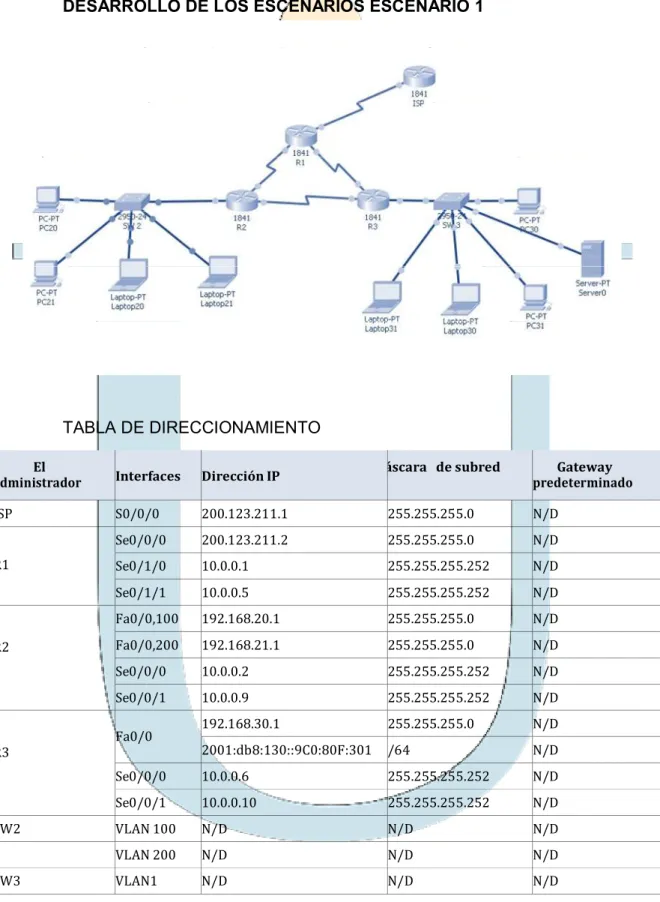
DESARROLLO DE LOS ESCENARIOS ESCENARIO 1
TABLA DE DIRECCIONAMIENTO
El
administrador Interfaces Dirección IP áscara de subred predeterminadoGateway
ISP S0/0/0 200.123.211.1 255.255.255.0 N/D
R1
Se0/0/0 200.123.211.2 255.255.255.0 N/D
Se0/1/0 10.0.0.1 255.255.255.252 N/D
Se0/1/1 10.0.0.5 255.255.255.252 N/D
R2
Fa0/0,100 192.168.20.1 255.255.255.0 N/D
Fa0/0,200 192.168.21.1 255.255.255.0 N/D
Se0/0/0 10.0.0.2 255.255.255.252 N/D
Se0/0/1 10.0.0.9 255.255.255.252 N/D
R3 Fa0/0
192.168.30.1 255.255.255.0 N/D
2001:db8:130::9C0:80F:301 /64 N/D
Se0/0/0 10.0.0.6 255.255.255.252 N/D
Se0/0/1 10.0.0.10 255.255.255.252 N/D
SW2 VLAN 100 N/D N/D N/D
VLAN 200 N/D N/D N/D
9
CONFIGURACIONES ESCENARIO 1
CONFIGURACIÓN BÁSICA R1
Router>en Router#conf t
Enter configuration commands, one per line. End with CNTL/Z. Router(config)#hostname R1
R1(config)#no ip domain-lookup R1(config)#enable secret class R1(config)#line con 0 R1(config-line)#password cisco
R1(config-line)#login R1(config-line)#exit
R1(config)#service password-encryption
R1(config)#banner motd $ Acceso no autorizado o prohibido! $ R1(config)#
CONFIGURACIÓN BÁSICA R2
Router>en Router#conf t
Enter configuration commands, one per line. End with CNTL/Z. Router(config)#hostname R2
R2(config)#no ip domain-lookup R2(config)#enable secret class R2(config)#line con 0 R2(config-line)#password cisco
R2(config-line)#login R2(config-line)#exit
R2(config)#service password-encryption
R2(config)#banner motd $ Acceso no autorizado o prohibido! $ R2(config)#
CONFIGURACIÓN BÁSICA R3
Router>en Router#conf t
Enter configuration commands, one per line. End with CNTL/Z. Router(config)#hostname R3
R3(config)#no ip domain-lookup R3(config)#enable secret class R3(config)#line con 0 R3(config-line)#password cisco
R3(config-line)#exit
R3(config)#service password-encryption
R3(config)#banner motd $ Acceso no autorizado o prohibido! $ R3(config)#
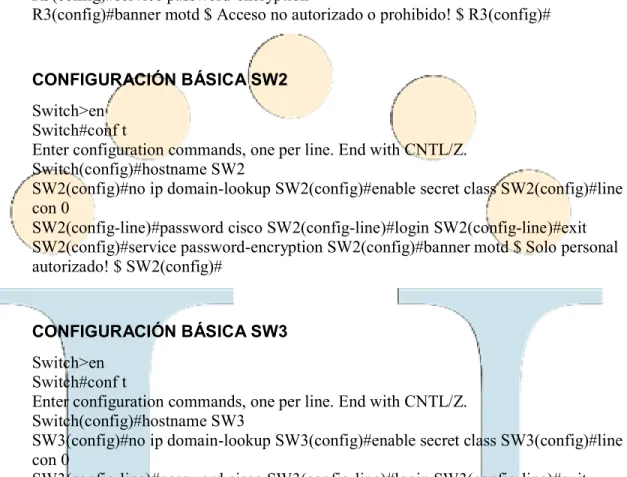
CONFIGURACIÓN BÁSICA SW2
Switch>en Switch#conf t
Enter configuration commands, one per line. End with CNTL/Z. Switch(config)#hostname SW2
SW2(config)#no ip domain-lookup SW2(config)#enable secret class SW2(config)#line con 0
SW2(config-line)#password cisco SW2(config-line)#login SW2(config-line)#exit SW2(config)#service password-encryption SW2(config)#banner motd $ Solo personal autorizado! $ SW2(config)#
CONFIGURACIÓN BÁSICA SW3
Switch>en Switch#conf t
Enter configuration commands, one per line. End with CNTL/Z. Switch(config)#hostname SW3
SW3(config)#no ip domain-lookup SW3(config)#enable secret class SW3(config)#line con 0
SW3(config-line)#password cisco SW3(config-line)#login SW3(config-line)#exit SW3(config)#service password-encryption SW3(config)#banner motd $ Solo personal autorizado! $ SW3(config)#
TABLA DE VLAN Y PUERTOS
Dispositivo VLAN Nombre Interf az
SW2 100 LAPTOPS Fa0/2-3
SW2 200 DESTOPS Fa0/4-5
11
TABLA DE ENLACES TRONCALES
Dispositivo local Interfaz local Dispositivo remoto
SW2 Fa0/2-3 100
VLAN SW 2
SW2(config)#vlan 100
SW2(config-vlan)#name LAPTOPS SW2(config-vlan)#vlan 200 SW2(config-vlan)#name DESTOPS SW2(config-vlan)#
VLAN PUERTOS SW2 F0/2-3 Y F0/4-5
SW2(config)#int range f0/2-3
SW2(config-if-range)#switchport mode access SW2(config-if-range)#switchport access vlan 100 SW2(config-if-range)#exit
SW2(config)#int range f0/4-5
SW2(config-if-range)#switchport mode access SW2(config-if-range)#switchport access vlan 200 SW2(config-if-range)#exit
SW2(config)#
VLAN TRONCAL SW2
SW2(config)#int range f0/2-3
SW2(config-if-range)#switchport mode trunk
SW2(config-if-range)#
%LINEPROTO-5-UPDOWN: Line protocol on Interface FastEthernet0/2, changed state to down
%LINEPROTO-5-UPDOWN: Line protocol on Interface FastEthernet0/2, changed state to up
%LINEPROTO-5-UPDOWN: Line protocol on Interface FastEthernet0/3, changed state to down
%LINEPROTO-5-UPDOWN: Line protocol on Interface FastEthernet0/3, changed state to up
INTERFACE S0/0/0 ISP
Router(config)#int s0/0/0
Router(config-if)#ip address 200.123.211.1 255.255.255.0 Router(config-if)#no shutdown
%LINK-5-CHANGED: Interface Serial0/0/0, changed state to down Router(config-if)#
INTERFACE S0/0/0 –R1
R1(config)#int s0/0/0
R1(config-if)#ip address 200.123.211.2 255.255.255.0 R1(config-if)#no shutdown
R1(config-if)#
%LINK-5-CHANGED: Interface Serial0/0/0, changed state to up
R1(config-if)#
%LINEPROTO-5-UPDOWN: Line protocol on Interface Serial0/0/0, changed state to up
R1(config-if)#exit
INTERFACE S0/1/0 –R1
R1(config)#int s0/1/0
R1(config-if)#ip address 10.0.0.1 255.255.255.252 R1(config-if)#no shutdown
%LINK-5-CHANGED: Interface Serial0/1/0, changed state to down R1(config-if)#exit
INTERFACE S0/1/1 –R1
R1(config)#int s0/1/1
R1(config-if)#ip address 10.0.0.5 255.255.255.252 R1(config-if)#no shutdown
13
INTERFACE S0/0/0 –R2
R2(config)#int s0/0/0
R2(config-if)#ip address 10.0.0.2 255.255.255.252 R2(config-if)#no shutdown
R2(config-if)#
%LINK-5-CHANGED: Interface Serial0/0/0, changed state to up
R2(config-if)#exit
INTERFACE S0/0/1 –R2
R2(config)#int s0/0/1
R2(config-if)#ip address 10.0.0.9 255.255.255.252 R2(config-if)#no shutdown
%LINK-5-CHANGED: Interface Serial0/0/1, changed state to down R2(config-if)#exit
INTERFACE S0/0/0 –R3
R3(config)#int s0/0/0
R3(config-if)#ip address 10.0.0.6 255.255.255.252 R3(config-if)#no shutdown
R3(config-if)#
%LINK-5-CHANGED: Interface Serial0/0/0, changed state to up
R3(config-if)#exit
INTERFACE S0/0/1 –R3
R3(config)#int s0/0/1
R3(config-if)#ip address 10.0.0.10 255.255.255.252 R3(config-if)#no shutdown
R3(config-if)#
%LINK-5-CHANGED: Interface Serial0/0/1, changed state to up
INTERFACE F0/0 –R3
R3(config)#int f0/0
R3(config-if)#ip address 192.168.30.1 255.255.255.0 R3(config-if)#no shutdown
R3(config-if)#
%LINK-5-CHANGED: Interface FastEthernet0/0, changed state to up
%LINEPROTO-5-UPDOWN: Line protocol on Interface FastEthernet0/0, changed state to up
R3(config-if)#ipv6 address 2001:db8:130::9C0:80F:301/64 R3(config-if)#no shutdown
R3(config-if)#
INTERFACE F0/0.100 –R2
R2(config)#int f0/0.100
R2(config-subif)#encap dot1q 100
R2(config-subif)#ip address 192.168.21.1 255.255.255.0 R2(config-subif)#no shutdown
R2(config-subif)#exit
INTERFACE F0/0.200 –R2
R2(config)#int f0/0.200
R2(config-subif)#encap dot1q 200
R2(config-subif)#ip address 192.168.20.1 255.255.255.0
15
ESCENARIO 2
CONFIGURACIONES ESCENARIO 2
1. Configurar el direccionamiento IP acorde con la topología de red para cada uno de los dispositivos que forman parte del escenario
CONFIGURACIÓN BÁSICA R1
Router>en Router#conf t
Enter configuration commands, one per line. End with CNTL/Z. Router(config)#hostname BOGOTA
17
BOGOTA(config-line)#exit BOGOTA(config)#service password-encryption BOGOTA(config)#banner motd $ Acceso no autorizado o prohibido!! $ BOGOTA(config)#
CONFIGURACIÓN BÁSICA R2
Router>en Router#conf t
Enter configuration commands, one per line. End with CNTL/Z. Router(config)#hostname MIAMI
MIAMI(config)# no ip domain-lookup MIAMI(config)#enable secret class MIAMI(config)#line con 0
line)#password cisco line)#login MIAMI(config-line)#exit
MIAMI(config)#service password-encryption
MIAMI(config)#banner motd $ Acceso no autorizado o prohibido!! $ MIAMI(config)#
CONFIGURACIÓN BÁSICA R3
Router>enable Router#conf t
Enter configuration commands, one per line. End with CNTL/Z.
Router(config)#hostname BUENOSAIRES BUENOSAIRES(config)#no ip domain-lookup BUENOSAIRES(config)#enable secret class BUENOSAIRES(config)#line con 0
BUENOSAIRES(config-line)#password cisco BUENOSAIRES(config-line)#login BUENOSAIRES(config-line)#exit BUENOSAIRES(config)#service password-encryption
BUENOSAIRES(config)#banner motd $ Acceso no autorizado o prohibido!! $ BUENOSAIRES(config)#
CONFIGURACIÓN BÁSICA S1
Switch>en Switch#conf t
Enter configuration commands, one per line. End with CNTL/Z. Switch(config)#hostname S1
S1(config)#no ip domain-lookup S1(config)#enable secret class S1(config)#line con 0 S1(config-line)#password cisco
S1(config)#service password-encryption S1(config)#banner motd $ Solo personal autorizado!! $ S1(config)#
CONFIGURACIÓN BÁSICA S3
Switch>en Switch#conf t
Enter configuration commands, one per line. End with CNTL/Z. Switch(config)#hostname S3
S3(config)#no ip domain-lookup S3(config)#enable secret class S3(config)#line con 0 S3(config-line)#password cisco
S3(config-line)#login S3(config-line)#exit
S3(config)#service password-encryption S3(config)#banner motd $ Solo personal autorizado!! $ S3(config)#
2. Configurar el protocolo de enrutamiento OSPFv2 bajo los siguientes criterios:
OSPFv2 area 0
Configuration Item or Task Specification
Router ID R1 1.1.1.1
Router ID R2
5.5.5.5 Router ID R3
8.8.8.8 Configurar todas las interfaces LAN como pasivas
Establecer el ancho de banda para enlaces seriales
en 256 Kb/s
Ajustar el costo en la métrica de S0/0 a 9500
Verificar información de OSPF
BOGOTA(config)#router ospf 1
BOGOTA(config-router)#router-id 1.1.1.1
19 BOGOTA(config-router)#passive-interface f0/0.30 BOGOTA(config-router)#passive-interface f0/0.40 BOGOTA(config-router)#passive-interface f0/0.200 BOGOTA(config-router)# BOGOTA(config)#int s0/0/0 BOGOTA(config-if)#bandwidth 256 BOGOTA(config-if)#ip ospf cost 9500 BOGOTA(config-if)#
MIAMI(config)#router ospf 1
MIAMI(config-router)#router-id 5.5.5.5
MIAMI(config-router)#network 172.31.21.0 0.0.0.3 area 0 MIAMI(config-router)#
00:16:21: %OSPF-5-ADJCHG: Process 1, Nbr 1.1.1.1 on Serial0/1/0 from LOADING to FULL, Loading Done
MIAMI(config-router)#network 172.31.23.0 0.0.0.3 area 0 MIAMI(config-router)#network 10.10.10.0 0.0.0.255 area 0 MIAMI(config-router)#
MIAMI(config-router)#passive-interface f0/1 MIAMI(config-router)#exit
MIAMI(config)#int s0/1/1
MIAMI(config-if)#bandwidth 256 MIAMI(config-if)#ip ospf cost 9500 MIAMI(config-if)#
BUENOSAIRES(config)#router ospf 1
BUENOSAIRES(config-router)#router-id 8.8.8.8
BUENOSAIRES(config-router)#network 172.31.23.0 0.0.0.3 area 0 BUENOSAIRES(config-router)#
00:25:00: %OSPF-5-ADJCHG: Process 1, Nbr 5.5.5.5 on Serial0/0/0 from LOADING to FULL, Loading Done
21
Visualizar tablas de enrutamiento y routers conectados por
OSPFv2
HIAHI#show ip ospf neighbor
Neighbor ID
Interface Pri State Dead Tim.e Address
l. l. l. l. o FULL/ 00:00:34 172. 31. 21. l
Serial0/1/0
8.8.8.8 o FULL/ 00:00:31 172. 31. 23. 2
Serial0/1/1 HIAHI#I
Visualizar lista resumida de interfaces por OSPF en donde se ilustre el costo
de cada interface
HIAHI#show ip ospf interface
FastEthernet0/1 is up, l.ine protocol. is up Internet address is 10.10.10.10/24, Area O
Process ID 1, Router ID 5.5.5.5, Network Type BROADCAST, Cost: l Transm.it Delay is l sec, State WAITING, Priority l
No designated router on this network
No backup designated router on this network
Tim.er intervals configured, Hello 10, Dead 40, Wait 40, Retransm.it 5
No Hellos (Passive interface) Index 1/1, flood queue length O Next OxO(O)/OxO(O) Last fl.ood sean l.ength is l., m.axim.um. is l.
Last fl.ood sean tim.e is O m.sec, m.axim.um. is O m.sec Neighbor Count is O, Adjacent neighbor count is O Suppress hello for O neighbor(s)
Serial0/1/1 is up, line protocol is up Internet address is l.72.31..23.1./30, Area O
Process ID l., Router ID 5.5.5.5, Network Type POINT-TO-POINT, Cost: 9500
Transm.it Del.ay is l sec, State POINT-TO-POINT, Priority O No designated router on this network
No backup designated router on this network
Tim.er intervals configured, Hello 10, Dead 40, Wait 40, Retransm.it 5 Hel.l.o due in 00:00:00
Index 2/2, fl.ood queue l.ength O Next OxO(O)/OxO(O) Last flood sean length is 1, m.axim.um. is l
Last flood sean tim.e is O m.sec, m.axim.um. is O m.sec Neighbor Count is 1, Adjacent neighbor count is l. Adjacent with neighbor 8.8.8.8
Suppress hel.l.o for O neighbor(s) Serial.0/1/0 is up, line protocol is up Internet address is 172.31..21.2/30, Area O
Process ID 1, Router ID 5.5.5.5, Network Type POINT-TO-POINT, Cost: 64
Transm.it Del.ay is l sec, State POINT-TO-POINT, Priority O No designated router on this network
No backup designated router on this network
Tim.er intervals configured, Hello 10, Dead 40, Wait 40, Retransm.it 5 Hello due in 00:00:09
Index 3/3, flood queue length O Next OxO(O)/OxO(O) Last flood sean l.ength is l., m.axim.um. is l.
Last flood sean tim.e is O m.sec, m.axim.um. is O m.sec Neighbor Count is l, Adjacent neighbor count is l. Adjacent with neighbor l..1.1.l
Visualizar el OSPF Process ID, Router ID, Address summarizations, Routing Networks, and passive interfaces configuradas en cada router
3. Configurar VLANs, Puertos troncales, puertos de acceso,
encapsulamiento, Inter-VLAN Routing y Seguridad en los Switches acorde a la topología de red establecida.
S1(config)# S1(config)#int f0/3 S1(config-if)#switchport mode trunk S1(config-if)#switchport trunk native vlan 1 S1(config-if)#
S1(config)#int f0/24
S1(config-if)#switchport mode trunk S1(config-if)#switchport trunk native vlan 1 S1(config-if)#no shutdown
S1(config-if)#
S1(config)#int range fa0/1-2, fa0/4-24 S1(config-if-range)#switchport mode access S1(config-if-range)#
S1(config)#int f0/1
S1(config-if)#switchport mode access S1(config-if)#switchport access vlan 30 S1(config-if)#int range fa0/1-2, fa0/4-24 S1(config-if-range)#shutdown
S1(config)#int vlan 200 S1(config-if)#
%LINK-5-CHANGED: Interface Vlan200, changed state to up
23 S3#conf t
Enter configuration commands, one per line. End with CNTL/Z. S3(config)#vlan 30 S3(config-vlan)#name ADMINISTRACION S3(config-vlan)#vlan 40
S3(config-vlan)#name MERCADEO S3(config-vlan)#vlan 200 S3(config-vlan)#name MANTENIMIENTO S3(config-vlan)#exit S3(config)# S3(config)#int vlan 200
S3(config-if)#
%LINK-5-CHANGED: Interface Vlan200, changed state to up S3(config-if)#ip address 192.168.99.3 255.255.255.0
S3(config-if)#
S3(config)#ip default-gateway 192.168.99.1 S3(config)# S3#
S3(config)#int f0/3
S3(config-if)#switchport mode trunk S3(config-if)#switchport trunk native vlan 1 S3(config-if)#
S3(config)#int range fa0/1-2, fa0/4-24 S3(config-if-range)#switchport mode access S3(config-if-range)#
S3(config)#int f0/1
S3(config-if)#switchport mode access S3(config-if)#switchport access vlan 40 S3(config-if)#int range fa0/1-2, fa0/4-24 S3(config-if-range)#shutdown
BOGOTA(config)#int f0/0.30
subif)#description accounting LAN BOGOTA(config-subif)#encapsulation dot1q 30
BOGOTA(config-subif)#ip address 192.168.30.1 255.255.255.0 BOGOTA(config-subif)# BOGOTA(config)#int f0/0.40
subif)#description accounting LAN BOGOTA(config-subif)#encapsulation dot1q 40
BOGOTA(config-subif)#ip address 192.168.40.1 255.255.255.0 BOGOTA(config-subif)# BOGOTA(config)#int f0/0.200
subif)#description accounting LAN BOGOTA(config-subif)#encapsulation dot1q 200
4. En el Switch 3 deshabilitar DNS lookup
S3(config)#no ip domain-lookup
5. Asignar direcciones IP a los Switches acorde a los lineamientos.
S1(config-if)#ip address 192.168.99.2 255.255.255.0 S1(config-if)#
S3(config-if)#ip address 192.168.99.3 255.255.255.0 S3(config-if)#
S3(config)#ip default-gateway 192.168.99.1 S3(config)#
6. Desactivar todas las interfaces que no sean utilizadas en el esquema de red.
S1(config-if)#int range fa0/1-2, fa0/4-24 S1(config-if-range)#shutdown
S3(config-if)#int range fa0/1-2, fa0/4-24 S3(config-if-range)#shutdown
7. Implement DHCP and NAT for IPv4
MIAMI(config)#user webuser privilege 15 secret cisco12345
MIAMI(config)#ip nat inside source static 10.10.10.10 209.165.200.229 MIAMI(config)#int f0/0
MIAMI(config-if)#ip nat outside MIAMI(config-if)#exit MIAMI(config)#int f0/1 MIAMI(config-if)#ip nat inside
MIAMI(config-if)# MIAMI(config-if)#exit
MIAMI(config)#access-list 1 permit 192.168.30.0 0.0.0.255 MIAMI(config)#access-list 1 permit 192.168.40.0 0.0.0.255 MIAMI(config)#access-list 1 permit 192.168.4.0 0.0.3.255
MIAMI(config)#ip nat pool INTERNET 209.165.200.225 209.165.200.229 netmask 255.255.255.248
25
8. Configurar R1 como servidor DHCP para las VLANs 30 y 40.
BOGOTA(config)#ip dhcp pool ADMINISTRACION BOGOTA(dhcp-config)#dns-server 10.10.10.11
BOGOTA(dhcp-config)#default-router 192.168.30.1
BOGOTA(dhcp-config)#network 192.168.30.0 255.255.255.0 BOGOTA(dhcp-config)#
BOGOTA(config)#ip dhcp pool MERCADEO BOGOTA(dhcp-config)#dns-server 10.10.10.11
BOGOTA(dhcp-config)#default-router 192.168.40.1
BOGOTA(dhcp-config)#network 192.168.40.0 255.255.255.0 BOGOTA(dhcp-config)#
9. Reservar las primeras 30 direcciones IP de las VLAN 30 y 40 para configuraciones estáticas.
BOGOTA#conf t
Enter configuration commands, one per line. End with CNTL/Z. BOGOTA(config)#ip dhcp excluded-address 192.168.30.1 192.168.30.30
BOGOTA(config)#ip dhcp excluded-address 192.168.30.1 192.168.40.30 BOGOTA(config)#
10. Configurar NAT en R2 para permitir que los host puedan salir a internet
MIAMI(config)#int f0/0
MIAMI(config-if)#ip nat outside MIAMI(config-if)#exit MIAMI(config)#int f0/1 MIAMI(config-if)#ip nat inside
MIAMI(config-if)#
11. Configurar al menos dos listas de acceso de tipo estándar a su criterio en para restringir o permitir tráfico desde R1 o R3 hacia R2.
MIAMI(config)#access-list 1 permit 192.168.30.0 0.0.0.255 MIAMI(config)#access-list 1 permit 192.168.40.0 0.0.0.255 MIAMI(config)#access-list 1 permit 192.168.4.0 0.0.3.255
MIAMI(config)#ip access-list standard ADMIN MIAMI(config-std-nacl)#permit host 172.31.21.1
MIAMI(config-std-nacl)#exit MIAMI(config)#line vty 0 4
MIAMI(config-line)#access-class ADMIN in MIAMI(config-line)#
12. Configurar al menos dos listas de acceso de tipo extendido o nombradas a su criterio en para restringir o permitir tráfico desde R1 o R3 hacia R2.
MIAMI(config)#access-list 100 permit tcp any host 209.165.200.229 eq www MIAMI(config)#access-list 100 permit icmp any any echo-reply
27
CONCLUSIONES
De acuerdo con los contenidos vistos dentro del curso Diplomado de
Profundización Cisco CCNA, se logra conceptualizar con claridad el término red, que es un conjunto de dispositivos conectados por medio de cables, ondas, señales, y demás métodos de transporte de datos para compartir información y servicios.
El protocolo DHCP es diseñado para ahorrar tiempo en la gestión de
BIBLIOGRAFÍA
Shaughnessy, T., Velte, T., & Sáchez García, J. I. (2000). Manual de CISCO. Ariganello, E., & Sevilla, B. (2011). Redes CISCO - guía de estudio para la certificación CCNP (No. 004.6 A73).
Benchimol, D. (2010). Redes Cisco-Instalacion y administracion de hardware y software.
CISCO. (s.f.). Principios básicos de routing y switching: Listas de Control de Acceso. (2017), Tomado de:
https://staticcourseassets.s3.amazonaws.com/RSE503/es/index.html#9.0.1
Principios básicos de routing y switching: Traducción de direcciones de red para IPv4. (2017), Tomado de:
https://staticcourseassets.s3.amazonaws.com/RSE503/es/index.html#11.0
DHCP. Principios de Enrutamiento y Conmutación. (2014) Recuperado de:
https://static-
courseassets.s3.amazonaws.com/RSE50ES/module10/index.html#10.0.1.1
Teare, D., Vachon B., Graziani, R. (2015). CISCO Press (Ed). Implementing IPv4 in the Enterprise Network. Implementing Cisco IP Routing (ROUTE) Foundation Learning Guide CCNP ROUTE 300-101. Recuperado de
https://1drv.ms/b/s!AmIJYei-NT1IlnMfy2rhPZHwEoWx
Segui, F. B. (2015). Configuración DHCP en routers CISCO.
Chamorro Serna, L., Montaño Torres, O., Guzmán Pérez, E. H., Daza Navia, M. Y., & Castillo Ortiz, O. F. (2018). Diplomado de Profundización Cisco-
Enrutamiento en soluciones de red.
Es.wikipedia.org. (2018). Open Shortest Path First. [online] disponible en: