
Criterios de diseño para actividades educativas (flipped classroom) fuera del aula
82
0
0
Texto completo
(2) PONTIFICIA UNIVERSIDAD CATOLICA DE CHILE ESCUELA DE INGENIERIA. CRITERIOS DE DISEÑO PARA ACTIVIDADES EDUCATIVAS (FLIPPED CLASSROOM) FUERA DEL AULA. IVÁN NICOLÁS GUTIÉRREZ ARIAS. Tesis presentada a la Comisión integrada por los profesores: MIGUEL NUSSBAUM VALERIA HERSKOVIC PABLO CHIUMINATTO RODRIGO ESCOBAR. Para completar las exigencias del grado de Magister en Ciencias de la Ingeniería. Santiago de Chile, abril, 2019.
(3) A mi familia que siempre ha sido un apoyo incondicional, en especial a mis padres Daniela y Cristian, ya que gracias a su amor y sacrificio es que he llegado donde estoy. A mi polola Cilian, por el amor y soporte que siempre me ha entregado. A todo quien ha aportado a mi formación académica y personal.. ii.
(4) AGRADECIMIENTOS Quiero agradecer a todos quienes han colaborado a lo largo del desarrollo de este proyecto. En primer lugar, al profesor Miguel Nussbaum, por convencerme de llevarlo a cabo, por cada consejo, idea y feedback en cada una de las múltiples reuniones. A Leonardo Madariaga, quien fue apoyo fundamental y con quien trabajé en conjunto para el desarrollo del paper. A Camila Barahona y la profesora Alejandra Meneses, quienes fueron un factor clave en el proceso de desarrollo inicial de este proyecto. A todos los docentes y ayudantes que se han involucrado en el proceso, el cual tiene como fin último generar paulatinamente un cambio en la educación chilena, a través de la modernización y el aumento de la calidad de esta.. iii.
(5) INDICE GENERAL Pág. DEDICATORIA ............ ………………………………………………………………...ii AGRADECIMIENTOS ................................................................................................... iii INDICE DE FIGURAS .................................................................................................... vi RESUMEN...................................................................................................................... vii ABSTRACT ................................................................................................................... viii 0.. Presentación ............................................................................................................. 1. 1.. Motivación, marco teórico, objetivos y detalles de la solución propuesta .............. 2 1.1 Flipped Classroom y Flipped Classroom UC: Ventajas y dificultades .......... 2 1.2 Usabilidad ....................................................................................................... 3 1.3 Metodología .................................................................................................... 4 1.3.1 Revisión bibliográfica ........................................................................... 5 1.3.2 Creación de las guías de diseño ............................................................ 5 1.3.3 Creación de las guías de diseño .......................................................... 13 1.3.4 Creación del material educativo ......................................................... 15 1.4 Conclusiones y aprendizajes ......................................................................... 16. BIBLIOGRAFIA ............................................................................................................ 18 A N E X O S ................................................................................................................... 21 Anexo A: SYSTEMIC EVALUATION OF USER EXPERIENCE WITH VIDEOBASED ENVIRONMENTS: FROM DESIGN GUIDELINES TO STUDENT USAGE IN FLIPPED CLASSROOMS ................................................................ 22 Anexo b: Email de acuso de recepción del artículo en revista higher education research & Development ...................................................................................................... 55 Anexo C : Guía de creación de videos de cursos flipped classroom .............................. 56.
(6) Anexo D : Guía de creación de evaluación formativa de cursos flipped classroom ....... 67 Anexo E : Guía de creación de preguntas de pensamiento crítico de cursos flipped classroom ............................................................................................................... 70.
(7) INDICE DE FIGURAS Pág. Figura 1: Captura de pantalla tomada del MOOC de gramática Visual .......................... 14 Figura 2: Captura de pantalla tomada del MOOC de evaluación formativa ................... 14 Figura 3: Captura de pantalla obtenida del MOOC referido al pensamiento crítico ...... 15. vi.
(8) RESUMEN El Flipped Classroom es un modelo de aprendizaje que lleva el aprendizaje de los contenidos fuera del aula, permitiendo un espacio de aprendizaje más activo dentro de la sala de clases. El espacio de aprendizaje de los contenidos fuera del aula esta principalmente compuesto por vídeos y por preguntas que pueden ser interactivas, lo que favorece la evaluación formativa. Sin embargo, los videos no siempre logran transmitir adecuadamente el mensaje deseado por el profesor, y la evaluación formativa no es una práctica instalada en el aprendizaje online. Es pues conveniente desarrollar una guía que apoye a los docentes tanto en el desarrollo de estos vídeos, como en el desarrollo de preguntas y contenidos que permitan la evaluación formativa. Por otra parte, es relevante conocer de qué manera estos criterios de diseño impactan tanto a los desarrolladores de contenido como en el producto final. En esta investigación se desarrollaron 3 guías de diseño para profesores que quieran implementar el modelo Flipped Classroom, implementadas también a través de vídeos que quedaron en línea. La primera explica cómo realizar videos efectivos y las otras dos se enfocan en enseñar cómo ha de ser una correcta evaluación formativa posterior al video. Para validar las guías desarrolladas, se crearon tres encuestas; la primera para que los profesores evaluasen la calidad de las guías de diseño, la segunda para que los profesores auto evaluaran el contenido creado, es decir, videos y evaluación formativa, en base a las guías, y la tercera, para que los alumnos calificaran el producto final. El objetivo era poder relacionar cada una de las 3 evaluaciones, a fin de mejorar el proceso de diseño y tener una mejor experiencia del usuario. El resultado fue la creación de un framework que involucra tanto al diseñador como al usuario final en instancias secuenciales de retroalimentación durante un proceso de diseño genérico.. Esta tesis contó con el apoyo del proyecto FONDECYT-CONICYT 1180024. Palabras Claves: Flipped Classroom, guías de diseño para MOOCs, guías de diseño para evaluación formativa, usabilidad como un proceso. vii.
(9) ABSTRACT Flipped Classroom is a learning model that carries the learning content outside the classroom, that allows an active learning space inside the classroom. The learning space of the contents outside the classroom is mainly composed by videos and questions that could be interactive, which stimulate formative evaluation. Nevertheless, videos not always achieve to transmit properly the desire message of the professor, and formative evaluation is not a common practice in e-learning. Because of that, is convenient to develop a guide that support the teachers both in creation of videos and development of questions and contents that allows formative evaluation. On the other hand, is relevant to know how this guides impact both the developers of content and the final product. In this investigation 3 design guides were created for professors who want to implement the flipped classroom model, this guides also are online. The first one explains how to make effective videos and the other two teach how to create a correct formative evaluation after the video. To validate the design guides, three surveys was created; in the first one the professors evaluate the quality of the guides, the second one for teachers to self-evaluate the created content based on the guides, and the third, for students to evaluate the final product. The objective was to relate each of the three evaluations, to improve the design process and to have a better user experience. The result was the creation of a framework, that involves both designer and end-user in sequenced instances of feedback during a generic design process.. This work had the support of the project FONDECYT-CONICYT 1180024. Keywords: Flipped Classroom, design guides for MOOCs, design guides for formative evaluation, usability as a process. viii.
(10) 1. PRESENTACIÓN Esta tesis detalla el trabajo realizado desde el año 2016 a la fecha, en el marco del proyecto Flipped Classroom UC, el cual busca la transformación de las prácticas docentes actuales, a través del desarrollo y uso de la tecnología. El trabajo está dividido en dos capítulos que detallan el proceso de investigación, desarrollo e implementación de guías de diseño que facilitan la labor docente al momento de cambiar su metodología tradicional por la del modelo Flipped Classroom. En el capítulo 1 se presenta la motivación, el marco teórico de los conceptos necesarios para comprender el trabajo realizado y el proceso de desarrollo, implementación y evaluación tanto de las guías de diseño como del producto obtenido a partir de ellas. Todo aquello sirve como base para el paper, cuyo título es SYSTEMIC EVALUATION OF USER EXPERIENCE WITH VIDEO-BASED ENVIRONMENTS: FROM DESIGN GUIDELINES TO STUDENT USAGE IN FLIPPED CLASSROOMS (ver en el anexo A). En el cual se desarrolla un framework que relaciona las evaluaciones de todo el proceso de diseño, las que corresponden a la evaluación de los diseñadores instruccionales de las guías de diseño, la autoevaluación de los diseñadores instruccionales del producto creado y la evaluación de los alumnos del producto creado en base a las guías de diseño. El fin de este capítulo es guiar a los creadores de contenido en las mejoras que son necesarias de realizar a lo largo del proceso de diseño para obtener una mejor experiencia por parte del usuario..
(11) 2. 1.. MOTIVACIÓN, MARCO TEÓRICO, OBJETIVOS Y DETALLES DE LA SOLUCIÓN PROPUESTA. Millennial es una palabra que se ha puesto de moda, de acuerdo con Prensky (2001); los estudiantes actuales entran en dicha categoría, lo que implica que tienen mayor acceso a la tecnología y medios digitales que cualquier generación anterior. Además, se ven involucrados con las tecnologías de información desde muy temprana edad (Roehl, Reddy & Shannon, 2013). Su conexión con la información es de todo el día, todos los días de la semana, por lo cual prefieren los ambientes multitasking (McMahon & Pospisil, 2005). Lo anterior presenta un desafío para escuelas, universidades, docentes y educadores; es necesario evolucionar hacia nuevos métodos de enseñanza que involucren la tecnología y el aprendizaje activo para satisfacer las necesidades de los estudiantes del siglo XXI. Un modelo que busca cumplir ese fin es el Flipped Classroom.. 1.1. Flipped Classroom y Flipped Classroom UC: Ventajas y dificultades. Flipped Classroom, o clase invertida en español, es un método de enseñanza, que como indica su nombre, invierte el enfoque tradicional de lo que se hace dentro y fuera del aula (Bergmann & Sams, 2012). La materia es entregada a los estudiantes a través de videos previos a la clase (Tucker, 2012). Esto permite que en la sala de clases se realicen actividades prácticas, lo que hace que los estudiantes trabajen y profundicen el contenido que les fue entregado (Bergmann & Sams, 2014). El proyecto Flipped Classroom UC nace el 2016, cuando se transforma el curso “Didáctica de la Lectura” de la facultad de Educación a dicha metodología.. Dado que los alumnos se enfrentan a un aprendizaje personalizado, por el hecho de estar aprendiendo con videos, es importante que los profesores sean capaces de.
(12) 3. evaluar el estado de aprendizaje de estos (Ng, 2015). Para ello, los videos de un curso Flipped Classroom han de tener evaluaciones formativas al momento de finalizarlos, de esa manera es posible chequear si los alumnos vieron su contenido y, además, saber que tan bien lo aprendieron (Smith & Mcdonald, 2013). Debido a lo anterior es que la implementación de Flipped Classroom UC considera una evaluación formativa breve al final de cada video visto por el alumno.. No obstante, también existen dificultades al momento de implementar el modelo Flipped Classroom, una de ellas, de acuerdo con Herreid & Schiller (2013) es que la creación o búsqueda de material para los videos de buena calidad requiere mucho tiempo. A este hecho debemos agregar que, de acuerdo con Avalos, et al. (2007), los profesores se ven enfrentados a una (sobre) carga de trabajo y escaso tiempo disponible. Por todo lo anterior, se hace necesario facilitar la labor del docente que quiera cambiar su metodología de enseñanza. Con ese fin se propone generar guías de diseño para desarrollar contenido para un curso tipo Flipped Classroom UC, con el objetivo de orientar al profesor de cómo han de ser los videos y evaluación formativa que debe crear para un curso de estas características.. 1.2. Usabilidad. La usabilidad corresponde a la medida en que un producto puede ser utilizado por usuarios específicos para alcanzar objetivos específicos con eficacia, eficiencia y satisfacción dentro de un contexto de uso específico (Abran, Khelifi, Suryn & Seffah, 2003). El concepto de usabilidad puede ser aplicado en distintas áreas, pero en este estudio es necesario mencionar 2: la usabilidad técnica y la usabilidad pedagógica..
(13) 4. Al momento de evaluar la usabilidad técnica el supuesto básico es que debería ser fácil de aprender a ocupar las funciones principales de un sistema y que las funciones son eficientes y convenientes en su uso. Sin embargo, al evaluar la usabilidad pedagógica el supuesto es que los diseñadores de la plataforma, o la unidad de aprendizaje, fueron guiados por una idea consciente o subconsciente de cómo las funciones del sistema facilitan el aprendizaje del material que se está entregando (Nokelainen, 2006).. Las investigaciones de la interacción humano-computadora han entregado una variedad de métodos y herramientas para evaluar la usabilidad de un sistema en general. Sin embargo, los métodos de evaluación de usabilidad tradicionales y los instrumentos disponibles son muy generales para ser aplicados en contextos específicos (Bevan & Macleod, 1994). De hecho, la mayor parte de los instrumentos se centran en la usabilidad técnica sobre la usabilidad pedagógica del sistema (Bratt, 2009).. Con el objetivo de medir la usabilidad en este estudio se ocuparon 5 parámetros: completitud, claridad, relevancia, extensión y facilidad de uso. Para obtener un aporte al conocimiento mayor, se realizó este estudio en las distintas etapas del proceso de diseño y luego se generó un framework que las vincula; de esta manera se obtiene un mejor proceder para mejorar la experiencia del usuario en cada iteración. Todo este proceso será detallado en el paper.. 1.3. Metodología. El proceso de creación, implementación y evaluación de las guías de diseño es posible dividirlo en 5 pasos: la búsqueda bibliográfica, la creación de las guías de diseño, la creación de MOOCs basados en las guías de diseño, la creación del contenido por parte de profesores y la evaluación de cada etapa..
(14) 5. 1.3.1 Revisión bibliográfica Se realizó una búsqueda de material bibliográfico, obteniéndose en total más de 20 papers, los cuales se dividen en los que contienen reglas respecto a la creación de presentaciones diseñadas para un curso Flipped Classroom y los que contienen reglas para la evaluación formativa posterior a cada video. Estos artículos se encuentran todos referenciados y se pueden encontrar en la bibliografía con una marca * al final de la referencia.. 1.3.2 Creación de las guías de diseño Se crearon de 3 guías de diseño: Gramática Visual, Diseño de evaluación formativa y Directrices para la generación de preguntas de evaluación formativa. Complementariamente se desarrollaron tres videos. El primer video es una guía para el desarrollo de la presentación, que estructura al profesor para realizar su MOOC; los otros 2 videos orientan al profesor en el desarrollo de la evaluación formativa, posterior a cada video.. a). Guía de Diseño para Videos: Gramática Visual. Se definió la gramática visual como el conjunto de reglas que ha de seguir una presentación para que su contenido sea claro y fácil de comprender para el estudiante. Para cumplir dicho fin esta guía divide en tres componentes: estructura visual, historia visual y estructura del aprendizaje i) Estructura visual La estructura visual está directamente relacionada con la percepción, por ello, las reglas que se presentan a continuación buscan captar y mantener la atención del estudiante en el video, son siete normas las presentadas con este fin:.
(15) 6. -. Colores: Utilizar una combinación de colores definida para toda la presentación, que sea agradable a la vista para el estudiante (Garrett, 2015). Una buena opción es ocupar los colores sugeridos por PowerPoint, además de un máximo de 4 colores. -. Imágenes: Añadir cuando sea posible imágenes a las diapositivas, los alumnos entienden mejor con palabras e imágenes que solo con palabras (Tangen et al., 2011).. -. Elementos visuales: Ocupar gráficos, esquemas y figuras a modo de reemplazar el texto excesivo (Johnson, 2012). -. Fondo y texto: Es importante que el color de fondo haga contraste con el del texto, esto facilita la percepción y aumenta la satisfacción al observar del estudiante. (Earnest, 2003). -. Similitud: Mantener el mismo estilo de imágenes, texto, colores y esquemas facilita que el alumno entienda el hilo de la presentación (Garret, 2015). -. Punto Focal: Es posible utilizar un color distinto para resaltar los aspectos más importantes de un texto, esquema o tabla. (Johnson, 2012). -. Textos: Concentrarse en las ideas principales, limitar la cantidad de información exhibida en la diapositiva, cada diapositiva debiese ser un punteo, no una historia completa. (Johnson, 2012). Se sugiere con este fin un máximo de 7 líneas de texto visibles.. ii) Historia visual Muy de la mano con el punto anterior, en la historia visual se definieron reglas para ayudar al estudiante a seguir el hilo de la presentación, con dicho fin se definieron 5 reglas:.
(16) 7. -. Learning Cues: Es el uso de íconos en la parte inferior de la pantalla, que ayuda al alumno a ubicarse en que parte de la presentación se encuentra (Apperson, Laws & Scepansky, 2006). -. Simplicidad: Evitar palabras, imágenes y animaciones innecesarias, ya que distraen al estudiante, disminuyendo su aprendizaje (Bartsch & Cobern, 2003). -. Redundancia: Dado que el aprendizaje se dificulta cuando hay narración y texto escrito, es necesario que el libreto del profesor sea consistente con el texto presentado en la diapositiva (Resetarits, 2011). -. Contigüidad Espacial: En caso de haber un diagrama, imagen o tabla, una breve frase al pie puede facilitar mucho su comprensión (Xie, et al., 2018). -. Coherencia Visual: El narrador, las imágenes, el guion y el ritmo debe estar alineado con la historia del video (Gao, W., Guo, Z., Zhang, H., Xu, X., & Shen, T., 2017). iii) Estructura del aprendizaje Para la creación de videos de contenido, es necesario contar con una estructura definida, sin embargo, no existe una estructura universal para este propósito (Turner, 2015). En el modelo Flipped Classroom UC, se definió una ruta de aprendizaje que ha sido implementada en los 4 cursos que se han creado y está compuesta por siete pasos que deben estar presentes en las diapositivas de los videos: -. Ruta de Aprendizaje: Se debe mostrar al estudiante explícitamente la ruta de aprendizaje que se detalla a continuación.. -. Objetivo: Definir y mostrar explícitamente el objetivo de aprendizaje del video, a modo de que los alumnos lo tengan en cuenta. (Lalor, 2012).
(17) 8. -. Aprendizaje contextualizado: Mostrar una situación del aprendizaje que sea cercana a la experiencia de los alumnos, así se aumenta su motivación por el aprendizaje. (Ormrod, 2005).. -. Análisis: Se analiza la situación contextualizada que se presentó en el punto anterior. Se busca el error o un ejemplo en lo cotidiano, que de paso a la explicación.. -. Explicación: Se presenta y explica el contenido que se desea que aprenda el alumno.. -. Ejemplo: El presentar un ejemplo, o evidencia científica de la materia, permite internalizar mejor los conceptos. (Arzarello, Ascari & Sabena, 2011).. -. Recapitulación: Se rescatan los principales aprendizajes del video, de esta manera se consolidan los aprendizajes y aumenta el éxito escolar (Quinquer, 2004).. En el anexo C es posible ver una tabla resumen de las reglas presentadas. b). Diseño de evaluación formativa. En esta guía contiene recomendaciones generales para la evaluación formativa, tanto para las preguntas de ella, como para su estructura general. También explica que es lo que se hace con los resultados de la evaluación formativa y como se muestran al profesor. i) Normas generales -. Propósito: El fin de la evaluación formativa es pre evaluar el aprendizaje de los alumnos y así enfocar la lección siguiente (Mehring, 2016).. -. Pensamiento Crítico: En las preguntas es necesario que el alumno justifique su respuesta, al responder un porqué, se está evaluando el.
(18) 9. pensamiento crítico. Esto permite que el aprendizaje del alumno no sea tan solo superficial (Duckor, 2014). -. Estructura: Los alumnos responderán 2 preguntas, una inicial y una de profundización, si el alumno falla su pregunta inicial, pasará a la pregunta de profundización (Race, Brown & Smith, 2005).. -. Conexión: Es necesario que exista un puente entre los distintos videos (y evaluaciones), por ello, es buena práctica que cada unidad tenga una introducción donde se muestre el tema de cada video de la unidad y su objetivo de aprendizaje (Wiggins, 2013; Duffy, 2013).. -. Feedback: Una vez respondida la pregunta, se muestra a los alumnos la alternativa correcta y las incorrectas, de manera de ayudarlos a distinguir su error, además se da un feedback acorde a los errores (Chan, Konrad, Gonzalez, Peters, & Ressa, 2014).. -. Reporte al profesor: Se entregará un informe de desempeño de los alumnos en la evaluación formativa al profesor (ver anexo D), de esta manera podrá planificar su clase en torno a los puntos más débiles del curso. De esta manera cada clase tendrá su dinámica y se modificará en función de las necesidades y metas de los alumnos (Mehring, 2016).. ii) Recomendaciones generales -. Transparencia: Se debe evaluar el contenido presentado en el video y no alguno externo a este. (Race, Brown & Smith, 2005). -. Primera pregunta: Debe ser globalizadora, es decir, simple e introductoria. Idealmente debe incluir los puntos más relevantes del video (Race, Brown & Smith, 2005).. -. Segunda pregunta: Debe requerir un conocimiento más profundo que la primera, de esa manera existen 2 niveles de dificultad en la evaluación. (Race, Brown & Smith, 2005).
(19) 10. -. Pregunta recuperativa: Existe porque es necesario que el alumno tenga una segunda oportunidad, es necesario que evalúe el mismo objetivo que la pregunta inicial (Evans, 2013).. -. Tiempo: El profesor debe insistir en que la evaluación debe realizarse apenas terminen de ver el video, dado que es lo más recomendable (Race, Brown & Smith, 2005).. -. Motivación: Otra labor del docente es motivar intrínsecamente a los alumnos, dado que de esa manera obtienen un aprendizaje más profundo que al ser motivados de manera extrínseca (Fisher, 2009). Para ello, ha de mostrar los beneficios que representa este modelo.. c). Diseño de preguntas de pensamiento crítico. Una de las gracias del modelo Flipped Classroom es que enseña a los alumnos habilidades superiores, como lo es el pensamiento crítico. Este se define como la habilidad de tomar decisiones a partir de datos, con sus incertezas y variabilidad inherente (Holmes et al., 2015). El pensamiento crítico es evaluado a través del argumentador que tienen cada una de las preguntas de la evaluación formativa del modelo Flipped Classroom. En particular se enseñan 5 habilidades que corresponden a pensamiento crítico: i) Interpretar Comprender y expresar el significado de una gran variedad de experiencias,. situaciones,. datos,. eventos,. juicios,. convenciones,. creencias, reglas, procedimientos o criterios. (Facione, 1990). Las reglas generales para esta habilidad son: Entregar la información sobre la cual se realizará la interpretación y/o categorización e indicar formato de presentación de la información (tabla, esquema, mapa conceptual, etc). Con respecto a la creación de preguntas, existen verbos tipo que sirven para cada tipo de ellas, si se desea….
(20) 11. -. Categorizar: Agrupar, caracterizar, distinguir, reconocer. -. La decodificación de un significado: Identificar, interpretar, describir. -. Clarificar un significado: Parafrasear, hacer explícito, ejemplificar.. ii) Analizar Identificar tanto la intencionada como la real relación entre enunciados, preguntas conceptos, descripciones o formas de representación que expresan creencias, juicios, experiencias, razones, información y opiniones. (Facione, 1990). Las reglas generales para esta habilidad son: Presentar claramente cuáles serán las ideas, conceptos, juicios o descripciones que serán evaluados; hacer notar que la respuesta debe identificar la información relevante, también solicitar justificación de las relaciones y poner de manifiesto si se buscan similitudes, diferencias, jerarquizaciones o deconstrucciones. Con respecto a los verbos para la creación de preguntas, si se desea… -. Examinar ideas: Determinar, contrastar, identificar, examinar. -. Identificar y analizar argumentos: Proveer, determinar, analizar, valorar, detectar, proponer. iii) Evaluar Evaluar la credibilidad de planteamientos u otras representaciones que describen las percepciones, experiencias, situaciones, juicios, creencias de una persona y evaluar la coherencia lógica de las relaciones inferenciales entre planteamientos, descripciones, cuestiones u otras formas de representación. (Facione, 1990). Las reglas generales de esta habilidad son 3: Indicar criterios requeridos para evaluar credibilidad de los planteamientos correspondientes (evitar valoraciones o juicios sin respaldo); sugerir el reconocimiento de los.
(21) 12. indicadores, criterios o elementos evaluados y que la pregunta presente criterios de validez para evaluar las descripciones, juicios u opiniones. Para la creación de preguntas existen las siguientes instrucciones: -. Establecer resultados. -. Justificar procedimientos. -. Presentar argumentos. -. Determinar si un principio es aplicable en otro contexto. -. Evaluar validez de una argumentación. -. Anticipar problemas de una posible actividad. iv) Inferir Identificar los elementos necesarios para sacar conclusiones razonables; para formar conjeturas e hipótesis; para considerar la información relevante y para extraer las consecuencias que fluyen de datos, declaraciones,. principios,. pruebas,. juicios,. creencias,. opiniones,. conceptos, descripciones, preguntas u otras formas de representación. (Facione, 1990). Las reglas generales para esta habilidad son: La pregunta de la actividad debe solicitar la presentación de evidencia que respalde las inferencias y requerir la presentación de la línea argumentativa o expositiva que llevó al estudiante a trazar determinada conclusión. Para la creación de preguntas se usarán los siguientes verbos, si se desea… -. Requerir evidencia: Reconocer, juzgar, determinar. -. Conjeturar alternativas: Formular, desarrollar, proponer, determinar. -. Proponer conclusiones: Determinar, trabajar. v) Explicar Declarar los resultados del razonamiento en función de las consideraciones probatorias, conceptuales, metodológicas, de criterios y.
(22) 13. contextuales sobre los que se basaron los resultados; y presentar su razonamiento en forma de argumentos convincentes. (Facione, 1990). Las reglas generales para esta habilidad son 2: Declarar la importancia de expresar de forma clara y coherente los resultados del razonamiento efectuado y indicar qué aspectos deben ser trabajados en la respuesta. Con respecto a los verbos para la creación de preguntas, si se desea... -. Declarar resultados: Presentar. -. Justificar procedimientos: Presentar, reportar. -. Presentar argumentos: Entregar, evaluar, anticipar. 1.3.3 Creación de los video tutoriales Una vez finalizadas las guías de diseño, se dejaron en formato de documento escrito (.docx) y en formato de presentación (.pptx). Estos se encuentran en Apendice B. en formato de guías. Complementariamente, a modo de que fueran más didácticas para los creadores de contenido se grabaron 3 videos tipo MOOC (Massive Online Open Course), es decir, en los que había una presentación de fondo y aparecía un recuadro con mi cara explicando los conceptos presentados en la presentación.. Para realizar este proceso se ocupó el software Screencast-O-Matic en su versión full. El resultado de esta grabación fueron los siguientes 3 tutoriales: a) Gramática Visual: Video donde se explican las reglas para la creación de presentaciones efectivas presentadas previamente. Tiene una duración de 9 minutos 51 segundos..
(23) 14. Figura 1: Captura de pantalla tomada del MOOC de gramática Visual Fuente: https://drive.google.com/open?id=1SJpdNrK-uhpivkOTarhGqMvquHfLdgwe b) Diseño de Evaluación Formativa: Que da las recomendaciones generales para la evaluación post-video. Tiene una duración de 9 minutos 41 segundos.. Figura 2: Captura de pantalla tomada del MOOC de evaluación formativa Fuente: https://drive.google.com/open?id=1Cf7U1YsmpNT8RMd3svOfRok3dLlxzZtv.
(24) 15. c) Directrices para la generación de preguntas de evaluación formativa: Donde se explican cada una de las habilidades de pensamiento crítico y como preguntar cada una de ellas. Tiene una duración de 10 minutos 51 segundos.. Figura 3: Captura de pantalla obtenida del MOOC referido al pensamiento crítico Fuente: https://drive.google.com/open?id=1QWwKe2L4q25PSAtgQqNwmLzY4p2Uz1ZY. Todos estos videos se subieron a una carpeta de Google Drive, desde donde se compartieron a los creadores de contenido. El link a los tres videos diseñados es: https://drive.google.com/drive/folders/0B77Kof0kIdHzbWZtbUNxVnI0ekE?usp= sharing. 1.3.4 Creación del material educativo Los 3 MOOCs creados fueron compartidos a las profesoras Pilar Cox, Verónica Lillo y Valentina Romeu, en conjunto con sus respectivos ayudantes. Para la creación de material para los siguientes cursos de la facultad de educación: Gestión y Liderazgo en el Aula (EDU0316) y Gestión de Aulas Heterogéneas (EDU0161)..
(25) 16. El material creado por cada profesora en conjunto con los ayudantes fue el siguiente: a) Pilar Cox diseñó un total de 6 videos con sus correspondientes evaluaciones formativas para el curso Gestión de Aulas Heterogéneas. b) Valentina Romeu diseñó 4 videos y sus correspondientes evaluaciones formativas para el curso Gestión y Liderazgo del Aula. c) Verónica Lillo diseñó 5 videos y las evaluaciones formativas respectivas para el curso Gestión y Liderazgo del Aula.. En total fueron 15 videos, en conjunto con sus respectivas evaluaciones, los que fueron subidos a la plataforma Flipped Classroom, para que estuviesen disponibles para los 166 alumnos que eran abarcados entre todas las secciones en las que impartían clases las profesoras mencionadas.. 1.4. Conclusiones y aprendizajes. La experiencia específica en sí fue un aprendizaje importante, el desarrollo de las guías de diseño y la creación de materia para cada uno de los cuatro cursos Flipped Classroom que han sido transformados en la Pontificia Universidad Católica fue todo un desafío; han sido en total más de 100 videos en conjunto con sus respectivas evaluaciones formativas que se han desarrollado a lo largo de cuatro semestres. Lo anterior no ha sido un trabajo menor, pero dado el gran equipo conjunto entre la facultad de educación y la de ingeniería fue posible sacarlo adelante.. De hecho, uno de los aprendizajes más significativos fue el hecho de pertenecer a un equipo multidisciplinario. Siendo yo un alumno de ingeniería civil industrial conformé un equipo de trabajo con profesores y ayudantes de la facultad de educación, en dicho proceso fue posible darse cuenta de las similitudes y.
(26) 17. diferencias en la formación de dos carreras distintas; ello conlleva dificultades sin duda, pero más importante que eso es el aprendizaje a través de la experiencia de pertenecer a un equipo. También me nutrí mucho del trabajo con compañeros de ingeniería que pertenecían al proyecto, los que en su mayoría pertenecían al departamento de computación, por lo que pude entender en mayor profundidad aplicaciones de su especialidad.. Yendo más a lo específico, es válido hacerse la pregunta: Dado que existen reglas de gramática visual y evaluación formativa, ¿Por qué estas no son utilizadas? Por dar un ejemplo, no fueron pocas las presentaciones que vi durante mis 6 años de estadía en la universidad que tenían un formato que dejaba mucho que desear, lo cual terminaba dificultando el aprendizaje del alumno, cuando debiese ser todo lo contrario. De esta inquietud surge otra pregunta: ¿Cómo podemos transferir este útil conocimiento?, espero que las guías y tutoriales diseñados sean un aporte. De hecho, estos ya fueron compartidos con las personas que están a cargo de todos los MOOCs creados en la universidad, para que puedan servir de apoyo a profesores que se aventuren a intentar nuevas metodologías en sus clases.. Sobre los MOOCs ya vimos que es posible generar una guía de diseño que apoye la creación de una presentación efectiva, sin embargo, un MOOC es mucho más que eso y sus creadores muchas veces no siguen esta experiencia.. Por último, me gustaría reflexionar acerca de la evaluación formativa, que siendo una herramienta muy poderosa y útil para entrenar a los alumnos en las habilidades superiores, las que son requeridas en el siglo XXI, sólo lo vine a conocer a través de este proyecto. Entiendo que las carreras tienen diversos enfoques y que probablemente la gran mayoría de la generación de mi carrera no tenga un trabajo relacionado directamente a la educación, pero nadie estará ajeno al educar y para ello, esta herramienta es increíble..
(27) 18. BIBLIOGRAFIA Abran, A., Khelifi, A., Suryn, W., & Seffah, A. (2003). Usability Meanings and Interpretations in ISO Standarts. Software Quality Journal, 11, 325-338. Apperson, J., Laws, E., & Scepansky, J. (2006). The impact of presentation graphics on students’ experience in the classroom. Computers & Education, 47(1), 116-126. * Arzarello, F., Ascari, M., & Sabena, C. (2011). A model for developing students’ example space: the key role of the teacher. ZMD, 43(2), 295-306. * Avalos, B., & Aylwin, P. (2007). How young teachers experience their professional work in Chile. Teachers and Teaching Education, 23, 515-528. Bartsch, R., & Cobern, K. (2003). Effectiveness of PowerPoint presentations in lectures. Computers & Education, 41, 77-86. * Bergmann, J., & Sams, A. (2012). Flip your classroom: Reach every student in every class every day. International Society for Technology in Education. Bergmann, J., & Sams, A. (2014). Flipped learning: Gateway to student engagement. International Society for Technology in Education. Bevan, N., & MacLeod, M. (1994). Usability Measurement in Context. Behaviour and Information Technology, 13(1), 132-145 Bratt, E. (2009). Development of an instrument to assess pedagogical utility in elearning systems (tesis doctoral). Simon Fraser University, Burnaby, Canada. Chan, P., Konrad, M., Gonzalez, V., Peters, M., & Ressa, V. (2014). The Critical Role of Feedback in Formative Instructional Practices. Intervention in School and Clinic, 50(2), 96-104. * Duckor, B. (2014). Formative Assessment in Seven Good Moves. Education Leadership, 71(6), 28. * Duffy, K. (2013). Providing constructive feedback to students during mentoring. Nursing Standard, 27(31), 50-60. * Earnest, W. (2003). Developing strategies to evaluate the effective use of electronic presentation software in communication education (tesis doctoral). The University of Texas at Austin, Austin, Estados Unidos. *.
(28) 19. Evans, C. (2013). Making Sense of Assessment Feedback in Higher Education. Review of Educational Research, 83(1), 70-120. * Facione, P. A. (1990). Critical thinking: A statement of expert consensus for purposes of educational assessment and instruction. The California Academic Press: Millbrae, California. * Fisher, D. (2009). The use of instructional time in the typical high school classroom. The Educational Forum, 73(2), 168. * Gao, L., Guo, Z., Zhang, H., Xu, X., & Shen, T. (2017). Video captioning with attention-based LSTM and semantic consistency. IEEE Transactions on Multimedia, 19(9), 2045-2055. * Garret, N. (2015). PowerPoint Outside Class: The Impact of Slide Design on Student Use. Journal of Educational Technology, 44(1), 69-85. * Herreid, C. F., & Schiller, N. A. (2013). Case studies and the flipped classroom. Journal of College Science Teaching, 42(5), 62-66. Holmes, N. G., Wieman, C. E., & Bonn D. A. (2015). Teaching critical thinking. Proceedings of the National Academy of Sciences of the United States of America, 112(36), 199-204. Johnson, L. (2012). Graphics dos and don’ts for PowerPoint. The young Lawyer, 16(3), 3. * Lalor, A. (2012). Keeping the Destination in Mind. Educational Leadership, 70(1), 75. * McMahon, M., & Pospisil, R. (2005). Laptops for a digital lifestyle: Millennial students and wireless mobile technologies. Proceedings of the Australasian Society for Computers in Learning in Tertiary Education, 421-431. Mehring, J. (2016). Present research on the flipped classroom and potential tools for the EFL classroom. Computers in the Schools, 33(1), 1-10. * Ng, W. (2015). Technology integration and the flipped classroom. In New digital technology in education (pp. 149-169). Springer International Publishing. Nokelainen, P. (2006). An empirical assessment of pedagogical usability criteria for digital learning material with elementary school students. Educational Technology & Society, 9(2), 178-197..
(29) 20. Ormrod, J. (2005). Aprendizaje humano. Madrid, España: Pearson Educación. Prensky, M. (2001). Digital Natives, digital immigrants part 1. On the horizon, 9(5), 16. Quinquer, D. (2004). Recapitular, sistematizar y estructurar en clase. Aula de Innovación Educativa, 136. * Race, P., Brown, S., & Smith, B. (2005). 500 Tips on Assessment. New York, Estados Unidos, RoutledgeFalmer. * Resetarits, M. (2011). Preparing presentations for ‘non-English’ audiences. Chemical Engineering, 118(12), 30. * Roehl, A., Reddy, S. L., & Shannon, G. J. (2013). The flipped classroom: An opportunity to engage millennial students through active learning. Journal of Family and Consumer Sciences, 105(2), 44. Smith, C. M., & McDonald, K. (2013). The flipped classroom for professional development: Part II. Making podcasts and videos. The Journal of Continuing Education in Nursing, 44(11), 486-487. Tangen, J., Constable, M., Durrant, E., Teeter, C., Beston, B., & Kim, J. (2011). The role of interest and images in slideware presentations. Computers & Education, 56(3), 865-872. * Tucker, B. (2012). The flipped classroom. Education next, 12(1). Turner, L. (2015). Case in point: How to make a MOOC. Computers in Libraries, 35(7), 10-13. * Wiggins, G. (2012). 7 keys to Effective Feedback. Educational Leadership, 70(1), 10. * Xie, H., Mayer, R., Wang, F., & Zhou, Z. (2018). Coordinating Visual and Auditory Cueing in Multimedia Learning. Journal of Educational Psychology, 110. *.
(30) 21. ANEXOS.
(31) 22. ANEXO A: SYSTEMIC EVALUATION OF USER EXPERIENCE WITH VIDEO-BASED ENVIRONMENTS: FROM DESIGN GUIDELINES TO STUDENT USAGE IN FLIPPED CLASSROOMS Abstract In order to provide students with high-quality, tailored content, higher education institutions face the challenge of helping their instructors to produce their own materials. New learning objects are usually assessed when students actually use the materials, without analyzing whether or not the design guidelines that were used influenced the final user experience. To improve quality assurance, this paper proposes analyzing the user experience of new learning objects systemically. This involves not only considering student feedback, but also integrating other perspectives into the feedback process. To do so, continuous feedback is integrated into each of the design stages, through a participatory design approach. The proposed framework was tested during the implementation of a flipped classroom initiative in a large Chilean university over a period of six months, involving 6 content designers and 98 students. We observe how elements of feedback are integrated through a systemic assessment, where the end result (the learning object) is contrasted with the elements that guided its creation (the guidelines). In this way, the roles of designer and user are complemented so as to identify design gaps early on in the process of creating a solution. This study adds to the current literature by relating design guidelines with the principles of instruction during the design process. 1. Introduction Blended learning environments have been proposed as a means for modifying and improving the traditional lecture style in higher education (Ngigi & Obura, 2019). In this sense, the premise is that changing the traditional roles and relationships between instructor and student may positively alter the process of knowledge construction and metacognition (DeLozier & Rhodes, 2017; Abeysekera & Dawson, 2015). In this scenario, students must assume a central role within the process of knowledge and skill acquisition, while instructors must focus on facilitating this process (Lee, Lim & Kim, 2017). One emerging form of blended learning is the flipped classroom. This model integrates online lectures (which are viewed by the students outside of class) with faceto-face interaction between students and instructors during class time (Davies, Dean & Ball, 2013; Strayer, 2009). Providing students with two main learning objects is central to this approach: a) high-quality learning materials aligned with the goals set by the instructors and b) self-assessment materials to support self-paced learning (DeLozier & Rhodes, 2017)..
(32) 23. Depending on the topic of study, as well as the students’ native language and educational stage, the flipped classroom can be supported by third-party materials, such as Khan Academy or YouTube, among others (Guo, Kim & Rubin, 2014). However, in order to provide students with high-quality, tailored content, higher education institutions face the challenge of helping their instructors to produce their own original materials (Tolks et al., 2016). This effort is supported in two main ways: a) the institution develops new materials with the support of professional content production teams or b) instructors are provided with design guidelines and instructional-design support that allows them to advance progressively towards a blended pedagogy (Ginns, Martin & Marsch, 2013; Jin, 2013). At institutions where the development of blended learning environments is in the initial stages of experimentation and analysis, instructors frequently assume the role of design agent for their own courses (Mor, Ferguson & Wasson, 2015). With minimal institutional support for creating and releasing new learning objects, instructors are faced with several challenges. This includes understanding the context of the learning, implementing design processes to reach the desired goals and, finally, assessing the effect of the end product on a student population. New learning objects are usually assessed when students actually use the materials (Roehl, Reddy & Shannon, 2013). Furthermore, higher education institutions across the world are faced with quality assurance standards that require them to involve different stakeholders in the assessment process for any current and future learning initiatives (Steinhardt et al., 2017). This paper aims to help institutional agents understand the user experience of new learning objects from a systemic perspective. This involves considering not only student feedback, but also integrating other perspectives into the feedback process.. 2. Literature Review 2.1 Learning objects in the flipped classroom Learning objects are one of the most widely defined concepts in the educational sciences. Nash (2005) defined them as “a collection of content items, practice items, and assessment items that are combined based on a single learning objective". They have also been defined as the “raw material” that is created, stored, used in teaching and administered by technologically-based tools in education (Cohen & Nycz, 2006). Learning objects in the flipped classroom are composed of a range of information artifacts such as readings, videos, questions, quizzes, and online tests, among many others (DeLozier and Rhodes, 2017). These artifacts correspond to a range of purposes related to the digital transformation of education, the impact of which is changing how.
(33) 24. students approach learning (Lo, Lie & hew, 2018; Kapur, Byfield, Del Frate et al., 2018). This is achieved through the following: Active engagement in the classroom: class time is focused on students producing their own learning objects, such as presentations or posters and/or discussing study topics. These activities aim to encourage peer-to-peer interaction among students, transforming the role of the instructor to one of a mediator for discussion and co-production of knowledge. Information retrieval: classroom activities, such as open-ended questions, quizzes and/or audience responses, focus on the students understanding and applying the content that has been previously accessed through the online platform. Individual study outside of class: the goal is to “earn” classroom time for face-to-face interaction between peers and instructors. Out of class means the students interact with video-based content streamed through online platforms and/or with presentations or readings delivered through a digital medium (e.g. wikis, repositories, email, among others). Personalized formative assessments: the goal is to allow students to guide themselves in their own out-of-class learning. This involves interacting with online quizzes, questions or any other assessment tool that allows them to move through the content at their own pace. Fulfilling each of these purposes effectively involves the students and instructors performing several tasks while using the learning objects. This includes accessing information, understanding the information, carrying out self-assessment and preparing for class. From a technology-design perspective, the interactive nature of learning objects in a flipped classroom is determined by the degree of two-way communication between the information artifact and the user (Merkt & Schwan, 2014). In the case of artifacts with a higher level of interactivity (such as online video platforms), the two-way communication between the artifact and the user can be greatly improved by using Human-Computer Interaction methods and guidelines during their design and development (Lai-Chong Law, Sun, 2012). However, despite the informational and interactive nature of the flipped classroom (Strayer, 2009), learning objects have rarely been evaluated from the Human-Computer Interaction perspective, even though the importance of user evaluation is acknowledged in instructional design models (Lee, Lim & Kim, 2017). 2.2. User experience of video-based environments The out-of-class elements of the flipped classroom model have largely been based on interaction with video-based content delivered through online platforms. This represents a multi-modal and media-rich environment (Merkt & Schwan, 2014). Given their.
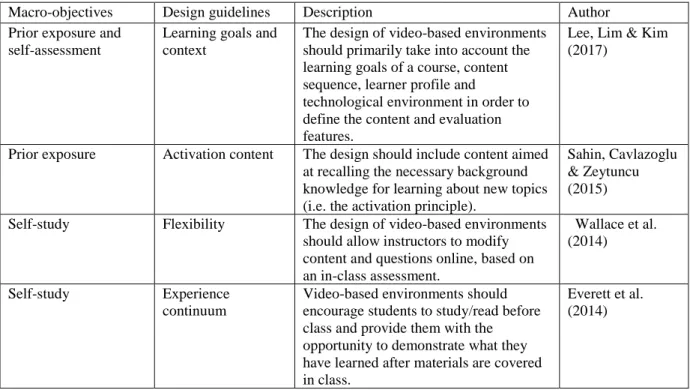
(34) 25. dynamic nature, video-based environments remain an important topic of research. A significant amount of research has focused on understanding how students experience the content delivered through these platforms, in the form of readings, presentations and exercises, among others (Kapur et al., 2018; Van der Meij & Van der Meij, 2016). Video-based environments have been used in the context of a flipped classroom for different purposes: acquiring background knowledge (Sahin et al., 2015), reviewing and summarizing concepts previously taught in class (Strayer, Hart & Bleiler, 2015), demonstrating and giving examples (Lee & lai, 2017) and for self-assessment (Davies, Dean & Ball, 2013). Different recommendations for proper interaction with video-based environments can be taken from previous educational initiatives such as Massive Open Online Courses (MOOCs) and other methods of online education (e.g. screen-casts and videoconferencing). Table 1 includes a summary of a set of aspects that allow for improved interaction or user experience with video-based environments. Each dimension regarding the quality of the material has been based on the 3C model (content, communication and construction) proposed by Kerres and Dewitt (2003). According to this model, any learning environment consists of three components: • a content component, which makes the learning material available to a learner; • a communication component, which offers interpersonal exchange between learners or learners and tutors; and • a constructive component, which facilitates and guides individual and cooperative learning activities in order to actively work on learning tasks (or assignments) with different degrees of complexity (from multiple choice to projects or problem-based learning). Table 1. HCI recommendations for improving the use of video-based environments.
(35) 26. Dimension Content. Aspect Length. Recommendations Pre-production lesson planning is key to producing videos equal to or shorter than 6 minutes.. Author Guo, Ki & Rubin (2014). Auditory. Avoid auditory distractions and ensure microphone and audio quality.. Smith & McDonald (2013). Navigation behavior. Develop feedback strategies to encourage students to engage deeply with the content, rather than just study a minimal amount in order to pass the course or year. Recording in informal settings may add a personal feel to the content (versus studio production).. Guo & Reinecke (2014). Changing text to emphasize a conversational style in first- or secondperson forms rather than third-person forms may impact on friendliness, retention and effective cognitive processing. Post-production editing should look to show the instructor’s face at opportune moments throughout the video. A greater sense of physical presence within a virtual environment may lead to greater degrees of friendliness and helpfulness for the content. Online lectures should contain a basic overview of or prerequisite content for an upcoming unit.. Ginns, Martin & Herbert (2013). Inserting micro-level activities within the video lecture to check learner understanding (e.g. pop- up quizzes or self-check activities).. Lee, Lim & Kim (2017). Scheduling. Understand student scheduling constraints in order to plan the number of flipped lessons.. Young et al. (2014). Forum and participation. Provide an online forum where all questions and answers can be viewed by all participants.. Street et al. (2015). Personal feel of video production Communication. Personalization effect. Instructor presence in slide-based videos Immersive digital environments. Construction. Including a clear introduction and summary of main points Formative evaluation. Guo, Ki & Rubin (2014). Guo, Ki & Rubin (2014) Moreno & Meyer (2004). Smith and McDonald (2013).
(36) 27. The following summary can be made from the information in Table 1: • Interactive features (e.g. friendliness, user personalization, personal feel of narrated voice, instructor presence, navigation and interactive streaming) brings the dynamics of a human–human interaction to human–computer interactions. • The students’ previous knowledge should be considered and assessed in terms of how the content is structured before new interactions are established. • The students’ contextual factors, such as potential distractions, amount of time (scheduling constraints) and access to the content, should be considered in the design of video-based environments. How these dimensions are considered and integrated into the end result depends significantly on the instructional design process and the decision-making of instructional designers. Therefore, we turned to the literature in order to understand how instructional designers take into account user-centered dimensions and guidelines. 2.3 Instructors as design agents “Teachers may also experience problems with camera set-up, video capture, and processing—problems that may impede the successful use of the own-video condition at scale.” (Beisiegel et al., 2018) The initial adoption stages of the flipped classroom model are commonly characterized by an informal design and implementation of video-based environments (Schnai, 2017). In many cases, instructors act as design agents for the entire experience delivered to students (McLaughlin, 2016; Davies, Dean & Ball, 2013). Design agents are represented by those who assume the role of designing the learning objects to be used by students and instructors. In this sense, a set of relevant barriers for design agents in the process of designing video-based environments includes: limited availability of time, low technological support and technological skills, and a lack of previous experience in the design of learning tools that focus on student engagement rather than test taking (Kapur, Byfield, Del Frate et al., 2018; Schnai, 2017). Consequently, design agents often rely heavily on their own previous experience in order to achieve reasonable levels of quality and adoption rates. Nevertheless, they may also need to access third-party or institutional resources so as to develop attractive and useful content (Jin, 2013; Mok, 2014). Given the development of new technological tools for designing and producing video-based environments, user feedback (i.e. from students, instructors and/or teaching assistants) can now be incorporated into the solution much sooner. However, this feedback must be structured around the design process, from the initial guidelines to the end product, as well as the prototypes (Lee, Lim & Kim, 2017)..
(37) 28. 2.4 Design guidelines Low, Lie & Hew (2018) stated that the “design of flipped classrooms is currently undertheorized”. Furthermore the rapid development of technology for recording, storing and sharing video-based content has led to an increase in the production of video-based environments for instructional use. There is a huge range in quality and methodology among these platforms, mainly due to the diverse contexts in which they are applied (DeLozier & Rhodes, 2017). However, four main macro-objectives can be identified for any flipped classroom initiative (Kim et al., 2014): • • • •. Prior exposure: ensure that students can be exposed to the content before class; Self-study: encourage students to prepare for class; Self-assessment: provide mechanisms to assess student understanding; Prepare for class time: provide in-class activities that focus on higher-level cognitive activities. From the perspective of the design agent, achieving these goals becomes critical. The decision-making process should therefore be supported by design guidelines. A literature review provided a set of general design guidelines that can relate to the macroobjectives and therefore provide design agents with a common design framework (Table 2). Table 2. Relation of flipped classroom macro-objectives to general design guidelines. Macro-objectives Prior exposure and self-assessment. Design guidelines Learning goals and context. Prior exposure. Activation content. Self-study. Flexibility. Self-study. Experience continuum. Description The design of video-based environments should primarily take into account the learning goals of a course, content sequence, learner profile and technological environment in order to define the content and evaluation features. The design should include content aimed at recalling the necessary background knowledge for learning about new topics (i.e. the activation principle). The design of video-based environments should allow instructors to modify content and questions online, based on an in-class assessment. Video-based environments should encourage students to study/read before class and provide them with the opportunity to demonstrate what they have learned after materials are covered in class.. Author Lee, Lim & Kim (2017). Sahin, Cavlazoglu & Zeytuncu (2015) Wallace et al. (2014). Everett et al. (2014).
(38) 29. Self-assessment. Simplicity. Prepare for class time. User integration. Prepare for class time. Application. Prepare for class time. Cohesive alignment. The design should provide students with short and simple questions that help them to be aware of their learning. The design should include features that encourage students to engage in online discussion and seek help from others. The design should provide students with the opportunity to tackle problemsolving exercises. The design should be capable of tying together interaction in the video-based environment with face-to-face interaction in class regarding the content, thus making it more relevant to the students.. Kim, Kim & Khera (2014) Lo, Lie & Hew (2018) Lo, Lie & Hew (2018) Buerck, Malmstrom & Peppers (2013). While these design guidelines provide general recommendations (Table 2), they can also be linked to specific design actions (Table 1). This can impact the quality of the content, communication and creation of video-based environments across different courses, while taking into consideration their specific context. The above table is not a comprehensive list of the design guidelines that are available in the literature. However, it does show how design agents can use these design principles to respond to each of the macro-objectives of student learning in a flipped classroom model.. 2.5 Summary When implementing an educational initiative, design agents must first understand the learning context (institutional context). This leads to the definition of macro-objectives that that will guide the creating of learning objects. These macro-objectives then lead into actions by defining and/or selecting a set of design guidelines. These then guide the specific actions that are taken during the design, leading to the end product (e.g. flipped learning environment), which can be broken down in terms of its content, communication and/or creation. This sequence is illustrated in Figure 1, relating the design agent and the user to one another. Figure 1. Summary of the literature review.
(39) 30. Consequently, the user experience of the end product is closely tied to the steps of understanding the learning context, defining macro-objectives, and defining and/or selecting the design guidelines. Most research presented in this section relates to how users evaluate the communication and creation features (e.g. navigational structure, ease of use of menus, findability, and the possibility to chat with peers, among others). Content features are usually left out of user experience evaluations (e.g. length, visual and audio quality, and relevance of content to student’s needs, among others). This is mainly due to the focus being on evaluating the medium of use (e.g. website, platform, wiki etc.). The present study will focus on understanding the user experience of the process shown in Figure 1. Our research question therefore asks: How can the user experience be assessed systemically, from design agent to user?. 3. Proposed user experience assessment framework 3.1 Design stages and user feedback The instructional design of learning materials has improved the way in which they are delivered and presented to students. However, most materials score poorly when it comes to instructional design principles, particularly information design (Margaryan, Bianco & Lotlejihn, 2015). Different methods have been proposed for enhancing these materials and the user experience. Lee, Lim & Kim (2017) outlined an instructional design method for the flipped classroom in which usability testing was used to validate the model itself. These assessments were made at a midway point (between initial analysis and final implementation) by usability experts and instructional design team members. In contrast, Noguera, Guerrero-Roldán & Masó (2018) propose an agile, continuous flow of improvement based on student and teacher opinions..
(40) 31. In order to ensure that user experience assessment data positively impacts the solution under development, the data must be linked to an underlying design-process. Given this, we therefore describe a three-level design-process based on Sim & Duffy (1998): • First design stage: An initial representation of the conceived solution is produced, and a design goal is set. Existing knowledge from the field is then analyzed and summarized in order to produce a feasible solution. Input knowledge of the current state of design, users, tools, constraints and external requirements (e.g. regulations) are used to produce a coherent solution for a given instructional context. • Second design stage: Output knowledge is produced in the form of prototypes. These artifacts or systems are the result of applying the input knowledge to a solution that has been developed based on the design goal. • Third design stage: A design goal is achieved and the resulting artifact/system is implemented and tested in order to address the constraints of the users and the context. From a participatory design perspective, continuous feedback from users can be integrated into each of these design stages (Kirschner, 2015). This therefore provides three instances of user feedback: • Process feedback 1: This first step of assessment covers the user experience of the input knowledge (design guidelines). These guidelines link the design actions to the desired objectives or goals of a new blended learning initiative. The aim of this feedback is to understand the value of a set of design guidelines in the context of blended learning. • Process feedback 2: The second step involves assessing the results of the design activity. Output knowledge is produced from early testing of prototypes, mockups and/or a final product that has not yet been fully launched. The aim of this is to see how useful the end product will be with regards to the desired goals. • Results feedback: The final step involves the knowledge that is provided by the user of the design result (Figure 1): Is the perception of the user agents (i.e. the students) consistent with the previous perceptions and accumulated knowledge (i.e. instructional design principles, best practices and standards). Figure 2 integrates the design stages and continuous feedback into the process depicted in Figure 1. Figure 2. Framework for the systemic evaluation of user experience.
(41) 32. This framework essentially depicts two main roles that are involved in providing feedback: • Design agents: Involved in understanding the learning context, defining (or selecting) a set of guidelines to be used for design activities (input knowledge) and finally producing an end product in the form of learning objects (output knowledge) • User agents: Involved in evaluating the end product and subsequently providing feedback on the design goal (whether or not it was successfully met)..
(42) 33. 4. Method 4.1 Participants and design A study was conducted over a six-month period during the first semester of 2018 at a large Chilean university. Since 2015, the Faculty of Education at the university has been running a pilot program to bring the flipped classroom model to some of its courses. This pilot was being driven by a collaborative effort between teams from different faculties (Computer Science and Education), with the aim of helping a group of instructors implement the flipped classroom model in two courses: • Course 1, Managing Heterogeneous Classrooms. Goal: This course aims to develop skills for creating classroom environments that guarantee the learning of all students. • Course 2, Management and Leadership in the Classroom. Goal: Developing a vision of the classroom as a complex, interdependent system, in which the educator can establish an inclusive environment that is conducive to learning and development. The research team adopted a design-based method (Reeves, 2015). The study was carried out in five phases based on the design stages depicted in Figure 2: • Phase 1: Development of design guidelines: Creation of a set of three videobased guidelines, covering visual grammar (Benoit, 2016), formative assessment (Lee, Lim and Kim, 2017) and critical thinking (Tolks et al., 2016). The videos were uploaded to a YouTube channel and shared with the instructors and teaching assistants participating in the project. The design guidelines were geared towards improving the user experience of the content of the videos and the structure of the online formative assessment exercises (see Appendix A). This phase corresponds to the first design stage (Figure 2). • Phase 2: Survey design and validation: A short, five-question survey with a Likert scale from 1 to 10 was used to measure the user experience of the videodesign and formative assessment (see Appendix B). The instrument was validated by three lecturers and a doctoral student from the School of Education. This was done by having them answer the survey and send their feedback to the research team by email. This phase corresponds to the first design stage (Figure 2). • Phase 3: Process feedback 1: After interacting with the design guidelines defined in Phase 1, a user experience survey was sent to the instructors responsible for producing learning objects for their courses, such as flipped-classroom videos and online formative assessment tools (see Appendix C). This phase corresponds to the first design stage and more specifically to the section process feedback 1 (Figure 2)..
(43) 34. • Phase 4: Survey of design results: Feedback on the videos and formative assessment tools that were created using the design guidelines from Phase 1 was then received from the instructors and teaching assistants at the beginning of the semester. This phase corresponds to the second design stage and more specifically to the section process feedback 2 (Figure 2). • Phase 5: Survey of results in use: Students from each of the courses assessed the user experience of both the videos and the formative assessment tools. Surveys were sent to students 1-2 weeks after they had experienced the flipped classroom approach, and before sitting any exams. This phase corresponds to the third design stage and to the section results feedback (Figure 2).. 4.2 Sample Due to the limited size of the two participating classes, sampling was non-probabilistic and aimed to include the entire population from the pilot study. Data was acquired at three stages during the study, with the total number of participants determined according to the framework proposed in Figure 2. Table 3 describes the sample of participants. Table 3. Sample participants Stage First: Process feedback 1: Survey of instructors in charge of designing the activities (design agents) Second: Process feedback 1: Survey of design results (design agents) Third: Results feedback: Survey of results in use by students (user agents). Number of participants 6. Participants. 5. Three instructors and two teaching assistants evaluated the final learning objects (videos and formative assessment tools).. 98. Undergraduate students enrolled on the corresponding courses evaluated both the flipped-classroom videos and the formative assessment tools.. Three academics with extensive teaching experience (more than 5 years) and three teaching assistants, also with significant experience (more than 3 years).. 4.3 Dimensions of user experience measured Interactive learning objects and/or environments are traditionally assessed by user agents during the final phases of implementation. In general, they are assessed based on their usability and the user experience of their interactive features (Antonenko, Dawson.
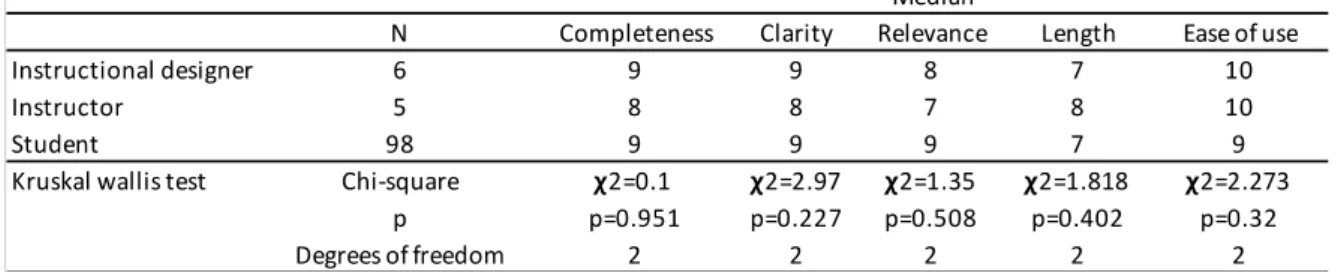
(44) 35. & Sahay, 2017). Content (Table 1) has traditionally been separated from the user experience when assessing an interactive learning object. However, in a process of systemic and continuous feedback, the only feature that is ever-present is the content (from the design guidelines, through the prototypes, until the end product). This study therefore focuses assessment of user experience on the information quality (Wang & Strong, 2006). In this sense, two dimensions of assessment were included: • Intrinsic properties: survey the information quality separately from the context. • Extrinsic or usage properties: survey the information quality while taking into account the context. Table 4 shows the intrinsic and extrinsic properties that were chosen based on the instances of feedback from Figure 2. This table also links each dimension of user experience to the respective macro-objectives included in the design guidelines (see Table 2) Table 4. Properties of user experience and how they relate to the design guidelines Dimension of user experience. Field study. Completeness (intrinsic). of. Design guideline. Definition. Information Quality (Wang & Strong, 1996). Prior exposure and self-study. Perception of how the design of the content relates to the user’s information needs in terms of prior exposure and self-study.. Clarity (intrinsic). Information Quality (Wang & Strong, 1996). Prior exposure and self-study. Perception of how the design of the content relates to the user’s prior skills and knowledge.. Relevance (intrinsic). Information Quality (Wang & Strong, 1996). Learning goals and context. Perception of how the design of the content relates to critical topics for preparing in-class interaction.. Length. User Experience (falta cita). Prior exposure and self-study. Perception of how the amount of information relates to the user’s availability for performing a task.. Ease of use (usage). Usability (ISO FDis, 2009). Selfassessment. Perception of how the design of the content relates to the user’s ability to operate efficiently based on the information provided, either while studying and/or while making self-assessments..
Figure



+3

Documento similar