VICTOR HUGO PACHON
DIPLOMADO DE PROFUNDIZACION CISCO - 203092
Universidad Nacional Abierta y a Distancia – UNAD Ingeniería Electrónica
INTRODUCCION
La capacidad de configurar y administrar dispositivos de Networking orientados al diseño de redes escalables y de conmutación, mediante el estudio del modelo OSI y la arquitectura TCP/IP, le dan la posibilidad al futuro ingeniero de desempeñar cargos en compañías dedicadas al desarrollo de servicios de TI, como en el caso de los ISP, así como la posibilidad de ser administrador de red de una compañía, con el fin de proporcionar soporte a la red que este implementada.
OBJETVOS
1. Desarrollar la capacidad de configurar y administrar dispositivos de Networking, verificar operaciones básicas de enrutamiento y establecer niveles de seguridad básicos.
2. Utilizar las herramientas adecuadas en el diseño y simulación de redes.
DESARROLLO
Descripción del escenario propuesto para la prueba de habilidades
Escenario: Una empresa de Tecnología posee tres sucursales distribuidas en las ciudades de Bogotá, Medellín y Bucaramanga, en donde el estudiante será el administrador de la red, el cual deberá configurar e interconectar entre sí cada uno de los dispositivos que forman parte del escenario, acorde con los lineamientos establecidos para el direccionamiento IP, protocolos de enrutamiento y demás aspectos que forman parte de la topología de red.
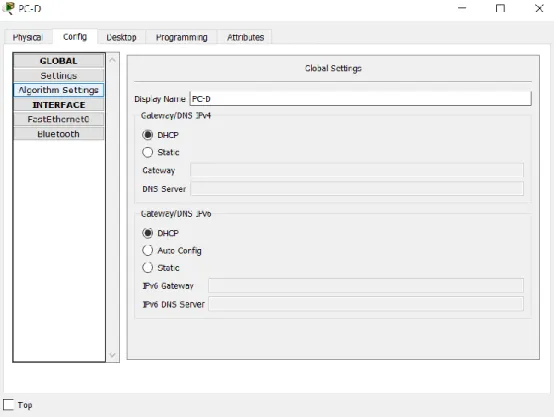
Figura 2. Configuración del direccionamiento IP de PC-A, PC-C, PC-D y Server 0.
Interfaces router R1: R1>enable
R1#conf ter
R1#conf terminal
Enter configuration commands, one per line. End with CNTL/Z.
R1(config)#interface fa 0/0
R1(config-if)#no shutdown
R1(config-if)#
%LINK-5-CHANGED: Interface FastEthernet0/0, changed state to up
R1(config-if)#exit
R1(config)#interface se 2/0
R1(config-if)#ip address 172.31.21.1 255.255.255.252
R1(config-if)#no shutdown
%LINK-5-CHANGED: Interface Serial2/0, changed state to down
R1(config-if)#exit
R1(config)#exit
R1#
R1#show run
R1#show running-config
Building configuration...
interface FastEthernet0/0
no ip address
duplex auto
speed auto
!
interface FastEthernet1/0
no ip address
duplex auto
speed auto
!
interface Serial2/0
ip address 172.31.21.1 255.255.255.252
clock rate 2000000
!
interface Serial3/0
no ip address
clock rate 2000000
shutdown
!
interface FastEthernet4/0
no ip address
shutdown
!
interface FastEthernet5/0
no ip address
shutdown
!
end
R2#conf
R2#configure ter
R2#configure terminal
Enter configuration commands, one per line. End with CNTL/Z.
R2(config)#interface se3/0
R2(config-if)#ip address 172.31.21.2 255.255.255.252
R2(config-if)#no shutdown
R2(config-if)#exit
R2(config)#interface fa1/0
R2(config-if)#ip address 209.165.200.225 255.255.255.248
R2(config-if)#no shutdown
R2(config-if)#exit
R2(config)#interface fa0/0
R2(config-if)#ip address 10.10.10.1 255.0.0.0
R2(config-if)#no shutdown
R2(config-if)#exit
R2(config)#interface se2/0
R2(config-if)#ip address 172.31.23.1 255.255.255.252
R2(config-if)#no shutdown
R2(config-if)#exit
R2#
%SYS-5-CONFIG_I: Configured from console by console
R2#copy run
R2#copy running-config star
R2#copy running-config startup-config
Destination filename [startup-config]?
Building configuration...
[OK]
R2#show run
R2#show running-config
Building configuration...
!
interface FastEthernet0/0
ip address 10.10.10.1 255.0.0.0
duplex auto
speed auto
!
interface FastEthernet1/0
ip address 209.165.200.225 255.255.255.248
speed auto
!
interface Serial2/0
ip address 172.31.23.1 255.255.255.252
clock rate 2000000
!
interface Serial3/0
ip address 172.31.21.2 255.255.255.252
!
interface FastEthernet4/0
no ip address
shutdown
!
interface FastEthernet5/0
no ip address
shutdown
!
!
end
R2#
R3>enable
R3#conf
R3#configure ter
R3#configure terminal
Enter configuration commands, one per line. End with CNTL/Z.
R3(config)#interface se3/0
R3(config-if)#ip address 172.31.23.2 255.255.255.252
R3(config-if)#no shutdown
R3(config-if)#
%LINK-5-CHANGED: Interface Serial3/0, changed state to up
R3(config-if)#exit
R3(config)#interface fa0/0
R3(config-if)#ip address 192.168.4.1 255.255.255.0
R3(config-if)#no shutdown
R3(config-if)#
%LINK-5-CHANGED: Interface FastEthernet0/0, changed state to up
%LINEPROTO-5-UPDOWN: Line protocol on Interface FastEthernet0/0, changed state to up
R3(config-if)#exit
R3(config)#exit
R3#copy run
R3#copy running-config star
R3#copy running-config startup-config
Destination filename [startup-config]?
Building configuration...
[OK]
R3#
R3#show running-config
Building configuration...
!
interface FastEthernet0/0
ip address 192.168.4.1 255.255.255.0
duplex auto
speed auto
!
interface FastEthernet1/0
no ip address
duplex auto
speed auto
shutdown
interface Serial2/0
no ip address
clock rate 2000000
shutdown
!
interface Serial3/0
ip address 172.31.23.2 255.255.255.252
!
interface FastEthernet4/0
no ip address
shutdown
!
interface FastEthernet5/0
no ip address
shutdown
!
end
R3#
2. Configurar el protocolo de enrutamiento OSPFv2 bajo los siguientes criterios: OSPFv2 area 0
Router ID R3: 3.3.3.3
Configurar todas las interfaces LAN como pasivas
Establecer el ancho de banda para enlaces seriales en 128 Kb/s Ajustar el costo en la métrica de S0/0 a 7500
Configuración OSPFv2 para R1: R1>enable
R1#conf
R1#configure ter
R1#configure terminal
Enter configuration commands, one per line. End with CNTL/Z.
R1(config)#router ospf 1
R1(config-router)#router-id 1.1.1.1
R1(config-router)#network 192.168.30.0 0.0.0.255 area 0
R1(config-router)#network 192.168.40.0 0.0.0.255 area 0
R1(config-router)#network 172.31.21.0 0.0.0.3 area 0
R1(config-router)#passive-interface fa0/0
R1(config-router)#interface s2/0
R1(config-if)#bandwidth 128
R1(config-if)#ip ospf cost 7500
R1(config-if)#exit
R1(config)#exit
R1#
%SYS-5-CONFIG_I: Configured from console by console
R1#copy run
R1#copy running-config startup-config
Destination filename [startup-config]?
Building configuration...
[OK]
R1#
Verificación de la configuración OSPFv2 en R1: R1#show ip protocols
Routing Protocol is "ospf 1"
Outgoing update filter list for all interfaces is not set
Incoming update filter list for all interfaces is not set
Router ID 1.1.1.1
Number of areas in this router is 1. 1 normal 0 stub 0 nssa
Maximum path: 4
Routing for Networks:
192.168.30.0 0.0.0.255 area 0
172.31.21.0 0.0.0.3 area 0
192.168.40.0 0.0.0.255 area 0
Passive Interface(s):
FastEthernet0/0
Routing Information Sources:
Gateway Distance Last Update
1.1.1.1 110 00:23:32
2.2.2.2 110 00:13:51
3.3.3.3 110 00:13:45
R1#
En las tablas de enrutamiento se pueden observar las rutas aprendidas a través de OSPF. Tabla de enrutamiento de R1:
R1>enable
R1#show ip route
Codes: C - connected, S - static, I - IGRP, R - RIP, M - mobile, B - BGP
D - EIGRP, EX - EIGRP external, O - OSPF, IA - OSPF inter area
N1 - OSPF NSSA external type 1, N2 - OSPF NSSA external type 2
E1 - OSPF external type 1, E2 - OSPF external type 2, E - EGP
i - IS-IS, L1 - IS-IS level-1, L2 - IS-IS level-2, ia - IS-IS inter area
* - candidate default, U - per-user static route, o - ODR
P - periodic downloaded static route
Gateway of last resort is not set
O 10.0.0.0/8 [110/7501] via 172.31.21.2, 00:00:45, Serial2/0
172.31.0.0/30 is subnetted, 2 subnets
C 172.31.21.0 is directly connected, Serial2/0
O 172.31.23.0 [110/15000] via 172.31.21.2, 00:00:45, Serial2/0
O 192.168.4.0/24 [110/15001] via 172.31.21.2, 00:00:35, Serial2/0
C 192.168.30.0/24 is directly connected, FastEthernet0/0.30
C 192.168.40.0/24 is directly connected, FastEthernet0/0.40
R1
R2>enable
R2#conf
R2#configure ter
R2#configure terminal
Enter configuration commands, one per line. End with CNTL/Z.
R2(config)#router ospf 1
R2(config-router)#router-id 2.2.2.2
R2(config-router)#network 172.31.21.0 0.0.0.3 area 0
R2(config-router)#
01:26:44: %OSPF-5-ADJCHG: Process 1, Nbr 1.1.1.1 on Serial3/0 from LOADING to FULL, Loading Done
R2(config-router)#network 10.10.10.0 0.255.255.255 area 0
R2(config-router)#network 172.31.23.0 0.0.0.3 area 0
R2(config-router)#passive-interface fa0/0
R2(config-router)#exit
R2(config)#interface s3/0
R2(config-if)#bandwidth 128
R2(config-if)#interface s0/0
R2(config)#interface s2/0
R2(config-if)#bandwidth 128
R2(config-if)#ip ospf cost 7500
R2(config-if)#exit
R2(config)#exit
R2#
R2#copy run
R2#copy running-config star
R2#copy running-config startup-config
Destination filename [startup-config]?
Building configuration...
[OK]
R2#
Verificación de la configuración OSPFv2 en R2: R2#show ip protocols
Routing Protocol is "ospf 1"
Outgoing update filter list for all interfaces is not set
Incoming update filter list for all interfaces is not set
Router ID 2.2.2.2
Number of areas in this router is 1. 1 normal 0 stub 0 nssa
Maximum path: 4
Routing for Networks:
172.31.21.0 0.0.0.3 area 0
10.0.0.0 0.255.255.255 area 0
172.31.23.0 0.0.0.3 area 0
Passive Interface(s):
FastEthernet0/0
Routing Information Sources:
Gateway Distance Last Update
1.1.1.1 110 00:04:34
Distance: (default is 110)
R2#
Tabla de enrutamiento de R2: R2>enable
R2#show ip route
Codes: C - connected, S - static, I - IGRP, R - RIP, M - mobile, B - BGP
D - EIGRP, EX - EIGRP external, O - OSPF, IA - OSPF inter area
N1 - OSPF NSSA external type 1, N2 - OSPF NSSA external type 2
E1 - OSPF external type 1, E2 - OSPF external type 2, E - EGP
i - IS-IS, L1 - IS-IS level-1, L2 - IS-IS level-2, ia - IS-IS inter area
* - candidate default, U - per-user static route, o - ODR
P - periodic downloaded static route
Gateway of last resort is not set
C 10.0.0.0/8 is directly connected, FastEthernet0/0
172.31.0.0/30 is subnetted, 2 subnets
C 172.31.21.0 is directly connected, Serial3/0
C 172.31.23.0 is directly connected, Serial2/0
O 192.168.4.0/24 [110/7501] via 172.31.23.2, 00:05:16, Serial2/0
O 192.168.30.0/24 [110/65] via 172.31.21.1, 00:05:16, Serial3/0
O 192.168.40.0/24 [110/65] via 172.31.21.1, 00:05:16, Serial3/0
R2#
R3>enable
R3#conf
R3#configure ter
R3#configure terminal
Enter configuration commands, one per line. End with CNTL/Z.
R3(config)#router ospf 1
R3(config-router)#router-id 3.3.3.3
R3(config-router)#network 172.31.23.0 0.0.0.3 area 0
R3(config-router)#
01:40:13: %OSPF-5-ADJCHG: Process 1, Nbr 2.2.2.2 on Serial3/0 from LOADING to FULL, Loading Done
R3(config-router)#network 192.168.4.0 0.0.0.255 area 0
R3(config-router)#passive-interface fa0/0
R3(config-router)#exit
R3(config)#interface s3/0
R3(config-if)#bandwidth 128
R3(config-if)#exit
R3(config)#exit
R3#
%SYS-5-CONFIG_I: Configured from console by console
R3#copy run
R3#copy running-config star
R3#copy running-config startup-config
Destination filename [startup-config]?
[OK]
R3#
Verificación de la configuración OSPFv2 en R3: R3#show ip protocols
Routing Protocol is "ospf 1"
Outgoing update filter list for all interfaces is not set
Incoming update filter list for all interfaces is not set
Router ID 3.3.3.3
Number of areas in this router is 1. 1 normal 0 stub 0 nssa
Maximum path: 4
Routing for Networks:
172.31.23.0 0.0.0.3 area 0
192.168.4.0 0.0.0.255 area 0
Passive Interface(s):
FastEthernet0/0
Routing Information Sources:
Gateway Distance Last Update
1.1.1.1 110 00:16:45
2.2.2.2 110 00:03:18
3.3.3.3 110 00:03:12
Distance: (default is 110)
R3#
Tabla de enrutamiento de R3: R3>enable
Codes: C - connected, S - static, I - IGRP, R - RIP, M - mobile, B - BGP
D - EIGRP, EX - EIGRP external, O - OSPF, IA - OSPF inter area
N1 - OSPF NSSA external type 1, N2 - OSPF NSSA external type 2
E1 - OSPF external type 1, E2 - OSPF external type 2, E - EGP
i - IS-IS, L1 - IS-IS level-1, L2 - IS-IS level-2, ia - IS-IS inter area
* - candidate default, U - per-user static route, o - ODR
P - periodic downloaded static route
Gateway of last resort is not set
O 10.0.0.0/8 [110/65] via 172.31.23.1, 00:09:36, Serial3/0
172.31.0.0/30 is subnetted, 2 subnets
O 172.31.21.0 [110/128] via 172.31.23.1, 00:09:36, Serial3/0
C 172.31.23.0 is directly connected, Serial3/0
C 192.168.4.0/24 is directly connected, FastEthernet0/0
O 192.168.30.0/24 [110/129] via 172.31.23.1, 00:09:36, Serial3/0
O 192.168.40.0/24 [110/129] via 172.31.23.1, 00:09:36, Serial3/0
R3#
3. Configurar VLANs, Puertos troncales, puertos de acceso, encapsulamiento, Inter-VLAN Routing y Seguridad en los Switches acorde a la topología de red establecida.
VLAN 30 en S1: S1>enable
S1#conf
S1#configure terminal
Enter configuration commands, one per line. End with CNTL/Z.
S1(config)#vlan 99
S1(config-vlan)#exit
S1(config)#interface fa1/1
S1(config-if)#switchport mode access
S1(config-if)#switchport access vlan 30
S1(config-if)#exit
S1(config)#interface fa3/1
S1(config-if)#switchport mode trunk
S1(config-if)#
%CDP-4-NATIVE_VLAN_MISMATCH: Native VLAN mismatch discovered on FastEthernet3/1 (99), with S3 FastEthernet3/1 (1).
S1(config-if)#switchport trunk native vlan 99
S1(config-if)#switchport trunk allowed vlan 30,40,99
S1(config-if)#exit
S1(config)#interface fa0/1
S1(config-if)#switchport mode trunk
S1(config-if)#
%LINEPROTO-5-UPDOWN: Line protocol on Interface FastEthernet0/1, changed state to down
S1(config-if)#exit
S1(config)#exit
S1#
%SYS-5-CONFIG_I: Configured from console by console
S1#copy
%CDP-4-NATIVE_VLAN_MISMATCH: Native VLAN mismatch discovered on FastEthernet3/1 (99), with S3 FastEthernet3/1 (1).
S1#copy run
S1#copy running-config star
S1#copy running-config startup-config
Destination filename [startup-config]?
Building configuration...
[OK]
S1#
S1#show run
S1#show running-config
Building configuration...
Current configuration : 691 bytes
version 12.1
no service timestamps log datetime msec
no service timestamps debug datetime msec
no service password-encryption
spanning-tree mode pvst
spanning-tree extend system-id
interface FastEthernet0/1
switchport mode trunk
interface FastEthernet1/1
switchport access vlan 30
switchport mode access
interface FastEthernet2/1
shutdown
interface FastEthernet3/1
switchport trunk native vlan 99
switchport trunk allowed vlan 30,40,99
switchport mode trunk
interface FastEthernet4/1
shutdown
interface FastEthernet5/1
shutdown
interface Vlan1
no ip address
shutdown
line con 0
line vty 0 4
login
line vty 5 15
end
S1#
S1#show vlan brief
VLAN Name Status Ports
---- --- --- ---
1 default active Fa2/1, Fa4/1, Fa5/1
30 VLAN0030 active Fa1/1
99 VLAN0099 active
1002 fddi-default active
1003 token-ring-default active
1004 fddinet-default active
1005 trnet-default active
S1#
VLAN 40 en S3: S3>enable
S3#conf
S3#configure ter
S3#configure terminal
Enter configuration commands, one per line. End with CNTL/Z.
S3(config)#vlan 99
S3(config-vlan)#
S3(config-vlan)#exit
S3(config)#interface fa0/1
S3(config-if)#switchport mode access
S3(config-if)#switchport access vlan 40
% Access VLAN does not exist. Creating vlan 40
S3(config-if)#exit
S3(config)#interface fa3/1
S3(config-if)#switchport mode trunk
S3(config-if)#switchport trunk native vlan 99
S3(config-if)#%SPANTREE-2-UNBLOCK_CONSIST_PORT: Unblocking FastEthernet3/1 on VLAN0099. Port consistency restored.
%SPANTREE-2-UNBLOCK_CONSIST_PORT: Unblocking FastEthernet3/1 on VLAN0001. Port consistency restored.
S3(config-if)#switchport trunk allowed vlan 30,40,99
S3(config-if)#exit
S3(config)#EXIT
S3#
%SYS-5-CONFIG_I: Configured from console by console
S3#copy run
S3#copy running-config star
Destination filename [startup-config]?
Building configuration...
[OK]
S3#
S3#show vlan brief
VLAN Name Status Ports
---- --- --- ---
1 default active Fa1/1, Fa2/1, Fa4/1, Fa5/1
40 VLAN0040 active Fa0/1
99 VLAN0099 active
1002 fddi-default active
1003 token-ring-default active
1004 fddinet-default active
1005 trnet-default active
S3#
S3#show run
S3#show running-config
Building configuration...
Current configuration : 698 bytes
version 12.1
no service timestamps log datetime msec
no service timestamps debug datetime msec
hostname S3
no ip domain-lookup
spanning-tree mode pvst
spanning-tree extend system-id
interface FastEthernet0/1
switchport access vlan 40
switchport mode access
interface FastEthernet1/1
shutdown
interface FastEthernet2/1
shutdown
interface FastEthernet3/1
switchport trunk native vlan 99
switchport trunk allowed vlan 30,40,99
switchport mode trunk
interface FastEthernet4/1
shutdown
interface FastEthernet5/1
shutdown
interface Vlan1
no ip address
shutdown
line con 0
line vty 0 4
line vty 5 15
login
end
S3#
Configuración de subinterfaces en R1: R1>enable
R1#conf
R1#configure ter
R1#configure terminal
Enter configuration commands, one per line. End with CNTL/Z.
R1(config)#interface fa0/0.30
R1(config-subif)#
%LINK-5-CHANGED: Interface FastEthernet0/0.30, changed state to up
%LINEPROTO-5-UPDOWN: Line protocol on Interface FastEthernet0/0.30, changed state to up
R1(config-subif)#encapsulation dot1q 30
R1(config-subif)#ip address 192.168.30.1 255.255.255.0
% 192.168.30.0 overlaps with FastEthernet0/0
R1(config-subif)#interface fa0/0.40
R1(config-subif)#
%LINK-5-CHANGED: Interface FastEthernet0/0.40, changed state to up
R1(config-subif)#encapsulation dot1q 40
R1(config-subif)#ip address 192.168.40.1 255.255.255.0
R1(config-subif)#exit
R1(config)#interface fa0/0
R1(config-if)#no shutdown
R1(config-if)#exit
R1(config)#exit
R1#
%SYS-5-CONFIG_I: Configured from console by console
R1#copy run
R1#copy running-config star
R1#copy running-config startup-config
Destination filename [startup-config]?
Building configuration...
[OK]
R1#
R1#show running-config
Building configuration...
Current configuration : 1139 bytes
version 12.2
no service timestamps log datetime msec
no service password-encryption
hostname R1
ip cef
no ipv6 cef
interface FastEthernet0/0
no ip address
duplex auto
speed auto
interface FastEthernet0/0.30
encapsulation dot1Q 30
ip address 192.168.30.1 255.255.255.0
interface FastEthernet0/0.40
encapsulation dot1Q 40
ip address 192.168.40.1 255.255.255.0
interface FastEthernet1/0
no ip address
duplex auto
speed auto
shutdown
interface Serial2/0
ip address 172.31.21.1 255.255.255.252
ip ospf cost 7500
clock rate 2000000
interface Serial3/0
clock rate 2000000
shutdown
interface FastEthernet4/0
no ip address
shutdown
interface FastEthernet5/0
no ip address
shutdown
router ospf 1
router-id 1.1.1.1
log-adjacency-changes
passive-interface FastEthernet0/0
network 192.168.30.0 0.0.0.255 area 0
network 172.31.21.0 0.0.0.3 area 0
network 192.168.40.0 0.0.0.255 area 0
ip classless
ip flow-export version 9
line con 0
line aux 0
line vty 0 4
login
end
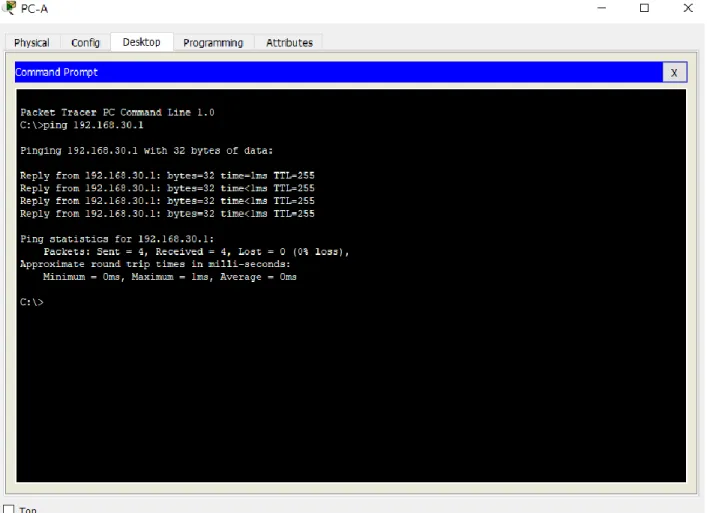
Figura 3. Prueba de conectividad entre la PC-A (vlan 30) a la subinterfaz del router fa0/0.30, la
cual es el Gateway predeterminado de la vlan 30. 4. En el Switch 3 deshabilitar DNS lookup
S3>enable
S3#conf
S3#configure ter
S3#configure terminal
Enter configuration commands, one per line. End with CNTL/Z.
S3(config)#no ip domain-lookup
S3(config)#exit
%SYS-5-CONFIG_I: Configured from console by console
S3#copy run
S3#copy running-config start
S3#copy running-config startup-config
Destination filename [startup-config]?
Building configuration...
[OK]
S3#
S3#show run
S3#show running-config
Building configuration...
Current configuration : 749 bytes
!
version 12.1
no service timestamps log datetime msec
no service timestamps debug datetime msec
no service password-encryption
!
hostname S3
!
!
!
no ip domain-lookup
Para S3:
6. Desactivar todas las interfaces que no sean utilizadas en el esquema de red. Para S1:
S1>enable
S1#conf
S1#configure ter
S1#configure terminal
Enter configuration commands, one per line. End with CNTL/Z.
S1(config)#interface fa2/1
S1(config-if)#shutdown
%LINK-5-CHANGED: Interface FastEthernet2/1, changed state to administratively down
S1(config-if)#interface fa4/1
S1(config-if)#shutdown
%LINK-5-CHANGED: Interface FastEthernet4/1, changed state to administratively down
S1(config-if)#interface fa5/1
S1(config-if)#shutdown
%LINK-5-CHANGED: Interface FastEthernet5/1, changed state to administratively down
S1(config-if)#exit
S1(config)#exit
%SYS-5-CONFIG_I: Configured from console by console
S1#copy run
S1#copy running-config star
S1#copy running-config startup-config
Destination filename [startup-config]?
Building configuration...
[OK]
S1#
S1#show run
S1#show running-config
Building configuration...
Current configuration : 521 bytes
version 12.1
no service timestamps log datetime msec
no service timestamps debug datetime msec
no service password-encryption
hostname S1
spanning-tree mode pvst
spanning-tree extend system-id
interface FastEthernet0/1
interface FastEthernet1/1
interface FastEthernet2/1
interface FastEthernet3/1
interface FastEthernet4/1
shutdown
interface FastEthernet5/1
shutdown
interface Vlan1
no ip address
shutdown
line con 0
line vty 0 4
login
line vty 5 15
login
end
S1#
Para S3: S3>enable
S3#conf
S3#configure ter
S3#configure terminal
Enter configuration commands, one per line. End with CNTL/Z.
S3(config)#interface fa1/1
S3(config-if)#shutdown
S3(config-if)#interface fa2/1
S3(config-if)#shutdown
%LINK-5-CHANGED: Interface FastEthernet2/1, changed state to administratively down
S3(config-if)#interface fa4/1
S3(config-if)#shutdown
%LINK-5-CHANGED: Interface FastEthernet4/1, changed state to administratively down
S3(config-if)#interface fa5/1
S3(config-if)#shutdown
%LINK-5-CHANGED: Interface FastEthernet5/1, changed state to administratively down
S3(config-if)#exit
S3(config)#exit
S3#
%SYS-5-CONFIG_I: Configured from console by console
S3#copy run
S3#copy running-config star
S3#copy running-config startup-config
Destination filename [startup-config]?
Building configuration...
[OK]
S3#
S3#show running-config
Building configuration...
Current configuration : 551 bytes
version 12.1
no service timestamps log datetime msec
no service timestamps debug datetime msec
no service password-encryption
hostname S3
no ip domain-lookup
spanning-tree mode pvst
spanning-tree extend system-id
interface FastEthernet0/1
interface FastEthernet1/1
shutdown
interface FastEthernet2/1
shutdown
interface FastEthernet3/1
interface FastEthernet4/1
shutdown
interface FastEthernet5/1
shutdown
interface Vlan1
no ip address
line con 0
line vty 0 4
login
line vty 5 15
login
end
S3#
Para R1: R1>enable
R1#conf
R1#configure ter
R1#configure terminal
Enter configuration commands, one per line. End with CNTL/Z.
R1(config)#interface fa1/0
R1(config-if)#shutdown
R1(config-if)#
%LINK-5-CHANGED: Interface FastEthernet1/0, changed state to administratively down
R1(config-if)#interface se3/0
R1(config-if)#shutdown
%LINK-5-CHANGED: Interface Serial3/0, changed state to administratively down
R1(config-if)#interface fa4/0
%LINK-5-CHANGED: Interface FastEthernet4/0, changed state to administratively down
R1(config-if)#interface fa5/0
R1(config-if)#shutdown
%LINK-5-CHANGED: Interface FastEthernet5/0, changed state to administratively down
R1(config-if)#exit
R1(config)#exit
R1#
%SYS-5-CONFIG_I: Configured from console by console
R1#copy run
R1#copy running-config star
R1#copy running-config startup-config
Destination filename [startup-config]?
Building configuration...
[OK]
R1#
R1#show run
R1#show running-config
Building configuration...
Current configuration : 1139 bytes
version 12.2
no service timestamps debug datetime msec
no service password-encryption
hostname R1
ip cef
no ipv6 cef
interface FastEthernet0/0
no ip address
duplex auto
speed auto
interface FastEthernet0/0.30
encapsulation dot1Q 30
ip address 192.168.30.1 255.255.255.0
interface FastEthernet0/0.40
encapsulation dot1Q 40
ip address 192.168.40.1 255.255.255.0
interface FastEthernet1/0
no ip address
duplex auto
speed auto
shutdown
interface Serial2/0
ip address 172.31.21.1 255.255.255.252
ip ospf cost 7500
clock rate 2000000
no ip address
clock rate 2000000
shutdown
interface FastEthernet4/0
no ip address
shutdown
interface FastEthernet5/0
no ip address
shutdown
router ospf 1
router-id 1.1.1.1
log-adjacency-changes
passive-interface FastEthernet0/0
network 192.168.30.0 0.0.0.255 area 0
network 172.31.21.0 0.0.0.3 area 0
network 192.168.40.0 0.0.0.255 area 0
ip classless
ip flow-export version 9
line con 0
line aux 0
line vty 0 4
login
end
R1#
R2>enable
R2#conf
R2#configure ter
R2#configure terminal
Enter configuration commands, one per line. End with CNTL/Z.
R2(config)#interface fa4/0
R2(config-if)#shutdown
R2(config-if)#interface fa5/0
R2(config-if)#shutdown
R2(config-if)#exit
R2(config)#exit
R2#
%SYS-5-CONFIG_I: Configured from console by console
R2#copy run
R2#copy running-config start
R2#copy running-config startup-config
Destination filename [startup-config]?
Building configuration...
[OK]
R2#
R2#show run
R2#show running-config
Current configuration : 980 bytes
version 12.2
no service timestamps log datetime msec
no service timestamps debug datetime msec
no service password-encryption
hostname R2
ip cef
no ipv6 cef
interface FastEthernet0/0
ip address 10.10.10.1 255.0.0.0
duplex auto
speed auto
interface FastEthernet1/0
ip address 209.165.200.225 255.255.255.248
duplex auto
speed auto
interface Serial2/0
ip address 172.31.23.1 255.255.255.252
ip ospf cost 7500
clock rate 2000000
interface Serial3/0
ip address 172.31.21.2 255.255.255.252
interface FastEthernet4/0
no ip address
interface FastEthernet5/0
no ip address
shutdown
router ospf 1
router-id 2.2.2.2
log-adjacency-changes
passive-interface FastEthernet0/0
network 172.31.21.0 0.0.0.3 area 0
network 10.0.0.0 0.255.255.255 area 0
network 172.31.23.0 0.0.0.3 area 0
ip classless
ip flow-export version 9
line con 0
line aux 0
line vty 0 4
login
end
R2#
Para R3: R3>enable
R3#conf
R3#configure ter
R3#configure terminal
Enter configuration commands, one per line. End with CNTL/Z.
R3(config-if)#shutdown
R3(config-if)#interface se2/0
R3(config-if)#shutdown
R3(config-if)#interface fa4/0
R3(config-if)#shutdown
R3(config-if)#interface fa5/0
R3(config-if)#shutdown
R3(config-if)#exit
R3(config)#exit
R3#
%SYS-5-CONFIG_I: Configured from console by console
R3#copy run
R3#copy running-config star
R3#copy running-config startup-config
Destination filename [startup-config]?
Building configuration...
[OK]
R3#
R3#show running-config
Building configuration...
Current configuration : 895 bytes
version 12.2
no service timestamps debug datetime msec
no service password-encryption
hostname R3
ip cef
no ipv6 cef
interface FastEthernet0/0
ip address 192.168.4.1 255.255.255.0
duplex auto
speed auto
interface FastEthernet1/0
no ip address
duplex auto
speed auto
shutdown
interface Serial2/0
no ip address
clock rate 2000000
shutdown
interface Serial3/0
ip address 172.31.23.2 255.255.255.252
interface FastEthernet4/0
no ip address
shutdown
interface FastEthernet5/0
shutdown
router ospf 1
router-id 3.3.3.3
log-adjacency-changes
passive-interface FastEthernet0/0
network 172.31.23.0 0.0.0.3 area 0
network 192.168.4.0 0.0.0.255 area 0
ip classless
ip flow-export version 9
line con 0
line aux 0
line vty 0 4
login
end
R3#
7. Implement DHCP and NAT for IPv4
8. Configurar R1 como servidor DHCP para las VLANs 30 y 40.
9. Reservar las primeras 30 direcciones IP de las VLAN 30 y 40 para configuraciones estáticas. Configurar DHCP pool para VLAN 30
Name: ADMINISTRACION DNS-Server: 10.10.10.11 Domain-Name: ccna-unad.com Establecer default gateway.
DNS-Server: 10.10.10.11 Domain-Name: ccna-unad.com Establecer default gateway. Configuración de DHCP en R1: R1>enable
R1#conf
R1#configure ter
R1#configure terminal
Enter configuration commands, one per line. End with CNTL/Z.
R1(config)#service dhcp
R1(config)#ip dhcp excluded-address 192.168.30.1 192.168.30.31
R1(config)#ip dhcp excluded-address 192.168.40.1 192.168.40.31
R1(config)#ip dhcp pool ADMINISTRACION
R1(dhcp-config)#network 192.168.30.0 255.255.255.0
R1(dhcp-config)#default-router 192.168.30.1
R1(dhcp-config)#dns-server 10.10.10.11
R1(dhcp-config)#exit
R1(config)#ip dhcp pool MERCADEO
R1(dhcp-config)#network 192.168.40.0 255.255.255.0
R1(dhcp-config)#default-router 192.168.40.1
R1(dhcp-config)#dns-server 10.10.10.11
R1(dhcp-config)#exit
R1(config)#exit
R1#
R1#copy run
R1#copy running-config star
R1#copy running-config startup-config
Destination filename [startup-config]?
Building configuration...
[OK]
R1#
R1#show run
Building configuration...
Current configuration : 1471 bytes
version 12.2
no service timestamps log datetime msec
no service timestamps debug datetime msec
no service password-encryption
hostname R1
ip dhcp excluded-address 192.168.30.1 192.168.30.31
ip dhcp excluded-address 192.168.40.1 192.168.40.31
ip dhcp pool ADMINISTRACION
network 192.168.30.0 255.255.255.0
default-router 192.168.30.1
dns-server 10.10.10.11
ip dhcp pool MERCADEO
default-router 192.168.40.1
dns-server 10.10.10.11
ip cef
no ipv6 cef
interface FastEthernet0/0
no ip address
duplex auto
speed auto
interface FastEthernet0/0.30
encapsulation dot1Q 30
ip address 192.168.30.1 255.255.255.0
interface FastEthernet0/0.40
encapsulation dot1Q 40
ip address 192.168.40.1 255.255.255.0
interface FastEthernet1/0
no ip address
duplex auto
speed auto
shutdown
interface Serial2/0
ip address 172.31.21.1 255.255.255.252
ip ospf cost 7500
clock rate 2000000
interface Serial3/0
clock rate 2000000
shutdown
interface FastEthernet4/0
no ip address
shutdown
interface FastEthernet5/0
no ip address
shutdown
router ospf 1
router-id 1.1.1.1
log-adjacency-changes
passive-interface FastEthernet0/0
network 192.168.30.0 0.0.0.255 area 0
network 172.31.21.0 0.0.0.3 area 0
network 192.168.40.0 0.0.0.255 area 0
ip classless
ip flow-export version 9
line con 0
line aux 0
line vty 0 4
login
end
R1#
R3#conf
R3#configure ter
R3#configure terminal
Enter configuration commands, one per line. End with CNTL/Z.
R3(config)#ip dhcp excluded-address 192.168.4.1
R3(config)#ip dhcp pool Final_R3
R3(dhcp-config)#network 192.168.4.0 255.255.255.0
R3(dhcp-config)#default-router 192.168.4.1
R3(dhcp-config)#dns-server 10.10.10.11
R3(dhcp-config)#exit
R3(config)#exit
R3#
%SYS-5-CONFIG_I: Configured from console by console
R3#copy run
R3#copy running-config star
R3#copy running-config startup-config
Destination filename [startup-config]?
Building configuration...
[OK]
R3#
R3#show run
R3#show running-config
Current configuration : 1041 bytes
version 12.2
no service timestamps log datetime msec
no service timestamps debug datetime msec
no service password-encryption
hostname R3
ip dhcp excluded-address 192.168.4.1
ip dhcp pool Final_R3
network 192.168.4.0 255.255.255.0
default-router 192.168.4.1
dns-server 10.10.10.11
ip cef
no ipv6 cef
interface FastEthernet0/0
ip address 192.168.4.1 255.255.255.0
duplex auto
speed auto
interface FastEthernet1/0
no ip address
duplex auto
speed auto
shutdown
interface Serial2/0
no ip address
shutdown
interface Serial3/0
ip address 172.31.23.2 255.255.255.252
interface FastEthernet4/0
no ip address
shutdown
interface FastEthernet5/0
no ip address
shutdown
router ospf 1
router-id 3.3.3.3
log-adjacency-changes
passive-interface FastEthernet0/0
network 172.31.23.0 0.0.0.3 area 0
network 192.168.4.0 0.0.0.255 area 0
ip classless
ip flow-export version 9
line con 0
line aux 0
line vty 0 4
login
end
R3#show ip dhcp binding
IP address Client-ID/ Lease expiration Type
192.168.4.2 0060.3EB4.57ED -- Automatic
R3#
Figura 4. Direccionamiento IP asignado a PC-A por DHCP.
10. Configurar NAT en R2 para permitir que los host puedan salir a internet R2>enable
R2#conf
R2#configure ter
R2#configure terminal
Enter configuration commands, one per line. End with CNTL/Z.
R2(config)#ip route 0.0.0.0 0.0.0.0 fa1/0
R2(config)#access-list 1 permit 198.168.0.0 0.0.255.255
R2(config)#access-list 1 permit any
R2(config)#ip nat inside source list 1 interface fa1/0 overload
R2(config)#interface se2/0
R2(config-if)#ip nat inside
R2(config-if)#exit
R2(config)#interface se3/0
R2(config-if)#ip nat inside
R2(config-if)#exit
R2(config)#interface fa1/0
R2(config-if)#ip nat outside
R2(config-if)#exit
R2(config)#exit
R2#
%SYS-5-CONFIG_I: Configured from console by console
R2#copy run
R2#copy running-config startup-config
Destination filename [startup-config]?
Building configuration...
[OK]
R2#
R2#show running-config
Building configuration...
Current configuration : 1201 bytes
version 12.2
no service timestamps log datetime msec
no service timestamps debug datetime msec
no service password-encryption
hostname R2
ip cef
no ipv6 cef
interface FastEthernet0/0
ip address 10.10.10.1 255.0.0.0
duplex auto
speed auto
interface FastEthernet1/0
ip address 209.165.200.225 255.255.255.248
ip nat outside
duplex auto
interface Serial2/0
ip address 172.31.23.1 255.255.255.252
ip ospf cost 7500
ip nat inside
clock rate 2000000
interface Serial3/0
ip address 172.31.21.2 255.255.255.252
ip nat inside
interface FastEthernet4/0
no ip address
shutdown
interface FastEthernet5/0
no ip address
shutdown
router ospf 1
router-id 2.2.2.2
log-adjacency-changes
passive-interface FastEthernet0/0
network 172.31.21.0 0.0.0.3 area 0
network 10.0.0.0 0.255.255.255 area 0
network 172.31.23.0 0.0.0.3 area 0
ip nat inside source list 1 interface FastEthernet1/0 overload
ip classless
ip route 0.0.0.0 0.0.0.0 FastEthernet1/0
access-list 1 permit 198.168.0.0 0.0.255.255
access-list 1 permit any
line con 0
line aux 0
line vty 0 4
login
end
R2#
R2#show ip nat statistics
Total translations: 0 (0 static, 0 dynamic, 0 extended)
Outside Interfaces: FastEthernet1/0
Inside Interfaces: Serial2/0 , Serial3/0
Hits: 0 Misses: 0
Expired translations: 0
Dynamic mappings:
R2#
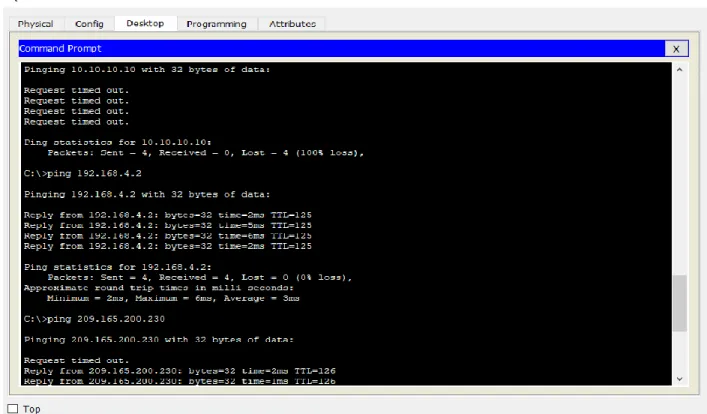
Se realiza ping desde PC-A y PC-D hasta el servidor de internet, y se verifica la tabla y las estadísticas de NAT para comprobar su funcionamiento, estos son los resultados:
R2#show ip nat translations
Pro Inside global Inside local Outside local Outside global
icmp 209.165.200.225:1024192.168.4.2:1 209.165.200.230:1 209.165.200.230:1024
icmp 209.165.200.225:1025192.168.4.2:2 209.165.200.230:2 209.165.200.230:1025
icmp 209.165.200.225:1026192.168.4.2:3 209.165.200.230:3 209.165.200.230:1026
icmp 209.165.200.225:1027192.168.4.2:4 209.165.200.230:4 209.165.200.230:1027
icmp 209.165.200.225:2 192.168.30.32:2 209.165.200.230:2 209.165.200.230:2
icmp 209.165.200.225:3 192.168.30.32:3 209.165.200.230:3 209.165.200.230:3
icmp 209.165.200.225:4 192.168.30.32:4 209.165.200.230:4 209.165.200.230:4
R2#show ip nat statistics
Total translations: 7 (0 static, 7 dynamic, 7 extended)
Outside Interfaces: FastEthernet1/0
Inside Interfaces: Serial2/0 , Serial3/0
Hits: 7 Misses: 8
Expired translations: 1
Dynamic mappings:
R2#
11. Configurar al menos dos listas de acceso de tipo estándar a su criterio en para restringir o permitir tráfico desde R1 o R3 hacia R2.
Ya se configuro una lista de acceso en la configuración de la NAT en R2, se crea otra lista en donde se deniega el acceso de la red 192.168.30.0 al servicio de correo interno del servidor Server0, se configura en el trafico entrante de R1:
Figura 6. Conectividad desde PC-A (en la red 192.168.30.0) hacia el servidor de correo Server0,
R1>enable
R1#conf
R1#configure ter
Enter configuration commands, one per line. End with CNTL/Z.
R1(config)#access-list 1 deny 10.0.0.0 0.255.255.255
R1(config)#access-list 1 permit any
R1(config)#interface fa0/0.30
R1(config-subif)#ip access-group 1 out
R1(config-subif)#exit
R1(config)#exit
R1#
%SYS-5-CONFIG_I: Configured from console by console
R1#copy run
R1#copy running-config star
R1#copy running-config startup-config
Destination filename [startup-config]?
Building configuration...
[OK]
R1#
Building configuration...
Current configuration : 1597 bytes
version 12.2
no service timestamps log datetime msec
no service timestamps debug datetime msec
no service password-encryption
hostname R1
ip dhcp excluded-address 192.168.30.1 192.168.30.31
ip dhcp excluded-address 192.168.40.1 192.168.40.31
ip dhcp pool ADMINISTRACION
network 192.168.30.0 255.255.255.0
default-router 192.168.30.1
dns-server 10.10.10.11
ip dhcp pool MERCADEO
network 192.168.40.0 255.255.255.0
default-router 192.168.40.1
dns-server 10.10.10.11
ip cef
no ipv6 cef
no ip address
duplex auto
speed auto
interface FastEthernet0/0.30
encapsulation dot1Q 30
ip address 192.168.30.1 255.255.255.0
ip access-group 1 out
interface FastEthernet0/0.40
encapsulation dot1Q 40
ip address 192.168.40.1 255.255.255.0
interface FastEthernet1/0
no ip address
duplex auto
speed auto
shutdown
interface Serial2/0
ip address 172.31.21.1 255.255.255.252
ip ospf cost 7500
clock rate 2000000
interface Serial3/0
clock rate 2000000
shutdown
interface FastEthernet4/0
no ip address
shutdown
interface FastEthernet5/0
no ip address
shutdown
router ospf 1
router-id 1.1.1.1
log-adjacency-changes
passive-interface FastEthernet0/0
network 192.168.30.0 0.0.0.255 area 0
network 172.31.21.0 0.0.0.3 area 0
network 192.168.40.0 0.0.0.255 area 0
ip classless
ip route 0.0.0.0 0.0.0.0 Serial2/0
ip flow-export version 9
access-list 1 deny 10.0.0.0 0.255.255.255
access-list 1 permit any
line aux 0
line vty 0 4
login
end
R1#show access-lists
Standard IP access list 1
10 deny 10.0.0.0 0.255.255.255 (25 match(es))
20 permit any (25 match(es))
R1#
Figura 7. Conectividad de la PC-A (en la red 192.168.30.0) luego de configurar la ACL, el host
12. Configurar al menos dos listas de acceso de tipo extendido o nombradas a su criterio en para restringir o permitir tráfico desde R1 o R3 hacia R2.
Se configura una ACL extendida en R3 para denegarle a la red 192.168.4.0 el acceso a páginas web (http):
R3>enable
R3#conf
R3#configure ter
R3#configure terminal
Enter configuration commands, one per line. End with CNTL/Z.
R3(config)#access-list 101 deny tcp 192.168.4.0 0.0.0.255 any eq 80
R3(config)#access-list 101 permit ip any any
R3(config)#interface fa0/0
R3(config-if)#ip access-group 101 in
R3(config-if)#exit
R3(config)#exit
R3#
%SYS-5-CONFIG_I: Configured from console by console
R3#copy run
R3#copy running-config star
R3#copy running-config startup-config
Destination filename [startup-config]?
Building configuration...
[OK]
R3#
R3#show run
R3#show running-config
Building configuration...
Current configuration : 1193 bytes
version 12.2
no service timestamps log datetime msec
no service timestamps debug datetime msec
no service password-encryption
hostname R3
ip dhcp excluded-address 192.168.4.1
ip dhcp pool Final_R3
network 192.168.4.0 255.255.255.0
default-router 192.168.4.1
dns-server 10.10.10.11
ip cef
no ipv6 cef
interface FastEthernet0/0
ip address 192.168.4.1 255.255.255.0
ip access-group 101 in
duplex auto
speed auto
interface FastEthernet1/0
no ip address
speed auto
shutdown
interface Serial2/0
no ip address
clock rate 2000000
shutdown
interface Serial3/0
ip address 172.31.23.2 255.255.255.252
interface FastEthernet4/0
no ip address
shutdown
interface FastEthernet5/0
no ip address
shutdown
router ospf 1
router-id 3.3.3.3
log-adjacency-changes
passive-interface FastEthernet0/0
network 172.31.23.0 0.0.0.3 area 0
network 192.168.4.0 0.0.0.255 area 0
ip classless
ip route 0.0.0.0 0.0.0.0 Serial3/0
ip flow-export version 9
access-list 101 deny tcp 192.168.4.0 0.0.0.255 any eq www
line con 0
line aux 0
line vty 0 4
login
end