
Acceptability and Satisfaction of an ICT based Training for University Teachers
13
0
0
Texto completo
(2) interact with information and communicate between each other is very different from the ways that the traditional schools propose (Bennett, Maton & Kervin, 2008). In this sense we need to prepare students for this new world. We must change what and how we teach in order to match what students need to know and where and when they learn. We need to bring technology into learning in meaningful ways so that we engage and motivate learners to achieve the required knowledge and expertise. In the present day, the education system depends on the relationship between teachers and their students, and it mainly supports learning from textbooks and, in some cases, through the use of technologies, although in a quite limited way. This is mainly based on the use of videos, PowerPoint presentations, or through a limited use of the Internet. However, technology also provides access to a much wider and more flexible set of learning resources. Nowadays, we have different technological devices that enable and enhance communication and knowledge transfers. Their potential utility in the field of education is considerable. Moreover, the challenge to the education system is to incorporate technology to create relevant learning experiences that mirror students’ daily lives and the reality of their futures (Bransford et al., 2006). The use of technologies is not generally well exploited or at least not fully exploited. E-learning can be defined as learning facilitated and supported through the use of ICTs. The term “e-learning” therefore essentially covers the use of computers and technology as a vehicle for knowledge exchange within teaching and learning. It is a recent concept (Sun, Tsai, Finger, Chen, & Yeh, 2008) that has emerged from the new paradigm of modern education. ICTs offer very useful tools for teaching and learning processes. Indeed, ICTs include a variety of applications such as the Internet, virtual environments, and serious games that can be used to improve some important skills, knowledge, and contents. These tools have several proven advantages, including an increase of motivation in the students (Papastergiou, 2009), a broader connection with reality, accelerating and improving the process of knowledge (Ponce, Mayer, & Lopez, 2013) and facilitating access to the information (Thompson, 2013). They proved to be highly effective in fostering skills, among which collaborative work stood out as prominent (Di Blas & Paolini, 2014). Also, they had some disadvantages such as problems related to distraction, including poor academic performance and comprehension (Fried, 2008; Sana, Weston, & Cepeda, 2013). In this line, Kong et al. (2014) identified some research issues critical for e-learning: the developing of some skills (communication and collaboration skills) and the maximization of learning opportunities during the learning process, among others. It is important to understand how these technologies work and under what circumstances they can be used to improve the learning process and also under what circumstances they are not recommended. The concept of e-learning is growing in importance. Proof of this lies is the interest shown by international organizations such as the European Commission, which has increased the economical resources available on the development and generation of programs, including ICTs in the educational field. One example is the Teaching to Teach with Technology (T3) KA3 ICT Multilateral Projects (PROJECT NUMBER 505169-LLP-1-2009-1-IT-KA3KA3MP). The main goal of the T3 Project was to develop and validate an innovative teaching program to promote the use of elearning tools in different contexts (Bretón-López, Botella, Vizcaíno, Quero, Baños, & Molés, 2010; Bretón-López, Quero, Botella, Baños, Farfallini, & Herrero, 2011; Bretón-López, Quero, Botella, Baños, Vizcaíno, Farfallini & Herrero, 2011). T3 comprised three trials in different countries (United Kingdom, Spain, and Italy) using a variety of technologies (web-based, Internet-based training, and virtual learning environments) in diverse educational contexts (secondary schools, universities, and commercial companies). The final purpose of T3 is to involve teachers directly in developing novel IT-based teaching practices. In this sense, the dissemination tools proposed by the project are designed to inspire, encouraging teachers to develop their own innovative applications to improve their own practice. The teachers’ beliefs play a critical role when we include the technology in their classes and also influence in the acceptability of these tools, but few studies have examined those beliefs (Howard, 2011). This paper aims to show the results of acceptability and satisfaction of Spanish teachers with three software programs presented in a workshop of ICT-based learning technologies for education in a university context, within the framework of the European project T3. The sample was composed of university teachers from different disciplines who were interested in the use of innovative teaching technologies. We present relevant data about teacher satisfaction with the technologies used and their opinion about the relevance of incorporating ICT-based learning tools in a university context. 499.
(3) Material and methods Participants The recruitment of the participants was conducted through the university email list. Information about the workshop was sent to teachers who usually participate in university training courses. The teachers interested in the workshop requested admission. Initially, 22 people registered. Two participants failed to start the course because of scheduling difficulties, and four did not meet the minimum attendance required for consideration in the final sample. Finally, the group was composed of 16 participants: 10 women and 6 men, with a mean age of 32 and a standard deviation of 4.4. Participants had various different levels of teaching experience, ranging from one to eight years’ teaching at the university. The participants had different academic backgrounds: five were psychologists, six were engineers, two were chemists, one was a translator, one specialized in information science and publicity, and one had a computing degree. All of the participants were teachers at Universitat Jaume I (UJI), but with different types of contracts: Six were predoctoral fellows, four were assistant professors, three were associate professors, two were contracted research staff, and one was a member of the research teaching personnel.. Selected technology and reasons Literature shows us that educational research has generated many methodologies, tools, and practices exploiting the potential of technology to improve education (Jin & Bridges, 2014). Games are not an exception and there are several examples where, appealing to entertainment, people can learn new things (Butler, Someya, & Fukuhara, 2014) and even change their habits of life (Baños et al., 2013). However, it is important to underline that the education sector and also teachers need a better understanding of the potential and the diversity of such tools (Sica, Nigrelli, Rega, & Miglino, 2011). The different learning contexts in which the educational relationship takes place (Olson & Bruner, 1974) use different means of transferring knowledge and need to be calibrated. For example, the use of serious games is particularly appropriate for young people because while they are playing they are also learning (Laudon & Laudon, 2007), but not for adults, given that they are accustomed to a different type of training (Sefton-Green, 2006). Therefore, the kind of tool selected to be used in each learning context is an important point to consider. In order to make a selection, a classification of the learning technologies was carried out. The resulting categories were based on the new trends in educational psychology (Jessel, 2011) and took two variables into account: (1) the type of technology (based on instructions or constructivism), and (2) the type of teaching (experimenting, experiencing soft skills, or exploring). Category 1 refers to technologies based on instructions, which develop environments to create educational materials that can be used even by non-computer experts. Constructivist technologies are self-contained applications that propose activities in a particular domain and use precise specifications. Category 2 refers to the main teaching practice. Sica et al. (2011) point out three types of teaching and learning strategies involved in games experimenting, experiencing soft skills, and exploring: • The demonstration-experiment is one of the most traditional strategies used by teachers. For example, performing laboratory experiments in which the student is involved in his or her own experience. • Learning by experience is an explicit learning focused on the working environment. It is both individual and collective and is focused not on knowledge, but on skills, attitudes, and expertise. The learner has an active role and consciously learns though collaboration with others and under the guidance of experts in safe environments. • Exploring is an innate human propensity to experience the environments in which they are to act. Many educational practices used this tendency to transfer their skills and knowledge. The adventure game is an example of this type of educational practice, where the transpositions to the technological environment take place. According to this classification, and taking into account the university context in relation to the relevance of the global origins of their students (especially since the Bologna process began), we considered that experiencing and 500.
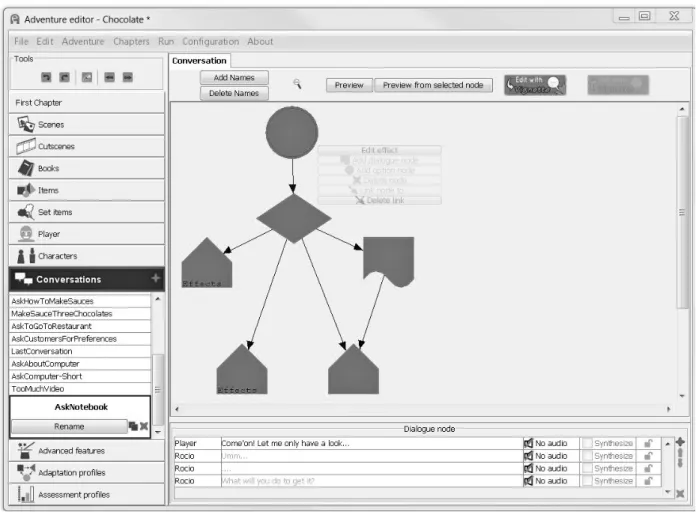
(4) exploring soft skills would be a relevant topic for the workshop. Also, considering the model explained by Jessel (2011) in terms of classification of learning technologies, a constructive approach is the best way to teach this material. Three technologies were selected as the most adequate ones to achieve our goals: e-Adventure, Eutopia, and PalMa systems. Other criteria followed during the selection were that technologies had to belong to an open educational resource, reside in the public domain, and have an intellectual property licence in order to allow participants the use of the technologies in their future educational practices.. e-Adventure The e-Adventure platform is the result of a research project aimed at facilitating the integration of educational games and game-like simulations within educational processes this is being developed by the e-learning research group at Universidad Complutense of Madrid. e-Adventure is a platform for the development of classic adventure computer games with an educational slant.. Figure 1. e-Adventure editor The platform includes both the game and the editor (see Figure 1). The main advantage of the editor platform is that the instructors are directly involved in the production of the games (Torrente, Moreno-Ger, Fernández-Manjón, & del Blanco, 2009), and it can be considered as a flexible tool capable to design different games with several purposes. The game editor involves different scenes that are connected to others. In each scene, the designer can include different objects, characters with which the users can interact in order to achieve the game’s goals. In addition, the editor can add dialogue and implement rules for the interaction within the game (Martínez-Ortiz, Moreno-Ger, Sierra, & Fernández-Manjón, 2006). The e-Adventure engine includes a built-in assessment mechanism that can be used to automatically grade the student or generate human-readable reports to be processed by instructors for assessment purposes. Once the game is completed, the assessment report is generated. The 501.
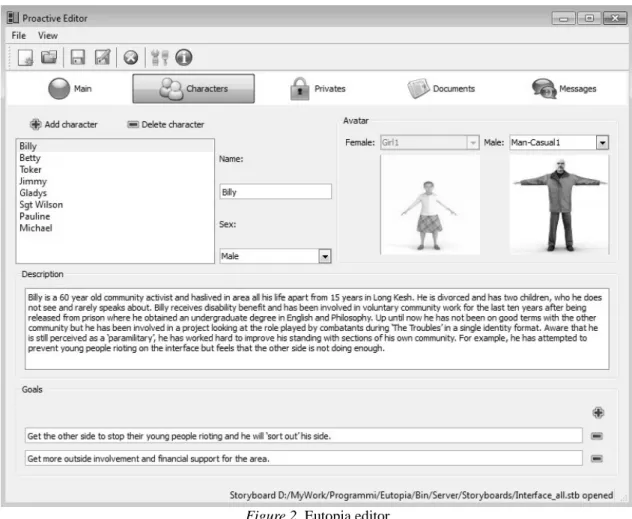
(5) instructors can access the results via the web, and the information can be shown to the students. The games are encapsulated as a learning object with standardized metadata that allows their storage and discovery in standardsbased repositories of learning content. More details about the tool can be found at http://e-adventure.e-ucm.es/.. Europia Eutopia is a platform designed to support distance learning. It is a useful platform to create and organize educational multiplayer online role-playing games. The term role-play describes a range of activities characterized by involving participants in as-if or simulated actions and circumstances that project into an imaginative-creative process established through the interpretation of a real or fictional role in a specific given situation. Role-play has been extensively recognized as a powerful technique for enhancing the traditional training practice, boosting participants’ learning experience, facilitating knowledge, and promoting skills and competencies in groups, as well as for personal development. This approach allows a small group of people to give a theatrical performance for educational purposes. Its main intrinsic value is to be a flexible method that allows participants to experience realistic learning scenarios in a way that best suits specific needs, situations, and learning styles. Eutopia is an online role-play platform conceived and designed around the presence of a group of players interacting with each other through the presence of a digital alter ego (an avatar) and under the supervision and guidance of a role-play director, because we have seen these as key aspects for meaningful learning experiences.. Figure 2. Eutopia editor Each actor (or learner) is represented by an avatar that interacts with other avatars controlled by real people in a virtual 3D scene (see Figure 2). The director (who, according to the context of role-play setting applications, can be a 502.
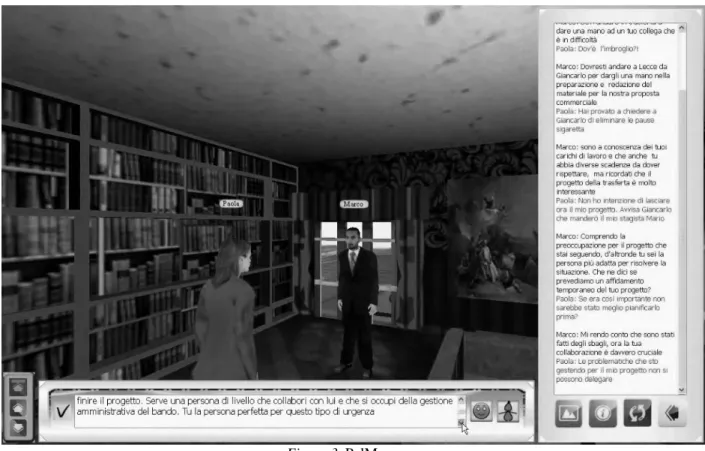
(6) teacher, trainer, educator, or consultant) can play different roles. They can write a storyboard as a playwright, assign roles to players (goals, characters, and the personalities of individual avatars) as a casting director, guide the action in the performances as a movie director, and finally, they can give personalized feedback to the group by recording and analyzing a significant part of the scene of the enacted performance (feedback and debriefing phase). Players communicate via short text messages and non-verbal communication features, like gestures, reproduction of volume, and tone of voice. Players can control avatars’ gestures and body movements. They can also whisper messages to each other. These messages are audible only to the other partner in the conversation and to the trainer. Finally, they can communicate with the trainer to ask for advice or clarification or to raise any other questions about the online simulation. Once the game is in progress, trainers can observe what is going on from either viewpoint (first-person and third-person point of view), get involved at any moment, send messages to players, or activate special events or happenings. When the game session is over, the trainer can lead a debriefing session in a group discussion, analyzing the communication and behaviour strategies adopted by the players. In educational fields, Eutopia allows interaction in real time between students; it also allows the teacher to see the students’ interactions, give them feedback, and interact with one or all of them. More details about the tool are provided at http://www.nac.unina.it/eutopia/download.htm.. PalMa Palestra Manageriale (PalMa) is a serious game conceived as a software tool with a specific learning outcome. It is a simulator of dialogues in which the human user is confronted with a bot (a software agent conceived to answer in a predefined way during the interaction) and, through a series of communicative exchanges, seeks to achieve a certain goal. The versatility of PalMa allows to train users in a wide range of soft skills such as leadership, negotiation, and effective communication skills.. Figure 3. PalMa scene The reference unit of PalMa is a scenario, a situation where the player is asked to achieve a predefined goal. The player acts through an avatar. The interlocutor of the player is a bot, in reaction to the action made by the player (see 503.
(7) Figure 3). From time to time the user selects a phrase (from a number of possible options) that he or she considers effective with respect to this objective. The bot responds in turn with its own feedback. If the user adopts an effective communication strategy reaches the goal. Otherwise the dialogue fails. PalMa is particularly flexible in terms of teaching because it can simulate any kind communicative exchange that occurs between two people. Whoever designs the training customizes the game, defining the environment in which the characters act, assigning the characters of both the user’s avatar and the bots, assigning the level of difficulty, and establishing the response options available to the player and the bots in different exchanges provided by the gym. PalMa provides several useful feedbacks to generate learning. The first kind of feedback is related to the information entered directly into the game. PalMa adopts the graphic language of comics, inserting every sentence inside a callout. The shape, colour, and size of the text in the callout allow the user to understand if the discussion is proceeding correctly or if the sentences selected are not. In addition, the user also has available data, graphics, and comments on the players’ performance at the end of the game. In educational fields, PalMa allows teachers to design exercises with different levels of difficulty to train and test their students in specific previously selected skills. More details about the tool are provided at http://www.entropykn.net/palma-seriousgame/.. Measures The following assessment protocol was applied to the participants: • Technology profile questionnaire (TPQ): This is a questionnaire designed by our research team in order to collect information about previous experience with computers and new technologies. Its aim is to build a technological profile of the different technologies used by the sample before the beginning of the workshop. This questionnaire is composed of 23 items, with a scale of response ranging from 1 (never) to 5 (very often). Each item corresponds to a specific technological tool, which the trainees could have used in their educational contexts (“Please indicate how often you use the following tools, e.g., conventional desktop or laptop; generic software tools, PowerPoint, data handling, word processing; games for educational purposes, etc.”). This tool was applied on the first day of the trials. • Tool Evaluation Questionnaire (TEQ): The aim of this questionnaire is to evaluate each form of technology used in the workshop in terms of design, usefulness perceived by the user, and usability. This questionnaire is composed of 13 items (e.g., “I found the technology easy to use”; “Things I needed were visible or easy to find”; “I would recommend the technology that I used to other colleagues”), with a scale of responses ranging from 1 (strongly disagree) to 5 (strongly agree). This tool is applied on the last day of the trials, and one questionnaire is applied per each tool. • Workshop Evaluation Questionnaire (WEQ): The aim of this questionnaire is to find out how helpful the training course was. The questionnaire has 11 items (“The course helped me find ways of using new technology in different learning contexts”; “The course has helped me explain the advantages of the technologies”; “I will continue to use and experiment with new technologies”; etc.), with response ranging from 1 (“strongly disagree”) to 5 (“strongly agree”). This tool is applied on the last day of the trials.. Workshop The main goal of the workshop was to introduce the use of technologies to university teachers as tools to enhance their own practice. The workshop comprised six sessions of eight hours, with the following structure (see Figure 4). Next, the goals of each session will be explained. The main objectives of the first session were to give a general presentation about the T3 Project and find out the different interests of the participants in relation to the application of ICTs in their own teaching practice, their knowledge about the topic, and their general experience with the new technologies. Moreover, a pre-evaluation protocol was applied; specifically a technology profile questionnaire. The aim of this first questionnaire was to find out which of the 23 technologies had been used by the trainees in their teaching contexts. The participants’ answers 504.
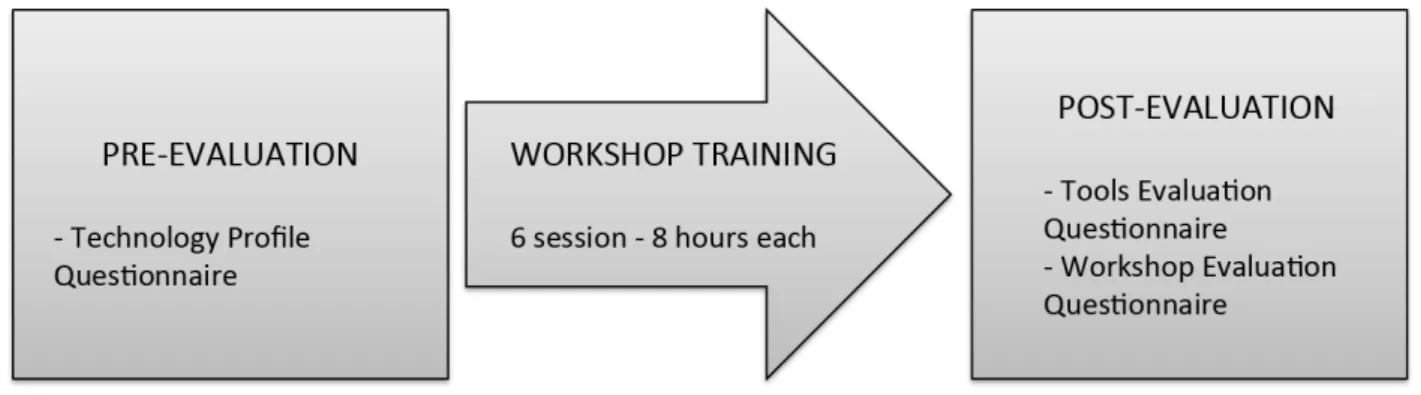
(8) could range from 1 (“never”) to 5 (“very often”). In addition, the questionnaire included items on socio-demographic data and academic background. After that, a presentation of all the tools was made. For the second session, a theoretical introduction to soft skills was first given to contextualize the different tools that the participants would use in the workshop. After that, PalMa tools were explained and their possibilities and limitations outlined. Once participants were familiar with the program, a practical session was set up, which consisted of designing of a small example showing how it would be used. Participants applied what they learned to a schema of a hypothetical application in their own subject. After that, the participants’ experience during the practical session was discussed and conclusions were drawn regarding future uses of the program with students. During the third session, an explanation of the Eutopia editor was given with attention being paid to its characteristics and its similarities and differences with PalMa. This was followed by a practical session that focused on the use of Eutopia. Participants were placed in different groups and, using an existing example, interacted with Eutopia. After the practical session finished, the experience of taking part in the exercise and possible applications of Eutopia were debated. In the fourth session, we followed the same structure. First, we gave a theoretical explanation of e-Adventure tools. Once the participants became familiar with the program, a practical session was carried out using the tool. During the practical session, each participant had to follow the guidelines for constructing a game using e-Adventure. After the practical task was completed, a debate about the experience and the possible applications of the program took place. The fifth and sixth sessions were entirely practical. The main purpose of these sessions was to give participants opportunities to design real scenarios for their own teaching. With that objective in mind, the teachers first shared their different ideas and then selected the right tools to make these possible. After the participants decided what they wanted to do, they started to build their own scenario. At the end of this sixth session, each participant shared their own project, received feedback from their partners, and completed the post-evaluation.. Figure 4. Workshop schedule. Procedure Different technologies were selected to teach the professors. An analysis of the proper methodology to teach the technology to university teachers was carried out in the context of T3 consortium meetings. It was concluded that the implementation of a workshop would be suitable in order for the university teachers to acquire the knowledge of the chosen systems, their main functions, and the specific utility for university teaching. The workshop “the Use of New Technologies of Information and Communication for Improving Teaching” was offered to professors. The workshop was assessed by the Centre for Education and New Technologies (CENT) of the UJI. This centre is the first in Spain to improve teaching and learning through the new information and communication technologies. The CENT promotes the educational use of ICT, evaluating the teaching methodologies and technological solutions and helping professors to develop best practices using ICT. Once CENT approved, the workshop was introduced in the training courses of formation for university teachers organized by UJI. Then, the information was sent through email to teachers. Those interested in the courses responded to the email and were contacted. The workshop took place in the Educational Support Unit at UJI. Two teachers and researchers who 505.
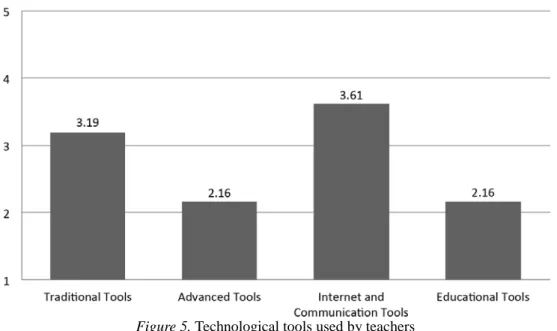
(9) were specializing in the field of education and new technologies, taught the workshop. They were both psychology graduates with master’s degrees and PhD students in their teaching phase. They were both trained in the specific contents of the workshop and had more than three years’ experience in the use of new technologies in psychology. The workshop was composed of six sessions (see Figure 4), and each one lasted eight hours. During the first and the last session, the participant must complete the pre- and post-valuation, respectively. The pre-evaluation consisted of the TPQ to explore the previous knowledge about technologies and its frequency of use for each participant. At the end of the workshop two questionnaires were applied: the TEQ, to evaluate each form of technology used in the workshop in terms of design and usability, and the WEQ, to discover participants’ opinions about how helpful the course was in understanding new learning concepts, how innovative and useful the technologies are, and the future application of the tools.. Results In order to analyze the participants’ previous experience with these technologies, we divided the information obtained by the TPQ into four different categories: traditional tools (conventional desktop, generic software, digital camera, digital audio), advanced tools (the use of robots, immersive technologies, simulations, computer modeling, hand-held technologies, virtual environments, production tools), Internet and communication tools (Internet, email, web 2.0, sharing information, communication tools, individual authoring tools, team work), and educational tools (games for educational purposes, e-portfolios, e-assessment, managed learning environments, construction of knowledge tools). The first and highest average in the use of technologies was the Internet and communication tools category (M = 3.61, SD = .91); the second one, the traditional tools category (M = 3.19, SD = 0.86); and finally, with the same the advanced tools category (M = 2.16, SD = .64) and the educational tools category (M = 2.16, SD = .80). For a graphical view of this information, please see Figure 5. In relation to this result, it is good to know that the high level of technology use shown by the professors in their profiles may be explained by the fact that UJI encourages the use of technology very much.. Figure 5. Technological tools used by teachers The results on the post-evaluation protocol are presented in two parts: the general evaluation of each technology as tools for their educational setting given by the participants and the participants’ opinion about the training course methodology in these technologies. Regarding the evaluation of each technology, in general, participants considered the three tools as relevant to implement in their educational setting. According to their opinions, e-Adventure seems to be the most adequate tool 506.
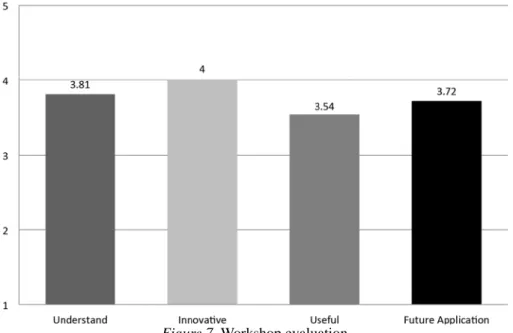
(10) (M = 4.04, SD = .51). The second best assessed tool was Eutopia (M = 3.65, SD = .31), and finally PalMa (M = 3.32, SD = .56). For a graphical view of this information, please see Figure 6.. Figure 6. Tool evaluation Also, a non-parametric Friedman test was carried out to compare those differences. Significant difference were found between the tools (X2 (2) = 20.87, p < .05), which were lower in PalMa (M = 3.32) compared with Eutopia’s score (M = 3.65), and both in relation to e-Adventure’s score (M = 4.04). This result shows that e-Adventure is considered as the most appropriate tool. Finally, regarding the opinions about the training course and the methodology used, the items were summarized in four relevant concepts: the benefits of the course for understanding, the innovation offered by the course, its usefulness, and the future applications of the acquired knowledge. The participants considered it helpful to understand new concepts of learning supported by new technologies (understanding: M = 3.81, SD = .96). They also considered they had learned innovative technologies (innovation: M = 4, SD = .98), and evaluated the technologies as useful (usefulness: M = 3.54, SD = .83). In relation to the possibilities of implementing these technologies in their future, they considered they would keep using them and would encourage others to use them as a learning method (future application: M = 3.71, SD = .98). For a graphical view, please see Figure 7.. Figure 7. Workshop evaluation 507.
(11) Discussion The results show that the acceptability of the technologies and methodology used during the workshop was high. This is a crucial first step for the incorporation of ICT tools in educational contexts (Sherman, & Howard, 2012). Regarding the workshop, the participants’ assessment and opinion have been favorable either for pedagogy and teaching methodology, aspects that facilitated the understanding of the tools, and the innovative nature of the contents of the workshop. Moreover, in the evaluation, the teachers also highlighted the vast possibilities of using these tools in the future, highlighting their usefulness in teaching. This is an important point, given that during the course, a significant feature used in the methodology was the training of the teachers in the selected technologies to use it in the future during their own practices with students. This suggests that it is likely that the acceptability is strongly related to how teachers value technologies for teaching and if they feel comfortable with them, as noted by other authors (Howard, 2011). Another important point in our experience was that the positive appraisal of these ICT-based tools was independent from the e-learning experience, the background of the teachers, and the subjects that they teach. This can be interpreted as a good result in terms of the potential use of these technologies in the real context. The participants also evaluated the technologies (PalMa, Eutopia, and e-Adventure) as being appropriate and easy to use. All systems received a score above 50% of the scale. However, one application stood out above the others: eAdventure. These differences were evaluated as significant, according to the non-parametric Friedman test. Probably, given the characteristics of this system, the versatility and ability to adapt to different teaching contexts have been two of the features most appreciated by the participants. Nevertheless, compared to the other tools, this tool requires much training time. On the other hand, PalMa and Eutopia are more specific, and the variables manipulated by the users are smaller in number. An important aspect to remark on is that all selected systems for the workshop have free access. This is a relevant standard of the workshop because it increases the possibilities of use these learning tools in the future. The initiative of T3 Project involved facilitating the incorporation and distribution of new teaching tools in the teaching processes and in several learning areas. Our main goal was to influence student motivation through creative methodologies, taking advantage of their daily experience with technology. More specifically, the objective of the workshop was to show a series of tools designed to highlight the possibilities that the new technologies can offer, and to extend and disseminate the use of ICT in educational contexts. This means using more accessible teaching methodologies and making improvements that bring the university closer to the European Higher Education System.. Limitations of the study There are some potential limitations to the interpretation and application of these results. The first limitation is that the entire sample was collected from the same university, and UJI is a pioneer in the field of these technologies. UJI was the first university in Spain to develop its own website and was a pioneer in the incorporation of technologies both in the classroom and in different studies developed in technological areas. This particular situation may suggest that teachers were more able and motivated to introduce technologies in their regular practice than teachers from other universities. Another limitation is that there is no way of measuring if the teachers made real use of the learning tools in their own practice once the workshop had finished. We do not know if using these new tools was useful to students’ practice nor do we know students’ opinion of the tools and their learning experience.. Future challenges Regarding future challenges, our next step will be to implement the improvements in the ICT-based learning tools, following the opinion manifested by professors during the workshop. Also, we intend to evaluate the effect of this type of workshop in real practice and over the long term to see the effects of this practice on the satisfaction and motivation of both teachers and students. Besides, it would be interesting to replicate this work in other countries to 508.
(12) know the intercultural common or shared aspects and to do so in a cost-effective way, since the tools used are freely accessible and very easy to use.. Acknowledgements This study has been funded in part by Ministerio de Ciencia e Innovación (PSI2010-17563), PROMETEO/2013/003 Fase II, ISIC/2012/012 Network of Excellence (Generalitat Valenciana, Conselleria de Educación), the CIBERobn (CB/06/03), and the Teaching to Teach with Technology Multilateral European Project (505169-LLP-1-2009-1-ITKA3-KA3MP). We would like to thank the Educational Support Unit at UJI, where the workshop was carried out.. References Baños, R. M., Cebolla, A., Oliver, E., Alcañiz, M., & Botella, C. (2013). Efficacy and acceptability of an Internet platform to improve the learning of nutritional knowledge in children: The ETIOBE mates. Health Education Research, 28(2), 234–248. Bennett, S., Maton, K., & Kervin, L. (2008). The “digital natives” debate: A Critical review of the evidence. British Journal of Educational Technology, 39(5), 775–786. Bransford, J. D., Barron, B., Pea, R., Meltzoff, A., Kuhl, P., Bell, P., Reed, S., Schwartz, D., Vye, N., Reeves, B., Roschelle, J., & Sabelli, N., (2006). Foundations and opportunities for an interdisciplinary science of learning. In K. Sawyer (Ed.), Cambridge handbook of the learning sciences (pp. 19–34). New York, NY: Cambridge University Press. Bretón-López, J., Botella, C., Vizcaíno, Y., Quero, S., Baños, R., & Molés, M. (2010, October). El proyecto europeo T3 (enseñando a enseñar con nuevas tecnologías) [The European project T3 (teaching teaching with new technologies)]. Poster session presented at the VII Congreso Nacional de la Asociación Española de Psicología Clínica y Psicopatología, Benicàssim, Castellón de la Plana. Bretón-López, J., Quero, S., Botella, C., Baños, R. M., Farfallini, L., & Herrero, R. (2011, June). El Proyecto Europeo T3: Resultados preliminares del uso de nuevas tecnologías para la docencia universitaria [The European Project T3: Preliminary results from the use of new technologies for university teaching]. Poster session presented at the SPDECE, Multidisciplinary symposium on the design and evaluation of digital content for education, Almagro, Ciudad Real. Bretón-López, J., Quero, S., Botella, C., Baños, R. M., Vizcaíno, Y., Farfallini, L., & Herrero, R. (2011, June). T3 European project: Advanced new technology to improve the learning process. Poster session presented at 16th Annual CyberTherapy & CyberPsychology Conference, Outaouais, Quebec. Butler, Y. G., Someya, Y., & Fukuhara, E. (2014). Online games for young learners’ foreign language learning. Teaching English to young learners, 68(3), 265–275. doi:10.1093/elt/ccu008 Di Blas, N., & Paolini, P. (2014). Multi-user virtual environments fostering collaboration in formal education. Educational Technology & Society, 17(1), 54–69. Fried, C. B. (2008). In-class laptop use and its effects on student learning. Computers & Education, 50(3), 906–914. Hansen, D. J. (2003). Book review: E-learning: Strategies for delivering knowledge in the digital age (Author: M. Rosenberg). Educational Technology & Society, 6(3), 80–81. Howard, S. K. (2011). Affect and acceptability: Exploring teachers’ technology-related risk perceptions, Educational Media International, 48(4), 261–272. doi:10.1080/09523987.2011.632275 Jessel, J. (2011). The Virtual learning environment: Directions for development in secondary education. In A. Rospigliosi (Ed.), Proceeding of the 10th European Conference on e-Learning, Brighton, UK (pp. 332–339). Reading, UK: Academic Conferences Limited. Jin, J., & Bridges, S. M. (2014). Educational technologies in problem-based learning in health sciences education: A Systematic review. Journal of Medical Internet Research, 16(12). doi:10.2196/jmir.3240 Kong, S. C., Chan, T. W., Griffin, P., Hoppe, U., Huang, R., Kinshuk, Looi, C. K., Milrad, M., Norris, C., Nussbaum, M., Sharples, M., So, W. M. W., Soloway, E., & Yu, S. (2014). E-learning in school education in the coming 10 years for developing 21st-century skills: Critical research issues and policy implications. Educational Technology & Society, 17(1), 70–78.. 509.
(13) Laudon, K. C., & Laudon, J. P. (2007). Management information systems: Managing the digital firm (10th ed.). Upper Saddle River, NJ: Pearson-Prentice Hall. Martínez-Ortiz, I., Moreno-Ger, P., Sierra, J. L., & Fernández-Manjón, B. (2006). Production and maintenance of contentintensive videogames: A Document-oriented approach. In Proceedings of the 3rd International Conference on Information Technology: New Generations (ITNG 2006), Las Vegas, Nevada (pp. 118–123). doi:10.1109/ITNG.2006.110 Olson, D., & Bruner, J. (1974). Learning through experience and learning through media. In D. Olson (Ed.), Media and Symbols: The Forms of Expression, The 73rd NSSE Yearbook. Chicago, IL: University of Chicago Press. Papastergiou, M. (2009). Digital game-based learning in high school computer science education: Impact on educational effectiveness and student motivation. Computers & Education, 52(1), 1–12. Ponce, H. R., Mayer, R. E., & Lopez, M. J. (2013). A Computer-based spatial learning strategy approach that improves reading comprehension and writing. Educational Technology Research and Development, 61(5), 819-840. doi:10.1007/s11423-013-93109 Porter, L. W., Bigley, G. A., & Steers, R. M. (2003). Motivation and work behaviour. Boston, MA: McGraw-Hill/Irwin. Prensky, M. (2001). Digital natives, digital immigrants: Part 1. On the Horizon, 9(5), 1–6. Prensky, M. (2009). H. Sapiens digital: From digital immigrants and digital natives to digital wisdom. Innovate: Journal of Online Education, 5(3). Retrieved from http://www.wisdompage.com/Prensky01.html Sana, F., Weston, T., & Cepeda, N. J. (2013). Laptop multitasking hinders classroom learning for both users and nearby peers. Computers & Education, 62, 24–31. Sefton-Green, J. (2004). Literature review in informal learning with technology outside school. A NESTA Futurelab Series Report 7. Bristol, UK: Futurelab. Retrieved from https://telearn.archives-ouvertes.fr/hal-00190222/document Sherman, K. & Howard, S. K. (2012). Teachers’ beliefs about first- and second-order barriers to ICT integration: Preliminary findings from a South African study. In P. Resta (Ed.), Proceedings of Society for Information Technology & Teacher Education International Conference 2012 (pp. 2098–2105). Chesapeake, VA: Association for the Advancement of Computing in Education (AACE). Sica, S. L., Nigrelli, M. L., Rega, A., & Miglino, O. (2011). The “Teaching to teach with technology” project: Promoting advanced games technologies in education. In Proceedings in the 4th edition of the “ICT for Language Learning” International Conference, The Future of Education (Vol. 2, pp. 169-173). Florence, Italy: Simonelli Editore - University Press. Sun, P. C., Tsai, R. J., Finger, G., Chen, Y. Y., & Yeh, D. (2008). What drives a successful e-Learning? An empirical investigation of the critical factors influencing learner satisfaction. Computers & Education, 50, 1183–1202. Thompson, P. (2013). The Digital natives as learners: Technology use patterns and approaches to learning. Computers & Education, 65, 12–33. Torrente, J., Moreno-Ger, P., Fernández-Manjón, B., & del Blanco, A. (2009). Game-like simulations for online adaptive learning: A case study. In M. Chang, R. Kuo, Kinshuk, G. D. Chen, & M. Hirose (Eds.), Proceedings of the 4th International Conference on E-Learning and Games (Edutainment 2009) (pp. 162–173). doi:10.1007/978-3-642-03364-3_21 U.S. Department of Education (2010a). Transforming American Education: Learning Powered by Technology. National Education Technology Plan. Washington, DC: U.S. Department of Education, Office of Educational Technology. Retrieved from https://www.ed.gov/sites/default/files/netp2010.pdf U.S. Department of Education (2010b). Use of education data at the local level: From accountability to instructional improvement. Washington, DC: U.S. Department of Education, Office of Planning, Evaluation, and Policy Development. Retrieved from https://www2.ed.gov/rschstat/eval/tech/use-of-education-data/use-of-education-data.pdf Uzunboylu, H. (2006). A Review of two mainline e-learning projects in the European Union. Educational Technology Research and Development, 54(2), 201–209. Wolfe, P., & Brandt, R. (1998). What do we know from brain research?. Educational Leadership, 56(3), 8–13.. 510.
(14)
Figure
+3
Documento similar