UNIVERSIDAD NACIONAL ABIERTA Y A DISTANCIA – UNAD
Escuela de Ciencias Básicas, Tecnología e Ingeniería
DIPLOMADO DE PROFUNDIZACIÓN CISCO (DISEÑO E IMPLEMENTACIÓN DE
SOLUCIONES INTEGRADAS LAN / WAN) (OPCI)
Actividad Individual Final
Evaluación – Prueba de habilidades prácticas CCNA
BRENDA GUTIERREZ FLOREZ
C.C. 57.457.118
TUTOR:
GIOVANNI ALBERTO BRACHO
GRUPO: 203092_2
INTRODUCCION
Para dar inicio a la presentación de la prueba de habilidad practica del diplomado de
profundización cisco (diseño e implementación de soluciones integradas lan / wan) (opci) la
cual busca identificar el grado de desarrollo de competencias y habilidades que fueron
adquiridas a lo largo del curso y a través de la cual se pondrá a prueba los niveles de
comprensión y solución de problemas relacionados con diversos aspectos de
Networking.Donde daremos como evidencia el desarrollo y solución a una empresa de
Tecnología que posee tres sucursales distribuidas en las ciudades de Bogotá, Medellín y
Bucaramanga, en donde desempeñaremos el rol será el administrador de la red, el cual deberá
configurar e interconectar entre sí cada uno de los dispositivos que forman parte del escenario,
acorde con los lineamientos establecidos para el direccionamiento IP, protocolos de
Descripción del escenario propuesto para la prueba de habilidades
Escenario: Una empresa de Tecnología posee tres sucursales distribuidas en las ciudades de
Bogotá, Medellín y Bucaramanga, en donde el estudiante será el administrador de la red, el cual
deberá configurar e interconectar entre sí cada uno de los dispositivos que forman parte del
escenario, acorde con los lineamientos establecidos para el direccionamiento IP, protocolos de
enrutamiento y demás aspectos que forman parte de la topología de red.
1. Configurar el direccionamiento IP acorde con la topología de red para cada uno de los
dispositivos que forman parte del escenario.
Verificar información de OSPF
Visualizar tablas de enrutamiento y routers conectados por OSPFv2
Visualizar lista resumida de interfaces por OSPF en donde se ilustre el costo de cada
interface
Visualizar el OSPF Process ID, Router ID, Address summarizations, Routing Networks,
and passive interfaces configuradasencada router.
3. Configurar VLANs, Puertos troncales, puertos de acceso, encapsulamiento, Inter-VLAN
Routing y Seguridad en los Switches acorde a la topología de red establecida.
4. En el Switch 3 deshabilitar DNS lookup
5. Asignar direcciones IP a los Switches acorde a los lineamientos.
6. Desactivar todas las interfaces que no sean utilizadas en el esquema de red.
7. Implement DHCP and NAT for IPv4
8. Configurar R1 como servidor DHCP para las VLANs 30 y 40.
9. Reservar las primeras 30 direcciones IP de las VLAN 30 y 40 para configuraciones estáticas.
Configurar DHCP pool para VLAN
30
Name: ADMINISTRACION
DNS-Server: 10.10.10.11
Domain-Name: ccna-unad.com
Establecer default gateway.
Configurar DHCP pool para VLAN
40
.
Name: MERCADEO
DNS-Server: 10.10.10.11
Domain-Name: ccna-unad.com
Establecer default gateway
10. Configurar NAT en R2 para permitir que los host puedan salir a internet
11. Configurar al menos dos listas de acceso de tipo estándar a su criterio en para restringir o
permitir tráfico desde R1 o R3 hacia R2.
12. Configurar al menos dos listas de acceso de tipo extendido o nombradas a su criterio en
para restringir o permitir tráfico desde R1 o R3 hacia R2.
SOLUCION:
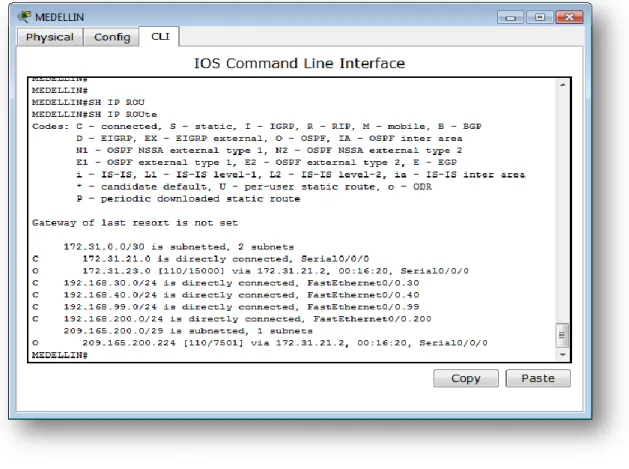
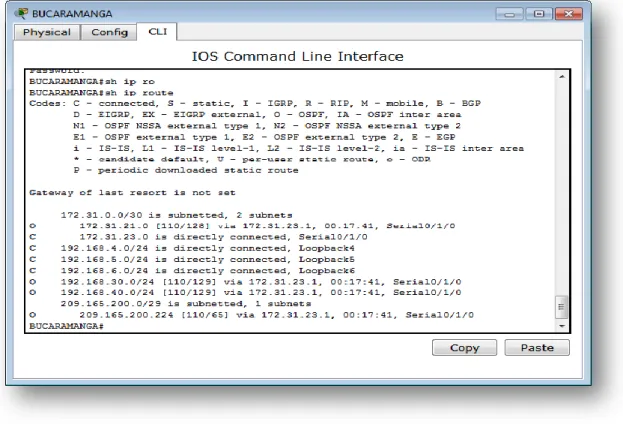
VISUALIZAR TABLAS DE ENRUTAMIENTO Y ROUTERS CONECTADOS POR OSPFV2
MEDELLIN
BOGOTA
BUCARAMANGA
TA
B
LA
S
DE
EN
R
UT
AMI
EN
TO
MEDELLIN#ship routeCodes: C - connected, S - static, I - IGRP, R - RIP, M - mobile, B - BGP D - EIGRP, EX - EIGRP external, O - OSPF, IA - OSPF inter area N1 - OSPF NSSA external type 1, N2 - OSPF NSSA external type 2 E1 - OSPF externaltype 1, E2 - OSPF externaltype 2, E - EGP i - IS-IS, L1 - IS-IS level-1, L2 - IS-IS level-2, ia - IS-IS inter area * - candidate default, U - per-user static route, o - ODR P - periodic downloaded static route
Gateway of last resort is not set 172.31.0.0/30 is subnetted, 2 subnets C 172.31.21.0 is directly connected, Serial0/0/0
O 172.31.23.0 [110/15000] via 172.31.21.2, 00:00:25, Serial0/0/0 C 192.168.30.0/24 is directly connected, FastEthernet0/0.30 C 192.168.40.0/24 is directly connected, FastEthernet0/0.40 C 192.168.99.0/24 is directly connected, FastEthernet0/0.99 C 192.168.200.0/24 is directly connected, FastEthernet0/0.200 209.165.200.0/29 is subnetted, 1 subnets
O 209.165.200.224 [110/7501] via 172.31.21.2, 00:00:25, Serial0/0/0
BOGOTA#ship route
Codes: C - connected, S - static, I - IGRP, R - RIP, M - mobile, B - BGP D - EIGRP, EX - EIGRP external, O - OSPF, IA - OSPF inter area N1 - OSPF NSSA external type 1, N2 - OSPF NSSA external type 2 E1 - OSPF externaltype 1, E2 - OSPF externaltype 2, E - EGP i - IS-IS, L1 - IS-IS level-1, L2 - IS-IS level-2, ia - IS-IS inter area * - candidate default, U - per-user static route, o - ODR P - periodic downloaded static route
Gateway of last resort is not set 10.0.0.0/32 is subnetted, 1 subnets C 10.10.10.10 is directly connected, Loopback0 172.31.0.0/30 is subnetted, 2 subnets C 172.31.21.0 is directly connected, Serial0/1/0 C 172.31.23.0 is directly connected, Serial0/0/0
O 192.168.30.0/24 [110/65] via 172.31.21.1, 00:00:10, Serial0/1/0 O 192.168.40.0/24 [110/65] via 172.31.21.1, 00:00:10, Serial0/1/0 209.165.200.0/29 is subnetted, 1 subnets
C 209.165.200.224 is directly connected, FastEthernet0/0 BOGOTA#
BUCARAMANGA#ship route
Codes: C - connected, S - static, I - IGRP, R - RIP, M - mobile, B - BGP D - EIGRP, EX - EIGRP external, O - OSPF, IA - OSPF inter area N1 - OSPF NSSA external type 1, N2 - OSPF NSSA external type 2 E1 - OSPF externaltype 1, E2 - OSPF externaltype 2, E - EGP i - IS-IS, L1 - IS-IS level-1, L2 - IS-IS level-2, ia - IS-IS inter area * - candidate default, U - per-user static route, o - ODR P - periodic downloaded static route
Gateway of last resort is not set 172.31.0.0/30 is subnetted, 2 subnets
O 172.31.21.0 [110/128] via 172.31.23.1, 00:01:23, Serial0/1/0 C 172.31.23.0 is directly connected, Serial0/1/0
C 192.168.4.0/24 is directly connected, Loopback4 C 192.168.5.0/24 is directly connected, Loopback5 C 192.168.6.0/24 is directly connected, Loopback6
O 192.168.30.0/24 [110/129] via 172.31.23.1, 00:01:23, Serial0/1/0 O 192.168.40.0/24 [110/129] via 172.31.23.1, 00:01:23, Serial0/1/0 209.165.200.0/29 is subnetted, 1 subnets
O 209.165.200.224 [110/65] via 172.31.23.1, 00:01:23, Serial0/1/0 BUCARAMANGA#
ROUT
ER
C
ONE
C
TAD
O
S
MEDELLIN#shipospf neighbor Neighbor ID Pri State Dead Time Address Interface2.2.2.2 0 FULL/ - 00:00:35 172.31.21.2 Serial0/0/0 MEDELLIN#
BOGOTA#shipospf neighbor
Neighbor ID Pri State Dead Time Address Interface 3.3.3.3 0 FULL/ - 00:00:32 172.31.23.2 Serial0/0/0 1.1.1.1 0 FULL/ - 00:00:37 172.31.21.1 Serial0/1/0
BUCARAMANGA#shipospf neighbor
Neighbor ID Pri State Dead Time Address Interface 2.2.2.2 0 FULL/ - 00:00:36 172.31.23.1 Serial0/1/0 BUCARAMANGA#
co
st
od
e
cada
in
ter
fa
ce
BUCARAMANGA#shipospf interface Serial0/1/0 is up, line protocol is up Internet address is 172.31.23.2/30, Area 0Process ID 1, Router ID 3.3.3.3, Network Type POINT-TO-POINT, Cost: 64
Transmit Delay is 1 sec, State POINT-TO-POINT, Priority 0 No designated router on this network
No backup designated router on this network
Timer intervals configured, Hello 10, Dead 40, Wait 40, Retransmit 5 Hello due in 00:00:09
Index 1/1, flood queue length 0 Next 0x0(0)/0x0(0)
Last flood scan length is 1, maximum is 1 Last flood scan time is 0 msec, maximum is 0 msec Neighbor Count is 1 , Adjacent neighbor count is 1 Adjacent with neighbor 2.2.2.2
Suppress hello for 0 neighbor(s)
BOGOTA#shipospf interface FastEthernet0/0 is up, line protocol is up Internet address is 209.165.200.225/29, Area 0
Process ID 1, Router ID 2.2.2.2, Network Type BROADCAST, Cost: 1
Transmit Delay is 1 sec, State DR, Priority 1
Designated Router (ID) 2.2.2.2, Interface address 209.165.200.225 No backup designated router on this network
Timer intervals configured, Hello 10, Dead 40, Wait 40, Retransmit 5 Hello due in 00:00:02
Index 1/1, flood queue length 0 Next 0x0(0)/0x0(0)
Last flood scan length is 1, maximum is 1 Last flood scan time is 0 msec, maximum is 0 msec Neighbor Count is 0, Adjacent neighbor count is 0 Suppress hello for 0 neighbor(s)
Serial0/0/0 is up, line protocol is up Internet address is 172.31.23.1/30, Area 0
Process ID 1, Router ID 2.2.2.2, Network Type POINT-TO-POINT, Cost: 7500
Transmit Delay is 1 sec, State POINT-TO-POINT, Priority 0 No designated router on this network
No backup designated router on this network
Timer intervals configured, Hello 10, Dead 40, Wait 40, Retransmit 5 Hello due in 00:00:02
Index 2/2, flood queue length 0 Next 0x0(0)/0x0(0)
Last flood scan length is 1, maximum is 1 Last flood scan time is 0 msec, maximum is 0 msec Neighbor Count is 1 , Adjacent neighbor count is 1 Adjacent with neighbor 3.3.3.3
Suppress hello for 0 neighbor(s) Serial0/1/0 is up, line protocol is up Internet address is 172.31.21.2/30, Area 0
Process ID 1, Router ID 2.2.2.2, Network Type POINT-TO-POINT, Cost: 64
Transmit Delay is 1 sec, State POINT-TO-POINT, Priority 0 No designated router on this network
No backup designated router on this network
Timer intervals configured, Hello 10, Dead 40, Wait 40, Retransmit 5 Hello due in 00:00:08
Index 3/3, flood queue length 0 Next 0x0(0)/0x0(0)
Last flood scan length is 1, maximum is 1 Last flood scan time is 0 msec, maximum is 0 msec Neighbor Count is 1 , Adjacent neighbor count is 1 Adjacent with neighbor 1.1.1.1
Suppress hello for 0 neighbor(s) BOGOTA#
BUCARAMANGA#shipospf interface Serial0/1/0 is up, line protocol is up Internet address is 172.31.23.2/30, Area 0
Process ID 1, Router ID 3.3.3.3, Network Type POINT-TO-POINT, Cost: 64
Transmit Delay is 1 sec, State POINT-TO-POINT, Priority 0 No designated router on this network
No backup designated router on this network
Timer intervals configured, Hello 10, Dead 40, Wait 40, Retransmit 5 Hello due in 00:00:03
Index 1/1, flood queue length 0 Next 0x0(0)/0x0(0)
Last flood scan length is 1, maximum is 1 Last flood scan time is 0 msec, maximum is 0 msec Neighbor Count is 1 , Adjacent neighbor count is 1 Adjacent with neighbor 2.2.2.2
Suppress hello for 0 neighbor(s)
Visualizar el OSPF Process ID, Router ID, Address summarizations, Routing Networks, and passive interfaces configuradasencada
router
OSPFv2 es la versión del protocolo OSPF que actualmente utilizamos en redes IPv4.
En este caso, el formato del router ID coincide con el formato de las direcciones IP utilizadas en las interfaces por lo que es posible utilizar la dirección IP de una interfaz como router ID, de manera tal que no es obligatorio configurar un router-id y el sistema operativo puede tomar la dirección IP de una interfaz para ser utilizada en esta función.
Por este motivo, al momento de levantar el proceso de OSPF la definición del router ID sigue esta secuencia:
Si hay router-id configurado, se utiliza ese router ID.
Si no hay router-id configurado se utiliza la dirección IP más alta de las interfaces de loopback configuradas.
OS
PF
P
roce
ss
ID
,
Rout
e
r
ID
MEDELLIN#shipospf databaseOSPF Router with ID (1.1.1.1) (Process ID 1)
Router Link States (Area 0)
Link ID ADV Router Age Seq# Checksum Link count 1.1.1.1 1.1.1.1 1543 0x80000005 0x008ada 4 2.2.2.2 2.2.2.2 1543 0x80000006 0x00d828 5 3.3.3.3 3.3.3.3 1543 0x80000002 0x00a23e 2
BOGOTA#shipospf database
OSPF Router with ID (2.2.2.2) (Process ID 1)
Router Link States (Area 0)
Link ID ADV Router Age Seq# Checksum Link count 3.3.3.3 3.3.3.3 1484 0x80000002 0x00a23e 2 1.1.1.1 1.1.1.1 1484 0x80000005 0x008ada 4
2.2.2.2 2.2.2.2 1484 0x80000006 0x00d828 5
BUCARAMANGA(config)#do shipospf data
OSPF Router with ID (3.3.3.3) (Process ID 1)
Router Link States (Area 0)
Link ID ADV Router Age Seq# Checksum Link count 3.3.3.3 3.3.3.3 1581 0x80000002 0x00a23e 2 1.1.1.1 1.1.1.1 1581 0x80000005 0x008ada 4 2.2.2.2 2.2.2.2 1581 0x80000006 0x00d828 5
A
ddr
e
ss
sum
ma
ri
zat
io
ns,
Rou
ti
ng
Ne
tw
o
rks
MEDELLIN#ship routeCodes: C - connected, S - static, I - IGRP, R - RIP, M - mobile, B - BGP D - EIGRP, EX - EIGRP external, O - OSPF, IA - OSPF inter area N1 - OSPF NSSA external type 1, N2 - OSPF NSSA external type 2 E1 - OSPF externaltype 1, E2 - OSPF externaltype 2, E - EGP i - IS-IS, L1 - IS-IS level-1, L2 - IS-IS level-2, ia - IS-IS inter area * - candidate default, U - per-user static route, o - ODR P - periodic downloaded static route
Gateway of last resort is not set 172.31.0.0/30 is subnetted, 2 subnets C 172.31.21.0 is directly connected, Serial0/0/0
O 172.31.23.0 [110/15000] via 172.31.21.2, 00:29:23, Serial0/0/0 C 192.168.30.0/24 is directly connected, FastEthernet0/0.30 C 192.168.40.0/24 is directly connected, FastEthernet0/0.40 C 192.168.99.0/24 is directly connected, FastEthernet0/0.99 C 192.168.200.0/24 is directly connected, FastEthernet0/0.200 209.165.200.0/29 is subnetted, 1 subnets
O 209.165.200.224 [110/7501] via 172.31.21.2, 00:29:23, Serial0/0/0 MEDELLIN#ship route ospf
172.31.0.0/30 is subnetted, 2 subnets
O 172.31.23.0 [110/15000] via 172.31.21.2, 00:29:52, Serial0/0/0 209.165.200.0/29 is subnetted, 1 subnets
O 209.165.200.224 [110/7501] via 172.31.21.2, 00:29:52, Serial0/0/0 MEDELLIN#
BOGOTA#ship route
Codes: C - connected, S - static, I - IGRP, R - RIP, M - mobile, B - BGP D - EIGRP, EX - EIGRP external, O - OSPF, IA - OSPF inter area N1 - OSPF NSSA external type 1, N2 - OSPF NSSA external type 2 E1 - OSPF externaltype 1, E2 - OSPF externaltype 2, E - EGP i - IS-IS, L1 - IS-IS level-1, L2 - IS-IS level-2, ia - IS-IS inter area * - candidate default, U - per-user static route, o - ODR P - periodic downloaded static route
Gateway of last resort is not set 10.0.0.0/32 is subnetted, 1 subnets C 10.10.10.10 is directly connected, Loopback0 172.31.0.0/30 is subnetted, 2 subnets C 172.31.21.0 is directly connected, Serial0/1/0 C 172.31.23.0 is directly connected, Serial0/0/0
O 192.168.30.0/24 [110/65] via 172.31.21.1, 00:30:23, Serial0/1/0 O 192.168.40.0/24 [110/65] via 172.31.21.1, 00:30:23, Serial0/1/0 209.165.200.0/29 is subnetted, 1 subnets
C 209.165.200.224 is directly connected, FastEthernet0/0 BOGOTA#shiprouteospf
O 192.168.30.0 [110/65] via 172.31.21.1, 00:30:18, Serial0/1/0 O 192.168.40.0 [110/65] via 172.31.21.1, 00:30:18, Serial0/1/0
BUCARAMANGA#ship route
Codes: C - connected, S - static, I - IGRP, R - RIP, M - mobile, B - BGP D - EIGRP, EX - EIGRP external, O - OSPF, IA - OSPF inter area N1 - OSPF NSSA external type 1, N2 - OSPF NSSA external type 2 E1 - OSPF externaltype 1, E2 - OSPF externaltype 2, E - EGP i - IS-IS, L1 - IS-IS level-1, L2 - IS-IS level-2, ia - IS-IS inter area * - candidate default, U - per-user static route, o - ODR P - periodic downloaded static route
Gateway of last resort is not set 172.31.0.0/30 is subnetted, 2 subnets
O 172.31.21.0 [110/128] via 172.31.23.1, 00:30:55, Serial0/1/0 C 172.31.23.0 is directly connected, Serial0/1/0
C 192.168.4.0/24 is directly connected, Loopback4 C 192.168.5.0/24 is directly connected, Loopback5 C 192.168.6.0/24 is directly connected, Loopback6
O 192.168.30.0/24 [110/129] via 172.31.23.1, 00:30:55, Serial0/1/0 O 192.168.40.0/24 [110/129] via 172.31.23.1, 00:30:55, Serial0/1/0 209.165.200.0/29 is subnetted, 1 subnets
O 209.165.200.224 [110/65] via 172.31.23.1, 00:30:55, Serial0/1/0 BUCARAMANGA#shiprouteospf
172.31.0.0/30 is subnetted, 2 subnets
O 172.31.21.0 [110/128] via 172.31.23.1, 00:31:07, Serial0/1/0 O 192.168.30.0 [110/129] via 172.31.23.1, 00:31:07, Serial0/1/0 O 192.168.40.0 [110/129] via 172.31.23.1, 00:31:07, Serial0/1/0 209.165.200.0/29 is subnetted, 1 subnets
O 209.165.200.224 [110/65] via 172.31.23.1, 00:31:07, Serial0/1/0
pa
ssive
int
e
rfa
ce
s
conf
igu
ra
d
as
router ospf 1 router-id 1.1.1.1 log-adjacency-changes
passive-interface FastEthernet0/0
network 172.31.21.0 0.0.0.3 area 0 network 192.168.30.0 0.0.0.255 area 0 network 192.168.40.0 0.0.0.255 area 0 MEDELLIN#ship route ospf 172.31.0.0/30 is subnetted, 2 subnets
O 172.31.23.0 [110/15000] via 172.31.21.2, 00:35:47, Serial0/0/0 209.165.200.0/29 is subnetted, 1 subnets
O 209.165.200.224 [110/7501] via 172.31.21.2, 00:35:47, Serial0/0/0
! router ospf 1 router-id 2.2.2.2 log-adjacency-changes network 172.31.21.0 0.0.0.3 area 0 network 172.31.23.0 0.0.0.3 area 0 network 209.165.200.224 0.0.0.7 area 0 !
BOGOTA#shiprouteospf
O 192.168.30.0 [110/65] via 172.31.21.1, 00:03:09, Serial0/1/0 O 192.168.40.0 [110/65] via 172.31.21.1, 00:03:09, Serial0/1/0
! router ospf 1 router-id 3.3.3.3 log-adjacency-changes network 172.31.23.0 0.0.0.3 area 0 BUCARAMANGA#ship route ospf 172.31.0.0/30 is subnetted, 2 subnets
O 172.31.21.0 [110/128] via 172.31.23.1, 00:04:03, Serial0/1/0 O 192.168.30.0 [110/129] via 172.31.23.1, 00:03:53, Serial0/1/0 O 192.168.40.0 [110/129] via 172.31.23.1, 00:03:53, Serial0/1/0 209.165.200.0/29 is subnetted, 1 subnets
O 209.165.200.224 [110/65] via 172.31.23.1, 00:04:03, Serial0/1/0
Configurar VLANs, Puertos troncales, puertos de acceso, encapsulamiento, Inter-VLAN Routing y Seguridad en los Switches acorde a la topología de red
establecida.
V
LA
N
s
MEDELLIN#ship interface brief
Interface IP-Address OK? Method Status Protocol FastEthernet0/0 unassigned YES unset up up FastEthernet0/0.30 192.168.30.1 YES manual up up FastEthernet0/0.40 192.168.40.1 YES manual up up FastEthernet0/0.99 192.168.99.1 YES manual up up FastEthernet0/0.200 192.168.200.1 YES manual up up FastEthernet0/1 unassigned YES unset administratively down down Serial0/0/0 172.31.21.1 YES manual up up Serial0/1/0 unassigned YES unset administratively down down Vlan1 unassigned YES unset administratively down down S1#sh vlan brief
VLAN Name Status Ports
---- --- --- --- 1 default active Fa0/4, Fa0/5, Fa0/6, Fa0/7 Fa0/8, Fa0/9, Fa0/10, Fa0/11
Fa0/12, Fa0/13, Fa0/14, Fa0/15 Fa0/16, Fa0/17, Fa0/18, Fa0/19 Fa0/20, Fa0/21, Fa0/22, Fa0/23 30 ADMINISTRACION active Fa0/1, Fa0/2 40 MERCADEO active
99 GESTION active 200 MANTENIMIENTO active 1002 fddi-default active 1003 token-ring-default active 1004 fddinet-default active 1005 trnet-default active S1#
S3#sh vlan brief
VLAN Name Status Ports
---- --- --- --- 1 default active Fa0/4, Fa0/5, Fa0/6, Fa0/7 Fa0/8, Fa0/9, Fa0/10, Fa0/11
Fa0/12, Fa0/13, Fa0/14, Fa0/15 Fa0/16, Fa0/17, Fa0/18, Fa0/19 Fa0/20, Fa0/21, Fa0/22, Fa0/23 Fa0/24
40 MERCADEO active Fa0/1, Fa0/2 99 GESTION active
p
u
er
to
s de
ac
ce
so
S1#sh running-config Building configuration... Current configuration : 1189 bytes !version 12.1
no service timestamps log datetimemsec no service timestamps debug datetimemsec no service password-encryption !
hostname S1 !
enable password cisco !
!
spanning-tree mode pvst !
interface FastEthernet0/1 switchport access vlan 30 switchport mode access !
interface FastEthernet0/2 switchport access vlan 30
S3#sh running-config Building configuration...
Current configuration : 1103 bytes !
version 12.1
no service timestamps log datetimemsec no service timestamps debug datetimemsec no service password-encryption !
hostname S3 ! !
spanning-tree mode pvst !
interface FastEthernet0/1 switchport access vlan 40 switchport mode access !
interface FastEthernet0/2 switchport access vlan 40
In
ter
-V
LA
N
Ro
u
ti
n
g
MEDELLIN#ship interface brief
Se
gu
ri
d
ad
en
lo
s
Sw
it
ch
e
s
enable password cisco !! line vty 0 4 password cisco login
enable password cisco !
! line vty 0 4 password cisco login
enable password cisco !
! line vty 0 4 password cisco login
1.
En el Switch 3 deshabilitar DNSlookup
no ipdomain-lookup
1.
AsignardireccionesIPalosSwitchesacordealoslineamientos.
Sw1 # interface Vlan99
ip address 192.168.99.2 255.255.255.0 !
! Sw3# interface Vlan99
ip address 192.168.99.3 255.255.255.0 !
S1(config)#interface range fastEthernet 0/4-23 S1(config-if-range)#no shutdown
S1(config-if-range)#do shipintbri
Interface IP-Address OK? Method Status Protocol FastEthernet0/1 unassigned YES manual up up FastEthernet0/2 unassigned YES manual up up FastEthernet0/3 unassigned YES manual up up FastEthernet0/4 unassigned YES manual down down FastEthernet0/5 unassigned YES manual down down FastEthernet0/6 unassigned YES manual down down FastEthernet0/7 unassigned YES manual down down FastEthernet0/8 unassigned YES manual down down FastEthernet0/9 unassigned YES manual down down FastEthernet0/10 unassigned YES manual down down FastEthernet0/11 unassigned YES manual down down FastEthernet0/12 unassigned YES manual down down FastEthernet0/13 unassigned YES manual down down FastEthernet0/14 unassigned YES manual down down FastEthernet0/15 unassigned YES manual down down FastEthernet0/16 unassigned YES manual down down FastEthernet0/17 unassigned YES manual down down FastEthernet0/18 unassigned YES manual down down FastEthernet0/19 unassigned YES manual down down FastEthernet0/20 unassigned YES manual down down FastEthernet0/21 unassigned YES manual down down FastEthernet0/22 unassigned YES manual down down FastEthernet0/23 unassigned YES manual down down FastEthernet0/24 unassigned YES manual up up Vlan1 unassigned YES manual administratively down down Vlan99 192.168.99.2 YES manual up up
S3#sh ipint brie
1.
Implement DHCP and NAT forIPv4
1.
ConfigurarR1comoservidorDHCPparalasVLANs30y40.
!
ipdhcp pool ADMINISTRACION network 192.168.30.0 255.255.255.0 default-router 192.168.30.1 dns-server 10.10.10.11 ipdhcp pool MERCADEO network 192.168.40.0 255.255.255.0 default-router 192.168.40.1 dns-server 10.10.10.11
1.
Reservarlasprimeras30direccionesIPdelasVLAN30y40paraconfiguracionesestáticas.
ipdhcp excluded-address 192.168.30.1 192.168.30.30ipdhcp excluded-address 192.168.40.1 192.168.40.30