Muñoz-Cristóbal, J. A., Prieto, L. P., Asensio-Pérez, J. I., Martínez-Monés, A., Jorrín-Abellán, I. M., & Dimitriadis, Y. (2015). Coming Down to Earth: Helping Teachers Use 3D Virtual Worlds in Across-Spaces Learning Situations. Educational Technology & Society, 18 (1), 13–26.
13 ISSN 1436-4522 (online) and 1176-3647 (print). This article of the Journal of Educational Technology & Society is available under Creative Commons CC-BY-ND-NC
Coming Down to Earth: Helping Teachers Use 3D Virtual Worlds in
Across-Spaces Learning Situations
Juan A. Muñoz-Cristóbal
1*, Luis P. Prieto
2, Juan I. Asensio-Pérez
1, Alejandra
Martínez-Monés
3, Iván M. Jorrín-Abellán
4and Yannis Dimitriadis
11
School of Telecommunications Engineering, Universidad de Valladolid, Paseo de Belén 15, 47011 Valladolid,
Spain // 2CHILI Lab, EPFL, Rolex Learning Center, Station 20, CH-1015 Lausanne, Switzerland // 3School of
Computer Engineering, Universidad de Valladolid, Paseo de Belén 15, 47011 Valladolid, Spain // 4Department of
Secondary and Middle Grades Education, Bagwell College of Education, Kennesaw State University, 1000 Chastain Road MD 0122. Kennesaw Hall, Bldg. #1, 30144-5591 Kennesaw, GA, USA // [email protected] // [email protected] // [email protected] // [email protected] // [email protected] // [email protected]
*
Corresponding author ABSTRACT
Different approaches have explored how to provide seamless learning across multiple ICT-enabled physical and virtual spaces, including three-dimensional virtual worlds (3DVW). However, these approaches present limitations that may reduce their acceptance in authentic educational practice: The difficulties of authoring and sharing teacher-created designs across different 3DVW platforms, or the lack of integration of 3DVWs with existing technologies in the classroom ecosystem (e.g., widespread web-based learning platforms such as Moodle, or mobile augmented reality applications). Focusing on a specific kind of 3DVW (virtual globes, such as Google Earth, used like 3DVWs), we propose a system that enables teachers to deploy across-spaces learning situations, which can be authored with a plethora of existing learning design tools, that involve different common web-based learning platforms, mobile AR applications and multiple kinds of virtual globes. A prototype of the architecture has been developed to evaluate this novel approach. The mixed-methods evaluation performed comprised both a feature analysis and a study where a teacher deployed an authentic across-spaces learning situation including Google Earth used as a 3DVW. Such evaluation shows that the system enables teachers deploy learning situations over different technological ecosystems composed by physical and web spaces, as well as by 3DVWs.
Keywords
3D virtual worlds, Virtual globes, Google Earth, Augmented reality, Across-spaces learning
Introduction
Advances in Information and Communication Technologies (ICT) are bringing about new possibilities for learning, such as those involving different virtual and physical spaces. For example, activities related to botany using a web platform in the classroom can be complemented with activities in a nearby forest (Kurti, Spikol, & Milrad, 2008). Different approaches have explored how to provide a continuous learning experience in these across-spaces learning situations (Kurti et al., 2008; Muñoz-Cristóbal et al., 2014), thus moving toward “seamless learning” (Chan et al., 2006). Mobile devices and Augmented Reality (AR) are among the technical scaffolds that have been explored to connect these physical and virtual spaces (Billinghurst & Duenser, 2012; Muñoz-Cristóbal et al., 2014; Sharples, Sanchez, Milrad, & Vavoula, 2009).
However, most of the approaches considering across-spaces learning situations that include 3DVWs show limitations that may contribute to the current lack of acceptance of their proposals in real educational practice (Gregory et al., 2013; Hendaoui, Limayem, & Thompson, 2008; Warburton, 2009). One limitation is the lack of support for teachers to create their own across-spaces learning situations. Also, the available range of technologies for the enactment of the authored scenarios is very limited (e.g., the specific combination of Moodle and Second Life in Livingstone & Kemp, 2008, or Open Wonderland and an ad-hoc mobile client in Ibáñez, et al., 2012). Additionally, existing proposals tend to consider 3DVW-supported activities in a rather isolated way with respect to activities in other 3DVWs, or supported by already existing technologies in the classroom (VLEs, Web 2.0 tools, AR tools).
To overcome these limitations, this paper proposes the architecture and prototype of a system capable of supporting teachers in creating, with a number of existing authoring tools, and deploying their own across-spaces learning situations in a variety of technological ecosystems comprising multiple learning spaces. These ecosystems may be composed of different mainstream VLEs and Web 2.0 tools (web learning space), multiple mobile AR applications (augmented physical learning space), as well as distinct 3DVWs (3DVW learning space). Thus, the system enables activities taking place in multiple physical, 3DVW and web spaces, at the same time or sequentially. Additionally, learning designs can be shared and reused in different technological ecosystems (e.g., those including different 3DVWs).
The system proposed is an extension of the one reported in (Muñoz-Cristóbal et al., 2014), which did not support 3DVWs as learning spaces. Our new proposal integrates Virtual Globes (VGs) such as Google Earth (http://www.google.com/earth/), used as a 3DVW. VGs are virtual 3D representations of the surface of the Earth, which are widely known and recurrently used with educational purposes (Chen & Choi, 2010; Lund & Macklin, 2007; Rakshit & Ogneva-Himmelberger, 2008; Schultz, Kerski, & Patterson, 2008; Ternier, Klemke, Kalz, van Ulzen, & Specht, 2012; Wells, Frischer, Ross, & Keller, 2009). Although VGs lack certain presence and interaction features of 3DVW, there exist proposals for their conversion into 3DVWs (see, e.g., Dordevic & Wild, 2012, or http://youbeq.com, which include user interaction and avatars in Google Earth). Technical reasons also make it recommendable to integrate VGs in across-spaces learning platforms, since both VGs and physical spaces use the same type of (geographical) coordinates, thus simplifying the flow of learning artifacts and participants among spaces. Furthermore, the growing availability of 3D content for mainstream VGs (see, e.g., Xiao & Furukawa, 2012) opens new opportunities for setting up innovative learning scenarios in VGs, and may promote the adoption of VGs used like 3DVWs by teachers.
The next section describes limitations of current approaches to across-spaces learning situations that include 3DVWs, and distills design requirements that a system should fulfill in order to enable teachers to devise and perform such situations. Then, the paper proposes the architecture and prototype of a system implementing those design requirements. The paper also reports on the evaluation of the proposed system, which involved a feature analysis and a study where a teacher designed and deployed an across-spaces learning situation. Finally, some reflections and conclusions are mentioned.
Limitations of current approaches and design requirements
Several proposals for supporting across-spaces learning situations include activities in 3DVWs. In order to connect
3DVW with web spaces, some approaches (Dickey, 2003) simply embed a web browser in the 3DVW user interface, triggering different web pages upon the occurrence of certain events in the virtual world. Some approaches can display web pages inside the 3DVW. This is also the case of OPENET4VE (Fernández-Gallego, Lama, Vidal, Sánchez, & Bugarín, 2010) which is able to deploy learning situations in different 3DVWs. Other interesting proposals are Sloodle (http://www.sloodle.org; Livingstone & Kemp, 2008), for linking Moodle with Second Life and OpenSim, and the system presented by Pourmirza & Gardner (2013), which links Facebook (https://www.facebook.com) with Open Wonderland.
Other approaches study the connection of 3DVWs with physical spaces. In the Citywide project (Izadi et al., 2002),
mirroring that same street using desktop computers. Participants in any of the two spaces can see avatars of the other participants and interact with them.
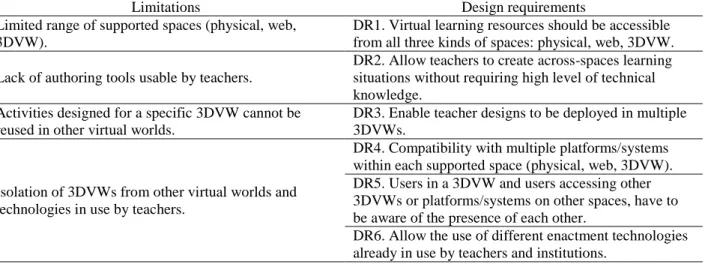
Table 1. Limitations of existing approaches for adoption in educational practice, and design requirements proposed to overcome such limitations
Limitations Design requirements
Limited range of supported spaces (physical, web, 3DVW).
DR1. Virtual learning resources should be accessible from all three kinds of spaces: physical, web, 3DVW.
Lack of authoring tools usable by teachers.
DR2. Allow teachers to create across-spaces learning situations without requiring high level of technical knowledge.
Activities designed for a specific 3DVW cannot be reused in other virtual worlds.
DR3. Enable teacher designs to be deployed in multiple 3DVWs.
Isolation of 3DVWs from other virtual worlds and technologies in use by teachers.
DR4. Compatibility with multiple platforms/systems within each supported space (physical, web, 3DVW). DR5. Users in a 3DVW and users accessing other 3DVWs or platforms/systems on other spaces, have to be aware of the presence of each other.
DR6. Allow the use of different enactment technologies already in use by teachers and institutions.
Other proposals explore across-spaces learning situations involving three types of spaces: physical, web and 3DVWs.
DigitalEE (Okada, Tarumi, Yoshimura, & Moriya, 2001) is a system for collaborative environmental education wherein a 3DVW replicates a forest. The participants in the 3DVW can interact with others moving through the real forest, equipped with laptops and GPS. Participants in the physical forest can generate and interact with information (e.g., pictures, videos) which is uploaded to the 3DVW as HTML pages.
However, these proposals are affected by some generic limitations of the 3DVWs (Gregory et al., 2013; Hendaoui et al., 2008; Warburton, 2009), which may prevent the adoption of such approaches in educational practice. In the following paragraphs, we indentify limitations that can affect especially across-spaces learning situations involving 3DVWs. From these limitations, we derive a list of design requirements (DR) that may help to overcome such limitations (Table 1).
Typically, across-spaces approaches limit their range of applicability to a specific combination of physical, 3DVW or
web spaces (see DR1 in Table 1). Of the aforementioned proposals, only DigitalEE supports learning activities in a 3DVW as well as in physical and web spaces. Thus, e.g., if a teacher using Sloodle wants to include an activity in a physical space, she would need to use another system, probably not integrated so seamlessly with the rest of the technological support.
In addition, there are few cases in which the design of learning scenarios is supported by authoring tools usable by
teachers without a high level of technical expertise (see DR2 in Table 1). Such authoring tools have been studied in the field of learning design (Koper, 2005), as a way of explicitly represent pedagogical ideas using computer-interpretable languages, sometimes independently from the targeted enactment platform. OPENET4VE and the system described by Ibáñez, et al. (2012), for example, enable the use of IMS-LD (IMS Global Learning Consortium, 2003) learning designs, thus allowing the use of different authoring tools based in that specification to create activities. In a different way, teachers may design learning situations with Sloodle by using Moodle’s user interface.
Another common limitation is that activities designed for a specific 3DVW cannot be reused in other virtual worlds
(see DR3 in Table 1). Of the aforementioned approaches, only OPENET4VE and Sloodle enable the use of more
than one 3DVW (Second Life and OpenSim), and DigitalEE provides limited support to other VRML-compliant 3DVWs.
Finally, in existing proposals, virtual worlds normally are isolated, disconnected from other 3DVWs and
hampering the adoption of such proposals in existing educational practice (see DR4, DR5 and DR6 in Table 1). Among the aforementioned approaches, only Sloodle integrates a widespread VLE (Moodle), and the system presented by Pourmirza & Gardner (2013) integrates Facebook. The rest of approaches integrate mostly ad-hoc, not widely adopted platforms.
Proposal
Following these design requirements, we propose an architecture that enables teachers to define their across-spaces learning situations with different existing authoring tools, and deploy them in complex technological settings which include multiple VLEs, mobile AR clients and VGs used like 3DVWs.
Architecture
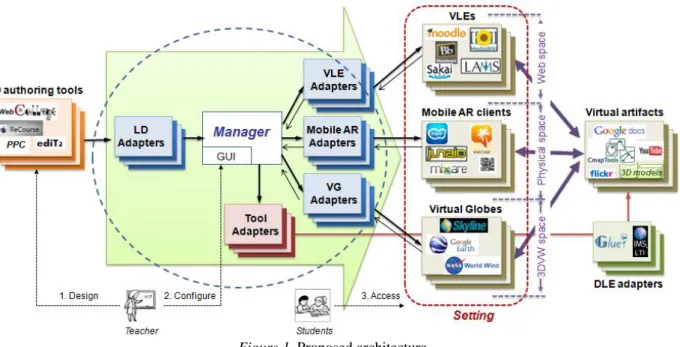
Previous work by the authors (Muñoz-Cristóbal et al., 2014) has tackled similar problems of connecting isolated spaces using existing platforms, enabling teachers to deploy their learning situations in different web and AR-enabled physical environments, but not in 3DVWs. Following the design requirements in the previous section, we now extend the previous proposal to consider also VGs used like 3DVWs. The architecture (Figure 1) is based on
adapters which allow the integration of multiple elements of the same type (i.e., authoring tools, external web tools, VLEs, mobile AR clients and VGs). Once an element is integrated in the architecture, it is connected with the rest of
the elements, enabling a multi-to-multi approach comprising already-existing authoring tools (compliant with DR2)
(e.g., those described in The Learning Design Grid, 2013), VLEs (e.g., Moodle or Blackboard
[http://www.blackboard.com]), mobile AR clients (e.g., Junaio [http://www.junaio.com] or Layar
[https://www.layar.com]) and VGs (e.g., Google Earth or SkylineGlobe [http://www.skylinesoft.com]) (DR3, DR4,
DR6). Thus, a teacher could use multiple learning design authoring tools to define her across-spaces activities, and
complete them (e.g., with positioning information for the learning artifacts in physical spaces and VGs) in the graphical user interface (GUI) of the system (DR2).
Figure 1. Proposed architecture
The architecture integrates also multiple tools and resources by means of Tool adapters. These Tool adapters may integrate, for instance, different Distributed Learning Environment (DLE) (MacNeill & Kraan, 2010) proposals such
as Glue! (Alario-Hoyos et al., 2013) or IMS-LTI (IMS Global Learning Consortium, 2012). Thus, a single DLE
2.0 tools, widgets, 3D models or web resources) (DR4, DR6). These tools and resources can be accessed from any of
the VLEs, mobile AR clients and VGs integrated in the system (DR1).
Since VGs are not by themselves 3DVWs (they do not provide avatars or interaction between users), the architecture,
by means of the adapters and the Manager, enables the use of VGs as if they were 3DVWs, by adding avatars for the
users and allowing interaction with any virtual resources and tools supported by the architecture (DR1, DR5). Students can interact with resources and tools or create new ones (e.g., opening a Google Docs document located in a VG, or uploading and positioning in the VG a picture taken in the physical space with their mobile device). Also, different communication tools (e.g., a chat) can be included in the teacher’s design and be deployed to this VG-based 3DVW, thus enabling students in a VG to chat with students using mobile AR in a physical location, or with students using a VLE in the classroom. The Manager element acts as a central hub for synchronizing user information in all
spaces. Thus, e.g., users in a physical location can see the avatars of users in a VG using AR, and vice-versa (DR5).
Integration of multiple Virtual Globes
The integration of an existing VG in the architecture depends on a single requirement: the target VG should have an API or SDK for allowing third parties to position data elements (e.g., learning artifacts or avatars), typically known as “points of interests” (POI). Our proposal uses a POI model for learning artifacts and avatars, which is based on the
model described in (Muñoz-Cristóbal et al., 2014). VG adapters are in charge of transforming POI representations
following this common model, to the different native representations used by each of the VGs.
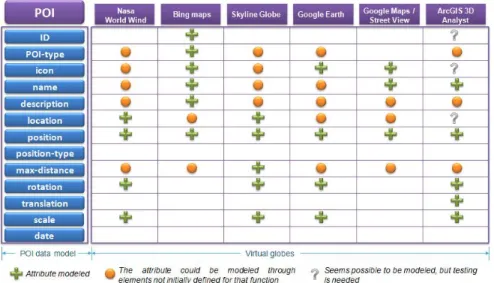
In order to assess the feasibility of such transformation for existing VGs, we have studied the API or SDK of some of the most widespread VGs (Rakshit & Ogneva-Himmelberger, 2008; Schultz et al., 2008): Nasa World Wind (http://worldwind.arc.nasa.gov), Bing Maps (http://www.bing.com/maps/), SkylineGlobe, Google Earth, Google
Maps/Street View (https://maps.google.com) and ArcGIS 3D Analyst
(http://www.esri.com/software/arcgis/extensions/3danalyst). We consider Google Maps/Street View also a VG because, although it does not support 3D views, its 360º realistic pictures provide an experience very close to that of 3D interfaces. We have also included Bing Maps for the sake of completeness, although its current support for 3D
views is quite limited. Figure 2 shows the POI model used by the proposed system, and the elements of such model
that are supported in each VG. The figure also shows how transforming POIs between the proposed system and the different VGs would not imply a significant loss of information. Therefore, all VGs reported in Figure 2 seem
susceptible of being integrated into our proposal (DR3, DR6).
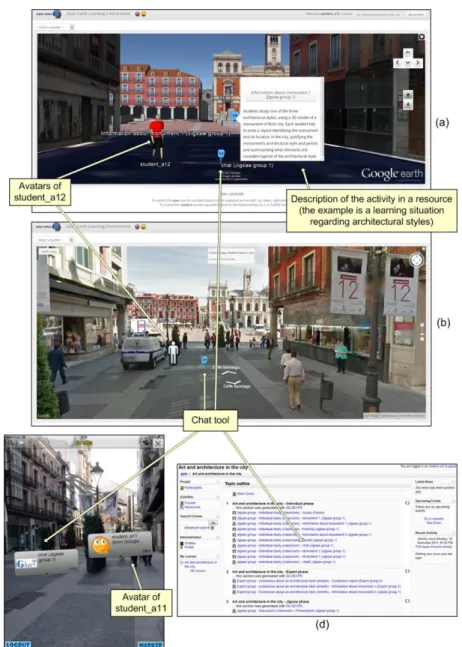
Figure 3. Example of a learning situation illustrating the user interfaces of different learning environments: Google Earth (a) and Google Maps/Street View (b) used like 3DVWs, the Junaio AR client (c) and Moodle (d)
Prototype
Evaluation
An evaluation has been conducted to explore the research question driving our work:
Does the proposed system enable teachers to deploy their across-spaces learning situations including web spaces, AR-enabled physical spaces, and VGs (used like 3DVWs)?
The evaluation consisted of (1) a study wherein a university teacher used the system to deploy an across-spaces learning situation that included Google Earth used like a 3DVW; and (2) a feature analysis, where the evaluation team scored the support of existing approaches and the proposed system to the design requirements defined in Table 1. The next subsections describe the methodological considerations, the evaluation process and its results.
Method
We have followed the Computer Supported Collaborative Learning - Evaluand-oriented Responsive Evaluation Model (CSCL-EREM) (Jorrín-Abellán, Stake, & Martínez-Monés, 2009), using a variety of data gathering techniques in a mixed-method approach (Creswell, Plano Clark, Gutmann, & Hanson, 2003). CSCL-EREM is a framework, focused on the phenomena under evaluation, that provides evaluators with concepts and tools to guide the evaluation of CSCL phenomena (in this case, a technological innovation) in ubiquitous collaborative learning settings. CSCL-EREM is based on the responsive evaluation approach (Stake, 2004) and, therefore, aims at responding to the participants in the evaluation (instead of just describing, measuring or judging them), to get a deep understanding of the setting that may facilitate the adoption of the innovation in practice. This evaluation method is framed within the interpretive research perspective (Orlikowski & Baroudi, 1991), that does not pursue statistically significant results or generalizations, rather aiming a deeper understanding of the concrete phenomena under study (Guba, 1981), in our case, the use of the proposed system by a teacher.
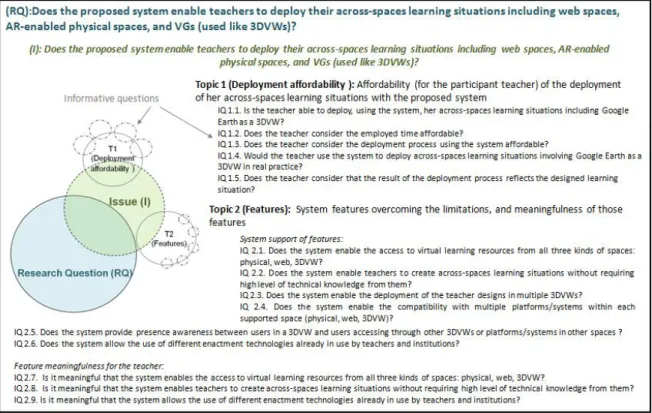
Figure 4. Anticipatory data reduction analysis. (RQ) Research question. (I) Issue. (IQ) Informative question.
(topic 1), and the support offered by the proposed system to overcome weaknesses of existing approaches and the meaningfulness of such features (topic 2). Each topic is investigated through various informative questions, which finally are mapped to data gathering techniques.
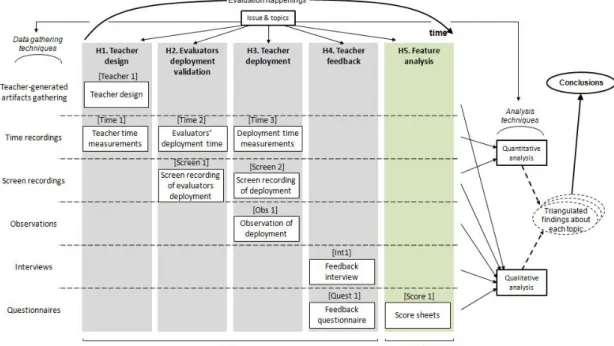
As mentioned, the evaluation consisted of a study and a feature analysis. Along the study, a profuse set of data gathering techniques and data sources has been used: teacher-generated artifacts (e.g., emails or learning designs), time recordings, screen recordings (with software that recorded operations in the screen as well as audio and video out of the screen), naturalistic observations (audio, video, pictures and observation notes), web-based questionnaires and interviews (see Figure 5). In parallel with the study, we performed a feature analysis: a systematic comparison of the proposed architecture with alternative approaches, in order to explore if the support of the proposed system to the design requirements defined improves the existing approaches’ support. For the feature analysis, we followed the screening method of the DESMET evaluation methodology (Kitchenham, Linkman, & Law, 1997). The screening method is a qualitative feature-based evaluation performed by a single individual or an evaluation group, who not
only determines the features to be assessed and their rating scale but also does the assessment. Questionnaires (Score
Sheets in Figure 5) are used to assess the features, and the scores are compiled in a final report (Evaluation Profile).
During our evaluation, triangulation of methods, data sources and evaluators was used, to cross-check data and interpretations as well as to assure the quality and credibility of the research (Guba, 1981). Figure 5 shows the
evaluation process, which is divided in different happenings (evaluation events), as the CSCL-EREM model
recommends, as well as the different data gathering techniques used in each happening, indicating the labels used to refer to them throughout the text.
Figure 5. Evaluation happenings and data gathering techniques
Study
Context
The study was performed in the College of Education and Social Work, University of Valladolid (Spain). In the first
year (out of four) in the Degree in Primary Education, within a mandatory course on ICT for pre-service teachers,
manually to the wiki and, in groups, they create a map in Google Maps, marking the routes followed by the group’s members, and create a marker in the map for each picture, associated to the URL of the picture in the wiki. Finally, students have to elaborate a reflective critique about the advertisements.
Intervention
One of the course teachers, a pedagogue relatively new to teaching (four years of teaching experience), who is familiar with ICT tools, showed interest in enhancing their usual across-spaces learning situation using Google Earth as a 3DVW (instead of the simple 2D Google Map described above). The proposed system may also help improve the connection of activities across the different spaces, automating several manual operations. In a first happening (H1, Figure 5), the teacher conceptualized a learning design without the support of an authoring tool. Then (H2), an ICT-expert from the evaluation team used the WebCollage (Villasclaras-Fernández, Hernández-Leo, Asensio-Pérez, & Dimitriadis, 2013) authoring tool to represent the teacher’s learning design, and used the system prototype to deploy the design across the technological enactment platforms (wiki, QR codes and Google Earth). In a subsequent happening (H3), the participant teacher (with the support of an ICT-expert evaluator) performed the authoring of the design with WebCollage and the actual deployment using the system prototype. The teacher also assessed the resulting technological infrastructure, using it in the role of a student. During this deployment session, three observers were present (taking notes, pictures, videos and audio) who, later on, created a multimedia collaborative triangulated observation report, including also an annotated analysis of the complete video of the session. Finally (H4), the teacher gave feedback by means of a web-based questionnaire and a semi-structured interview (to provide further details about the deployment process and her perception of it).
Findings
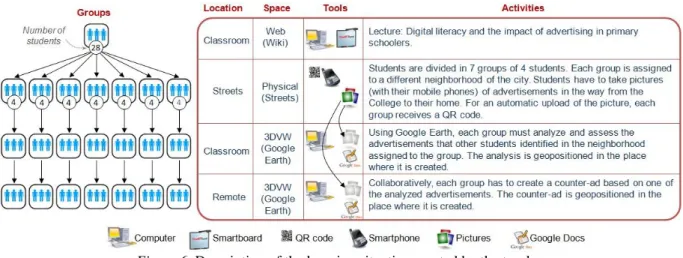
Figure 6 illustrates the learning situation designed by the teacher, as a variation of the original across-spaces activities usually performed. It is composed of four collaborative activities spanning four hours of face-to-face work and two hours of remote work, performed in the classroom (using a wiki and Google Earth), in the streets (using QR codes and mobile devices for reading them), and online (using Google Earth). In order to use some of the time saved (due to the system’s automation of the enactment), a new “counter-ad” activity was included at the end of the design. Also, a simple analysis of advertisement in general was replaced by a detailed analysis of the student-contributed advertisements.
Figure 6. Description of the learning situation created by the teacher
than reflecting on them (as the teacher did) [Screen 1]. Indeed, even if the conceptual design had already been done on paper, the teacher included last-minute changes in activities during her use of WebCollage (e.g., a questionnaire was replaced by the counter-ad activity in Google Earth [Teacher 1, Screen 2]), and she queried the ICT-expert
evaluator about the modeling of some activities using the provided tools (“[…] The teacher explains a new activity
for the last part of the design where she wants students to generate a counter-ad based on one of the previously analyzed ones. ‘How can I make it happen? Which is the best way for my students to upload the image with the counter-ad to Google earth?’ [...] [Obs 1]). The teacher considered the total time dedicated to the process was
“long” (about 90 minutes) (IQ 1.2) ([when asked to assess the time dedicated in the deployment session:] “Well, I
think it was a long time […] because in the end it took an hour and a half” [Int 1]). Nevertheless, she considered such time as acceptable since she felt that the system was intuitive, and subsequent deployments would take less time (“I think that with another go of practice, it would take me a lot less time” [Int 1]; “I think [the time dedicated] is acceptable, since the design can be reused in upcoming years, and in other courses performing minor adaptations […] anyway, I’m sure that, with practice, the time [it takes] would be greatly reduced, since it is quite intuitive once you know some of the terms that are confusing at the beginning” [Quest 1]). The teacher also considered the
deployment process affordable (IQ 1.3), both in a questionnaire ([to the assertion “I think that the deployment of the
scenario with the system has been easy”] she answered “Agree”, 5 in a 1-6 scale [Quest 1]) and in the interview [Int
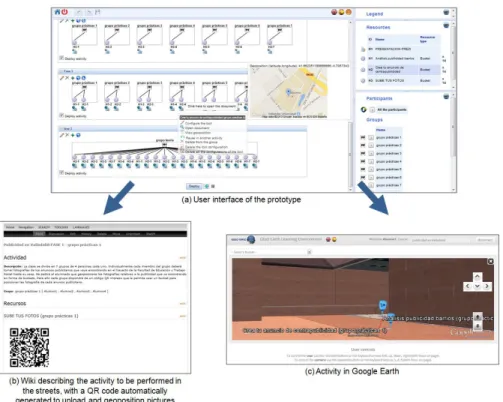
1]. She also showed interest in using the system in her real practice (IQ 1.5). This idea was confirmed during the deployment session (“I want to use it” [Screen 1]) as well as in a questionnaire (”I have the idea of putting [the scenario] in practice the next semester in my courses” [Quest 1]) and on the interview (“[...] and probably, if we put this [learning situation] into practice, since I’m convinced that I want to put it into practice, we will change things again […]” [Int 1]). After the deployment, she reviewed the resulting learning environment in the wiki and in Google Earth (see Figure 7), and simulated the tasks of a student [Obs 1, Screen 2]. She confirmed that it corresponded well to her initial design (IQ 1.6) [Int 1, Quest 1] (e.g., [to the assertion “do you consider that the result of the deployment process reflects your designed learning situation?”] she answered “Strongly agree”, 6 in a 1-6
scale). Finally, she valued as important the three features that she had used (IQ. 2.7, IQ 2.8, IQ 2.9), both in the
questionnaire (she answered “Strongly agree”, maximum in the 1-6 scale, to the three questions asking about those
features’ importance [Quest 1]), and in the interview (e.g., “[…] a teacher has to be trained to be able to design
contextualized activities […], and that implies going beyond things or recipes that already exist. She has to be able to design these materials with the things that she can reach. On the other hand, a teacher also has to reuse things that are known to work, and which are free, [Web] 2.0 tools available to everybody” [Int 1]).
Feature analysis
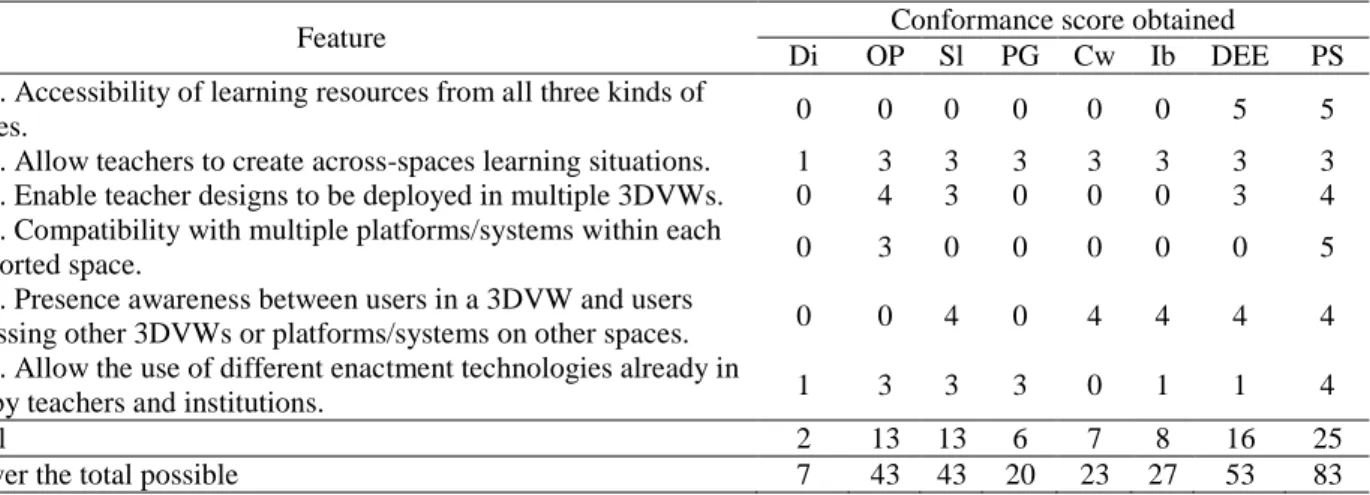
Simultaneously to the study, a feature analysis was performed by the evaluation team (H5, see Figure 5). Table 2 shows the Evaluation Profile summarizing the scores obtained (in a 0-5 scale) by the different existing approaches reported in the literature, assessing their support to the design requirements mentioned in Table 1. The publications on each existing approach were studied by the evaluation team. Then, evaluators provided an individual score [Score 1], which was then shared in a two hours panel to discuss conflicting criteria and agree on a final score for each of the approaches.
As Table 2 shows, the proposed system supports all the defined design requirements (IQ 2.1 – IQ 2.6). The feature with the lowest degree of support by the proposed system is DR2, since the authoring tool and user interfaces of the different systems (both the prototype and the authoring tools it supports) could be improved to reduce the learning curve for teachers without high technical knowledge. The existing proposal that was scored nearest second was DigitalEE, since it supports all three spaces (web, physical and 3DVW), and has potential to integrate more than one 3DVW (since it used a standard for the 3D scene’s models).
Table 2. Evaluation profile of the different approaches: (Dickey, 2003) (Di), (Fernández-Gallego et al., 2010) (OP), (Livingstone & Kemp, 2008) (Sl), (Pourmirza & Gardner, 2013) (PG), (Izadi et al., 2002) (Cw), (Ibáñez et al., 2012)
(Ib), (Okada et al., 2001) (DEE) and the proposed system (PS)
Feature Conformance score obtained
Di OP Sl PG Cw Ib DEE PS
DR1. Accessibility of learning resources from all three kinds of
spaces. 0 0 0 0 0 0 5 5
DR2. Allow teachers to create across-spaces learning situations. 1 3 3 3 3 3 3 3
DR3. Enable teacher designs to be deployed in multiple 3DVWs. 0 4 3 0 0 0 3 4
DR4. Compatibility with multiple platforms/systems within each
supported space. 0 3 0 0 0 0 0 5
DR5. Presence awareness between users in a 3DVW and users
accessing other 3DVWs or platforms/systems on other spaces. 0 0 4 0 4 4 4 4
DR6. Allow the use of different enactment technologies already in
use by teachers and institutions. 1 3 3 3 0 1 1 4
Total 2 13 13 6 7 8 16 25
% over the total possible 7 43 43 20 23 27 53 83
Discussion, conclusions and future work
The data gathered in our evaluation highlight that the deployment using the system is affordable for a teacher (topic 1). In addition, the feature analysis shows how the proposed system supports the design requirements defined to ease the adoption of across-spaces learning situations including 3DVWs. To the best of our knowledge, the rest of systems analyzed do not support all such design requirements. Indeed, none of the existing approaches supports all three features that were actually used by the teacher in the design and deployment of her learning situation (topic 2). Thus, the learning scenario devised by the teacher would not be deployable by her without the support of the proposed system (or at least, not in 90 minutes). The findings across these two topics help illuminate our initial
research question, providing evidence that the proposed system enables teachers to deploy their across-spaces
learning situations including web spaces, AR-enabled physical spaces, and VGs used like 3DVWs. We expect that the system and the design requirements proposed here may help to promote the adoption of 3DVWs in across-spaces learning situations, moving 3DVWs closer to everyday practice of teachers and their institutions. We claim that using currently-widespread VGs (e.g., Google Earth) as 3DVWs, and achieving seamless integration with other existing educational technologies (authoring tools, VLEs, Web 2.0 tools, 3D models or AR applications), could significantly help adoption in real practice.
We intend to delve further into this line of research, enacting the learning situation designed by the teacher, as well as exploring other learning situations that make use of the aforementioned set of features, with different teachers, in different educational contexts, and using a variety of existing technologies (e.g., other VLEs, mobile AR clients and VGs). We also plan further research to improve the prototype’s usability (DR2), and its current limitations regarding identity and immersion of the users in the 3DVW (Dalgarno & Lee, 2010) (e.g., improving avatar features). Further investigation is also needed to propose a more general architecture, that is able to integrate other types of 3DVWs (e.g., Second Life), or to explore other known limitations of the 3DVWs (e.g., technological, social or psychological) not studied in the present article.
Acknowledgements
This research has been partially funded by the Spanish Project TIN2011-28308-C03-02 and the European Project 531262-LLP-2012-ES-KA3-KA3MP, as well as by a Marie Curie Fellowship within the 7th European Community Framework Programme (MIOCTI, FP7-PEOPLE-2012-IEF project no. 327384). The authors thank especially the teacher involved in the evaluation, as well as Mario Marinero, who developed a first version of the Google Earth adapter in his Degree Thesis and Javier Hoyos, who developed the current version of the Google Earth and Google Maps/Street View adapters. The authors thank also the rest of the GSIC/EMIC research team for their ideas and support.
References
Alario-Hoyos, C., Bote-Lorenzo, M. L., Gómez-Sánchez, E., Asensio-Pérez, J. I., Vega-Gorgojo, G., & Ruiz-Calleja, A. (2013). GLUE!: An architecture for the integration of external tools in Virtual Learning Environments. Computers & Education, 60(1), 122-137.
Billinghurst, M., & Duenser, A. (2012). Augmented Reality in the classroom. Computer, 45(7), 56-63.
Creswell, J. W., Plano Clark, V. L., Gutmann, M. L., & Hanson, W. E. (2003). Advanced mixed methods research designs. In A. Tashakkori & C. Teddlie (Eds.), Handbook of mixed methods in social and behavioral research (pp. 209-240). Thousand Oaks, CA: SAGE Publications, Inc.
Chan, T.-W., Roschelle, J., Hsi, S., Kinshuk, K., Sharples, M., Brown, … Hoppe, U. (2006). One-to-one Technology-Enhanced Learning: An opportunity for global research collaboration. Research and Practice in Technology Enhanced Learning, 1(1), 3-29. Chen, X., & Choi, J. H. (2010). Designing online collaborative location-aware platform for history learning. Journal of Educational Technology Development and Exchange, 3(1), 13-26.
Dalgarno, B., & Lee, M. J. W. (2010). What are the learning affordances of 3-D virtual environments? British Journal of Educational Technology, 41(1), 10-32.
Dede, C. (2009). Immersive interfaces for engagement and learning. Science, 323(5910), 66-69.
Dede, C., Salzman, M., & Loftin, R. B. (1996). The development of a virtual world for learning newtonian mechanics. In P. Brusilovsky, P. Kommers & N. Streitz (Eds.), Multimedia, Hypermedia, and Virtual Reality Models, Systems, and Applications (Vol. 1077, pp. 87-106): Springer Berlin Heidelberg.
Dickey, M. D. (2003). Teaching in 3D: Pedagogical affordances and constraints of 3D Virtual Worlds for synchronous distance learning. Distance Education, 24(1), 105-121.
Dordevic, M. M., & Wild, S. C. (2012). Avatars and multi-student interactions in Google Earth–based virtual field experiences. Geological Society of America Special Papers, 492, 315-321.
Fernández-Gallego, B., Lama, M., Vidal, J. C., Sánchez, E., & Bugarín, A. (2010, July). OPENET4VE: A platform for the execution of IMS LD units of learning in virtual environments. Paper presented at the IEEE 10th International Conference on Advanced Learning Technologies (ICALT).
Guba, E. (1981). Criteria for assessing the trustworthiness of naturalistic inquiries. Educational Communication and Technology Journal, 29(2), 75-91.
Hendaoui, A., Limayem, M., & Thompson, C. W. (2008). 3D social virtual worlds: Research issues and challenges. Internet Computing, IEEE, 12(1), 88-92.
Ibáñez, M. B., Maroto, D., García Rueda, J. J., Leony, D., & Delgado Kloos, C. (2012). Architecture for collaborative learning activities in hybrid learning environments. Journal of Universal Computer Science, 18(15), 2187-2202.
IMS Global Learning Consortium. (2003, January). IMS Learning Design information model. Retrieved November 10, 2013, from http://www.imsglobal.org/learningdesign/ldv1p0/imsld_infov1p0.html
IMS Global Learning Consortium. (2012, March). IMS learning tools interoperability. Retrieved November 21, 2013, from http://www.imsglobal.org/toolsinteroperability2.cfm
Izadi, S., Fraser, M., Benford, S., Flintham, M., Greenhalgh, C., Rodden, T., & Schnädelbach, H. (2002). Citywide: Supporting interactive digital experiences across physical space. Personal and Ubiquitous Computing, 6(4), 290-298.
Jorrín-Abellán, I. M., Stake, R. E., & Martínez-Monés, A. (2009, July). The needlework in evaluating a CSCL system: The evaluand oriented responsive evaluation model. Paper presented at the 9th International CSCL Conference, Hong Kong, China. Kitchenham, B., Linkman, S., & Law, D. (1997). DESMET: A methodology for evaluating software engineering methods and tools. Computing Control Engineering Journal, 8(3), 120-126.
Koper, R. (2005). An introduction to learning design. In R. Koper & C. Tattersall (Eds.), Learning Design. A Handbook on Modelling and Delivering Networked Education and Training (pp. 3-20). Berlin, Germany: Springer.
Kurti, A., Spikol, D., & Milrad, M. (2008). Bridging outdoors and indoors educational activities in schools with the support of mobile and positioning technologies. International Journal of Mobile Learning and Organisation, 2(2), 166-186.
Livingstone, D., & Kemp, J. (2008). Integrating web-based and 3D learning environments: Second Life meets Moodle. UPGRADE, 9(3), 8-14.
Lund, J., J., & Macklin, S. (2007, June). ArcGIS and Google Earth: Rules of engagement. Paper presented at the ESRI Education Users Conference, San Diego, CA, USA.
MacNeill, S., & Kraan, W. (2010). Distributed Learning Environments. A briefing paper. JISC Center for Educational
Technology & Interoperability Standards Retrieved November 21, 2013, from
http://wiki.cetis.ac.uk/images/6/6c/Distributed_Learning.pdf
Miles, M. B., & Huberman, A. M. (1994). Qualitative data analysis. An expanded sourcebook. Thousand Oaks, CA: SAGE Publications Inc.
Muñoz-Cristóbal, J. A., Prieto, L. P., Asensio-Pérez, J. I., Martínez-Monés, A., Jorrín-Abellán, I. M., & Dimitriadis, Y. (2014). Deploying learning designs across physical and web spaces: Making pervasive learning affordable for teachers. Pervasive and Mobile Computing, 14, 31-46.
Okada, M., Tarumi, H., Yoshimura, T., & Moriya, K. (2001). Collaborative environmental education using distributed virtual environment accessible from real and virtual worlds. SIGAPP Applied Computing Review, 9(1), 15-21.
Orlikowski, W. J., & Baroudi, J. J. (1991). Studying information technology in organizations: Research approaches and assumptions. Information Systems Research, 2(1), 1-28.
Pourmirza, S., & Gardner, M. (2013, November). Integrating a Facebook group with the Open Wonderland environment. Paper presented at the 3rd European Immersive Education Summit (EiED’13), London, UK.
Rakshit, R., & Ogneva-Himmelberger, Y. (2008). Application of Virtual Globes in education. Geography Compass, 2(6), 1995-2010.
Schultz, R. B., Kerski, J. J., & Patterson, T. C. (2008). The use of Virtual Globes as a apatial teaching tool with suggestions for metadata standards. Journal of Geography, 107(1), 27-34.
Sharples, M., Sanchez, I. A., Milrad, M., & Vavoula, G. (2009). Mobile learning: Small devices, big issues. In N. Balacheff, S. Ludvigsen, T. de Jong & S. Barnes (Eds.), Technology Enhanced Learning: Principles and Products (pp. 233-249). Heidelberg, Germany: Springer.
Ternier, S., Klemke, R., Kalz, M., van Ulzen, P., & Specht, M. (2012). ARLearn: Augmented reality meets augmented virtuality. Journal of Universal Computer Science, 18(15), 2143-2164.
The Learning Design Grid. (2013). Tools registered at The Learning Design Grid. Retrieved November 21, 2013, from http://www.ld-grid.org/resources/tools
Villasclaras-Fernández, E., Hernández-Leo, D., Asensio-Pérez, J. I., & Dimitriadis, Y. (2013). Web Collage: An implementation of support for assessment design in CSCL macro-scripts. Computers & Education, 67, 79-97.
Warburton, S. (2009). Second Life in higher education: Assessing the potential for and the barriers to deploying virtual worlds in learning and teaching. British Journal of Educational Technology, 40(3), 414-426.
Wells, S., Frischer, B., Ross, D., & Keller, C. (2009, March). Rome reborn in Google Earth. Paper presented at the 37th international conference on Computer Applications and Quantitative Methods in Archaeology (CAA), Williamsburg, Virginia, US.