AnArU, a Virtual Reality Framework for Physical
Human Interactions
Matías Selzer1,2, Martín Larrea1,2
1Departamento de Ciencias e Ingeniería de la Computación
2Laboratorio de Investigación y Desarrollo en Visualización y Computación Gráfica Universidad Nacional del Sur
Av. Alem 1253, Bahía Blanca Buenos Aires, Argentina {matias.selzer, mll}@cs.uns.edu.ar
Abstract. Virtual Reality has become, once again, a popular and interesting topic, both as a research and commercial field. This trend has its origin in the use of mobile devices as computational core and displays for Virtual Reality. Android is one of the most used platform in this context and Unity3d is a suitable graphic engine for such platform. In order to improve the immersive experience, some electronic devices, Arduino especially, are used to gather information, such as the movement of the user's arms or legs. Although these three elements are often used in Virtual Reality, few studies use all of them in combination. Those who do, do not develop a reusable framework for their implementations. In this work we present AnArU, a framework for physical human interaction in Virtual Reality. The goal of AnArU is to allow an easy, efficient and extensible communication between electronic devices and the Virtual Reality system.
Keywords. Virtual Reality, Arduino, Android, Unity3d, Human Computer Interaction.
1. Introduction
In recent years, there has been a spate of interest in Virtual Reality and its interactions, especially regarding the creation of Head Mounted Displays (HMD) using mobile devices as the computational core ([1, 2, 3, 4, 5]). We have seen mobile phones and small tablets become an ideal platform for Virtual Reality (VR). The current generation of these devices have full color displays, integrated cameras, fast processors and even dedicated 3D graphics chips.
the same physical button. This, of course, decreases the immersive experience resulting in unpleasant results.
The use of Game Engines for the creation of VR content has been extensively studied in the past years ([7, 8, 9]). They provide developers a fast way of develop virtual content without the necessity of program directly in low-level languages. They also allow the application to process input from many different sources, including keyboards, cameras and microphones. For this project we decided to use Unity3d, not only for the creation of virtual content, but also because it has a plugin architecture that allows developers to extend the core functionality. Furthermore, Unity3d allows the exportation to many platforms, including Android.
There have been many publications addressing the problem of creating a more natural interaction between the user and the virtual environment, most of them include electronic devices ([15, 16]). However, each of these investigations has solved one particular problem and none of them has considered the creation of a practical and extensible framework for the communication of these electronic devices to the VR system.
The aim of this paper is to present a framework called AnArU (Android, Arduino, Unity3d) which allows an easy, efficient and extensible communication between electronic devices and the VR system by combining Android, Arduino and Unity3d.
In the next section we provide a brief introduction to the background concepts related to the AnArU Framework, and then discuss some relevant work done in this topic. Next we describe the AnArU Framework and its architecture, follow by the case study used to test it. Finally, we conclude with some remarks on the framework and directions for future research.
2. Background
In this section, we provide a brief introduction to the three main component of the AnArU Framework: Android, Arduino and Unity3d.
2.1. Android
Android1 is a mobile operating system (OS) based on the Linux kernel and currently developed by Google. With a user interface based on direct manipulation,
1
Android is designed primarily for touchscreen mobile devices such as smartphones and tablet computers.
Its source code is released by Google under open source licenses. This has encouraged a large community of developers and enthusiasts to use the open-source code as a foundation for community-driven projects, which add new features for advanced users. What is more, that brings the possibility of installing Android to devices with other operating systems.
Taking advantage of these benefits, in a similar approach as [2, 3, 5], we developed a Head Mounted Display by using the power of a smartphone running Android.
2.2 Unity3d
Unity3d2 is a cross-platform game engine developed by Unity Technologies and it is widely used to develop video games for PC, consoles, mobile devices and websites. Unity3d was developed with an emphasis on portability, thus it is capable of porting to Windows, Xbox 360, Mac, Android and iOS.
We chose Unity3d for AnArU Framework because it is available for free, works very well with Android and it is easy to use.
2.3 Arduino
Arduino is an open-source computer hardware and Software Company3 that designs and manufactures microcontroller-based kits for building digital devices and interactive objects that can sense and control the physical world. Their products are commonly known as Arduino and they are available commercially in preassembled form. The hardware design specifications are openly available, allowing the Arduino boards to be manufactured by anyone. It is estimated that in mid-2011 more than 300,000 official Arduinos were commercially produced and in 2013 more than 700,000 official boards were in users' hands.
We decided to use Arduino UNO for this project because it is one of the most popular, powerful and cheap microcontrollers nowadays, and also there have been many investigations which use it to create intuitive Human Computer Interaction devices ([11, 15]).
2
www.unity3d.com 3
3. Previous Work
The combination of Android, Arduino and Unity3d as a platform for VR is not very common. There are very few and recent works published about the three of them associated.
In many investigations, virtual worlds are created in the context of cultural heritage; that is the case of [10], which works with archaeological sites. The virtual constructions are done using Unity3d and the platform for visualization is Android. An Arduino is used to gather information such as orientation of the viewer, physical location, tilt, pan and other movements of the tablet.
Lyons et al. ([11]) developed Loupe, a handheld near-eye display. Although it is
not a HMD, it is very similar. In this case Unity3d is used for the Loupe’s GUI,
Android is the computational core and Arduino provided sensor information.
In contrast to what happens in VR, there are several investigations about Augmented Reality (AR) using Android, Arduino and Unity3d. AR is defined as a live direct or indirect view of a physical, real-world environment whose elements are augmented (or enhanced) by computer-generated sensory input, such as sound, video or graphics ([17]).
We can found several research papers that used this set of elements ([12, 13, 14]) in AR, but all these works, as well as the ones about VR, developed a solution for just a particularly problem. None of them thought about implementing a reusable framework.
4. AnArU Framework
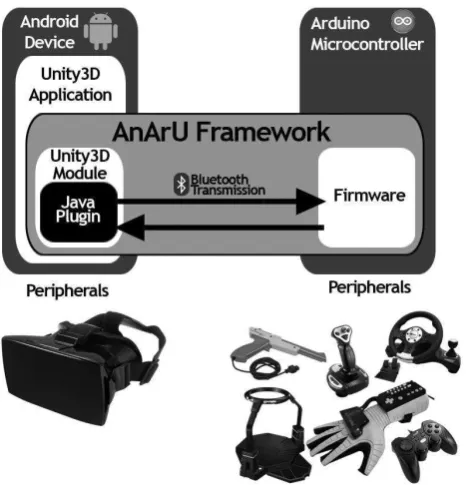
AnArU consists of three main modules: a Unity3d Module running on an Android device; an Arduino Uno Module, responsible for controlling any electronic device attached to it; and a Java Plugin responsible for the communication between the other two. An overview of the framework is shown in Figure 1.
4.1. Arduino Module
The application running on Arduino is in charge of two simple tasks: waiting for the arrival of any message, and sending new messages whenever necessary. Thus, a new level of abstraction is introduced because any user can communicate by using such interface regardless of the connected devices. The communication protocol will be explained later on this section.
[image:5.595.200.434.283.526.2]Once users know how to communicate, they can connect their particular devices or peripherals to the Arduino Module and start sending messages to the application running on the other modules of the framework. Furthermore, they can prepare the system to do specific tasks when any special message is received.
Fig. 1. AnArU Framework overview
4.2 Android Java Plugin
The Plugin first task is connecting to the Arduino Module by using the Bluetooth libraries. To accomplish this, the Arduino Bluetooth shield MAC is required. Thus, once the connection is established, a thread is executed in order to wait for any received message. A function is provided to send messages from and to the Arduino Module.
As any electronic device works with many different values, a protocol was implemented in order to get a generic message format. No matter what device is connected to the Arduino, the user has to package the respective values into a single string of text, surrounded by special characters. Then, when needed, this string can be sent. On the other side of the framework, the Java Plugin automatically gets any new message but, in order to save memory, only keeps a backup of the last message received. Note that the protocol is Asynchronous in order to save time. However, a retransmission system was implemented to detect and recover broken or lost messages. On the other hand, when the Java Plugin wants to send a message to the Arduino Module, an analog communication takes place.
4.3 Unity3d Module
The Unity3d Module consists on a collection of scripts that allow the initialization and communication of the Java Plugin. Hence, users can make any application in Unity3d, communicate to the Arduino Module by using the provided methods, and do anything they need with the received values. Note that the values come in form of a string of text. However, as the user knows the specific structure of that string, it can be parsed in an easily manner and the values can be retrieved.
5. Study Case
In recent years, numerous investigations has focused on the ability of walking in Virtual Reality environments, leading to an increment of users’ immersion ([18]). Our current investigation involved building an omnidirectional walking platform controlled by Arduino which communicates to a VR application running on an Android mobile device, by using AnArU Framework.
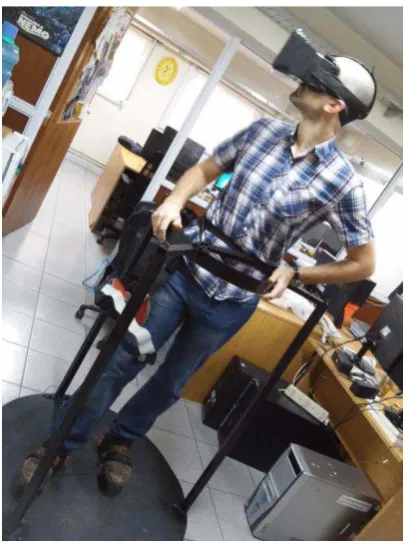
In order to sense users’ movements, an Arduino UNO Microcontroller and a gyroscope are attached to one of their legs. Thus, by measuring the leg angle respecting to the vertical, the system knows whether users are walking or not, and the corresponding direction. Users are also wearing a Head Mounted Display running a Unity3d application which recreates a complete model of them in a virtual environment. That is, a virtual representation of the user’s body and environment in an appropriate scale. By using AnArU Framework, a communication between the Arduino on the leg of the user and the HMD application is performed, giving users the sensation that they are really walking inside the virtual environment, increasing the immersion level.In Figure 2 a user with all mentioned components is shown.
Fig. 2. User on the omnidirectional platform. He is wearing a HMD running a Unity3d application on an Android tablet, and the Arduino Module is attached to his leg.
[image:7.595.196.400.291.564.2]commercial Plugin to perform a similar connectivity. However, this Plugin is not open source and just a few aspects of the microcontroller are available.
During the first experimentations, we observed some problems when the communication went from Arduino Module to Unity Module and the other way around, at the same time. A retransmission mechanism was implemented to solve this problem, and hence, we have not observed any more similar issues since then.
In an ideal VR system, the minimal delay should exist between users’ movements and the corresponding visualization ([21]). In general, a maximum accepted delay is in the order of milliseconds. Hereby, a quantitative speed analysis to measure the communication time, based on the transmission time of a specific size message, was applied. As the average speed of a Bluetooth 2.0 communication is 3Mbit/sec, we tested the communication time of a specific message containing three float values corresponding to the values provided by the gyroscope. For this message, with a size of 9 Bytes, after a few tests, we obtained an overall transmission time of 0.04ms, compared to an ideal transmission time of 0.024ms. In case longer messages are needed, we tested the communication time of messages with a size of 23 Bytes. This experiment showed an overall transmission time of 0.07ms. Hence, these results suggests that the communication time of AnArU Framework is fast enough to fulfill its objectives.
6. Conclusions
Prior work has documented some interactivity between Arduino, Android and Unity3d technologies. However, none of them define a transparent and extensible method of communicating these technologies. In this study we created and tested a framework capable of interconnecting these technologies in a straightforward way. Furthermore, we found that the communication is fast enough to satisfy the necessities of VR interactions.
AnArU Framework can be used for any VR interaction, helping developers to save time as they would not need to design any new communication protocol. However, some limitations are worth noting. Although Arduino UNO is a powerful tool for prototyping, it has little memory and computational power, so that, in some cases, it would not be functional.
References
1. Amer, A., & Peralez, P. (2014). Affordable altered perspectives: Making augmented and virtual reality technology accessible. In Global Humanitarian Technology Conference (GHTC), 2014 IEEE (pp. 603-608). IEEE.
2. Olson, J. L., Krum, D. M., Suma, E., & Bolas, M. (2011, March). A design for a smartphone-based head mounted display. In Virtual Reality Conference (VR), 2011 IEEE (pp. 233-234). IEEE.
3. Petry, B., & Huber, J. (2015, March). Towards effective interaction with omnidirectional videos using immersive virtual reality headsets. In Proceedings of the 6th Augmented Human International Conference (pp. 217-218). ACM.
4. Hürst, W., & Helder, M. (2011, November). Mobile 3D graphics and virtual reality interaction. In Proceedings of the 8th International Conference on Advances in Computer Entertainment Technology (p. 28). ACM.
5. Steed, A., & Julier, S. (2013, March). Design and implementation of an immersive virtual reality system based on a smartphone platform. In 3D User Interfaces (3DUI), 2013 IEEE Symposium on (pp. 43-46). IEEE.
6. Pujol-Tost, L. (2011). Realism in Virtual Reality applications for Cultural Heritage.
International Journal of Virtual Reality, 10(3), 41.
7. Wang, S., Mao, Z., Zeng, C., Gong, H., Li, S., & Chen, B. (2010, June). A new method of virtual reality based on Unity3D. In Geoinformatics, 2010 18th International Conference on (pp. 1-5). IEEE.Shiratuddin, M. F., & Thabet, W. (2011). Utilizing a 3D game engine to develop a virtual design review system.
Journal of Information Technology in Construction–ITcon, 16, 39-68.
8. Shiratuddin, M. F., & Thabet, W. (2011). Utilizing a 3D game engine to develop a virtual design review system. Journal of Information Technology in Construction– ITcon, 16, 39-68.
9. Jacobson, J., & Lewis, M. (2005). Game engine virtual reality with CaveUT.
Computer, 38(4), 79-82.
10. Davies, C. J., Miller, A., & Allison, C. (2012). Virtual Time Windows: Applying cross reality to cultural heritage. In Proceedings of the Postgraduate Conference on the Convergence of Networking and Telecomunications.
11. Lyons, K., Kim, S. W., Seko, S., Nguyen, D., Desjardins, A., Vidal, M., ... & Rubin, J. (2014, October). Loupe: a handheld near-eye display. In Proceedings of the 27th annual ACM symposium on User interface software and technology (pp. 351-354). ACM.
12. Olmedo, H., & Augusto, J. (2013). Towards the Commodification of Augmented Reality: Tools and Platforms. In New Trends in Interaction, Virtual Reality and Modeling (pp. 63-72). Springer London.
14. Lin, C. F., Pa, P. S., & Fuh, C. S. (2014). A MAR Game Design via a Remote Control Module. In Augmented and Virtual Reality (pp. 3-18). Springer International Publishing.
15. Schmidt, D., Kovacs, R., Mehta, V., Umapathi, U., Köhler, S., Cheng, L. P., & Baudisch, P. (2015, April). Level-Ups: Motorized Stilts that Simulate Stair Steps in Virtual Reality. In Proceedings of the 33rd Annual ACM Conference on Human Factors in Computing Systems (pp. 2157-2160). ACM.
16. Blake, J., & Gurocak, H. B. (2009). Haptic glove with MR brakes for virtual reality.
Mechatronics, IEEE/ASME Transactions on, 14(5), 606-615.
17. Azuma, R. T. (1997). A survey of augmented reality. Presence, 6(4), 355-385. 18. Cakmak, T., & Hager, H. (2014, July). Cyberith virtualizer: a locomotion device for
virtual reality. In ACM SIGGRAPH 2014 Emerging Technologies (p. 6). ACM. 19. Baraka, K., Ghobril, M., Malek, S., Kanj, R., & Kayssi, A. (2013, June). Low cost
arduino/android-based energy-efficient home automation system with smart task scheduling. In Computational Intelligence, Communication Systems and Networks (CICSyN), 2013 Fifth International Conference on (pp. 296-301). IEEE.
20. Lai, A. S., & Leung, S. Y. (2013, December). Mobile Bluetooth-Based Game Development Using Arduino on Android Platform. In Applied Mechanics and Materials (Vol. 427, pp. 2192-2196).