PRUEBA DE HABILIDADES PRACTICAS CCNA
NIDIA SELENE OCAMPO ARANGO
UNIVERSIDAD NACIONAL ABIERTA Y A DISTANCIA UNAD
ESCUELA DE CIENCIAS BASICAS, TECNOLOGIA E INGENIERIA ECBTI
INGENIERIA DE SISTEMAS
SANTANDER DE QUILICHAO
2
PRUEBA DE HABILIDADES PRACTICAS CCNA
NIDIA SELENE OCAMPO ARANGO
Diplomado de profundización Cisco
JUAN CARLOS VESGA
Director del Curso
UNIVERSIDAD NACIONAL ABIERTA Y A DISTANCIA UNAD
ESCUELA DE CIENCIAS BASICAS, TECNOLOGIA E INGENIERIA ECBTI
INGENIERIA DE SISTEMAS
CONTENIDO
INTRODUCCION ... 4
Descripción de escenarios ... 5
Escenario 1 ... 5
Escenario 2 ... 24
CONCLUSIONES ... 63
4
INTRODUCCION
La evaluación final denominada prueba de habilidades prácticas, perteneciente al Diplomado de profundización CISCO, la cual busca que, a través de la solución de los ejercicios propuestos, los estudiantes pongan en práctica los niveles de conocimiento y habilidades adquiridos a lo largo del diplomado.
Escenario 1
Topología:
Tabla de direccionamiento
El administr ado r
Interface s Dirección IP Máscara de subred predeterminad Gateway
o
ISP S0/0/0 200.123.211.1 255.255.255.0 N/D
R1
Se0/0/0 200.123.211.2 255.255.255.0 N/D
Se0/1/0 10.0.0.1 255.255.255.252 N/D
Se0/1/1 10.0.0.5 255.255.255.252 N/D
R2
Fa0/0,100 192.168.20.1 255.255.255.0 N/D
Fa0/0,200 192.168.21.1 255.255.255.0 N/D
Se0/0/0 10.0.0.2 255.255.255.252 N/D
Se0/0/1 10.0.0.9 255.255.255.252 N/D
R3
Fa0/0 192.168.30.1 255.255.255.0 N/D
2001:db8:130::9C0:80 F:3
01
/64 N/D
Se0/0/0 10.0.0.6 255.255.255.252 N/D
6
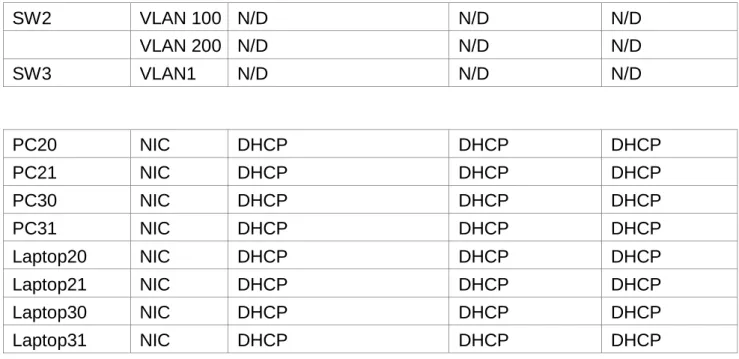
SW2 VLAN 100 N/D N/D N/D
VLAN 200 N/D N/D N/D
SW3 VLAN1 N/D N/D N/D
PC20 NIC DHCP DHCP DHCP
PC21 NIC DHCP DHCP DHCP
PC30 NIC DHCP DHCP DHCP
PC31 NIC DHCP DHCP DHCP
Laptop20 NIC DHCP DHCP DHCP
Laptop21 NIC DHCP DHCP DHCP
Laptop30 NIC DHCP DHCP DHCP
Laptop31 NIC DHCP DHCP DHCP
Tabla de asignación de VLAN y de puertos
Dispositivo VLAN Nombre Interfaz
SW2 100 LAPTOPS Fa0/2-3
SW2 200 DESTOPS Fa0/4-5
SW3 1 - Todas las interfaces
Tabla de enlaces troncales
Dispositivo local Interfaz local Dispositivo remoto
SW2 Fa0/2-3 100
Situación
Topología escenario 1.
Descripción de los actividades
SW1 VLAN y las asignaciones de puertos de VLAN deben cumplir
con la tabla 1.
Configurar el SW2 y SW3:
SW2:
Switch>enable
Switch#configure terminal
Enter configuration commands, one per line. End with CNTL/Z.
Switch(config)#vlan 100
Switch(config-vlan)#name LAPTOPS
Switch(config-vlan)#int range f0/2-3
Switch(config-if-range)#switchport mode access
Switch(config-if-range)#switchport access vlan 100
Switch(config-if-range)#exit
Switch(config)#vlan 200
Switch(config-vlan)#name DESTOPS
Switch(config-vlan)#int range f0/4-5
Switch(config-if-range)#switchport mode access
Switch(config-if-range)#switchport access vlan 200
Switch(config-if-range)#int f0/1
8
Switch(config-if)#int range f0/6-24
Switch(config-if-range)#shutdown
%LINK-5-CHANGED: Interface FastEthernet0/6, changed state to administratively down
%LINK-5-CHANGED: Interface FastEthernet0/7, changed state to administratively down
%LINK-5-CHANGED: Interface FastEthernet0/8, changed state to administratively down
%LINK-5-CHANGED: Interface FastEthernet0/9, changed state to administratively down
%LINK-5-CHANGED: Interface FastEthernet0/10, changed state to administratively down
%LINK-5-CHANGED: Interface FastEthernet0/11, changed state to administratively down
%LINK-5-CHANGED: Interface FastEthernet0/12, changed state to administratively down
%LINK-5-CHANGED: Interface FastEthernet0/13, changed state to administratively down
%LINK-5-CHANGED: Interface FastEthernet0/14, changed state to administratively down
%LINK-5-CHANGED: Interface FastEthernet0/15, changed state to administratively down
%LINK-5-CHANGED: Interface FastEthernet0/16, changed state to administratively down
%LINK-5-CHANGED: Interface FastEthernet0/17, changed state to administratively down
%LINK-5-CHANGED: Interface FastEthernet0/18, changed state to administratively down
%LINK-5-CHANGED: Interface FastEthernet0/19, changed state to administratively down
%LINK-5-CHANGED: Interface FastEthernet0/20, changed state to administratively down
%LINK-5-CHANGED: Interface FastEthernet0/21, changed state to administratively down
%LINK-5-CHANGED: Interface FastEthernet0/22, changed state to administratively down
%LINK-5-CHANGED: Interface FastEthernet0/23, changed state to administratively down
administratively down
Switch(config-if-range)#
SW3:
Switch>enable
Switch#configure terminal
Enter configuration commands, one per line. End with CNTL/Z.
Switch(config)#vlan 1
Switch(config-vlan)#exit
Switch(config)#int range f0/1-24
Switch(config-if-range)#switchport mode access
Switch(config-if-range)#switchpor access vlan 1
Switch(config-if-range)#exit
Switch(config)#exit
Switch#
%SYS-5-CONFIG_I: Configured from console by console
Switch#wr
Building configuration...
[OK]
Los puertos de red que no se utilizan se deben deshabilitar.
Se desabilitan los puertos que no se van autilizar en ambos switch.
SW2:
Switch>enable
Switch#configure terminal
Enter configuration commands, one per line. End with CNTL/Z.
Switch(config)#int range f0/6-24
Switch(config-if-range)#shutdown
SW3:
Switch#configure terminal
Enter configuration commands, one per line. End with CNTL/Z.
Switch(config)#int range f0/6-23
Switch(config-if-range)#shutdown
La información de dirección IP R1, R2 y R3 debe cumplir con la tabla
10
Se procede a realizar el direccionamiento ip en los diferentes routers de la topologia.
R1:
Router>enabl
Router#configure terminal
Enter configuration commands, one per line. End with CNTL/Z. Router(config)#int f0/0.100
Router(config-subif)#encapsulation dot1q 100
Router(config-subif)#ip address 192.168.20.1 255.255.255.0 Router(config-subif)#exit
Router(config)#int f0/0.200
Router(config-subif)#encapsulation dot1q 200
Router(config-subif)#ip address 192.168.21.1 255.255.255.0 Router(config-subif)#exit
Router(config)#int f0/0 Router(config-if)#no shut Router(config-if)#
%LINK-5-CHANGED: Interface FastEthernet0/0, changed state to up
%LINEPROTO-5-UPDOWN: Line protocol on Interface
FastEthernet0/0, changed state to up
%LINK-5-CHANGED: Interface FastEthernet0/0.100, changed state to up
%LINEPROTO-5-UPDOWN: Line protocol on Interface
FastEthernet0/0.100, changed state to up
%LINK-5-CHANGED: Interface FastEthernet0/0.200, changed state to up
%LINEPROTO-5-UPDOWN: Line protocol on Interface
FastEthernet0/0.200, changed state to up Router(config-if)#int s0/0/0
Router(config-if)#ip address 10.0.0.2 255.255.255.252 Router(config-if)#no shut
%LINK-5-CHANGED: Interface Serial0/0/0, changed state to down Router(config-if)#int s0/0/1
Router(config-if)#ip address 10.0.0.9 255.255.255.252 Router(config-if)#no shut
R2:
Router>enable
Router#configure terminal
Enter configuration commands, one per line. End with CNTL/Z. Router(config)#int s0/0/0
Router(config-if)#ip address 200.123.211.2 255.255.255.0 Router(config-if)#no shut
%LINK-5-CHANGED: Interface Serial0/0/0, changed state to down Router(config-if)#int s0/1/0
Router(config-if)#ip address 10.0.0.1 255.255.255.252 Router(config-if)#no shut
Router(config-if)#
%LINK-5-CHANGED: Interface Serial0/1/0, changed state to up Router(config)#int s0/1/1
Router(config-if)#ip address 10.0.0.5 255.255.255.252 Router(config-if)#no shut
%LINK-5-CHANGED: Interface Serial0/1/1, changed state to down Router(config-if)#
R3:
Router>enable
Router#configure terminal
Enter configuration commands, one per line. End with CNTL/Z. Router(config)#ipv6 unicast-routing
Router(config)#int f0/0
Router(config-if)#ip address 192.168.30.1 255.255.255.0 Router(config-if)#ipv6 address 2001:db8:130::9c0:80f:301/64 Router(config-if)#no shut
Router(config-if)#
%LINK-5-CHANGED: Interface FastEthernet0/0, changed state to up
%LINEPROTO-5-UPDOWN: Line protocol on Interface
FastEthernet0/0, changed state to up Router(config-if)#ipv6 dhcp server vlan_1 Router(config-if)#ipv6 nd other-config-flag Router(config-if)#no shut
Router(config-if)#int s0/0/0
12
Router(config-if)#
%LINK-5-CHANGED: Interface Serial0/0/0, changed state to up Router(config-if)#int s0/
%LINEPROTO-5-UPDOWN: Line protocol on Interface Serial0/0/0, changed state to up
0/1
Router(config-if)#ip address 10.0.0.10 255.255.255.252 Router(config-if)#no shut
Router(config-if)#
%LINK-5-CHANGED: Interface Serial0/0/1, changed state to up %LINEPROTO-5-UPDOWN: Line protocol on Interface Serial0/0/1, changed state to up
Laptop20, Laptop21, PC20, PC21, Laptop30, Laptop31, PC30
y PC31 deben obtener información IPv4 del servidor DHCP.
14
R1 debe realizar una NAT con sobrecarga sobre una dirección
IPv4 pública. Asegúrese de que todos los terminales pueden comunicarse con Internet pública (haga ping a la dirección ISP)
y la lista de acceso estándar se llama INSIDE-DEVS.
Se procede a configura la NAT en el R1 con sobrecarga en una direccion IPV4 publica.
Router>enable Router#conf t
Router(config)#access-list 1 permit 192.168.0.0 0.0.255.255
Router(config)#access-list 1 permit 10.0.0.0 0.0.0.255
Router(config)#ip nat pool INSIDE-DEVS 200.123.211.2 200.123.211.128 netmask 255.255.255.0
Router(config)#ip nat inside source list 1 interface s0/0/0 overload
Router(config)#int s0/1/1 Router(config-if)#ip nat inside Router(config-if)#int s0/1/0 Router(config-if)#ip nat inside Router(config-if)#int s0/0/0 Router(config-if)#ip nat outside Router(config-if)#exit
Router(config)#router rip
Router(config-router)#version 2 Router(config-router)#network 1.0.0.0
Router(config-router)#network 10.0.0.0
Router(config-router)#default-information originate Router(config-router)#ip route 0.0.0.0 0.0.0.0 s0/0/0 Router(config)#
%LINK-5-CHANGED: Interface Serial0/0/0, changed state to up
%LINEPROTO-5-UPDOWN: Line protocol on Interface
16
R1 debe tener una ruta estática predeterminada al ISP que
se configuró y que incluye esa ruta en el dominio RIPv2.
Se procedio desde el R1 crear una ruta estatica predeterminada al ISP.
Router(config-router)#ip route 0.0.0.0 0.0.0.0 s0/0/0
R2 es un servidor de DHCP para los dispositivos conectados al puerto
FastEthernet0/0.
Se procedio a configura el R2 como un servidor DHCP para los dispositivos conectados a la interfaz f0/0.
Router>enable
Router#configure terminal
Enter configuration commands, one per line. End with CNTL/Z. Router(config)#ip dhcp excluded-address 10.0.0.2 10.0.0.9 Router(config)#ip dhcp pool INSIDE-DEVS
Router(dhcp-config)#network 192.168.20.1 255.255.255.0 Router(dhcp-config)#network 192.168.21.1 255.255.255.0 Router(dhcp-config)#default-router 192.168.1.1
Router(dhcp-config)#dns-server 0.0.0.0 Router(dhcp-config)#exit
Router(config)#
R2 debe, además de enrutamiento a otras partes de la red, ruta entre
las VLAN 100 y 200.
Se configuro las vlan 100 y 200 en el router 2. Router(config)#int vlan 100
Router(config-if)#ip address 192.168.20.1 255.255.255.0 % 192.168.20.0 overlaps with FastEthernet0/0.100 Router(config-if)#exit
Router(config)#int vlan 200
Router(config-if)#ip address 192.168.21.1 255.255.255.0 % 192.168.21.0 overlaps with FastEthernet0/0.200 Router(config-if)#end
Router#
%SYS-5-CONFIG_I: Configured from console by console Router#wr
Building configuration... [OK]
Router#
los dispositivos en R3 (ping).
Se configuro el servidor0 con direccionamiento para que solo puedan acceder los dipsositovos conectados al R3.
La NIC instalado en direcciones IPv4 e IPv6 de Laptop30, de
Laptop31, de PC30 y obligación de configurados PC31 simultáneas (dual-stack). Las direcciones se deben configurar mediante DHCP y DHCPv6.
18
La interfaz FastEthernet 0/0 del R3 también deben tener
direcciones IPv4 e IPv6 configuradas (dual- stack).
Se configuro la interfaz f0/0 del R3 con direcciones ipv4 y ipv6 dual-stack.
Router>enable
Router#configure terminal
Enter configuration commands, one per line. End with
CNTL/Z.
Router(config)#ipv6 unicast-routing Router(config)#int f0/0
Router(config-if)#ipv6 enable
Router(config-if)#ipv6 address 2001:db8::9c0:80f:301/64 Router(config-if)#no shutdown
Router(config-if)#
R1, R2 y R3 intercambian información de routing mediante RIP
versión 2.
Se configuraron los router para intercambiar informacionde routing mediante RIP version 2.
R1:
Router>enable
Router#configure terminal
Enter configuration commands, one per line. End with CNTL/Z. Router(config)#router rip
Router(config-router)#version 2
Router(config-router)#ip route 0.0.0.0 0.0.0.0 s0/0/0
Router(config)#router rip Router(config-router)#network 10.0.0.4 Router(config-router)#network 10.0.0.0 Router(config-router)#default-information originate Router(config-router)# R2: Router>enable Router#configure terminal
Enter configuration commands, one per line. End with CNTL/Z. Router(config)#router rip Router(config-router)#version 2 Router(config-router)#network 192.168.30.0 Router(config-router)#network 192.168.20.0 Router(config-router)#network 192.168.21.0 Router(config-router)#network 10.0.0.0 Router(config-router)#network 10.0.0.8 Router(config-router)# R3: Router>enable Router#configure terminal
20
R1, R2 y R3 deben saber sobre las rutas de cada uno y la ruta
predeterminada desde R1.
La ruta predeterminada desde R1 es:
Router(config-router)#ip route 0.0.0.0 0.0.0.0 s0/0/0 Rutas de cada uno de ellos:
R1:
Router(config-router)#network 10.0.0.4 Router(config-router)#network 10.0.0.0 R2:
Router(config-router)#network 192.168.30.0 Router(config-router)#network 192.168.20.0
Router(config-router)#network 192.168.21.0 Router(config-router)#network 10.0.0.0 Router(config-router)#network 10.0.0.8 R3:
Router(config-router)#network 192.168.0.0 Router(config-router)#network 10.0.0.8 Router(config-router)#network 10.0.0.4
Verifique la conectividad. Todos los terminales deben poder hacer
ping entre sí y a la dirección IP del ISP. Los terminales bajo el R3
deberían poder hacer IPv6-ping entre ellos y el servidor.
Ping de PC0 A Laptop 30:
22
Ping de PC30 a ISP:
PC0 a ISP:
24
ESCENARIO 2
DESCRIPCIÓN DEL ESCENARIO PROPUESTO
Una empresa de Tecnología posee tres sucursales distribuidas en las ciudades de
Bogotá, Medellín y Bucaramanga, en donde el estudiante será el administrador de la red,
el cual deberá configurar e interconectar entre sí cada uno de los dispositivos que forman
parte del escenario, acorde con los lineamientos establecidos para el direccionamiento
IP, protocolos de enrutamiento y demás aspectos que forman parte de la topología de
red.
25
DIRECCIONAMIENTO DE RED
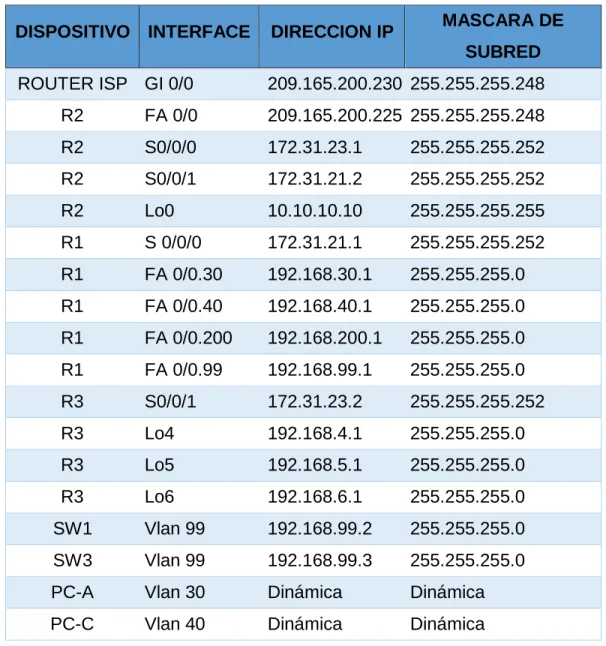
TABLA DE DIRECCIONAMIENTO IP ASIGNADO
El direccionamiento IP asignado a los equipos que conforman el escenario de red
propuesto se resumen a continuación:
Tabla 1. Direccionamiento de IP de equipos de red
DISPOSITIVO INTERFACE DIRECCION IP MASCARA DE
SUBRED
ROUTER ISP GI 0/0 209.165.200.230 255.255.255.248
R2 FA 0/0 209.165.200.225 255.255.255.248
R2 S0/0/0 172.31.23.1 255.255.255.252
R2 S0/0/1 172.31.21.2 255.255.255.252
R2 Lo0 10.10.10.10 255.255.255.255
R1 S 0/0/0 172.31.21.1 255.255.255.252
R1 FA 0/0.30 192.168.30.1 255.255.255.0
R1 FA 0/0.40 192.168.40.1 255.255.255.0
R1 FA 0/0.200 192.168.200.1 255.255.255.0
R1 FA 0/0.99 192.168.99.1 255.255.255.0
R3 S0/0/1 172.31.23.2 255.255.255.252
R3 Lo4 192.168.4.1 255.255.255.0
R3 Lo5 192.168.5.1 255.255.255.0
R3 Lo6 192.168.6.1 255.255.255.0
SW1 Vlan 99 192.168.99.2 255.255.255.0
SW3 Vlan 99 192.168.99.3 255.255.255.0
PC-A Vlan 30 Dinámica Dinámica
26
1. CONFIGURACIÓN Y VERIFICACIÓN PROTOCOLO OSPF V2
3.1 TABLA DE ENRUTAMIENTO Y ROUTERS CONECTADOS POR OSPF
27
3.1.2 Router 2
28
3.2 CONFIGURACIÓN OSPF (PROCESS ID, INTERFACES, ROUTER ID,
INTERFACES COSTO)
29
30
3.2.3 Router 3
2. CONFIGURACIÓN DE VLANS, PUERTOS TRONCALES, PUERTOS DE
31
4.1 Router 1
En R1 se llevó a cabo la configuración del enrutamiento inter-vlan y la respectiva
32
4.2 SW1
En el switch 1 se llevó a cabo a configuración de puertos troncales (conexión a router 1 y
conexión a SW3), puerto de acceso, conexión a PC-A
Puerto de acceso:
Puertos troncales:
4.3 SW3
En el SW3 de configuró el puerto de acceso para la conexión a PC – C y un puerto
troncal que conecta a SW1.
33
Puertos troncales:
3. DESHABILITAR DNS LOOKUP EN SW3
5.1 SW3
Se llevó a cabo la configuración requerida mediante el comando que se ilustra en la
imagen:
4. ASIGNACIÓN DE DIRECIONES IP A SWITCHES
Para la administración de los switches se llevó a cabo la creación de la vlan 99 para
gestionar los equipos, como buena práctica se evitó usar la vlan 1 para administrar los
equipos, en la tabla se resumen el direccionamiento IP asignado a los dispositivos.
Tabla 2. Direccionamiento de IP asignado switches
DISPOSITIVO INTERFACE DIRECCION IP MASCARA DE
SUBRED
SW1 Vlan 99 192.168.99.2 255.255.255.0
34
5. CONFIGURACIÓN DE DHCP
La configuración del protocolo DHCP para las vlan 30 y 40 se llevó a cabo en el R1,
inicialmente se configuró en el dispositivo los rangos de IP que debían excluirse y
posteriormente se asignaron los parámetros propuestos en el escenario.
35
7. CONFIGURACIÓN DE ACL ESTÁNDAR
ACL20: Esta lista de acceso aplicada en R3 deniega el tráfico de la red 192.168.6.0/24
hacia el R2
ACL1: Esta lista de acceso aplicada en R1 deniega el tráfico de la red
36
8. CONFIGURACIÓN DE ACL EXTENDIDA
Se crearon dos listas de acceso extendidas en R1: La ACL 101 deniega el tráfico de la
red 192.168.40.0/24 hacia la red de internet 209.165.200.224/29 y la ACL 102 deniega el
tráfico de la red 192.168.30.0/24 hacia el servidor web con la IP 10.10.10.10. Todo el
37
9. PRUEBAS DE CONECTIVIDAD
Trazas desde la PC-A hacia las redes de R3
38
39
40
41
42
10. ARCHIVOS DE CONFIGURACIÓN
Adicional a la configuración requerida en el escenario propuesto, a los equipos de red se
les realizó la siguiente configuración: Banners, cifrado de contraseñas, SSH, nombres,
direcciones IP de gestión, y accesos para líneas de consola y vty. El siguiente es el
archivo de configuración de cada uno de los equipos con componen la red.
ROUTER 1
R1#sh run
Building configuration...
Current configuration : 2609 bytes
!
version 12.4
no service timestamps log datetime msec
no service timestamps debug datetime msec
service password-encryption
!
hostname R1
!
enable secret 5 $1$mERr$9cTjUIEqNGurQiFU.ZeCi1 enable
password 7 0822455D0A16
!
ip dhcp excluded-address 192.168.30.1 192.168.30.30
ip dhcp excluded-address 192.168.40.1 192.168.40.30
!
ip dhcp pool ADMINISTRACION network
192.168.30.0 255.255.255.0
43
dns-server 10.10.10.11
ip dhcp pool MERCADEO
network 192.168.40.0 255.255.255.0
default-router 192.168.40.1
dns-server 10.10.10.11
!
no ip cef no
ipv6 cef
!
username admin secret 5 $1$mERr$9cTjUIEqNGurQiFU.ZeCi1
!
ip ssh version 2
ip domain-name ccna-unad.com
!
spanning-tree mode pvst
!
interface FastEthernet0/0
description LAN
no ip address
duplex auto speed
auto
!
interface FastEthernet0/0.30
description VLAN Administracion
encapsulation dot1Q 30
ip address 192.168.30.1 255.255.255.0
ip access-group 102 out
!
interface FastEthernet0/0.40
44
encapsulation dot1Q 40
ip address 192.168.40.1 255.255.255.0
ip access-group 101 out
!
interface FastEthernet0/0.99
description VLAN Management
encapsulation dot1Q 99
ip address 192.168.99.1 255.255.255.0
!
interface FastEthernet0/0.200
description VLAN Mantenimiento
encapsulation dot1Q 200
ip address 192.168.200.1 255.255.255.0
ip access-group 21 out
!
interface FastEthernet0/1 no
ip address
duplex auto
speed auto
shutdown
!
interface Serial0/0/0
description Enlace a R2
bandwidth 128
ip address 172.31.21.1 255.255.255.252
ip ospf cost 7500
clock rate 64000
!
interface Serial0/0/1 no
45
clock rate 2000000
shutdown
!
interface Vlan1 no
ip address
shutdown
!
router ospf 1
router-id 1.1.1.1
log-adjacency-changes
passive-interface FastEthernet0/0
network 172.31.21.0 0.0.0.3 area 0
network 192.168.30.0 0.0.0.255 area 0
network 192.168.40.0 0.0.0.255 area 0
network 192.168.200.0 0.0.0.255 area 0
network 192.168.99.0 0.0.0.255 area 0
!
ip classless
!
ip flow-export version 9
!
access-list 21 deny 192.168.200.0 0.0.0.255
access-list 21 permit host 0.0.0.0
access-list 101 deny ip 192.168.40.0 0.0.0.255 209.165.200.224 0.0.0.7
access-list 101 permit ip any any
access-list 102 deny ip 192.168.30.0 0.0.0.255 host 10.10.10.10
access-list 102 permit ip any any
!
no cdp run
46
banner motd ^C Acceso solo a personal autorizado ^C
!
line con 0
exec-timeout 5 0
password 7 0822455D0A16
login
!
line aux 0
!
line vty 0 4
login local
transport input ssh line
vty 5 15
login local transport
input ssh
!
end R1#
ROUTER 2
R2#sh run
Building configuration...
Current configuration : 2077 bytes
!
version 12.4
no service timestamps log datetime msec
no service timestamps debug datetime msec
service password-encryption
47
hostname R2
!
enable secret 5 $1$mERr$9cTjUIEqNGurQiFU.ZeCi1 enable
password 7 0822455D0A16
!
no ip cef no
ipv6 cef
!
username admin secret 5 $1$mERr$9cTjUIEqNGurQiFU.ZeCi1
!
ip ssh version 2
ip domain-name unad-ccna.com
!
spanning-tree mode pvst
!
interface Loopback0
description Web Server
ip address 10.10.10.10 255.255.255.255
!
interface FastEthernet0/0
description Enlace_ISP
ip address 209.165.200.225 255.255.255.248
ip nat outside
duplex auto speed
auto
!
interface FastEthernet0/1 no
ip address
duplex auto
48
shutdown
!
interface Serial0/0/0
description Enlace a R3
bandwidth 128
ip address 172.31.23.1 255.255.255.252
ip ospf cost 7500 ip
nat inside clock rate
64000
!
interface Serial0/0/1
description Enlace a R1
bandwidth 128
ip address 172.31.21.2 255.255.255.252
ip nat inside
!
interface Vlan1 no
ip address
shutdown
!
router ospf 1
router-id 2.2.2.2
log-adjacency-changes
passive-interface FastEthernet0/0
network 172.31.21.0 0.0.0.3 area 0
network 10.10.10.10 0.0.0.0 area 0
network 172.31.23.0 0.0.0.255 area 0
network 209.165.200.224 0.0.0.7 area 0
!
49
ip classless
ip route 0.0.0.0 0.0.0.0 209.165.200.230
!
ip flow-export version 9
!
access-list 10 permit 172.31.21.0 0.0.0.3
access-list 10 permit 172.31.23.0 0.0.0.3
access-list 10 permit host 10.10.10.10
access-list 10 permit 192.168.30.0 0.0.0.255
access-list 10 permit 192.168.40.0 0.0.0.255
access-list 10 permit 192.168.200.0 0.0.0.255
access-list 10 permit 192.168.4.0 0.0.0.255
access-list 10 permit 192.168.5.0 0.0.0.255
access-list 10 permit 192.168.6.0 0.0.0.255
!
no cdp run
!
banner motd ^C Acceso solo a peronal aoturizado ^C
!
line con 0
exec-timeout 5 0
password 7 0822455D0A16
login
!
line aux 0
!
line vty 0 4
login local
transport input ssh line
50
login local transport
input ssh ! end ROUTER 3 R3#sh run Building configuration...
Current configuration : 1615 bytes
!
version 12.4
no service timestamps log datetime msec
no service timestamps debug datetime msec
service password-encryption
!
hostname R3
!
enable secret 5 $1$mERr$9cTjUIEqNGurQiFU.ZeCi1 enable
password 7 0822455D0A16
!
no ip cef no
ipv6 cef
!
username admin secret 5 $1$mERr$9cTjUIEqNGurQiFU.ZeCi1
!
ip ssh version 2
ip domain-name unad-ccna.com
!
51
!
interface Loopback4
ip address 192.168.4.1 255.255.255.0
!
interface Loopback5
ip address 192.168.5.1 255.255.255.0
!
interface Loopback6
ip address 192.168.6.1 255.255.255.0
!
interface FastEthernet0/0 no
ip address
duplex auto
speed auto
shutdown
!
interface FastEthernet0/1 no
ip address
duplex auto
speed auto
shutdown
!
interface Serial0/0/0 no
ip address
clock rate 2000000
shutdown
!
interface Serial0/0/1
description Enlace a R2
52
ip address 172.31.23.2 255.255.255.252
ip access-group 20 out
!
interface Vlan1 no
ip address
shutdown
!
router ospf 1
router-id 3.3.3.3
log-adjacency-changes
passive-interface FastEthernet0/0
network 172.31.23.0 0.0.0.3 area 0
network 192.168.4.0 0.0.0.255 area 0
network 192.168.5.0 0.0.0.255 area 0
network 192.168.6.0 0.0.0.255 area 0
!
ip classless
!
ip flow-export version 9
!
access-list 20 deny 192.168.6.0 0.0.0.255
access-list 20 permit host 0.0.0.0
!
no cdp run
!
banner motd ^C Acceso solo a personal autorizado ^C
!
line con 0
exec-timeout 5 0
53
login
!
line aux 0
!
line vty 0 4
login local
transport input ssh line
vty 5 15
login local transport
input ssh
!
end R3#
SWITCH 1
SW1#sh run
Building configuration...
Current configuration : 2521 bytes
!
version 12.1
no service timestamps log datetime msec
no service timestamps debug datetime msec
service password-encryption
!
hostname SW1
!
enable secret 5 $1$mERr$9cTjUIEqNGurQiFU.ZeCi1 enable
password 7 0822455D0A16
54
ip ssh version 2
ip domain-name unad-ccna.com
!
username admin secret 5 $1$mERr$9cTjUIEqNGurQiFU.ZeCi1
!
spanning-tree mode pvst
!
interface FastEthernet0/1
description PC VLAN 30
switchport access vlan 30
switchport mode access
spanning-tree portfast
!
interface FastEthernet0/2
description Sin uso shutdown
!
interface FastEthernet0/3
description Enlace a SW3
switchport mode trunk
!
interface FastEthernet0/4
description Interfaces sin uso
shutdown
!
interface FastEthernet0/5
description Interfaces sin uso
shutdown
!
55
description Interfaces sin uso
shutdown
!
interface FastEthernet0/7
description Interfaces sin uso
shutdown
!
interface FastEthernet0/8
description Interfaces sin uso
shutdown
!
interface FastEthernet0/9
description Interfaces sin uso
shutdown
!
interface FastEthernet0/10
description Interfaces sin uso
shutdown
!
interface FastEthernet0/11
description Interfaces sin uso
shutdown
!
interface FastEthernet0/12
description Interfaces sin uso
shutdown
!
interface FastEthernet0/13
description Interfaces sin uso
56
!
interface FastEthernet0/14
description Interfaces sin uso
shutdown
!
interface FastEthernet0/15
description Interfaces sin uso
shutdown
!
interface FastEthernet0/16
description Interfaces sin uso
shutdown
!
interface FastEthernet0/17
description Interfaces sin uso
shutdown
!
interface FastEthernet0/18
description Interfaces sin uso
shutdown
!
interface FastEthernet0/19
description Interfaces sin uso
shutdown
!
interface FastEthernet0/20
description Interfaces sin uso
shutdown
!
57
description Interfaces sin uso
shutdown
!
interface FastEthernet0/22
description Interfaces sin uso
shutdown
!
interface FastEthernet0/23
description Interfaces sin uso
shutdown
!
interface FastEthernet0/24
description Enlace a R1
switchport mode trunk
!
interface Vlan1 no
ip address
shutdown
!
interface Vlan99 description
Management
mac-address 00d0.5840.3901
ip address 192.168.99.2 255.255.255.0
!
ip default-gateway 192.168.99.1
!
banner motd ^C Acceso solo a personal autorizado ^C
!
line con 0
58
login
exec-timeout 5 0
!
line vty 0 4
login local
transport input ssh line
vty 5 15
login local transport
input ssh
!
end
SW1#
SWITCH 3
SW3#sh run
Building configuration...
Current configuration : 2458 bytes
!
version 12.1
no service timestamps log datetime msec
no service timestamps debug datetime msec
service password-encryption
!
hostname SW3
!
enable secret 5 $1$mERr$9cTjUIEqNGurQiFU.ZeCi1 enable
59
!
ip ssh version 2
no ip domain-lookup
ip domain-name unad-ccna.com
!
username admin secret 5 $1$mERr$9cTjUIEqNGurQiFU.ZeCi1
!
spanning-tree mode pvst
!
interface FastEthernet0/1
description PC VLAN 40
switchport access vlan 40
switchport mode access
spanning-tree portfast
!
interface FastEthernet0/2
description Puerto sin uso
shutdown
!
interface FastEthernet0/3
description Enlace a SW1
switchport mode trunk
!
interface FastEthernet0/4
description Puerto Sin uso
shutdown
!
interface FastEthernet0/5
description Puerto Sin uso
60
!
interface FastEthernet0/6
description Puerto Sin uso
shutdown
!
interface FastEthernet0/7
description Puerto Sin uso
shutdown
!
interface FastEthernet0/8
description Puerto Sin uso
shutdown
!
interface FastEthernet0/9
description Puerto Sin uso
shutdown
!
interface FastEthernet0/10
description Puerto Sin uso
shutdown
!
interface FastEthernet0/11
description Puerto Sin uso
shutdown
!
interface FastEthernet0/12
description Puerto Sin uso
shutdown
!
61
description Puerto Sin uso
shutdown
!
interface FastEthernet0/14
description Puerto Sin uso
shutdown
!
interface FastEthernet0/15
description Puerto Sin uso
shutdown
!
interface FastEthernet0/16
description Puerto Sin uso
shutdown
!
interface FastEthernet0/17
description Puerto Sin uso
shutdown
!
interface FastEthernet0/18
description Puerto Sin uso
shutdown
!
interface FastEthernet0/19
description Puerto Sin uso
shutdown
!
interface FastEthernet0/20
description Puerto Sin uso
62
!
interface FastEthernet0/21
description Puerto Sin uso
shutdown
!
interface FastEthernet0/22
description Puerto Sin uso
shutdown
!
interface FastEthernet0/23
description Puerto Sin uso
shutdown
!
interface FastEthernet0/24
description Puerto Sin uso
shutdown
!
interface Vlan1 no
ip address
shutdown
!
interface Vlan99 description
Management
mac-address 0090.2b35.9401
ip address 192.168.99.3 255.255.255.0
!
ip default-gateway 192.168.99.1
!
banner motd ^C Acceso solo a personal autorizado ^C
63
line con 0
password 7 0822455D0A16 login
exec-timeout 5 0
!
line vty 0 4 login local
transport input ssh line vty 5 15
login local transport input ssh
!
64
CONCLUSIONES
Durante el desarrollo de esta actividad, se logró demostrar los conocimientos adquiridos en cuanto a la configuración de los equipos de red, Cisco, como routers y Switches, mediante la configuración y direccionamiento de los diferentes dispositivos
.
65
BIBLIOGRAFIAS
CISCO. (s.f.). Principios básicos de routing y switching: Listas de Control de
Acceso. (2017), Tomado de:
https://staticcourseassets.s3.amazonaws.com/RSE503/es/index.html#9. 0.1
Principios básicos de routing y switching: Traducción de direcciones
de red para IPv4. (2017), Tomado de:
https://staticcourseassets.s3.amazonaws.com/RSE503/es/index.html# 11.0
DHCP. Principios de Enrutamiento y Conmutación. (2014) Recuperado de:
https://static-
courseassets.s3.amazonaws.com/RSE50ES/module10/index.html#10.0. 1.1
Chamorro Serna, L., Montaño Torres, O., Guzmán Pérez, E. H., Daza
Navia, M. Y., & Castillo Ortiz, O. F. (2018). Diplomado de Profundización Cisco- Enrutamiento en soluciones de red.
CISCO. (s.f.). Cisco Networking Academy. Obtenido de
https://www.netacad.com/es/about-networking-academy
LÓPEZ CASTAÑO. Hugo, El comportamiento de la oferta y de la tasa de