PRUEBA DE HABILIDADES PRÁCTICAS
DIPLOMADO DE PROFUNDIZACIÓN CISCO
Presentado por:
OSCAR JAVIER ACOSTA PARRA
Presentado a: DIEGO EDINSON RAMIREZ
Tutor
UNIVERSIDAD NACIONAL ABIERTA Y A DISTANCIA - UNAD
ESCUELA DE CIENCIAS BÁSICAS, TECNOLOGÍA E INGENIERÍA
INGENIERÍA DE SISTEMAS
CONTENIDO
INTRODUCCIÓN ... 3
DESARROLLO DEL ESCENARIO 1 ... 4
Tabla de direccionamiento ... 5
Tabla de asignación de VLAN y de puertos... 6
Tabla de enlaces troncales... 6
Desarrollo de la actividad ... 7
DESARROLLO DEL ESCENARIO 2 ... 18
Desarrollo de la Actividad ... 19
CONCLUSIONES ... 34
INTRODUCCIÓN
Este trabajo se realiza con el fin de poner a prueba todas las temáticas y
experiencias adquiridas a lo largo del curso de profundización, en esta prueba
de habilidades evaluara y medirá el grado de competencias que hemos
adquirido en configuración de equipos CISCO y en análisis y resolución de
problemas de redes y en generar todos los inconvenientes de conectividad de
datos.
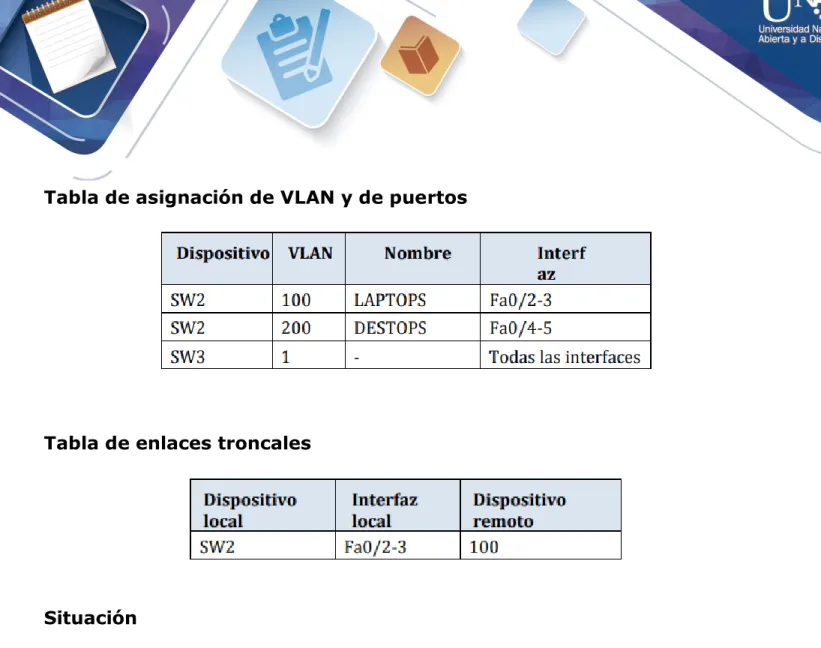
Tabla de asignación de VLAN y de puertos
Tabla de enlaces troncales
Situación
En esta actividad, demostrará y reforzará su capacidad para implementar NAT,
servidor de DHCP, RIPV2 y el routing entre VLAN, incluida la configuración de
direcciones IP, las VLAN, los enlaces troncales y las subinterfaces. Todas las
pruebas de alcance deben realizarse a través de ping únicamente.
Desarrollo de la actividad
➢
SW1 VLAN y las asignaciones de puertos de VLAN deben cumplir
con la tabla 1.
SW2>enable
SW2#configure terminal
Enter configuration commands, one per line. End with CNTL/Z. SW2(config)#vlan 100
SW2(config-vlan)#name LAPTOPS SW2(config-vlan)#vlan 200 SW2(config-vlan)#name DESTOPS SW2(config-vlan)#exit
SW2(config)#interface range fa0/2-3
SW2(config-if-range)#switchport mode access SW2(config-if-range)#switchport access vlan 100
SW2(config)#interface range fa0/4-5
SW2(config-if-range)#switchport mode access SW2(config-if-range)#switchport access vlan 200 SW2(config-if-range)#exit
SW2(config)#interface fa0/1
SW2(config-if)#switchport mode trunk
➢
Los puertos de red que no se utilizan se deben deshabilitar.
➢
La información de dirección IP R1, R2 y R3 debe cumplir con la
tabla 1.
R1
R1>enable
R1#configure terminal
Enter configuration commands, one per line. End with CNTL/Z. R1(config)#interface s0/0/0
R1(config-if)#ip address 200.123.211.2 255.255.255.0 R1(config-if)#no shutdown
R1(config-if)#interface s0/1/0
R1(config-if)#ip address 10.0.0.1 255.255.255.252 R1(config-if)#no shutdown
R1(config-if)#interface s0/1/1
R1(config-if)#ip address 10.0.0.5 255.255.255.252 R1(config-if)#no shutdown
R2
R2>enable
R2#configure terminal
R2configuration commands, one per line. End with CNTL/Z. R2(config)#interface fa0/0.100
R2(config-subif)#encapsulation dot1Q 100
R2(config-subif)#ip address 192.168.20.1 255.255.255.0 R2(config-subif)#interface fa0/0.200
R2(config-subif)#encapsulation dot1Q 200
R2(config-subif)#ip address 192.168.21.1 255.255.255.0 R2(config-subif)#interface fa0/0
R2(config-if)#no shutdown R2(config-if)#interface s0/0/0
R2(config-if)#ip address 10.0.0.2 255.255.255.252 R2(config-if)#no shutdown
R2(config-if)#ip address 10.0.0.9 255.255.255.252 R2(config-if)#no shutdown
R3
R3>enable R3#configure terminal R3(config)#ipv6 unicast-routing R3(config)#ipv6 dhcp pool ciscoR3(config-dhcp)#prefix-delegation pool cisco
R3(config)#ipv6 general-prefix cisco 2001:db8:130::/64 R3(config)#ipv6 local pool cisco 2001:db8:130::/40 64 R3(config)#interface f0/0
R3(config-if)#ip address 192.168.30.1 255.255.255.0 R3(config-if)#ipv6 address 2001:db8:130::9C0:80F:301/64 R3(config-if)#ipv6 dhcp server vlan_1
R3(config-if)#ipv6 nd other-config-flag R3(config-if)#ipv6 dhcp server cisco R3(config-if)#no shutdown
R3(config-if)#interface s0/0/0
R3(config-if)#ip address 10.0.0.6 255.255.255.252 R3(config-if)#no shutdown
R3(config-if)#interface s0/0/1
R3(config-if)#ip address 10.0.0.10 255.255.255.252 R3(config-if)#no shutdown
➢
Laptop20, Laptop21, PC20, PC21, Laptop30, Laptop31, PC30 y PC31
deben obtener información IPv4 del servidor DHCP.
R2(config)#ip dhcp pool vlan_100
R2(dhcp-config)#network 192.168.20.1 255.255.255.0 R2(dhcp-config)#default-router 192.168.20.1
R2(dhcp-config)#ip dhcp pool vlan_200
R3(config)#ip dhcp pool vlan_1
R3(dhcp-config)#network 192.168.30.1 255.255.255.0 R3(dhcp-config)#default-router 192.168.30.1
➢
R1 debe realizar una NAT con sobrecarga sobre una dirección IPv4
pública. Asegúrese de que todos los terminales pueden
comunicarse con Internet pública (haga ping a la dirección ISP) y la
lista de acceso estándar se llama INSIDE-DEVS.
R1(config)#interface s0/1/1 R1(config-if)#ip nat inside R1(config-if)#exit
R1(config)#interface s0/1/0 R1(config-if)#ip nat inside R1(config-if)#exit
R1(config)#interface s0/0/0 R1(config-if)#ip nat outside R1(config-if)#exit
R1(config)#ip nat pool INSIDE-DEVS 200.123.211.2 200.123.211.128 netmask 255.255.255.0
R1(config)#access-list 1 permit 192.168.0.0 0.0.255.255 R1(config)#access-list 1 permit 10.0.0.0 0.255.255.255
R1(config)#ip nat inside source list 1 interface s0/0/0 overload
➢
R1 debe tener una ruta estática predeterminada al ISP que se
configuró y que incluye esa ruta en el dominio RIPv2.
R1(config)#ip nat inside source static tcp 192.168.30.6 80 200.123.211.1 80 R1(config)#router rip
R1(config-router)#version 2
➢
R2 es un servidor de DHCP para los dispositivos conectados al
puerto FastEthernet0/0.
R2>enable
R2#configure terminal
R2(config)#ip dhcp pool vlan_100
R2(dhcp-config)#network 192.168.20.1 255.255.255.0 R2(dhcp-config)#default-router 192.168.20.1
R2(dhcp-config)#ip dhcp pool vlan_200
R2(dhcp-config)#network 192.168.21.1 255.255.255.0 R2(dhcp-config)#default-router 192.168.21.1
➢
La NIC instalado en direcciones IPv4 e IPv6 de Laptop30, de
Laptop31, de PC30 y obligación de configurados PC31 simultáneas
(dual-stack). Las direcciones se deben configurar mediante DHCP y
DHCPv6.
SW2
SW3
➢
La interfaz FastEthernet 0/0 del R3 también deben tener
direcciones IPv4 e IPv6 configuradas (dual- stack).
R3(config)#ip dhcp pool vlan_1
R3(dhcp-config)#network 192.168.30.1 255.255.255.0 R3(dhcp-config)#default-router 192.168.30.1
R3(dhcp-config)#ipv6 dhcp pool vlan_1 R3(config-dhcp)#dns-server 2001:db8:130::
➢
R1, R2 y R3 intercambian información de routing mediante RIP
versión 2.
➢
R1, R2 y R3 deben saber sobre las rutas de cada uno y la ruta
predeterminada desde R1.
R1
R1(config)#router rip
R1(config-router)#version 2
R1(config-router)#ip route 0.0.0.0 0.0.0.0 s0/0/0 R1(config)#router rip
R1(config-router)#network 10.0.0.4 R1(config-router)#network 10.0.0.0
R1(config-router)#default-information originate
R2
R2(config)#router rip
R2(config-router)#network 192.168.30.0 R2(config-router)#network 192.168.20.0 R2(config-router)#network 192.168.21.0 R2(config-router)#network 10.0.0.0 R2(config-router)#network 10.0.0.8
R3
R3(config)#router rip
R3(config-router)#version 2
R3(config-router)#network 192.168.0.0 R3(config-router)#network 10.0.0.8 R3(config-router)#network 10.0.0.4
DESARROLLO DEL ESCENARIO 2
Desarrollo de la Actividad
:
➢
Configurar el direccionamiento IP acorde con la topología de red
para cada uno de los dispositivos que forman parte del escenario
PC Internet
Router R2
R2>enable
R2#configure terminal
R2(config)#no ip domain-lookup R2(config)#enable secret class R2(config)#line console 0 R2(config-line)#password cisco R2(config-line)#login
R2(config-line)#line vty 0 4 R2(config-line)#password cisco
R2(config)#service password-encryption
R2(config)#banner motd *Prohibido el Acceso a todo el personal no Autorizado*
R2(config-if)#description Conexion con R3
R2(config-if)#ip address 172.31.23.1 255.255.255.252 R2(config-if)#clock rate 128000
R2(config-if)#no shutdown
R2(config-if)#interface s0/0/1
R2(config-if)#description Conexion con R1
R2(config-if)#ip address 172.31.21.2 255.255.255.252 R2(config-if)#no shutdown
R2(config-if)#interface g0/1
R2(config-if)#description Conexion PC Internet
R2(config-if)#ip address 209.165.200.225 255.255.255.248 R2(config-if)#no shutdown
R2(config-if)#interface g0/0
R2(config-if)#description Conexion con Web Server R2(config-if)#ip address 10.10.10.1 255.255.255.0 R2(config-if)#no shutdown
R2(config)#ip route 0.0.0.0 0.0.0.0 g0/1
Router R1
R1>enable
R1#configure terminal
Enter configuration commands, one per line. End with CNTL/Z. R1(config)#no ip domain lookup
R1(config)#enable secret class R1(config)#line console 0 R1(config-line)#password cisco R1(config-line)#line vty 0 4 R1(config-line)#password class
R1(config)#service password-encryption
R1(config)#banner motd *Prohibido el Acceso a todo personal no Autorizado*
R1(config)#interface s0/0/0
R1(config-if)#description Conexion con R2
R1(config-if)#ip address 172.31.21.1 255.255.255.252 R1(config-if)#clock rate 128000
R1(config-if)#no shutdown
R1(config)#ip route 0.0.0.0 0.0.0.0 s0/0/0
R1(config)#interface g0/0.30
R1(config-subif)#description ADMINISTRACION LAN R1(config-subif)#encapsulation dot1Q 30
R1(config)#interface g0/0.40
R1(config-subif)#description MERCADEO LAN R1(config-subif)#encapsulation dot1Q 40
R1(config-subif)#ip address 192.168.40.1 255.255.255.0
R1(config)#interface g0/0.200
R1(config-subif)#description MANTENIMIENTO LAN R1(config-subif)#encapsulation dot1Q 200
R1(config-subif)#ip address 192.168.200.1 255.255.255.0
R1(config)#interface g0/0 R1(config-if)#no shutdown
Router R3
R3>enable
R3#configure terminal
Enter configuration commands, one per line. End with CNTL/Z. R3(config)#no ip domain-lookup
R3(config)#enable secret class R3(config)#line console 0 R3(config-line)#password cisco R3(config-line)#line vty 0 4 R3(config-line)#password cisco
R3(config)#service password-encryption
R3(config)#banner motd *Prohibido el Acceso a todo personal no Autorizado*
R3(config)#interface s0/0/1
R3(config-if)#description Conexion con R2
R3(config-if)#ip address 172.31.23.2 255.255.255.252 R3(config-if)#no shutdown
R3(config-if)#interface loopback 4
R3(config-if)#ip address 192.168.4.1 255.255.255.0 R3(config-if)#no shutdown
R3(config-if)#ip address 192.168.5.1 255.255.255.0 R3(config-if)#no shutdown
R3(config-if)#interface loopback 6
R3(config-if)#ip address 192.168.6.1 255.255.255.0 R3(config-if)#no shutdown
R3(config-if)#exit
R3(config)#ip route 0.0.0.0 0.0.0.0 s0/0/1
Switch S1
S1>enable
S1#configure terminal
S1(config)#no ip domain-lookup S1(config)#enable secret class S1(config)#line console 0 S1(config-line)#password cisco S1(config-line)#line vty 0 4 S1(config-line)#password cisco
S1(config)#service password-encryption
S1(config)#banner motd *Prohibido el Acceso a todo personal no autorizado*
Switch S3
S3>enable
S3#configure terminal
S3(config)#service password-encryption
S3(config)#banner motd *Prohibido el Acceso a todo personal no autorizado*
➢
Configurar el protocolo de enrutamiento OSPFv2 bajo los siguientes
criterios:
Router R1
R1(config)#router ospf 1
R1(config-router)#router-id 1.1.1.1
R1(config-router)#network 172.31.21.0 0.0.0.3 area 0 R1(config-router)#Network 192.168.30.0 0.0.0.255 area 0 R1(config-router)#Network 192.168.40.0 0.0.0.255 area 0 R1(config-router)#Network 192.168.200.0 0.0.0.255 area 0 R1(config-router)#passive-interface g0/0.30
R1(config-router)#passive-interface g0/0.40 R1(config-router)#passive-interface g0/0.200 R1(config)#interface s0/0/0
R1(config-if)#bandwidth 128 R1(config-if)#ip ospf cost 7500
Router R2
R2>enable
R2(config-router)#router-id 2.2.2.2
R2(config-router)#Network 172.31.21.0 0.0.0.3 area 0 R2(config-router)#Network 172.31.21.0 0.0.0.3 area 0 R2(config-router)#Network 172.31.23.0 0.0.0.3 area 0 R2(config-router)#Network 10.10.10.0 0.0.0.255 area 0 R2(config-router)#passive-interface g0/0
R2(config)#interface s0/0/0 R2(config-if)#bandwidth 128 R2(config-if)#ip ospf cost 7500
R2(config)#interface s0/0/1 R2(config-if)#bandwidth 128
Router R3
R3>enable
R3#configure terminal R3(config)#router ospf 1
R3(config-router)#router-id 3.3.3.3
R3(config-router)#Network 172.31.23.0 0.0.0.3 area 0 R3(config-router)#Network 192.168.4.0 0.0.3.255 area 0 R3(config-router)#Passive-interface lo4
R3(config-router)#Passive-interface lo5 R3(config-router)#Passive-interface lo6
R3(config)#interface s0/0/1 R3(config-if)#bandwidth 128
➢
Configurar VLANs, Puertos troncales, puertos de acceso,
encapsulamiento, Inter-VLAN Routing y Seguridad en los Switches
acorde a la topología de red establecida.
Switch S1
S1>enable
S1(config)#vlan 30
S1(config-vlan)#name ADMINISTRACION S1(config-vlan)#exit
S1(config)#vlan 40
S1(config-vlan)#name MERCADEO S1(config-vlan)#exit
S1(config)#vlan 200
S1#configure terminal
Enter configuration commands, one per line. End with CNTL/Z. S1(config)#interface vlan 200
S1(config-if)#ip address 192.168.200.2 255.255.255.0 S1(config-if)#ip default-gateway 192.168.200.1 S1(config-if)#no shutdown
S1(config)#interface f0/3
S1(config-if)#switchport mode trunk
S1(config-if)#switchport trunk native vlan 1
S1(config)#interface f0/24
S1(config-if)#switchport mode trunk
S1(config-if)#switchport trunk native vlan 1
S1(config)#interface range f0/2, f0/4-23 S1(config-if-range)#switchport mode access
S1(config)#interface f0/1
S1(config-if)#switchport mode access S1(config-if)#switchport access vlan 30
Switch S3
S3>enable
S3#configure terminal
Enter configuration commands, one per line. End with CNTL/Z. S3(config)#vlan 30 S3(config-vlan)#name ADMINISTRACION S3(config-vlan)#vlan 40 S3(config-vlan)#name MERCADEO S3(config-vlan)#vlan 200 S3(config-vlan)#name MANTENIMIENTO
S3(config)#interface vlan 200
S3(config-if)#interface f0/3
S3(config-if)#switchport mode trunk
S3(config-if)#switchport trunk native vlan 1
S3(config-if)#interface range f0/2, f0/4-24 S3(config-if-range)#switchport mode access
S3(config)#interface f0/1
S3(config-if)#switchport mode access S3(config-if)#switchport access vlan 40
➢
En el Switch 3 deshabilitar DNS lookup
S3>enable
S3#configure terminal
Enter configuration commands, one per line. End with CNTL/Z. S3(config)#no ip domain-lookup
➢
Desactivar todas las interfaces que no sean utilizadas en el
esquema de red.
Switch S1
S1#configure terminal
Enter configuration commands, one per line. End with CNTL/Z. S1(config)#interface range f0/2, f0/4-23
S1(config-if-range)#shutdown
Switch S3
S3#configure terminal
Enter configuration commands, one per line. End with CNTL/Z. S3(config)#interface range f0/2, f0/4-24
➢
Implement DHCP and NAT for IPv4
➢
Reservar las primeras 30 direcciones IP de las VLAN 30 y 40 para
configuraciones estáticas
R1>enable
R1#configure terminal
R1(config)#ip dhcp excluded-address 192.168.30.1 192.168.30.30 R1(config)#ip dhcp excluded-address 192.168.40.1 192.168.40.30
R1(dhcp-config)#default-router 192.168.30.1
R1(dhcp-config)#network 192.168.30.0 255.255.255.0
R1(config)#ip dhcp pool MERCADEO R1(dhcp-config)#dns-server 10.10.10.11 R1(dhcp-config)#default-router 192.168.40.1
R1(dhcp-config)#network 192.168.40.0 255.255.255.0
➢
Configurar al menos dos listas de acceso de tipo extendido o
nombradas a su criterio en para restringir o permitir tráfico desde
R1 o R3 hacia R2.
R2>enable
R2#configure terminal
R2(config)#user webuser privilege 15 secret cisco12345
R2(config)#ip nat inside source static 10.10.10.10 209.165.200.229 R2(config)#interface g0/1
R2(config-if)#ip nat outside
R2(config)#interface g0/0 R2(config-if)#ip nat inside
R2(config-if)#access-list 1 permit 192.168.30.0 0.0.0.255 R2(config-if)#access-list 1 permit 192.168.40.0 0.0.0.255 R2(config-if)#access-list 1 permit 192.168.4.0 0.0.3.255
R2(config)#Ip nat pool INTERNET 209.165.200.225 209.165.200.228 netmask 255.255.255.248
R2(config)#ip nat inside source list 1 pool INTERNET
R2(config)#ip Access-list standard ADMIN-MANTENIMIENTO R2(config-std-nacl)#permit host 172.31.21.1
R2(config)#line vty 0 4
R2(config-line)#access-class ADMIN-MANTENIMIENTO in
R2(config)#interface g0/1
R2(config-if)#ip access-group 101 in
R2(config)#interface g0/0
R2(config-if)#ip access-group 101 out
R2(config)#interface s0/0/0
R2(config-if)#ip access-group 101 out
R2(config)#interface s0/0/1
R2(config-if)#ip access-group 101 out
TRACEROUTE
CONCLUSIONES
REFERENCIAS BIBLIOGRAFICAS
➢ CISCO. (2014). Exploración de la red. Fundamentos de Networking. Recuperado de
https://static-course-assets.s3.amazonaws.com/ITN50ES/module1/index.html#1.0.1.1
➢ CISCO. (2014). Acceso a la red. Fundamentos de Networking. Recuperado de
https://static-course-assets.s3.amazonaws.com/ITN50ES/module2/index.html#4.0.1.1
➢ UNAD (2014). Diseño y configuración de redes con Packet Tracer [OVA]. Recuperado de https://1drv.ms/u/s!AmIJYei-NT1IhgCT9VCtl_pLtPD9
➢ Lucas, M. (2009). Cisco Routers for the Desperate : Router and Switch Management, the Easy Way. San Francisco: No Starch Press. Recuperado de https://1drv.ms/b/s!AmIJYei-NT1Im3L74BZ3bpMiXRx0
➢ Macfarlane, J. (2014). etwork Routing Basics : Understanding IP Routing in Cisco
Systems. Recuperado de