DIPLOMADO DE PROFUNDIZACION CISCO (DISEÑO E IMPLEMENTACION DE SOLUCIONES INTEGRADAS LAN / WAN)
CÓDIGO: 90169A_611
EVALUACION – PRUEBA DE HABILIDADES PRACTICAS CCNA
Presentado a: JUAN CARLOS VESGA
Tutor
Entregado por:
JHONNY CAICEDO VELARDE
Grupo: 203092_14
UNIVERSIDAD NACIONAL ABIERTA Y A DISTANCIA - UNAD ESCUELA DE CIENCIAS BÁSICAS TECNOLOGÍA E INGENIERÍA
CONTENIDO
RESUMEN ... 3
ABSTRACT ... 4
INTRODUCCION ... 5
DESARROLLO DE LOS ESCENARIOS ... 6
Escenario 1 ... 6
Escenario 2 ... 28
CONCLUSIONES ... 40
RESUMEN
En el siguiente trabajo se describen las actividades de la prueba de habilidades para la aprobación del diplomado de profundización Cisco, donde se realizara la configuración de las topologías propuestas.
ABSTRACT
The following paper describes the activities of the skills test for the approval of the Cisco deepening diploma, where the configuration of the proposed topologies will be carried out.
INTRODUCCION
DESARROLLO DE LOS ESCENARIOS
Escenario 1
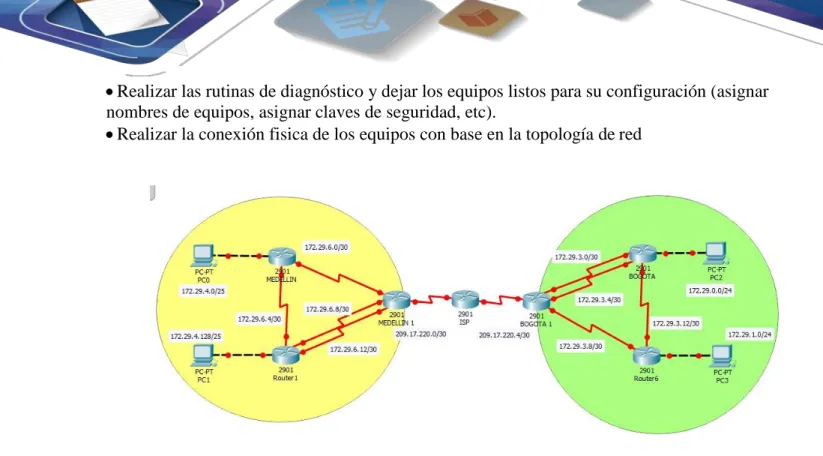
Una empresa posee sucursales distribuidas en las ciudades de Bogotá y Medellín, en donde el estudiante será el administrador de la red, el cual deberá configurar e interconectar entre sí cada uno de los dispositivos que forman parte del escenario, acorde con los lineamientos establecidos para el direccionamiento IP, protocolos de enrutamiento y demás aspectos que forman parte de la topología de red.
Topología de red
Este escenario plantea el uso de RIP como protocolo de enrutamiento, considerando que se tendran rutas por defecto redistribuidas; asimismo, habilitar el encapsulamiento PPP y su autenticación.
Los routers Bogota2 y medellin2 proporcionan el servicio DHCP a su propia red LAN y a los routers 3 de cada ciudad.
Debe configurar PPP en los enlaces hacia el ISP, con autenticación.
Debe habilitar NAT de sobrecarga en los routers Bogota1 y medellin1.
Desarrollo
•Realizar las rutinas de diagnóstico y dejar los equipos listos para su configuración (asignar nombres de equipos, asignar claves de seguridad, etc).
•Realizar la conexión fisica de los equipos con base en la topología de red
Configurar la topología de red, de acuerdo con las siguientes especificaciones.
Parte 1: Configuración del enrutamiento
a. Configurar el enrutamiento en la red usando el protocolo RIP versión 2, declare la red principal, desactive la sumarización automática.
b. Los routers Bogota1 y Medellín deberán añadir a su configuración de enrutamiento una ruta por defecto hacia el ISP y, a su vez, redistribuirla dentro de las publicaciones de RIP.
c. El router ISP deberá tener una ruta estática dirigida hacia cada red interna de Bogotá y Medellín para el caso se sumarizan las subredes de cada uno a /22.
Parte 2: Tabla de Enrutamiento.
Verificar la tabla de enrutamiento en cada uno de los routers para comprobar las redes y sus rutas.
Verificar el balanceo de carga que presentan los routers.
Obsérvese en los routers Bogotá1 y Medellín1 cierta similitud por su ubicación, por tener dos enlaces de conexión hacia otro router y por la ruta por defecto que manejan.
Los routers Medellín2 y Bogotá2 también presentan redes conectadas directamente y recibidas mediante RIP.
Las tablas de los routers restantes deben permitir visualizar rutas redundantes para el caso de la ruta por defecto.
Parte 3: Deshabilitar la propagación del protocolo RIP.
Para no propagar las publicaciones por interfaces que no lo requieran se debe deshabilitar la propagación del protocolo RIP, en la siguiente tabla se indican las interfaces de cada router que no necesitan desactivación.
ROUTER INTERFAZ
Bogota1 SERIAL0/0/1; SERIAL0/1/0; SERIAL0/1/1
Bogota2 SERIAL0/0/0; SERIAL0/0/1 Bogota3 SERIAL0/0/0; SERIAL0/0/1;
SERIAL0/1/0
Medellín1 SERIAL0/0/0; SERIAL0/0/1; SERIAL0/1/1
Medellín2 SERIAL0/0/0; SERIAL0/0/1 Medellín3 SERIAL0/0/0; SERIAL0/0/1;
SERIAL0/1/0
ISP No lo requiere
Parte 4: Verificación del protocolo RIP.
Verificar y documentar las opciones de enrutamiento configuradas en los routers, como el passive interface para la conexión hacia el ISP, la versión de RIP y las interfaces que participan de la publicación entre otros datos.
Verificar y documentar la base de datos de RIP de cada router, donde se informa de manera detallada de todas las rutas hacia cada red.
Parte 5: Configurar encapsulamiento y autenticación PPP.
Según la topología se requiere que el enlace Medellín1 con ISP sea configurado con autenticación PAT.
El enlace Bogotá1 con ISP se debe configurar con autenticación CHAT.
En la topología, si se activa NAT en cada equipo de salida (Bogotá1 y Medellín1), los routers internos de una ciudad no podrán llegar hasta los routers internos en el otro extremo, sólo existirá comunicación hasta los routers Bogotá1, ISP y Medellín1.
Después de verificar lo indicado en el paso anterior proceda a configurar el NAT en el router Medellín1. Compruebe que la traducción de direcciones indique las interfaces de entrada y de salida. Al realizar una prueba de ping, la dirección debe ser traducida automáticamente a la dirección de la interfaz serial 0/1/0 del router Medellín1, cómo diferente puerto.
Proceda a configurar el NAT en el router Bogotá1. Compruebe que la traducción de direcciones indique las interfaces de entrada y de salida. Al realizar una prueba de ping, la dirección debe ser traducida automáticamente a la dirección de la interfaz serial 0/1/0 del router Bogotá1, cómo diferente puerto.
Parte 7: Configuración del servicio DHCP.
Configurar la red Medellín2 y Medellín3 donde el router Medellín 2 debe ser el servidor DHCP para ambas redes Lan.
El router Medellín3 deberá habilitar el paso de los mensajes broadcast hacia la IP del router Medellín2.
Configurar la red Bogotá2 y Bogotá3 donde el router Medellín2 debe ser el servidor DHCP para ambas redes Lan.
Configure el router Bogotá1 para que habilite el paso de los mensajes Broadcast hacia la IP del router Bogotá2.
Desarrollo
Asignar nombres y claves
MEDELLIN Router>en Router#conf t
Enter configuration commands, one per line. End with CNTL/Z. Router(config)#hostname MEDELLIN
MEDELLIN(config)# enable secret class MEDELLIN(config)# line con 0
MEDELLIN (config-line)#login MEDELLIN (config-line)#exit
MEDELLIN (config)#service password-encryption
MEDELLIN (config)#banner motd $Solo Personal Autorizado$ MEDELLIN (config)#
MEDELLIN #
MEDELLIN1 Router>en Router#conf t
Enter configuration commands, one per line. End with CNTL/Z. Router(config)#hostname MEDELLIN1
MEDELLIN1(config)#enable secret class MEDELLIN1(config)#line con 0
MEDELLIN1(config-line)#password cisco MEDELLIN1(config-line)#login
MEDELLIN1(config-line)#line vty 0 4 MEDELLIN1(config-line)#password cisco MEDELLIN1(config-line)#login
MEDELLIN1(config-line)#exit
MEDELLIN1(config)#service password-encryption
MEDELLIN1(config)#banner motd $Solo Personal Autorizado$ MEDELLIN1(config)#exit
MEDELLIN1#
%SYS-5-CONFIG_I: Configured from console by console
MEDELLIN 2 Router>en Router#conf t
Enter configuration commands, one per line. End with CNTL/Z. Router(config)#hostname MEDELLIN2
MEDELLIN2(config)#enable secret class MEDELLIN2(config)#line con 0
MEDELLIN2(config-line)#password cisco MEDELLIN2(config-line)#login
MEDELLIN2(config-line)#line vty 0 4 MEDELLIN2(config-line)#password cisco MEDELLIN2(config-line)#login
MEDELLIN2(config-line)#exit
MEDELLIN2(config)#service password-encryption
MEDELLIN2(config)#banner motd $Solo Personal Autorizado$ MEDELLIN2(config)#exit
MEDELLIN2#
ISP Router>en Router#conf t
Enter configuration commands, one per line. End with CNTL/Z. Router(config)#hostname ISP
ISP(config)#enable secret class ISP(config)#line con 0
ISP(config-line)#password cisco ISP(config-line)#login
ISP(config-line)#line vty 0 4 ISP(config-line)#password cisco ISP(config-line)#login
ISP(config-line)#exit
ISP(config)#service password-encryption
ISP(config)#banner motd $Solo Personal Autorizado$ ISP(config)#exit
ISP#
%SYS-5-CONFIG_I: Configured from console by console
BOGOTA 1 Router>en Router#conf t
Enter configuration commands, one per line. End with CNTL/Z. Router(config)#hostname BOGOTA1
BOGOTA1(config)#enable secret class BOGOTA1(config)#line con 0
BOGOTA1(config-line)#password cisco BOGOTA1(config-line)#login
BOGOTA1(config-line)#line vty 0 4 BOGOTA1(config-line)#password cisco BOGOTA1(config-line)#login
BOGOTA1(config-line)#exit
BOGOTA1(config)#service password-encryption
BOGOTA1(config)#banner motd $Solo Personal Autorizado$ BOGOTA1(config)#exit
BOGOTA1#
%SYS-5-CONFIG_I: Configured from console by console
BOGOTA Router>en Router#conf t
Enter configuration commands, one per line. End with CNTL/Z. Router(config)#hostname BOGOTA
BOGOTA(config)#line con 0
BOGOTA(config-line)#password cisco BOGOTA(config-line)#login
BOGOTA(config-line)#line vty 0 4 BOGOTA(config-line)#password cisco BOGOTA(config-line)#login
BOGOTA(config-line)#exit
BOGOTA(config)#service password-encryption
BOGOTA(config)#banner motd $Solo Personal Autorizado$ BOGOTA(config)#exit
BOGOTA#
%SYS-5-CONFIG_I: Configured from console by console
BOGOTA 2 Router>en Router#conf t
Enter configuration commands, one per line. End with CNTL/Z. Router(config)#hostname BOGOTA2
BOGOTA2(config)#enable secret class BOGOTA2(config)#line con 0
BOGOTA2(config-line)#password cisco BOGOTA2(config-line)#login
BOGOTA2(config-line)#line vty 0 4 BOGOTA2(config-line)#password cisco BOGOTA2(config-line)#login
BOGOTA2(config-line)#exit
BOGOTA2(config)#service password-encryption
BOGOTA2(config)#banner motd $Solo Personal Autorizado$ BOGOTA2(config)#exit
BOGOTA2#
%SYS-5-CONFIG_I: Configured from console by console
CONFIGURACION DEL DIRECCIONAMIENTO ISP
ISP>en Password: ISP#conf t
Enter configuration commands, one per line. End with CNTL/Z. ISP(config)#int s0/3/0
ISP(config-if)#ip address 209.17.220.1 255.255.255.252 ISP(config-if)#clock rate 4000000
ISP(config-if)#no shutdown
ISP(config-if)#int s0/3/1
ISP(config-if)#ip address 209.17.220.5 255.255.255.252 ISP(config-if)#clock rate 4000000
ISP(config-if)#no shutdown
%LINK-5-CHANGED: Interface Serial0/3/1, changed state to down ISP(config-if)#
MEDELLIN 1 MEDELLIN1>en Password:
MEDELLIN1#conf t
Enter configuration commands, one per line. End with CNTL/Z. MEDELLIN1(config)#int s0/3/0
MEDELLIN1(config-if)#ip address 209.17.220.2 255.255.255.252 MEDELLIN1(config-if)#no shutdown
MEDELLIN1(config-if)#
%LINK-5-CHANGED: Interface Serial0/3/0, changed state to up MEDELLIN1(config-if)#
%LINEPROTO-5-UPDOWN: Line protocol on Interface Serial0/3/0, changed state to up
MEDELLIN1(config-if)#int s0/2/0
MEDELLIN1(config-if)#ip address 172.29.6.1 255.255.255.252 MEDELLIN1(config-if)#clock rate 4000000
MEDELLIN1(config-if)#no shutdown
%LINK-5-CHANGED: Interface Serial0/2/0, changed state to down
MEDELLIN1(config-if)#int s0/3/1
MEDELLIN1(config-if)#ip address 172.29.6.9 255.255.255.252 MEDELLIN1(config-if)#clock rate 4000000
MEDELLIN1(config-if)#no shutdown
%LINK-5-CHANGED: Interface Serial0/3/1, changed state to down
MEDELLIN1(config-if)#int s0/2/1
MEDELLIN1(config-if)#ip address 172.29.6.13 255.255.255.252 MEDELLIN1(config-if)#clock rate 4000000
MEDELLIN1(config-if)#no shutdown
%LINK-5-CHANGED: Interface Serial0/2/1, changed state to down MEDELLIN1(config-if)#
MEDELLIN#conf t
Enter configuration commands, one per line. End with CNTL/Z. MEDELLIN(config)#int s0/2/0
MEDELLIN(config-if)#ip address 172.29.6.2 255.255.255.252 MEDELLIN(config-if)#no shutdown
MEDELLIN(config-if)#
%LINK-5-CHANGED: Interface Serial0/2/0, changed state to up
MEDELLIN(config-if)#int s0/3/0
MEDELLIN(config-if)#ip address 172.29.6.5 255.255.255.252 MEDELLIN(config-if)#no shutdown
%LINK-5-CHANGED: Interface Serial0/3/0, changed state to down MEDELLIN(config-if)#
MEDELLIN(config-if)#int g0/0
MEDELLIN(config-if)#ip address 172.29.4.1 255.255.255.128 MEDELLIN(config-if)#no shutdown
MEDELLIN(config-if)#
%LINK-5-CHANGED: Interface GigabitEthernet0/0, changed state to up
%LINEPROTO-5-UPDOWN: Line protocol on Interface GigabitEthernet0/0, changed state to up
MEDELLIN 2 Password:
MEDELLIN2>en Password:
MEDELLIN2#conf t
Enter configuration commands, one per line. End with CNTL/Z. MEDELLIN2(config)#int s0/3/1
MEDELLIN2(config-if)#ip address 172.29.6.10 255.255.255.252 MEDELLIN2(config-if)#no shutdown
MEDELLIN2(config-if)#
%LINK-5-CHANGED: Interface Serial0/3/1, changed state to up MEDELLIN2(config-if)#
%LINEPROTO-5-UPDOWN: Line protocol on Interface Serial0/3/1, changed state to up
MEDELLIN2(config-if)#int s0/2/1
MEDELLIN2(config-if)#ip address 172.29.6.14 255.255.255.252 MEDELLIN2(config-if)#no shutdown
MEDELLIN2(config-if)#
%LINK-5-CHANGED: Interface Serial0/2/1, changed state to up MEDELLIN2(config-if)#
%LINEPROTO-5-UPDOWN: Line protocol on Interface Serial0/2/1, changed state to up
MEDELLIN2(config-if)#int s0/3/0
MEDELLIN2(config-if)#no shutdown MEDELLIN2(config-if)#
%LINK-5-CHANGED: Interface Serial0/3/0, changed state to up MEDELLIN2(config-if)#
%LINEPROTO-5-UPDOWN: Line protocol on Interface Serial0/3/0, changed state to up
MEDELLIN2(config-if)#int g0/0
MEDELLIN2(config-if)#ip address 172.29.4.129 255.255.255.128 MEDELLIN2(config-if)#no shutdown
MEDELLIN2(config-if)#
%LINK-5-CHANGED: Interface GigabitEthernet0/0, changed state to up
%LINEPROTO-5-UPDOWN: Line protocol on Interface GigabitEthernet0/0, changed state to up MEDELLIN2(config-if)# BOGOTA 1 Password: BOGOTA1>en Password: BOGOTA1#conf t
Enter configuration commands, one per line. End with CNTL/Z. BOGOTA1(config)#int s0/3/1
BOGOTA1(config-if)#ip address 209.17.220.6 255.255.255.252 BOGOTA1(config-if)#no shutdown
BOGOTA1(config-if)#
%LINK-5-CHANGED: Interface Serial0/3/1, changed state to up BOGOTA1(config-if)#
%LINEPROTO-5-UPDOWN: Line protocol on Interface Serial0/3/1, changed state to up
BOGOTA1(config-if)#int s0/2/1
BOGOTA1(config-if)#ip address 172.29.3.9 255.255.255.252 BOGOTA1(config-if)#clock rate 4000000
BOGOTA1(config-if)#no shutdown
%LINK-5-CHANGED: Interface Serial0/2/1, changed state to down
BOGOTA1(config-if)#int s0/3/0
BOGOTA1(config-if)#ip address 172.29.3.1 255.255.255.252 BOGOTA1(config-if)#clock rate 4000000
BOGOTA1(config-if)#no shutdown
%LINK-5-CHANGED: Interface Serial0/3/0, changed state to down BOGOTA1(config-if)#
BOGOTA1(config-if)#int s0/2/0
BOGOTA1(config-if)#ip address 172.29.3.5 255.255.255.252 BOGOTA1(config-if)#clock rate 4000000
BOGOTA1(config-if)#no shutdown
BOGOTA1(config-if)#
BOGOTA 2 Password: BOGOTA2>en Password:
BOGOTA2#conf t
Enter configuration commands, one per line. End with CNTL/Z. BOGOTA2(config)#int s0/2/1
BOGOTA2(config-if)#ip address 172.29.3.10 255.255.255.252 BOGOTA2(config-if)#no shutdown
BOGOTA2(config-if)#
%LINK-5-CHANGED: Interface Serial0/2/1, changed state to up
BOGOTA2#conf t
Enter configuration commands, one per line. End with CNTL/Z. BOGOTA2(config)#int s0/3/1
BOGOTA2(config-if)#ip address 172.29.3.13 255.255.255.252 BOGOTA2(config-if)#no shutdown
%LINK-5-CHANGED: Interface Serial0/3/1, changed state to down BOGOTA2(config-if)#int g0/0
BOGOTA2(config-if)#ip address 172.29.1.1 255.255.255.0 BOGOTA2(config-if)#no shutdown
BOGOTA2(config-if)#
%LINK-5-CHANGED: Interface GigabitEthernet0/0, changed state to up
%LINEPROTO-5-UPDOWN: Line protocol on Interface GigabitEthernet0/0, changed state to up BOGOTA2(config-if)#
BOGOTA Password: BOGOTA>en Password:
BOGOTA#conf t
Enter configuration commands, one per line. End with CNTL/Z. BOGOTA(config)#int s0/2/0
BOGOTA(config-if)#ip address 172.29.3.2 255.255.255.252 BOGOTA(config-if)#no shutdown
BOGOTA(config-if)#
%LINK-5-CHANGED: Interface Serial0/2/0, changed state to up
BOGOTA(config)#int s0/3/0
BOGOTA(config-if)#
%LINK-5-CHANGED: Interface Serial0/3/0, changed state to up BOGOTA(config-if)#
%LINEPROTO-5-UPDOWN: Line protocol on Interface Serial0/3/0, changed state to up
BOGOTA(config)#int s0/3/1
BOGOTA(config-if)#ip address 172.29.3.14 255.255.255.252 BOGOTA(config-if)#no shutdown
BOGOTA(config-if)#
%LINK-5-CHANGED: Interface Serial0/3/1, changed state to up BOGOTA(config-if)#
%LINEPROTO-5-UPDOWN: Line protocol on Interface Serial0/3/1, changed state to up
BOGOTA(config-if)#int g0/0
BOGOTA(config-if)#ip address 172.29.0.1 255.255.255.0 BOGOTA(config-if)#no shutdown
BOGOTA(config-if)#
%LINK-5-CHANGED: Interface GigabitEthernet0/0, changed state to up
%LINEPROTO-5-UPDOWN: Line protocol on Interface GigabitEthernet0/0, changed state to up BOGOTA#
%SYS-5-CONFIG_I: Configured from console by console
• Configuracion del enrutamiento en la red usando el protocolo RIP versión 2, declare la red principal, desactive la sumarización automática
MEDELLIN 1 Password:
MEDELLIN1>en Password:
MEDELLIN1#conf t
Enter configuration commands, one per line. End with CNTL/Z. MEDELLIN1(config)#router rip
MEDELLIN1(config-router)#version 2
MEDELLIN1(config-router)#no auto-summary
MEDELLIN1(config-router)#do show ip route connected C 172.29.6.0/30 is directly connected, Serial0/2/0
C 172.29.6.8/30 is directly connected, Serial0/3/1 C 172.29.6.12/30 is directly connected, Serial0/2/1 C 209.17.220.0/30 is directly connected, Serial0/3/0
MEDELLIN
MEDELLIN>en Password:
MEDELLIN#conf t
Enter configuration commands, one per line. End with CNTL/Z. MEDELLIN(config)#router rip
MEDELLIN(config-router)#version 2
MEDELLIN(config-router)#no auto-summary
MEDELLIN(config-router)#do show ip route connected C 172.29.4.0/25 is directly connected, GigabitEthernet0/0 C 172.29.6.0/30 is directly connected, Serial0/2/0
C 172.29.6.4/30 is directly connected, Serial0/3/0
MEDELLIN(config-router)#network 172.29.4.0 MEDELLIN(config-router)#network 172.29.6.0 MEDELLIN(config-router)#network 172.29.6.4 MEDELLIN(config-router)#passive-interface g0/0 MEDELLIN(config-router)#
MEDELLIN 2 MEDELLIN2#conf t
Enter configuration commands, one per line. End with CNTL/Z. MEDELLIN2(config)#router rip
MEDELLIN2(config-router)#version 2
MEDELLIN2(config-router)#no auto-summary
MEDELLIN2(config-router)#do show ip route connected C 172.29.4.128/25 is directly connected, GigabitEthernet0/0 C 172.29.6.4/30 is directly connected, Serial0/3/0
C 172.29.6.8/30 is directly connected, Serial0/3/1 C 172.29.6.12/30 is directly connected, Serial0/2/1
MEDELLIN2(config-router)#network 172.29.4.128 MEDELLIN2(config-router)#network 172.29.6.4 MEDELLIN2(config-router)#network 172.29.6.8 MEDELLIN2(config-router)#network 172.29.6.12 MEDELLIN2(config-router)#passive-interface g0/0 MEDELLIN2(config-router)#
BOGOTA 1 BOGOTA1#conf t
Enter configuration commands, one per line. End with CNTL/Z. BOGOTA1(config)#router rip
BOGOTA1(config-router)#no auto-summary
BOGOTA1(config-router)#do show ip route connected C 172.29.3.0/30 is directly connected, Serial0/3/0 C 172.29.3.4/30 is directly connected, Serial0/2/0 C 172.29.3.8/30 is directly connected, Serial0/2/1 C 209.17.220.4/30 is directly connected, Serial0/3/1
BOGOTA1(config-router)#network 172.29.3.0 BOGOTA1(config-router)#network 172.29.3.4 BOGOTA1(config-router)#network 172.29.3.8 BOGOTA1(config-router)#passive-interface s0/3/1 BOGOTA1(config-router)# BOGOTA 2 BOGOTA2#conf t
Enter configuration commands, one per line. End with CNTL/Z. BOGOTA2(config)#router rip
BOGOTA2(config-router)#version 2
BOGOTA2(config-router)#no auto-summary
BOGOTA2(config-router)#do show ip route connected C 172.29.1.0/24 is directly connected, GigabitEthernet0/0 C 172.29.3.8/30 is directly connected, Serial0/2/1
C 172.29.3.12/30 is directly connected, Serial0/3/1
BOGOTA2(config-router)#network 172.29.1.0 BOGOTA2(config-router)#network 172.29.3.8 BOGOTA2(config-router)#network 172.29.3.12 BOGOTA2(config-router)#passive-interface g0/0 BOGOTA2(config-router)# BOGOTA BOGOTA#conf t
Enter configuration commands, one per line. End with CNTL/Z. BOGOTA(config)#router rip
BOGOTA(config-router)#version 2
BOGOTA(config-router)#no auto-summary
BOGOTA(config-router)#do show ip route connected C 172.29.0.0/24 is directly connected, GigabitEthernet0/0 C 172.29.3.0/30 is directly connected, Serial0/2/0
C 172.29.3.4/30 is directly connected, Serial0/3/0 C 172.29.3.12/30 is directly connected, Serial0/3/1
BOGOTA(config-router)#network 172.29.3.12 BOGOTA(config-router)#passive-interface g0/0 BOGOTA(config-router)#
VERIFICACION DE CONEXIONES Y TABLA DE ENRUTAMIENTO BOGOTA 1
BOGOTA1#show ip route
Codes: L - local, C - connected, S - static, R - RIP, M - mobile, B - BGP D - EIGRP, EX - EIGRP external, O - OSPF, IA - OSPF inter area N1 - OSPF NSSA external type 1, N2 - OSPF NSSA external type 2 E1 - OSPF external type 1, E2 - OSPF external type 2, E - EGP i - IS-IS, L1 - IS-IS level-1, L2 - IS-IS level-2, ia - IS-IS inter area *- candidate default, U - per-user static route, o - ODR
P - periodic downloaded static route
Gateway of last resort is not set
172.29.0.0/16 is variably subnetted, 9 subnets, 3 masks
R 172.29.0.0/24 [120/2] via 172.29.3.10, 00:00:19, Serial0/2/1 R 172.29.1.0/24 [120/1] via 172.29.3.10, 00:00:19, Serial0/2/1 C 172.29.3.0/30 is directly connected, Serial0/3/0
L 172.29.3.1/32 is directly connected, Serial0/3/0 C 172.29.3.4/30 is directly connected, Serial0/2/0 L 172.29.3.5/32 is directly connected, Serial0/2/0 C 172.29.3.8/30 is directly connected, Serial0/2/1 L 172.29.3.9/32 is directly connected, Serial0/2/1
R 172.29.3.12/30 [120/1] via 172.29.3.10, 00:00:19, Serial0/2/1 209.17.220.0/24 is variably subnetted, 2 subnets, 2 masks C 209.17.220.4/30 is directly connected, Serial0/3/1 L 209.17.220.6/32 is directly connected, Serial0/3/1
MEDELLIN 1
MEDELLIN1#show ip route
Codes: L - local, C - connected, S - static, R - RIP, M - mobile, B - BGP D - EIGRP, EX - EIGRP external, O - OSPF, IA - OSPF inter area N1 - OSPF NSSA external type 1, N2 - OSPF NSSA external type 2 E1 - OSPF external type 1, E2 - OSPF external type 2, E - EGP i - IS-IS, L1 - IS-IS level-1, L2 - IS-IS level-2, ia - IS-IS inter area *- candidate default, U - per-user static route, o - ODR
P - periodic downloaded static route
Gateway of last resort is not set
R 172.29.4.0/25 [120/1] via 172.29.6.2, 00:00:20, Serial0/2/0 R 172.29.4.128/25 [120/1] via 172.29.6.14, 00:00:14, Serial0/2/1 [120/1] via 172.29.6.10, 00:00:14, Serial0/3/1
C 172.29.6.0/30 is directly connected, Serial0/2/0 L 172.29.6.1/32 is directly connected, Serial0/2/0
R 172.29.6.4/30 [120/1] via 172.29.6.2, 00:00:20, Serial0/2/0 [120/1] via 172.29.6.14, 00:00:14, Serial0/2/1
[120/1] via 172.29.6.10, 00:00:14, Serial0/3/1 C 172.29.6.8/30 is directly connected, Serial0/3/1 L 172.29.6.9/32 is directly connected, Serial0/3/1 C 172.29.6.12/30 is directly connected, Serial0/2/1 L 172.29.6.13/32 is directly connected, Serial0/2/1
209.17.220.0 /24 is variably subnetted, 2 subnets, 2 masks
C 209.17.220.0/30 is directly connected, Serial0/3/0 L 209.17.220.2/32 is directly connected, Serial0/3/0
• Los routers Bogota1 y Medellín deberán añadir a su configuración de enrutamiento una ruta por defecto hacia el ISP y, a su vez, redistribuirla dentro de las publicaciones de RIP
BOGOTA 1 BOGOTA1#conf t
Enter configuration commands, one per line. End with CNTL/Z. BOGOTA1(config)#ip route 0.0.0.0 0.0.0.0 209.17.220.5 BOGOTA1(config)#router rip
BOGOTA1(config-router)#default-information originate BOGOTA1(config-router)#
MEDELLIN 1 MEDELLIN1#en MEDELLIN1#conf t
Enter configuration commands, one per line. End with CNTL/Z. MEDELLIN1(config)#ip route 0.0.0.0 0.0.0.0 209.17.220.1 MEDELLIN1(config)#router rip
MEDELLIN1(config-router)#default-information originate MEDELLIN1(config-router)#
• El router ISP deberá tener una ruta estática dirigida hacia cada red interna de Bogotá y Medellín para el caso se sumarizan las subredes de cada uno a /22.
Enter configuration commands, one per line. End with CNTL/Z. ISP(config)#ip route 172.29.4.0 255.255.252.0 209.17.220.2 ISP(config)#ip route 172.29.0.0 255.255.252.0 209.17.220.6
ISP(config)#
PING DE BOGOTA A BOGOTA 1 BOGOTA#ping 172.29.3.1
Type escape sequence to abort.
Sending 5, 100-byte ICMP Echos to 172.29.3.1, timeout is 2 seconds: !!!!!
Success rate is 100 percent (5/5), round-trip min/avg/max = 1/4/16 ms BOGOTA#
• Configurar encapsulamiento y autenticación PPP.
CREACION DE USUARIOS DESDE DIFERENTES PUNTOS
De ISP a MEDELLIN 1
ISP#conf t
Enter configuration commands, one per line. End with CNTL/Z. ISP(config)#user MEDELLIN1 password cisco
ISP(config)#int s0/3/0
ISP(config-if)#encapsulation ppp ISP(config-if)#
%LINEPROTO-5-UPDOWN: Line protocol on Interface Serial0/3/0, changed state to down ISP(config-if)#ppp authentication pap
ISP(config-if)#ppp pap sent-username ISP password cisco ISP(config-if)#
DE MEDELLIN 1 a ISP
MEDELLIN1#conf t
Enter configuration commands, one per line. End with CNTL/Z. MEDELLIN1(config)#username ISP password cisco
MEDELLIN1(config)#int s0/3/0
MEDELLIN1(config-if)#encapsulation ppp MEDELLIN1(config-if)#ppp authentication pap
MEDELLIN1(config-if)#ppp pap sent-username MEDELLIN1 password cisco MEDELLIN1(config-if)#
%LINEPROTO-5-UPDOWN: Line protocol on Interface Serial0/3/0, changed state to up
DE ISP a BOGOTA1
ISP(config-if)#exit
ISP(config)#
ISP(config)#int s0/3/1
ISP(config-if)#encapsulation ppp ISP(config-if)#
%LINEPROTO-5-UPDOWN: Line protocol on Interface Serial0/3/1, changed state to down ISP(config-if)#ppp authentication chap
ISP(config-if)#
DE BOGOTA1 a ISP BOGOTA1#conf t
Enter configuration commands, one per line. End with CNTL/Z. BOGOTA1(config)#username ISP password cisco
BOGOTA1(config)#
BOGOTA1(config)#int s0/3/1
BOGOTA1(config-if)#encapsulation ppp BOGOTA1(config-if)#
%LINEPROTO-5-UPDOWN: Line protocol on Interface Serial0/3/1, changed state to up
BOGOTA1(config-if)#ppp authentication chap BOGOTA1(config-if)#
%LINEPROTO-5-UPDOWN: Line protocol on Interface Serial0/3/1, changed state to down
%LINEPROTO-5-UPDOWN: Line protocol on Interface Serial0/3/1, changed state to up
ISP#ping 209.17.220.6
Type escape sequence to abort.
Sending 5, 100-byte ICMP Echos to 209.17.220.6, timeout is 2 seconds: !!!!!
Success rate is 100 percent (5/5), round-trip min/avg/max = 1/2/9 ms ISP#
• Configuracion del servicio DHCP
MEDELLIN
MEDELLIN>en Password:
MEDELLIN#conf t
MEDELLIN(config)#ip dhcp pool MED
MEDELLIN(dhcp-config)#network 172.29.4.0 255.255.255.128 MEDELLIN(dhcp-config)#default-router 172.29.4.1
MEDELLIN(dhcp-config)#dns-server 8.8.8.8 MEDELLIN(dhcp-config)#
MEDELLIN#conf t
Enter configuration commands, one per line. End with CNTL/Z. MEDELLIN(config)#ip dhcp pool MED2
MEDELLIN(dhcp-config)#network 172.29.4.128 255.255.255.128 MEDELLIN(dhcp-config)#default-router 172.29.4.129
MEDELLIN(dhcp-config)#dns-server 8.8.8.8
MEDELLIN2>en Password:
MEDELLIN2#conf t
Enter configuration commands, one per line. End with CNTL/Z. MEDELLIN2(config)#int g0/0
MEDELLIN2(config-if)#ip helper-address 172.29.6.5 MEDELLIN2(config-if)#
BOGOTA2>en Password:
BOGOTA2#conf t
Enter configuration commands, one per line. End with CNTL/Z. BOGOTA2(config)#ip dhcp excluded-address 172.29.1.1 172.29.1.5 BOGOTA2(config)#ip dhcp excluded-address 172.29.0.1 172.29.0.5 BOGOTA2(config)#ip dhcp pool BOG2
BOGOTA2(dhcp-config)#network 172.29.1.0 255.255.255.0 BOGOTA2(dhcp-config)#default-router 172.29.1.1
BOGOTA2(dhcp-config)#dns-server 8.8.8.8 BOGOTA2(dhcp-config)#ip dhcp pool BOG
BOGOTA2(dhcp-config)#network 172.29.0.0 255.255.255.0 BOGOTA2(dhcp-config)#default-router 172.29.0.1
PING DE PC2 A PC3
DE PC 0 A PC2
Escenario 2
Escenario: Una empresa de Tecnología posee tres sucursales distribuidas en las ciudades de Miami, Bogotá y Buenos Aires, en donde el estudiante será el administrador de la red, el cual deberá configurar e interconectar entre sí cada uno de los dispositivos que forman parte del escenario, acorde con los lineamientos establecidos para el direccionamiento IP, protocolos de enrutamiento y demás aspectos que forman parte de la topología de red.
1. Configurar el direccionamiento IP acorde con la topología de red para cada uno de los dispositivos que forman parte del escenario
2. Configurar el protocolo de enrutamiento OSPFv2 bajo los siguientes criterios:
OSPFv2 area 0
Configuration Item or Task Specification
Router ID R1 1.1.1.1
Router ID R2 5.5.5.5
Router ID R3 8.8.8.8
Configurar todas las interfaces LAN como pasivas
• Visualizar tablas de enrutamiento y routers conectados por OSPFv2
• Visualizar lista resumida de interfaces por OSPF en donde se ilustre el costo de cada interface
• Visualizar el OSPF Process ID, Router ID, Address summarizations, Routing Networks, and passive interfaces configuradas en cada router.
Configurar VLANs, Puertos troncales, puertos de acceso, encapsulamiento, Inter-VLAN Routing y Seguridad en los Switches acorde a la topología de red establecida.
En el Switch 3 deshabilitar DNS lookup
Asignar direcciones IP a los Switches acorde a los lineamientos.
Desactivar todas las interfaces que no sean utilizadas en el esquema de red.
Implement DHCP and NAT for IPv4
Configurar R1 como servidor DHCP para las VLANs 30 y 40.
Reservar las primeras 30 direcciones IP de las VLAN 30 y 40 para configuraciones estáticas.
Configurar DHCP pool para VLAN 30
Name: ADMINISTRACION DNS-Server: 10.10.10.11 Domain-Name: ccna-unad.com Establecer default gateway.
Configurar DHCP pool para VLAN 40
Name: MERCADEO DNS-Server: 10.10.10.11 Domain-Name: ccna-unad.com Establecer default gateway. Configurar NAT en R2 para permitir que los host puedan salir a internet
Configurar al menos dos listas de acceso de tipo estándar a su criterio en para restringir o permitir tráfico desde R1 o R3 hacia R2.
Configurar al menos dos listas de acceso de tipo extendido o nombradas a su criterio en para restringir o permitir tráfico desde R1 o R3 hacia R2.
Verificar procesos de comunicación y redireccionamiento de tráfico en los routers mediante el uso de Ping y Traceroute.
DESARROLLO
Configuracion del Router 1:
Router>en Router#conf t
Enter configuration commands, one per line. End with CNTL/Z. Router(config)#hostname Bogota
Bogota(config)#no ip domain-lookup Bogota(config)#enable secret class Bogota(config)#line con 0
Bogota(config-line)#password cisco Bogota(config-line)#login
Bogota(config-line)#line vty 0 4 Bogota(config-line)#password cisco Bogota(config-line)#login
Bogota(config-line)#exit
Bogota(config)#service password-encryption
Bogota(config)#banner motd $Solo Personal Autorizado$ Bogota(config)#
Configuracion del router 2:
Router>en Router#conf t
Miami(config)#no ip domain-lookup Miami(config)#enable secret class Miami(config)#line con 0
Miami(config-line)#password cisco Miami(config-line)#login
Miami(config-line)#exit
Miami(config)#service password-encryption
Miami(config)#banner motd $Solo Personal Autorizado$ Miami(config)#
Miami#
%SYS-5-CONFIG_I: Configured from console by console
Configuracion del router 3:
Router>en Router#conf t
Enter configuration commands, one per line. End with CNTL/Z. Router(config)#hostname Buenos_Aires
Buenos_Aires(config)#no ip domain-lookup Buenos_Aires(config)#enable secret class Buenos_Aires(config)#line con 0
Buenos_Aires(config-line)#password cisco Buenos_Aires(config-line)#login
Buenos_Aires(config-line)#line vty 0 4 Buenos_Aires(config-line)#password cisco Buenos_Aires(config-line)#login
Buenos_Aires(config-line)#exit
Buenos_Aires(config)#service password-encryption
Buenos_Aires(config)#banner motd $Solo Personal Autorizado$ Buenos_Aires(config)#
Configuracion del S1:
Switch> Switch>enable
Switch#configure terminal
Enter configuration commands, one per line. End with CNTL/Z. Switch(config)#hostname S1
S1(config)#no ip domain-lookup S1(config)#enable secret class S1(config)#line con 0
S1(config-line)#password cisco S1(config-line)#login
S1(config-line)#exit
S1(config)#service password-encryption
S1(config)#
Configuracion de S2:
Switch>enable
Switch#configure terminal
Enter configuration commands, one per line. End with CNTL/Z. Switch(config)#hostname S2
S2(config)#no ip domain-lookup S2(config)#enable secret class S2(config)#line con 0
S2(config-line)#password cisco S2(config-line)#login
S2(config-line)#exit
S2(config)#service password-encryption
S2(config)#banner motd $Solo Personal Autorizado$ S2(config)#
VLAN DIRECCIONAMIENTO NOMBRE
30 192.168.30.0/24 Administracion
40 192.168.40.0/24 Mercadeo
200 192.168.200.0/24 Mantenimiento
VLANS S1
S1#conf t
Enter configuration commands, one per line. End with CNTL/Z. S1(config)#vlan 30
S1(config-vlan)#name Administracion S1(config-vlan)#vlan 40
S1(config-vlan)#name Mercadeo S1(config-vlan)#vlan 200
S1(config-vlan)#name Mantenimiento S1(config-vlan)#
F 0/3
S1(config)#int f0/3
S1(config-if)#switchport mode trunk S1(config-if)#
%LINEPROTO-5-UPDOWN: Line protocol on Interface FastEthernet0/3, changed state to down %LINEPROTO-5-UPDOWN: Line protocol on Interface FastEthernet0/3, changed state to up S1(config-if)#switchport trunk native vlan 1
F 0/24
S1(config)#int f0/24
S1(config-if)#switchport mode trunk S1(config-if)#
S1(config-if)#switchport mode trunk
S1(config-if)#switchport trunk native vlan 1 S1(config-if)#
Puertos de modo access
S1(config-if)#int range fa0/1-2, fa0/4-24, g0/1-2 S1(config-if-range)#switchport mode acess S1(config-if-range)#switchport mode access S1(config-if-range)#
Puerto F0/1
S1(config)#int f0/1
S1(config-if)#switchport mode access S1(config-if)#switchport access vlan 30 S1(config-if)#int range fa0/2, fa0/4-24, g0/1-2 S1(config-if-range)#shutdown
%LINK-5-CHANGED: Interface FastEthernet0/24, changed state to administratively down %LINK-5-CHANGED: Interface GigabitEthernet0/1, changed state to administratively down %LINK-5-CHANGED: Interface GigabitEthernet0/2, changed state to administratively down S1(config-if-range)#
%LINK-5-CHANGED: Interface FastEthernet0/2, changed state to administratively down
%LINEPROTO-5-UPDOWN: Line protocol on Interface FastEthernet0/2, changed state to down
Vlan mantenimiento
S1(config)#int vlan 200 S1(config-if)#
%LINK-5-CHANGED: Interface Vlan200, changed state to up
%LINEPROTO-5-UPDOWN: Line protocol on Interface Vlan200, changed state to up S1(config-if)#ip address 192.168.99.2 255.255.255.0
S1(config-if)#
Vlans S2
User Access Verification Password:
S2>enable Password: S2#conf t
Enter configuration commands, one per line. End with CNTL/Z. S2(config)#vlan 30
S2(config-vlan)#name Administracion S2(config-vlan)#vlan 40
S2(config-vlan)#name Mercadeo S2(config-vlan)#vlan 200
S2(config-vlan)#name Mantenimiento S2(config-vlan)#
Vlan Mantenimiento
S2(config)#int vlan 200 S2(config-if)#
%LINK-5-CHANGED: Interface Vlan200, changed state to up S2(config-if)#ip address 192.168.99.3 255.255.255.0
S2(config-if)#
S2(config)#int f0/3
S2(config-if)#switchport mode trunk
S2(config-if)#switchport trunk native vlan 1 S2(config-if)#
Puertos de modo access
S2(config)#int f0/3
S2(config-if)#int range fa0/1-2, fa0/4-24, g0/1-2 S2(config-if-range)#switchport mode access S2(config-if-range)#
Puerto F0/1
S2(config)#int f0/1
S2(config-if)#switchport mode access S2(config-if)#switchport access vlan 40 S2(config-if)#int range fa0/2, fa0/4-24, g0/1-2 S2(config-if-range)#shutdown
%LINK-5-CHANGED: Interface FastEthernet0/4, changed state to administratively down %LINK-5-CHANGED: Interface FastEthernet0/5, changed state to administratively down %LINK-5-CHANGED: Interface FastEthernet0/6, changed state to administratively down %LINK-5-CHANGED: Interface FastEthernet0/7, changed state to administratively down %LINK-5-CHANGED: Interface FastEthernet0/8, changed state to administratively down %LINK-5-CHANGED: Interface FastEthernet0/9, changed state to administratively down %LINK-5-CHANGED: Interface FastEthernet0/10, changed state to administratively down %LINK-5-CHANGED: Interface FastEthernet0/11, changed state to administratively down %LINK-5-CHANGED: Interface FastEthernet0/12, changed state to administratively down %LINK-5-CHANGED: Interface FastEthernet0/13, changed state to administratively down %LINK-5-CHANGED: Interface FastEthernet0/14, changed state to administratively down %LINK-5-CHANGED: Interface FastEthernet0/15, changed state to administratively down %LINK-5-CHANGED: Interface FastEthernet0/16, changed state to administratively down %LINK-5-CHANGED: Interface FastEthernet0/17, changed state to administratively down %LINK-5-CHANGED: Interface FastEthernet0/18, changed state to administratively down %LINK-5-CHANGED: Interface FastEthernet0/19, changed state to administratively down %LINK-5-CHANGED: Interface FastEthernet0/20, changed state to administratively down %LINK-5-CHANGED: Interface FastEthernet0/21, changed state to administratively down %LINK-5-CHANGED: Interface FastEthernet0/22, changed state to administratively down %LINK-5-CHANGED: Interface FastEthernet0/23, changed state to administratively down %LINK-5-CHANGED: Interface FastEthernet0/24, changed state to administratively down %LINK-5-CHANGED: Interface GigabitEthernet0/1, changed state to administratively down %LINK-5-CHANGED: Interface GigabitEthernet0/2, changed state to administratively down S2(config-if-range)#
%LINK-5-CHANGED: Interface FastEthernet0/2, changed state to administratively down
Configurar Bogota
Bogota(config)#int s0/0/0
Bogota(config-if)#description connetion to Miami
Bogota(config-if)#ip address 172.31.21.1 255.255.255.252 Bogota(config-if)#clock rate 128000
Bogota(config-if)#no shutdown
%LINK-5-CHANGED: Interface Serial0/0/0, changed state to down Bogota(config-if)#
Bogota(config)#ip route 0.0.0.0 0.0.0.0 s0/0/0 Bogota(config)#
Configurar Miami
Solo Personal Autorizado
User Access Verification
Password: Miami>enable Password: Miami#conf t
Enter configuration commands, one per line. End with CNTL/Z. Miami(config)#int g
Miami(config)#int gigabitEthernet % Incomplete command.
Miami(config)#int gigabitEthernet 0/0 Miami(config-if)#ip ad
Miami(config-if)#ip address 209.165.200.225 255.255.255.248 Miami(config-if)#no sh
Miami(config-if)#no shutdown Miami(config-if)#
Miami(config-if)#int gigabitEthernet 0/1 Miami(config-if)#exit
Miami(config)#intint gigabitEthernet 0/1 Miami(config)#int gigabitEthernet 0/1
Miami(config-iip address 10.10.10.10 255.255.255.0 Miami(config-if)#no shutdown
Miami(config-if)#
Miami(config-if)#int s0/0/0
Miami(config-if)#ip address 172.31.23.1 255.255.255.252 Miami(config-if)#clock rate 128000
Miami(config-if)#no shutdown
%LINK-5-CHANGED: Interface Serial0/0/0, changed state to down Miami(config-if)#
Configurar Buenos Aires
Solo Personal Autorizado User Access Verification Password:
Buenos_Aires>enable Password:
Buenos_Aires#conf t
Enter configuration commands, one per line. End with CNTL/Z. Buenos_Aires(config)#int s0/0/1
Buenos_Aires(config-if)#description to Miami
Buenos_Aires(config-if)#ip address 172.31.23.2 255.255.255.252 Buenos_Aires(config-if)#no shutdown
Buenos_Aires(config-if)#
%LINK-5-CHANGED: Interface Serial0/0/1, changed state to up
%LINEPROTO-5-UPDOWN: Line protocol on Interface Serial0/0/1, changed state to up Buenos_Aires#
%SYS-5-CONFIG_I: Configured from console by console
Loopback 4
Buenos_Aires(config-if)#int lo4
Buenos_Aires(config-if)#
%LINK-5-CHANGED: Interface Loopback4, changed state to up
%LINEPROTO-5-UPDOWN: Line protocol on Interface Loopback4, changed state to up
Buenos_Aires(config-if)#ip address 192.168.4.1 255.255.255.0 Buenos_Aires(config-if)#
Loopback 5
Buenos_Aires(config-if)#int lo5
Buenos_Aires(config-if)#
%LINK-5-CHANGED: Interface Loopback5, changed state to up
%LINEPROTO-5-UPDOWN: Line protocol on Interface Loopback5, changed state to up
Buenos_Aires(config-if)#no shutdown Buenos_Aires(config-if)#
Loopback 6
Buenos_Aires(config-if)#int lo6
Buenos_Aires(config-if)#
%LINK-5-CHANGED: Interface Loopback6, changed state to up
%LINEPROTO-5-UPDOWN: Line protocol on Interface Loopback6, changed state to up
Buenos_Aires(config-if)#ip address 192.168.6.1 255.255.255.0 Buenos_Aires(config-if)#
Configurar el server-pt
CONCLUSIONES
REFERENCIAS BIBLIOGRAFICAS
Cisco Ccna – Configuraicón Dhcp . (S.F.). Recuperado de:
Http://Blog.Capacityacademy.Com/2014/01/09/Cisco-Ccna-Como- Configurar-Dhcp-En-Cisco- Router/.
Configuración Troncal 802.1q. (S.F.). recuperado de: