SOLUCIÓN DE DOS CASOS DE ESTUDIO, BAJO EL USO DE TECNOLOGÍA CISCO
HENRY ALBERTO AMÉZQUITA CORREA FRANK SINISTERRA NEIVA
UNIVERSIDAD NACIONAL ABIERTA Y A DISTANCIA “UNAD” ESCUELA DE CIENCIAS BASICAS DE INGENIERIA
CURSO DE PROFUNDIZACIÓN CISCO PALMIRA
SOLUCIÓN DE DOS CASOS DE ESTUDIO, BAJO EL USO DE TECNOLOGÍA CISCO
HENRY ALBERTO AMÉZQUITA CORREA FRANK SINISTERRA NEIVA
Monografía para optar el título de Ingeniero de Sistemas
TUTORES:
Yhon Jerson Robles Puentes Ingeniero
Juan Carlos Vesga Ingeniero
UNIVERSIDAD NACIONAL ABIERTA Y A DISTANCIA “UNAD” ESCUELA DE CIENCIAS BASICAS DE INGENIERIA
CURSO DE PROFUNDIZACIÓN CISCO PALMIRA
TABLA DE CONTENIDO
Pág.
LISTA DE TABLAS ... 5
LISTA DE GRÁFICAS ... 6
INTRODUCCION ... 7
OBJETIVOS ... 8
OBJETIVOS GENERALES ... 8
OBJETIVOS ESPECÍFICOS ... 8
1. CASO DE ESTUDIO CCNA1 ... 9
1.1 DISPOSITIVOS A EMPLEAR ...10
1.2 CONFIGURAR TOPOLOGÍA LÓGICA ...10
1.3 CONFIGURAR TOPOLOGÍA FÍSICA ...13
1.4 CONFIGURACION DE LOS ROUTERS ...14
1.4.1 Router Bogotá ...14
1.4.2 Router Bucaramanga ...17
1.4.3 Router Pasto ...22
1.5 CONFIGURACIÓN DE SWITCHES BOGOTÁ ...26
1.5.1 Switch – Ingeniería ...26
1.5.2 Switch –R y C ...29
1.6 CONFIGURACIÓN DE SWITCHES BUCARAMANGA ...32
1.6.1 Switch – Biblioteca ...32
1.6.2 Switch – Administración ...35
1.7 CONFIGURACIÓN DE SWITCH PASTO ...38
1.7.1 Switch Pasto ...38
1.8 CONFIGURACIÓN PROTOCOLO RIP EN TODOS LOS ROUTERS ...42
1.9 PRUEBAS DE CONECTIVIDAD DE LA RED ...43
2. CASO DE ESTUDIO CCNA2 ...47
2.1 DISEÑO CON ESPECIFICACIONES ACTUALES ...49
2.2 DIRECCIONAMIENTO CON VLSM ...55
2.3 CONFIGURACION DE LOS ROUTERS ...57
2.3.1 Configuración para sistema actual ...57
2.3.2 Configuración sistema con vlsm ...63
3. CONCLUSIONES ...71
LISTA DE TABLAS
Pág.
Tabla 1. Tabla de direccionamiento LAN --- 11
Tabla 2. Tabla de direccionamiento WAN Bogotá - Bucaramanga --- 11
Tabla 3. Tabla de direccionamiento WAN Bogotá - Pasto --- 11
Tabla 4. Tabla de direccionamiento WAN Pasto - Bucaramanga --- 12
Tabla 5. Tabla de direccionamiento de Puertos - Bogotá --- 12
Tabla 6. Tabla de direccionamiento de Puertos - Bucaramanga --- 13
Tabla 7. Tabla de direccionamiento de Puertos – Pasto --- 13
Tabla 8. Tabla sede principal Pasto --- 49
Tabla 9. Tabla sede Bogotá --- 50
Tabla 10. Tabla sede Medellín --- 50
Tabla 11. Tabla sede Pereira --- 50
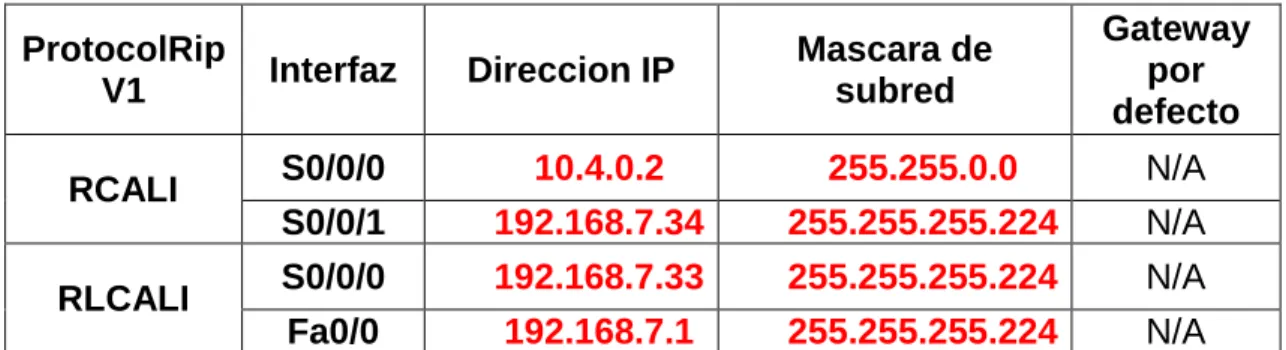
Tabla 12. Tabla sede Cali --- 51
Tabla 13. Tabla sede Cartagena --- 51
Tabla 14. Tabla sede Ibagué --- 51
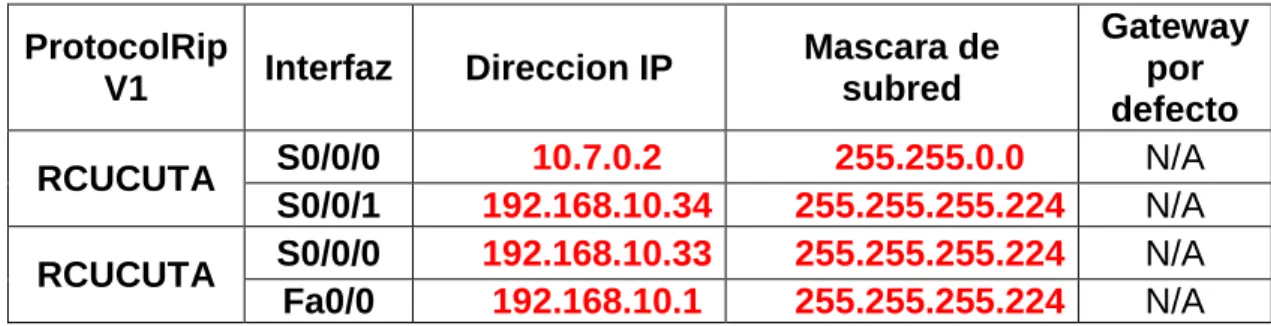
Tabla 15. Tabla sede Cúcuta --- 52
Tabla 16. Tabla sede Bucaramanga --- 52
Tabla 17. Tabla sede Barranquilla --- 52
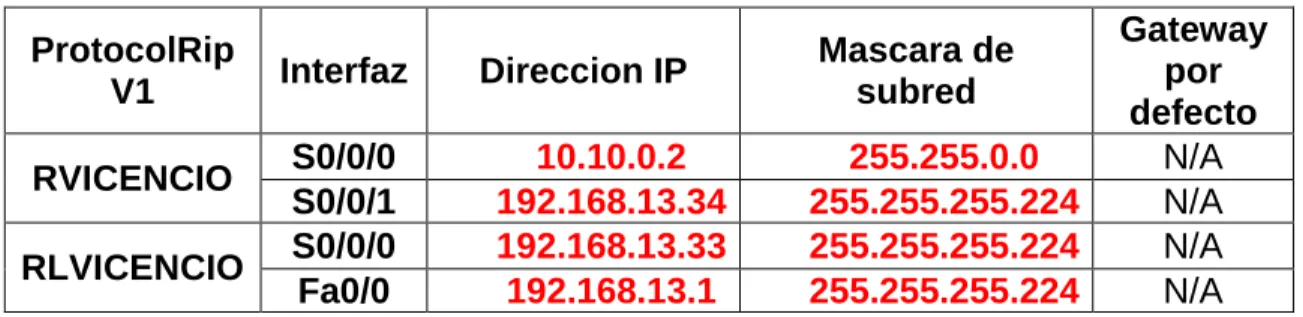
Tabla 18. Tabla sede Villavicencio --- 53
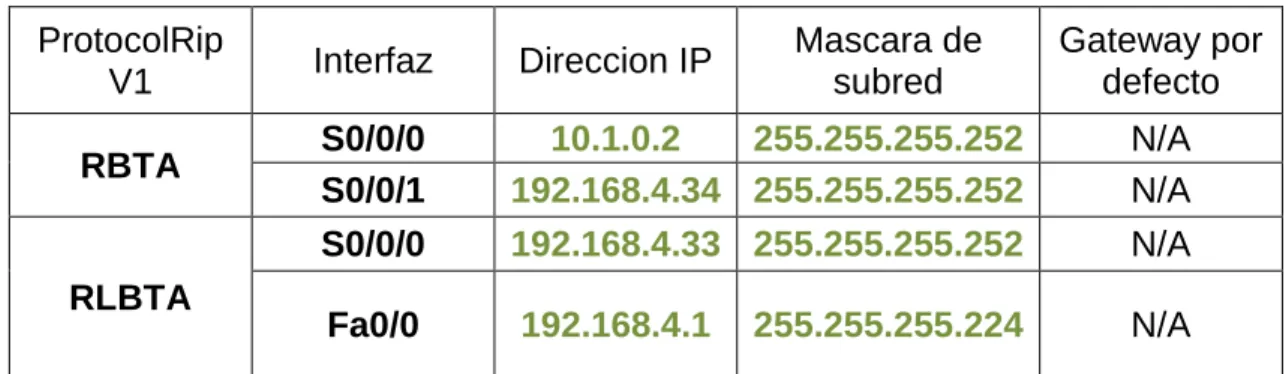
Tabla 19. Tabla sede Bogotá - VLSM --- 55
Tabla 20. Tabla sede Medellín - VLSM --- 55
Tabla 21.Tabla sede Pereira - VLSM --- 55
Tabla 22.Tabla sede Cali - VLSM --- 56
Tabla 23. Tabla sede Cartagena - VLSM --- 56
Tabla 24.Tabla sede Ibagué - VLSM --- 56
Tabla 25.Tabla sede Cúcuta - VLSM --- 56
Tabla 26.Tabla sede Bucaramanga - VLSM --- 57
Tabla 27Tabla sede Barranquilla - VLSM --- 57
LISTA DE GRÁFICAS
Pág.
Ilustración 1. Adición de módulo WIC-2T --- 9
Ilustración 2. Dispositivos a emplear --- 10
Ilustración 3. Configurar topología física --- 13
Ilustración 4. Prueba envío de mensajes --- 43
Ilustración 5. Prueba envío de mensajes --- 43
Ilustración 6. Ping PC1-Pasto a PC1-Ing --- 44
Ilustración 7. Ping PC5-Pasto a PC1-Biblioteca --- 44
Ilustración 8. Ping PC1-Biblioteca a PC1-Pasto --- 45
Ilustración 9. Ping PC1-Biblioteca a Router Pasto --- 45
Ilustración 10. Tracert PC10-RyC a Router-Bucaramanga --- 46
INTRODUCCION
En el CCNA1, la práctica consiste en configurar tres routers ubicado en las ciudades de Bogotá, Bucaramanga y Pasto, cada una de estas ciudades representa una sede, cada una de las sedes consta de una distribución específica de acuerdo a los datos suministrados en la guía.
Para la realización de la práctica se debe tener en cuenta todo lo realizado en las prácticas y/o laboratorios anteriores para poder llevar a buen término la red, puntos como el subneteo, cables a utilizar, equipos de comunicación, etc., son de fundamental cuidado.
En lo que se refiere a CCNA2 se iniciará manifestando que para que un dispositivo de capa tres pueda determinar la ruta hacia un destino debe tener conocimiento de cómo hacerlo. Por eso se utilizarán:
Rutas estáticas: Aprendidas por el router a través del administrador, que establece dicha ruta manualmente, quien también debe actualizar cuando tenga lugar un cambio en la topología. Rutas dinámicas: Rutas aprendidas automáticamente por el router a través de la información enviada por otros routers, una vez que el administrador ha configurado un protocolo de enrutamiento que permite el
aprendizaje dinámico de rutas.
Para poder enrutar paquetes de información un router debe conocer lo siguiente: La información de enrutamiento que el router aprende desde sus fuentes de enrutamiento se coloca en su propia tabla de enrutamiento. La tabla de enrutamiento es la fuente principal de información del router acerca de las redes. Si la red de destino está conectada directamente, el router ya sabrá el puerto que debe usar para reenviar paquetes. Si las redes de destino no están conectados directamente, el router debe aprender y calcular la ruta más óptima a usar para reenviar paquetes a dichas redes. La tabla de enrutamiento se construye manualmente por medio del administrador de la red y/o procesos dinámicos que se ejecutan en la red.
OBJETIVOS
OBJETIVOS GENERALES
En CCNA1 diseñar y configurar por medio del packet tracert una red que cumpla ciertos requerimientos y por supuesto halla conectividad en toda la red.
Diseñar todo el esquema de enrutamiento para la topología acorde a las pautas establecidas en el documento Caso de estudio CCNA 2 exploración. Este diseño se debe realizar documentando cada uno de los pasos que se desarrollaron para alcanzar el objetivo.
OBJETIVOS ESPECÍFICOS
Diseñar y documentar un esquema de direccionamiento según los requisitos.
Aplicar una configuración básica a los dispositivos.
Configurar una prioridad de Routers y RIP.
1. CASO DE ESTUDIO CCNA1
Se analizará cada sede con el fin de tomar las decisiones y elegir la mejor la estructura de la red.
De acuerdo a la solicitud de la guía, se da inicio al estudio de las sedes en forma jerárquica, basándonos en el número de equipos (Host), quedando en su orden así.
Bucaramanga: Switch1: Biblioteca. Switch2: Administración 15 hosts
Bogotá: Switch1: Ingeniera, Switch2: RyC 10 hosts
Pasto: Switch1: Spasto 5 hosts
El router de Bogotá será quien maneje la sincronización (adicionar clockrate)
Se les adiciona a los tres routers el módulo WIC-2T para poder conectar los routers entre ellos.
Ilustración 1. Adición de módulo WIC-2T
1.1 DISPOSITIVOS A EMPLEAR
1.2 CONFIGURAR TOPOLOGÍA LÓGICA
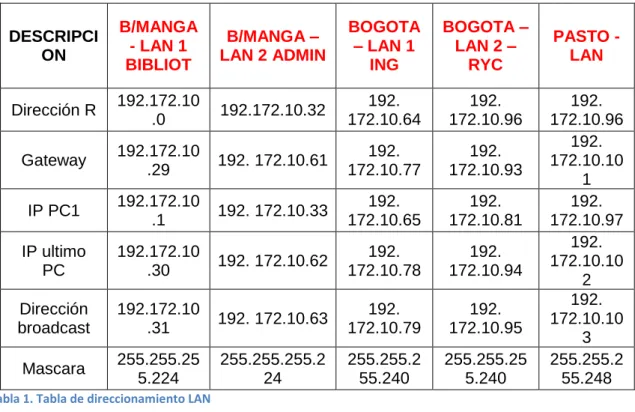
Se inicia con la dirección ip 192.172.10.0 y se procede a realizar el subneteo dependiendo de la cantidad de hosts a utilizar por cada subred. Entonces como para Bucaramanga son 15 hosts se toma una máscara de subred /27 y el número máximo de hosts es de 30 es decir se podría en un futuro adicionar 15 equipos más por subred. En esta ciudad se pueden formar 8 subredes.
Para Bogotá son 10 hosts se toma una máscara de subred /28 y el número máximo de hosts es de 14 es decir se podría en un futuro adicionar 4 equipos más por subred. En esta ciudad se pueden formar 16 subredes.
Para Pasto son 5 hosts se toma una máscara de subred /29 y el número máximo de hosts es de 6 es decir se podría en un futuro adicionar 1 equipo más por subred. En esta ciudad se pueden formar 32 subredes.
TABLA DE DIRECCIONAMIENTO LAN
DESCRIPCI ON
B/MANGA - LAN 1 BIBLIOT
B/MANGA – LAN 2 ADMIN
BOGOTA – LAN 1
ING
BOGOTA – LAN 2 –
RYC
PASTO - LAN
Dirección R 192.172.10
.0 192.172.10.32
192. 172.10.64 192. 172.10.96 192. 172.10.96
Gateway 192.172.10
.29 192. 172.10.61
192. 172.10.77 192. 172.10.93 192. 172.10.10 1
IP PC1 192.172.10
.1 192. 172.10.33
192. 172.10.65 192. 172.10.81 192. 172.10.97 IP ultimo PC 192.172.10
.30 192. 172.10.62
192. 172.10.78 192. 172.10.94 192. 172.10.10 2 Dirección broadcast 192.172.10
.31 192. 172.10.63
192. 172.10.79 192. 172.10.95 192. 172.10.10 3
Mascara 255.255.25
5.224 255.255.255.2 24 255.255.2 55.240 255.255.25 5.240 255.255.2 55.248 Tabla 1. Tabla de direccionamiento LAN
TABLA DE DIRECCIONAMIENTO WAN BOGOTÁ – BUCARAMANGA
DESCRIPCION ENLACE B/GOTA-B/MANGA
Dirección de red 192.172.10.104
Serial Ser 0/0/1 (BOGOTA) 192.172.10.105 Serial Ser 0/1/1 (B/MANGA) 192.172.10.106
Dirección broadcast 192.172.10.107
Mascara de subred 255.255.255.252
Tabla 2. Tabla de direccionamiento WAN Bogotá - Bucaramanga
TABLA DE DIRECCIONAMIENTO WAN BOGOTÁ – PASTO
DESCRIPCION ENLACE PASTO-B7GOTA
Dirección de red 192.172.10.112
Serial Ser 0/0/0 (BOGOTÁ) 192.172.10.113 Serial Ser 0/0/0 (PASTO) 192.172.10.114 Dirección broadcast 192.172.10.115
Mascara de subred 255.255.255.252
TABLA DE DIRECCIONAMIENTO WAN PASTO – BUCARAMANGA
DESCRIPCION ENLACE B/MANGA-PASTO
Dirección de red 192.172.10.108
Serial Ser 0/0/1 (PASTO) 192.172.10.109 Serial Ser 0/1/0 (B/MANGA) 192.172.10.110 Dirección broadcast 192.172.10.111
Mascara de subred 255.255.255.252
Tabla 4. Tabla de direccionamiento WAN Pasto - Bucaramanga
TABLA DE DIRECCIONAMIENTO DE PUERTOS – BOGOTÁ
Dirección SubRed: (INGENIERÍAS) 192.172.10.64/28 y (R y C)192.172.10.96/28
DISPOSITIVO Puertos IP Máscara
subred Gateway
PC1-ING Fast
Ethernet 192.172.10.65 255.255.255.240 192.172.10.77 PC10-RYC Fast
Ethernet 192.172.10.94 255.255.255.240 192.172.10.93
SWITCH-INGENIERIA
Fa 0/2 No aplica No aplica No aplica Fa 0/1 No aplica No aplica No aplica SWITCH-RYC Fa 0/2 No aplica No aplica No aplica Fa 0/1 No aplica No aplica No aplica
ROUTER
Fa 0/1 (RYC)
192.
172.10.93 255.255.255.240 No aplica
Fa 0/0 (ING)
192.
172.10.77 255.255.255.240 No aplica
Tabla 5. Tabla de direccionamiento de Puertos - Bogotá
TABLA DE DIRECCIONAMIENTO DE PUERTOS – BUCARAMANGA Dirección SubRed: (BIBLIOTECA) 192.172.10.0/27 y
(ADMINISTRACIÓN)192.172.10.32/27
DISPOSITIVO Puertos IP Máscara
subred Gateway
PC1-BIBLIOTECA Fast Ethernet 192. 172.10.1 255.255.255.224 192. 172.10.29 PC15-ADMIN Fast Ethernet 192.
172.10.62 255.255.255.224
192. 172.10.61
SWITCH-BIBLIOTECA
Fa 0/2 No aplica No aplica No aplica Fa 0/1 No aplica No aplica No aplica
SWITCH-ADMIN
ROUTER
Fa 0/0 (BIBLIOTECA)
192.
172.10.29 255.255.255.224 No aplica
Fa 0/1 (ADMIN)
192.
172.10.61 255.255.255.224 No aplica
Tabla 6. Tabla de direccionamiento de Puertos - Bucaramanga
TABLA DE DIRECCIONAMIENTO DE PUERTOS – PASTO Dirección SubRed: (PASTO) 192.172.10.96/29 DISPOSITIVO Puertos IP Máscara
subred Gateway PC1-PASTO Fast
Ethernet 192.172.10.97 255.255.255.248 192.172.10.101 PC5-PASTO Fast
Ethernet 192.172.10.102 255.255.255.248 192.172.10.101
SWITCH-SPASTO
Fa 0/1 No aplica No aplica No aplica Fa 0/2 No aplica No aplica No aplica Fa 0/3 No aplica No aplica No aplica ROUTER Fa 0/0 192.
172.10.101 255.255.255.248 No aplica Tabla 7. Tabla de direccionamiento de Puertos – Pasto
1.3 CONFIGURAR TOPOLOGÍA FÍSICA
Cables utilizados.
Cable de conexión directa Cable serial DCE
1.4 CONFIGURACION DE LOS ROUTERS
1.4.1 Router Bogotá
Router>enable
Router#configure terminal
Enter configuration commands, one per line. End with CNTL/Z. Router(config)#interface FastEthernet0/0
Router(config-if)#no shutdown
%LINK-5-CHANGED: Interface FastEthernet0/0, changed state to up
%LINEPROTO-5-UPDOWN: Line protocol on Interface FastEthernet0/0, changed state to up
Router(config-if)#ip address 192.172.10.77 255.255.255.240 Router(config-if)#
Router(config-if)#exit
Router(config)#interface FastEthernet0/1 Router(config-if)#no shutdown
%LINK-5-CHANGED: Interface FastEthernet0/1, changed state to up
%LINEPROTO-5-UPDOWN: Line protocol on Interface FastEthernet0/1, changed state to up
Router(config)#interface FastEthernet0/1
Router(config-if)#ip address 192.172.10.93 255.255.255.240 Router(config)#interface Serial0/0/1
Router(config-if)#ip address 192.172.10.105 255.255.255.252 Router(config-if)#no shutdown
Router(config-if)#clock rate 9600 Router(config-if)#
%LINK-5-CHANGED: Interface Serial0/0/1, changed state to up
%LINEPROTO-5-UPDOWN: Line protocol on Interface Serial0/0/1, changed state to up
Router(config-if)#exit
Router(config)#interface Serial0/0/0
Router(config-if)#no shutdown Router(config-if)#clock rate 9600 Router(config-if)#exit
Router(config)#hostname BOGOTA BOGOTA(config)#enable secret CISCO BOGOTA(config)#line con 0
BOGOTA(config-line)#password CISCO BOGOTA(config-line)#login
BOGOTA(config-line)#line vty 0 4
BOGOTA(config-line)#password CISCO BOGOTA(config-line)#login
BOGOTA(config-line)#banner motd %
Enter TEXT message. End with the character '%'. ROUTER-BOGOTA %
BOGOTA(config)#interface fa0/0
BOGOTA(config-if)#description INTERFACE DE CONEXION CON LA RED DE INGENIERIA
BOGOTA(config-if)#exit
BOGOTA(config)#interface fa0/1
BOGOTA(config-if)#description INTERFACE DE CONEXION CON LA RED DE REGISTRO Y CONTROL
BOGOTA(config-if)#exit BOGOTA(config)#exit
%SYS-5-CONFIG_I: Configured from console by console BOGOTA#show interface fa0/0
FastEthernet0/0 is up, line protocol is up (connected)
Hardware is Lance, address is 0004.9a8c.b101 (bia 0004.9a8c.b101) Description: INTERFACE DE CONEXION CON LA RED DE INGENIERIA Internet address is 192.172.10.77/28
MTU 1500 bytes, BW 100000 Kbit, DLY 100 usec, rely 255/255, load 1/255 Encapsulation ARPA, loopback not set
ARP type: ARPA, ARP Timeout 04:00:00,
Last input 00:00:08, output 00:00:05, output hang never Last clearing of "show interface" counters never
Queueing strategy: fifo
Output queue :0/40 (size/max)
Received 0 broadcasts, 0 runts, 0 giants, 0 throttles
0 input errors, 0 CRC, 0 frame, 0 overrun, 0 ignored, 0 abort 0 input packets with dribble condition detected
0 packets output, 0 bytes, 0 underruns
0 output errors, 0 collisions, 1 interface resets 0 babbles, 0 late collision, 0 deferred
0 lost carrier, 0 no carrier
0 output buffer failures, 0 output buffers swapped out BOGOTA#show interface fa0/1
FastEthernet0/1 is up, line protocol is up (connected)
Hardware is Lance, address is 0004.9a8c.b102 (bia 0004.9a8c.b102)
Description: INTERFACE DE CONEXION CON LA RED DE REGISTRO Y CONTROL
Internet address is 192.172.10.93/28
MTU 1500 bytes, BW 100000 Kbit, DLY 100 usec, rely 255/255, load 1/255 Encapsulation ARPA, loopback not set
ARP type: ARPA, ARP Timeout 04:00:00,
Last input 00:00:08, output 00:00:05, output hang never Last clearing of "show interface" counters never
Queueing strategy: fifo
Output queue :0/40 (size/max)
5 minute input rate 0 bits/sec, 0 packets/sec 5 minute output rate 0 bits/sec, 0 packets/sec 0 packets input, 0 bytes, 0 no buffer
Received 0 broadcasts, 0 runts, 0 giants, 0 throttles
0 input errors, 0 CRC, 0 frame, 0 overrun, 0 ignored, 0 abort 0 input packets with dribble condition detected
0 packets output, 0 bytes, 0 underruns
0 output errors, 0 collisions, 1 interface resets 0 babbles, 0 late collision, 0 deferred
0 lost carrier, 0 no carrier
0 output buffer failures, 0 output buffers swapped out BOGOTA#showip interface brief
Interface IP-Address OK? Method Status Protocol
FastEthernet0/0 192.172.10.77 YES manual up up
Serial0/0/0 192.172.10.113 YES manual up up
Serial0/0/1 192.172.10.105 YES manual up up
Vlan1 unassigned YES manual administratively down down BOGOTA#
BOGOTA#copy running-config startup-config Destination filename [startup-config]?
Building configuration... [OK]
BOGOTA# BOGOTA#config
Configuring from terminal, memory, or network [terminal]? terminal Enter configuration commands, one per line. End with CNTL/Z. BOGOTA(config)#
BOGOTA(config)#interface Serial0/0/0
BOGOTA(config-if)#description WAN BOGOTA-PASTO BOGOTA(config-if)#no shutdown
BOGOTA(config-if)#exit
BOGOTA(config)#interface Serial0/0/1
BOGOTA(config-if)#description WAN BOGOTA-BUCARAMANGA BOGOTA(config-if)#NO SHUTDOWN
BOGOTA(config-if)#interface fa0/0 BOGOTA(config-if)#no shutdown BOGOTA(config-if)#interface fa0/1 BOGOTA(config-if)#no shutdown BOGOTA(config-if)#
%SYS-5-CONFIG_I: Configured from console by console BOGOTA#
1.4.2 Router Bucaramanga
Router>enable
Router#configure terminal
Enter configuration commands, one per line. End with CNTL/Z. Router(config)#interface FastEthernet0/0
Router(config-if)#no shutdown
%LINEPROTO-5-UPDOWN: Line protocol on Interface FastEthernet0/0, changed state to up
Router(config-if)#ip address 192.172.10.29 255.255.255.224 Router(config-if)#
Router(config-if)#exit
Router(config)#interface FastEthernet0/1 Router(config-if)#no shutdown
%LINK-5-CHANGED: Interface FastEthernet0/1, changed state to up
%LINEPROTO-5-UPDOWN: Line protocol on Interface FastEthernet0/1, changed state to up
Router(config-if)#shutdown
%LINK-5-CHANGED: Interface FastEthernet0/1, changed state to administratively down
%LINEPROTO-5-UPDOWN: Line protocol on Interface FastEthernet0/1, changed state to down
Router(config-if)#no shutdown
%LINK-5-CHANGED: Interface FastEthernet0/1, changed state to up
%LINEPROTO-5-UPDOWN: Line protocol on Interface FastEthernet0/1, changed state to up
Router(config-if)#ip address 192.172.10.61 255.255.255.224 Router(config-if)#
Router(config-if)#exit
Router(config)#interface Serial0/1/1 Router(config-if)#
%LINK-5-CHANGED: Interface Serial0/1/1, changed state to upno shutdown Router(config-if)#
%LINEPROTO-5-UPDOWN: Line protocol on Interface Serial0/1/1, changed state to upip address 192.172.10.106 255.255.255.224
Router(config-if)#ip address 192.172.10.106 255.255.255.252 Router(config-if)#
Router(config-if)#exit
Router(config)#interface Serial0/1/0
Router(config-if)#ip address 192.172.10.110 255.255.255.252 Router(config-if)#no shutdown
Router(config-if)#exit Router(config)#exit
BUCARAMANGA(config)#enablesecret CISCO BUCARAMANGA(config)#line con 0
BUCARAMANGA(config-line)#password CISCO BUCARAMANGA(config-line)#login
BUCARAMANGA(config-line)#line vty 0 4
BUCARAMANGA(config-line)#password CISCO BUCARAMANGA(config-line)#login
BUCARAMANGA(config-line)#banner motd % Enter TEXT message. End with the character '%'. ROUTER-BMANGA%
BUCARAMANGA(config)#interface fa0/0
BUCARAMANGA(config-if)#description INTERFACE DE CONEXION CON LA RED DE BIBLIOTECA
BUCARAMANGA(config-if)#no shutdown BUCARAMANGA(config-if)#exit
BUCARAMANGA(config)#interface fa0/1
BUCARAMANGA(config-if)#description INTERFACE DE CONEXION CON LA RED DE ADMINISTRACION
BUCARAMANGA(config-if)#no shutdown BUCARAMANGA(config-if)#exit
BUCARAMANGA(config)#interface serial0/0/1 %Invalid interface type and number
BUCARAMANGA(config)#interface serial0/1/1
BUCARAMANGA(config-if)#description WAN BUCARAMANGA-BOGOTA BUCARAMANGA(config-if)#no shutdown
BUCARAMANGA(config-if)#exit
BUCARAMANGA(config)#interface serial0/1/0
BUCARAMANGA(config-if)#description WAN BUCARAMANGA-PASTO BUCARAMANGA(config-if)#no shutdown
BUCARAMANGA(config-if)# BUCARAMANGA(config-if)#exit BUCARAMANGA(config)#
%SYS-5-CONFIG_I: Configured from console by console BUCARAMANGA#show interface fa0/1
FastEthernet0/1 is up, line protocol is up (connected)
Hardware is Lance, address is 0002.4aec.be02 (bia 0002.4aec.be02)
Description: INTERFACE DE CONEXION CON LA RED DE ADMINISTRACION Internet address is 192.172.10.61/27
Encapsulation ARPA, loopback not set ARP type: ARPA, ARP Timeout 04:00:00,
Last input 00:00:08, output 00:00:05, output hang never Last clearing of "show interface" counters never
Queueing strategy: fifo
Output queue :0/40 (size/max)
5 minute input rate 0 bits/sec, 0 packets/sec 5 minute output rate 0 bits/sec, 0 packets/sec 0 packets input, 0 bytes, 0 no buffer
Received 0 broadcasts, 0 runts, 0 giants, 0 throttles
0 input errors, 0 CRC, 0 frame, 0 overrun, 0 ignored, 0 abort 0 input packets with dribble condition detected
0 packets output, 0 bytes, 0 underruns
0 output errors, 0 collisions, 2 interface resets 0 babbles, 0 late collision, 0 deferred
0 lost carrier, 0 no carrier
0 output buffer failures, 0 output buffers swapped out BUCARAMANGA#show interface fa0/0
FastEthernet0/0 is up, line protocol is up (connected)
Hardware is Lance, address is 0002.4aec.be01 (bia 0002.4aec.be01) Description: INTERFACE DE CONEXION CON LA RED DE BIBLIOTECA Internet address is 192.172.10.29/27
MTU 1500 bytes, BW 100000 Kbit, DLY 100 usec, rely 255/255, load 1/255 Encapsulation ARPA, loopback not set
ARP type: ARPA, ARP Timeout 04:00:00,
Last input 00:00:08, output 00:00:05, output hang never Last clearing of "show interface" counters never
Queueing strategy: fifo
Output queue :0/40 (size/max)
5 minute input rate 0 bits/sec, 0 packets/sec 5 minute output rate 0 bits/sec, 0 packets/sec 0 packets input, 0 bytes, 0 no buffer
Received 0 broadcasts, 0 runts, 0 giants, 0 throttles
0 input errors, 0 CRC, 0 frame, 0 overrun, 0 ignored, 0 abort 0 input packets with dribble condition detected
0 packets output, 0 bytes, 0 underruns
0 output errors, 0 collisions, 1 interface resets 0 babbles, 0 late collision, 0 deferred
0 output buffer failures, 0 output buffers swapped out BUCARAMANGA#showip interface brief
Interface IP-Address OK? Method Status Protocol
FastEthernet0/0 192.172.10.29 YES manual up up
FastEthernet0/1 192.172.10.61 YES manual up up
Serial0/1/0 192.172.10.110 YES manual up down
Serial0/1/1 192.172.10.106 YES manual up up
Vlan1 unassigned YES manual administratively down down BUCARAMANGA#show interface serial0/1/1
Serial0/1/1 is up, line protocol is up (connected) Hardware is HD64570
Description: WAN BUCARAMANGA-BOGOTA Internet address is 192.172.10.106/30
MTU 1500 bytes, BW 1544 Kbit, DLY 20000 usec, rely 255/255, load 1/255 Encapsulation HDLC, loopback not set, keepalive set (10 sec)
Last input never, output never, output hang never Last clearing of "show interface" counters never
Input queue: 0/75/0 (size/max/drops); Total output drops: 0 Queueing strategy: weighted fair
Output queue: 0/1000/64/0 (size/max total/threshold/drops) Conversations 0/0/256 (active/max active/max total)
Reserved Conversations 0/0 (allocated/max allocated) 5 minute input rate 0 bits/sec, 0 packets/sec
5 minute output rate 0 bits/sec, 0 packets/sec 0 packets input, 0 bytes, 0 no buffer
Received 0 broadcasts, 0 runts, 0 giants, 0 throttles
0 input errors, 0 CRC, 0 frame, 0 overrun, 0 ignored, 0 abort 0 packets output, 0 bytes, 0 underruns
0 output errors, 0 collisions, 1 interface resets
0 output buffer failures, 0 output buffers swapped out 0 carrier transitions
Description: WAN BUCARAMANGA-PASTO Internet address is 192.172.10.110/30
MTU 1500 bytes, BW 1544 Kbit, DLY 20000 usec, rely 255/255, load 1/255 Encapsulation HDLC, loopback not set, keepalive set (10 sec)
Last input never, output never, output hang never Last clearing of "show interface" counters never
Input queue: 0/75/0 (size/max/drops); Total output drops: 0 Queueing strategy: weighted fair
Output queue: 0/1000/64/0 (size/max total/threshold/drops) Conversations 0/0/256 (active/max active/max total)
Reserved Conversations 0/0 (allocated/max allocated) 5 minute input rate 0 bits/sec, 0 packets/sec
5 minute output rate 0 bits/sec, 0 packets/sec 0 packets input, 0 bytes, 0 no buffer
Received 0 broadcasts, 0 runts, 0 giants, 0 throttles
0 input errors, 0 CRC, 0 frame, 0 overrun, 0 ignored, 0 abort 0 packets output, 0 bytes, 0 underruns
0 output errors, 0 collisions, 1 interface resets
0 output buffer failures, 0 output buffers swapped out 0 carrier transitions
DCD=up DSR=up DTR=up RTS=up CTS=up BUCARAMANGA#
1.4.3 Router Pasto
Router>enable
Router#configure terminal
Enter configuration commands, one per line. End with CNTL/Z. Router(config)#interface FastEthernet0/0
Router(config-if)#no shutdown
%LINK-5-CHANGED: Interface FastEthernet0/0, changed state to up
%LINEPROTO-5-UPDOWN: Line protocol on Interface FastEthernet0/0, changed state to up
Router(config-if)#ip address 192.172.10.101 255.255.255.248 Router(config-if)#
Router(config-if)#exit
Router(config)#interface Serial0/0/0
Router(config-if)#
%LINK-5-CHANGED: Interface Serial0/0/0, changed state to upno shutdown Router(config-if)#
%LINEPROTO-5-UPDOWN: Line protocol on Interface Serial0/0/0, changed state to up
Router(config-if)#exit
Router(config)#interface Serial0/0/1
Router(config-if)#ip address 192.172.10.109 255.255.255.252 Router(config-if)#
%LINK-5-CHANGED: Interface Serial0/0/1, changed state to upno shutdown Router(config-if)#exit
Router(config)#hostname PASTO PASTO(config)#enable secret CISCO PASTO(config)#line con 0
PASTO(config-line)#password CISCO PASTO(config-line)#login
PASTO(config-line)#line vty 0 4
PASTO(config-line)#password CISCO PASTO(config-line)#login
PASTO(config-line)#banner motd %
Enter TEXT message. End with the character '%'. ROUTER-PASTO %
PASTO(config)#interface fa0/0
PASTO(config-if)#description INTERFACE DE CONEXION CON LA LAN DE PASTO
PASTO(config-if)#no shutdown PASTO(config-if)#exit
PASTO(config)#interface serial0/0/1
PASTO(config-if)#description WAN PASTO-BUCARAMANGA PASTO(config-if)#no shutdown
PASTO(config-if)#exit
PASTO(config)#interface serial0/0/0
PASTO(config-if)#description WAN PASTO-BOGOTA PASTO(config-if)#no shutdown
PASTO(config-if)#EXIT PASTO(config)#exit
%SYS-5-CONFIG_I: Configured from console by console PASTO#show interface fa0/0
Hardware is Lance, address is 0006.2ac4.8201 (bia 0006.2ac4.8201) Description: INTERFACE DE CONEXION CON LA LAN DE PASTO Internet address is 192.172.10.101/29
MTU 1500 bytes, BW 100000 Kbit, DLY 100 usec, rely 255/255, load 1/255 Encapsulation ARPA, loopback not set
ARP type: ARPA, ARP Timeout 04:00:00,
Last input 00:00:08, output 00:00:05, output hang never Last clearing of "show interface" counters never
Queueing strategy: fifo
Output queue :0/40 (size/max)
5 minute input rate 0 bits/sec, 0 packets/sec 5 minute output rate 0 bits/sec, 0 packets/sec 0 packets input, 0 bytes, 0 no buffer
Received 0 broadcasts, 0 runts, 0 giants, 0 throttles
0 input errors, 0 CRC, 0 frame, 0 overrun, 0 ignored, 0 abort 0 input packets with dribble condition detected
0 packets output, 0 bytes, 0 underruns
0 output errors, 0 collisions, 1 interface resets 0 babbles, 0 late collision, 0 deferred
0 lost carrier, 0 no carrier
0 output buffer failures, 0 output buffers swapped out PASTO#show interface serial0/0/1
Serial0/0/1 is up, line protocol is down (disabled) Hardware is HD64570
Description: WAN PASTO-BUCARAMANGA Internet address is 192.172.10.109/30
MTU 1500 bytes, BW 1544 Kbit, DLY 20000 usec, rely 255/255, load 1/255 Encapsulation HDLC, loopback not set, keepalive set (10 sec)
Last input never, output never, output hang never Last clearing of "show interface" counters never
Input queue: 0/75/0 (size/max/drops); Total output drops: 0 Queueing strategy: weighted fair
Output queue: 0/1000/64/0 (size/max total/threshold/drops) Conversations 0/0/256 (active/max active/max total)
Reserved Conversations 0/0 (allocated/max allocated) 5 minute input rate 0 bits/sec, 0 packets/sec
5 minute output rate 0 bits/sec, 0 packets/sec 0 packets input, 0 bytes, 0 no buffer
0 input errors, 0 CRC, 0 frame, 0 overrun, 0 ignored, 0 abort 0 packets output, 0 bytes, 0 underruns
0 output errors, 0 collisions, 1 interface resets
0 output buffer failures, 0 output buffers swapped out 0 carrier transitions
DCD=up DSR=up DTR=up RTS=up CTS=up PASTO#show interface serial0/0/0
Serial0/0/0 is up, line protocol is up (connected) Hardware is HD64570
Description: WAN PASTO-BOGOTA Internet address is 192.172.10.114/30
MTU 1500 bytes, BW 1544 Kbit, DLY 20000 usec, rely 255/255, load 1/255 Encapsulation HDLC, loopback not set, keepalive set (10 sec)
Last input never, output never, output hang never Last clearing of "show interface" counters never
Input queue: 0/75/0 (size/max/drops); Total output drops: 0 Queueing strategy: weighted fair
Output queue: 0/1000/64/0 (size/max total/threshold/drops) Conversations 0/0/256 (active/max active/max total)
Reserved Conversations 0/0 (allocated/max allocated) 5 minute input rate 0 bits/sec, 0 packets/sec
5 minute output rate 0 bits/sec, 0 packets/sec 0 packets input, 0 bytes, 0 no buffer
Received 0 broadcasts, 0 runts, 0 giants, 0 throttles
0 input errors, 0 CRC, 0 frame, 0 overrun, 0 ignored, 0 abort 0 packets output, 0 bytes, 0 underruns
0 output errors, 0 collisions, 1 interface resets
0 output buffer failures, 0 output buffers swapped out 0 carrier transitions
DCD=up DSR=up DTR=up RTS=up CTS=up PASTO#showip interface brief
Interface IP-Address OK? Method Status Protocol
FastEthernet0/0 192.172.10.101 YES manual up up
FastEthernet0/1 unassigned YES manual administratively down down
Serial0/0/1 192.172.10.109 YES manual up down
Vlan1 unassigned YES manual administratively down down PASTO#
1.5 CONFIGURACIÓN DE SWITCHES BOGOTÁ
1.5.1 Switch – Ingeniería
Switch>enable Switch#config
Configuring from terminal, memory, or network [terminal]? terminal Enter configuration commands, one per line. End with CNTL/Z. Switch(config)#hostname INGENIERIA
INGENIERIA(config)#enable secret CISCO INGENIERIA(config)#line con 0
INGENIERIA(config-line)#password CISCO INGENIERIA(config-line)#login
INGENIERIA(config-line)#line vty 0 4
INGENIERIA(config-line)#password CISCO INGENIERIA(config-line)#login
INGENIERIA(config-line)#banner motd %
Enter TEXT message. End with the character '%'. LAN-INGENIERIA %
INGENIERIA(config)#INTERFACE fa0/2
INGENIERIA(config-if)#description INGENIERIA-HOST1 INGENIERIA(config-if)#no shutdown
INGENIERIA(config-if)#exit
INGENIERIA(config)#INTERFACE fa0/1
INGENIERIA(config-if)#description INGENIERIA-ROUTER INGENIERIA(config-if)#NO SHUTDOWN
INGENIERIA(config-if)#exit INGENIERIA(config)#exit
%SYS-5-CONFIG_I: Configured from console by console INGENIERIA#showip interface brief
FastEthernet0/1 unassigned YES manual up up FastEthernet0/2 unassigned YES manual up up FastEthernet0/3 unassigned YES manual down down FastEthernet0/4 unassigned YES manual down down FastEthernet0/5 unassigned YES manual down down
FastEthernet0/6 unassigned YES manual down down FastEthernet0/7 unassigned YES manual down down FastEthernet0/8 unassigned YES manual down down FastEthernet0/9 unassigned YES manual down down FastEthernet0/10 unassigned YES manual down down FastEthernet0/11 unassigned YES manual down down FastEthernet0/12 unassigned YES manual down down FastEthernet0/13 unassigned YES manual down down FastEthernet0/14 unassigned YES manual down down FastEthernet0/15 unassigned YES manual down down FastEthernet0/16 unassigned YES manual down down FastEthernet0/17 unassigned YES manual down down FastEthernet0/18 unassigned YES manual down down FastEthernet0/19 unassigned YES manual down down FastEthernet0/20 unassigned YES manual down down FastEthernet0/21 unassigned YES manual down down FastEthernet0/22 unassigned YES manual down down FastEthernet0/23 unassigned YES manual down down FastEthernet0/24 unassigned YES manual down down GigabitEthernet1/1 unassigned YES manual down down GigabitEthernet1/2 unassigned YES manual down down Vlan1 unassigned YES manual administratively down down INGENIERIA#show interface fa0/1
FastEthernet0/1 is up, line protocol is up (connected)
Hardware is Lance, address is 00d0.5835.3101 (bia 00d0.5835.3101) Description: INGENIERIA-ROUTER
MTU 1500 bytes, BW 100000 Kbit, DLY 1000 usec, reliability 255/255, txload 1/255, rxload 1/255
Encapsulation ARPA, loopback not set Keepalive set (10 sec)
Full-duplex, 100Mb/s
Last input 00:00:08, output 00:00:05, output hang never Last clearing of "show interface" counters never
Input queue: 0/75/0/0 (size/max/drops/flushes); Total output drops: 0 Queueing strategy: fifo
Output queue :0/40 (size/max)
5 minute input rate 0 bits/sec, 0 packets/sec 5 minute output rate 0 bits/sec, 0 packets/sec 956 packets input, 193351 bytes, 0 no buffer
Received 956 broadcasts, 0 runts, 0 giants, 0 throttles 0 input errors, 0 CRC, 0 frame, 0 overrun, 0 ignored, 0 abort 0 watchdog, 0 multicast, 0 pause input
0 input packets with dribble condition detected 2357 packets output, 263570 bytes, 0 underruns 0 output errors, 0 collisions, 10 interface resets 0 babbles, 0 late collision, 0 deferred
0 lost carrier, 0 no carrier
0 output buffer failures, 0 output buffers swapped out INGENIERIA#
INGENIERIA#show interface fa0/2
FastEthernet0/2 is up, line protocol is up (connected)
Hardware is Lance, address is 00d0.5835.3102 (bia 00d0.5835.3102) Description: INGENIERIA-HOST1
MTU 1500 bytes, BW 100000 Kbit, DLY 1000 usec, reliability 255/255, txload 1/255, rxload 1/255
Encapsulation ARPA, loopback not set Keepalive set (10 sec)
Full-duplex, 100Mb/s
input flow-control is off, output flow-control is off ARP type: ARPA, ARP Timeout 04:00:00
Last input 00:00:08, output 00:00:05, output hang never Last clearing of "show interface" counters never
Input queue: 0/75/0/0 (size/max/drops/flushes); Total output drops: 0 Queueing strategy: fifo
Output queue :0/40 (size/max)
5 minute input rate 0 bits/sec, 0 packets/sec 5 minute output rate 0 bits/sec, 0 packets/sec 956 packets input, 193351 bytes, 0 no buffer
0 watchdog, 0 multicast, 0 pause input
0 input packets with dribble condition detected 2357 packets output, 263570 bytes, 0 underruns 0 output errors, 0 collisions, 10 interface resets 0 babbles, 0 late collision, 0 deferred
0 lost carrier, 0 no carrier
0 output buffer failures, 0 output buffers swapped out INGENIERIA#
1.5.2 Switch –R y C
Switch>enable Switch#config
Configuring from terminal, memory, or network [terminal]? terminal Enter configuration commands, one per line. End with CNTL/Z. Switch(config)#hostname RYC
RYC(config)#enable secret CISCO RYC(config)#line con 0
RYC(config-line)#password CISCO RYC(config-line)#login
RYC(config-line)#line vty 0 4
RYC(config-line)#password CISCO RYC(config-line)#login
RYC(config-line)#banner motd %
Enter TEXT message. End with the character '%'. LAN-RYC %
RYC(config)#INTERFACE fa0/1
RYC(config-if)#descriptio RYC-ROUTER RYC(config-if)#no shutdown
RYC(config-if)#exit
RYC(config)#INTERFACE fa0/2
RYC(config-if)#descriptio RYC-HOST10 RYC(config-if)#no shutdown
RYC(config-if)#exit RYC(config)#exit
%SYS-5-CONFIG_I: Configured from console by console RYC#showip interface brief
FastEthernet0/1 unassigned YES manual up up FastEthernet0/2 unassigned YES manual up up FastEthernet0/3 unassigned YES manual down down FastEthernet0/4 unassigned YES manual down down FastEthernet0/5 unassigned YES manual down down FastEthernet0/6 unassigned YES manual down down FastEthernet0/7 unassigned YES manual down down FastEthernet0/8 unassigned YES manual down down FastEthernet0/9 unassigned YES manual down down FastEthernet0/10 unassigned YES manual down down FastEthernet0/11 unassigned YES manual down down FastEthernet0/12 unassigned YES manual down down FastEthernet0/13 unassigned YES manual down down FastEthernet0/14 unassigned YES manual down down FastEthernet0/15 unassigned YES manual down down
FastEthernet0/16 unassigned YES manual down down FastEthernet0/17 unassigned YES manual down down FastEthernet0/18 unassigned YES manual down down FastEthernet0/19 unassigned YES manual down down FastEthernet0/20 unassigned YES manual down down FastEthernet0/21 unassigned YES manual down down FastEthernet0/22 unassigned YES manual down down FastEthernet0/23 unassigned YES manual down down FastEthernet0/24 unassigned YES manual down down GigabitEthernet1/1 unassigned YES manual down down GigabitEthernet1/2 unassigned YES manual down down Vlan1 unassigned YES manual administratively down down RYC#show interface fa0/1
FastEthernet0/1 is up, line protocol is up (connected)
Hardware is Lance, address is 0010.1190.6401 (bia 0010.1190.6401) Description: RYC-ROUTER
MTU 1500 bytes, BW 100000 Kbit, DLY 1000 usec, reliability 255/255, txload 1/255, rxload 1/255
Encapsulation ARPA, loopback not set Keepalive set (10 sec)
Full-duplex, 100Mb/s
Last input 00:00:08, output 00:00:05, output hang never Last clearing of "show interface" counters never
Input queue: 0/75/0/0 (size/max/drops/flushes); Total output drops: 0 Queueing strategy: fifo
Output queue :0/40 (size/max)
5 minute input rate 0 bits/sec, 0 packets/sec 5 minute output rate 0 bits/sec, 0 packets/sec 956 packets input, 193351 bytes, 0 no buffer
Received 956 broadcasts, 0 runts, 0 giants, 0 throttles
0 input errors, 0 CRC, 0 frame, 0 overrun, 0 ignored, 0 abort 0 watchdog, 0 multicast, 0 pause input
0 input packets with dribble condition detected 2357 packets output, 263570 bytes, 0 underruns 0 output errors, 0 collisions, 10 interface resets 0 babbles, 0 late collision, 0 deferred
0 lost carrier, 0 no carrier
0 output buffer failures, 0 output buffers swapped out RYC#
RYC#show interface fa0/2
FastEthernet0/2 is up, line protocol is up (connected)
Hardware is Lance, address is 0010.1190.6402 (bia 0010.1190.6402) Description: RYC-HOST10
MTU 1500 bytes, BW 100000 Kbit, DLY 1000 usec, reliability 255/255, txload 1/255, rxload 1/255
Encapsulation ARPA, loopback not set Keepalive set (10 sec)
Full-duplex, 100Mb/s
input flow-control is off, output flow-control is off ARP type: ARPA, ARP Timeout 04:00:00
Last input 00:00:08, output 00:00:05, output hang never Last clearing of "show interface" counters never
Input queue: 0/75/0/0 (size/max/drops/flushes); Total output drops: 0 Queueing strategy: fifo
Output queue :0/40 (size/max)
5 minute input rate 0 bits/sec, 0 packets/sec 5 minute output rate 0 bits/sec, 0 packets/sec 956 packets input, 193351 bytes, 0 no buffer
0 watchdog, 0 multicast, 0 pause input
0 input packets with dribble condition detected 2357 packets output, 263570 bytes, 0 underruns 0 output errors, 0 collisions, 10 interface resets 0 babbles, 0 late collision, 0 deferred
0 lost carrier, 0 no carrier
0 output buffer failures, 0 output buffers swapped out RYC#
1.6 CONFIGURACIÓN DE SWITCHES BUCARAMANGA
1.6.1 Switch – Biblioteca
Switch>enable Switch#config
Configuring from terminal, memory, or network [terminal]? terminal Enter configuration commands, one per line. End with CNTL/Z. Switch(config)#hostname BIBLIOTECA
BIBLIOTECA(config)#enable secret CISCO BIBLIOTECA(config)#line con 0
BIBLIOTECA(config-line)#password CISCO BIBLIOTECA(config-line)#login
BIBLIOTECA(config-line)#line vty 0 4
BIBLIOTECA(config-line)#password CISCO BIBLIOTECA(config-line)#login
BIBLIOTECA(config-line)#banner motd %
Enter TEXT message. End with the character '%'. LAN-BIBLIOTECA %
BIBLIOTECA(config)#interface fa0/1
BIBLIOTECA(config-if)#description BIBLIOTECA-ROUTER BIBLIOTECA(config-if)#no shutdown
BIBLIOTECA(config-if)#exit
BIBLIOTECA(config)#interface fa0/2
BIBLIOTECA(config-if)#description BIBLIOTECA-HOST1 BIBLIOTECA(config-if)#no shutdown
%SYS-5-CONFIG_I: Configured from console by console BIBLIOTECA#showip interface brief
Interface IP-Address OK? Method Status Protocol FastEthernet0/1 unassigned YES manual up up FastEthernet0/2 unassigned YES manual up up FastEthernet0/3 unassigned YES manual down down FastEthernet0/4 unassigned YES manual down down FastEthernet0/5 unassigned YES manual down down FastEthernet0/6 unassigned YES manual down down FastEthernet0/7 unassigned YES manual down down FastEthernet0/8 unassigned YES manual down down FastEthernet0/9 unassigned YES manual down down FastEthernet0/10 unassigned YES manual down down FastEthernet0/11 unassigned YES manual down down FastEthernet0/12 unassigned YES manual down down FastEthernet0/13 unassigned YES manual down down FastEthernet0/14 unassigned YES manual down down FastEthernet0/15 unassigned YES manual down down FastEthernet0/16 unassigned YES manual down down FastEthernet0/17 unassigned YES manual down down FastEthernet0/18 unassigned YES manual down down FastEthernet0/19 unassigned YES manual down down FastEthernet0/20 unassigned YES manual down down FastEthernet0/21 unassigned YES manual down down FastEthernet0/22 unassigned YES manual down down FastEthernet0/23 unassigned YES manual down down FastEthernet0/24 unassigned YES manual down down GigabitEthernet1/1 unassigned YES manual down down
GigabitEthernet1/2 unassigned YES manual down down Vlan1 unassigned YES manual administratively down down BIBLIOTECA#show interface fa0/1
FastEthernet0/1 is up, line protocol is up (connected)
Hardware is Lance, address is 0000.0ccb.ae01 (bia 0000.0ccb.ae01) Description: BIBLIOTECA-ROUTER
MTU 1500 bytes, BW 100000 Kbit, DLY 1000 usec, reliability 255/255, txload 1/255, rxload 1/255
Full-duplex, 100Mb/s
input flow-control is off, output flow-control is off ARP type: ARPA, ARP Timeout 04:00:00
Last input 00:00:08, output 00:00:05, output hang never Last clearing of "show interface" counters never
Input queue: 0/75/0/0 (size/max/drops/flushes); Total output drops: 0 Queueing strategy: fifo
Output queue :0/40 (size/max)
5 minute input rate 0 bits/sec, 0 packets/sec 5 minute output rate 0 bits/sec, 0 packets/sec 956 packets input, 193351 bytes, 0 no buffer
Received 956 broadcasts, 0 runts, 0 giants, 0 throttles 0 input errors, 0 CRC, 0 frame, 0 overrun, 0 ignored, 0 abort 0 watchdog, 0 multicast, 0 pause input
0 input packets with dribble condition detected 2357 packets output, 263570 bytes, 0 underruns 0 output errors, 0 collisions, 10 interface resets 0 babbles, 0 late collision, 0 deferred
0 lost carrier, 0 no carrier
0 output buffer failures, 0 output buffers swapped out
BIBLIOTECA#
BIBLIOTECA#show interface fa0/2
FastEthernet0/2 is up, line protocol is up (connected)
Hardware is Lance, address is 0000.0ccb.ae02 (bia 0000.0ccb.ae02) Description: BIBLIOTECA-HOST1
MTU 1500 bytes, BW 100000 Kbit, DLY 1000 usec, reliability 255/255, txload 1/255, rxload 1/255
Encapsulation ARPA, loopback not set Keepalive set (10 sec)
Full-duplex, 100Mb/s
input flow-control is off, output flow-control is off ARP type: ARPA, ARP Timeout 04:00:00
Last input 00:00:08, output 00:00:05, output hang never Last clearing of "show interface" counters never
Input queue: 0/75/0/0 (size/max/drops/flushes); Total output drops: 0 Queueing strategy: fifo
Output queue :0/40 (size/max)
5 minute output rate 0 bits/sec, 0 packets/sec 956 packets input, 193351 bytes, 0 no buffer
Received 956 broadcasts, 0 runts, 0 giants, 0 throttles 0 input errors, 0 CRC, 0 frame, 0 overrun, 0 ignored, 0 abort 0 watchdog, 0 multicast, 0 pause input
0 input packets with dribble condition detected 2357 packets output, 263570 bytes, 0 underruns 0 output errors, 0 collisions, 10 interface resets 0 babbles, 0 late collision, 0 deferred
0 lost carrier, 0 no carrier
0 output buffer failures, 0 output buffers swapped out BIBLIOTECA#
1.6.2 Switch – Administración
Switch>ENABLE Switch#config
Configuring from terminal, memory, or network [terminal]? terminal Enter configuration commands, one per line. End with CNTL/Z. Switch(config)#hostname ADMIN
ADMIN(config)#enable secret CISCO ADMIN(config)#LINE CON 0
ADMIN(config-line)#password CISCO ADMIN(config-line)#login
ADMIN(config-line)#line vty 0 4
ADMIN(config-line)#password CISCO ADMIN(config-line)#login
ADMIN(config-line)#banner motd %
Enter TEXT message. End with the character '%'. LAN-ADMIN%
ADMIN(config)#interface fa0/1
ADMIN(config-if)#description ADMIN-ROUTER ADMIN(config-if)#no shutdown
ADMIN(config-if)#exit
ADMIN(config)#interface fa0/2
ADMIN(config-if)#description ADMIN-HOST15 ADMIN(config-if)#no shutdown
ADMIN(config)#exit
%SYS-5-CONFIG_I: Configured from console by console ADMIN#showip interface brief
Interface IP-Address OK? Method Status Protocol FastEthernet0/1 unassigned YES manual up up FastEthernet0/2 unassigned YES manual up up FastEthernet0/3 unassigned YES manual down down FastEthernet0/4 unassigned YES manual down down FastEthernet0/5 unassigned YES manual down down FastEthernet0/6 unassigned YES manual down down FastEthernet0/7 unassigned YES manual down down FastEthernet0/8 unassigned YES manual down down FastEthernet0/9 unassigned YES manual down down FastEthernet0/10 unassigned YES manual down down FastEthernet0/11 unassigned YES manual down down FastEthernet0/12 unassigned YES manual down down FastEthernet0/13 unassigned YES manual down down FastEthernet0/14 unassigned YES manual down down FastEthernet0/15 unassigned YES manual down down FastEthernet0/16 unassigned YES manual down down FastEthernet0/17 unassigned YES manual down down FastEthernet0/18 unassigned YES manual down down FastEthernet0/19 unassigned YES manual down down FastEthernet0/20 unassigned YES manual down down FastEthernet0/21 unassigned YES manual down down FastEthernet0/22 unassigned YES manual down down FastEthernet0/23 unassigned YES manual down down FastEthernet0/24 unassigned YES manual down down GigabitEthernet1/1 unassigned YES manual down down GigabitEthernet1/2 unassigned YES manual down down Vlan1 unassigned YES manual administratively down down
ADMIN#show interface fa0/1
FastEthernet0/1 is up, line protocol is up (connected)
Hardware is Lance, address is 0002.16e8.2c01 (bia 0002.16e8.2c01) Description: ADMIN-ROUTER
MTU 1500 bytes, BW 100000 Kbit, DLY 1000 usec, reliability 255/255, txload 1/255, rxload 1/255
Keepalive set (10 sec) Full-duplex, 100Mb/s
input flow-control is off, output flow-control is off ARP type: ARPA, ARP Timeout 04:00:00
Last input 00:00:08, output 00:00:05, output hang never Last clearing of "show interface" counters never
Input queue: 0/75/0/0 (size/max/drops/flushes); Total output drops: 0 Queueing strategy: fifo
Output queue :0/40 (size/max)
5 minute input rate 0 bits/sec, 0 packets/sec 5 minute output rate 0 bits/sec, 0 packets/sec 956 packets input, 193351 bytes, 0 no buffer
Received 956 broadcasts, 0 runts, 0 giants, 0 throttles 0 input errors, 0 CRC, 0 frame, 0 overrun, 0 ignored, 0 abort 0 watchdog, 0 multicast, 0 pause input
0 input packets with dribble condition detected 2357 packets output, 263570 bytes, 0 underruns 0 output errors, 0 collisions, 10 interface resets 0 babbles, 0 late collision, 0 deferred
0 lost carrier, 0 no carrier
0 output buffer failures, 0 output buffers swapped out ADMIN#show interface fa0/2
FastEthernet0/2 is up, line protocol is up (connected)
Hardware is Lance, address is 0002.16e8.2c02 (bia 0002.16e8.2c02) Description: ADMIN-HOST15
MTU 1500 bytes, BW 100000 Kbit, DLY 1000 usec, reliability 255/255, txload 1/255, rxload 1/255
Encapsulation ARPA, loopback not set Keepalive set (10 sec)
Full-duplex, 100Mb/s
input flow-control is off, output flow-control is off ARP type: ARPA, ARP Timeout 04:00:00
Last input 00:00:08, output 00:00:05, output hang never Last clearing of "show interface" counters never
Input queue: 0/75/0/0 (size/max/drops/flushes); Total output drops: 0 Queueing strategy: fifo
Output queue :0/40 (size/max)
956 packets input, 193351 bytes, 0 no buffer
Received 956 broadcasts, 0 runts, 0 giants, 0 throttles 0 input errors, 0 CRC, 0 frame, 0 overrun, 0 ignored, 0 abort 0 watchdog, 0 multicast, 0 pause input
0 input packets with dribble condition detected 2357 packets output, 263570 bytes, 0 underruns 0 output errors, 0 collisions, 10 interface resets 0 babbles, 0 late collision, 0 deferred
0 lost carrier, 0 no carrier
0 output buffer failures, 0 output buffers swapped out ADMIN#
1.7 CONFIGURACIÓN DE SWITCH PASTO
1.7.1 Switch Pasto
Switch>enable Switch#config
Configuring from terminal, memory, or network [terminal]? terminal Enter configuration commands, one per line. End with CNTL/Z. Switch(config)#hostname SPASTO
SPASTO(config)#enable secret CISCO SPASTO(config)#line con 0
SPASTO(config-line)#password CISCO SPASTO(config-line)#login
SPASTO(config-line)#line vty 0 4
SPASTO(config-line)#password CISCO SPASTO(config-line)#login
SPASTO(config-line)#banner motd %
Enter TEXT message. End with the character '%'. LAN-SPASTO %
SPASTO(config)#INTERFACE fa0/1
SPASTO(config-if)#description SPASTO-ROUTER SPASTO(config-if)#no shutdown
SPASTO(config-if)#exit
SPASTO(config)#INTERFACE fa0/2
SPASTO(config-if)#exit
SPASTO(config)#INTERFACE fa0/3
SPASTO(config-if)#description SPASTO-HOST5 SPASTO(config-if)#no shutdown
SPASTO(config-if)#exit SPASTO(config)#exit
%SYS-5-CONFIG_I: Configured from console by console SPASTO#showip interface brief
Interface IP-Address OK? Method Status Protocol FastEthernet0/1 unassigned YES manual up up FastEthernet0/2 unassigned YES manual up up FastEthernet0/3 unassigned YES manual up up FastEthernet0/4 unassigned YES manual down down FastEthernet0/5 unassigned YES manual down down FastEthernet0/6 unassigned YES manual down down FastEthernet0/7 unassigned YES manual down down FastEthernet0/8 unassigned YES manual down down
FastEthernet0/9 unassigned YES manual down down FastEthernet0/10 unassigned YES manual down down FastEthernet0/11 unassigned YES manual down down FastEthernet0/12 unassigned YES manual down down FastEthernet0/13 unassigned YES manual down down FastEthernet0/14 unassigned YES manual down down FastEthernet0/15 unassigned YES manual down down FastEthernet0/16 unassigned YES manual down down FastEthernet0/17 unassigned YES manual down down FastEthernet0/18 unassigned YES manual down down FastEthernet0/19 unassigned YES manual down down FastEthernet0/20 unassigned YES manual down down FastEthernet0/21 unassigned YES manual down down FastEthernet0/22 unassigned YES manual down down FastEthernet0/23 unassigned YES manual down down FastEthernet0/24 unassigned YES manual down down GigabitEthernet1/1 unassigned YES manual down down GigabitEthernet1/2 unassigned YES manual down down Vlan1 unassigned YES manual administratively down down SPASTO#show interface fa0/1
Hardware is Lance, address is 0001.c7e0.ed01 (bia 0001.c7e0.ed01) Description: SPASTO-ROUTER
MTU 1500 bytes, BW 100000 Kbit, DLY 1000 usec, reliability 255/255, txload 1/255, rxload 1/255
Encapsulation ARPA, loopback not set Keepalive set (10 sec)
Full-duplex, 100Mb/s
input flow-control is off, output flow-control is off ARP type: ARPA, ARP Timeout 04:00:00
Last input 00:00:08, output 00:00:05, output hang never Last clearing of "show interface" counters never
Input queue: 0/75/0/0 (size/max/drops/flushes); Total output drops: 0 Queueing strategy: fifo
Output queue :0/40 (size/max)
5 minute input rate 0 bits/sec, 0 packets/sec 5 minute output rate 0 bits/sec, 0 packets/sec 956 packets input, 193351 bytes, 0 no buffer
Received 956 broadcasts, 0 runts, 0 giants, 0 throttles 0 input errors, 0 CRC, 0 frame, 0 overrun, 0 ignored, 0 abort 0 watchdog, 0 multicast, 0 pause input
0 input packets with dribble condition detected 2357 packets output, 263570 bytes, 0 underruns 0 output errors, 0 collisions, 10 interface resets 0 babbles, 0 late collision, 0 deferred
0 lost carrier, 0 no carrier
0 output buffer failures, 0 output buffers swapped out SPASTO#
SPASTO#show interface fa0/2
FastEthernet0/2 is up, line protocol is up (connected)
Hardware is Lance, address is 0001.c7e0.ed02 (bia 0001.c7e0.ed02) Description: SPASTO-HOST1
MTU 1500 bytes, BW 100000 Kbit, DLY 1000 usec, reliability 255/255, txload 1/255, rxload 1/255
Encapsulation ARPA, loopback not set Keepalive set (10 sec)
Full-duplex, 100Mb/s
input flow-control is off, output flow-control is off ARP type: ARPA, ARP Timeout 04:00:00
Last clearing of "show interface" counters never
Input queue: 0/75/0/0 (size/max/drops/flushes); Total output drops: 0 Queueing strategy: fifo
Output queue :0/40 (size/max)
5 minute input rate 0 bits/sec, 0 packets/sec 5 minute output rate 0 bits/sec, 0 packets/sec 956 packets input, 193351 bytes, 0 no buffer
Received 956 broadcasts, 0 runts, 0 giants, 0 throttles 0 input errors, 0 CRC, 0 frame, 0 overrun, 0 ignored, 0 abort 0 watchdog, 0 multicast, 0 pause input
0 input packets with dribble condition detected 2357 packets output, 263570 bytes, 0 underruns 0 output errors, 0 collisions, 10 interface resets 0 babbles, 0 late collision, 0 deferred
0 lost carrier, 0 no carrier
0 output buffer failures, 0 output buffers swapped out SPASTO#show interface fa0/3
FastEthernet0/3 is up, line protocol is up (connected)
Hardware is Lance, address is 0001.c7e0.ed03 (bia 0001.c7e0.ed03) Description: SPASTO-HOST5
MTU 1500 bytes, BW 100000 Kbit, DLY 1000 usec, reliability 255/255, txload 1/255, rxload 1/255
Encapsulation ARPA, loopback not set Keepalive set (10 sec)
Full-duplex, 100Mb/s
input flow-control is off, output flow-control is off ARP type: ARPA, ARP Timeout 04:00:00
Last input 00:00:08, output 00:00:05, output hang never Last clearing of "show interface" counters never
Input queue: 0/75/0/0 (size/max/drops/flushes); Total output drops: 0 Queueing strategy: fifo
Output queue :0/40 (size/max)
5 minute input rate 0 bits/sec, 0 packets/sec 5 minute output rate 0 bits/sec, 0 packets/sec 956 packets input, 193351 bytes, 0 no buffer
Received 956 broadcasts, 0 runts, 0 giants, 0 throttles 0 input errors, 0 CRC, 0 frame, 0 overrun, 0 ignored, 0 abort 0 watchdog, 0 multicast, 0 pause input
2357 packets output, 263570 bytes, 0 underruns 0 output errors, 0 collisions, 10 interface resets 0 babbles, 0 late collision, 0 deferred
0 lost carrier, 0 no carrier
0 output buffer failures, 0 output buffers swapped out SPASTO#
1.8 CONFIGURACIÓN PROTOCOLO RIP EN TODOS LOS ROUTERS
En todos los routers en el protocolo RIP se digita la dirección de red general que es 192.172.10.0.
BOGOTA(config)#
BOGOTA(config)#router rip
BOGOTA(config-router)#network 192.172.10.0 BOGOTA(config-router)#version 2
BOGOTA(config-router)#
PASTO(config)#
PASTO(config)#router rip
PASTO(config-router)#network 192.172.10.0 PASTO(config-router)#network 192.172.10.0 PASTO(config-router)#version 2
PASTO(config-router)#
BUCARAMANGA(config)#router rip BUCARAMANGA(config-router)# BUCARAMANGA(config-router)#exit BUCARAMANGA(config)#router rip
BUCARAMANGA(config-router)#network 192.172.10.0 BUCARAMANGA(config-router)#version 2
1.9 PRUEBAS DE CONECTIVIDAD DE LA RED
1.9.1 Prueba de envío de mensajes
Ilustración 5. Prueba envío de mensajes
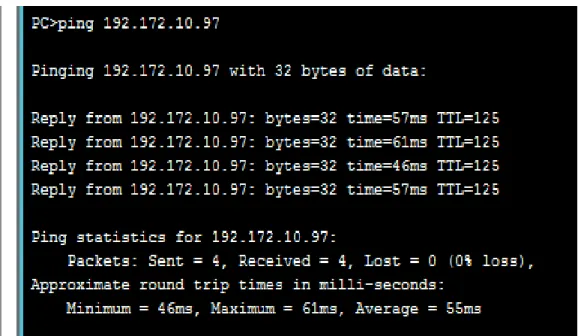
A través de ping. Los siguientes son algunos de los pantallazos donde se prueba la conectividad de la red.
De PC1-PASTO a PC1-ING (PASTO – BOGOTA)
De PC5-PASTO a PC1-BIBLIOTECA (PASTO – BUCARAMANGA) Ilustración 6. Ping PC1-Pasto a PC1-Ing
De PC1-BIBLIOTECA a PC1-PASTO (BUCARAMANGA – PASTO)
De PC1-BIBLIOTECA a ROUTER PASTO (BUCARAMANGA – PASTO) Ilustración 8. Ping PC1-Biblioteca a PC1-Pasto
A través de tracert. A continuación se muestran algunos pantallazos. De PC10-RYC a ROUTER-BUCARAMANGA (BOGOTÁ – BUCARAMANGA)
De PC1-ING a PC1-BIBLIOTECA (BOGOTA – BUCARAMANGA) Ilustración 10. Tracert PC10-RyC a Router-Bucaramanga
2. CASO DE ESTUDIO CCNA2
Una empresa con varias sucursales en diferentes ciudades del país desea modernizar el manejo de la red de datos que actualmente tiene y se describe a continuación:
Nombre empresa: CHALVER
Objeto social: Empresa dedicada a la exportación e importación de equipos de cómputo.
Sedes:
*Principal: Pasto
Sucursales • Bogotá • Medellín • Pereira • Cali • Cartagena • Ibagué • Cúcuta
• Bucaramanga • Barranquilla • Villavicencio
Descripción Sede Principal:
Se cuenta con un edificio que tiene 3 pisos, en el primero están los cuartos de equipos que permiten la conexión con todo el país, allí se tiene:
• 3 Enrutadores CISCO principales, uno para el enlace nacional, otro para la administración de la red interna en los pisos 1 y 2 y otro para el tercer piso.
• 3 SwitchesCatalyst CISCO, uno para cada piso del edificio con soporte de 24 equipos cada uno, actualmente se está al 95% de la capacidad.
• Un canal dedicado con tecnología ATM que se ha contratado con ISP nacional de capacidad de 2048 Kbps.
piso), Ventas (30 equipos, segundo piso), Importaciones (10 Equipos, tercer piso), Mercadeo (5 Equipos, tercer piso) y Contabilidad (5 Equipos, tercer piso)
• El direccionamiento a nivel nacional es Clase A privada, se tiene un IP pública al ISP para el servicio de Internet la cual es: 200.21.85.93 Mascara: 255.255.240.0.
• Actualmente el Enrutamiento se hace con RIP versión 1, tanto para la parte local como para la parte nacional.
Descripción de sucursales:
Cada sucursal se compone de oficinas arrendadas en un piso de un edificio y compone de los siguientes elementos:
• Dos Routers por sucursal: Uno para el enlace nacional y otro para la administración de la red interna.
• Un SwitchCatalyst para 24 equipos, actualmente se utilizan 20 puertos.
• Los 20 equipos se utilizan así: 10 para ventas, 5 para sistemas, 2 para importaciones y 3 para contabilidad.
• Un canal dedicado con tecnología ATM para conectarse a la sede principal de 512Kbps.
• El direccionamiento a nivel local es Clase C privado y a nivel nacional B como se había dicho en la descripción de la sede principal.
• El enrutamiento también es RIP.
Entonces:
1. Realizar el diseño de la sede principal y sucursales con las especificaciones actuales, un archivo PKT para la sede principal y para una sucursal.
2. Realizar un diseño a nivel de Routers y Switch para todo el país con PacketTracert. 3. Aplicar el direccionamiento especificado en el diseño del punto anterior.
4. Aplicar el enrutamiento actual en el diseño del punto 2.
5. Cambiar las especificaciones de direccionamiento y enrutamiento según las siguientes condiciones:
• Aplicar VLSM en la sede principal y sucursales, para la conexión nacional
• Aplicar Enrutamiento OSPF en la conexión Nacional, EIGRP para la conexión interna en la sede principal
2.1 DISEÑO CON ESPECIFICACIONES ACTUALES
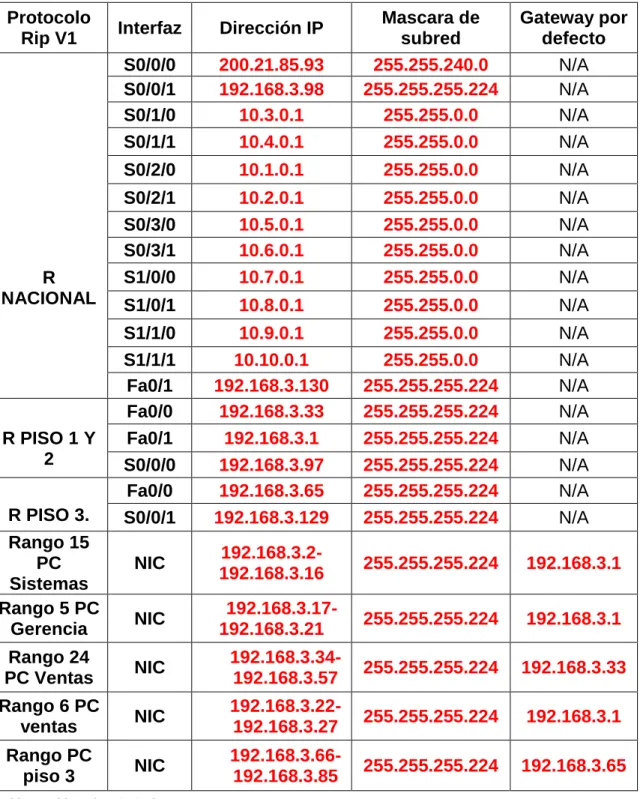
SEDE PRINCIPAL PASTO,
Subred direccionamiento nacional 10.0.0.0 Subred direccionamiento local 192.168.0.0
Protocolo
Rip V1 Interfaz Dirección IP
Mascara de subred Gateway por defecto R NACIONAL
S0/0/0 200.21.85.93 255.255.240.0 N/A S0/0/1 192.168.3.98 255.255.255.224 N/A
S0/1/0 10.3.0.1 255.255.0.0 N/A
S0/1/1 10.4.0.1 255.255.0.0 N/A
S0/2/0 10.1.0.1 255.255.0.0 N/A
S0/2/1 10.2.0.1 255.255.0.0 N/A
S0/3/0 10.5.0.1 255.255.0.0 N/A
S0/3/1 10.6.0.1 255.255.0.0 N/A
S1/0/0 10.7.0.1 255.255.0.0 N/A
S1/0/1 10.8.0.1 255.255.0.0 N/A
S1/1/0 10.9.0.1 255.255.0.0 N/A
S1/1/1 10.10.0.1 255.255.0.0 N/A
Fa0/1 192.168.3.130 255.255.255.224 N/A
R PISO 1 Y 2
Fa0/0 192.168.3.33 255.255.255.224 N/A Fa0/1 192.168.3.1 255.255.255.224 N/A S0/0/0 192.168.3.97 255.255.255.224 N/A
R PISO 3.
Fa0/0 192.168.3.65 255.255.255.224 N/A S0/0/1 192.168.3.129 255.255.255.224 N/A Rango 15
PC Sistemas
NIC
192.168.3.2-192.168.3.16 255.255.255.224 192.168.3.1
Rango 5 PC
Gerencia NIC
192.168.3.17-
192.168.3.21 255.255.255.224 192.168.3.1
Rango 24
PC Ventas NIC
192.168.3.34-192.168.3.57 255.255.255.224 192.168.3.33 Rango 6 PC
ventas NIC
192.168.3.22-192.168.3.27 255.255.255.224 192.168.3.1
Rango PC
piso 3 NIC
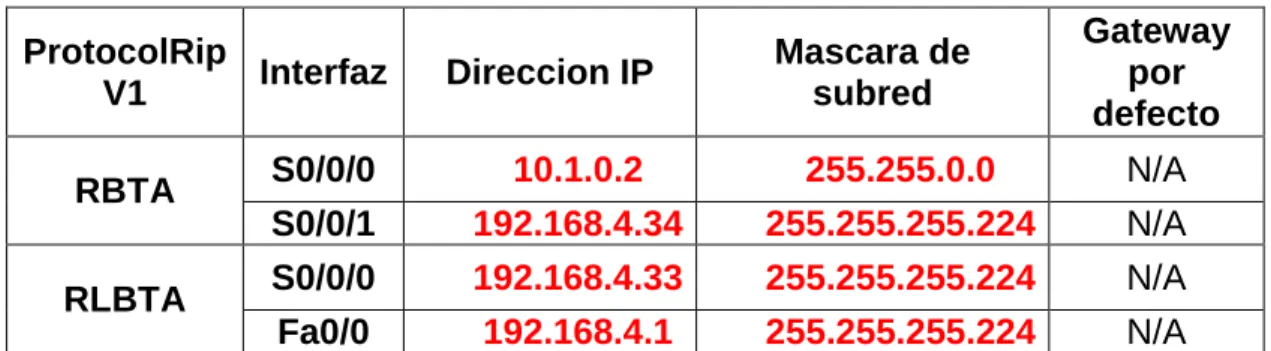
SEDE BOGOTA
Subred nacional 10.1.0.0 Subred local 192.168.4.0
ProtocolRip
V1 Interfaz Direccion IP
Mascara de subred
Gateway por defecto
RBTA S0/0/0 10.1.0.2 255.255.0.0 N/A
S0/0/1 192.168.4.34 255.255.255.224 N/A RLBTA S0/0/0 192.168.4.33 255.255.255.224 N/A Fa0/0 192.168.4.1 255.255.255.224 N/A Tabla 9. Tabla sede Bogotá
SEDE MEDELLIN
Subred nacional 10.2.0.0 Subred local 192.168.5.0
ProtocolRip
V1 Interfaz Direccion IP
Mascara de subred
Gateway por defecto
RMED S0/0/0 10.2.0.2 255.255.0.0 N/A
S0/0/1 192.168.5.34 255.255.255.224 N/A RLMED S0/0/0 192.168.5.33 255.255.255.224 N/A Fa0/0 192.168.5.1 255.255.255.224 N/A Tabla 10. Tabla sede Medellín
SEDE PEREIRA
Subred nacional 10.3.0.0 Subred local 192.168.6.0
ProtocolRip
V1 Interfaz Direccion IP
Mascara de subred
Gateway por defecto
RPEREIRA S0/0/0 10.3.0.2 255.255.0.0 N/A
S0/0/1 192.168.6.34 255.255.255.224 N/A RLPEREIRA S0/0/0 192.168.6.33 255.255.255.224 N/A Fa0/0 192.168.6.1 255.255.255.224 N/A Tabla 11. Tabla sede Pereira