PRUEBAS DE HABILIDADES PRÁCTICAS CCNA
ALEXANDER CASTAÑEDA VILLALBA
CÓDIGO 75158013
GERARDO GRANADOS ACUÑA TUTOR
UNIVERSIDAD NACIONAL ABIERTA Y A DISTANCIA UNAD
INTRODUCCIÓN
OBJETIVOS
Implementar una red de trabajo segura, confiable y escalable.
Segmentar de redes con Vlans.
Configurar la red según criterios de diseño
Crear listas de acceso para restringir el acceso a redes externas o a servicios que no
sean propias de una VLAN.
Implementar el protocolo de enrutamiento OSPFv2 según criterios de diseño.
Realizar pruebas de ping, tracer y telent para verificar la conectividad entre equipos,
DESCRIPCIÓN DEL ESCENARIO PROPUESTO PARA LA PRUEBA DE HABILIDADES
Una empresa de Tecnología posee tres sucursales distribuidas en las ciudades de Bogotá, Medellín y Bucaramanga, en donde el estudiante será el administrador de la red, el cual deberá configurar e interconectar entre sí cada uno de los dispositivos que forman parte del escenario, acorde con los lineamientos establecidos para el direccionamiento IP, protocolos de enrutamiento y demás aspectos que forman parte de la topología de red.
1. Configurar el direccionamiento IP acorde con la topología de red para cada uno de los dispositivos que forman parte del escenario 2. Configurar el protocolo de enrutamiento OSPFv2 bajo los siguientes criterios:
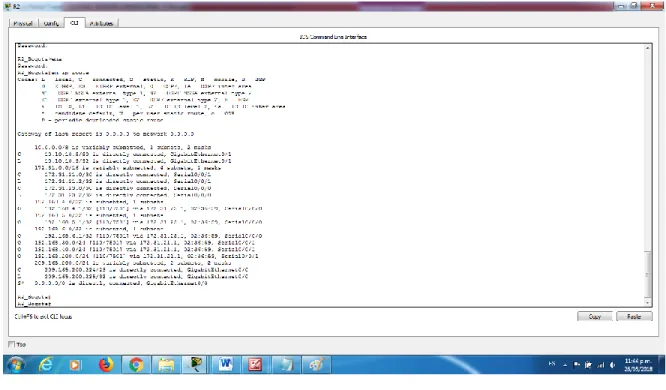
Verificar información de OSPF
Visualizar tablas de enrutamiento y routers conectados por OSPFv2
TABLA DE ENRUTAMIENTO R1
TABLA DE ENRUTAMIENTO R2
Imagen No. 3
TABLA DE ENRUTAMIENTO R3
Visualizar lista resumida de interfaces por OSPF en donde se ilustre el costo de cada
interface
Visualizar el OSPF Process ID, Router ID, Address summarizations, Routing Networks,
and passive interfaces configuradas en cada router.
OSPF RESUMIDA R1
OSPF RESUMIDA R2
Imagen No. 6
OSPF RESUMIDA R3
3. Configurar VLANs, Puertos troncales, puertos de acceso, encapsulamiento, Inter-VLAN Routing y Seguridad en los Switches acorde a la topología de red establecida.
4. En el Switch 3 deshabilitar DNS lookup
5. Asignar direcciones IP a los Switches acorde a los lineamientos.
6. Desactivar todas las interfaces que no sean utilizadas en el esquema de red.
7. Implement DHCP and NAT for IPv4.
8. Configurar R1 como servidor DHCP para las VLANs 30 y 40.
9. Reservar las primeras 30 direcciones IP de las VLAN 30 y 40 para configuraciones estáticas.
Configurar DHCP pool para VLAN 30 Name: ADMINISTRACIÓN DNS-Server: 10.10.10.11 Domain-Name: ccna-unad.com Establecer default gateway. Configurar DHCP pool para VLAN 40 Name: MERCADEO
DNS-Server: 10.10.10.11
10. Configurar NAT en R2 para permitir que los host puedan salir a internet
11. Configurar al menos dos listas de acceso de tipo estándar a su criterio en para restringir o permitir tráfico desde R1 o R3 hacia R2.
CONFIGURACIÓN ROUTER 1
R1_Medellin#sh run Building configuration...
Current configuration: 1699 bytes !
version 15.1
no service timestamps log datetime msec no service timestamps debug datetime msec service password-encryption
!
hostname R1_Medellin !
enable secret 5 $1$mERr$9cTjUIEqNGurQiFU.ZeCi1 !
no ip cef no ipv6 cef !
license udi pid CISCO1941/K9 sn FTX1524KTI7 !
no ip domain-lookup !
!
spanning-tree mode pvst !
interface GigabitEthernet0/0 no ip address
duplex auto speed auto !
interface GigabitEthernet0/0.30
description VLAN ADMINISTRATION encapsulation dot1Q 30
ip address 192.168.30.1 255.255.255.0 !
interface GigabitEthernet0/0.40 description VLAN MERCADEO encapsulation dot1Q 40
ip address 192.168.40.1 255.255.255.0 !
ip address 192.168.200.1 255.255.255.0 !
interface GigabitEthernet0/1 no ip address
duplex auto speed auto shutdown !
interface Serial0/0/0
description CONEXION AL R2 bandwidth 128
ip address 172.31.21.1 255.255.255.252 ip ospf cost 7500
clock rate 128000 !
interface Serial0/0/1 no ip address
clock rate 2000000 shutdown
!
interface Vlan1 no ip address !
router ospf 1 router-id 1.1.1.1 log-adjacency-changes passive-interface default
no passive-interface Serial0/0/0 network 172.31.21.0 0.0.0.3 area 0 network 192.168.30.0 0.0.0.255 area 0 network 192.168.40.0 0.0.0.255 area 0 network 192.168.200.0 0.0.0.255 area 0 !
ip classless
ip route 0.0.0.0 0.0.0.0 Serial0/0/0 !
ip flow-export version 9 !
! !
banner motd ^C PROHIBIDO EL ACCESO NO AUTORIZADO ^C !
! ! !
line con 0
login !
line aux 0 !
line vty 0 4
password 7 0822455D0A16 logging synchronous
CONFIGURACIÓN ROUTER 2
R2_Bogota#sh run Building configuration...
Current configuration : 2203 bytes !
version 15.1
no service timestamps log datetime msec no service timestamps debug datetime msec no service password-encryption
!
hostname R2_Bogota !
! !
enable secret 5 $1$mERr$9cTjUIEqNGurQiFU.ZeCi1 !
!
ip dhcp excluded-address 192.168.30.1 192.168.30.30 ip dhcp excluded-address 192.168.40.1 192.168.40.30 !
ip dhcp pool ADMINISTACION default-router 192.168.30.1 dns-server 10.10.10.11 ip dhcp pool MERCADEO default-router 192.168.40.1 dns-server 10.10.10.11
ip dhcp pool ADMIISTRACION network 192.168.30.0 255.255.255.0 !
! !
no ip cef no ipv6 cef !
! !
username webuser privilege 15 password 0 cisco12345 !
!
license udi pid CISCO1941/K9 sn FTX1524PS0Y !
!
no ip domain-lookup
! !
spanning-tree mode pvst !
!interface GigabitEthernet0/0
description CONEXION PC-INTERNET ip address 209.165.200.225 255.255.255.248 ip nat outside
duplex auto speed auto !
interface GigabitEthernet0/1
ip address 10.10.10.9 255.255.255.252 ip nat inside
duplex auto speed auto !
interface Serial0/0/0
description CONEXION R3_B/MANGA bandwidth 128
ip address 172.31.23.2 255.255.255.252 ip ospf cost 7500
clock rate 128000 !
interface Serial0/0/1
description CONEXION A R1_MEDELLIN bandwidth 128
ip address 172.31.21.2 255.255.255.252 ip ospf cost 7500
!
interface Vlan1 no ip address shutdown !
router ospf 1 router-id 2.2.2.2 log-adjacency-changes
passive-interface GigabitEthernet0/1 network 10.10.10.8 0.0.0.3 area 0 network 172.31.21.0 0.0.0.3 area 0 network 172.31.23.0 0.0.0.3 area 0 !
ip nat pool INTERNET 209.165.200.225 209.165.200.228 netmask 255.255.255.248 ip nat inside source static 10.10.10.10 209.165.200.229
ip classless
ip flow-export version 9 !
!
access-list 1 permit 192.168.30.0 0.0.0.255 access-list 1 permit 192.168.40.0 0.0.0.255 access-list 1 permit 192.168.4.0 0.0.3.255
access-list 101 permit tcp any host 209.165.200.229
access-list 101 permit tcp any host 209.165.200.229 eq www !
banner motd ^C PROHIBIDO EL ACCESO NO AUTORIZADO ^C !!
line con 0 password cisco login
!
line aux 0 !
line vty 0 4 password cisco logging synchronous login
CONFIGURACIÓN ROUTER 3
R2_Bogota#sh run Building configuration...
Current configuration : 2203 bytes !
version 15.1
no service timestamps log datetime msec no service timestamps debug datetime msec no service password-encryption
!
hostname R2_Bogota !
enable secret 5 $1$mERr$9cTjUIEqNGurQiFU.ZeCi1 !
!
ip dhcp excluded-address 192.168.30.1 192.168.30.30 ip dhcp excluded-address 192.168.40.1 192.168.40.30 !
ip dhcp pool ADMINISTACION default-router 192.168.30.1 dns-server 10.10.10.11 ip dhcp pool MERCADEO default-router 192.168.40.1 dns-server 10.10.10.11
ip dhcp pool ADMIISTRACION network 192.168.30.0 255.255.255.0 !
no ip cef no ipv6 cef !
username webuser privilege 15 password 0 cisco12345 !
!
license udi pid CISCO1941/K9 sn FTX1524PS0Y !
no ip domain-lookup
ip domain-name ccna-unad.com !
!
spanning-tree mode pvst !
interface GigabitEthernet0/0
ip address 209.165.200.225 255.255.255.248 ip nat outside
duplex auto speed auto !
interface GigabitEthernet0/1
ip address 10.10.10.9 255.255.255.252 ip nat inside
duplex auto speed auto !
interface Serial0/0/0
description CONEXION R3_B/MANGA bandwidth 128
ip address 172.31.23.2 255.255.255.252 ip ospf cost 7500
clock rate 128000 !
interface Serial0/0/1
description CONEXION A R1_MEDELLIN bandwidth 128
ip address 172.31.21.2 255.255.255.252 ip ospf cost 7500
!
interface Vlan1 no ip address shutdown !
router ospf 1 router-id 2.2.2.2 log-adjacency-changes
passive-interface GigabitEthernet0/1 network 10.10.10.8 0.0.0.3 area 0 network 172.31.21.0 0.0.0.3 area 0 network 172.31.23.0 0.0.0.3 area 0 !
ip nat pool INTERNET 209.165.200.225 209.165.200.228 netmask 255.255.255.248 ip nat inside source static 10.10.10.10 209.165.200.229
ip classless
ip route 0.0.0.0 0.0.0.0 GigabitEthernet0/0 !
ip flow-export version 9 !
!
access-list 101 permit tcp any host 209.165.200.229
access-list 101 permit tcp any host 209.165.200.229 eq www !
banner motd ^C PROHIBIDO EL ACCESO NO AUTORIZADO ^C !
! ! !
line con 0 password cisco login
!
line aux 0 !
line vty 0 4 password cisco logging synchronous login
! ! ! end
13. Verificar procesos de comunicación y redireccionamiento de tráfico en los routers mediante el uso de Ping y Traceroute.
PRUEBAS DE PING Y TRACERROUTE DESDE R1 HACIA R2 Y R3
R1_Medellin#ping 172.31.21.2 Type escape sequence to abort.
Sending 5, 100-byte ICMP Echos to 172.31.21.2, timeout is 2 seconds: !!!!!
Success rate is 100 percent (5/5), round-trip min/avg/max = 1/1/2 ms R1_Medellin#ping 172.31.23.2
Type escape sequence to abort.
Sending 5, 100-byte ICMP Echos to 172.31.23.2, timeout is 2 seconds: !!!!!
Success rate is 100 percent (5/5), round-trip min/avg/max = 1/3/15 ms R1_Medellin#ping 172.31.23.1
Type escape sequence to abort.
Sending 5, 100-byte ICMP Echos to 172.31.23.1, timeout is 2 seconds: !!!!!
Success rate is 100 percent (5/5), round-trip min/avg/max = 2/4/15 ms R1_Medellin#ping 192.168.6.0
Type escape sequence to abort.
Sending 5, 100-byte ICMP Echos to 192.168.6.0, timeout is 2 seconds: ...
Success rate is 0 percent (0/5) R1_Medellin#ping 192.168.6.1 Type escape sequence to abort.
Sending 5, 100-byte ICMP Echos to 192.168.6.1, timeout is 2 seconds: !!!!!
Success rate is 100 percent (5/5), round-trip min/avg/max = 2/2/5 ms R1_Medellin#ping 192.168.5.1
Type escape sequence to abort.
!!!!!
Success rate is 100 percent (5/5), round-trip min/avg/max = 2/2/4 ms R1_Medellin#ping 192.168.4.1
Type escape sequence to abort.
Sending 5, 100-byte ICMP Echos to 192.168.4.1, timeout is 2 seconds: !!!!!
Success rate is 100 percent (5/5), round-trip min/avg/max = 2/5/16 ms R1_Medellin#
R1_Medellin#ping 209.165.200.230 Type escape sequence to abort.
Sending 5, 100-byte ICMP Echos to 209.165.200.230, timeout is 2 seconds: .!!!!
Success rate is 80 percent (4/5), round-trip min/avg/max = 1/2/6 ms R1_Medellin#ping 209.165.200.230
Type escape sequence to abort.
Sending 5, 100-byte ICMP Echos to 209.165.200.230, timeout is 2 seconds: !!!!!
Success rate is 100 percent (5/5), round-trip min/avg/max = 1/4/17 ms R1_Medellin#tracer
R1_Medellin#traceroute 172.31.21.2 Type escape sequence to abort. Tracing the route to 172.31.21.2 1 172.31.21.2 2 msec 1 msec 0 msec R1_Medellin#traceroute 172.31.23.1 Type escape sequence to abort. Tracing the route to 172.31.23.1 1 172.31.21.2 1 msec 1 msec 0 msec 2 172.31.23.1 1 msec 1 msec 2 msec R1_Medellin#traceroute 209.165.200.230 Type escape sequence to abort.
PRUEBAS DE PING Y TRACERROUTE DESDE R2 HACIA R1 Y R3
R2_Bogota#ping 172.31.21.1 Type escape sequence to abort.
Sending 5, 100-byte ICMP Echos to 172.31.21.1, timeout is 2 seconds: !!!!!
Success rate is 100 percent (5/5), round-trip min/avg/max = 1/3/11 ms R2_Bogota#ping 172.31.23.1
Type escape sequence to abort.
Sending 5, 100-byte ICMP Echos to 172.31.23.1, timeout is 2 seconds: !!!!!
Success rate is 100 percent (5/5), round-trip min/avg/max = 1/3/14 ms R2_Bogota#ping 192.168.99.3
Type escape sequence to abort.
Sending 5, 100-byte ICMP Echos to 192.168.99.3, timeout is 2 seconds: ...
Success rate is 0 percent (0/5) R2_Bogota#ping 192.168.4.1 Type escape sequence to abort.
Sending 5, 100-byte ICMP Echos to 192.168.4.1, timeout is 2 seconds: !!!!!
Success rate is 100 percent (5/5), round-trip min/avg/max = 1/3/14 ms R2_Bogota#ping 192.168.5.1
Type escape sequence to abort.
Sending 5, 100-byte ICMP Echos to 192.168.5.1, timeout is 2 seconds: !!!!!
Success rate is 100 percent (5/5), round-trip min/avg/max = 1/3/15 ms R2_Bogota#ping 192.168.6.1
Type escape sequence to abort.
Sending 5, 100-byte ICMP Echos to 192.168.6.1, timeout is 2 seconds: !!!!!
Type escape sequence to abort.
Sending 5, 100-byte ICMP Echos to 192.168.99.2, timeout is 2 seconds: ...
Success rate is 0 percent (0/5) R2_Bogota#trace route 172.31.21.1 ^
% Invalid input detected at '^' marker. R2_Bogota#trace
PRUEBAS DE PING Y TRACERROUTE DESDE R3 HACIA R2 Y R1
R3_B/manga#ping 172.31.23.2 Type escape sequence to abort.
Sending 5, 100-byte ICMP Echos to 172.31.23.2, timeout is 2 seconds: !!!!!
Success rate is 100 percent (5/5), round-trip min/avg/max = 1/3/12 ms R3_B/manga#ping 172.31.21.2
Type escape sequence to abort.
Sending 5, 100-byte ICMP Echos to 172.31.21.2, timeout is 2 seconds: !!!!!
Success rate is 100 percent (5/5), round-trip min/avg/max = 1/3/15 ms R3_B/manga#ping 172.31.21.1
Type escape sequence to abort.
Sending 5, 100-byte ICMP Echos to 172.31.21.1, timeout is 2 seconds: !!!!!
Success rate is 100 percent (5/5), round-trip min/avg/max = 2/4/15 ms R3_B/manga#ping 10.10.10.10
Type escape sequence to abort.
Sending 5, 100-byte ICMP Echos to 10.10.10.10, timeout is 2 seconds: .!!!!
Success rate is 80 percent (4/5), round-trip min/avg/max = 1/1/1 ms R3_B/manga#ping 209.165.200.230
Type escape sequence to abort.
Sending 5, 100-byte ICMP Echos to 209.165.200.230, timeout is 2 seconds: !!!!!
Success rate is 100 percent (5/5), round-trip min/avg/max = 1/5/20 ms R3_B/manga#ping 192.168.99
Translating "192.168.99"
% Unrecognized host or address or protocol not running. R3_B/manga#ping 192.168.99.2
Type escape sequence to abort.
CONCLUSIONES
Se implementó una red de trabajo segura, confiable y escalable.
Se crearon 3 VLANS y se configuraron según los parámetros.
Se configuró la red según criterios de diseño
Se crearon listas de acceso para restringir el acceso a redes externas o a servicios
que no sean propias de una VLAN.
Se implementó el protocolo de enrutamiento OSPFv2 según criterios de diseño.
Se realizaron pruebas de ping, tracer y telent para verificar la conectividad entre
BIBLIOGRAFÍA
Campus Virtual: www.unad.edu.co.
Cisco. (2018). Switching and Routing CCNA: Introducción a Redes. Agosto 8,
2018, de Unad Sitio web: https://1314297.netacad.com/courses/627676/grades. Cisco. (2018). Routing and Switching CCNA: Principios Básicos de Routing y
Switching. Agosto 8, 2018, de Cisco Sitio web: