Matlab and Simulink for Modeling and Control
Robert Babuˇska and Stefano Stramigioli
November 1999
Delft University of Technology
Delft
Control Laboratory1
Introduction
With the help of two examples, a DC motor and a magnetic levitation system, the use of MATLAB and Simulink for modeling, analysis and control design is demonstrated. It is assumed that the reader already has basic knowledge of MATLABand Simulink. The main focus is on the use of the Control System Toolbox functions. We recommend the reader to try the commands out directly in MATLABwhile reading this text. The examples have been implemented by the authors and can be downloaded fromhttp://lcewww.et.tudelft.nl/˜et4092. The implementation is done in MATLABversion 5.3 and has also been tested in version 5.2.
2
Modeling a DC Motor
In this example we will learn how to develop a linear model for a DC motor, how to analyze the model under MATLAB (poles and zeros, frequency response, time-domain response, etc.), how to design a controller, and how to simulate the open-loop and closed-loop systems under SIMULINK.
2.1 Physical System
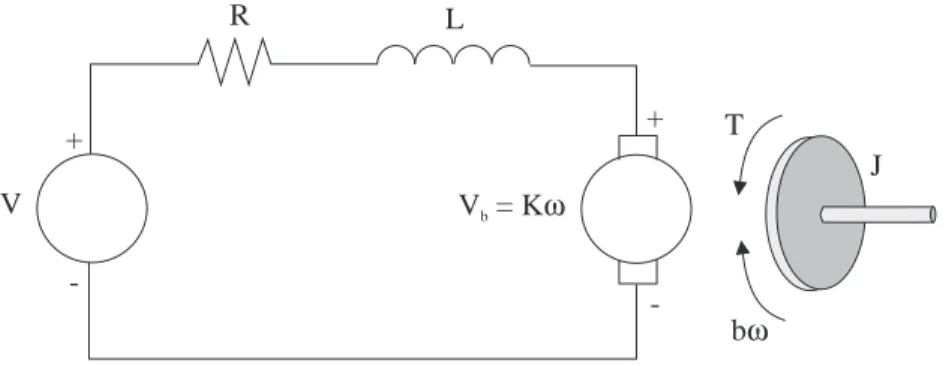
Consider a DC motor, whose electric circuit of the armature and the free body diagram of the rotor are shown in Figure 1.
V
T
J
R L
+
Vb= Kω
bω
-+
-Figure 1: Schematic representation of the considered DC motor.
The rotor and the shaft are assumed to be rigid. Consider the following values for the physical parameters:
moment of inertia of the rotor J =0.01 kg·m2 damping (friction) of the mechanical system b=0.1 Nms (back-)electromotive force constant K=0.01 Nm/A
electric resistance R=1Ω
electric inductance L=0.5 H
The input is the armature voltageV in Volts (driven by a voltage source). Measured variables are the angular velocity of the shaftωin radians per second, and the shaft angleθin radians.
2.2 System Equations
The motor torque,T, is related to the armature current,i, by a constant factorK:
T =Ki . (1)
The back electromotive force (emf),Vb, is related to the angular velocity by:
Vb=Kω=K
dθ
From Figure 1 we can write the following equations based on the Newton’s law combined with the Kirchhoff’s law:
Jd
2θ
dt2 +b
dθ
dt = Ki, (3)
Ldi
dt +Ri = V −K
dθ
dt . (4)
2.3 Transfer Function
Using the Laplace transform, equations (3) and (4) can be written as:
J s2θ(s) +bsθ(s) = KI(s), (5)
LsI(s) +RI(s) = V(s)−Ksθ(s), (6)
wheresdenotes the Laplace operator. From (6) we can expressI(s):
I(s) = V(s)−Ksθ(s)
R+Ls , (7)
and substitute it in (5) to obtain:
J s2θ(s) +bsθ(s) =KV(s)−Ksθ(s)
R+Ls . (8)
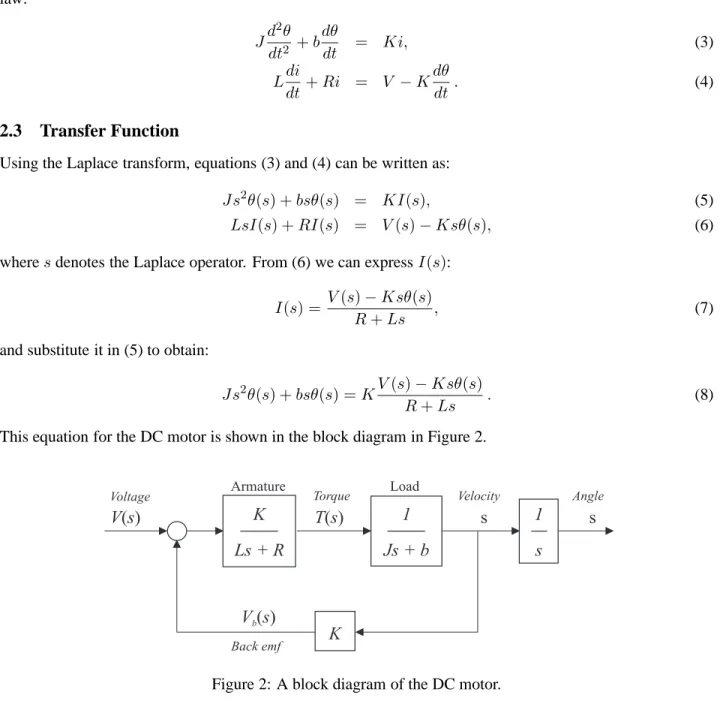
This equation for the DC motor is shown in the block diagram in Figure 2.
Velocity Torque
Armature
T s( )
Load
Back emf
Voltage Angle
w( ) s
V s( ) +
-1 Js + b
q( ) s
K V sb( )
K Ls + R
1 s
Figure 2: A block diagram of the DC motor.
From equation (8), the transfer function from the input voltage,V(s), to the output angle,θ, directly follows:
Ga(s) =
θ(s)
V(s) =
K
s[(R+Ls)(J s+b) +K2]. (9)
From the block diagram in Figure 2, it is easy to see that the transfer function from the input voltage,V(s), to the angular velocity,ω, is:
Gv(s) =
ω(s)
V(s) =
K
(R+Ls)(J s+b) +K2 . (10)
3
MATLAB Representation
entered in a descending order of the powers ofs.
Example: The polynomialA= 3s3+ 2s+ 10is in MATLAB entered as: A = [3 0 2 10].
Furthermore, we will make use of the function conv(A,B), which computes the product (convolution) of the polynomialsAandB. Open the M-filemotor.m. It already contains the definition of the motor constants:
J=0.01; b=0.1; K=0.01; R=1; L=0.5;
The transfer function (9) can be entered in MATLABin a number of different ways.
1. As Ga(s) can be expressed as Gv(s) · 1s, we can enter these two transfer functions separately and combine them in series:
aux = tf(K,conv([L R],[J b]))
Gv = feedback(aux,K);
Ga = tf(1,[1 0])*Gv;
Here, we made use of the function feedbackto create a feedback connection of two transfer functions and the multiplication operator *, which is overloaded by the LTI class of the Control System Toolbox
such that is computes the product of two transfer functions.
2. Instead of using convolution, the first of the above three commands can be replaced by the product of two transfer functions:
aux = tf(K,[L R])*tf(1,[J b]);
3. Another possibility (perhaps the most convenient one) is to define the transfer function in a symbolic way. First introduce a system representing the Laplace operator s (differentiator) and then enter the transfer function as an algebraic expression:
s = tf([1 0],1);
Gv = K/((L*s + R)*(J*s + b) + Kˆ2); Ga = Gv/s;
It is convenient to label the inputs and outputs by the names of the physical variables they represent:
Gv.InputName = ’Voltage’;
Gv.OutputName = ’Velocity’;
Ga.InputName = ’Voltage’;
Ga.OutputName = ’Angle’;
Now by calling motor from the workspace, we have both the velocity (Gv) and the position (Ga) transfer functions defined in the workspace.
3.1 Exercises
1. ConvertGvandGainto their respective state-space (functionss) and zero-pole-gain (functionzpk) rep-resentations.
2. What are the poles and zeros of the system? Is the system stable? Why?
4
Analysis
TheControl System Toolboxoffers a variety of functions that allow us to examine the system’s characteristics.
4.1 Time-Domain and Frequency Responses
As we may want plot the responses for the velocity and angle in one figure, it convenient to group the two transfer functions into a single system with one input, the voltage, and two outputs, the velocity and the angle:
G = [Gv; Ga];
Another way is to first convertGainto its state-space representation and then add one extra output being equal to the second state (the velocity):
G = ss(Ga);
set(G,’c’,[0 1 0; 0 0 1],’d’,[0;0],’OutputName’,{’Velocity’;’Angle’});
Note that this extension of the state-space model with an extra output has to be done in onesetcommand in order to keep the dimensions consistent.
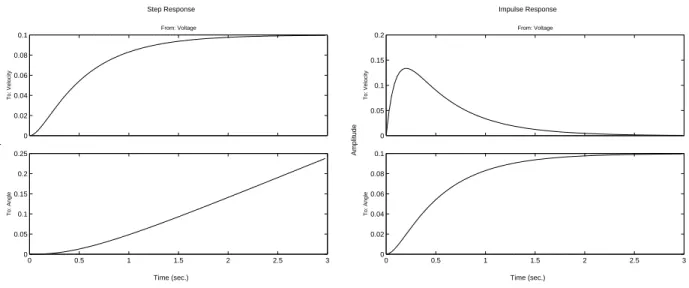
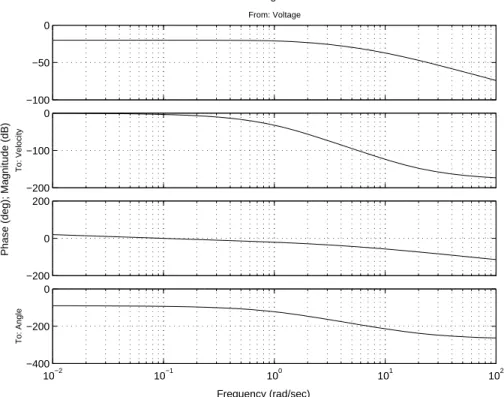
Now, we can plot the step, impulse and frequency responses of the motor model:
figure(1); step(G); figure(2); impulse(G); figure(3); bode(G);
You should get the plots given in Figure 3 and Figure 4.
Time (sec.) Amplitude Step Response 0 0.02 0.04 0.06 0.08 0.1 From: Voltage To: Velocity
0 0.5 1 1.5 2 2.5 3
0 0.05 0.1 0.15 0.2 0.25 To: Angle Time (sec.) Amplitude Impulse Response 0 0.05 0.1 0.15 0.2 From: Voltage To: Velocity
0 0.5 1 1.5 2 2.5 3
0 0.02 0.04 0.06 0.08 0.1 To: Angle
Figure 3: Step and impulse response.
4.2 Exercise
1. Simulate and plot in MATLAB the time response of the velocity and of the angle for an input signal
Frequency (rad/sec)
Phase (deg); Magnitude (dB)
Bode Diagrams
−100 −50 0
From: Voltage
−200 −100 0
To: Velocity
−200 0 200
10−2 10−1 100 101 102
−400 −200 0
To: Angle
Figure 4: Bode diagram.
5
Control Design
Let us design a PID feedback controller to control the velocity of the DC motor. Recall that the transfer function of a PID controller is:
C(s) = U(s)
E(s) =Kp+
Ki
s +Kds=
Kds2+Kps+Ki
s , (11)
whereuis the controller output (in our case the voltage V),e = uc−y is the controller input (the control error), andKp,Kd, Ki are the proportional, derivative and integral gains, respectively. A block diagram of the closed-loop system is given in Figure 5.
r
DC Motor
Velocity
V
Voltage
ω
e
+
−
PIDFigure 5: Closed-loop system with a PID controller.
5.1 Proportional Control
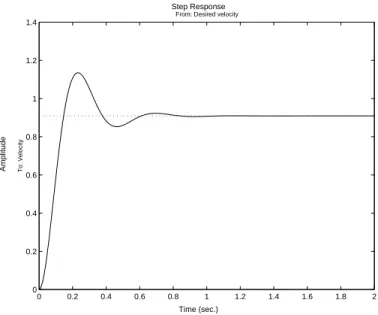
First, try a simple proportional controller with some estimated gain, say, 100. To compute the closed-loop transfer function, use thefeedbackcommand. Add the following lines to your m-file:
Kp = 100;
Gc = feedback(Gv*Kp,1);
HereGcis the closed-loop transfer function. To see the step response of the closed-loop system, enter:
figure(4); step(Gc,0:0.01:2);
You should get the plot given in Figure 6:
Time (sec.)
Amplitude
Step Response
0 0.2 0.4 0.6 0.8 1 1.2 1.4 1.6 1.8 2 0
0.2 0.4 0.6 0.8 1 1.2 1.4
From: Desired velocity
To: Velocity
Figure 6: Closed-loop step response with a P controller.
To eliminate the steady-state error, an integral action must be used. To reduce the overshoot, a derivative action can be employed. In the following section, a complete PID controller is designed.
5.2 PID Control
Let us try a PID controller. Edit your M-file so that it contains the following commands:
Kp = 1; Ki = 0.8; Kd = 0.3;
C = tf([Kd Kp Ki],[1 0]); rlocus(Ga*C);
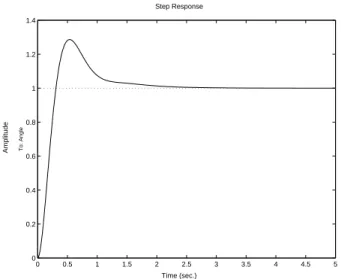
Kp = rlocfind(Ga*C); Gc = feedback(Ga*C*Kp,1); figure(9); step(Gc,0:0.01:5)
The rlocusand rlocfindfunctions are used to select the overall gain of the PID controller, such that the con-troller is stable and has the desired location of the poles (within the defined ratio among theKp,Ki andKd constants). If the design is not satisfactory, this ratio can be changed, of course. We should obtain a plot similar to the one in Figure 7:
5.3 Exercise
Time (sec.)
Amplitude
Step Response
0 0.5 1 1.5 2 2.5 3 3.5 4 4.5 5
0 0.2 0.4 0.6 0.8 1 1.2 1.4
To: Angle
Figure 7: Closed-loop step response with a PID controller.
6
SIMULINK Model
The block diagram from Figure 2 can be directly implemented in SIMULINK, as shown in the figure Figure 8:
omega To Workspace t
To Workspace Clock
angular speed
s 1 Step Input
Ls+R K(s) Armature
Js+b 1 Load +
−
K theta
To Workspace angle
Figure 8: SIMULINK block diagram of the DC motor.
Set the simulation parameters and run the simulation to see the step response. Compare with the response in Figure 3. Save the file under a new name and remove the position integrator along with the ‘Graph’ and ‘To Workspace’ blocks. Group the block describing the DC motor into a single block and add a PID controller according to Figure 5. The corresponding SIMULINK diagram is given in Figure 9. Experiment with the controller. Compare the responses with those obtained previously in MATLAB.
7
Obtaining MATLAB Representation from a SIMULINK Model
From a SIMULINK diagram, a MATLABrepresentation (state space, transfer function, etc.) can be obtained. The ‘Inport’ and ‘Outport’ blocks must be added to the SIMULINK diagram, as shown in Figure 10.
Then we can use thelinmodcommand to obtain a state-space representation of the diagram:
[A,B,C,D] = linmod(’filename’);
DC motor
omega To Workspace
angular speed Step Input
+ − Sum
PID
Clock
t To Workspace
Figure 9: SIMULINK block diagram of the DC motor with a PID controller.
s 1 Ls+R
K(s) Armature
Js+b 1 Load
+ −
K
1 Outport 1
Inport
Figure 10: SIMULINK block diagram of the DC motor with ‘Inport’ and ‘Outport’ blocks.
7.1 Exercise
1. Convert the four matrices A,B Cand Dinto a corresponding state space LTI object. Convert this one into a transfer function and compare the result with the transfer function entered previously in MATLAB.
8
Linearization of Nonlinear Simulink Model
In this section, we will use an example of a highly nonlinear system to show how to linearize a nonlinear Simulink model and extract the linearized model to MATLABfor control design purposes.
8.1 Magnetic Levitation System
Magnetic levitation as a friction-less support for high-speed trains, in bearings of low-energy motors, etc. It consists of an electromagnet which is attracted to an object made of a magnetic material (such as a rail). The control goal is to keep the air gap between this material and the electromagnet constant by controlling the current in the coil. A schematic drawing is given in Figure 11.
Rail
Airgap z
Current i FR
Fgrav Fdist
Computer
D-A A-D
Figure 11: Schematic drawing of the magnetic levitation system.
dynamic equation of the system is derived from the basic lawF =ma,
d2
dt2y(t) = 1
m(Fgrav+Fdist−FR), (12)
whereFgrav =mg,Fdist is an unknown disturbance, and the electromagnetic force is
FR=
µ0N2Ai2(t)
2y2(t) =Kmag
i2(t)
y2(t). (13)
In our example, we useKmag = 17.8µHandm= 8kg.
8.2 Nonlinear Simulink Model
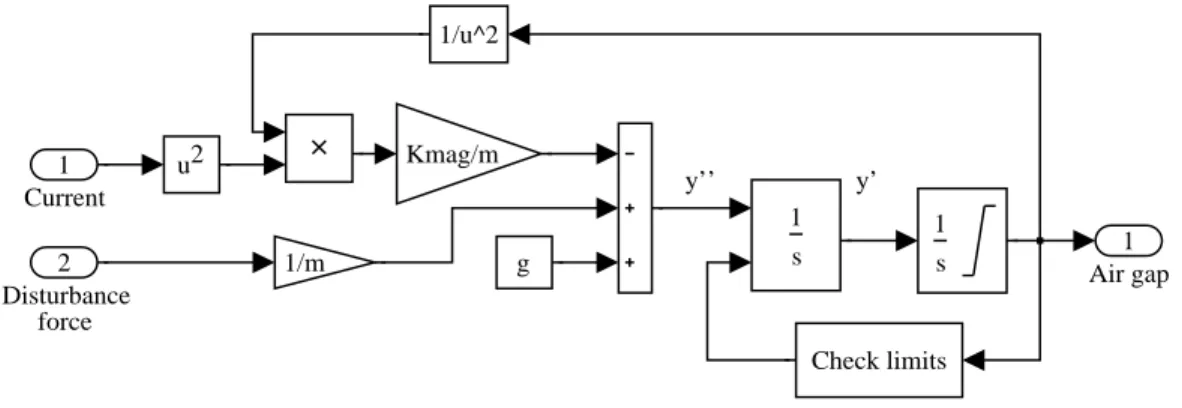
The nonlinear equation (12) is implemented in a Simulink model given in Figure 12.
y’ y’’
1 Air gap s
1 s
1
u2 Kmag/m
1/m
1/u^2
g
Check limits 2
Disturbance force
1 Current
Figure 12: Nonlinear Simulink model (bearing.mdl) of the magnetic levitation system.
8.3 Linearization
Let us linearize the nonlinear model around an operating point y0 = 2mm. There are two possibilities to linearize a nonlinear model:
• Analytically: by hand or using symbolic maths software such as Mathematica, Maple or the Symbolic
Toolbox of MATLAB.
• Numerically by applying thetrimandlinmodfunctions of MATLAB.
The second possibility will be explored here (you can do the first one as an exercise). Let us use the following script (lin.m):
params; % a script with definition of system’s parameters
file = ’bearing’; % nonlinear Simulink model to be linearized
u0 = [10; 0]; % initial input guess [input; disturbance]
y0 = 0.002; % initial output guess
x0 = [y0 0]’; % initial state guess
[x0,u0]=trim(file,x0,u0,y0,[],[2],[]); [A,B,C,D] = linmod(file,x0,u0);
Thetrimfunction numerically searches for an equilibrium of the nonlinear system. A reasonable initial guess (x0,u0andy0) must be provided. The additional parameters of this function are indices of the inputs, states and outputs that are not free to vary during the search. A typical example of such a variable is the state variable corresponding to the operating point.
Thelinmodfunction extracts the matrices of a linear model obtained by numerical linearization at the equilib-rium. Once this model is available, it can be used for analysis or control design.
8.4 Exercise
1. Choose another operating point and extract a linear model at that point. Compare to the model obtained above in terms their gains, poles and zeros.