PRUEBA DE HABILIDADES PRACTICAS CCNA EVALUACIÓN
DOMINGO DE JESUS FLOREZ VARILLA
UNIVERSIDAD NACIONAL ABIERTA Y A DISTANCIA ESCUELA DE CIENCIAS BÁSICAS Y TECNOLOGÍA
DIPLOMADO DE PROFUNDIZACIÓN CISCO DISEÑO E IMPLEMENTACIÓN DE SOLUCIONES INTEGRADAS LAN / WAN7 OPCI.
EVALUACIÓN – PRUEBA DE HABILIDADES PRÁCTICAS CCNA
PRESENTADO POR:
DOMINGO DE JESUS FLOREZ VARILLA
TUTOR
DIEGO EDINSON RAMIREZ CLAROS
UNIVERSIDAD NACIONAL ABIERTA Y A DISTANCIA
TABLA DE CONTENIDO
1. INTRODUCCION… ...5
2. JUSTIFICACION… ... 6
3. ESCENARIO 1 ... 7
3.1 SW1 VLAN y las asignaciones de puertos de VLAN deben cumplir con la tabla 1 ... 10
3.1.1 Habilitar el Puerto fa0/1 como troncal para la transmisión de datos en las VLANS ... 11
3.2 Los puertos de red que no se utilizan se deben deshabilitar………12
3.3 La información de dirección IP R1, R2 y R3 debe cumplir con la tabla ... 13
3.3.1 Configuración IP en ISP ... 13
3.3.2 Configuración IP en R1 ... 13
3.3.3 Configuración IP en R2 ... 16
3.3.4 Configuración IP en R3 ... 18
3.4 Laptop20, Laptop21, PC20, PC21, Laptop30, Laptop31, PC30 y PC31 deben obtener información IPv4 del servidor DHCP ... 19
3.5 R1 debe realizar una NAT con sobrecarga sobre una dirección IPv4 pública. Asegúrese de que todos los terminales pueden comunicarse con Internet pública (haga ping a la dirección ISP) y la lista de acceso estándar se llama INSIDE-DEVS ... 23
3.5.1 Creamos la lista de control de acceso usando el comando Access- list 23 3.5.2 NAT con sobrecarga ... 23
3.6 R1 debe tener una ruta estática predeterminada al ISP que se configuró y que incluye esa ruta en el dominio RIPv2 ...24
3.7 R2 es un servidor de DHCP para los dispositivos conectados al puerto FastEthernet0/0 ... 24
3.8 R2 debe, además de enrutamiento a otras partes de la red, ruta entre las VLAN 100 y 200 ... 25
3.9 El Servidor0 es sólo un servidor IPv6 y solo debe ser accesibles para los dispositivos en R3 (ping) ... 26
3.10 La NIC instalado en direcciones IPv4 e IPv6 de Laptop30, de Laptop31, de PC30 y obligación de configurados PC31 simultáneas (dual-stack). Las direcciones se deben configurar mediante DHCP y DHCPv6 ... 26
3.11 La interfaz FastEthernet 0/0 del R3 también deben tener direcciones IPv4 e IPv6 configuradas (dual- stack) ... 28
3.13 R1, R2 y R3 deben saber sobre las rutas de cada uno y la ruta predeterminada desde R1 ... 30 3.14 Verifique la conectividad. Todos los terminales deben poder hacer ping entre sí y a la dirección IP del ISP. Los terminales bajo el R3 deberían poder hacer IPv6-ping entre ellos y el servidor ...32
5
1. INTRODUCCION
La necesidad creciente que las Instituciones de Educación del mundo están enfrentando corresponde a la gran importancia de formar alumnos preparados para un ambiente de trabajo globalizado y para una sociedad digital. Lo que esta generado nuevas formas de aprender, enseñar y nuevos ambientes de aprendizaje.
En este escenario, las instituciones de enseñanza y los educadores cuenta cada vez más con las tecnologías digitales para que sus alumnos desarrollen las competencias, habilidades y actitudes que les permitirán beneficiarse de esa abundancia de informaciones, y estar preparados para ser los mejores profesionales.
Tomado de: https://gblogs.cisco.com/cansac/cisco-para-la-educacion-vision- general-de-las-soluciones/
El siguiente trabajo final de pruebas de habilidades CCNA del diplomado CISCO es el consolidado de los conocimientos obtenidos durante el curso, de los laboratorios realizados y de la interacción con los compañeros de grupo.
2. JUSTIFICACION
7
3. ESCENARIO 1
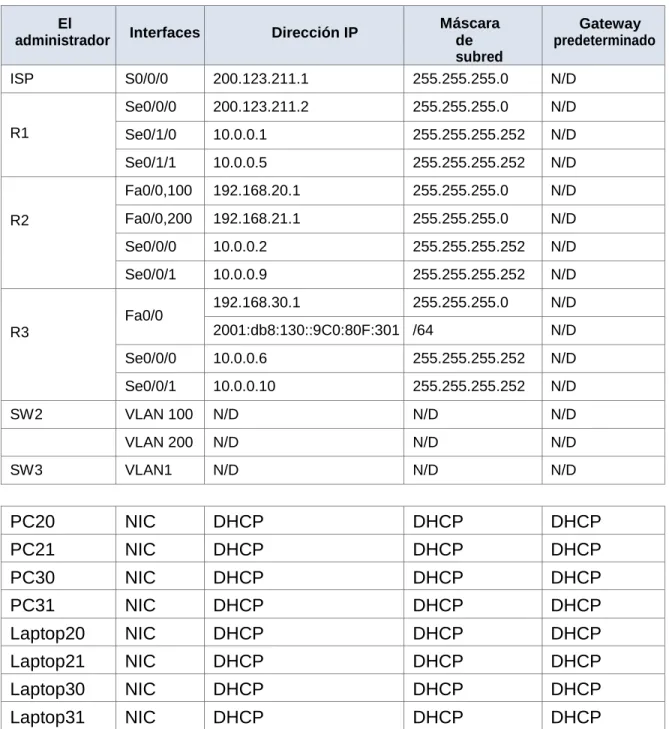
Tabla de direccionamiento
El
administrador Interfaces Dirección IP
Máscara de subred
Gateway predeterminado
ISP S0/0/0 200.123.211.1 255.255.255.0 N/D
R1
Se0/0/0 200.123.211.2 255.255.255.0 N/D
Se0/1/0 10.0.0.1 255.255.255.252 N/D
Se0/1/1 10.0.0.5 255.255.255.252 N/D
R2
Fa0/0,100 192.168.20.1 255.255.255.0 N/D
Fa0/0,200 192.168.21.1 255.255.255.0 N/D
Se0/0/0 10.0.0.2 255.255.255.252 N/D
Se0/0/1 10.0.0.9 255.255.255.252 N/D
R3
Fa0/0 192.168.30.1 255.255.255.0 N/D
2001:db8:130::9C0:80F:301 /64 N/D
Se0/0/0 10.0.0.6 255.255.255.252 N/D
Se0/0/1 10.0.0.10 255.255.255.252 N/D
SW2 VLAN 100 N/D N/D N/D
VLAN 200 N/D N/D N/D
SW3 VLAN1 N/D N/D N/D
PC20 NIC DHCP DHCP DHCP
PC21 NIC DHCP DHCP DHCP
PC30 NIC DHCP DHCP DHCP
PC31 NIC DHCP DHCP DHCP
Laptop20 NIC DHCP DHCP DHCP
Laptop21 NIC DHCP DHCP DHCP
9
Tabla de asignación de VLAN y de puertos
Dispositivo VLAN Nombre Interfaz
SW2 100 LAPTOPS Fa0/2-3
SW2 200 DESTOPS Fa0/4-5
SW3 1 - Todas las interfaces
Tabla de enlaces troncales
Dispositivo local Interfaz local Dispositivo remoto
SW2 Fa0/2-3 100
Situación
En esta actividad, demostrará y reforzará su capacidad para implementar NAT, servidor de DHCP, RIPV2 y el routing entre VLAN, incluida la configuración de direcciones IP, las VLAN, los enlaces troncales y las subinterfaces. Todas las pruebas de alcance deben realizarse a través de ping únicamente.
3.1 SW1 VLAN y las asignaciones de puertos de VLAN deben cumplir con la tabla 1.
S2>enable
S2#configure terminal
Enter configuration commands, one per line. End with CNTL/Z.
S2(config)#vlan 100
S2(config-vlan)#name LAPTOPS
S2(config-vlan)#exit
S2(config)#vlan 200
S2(config-vlan)#name DESKTOPS
S2(config-vlan)#exit
S2(config)#interface range fa0/2 - 3
S2(config-if-range)# switchport mode trunk
S2(config-if-range)#switchport trunk native vlan 100
S2(config-if-range)#no shutdown
S2(config-if-range)#exit
S2(config)#interface range fa0/4 – 5
S2(config-if-range)#port access vlan 200
S2(config-if-range)#no shutdown
11
3.1.1 Habilitar el Puerto fa0/1 como troncal para la transmisión de datos en las VLANS
S2(config)#interface fa0/1
3.2 Los puertos de red que no se utilizan se deben deshabilitar.
S2>enable
S2#configure terminal
Enter configuration commands, one per line. End with CNTL/Z.
S2(config)#interface range fa0/6 - 22, g0/1 - 2
13
3.3 La información de dirección IP R1, R2 y R3 debe cumplir con la tabla 1.
3.3.1 Configuración IP en ISP
ISP>enable
ISP#configure terminal
Enter configuration commands, one per line. End with CNTL/Z.
ISP(config)#interface lo0
ISP(config-if)#
%LINK-5-CHANGED: Interface Loopback0, changed state to up
%LINEPROTO-5-UPDOWN: Line protocol on Interface Loopback0, changed state to up
ISP(config-if)#ip address 192.31.7.1 255.255.255.0
ISP(config-if)#no shutdown
ISP(config-if)#end
3.3.2 Configuración IP en R1
R1>enable
R1#configure terminal
Enter configuration commands, one per line. End with CNTL/Z.
R1(config)#interface s0/0/0
R1(config-if)#ip address 200.123.211.2 255.255.255.0
R1(config-if)#no shutdown
%LINK-5-CHANGED: Interface Serial0/0/0, changed state to down
R1(config-if)#
R1(config-if)#exit
R1(config)#interface s0/1/0
R1(config-if)#ip address 10.0.0.1 255.255.255.252
%LINK-5-CHANGED: Interface Serial0/1/0, changed state to down
R1(config-if)#exit
R1(config)#inetrface s0/1/1
R1(config)#interface s0/1/1
R1(config-if)#ip address 10.0.0.5 255.255.255.252
3.3.3 Configuración IP en R2
R1>enable
R1#configure terminal
Enter configuration commands, one per line. End with CNTL/Z.
R2(config)#interface s0/0/0
R2(config-if)#ip address 10.0.0.2 255.255.255.252
R2(config-if)#no shutdown
%LINK-5-CHANGED: Interface Serial0/0/0, changed state to up
R2(config-if)#exit
R2(config)#interface s0/0/
%LINEPROTO-5-UPDOWN: Line protocol on Interface Serial0/0/0, changedstate to up
R2(config)#interface s0/0/1
R2(config-if)#ip address 10.0.0.9 255.255.255.252
R2(config-if)#no shutdown
%LINK-5-CHANGED: Interface Serial0/0/1, changed state to down
R2(config)#interface fa0/0.100
R2(config-subif)#encapsulation dot1Q 100
R2(config-subif)#ip address 192.168.20.1 255.255.255.0
R2(config-subif)#interface fa0/0.200
R2(config-subif)#encapsulation dot1Q 200
R2(config-subif)#ip address 192.168.21.1 255.255.255.0
R2(config-subif)#exit
R2(config)#interface fa0/0
3.3.4 Configuración IP en R3
R3>enable
R3#configure terminal
Enter configuration commands, one per line. End with CNTL/Z.
R3(config)#unicast routing-ipv6
R3(config)#ipv6 unicast-routing
R3(config)#end
R3#
%SYS-5-CONFIG_I: Configured from console by console
R3# configure terminal
Enter configuration commands, one per line. End with CNTL/Z.
R3(config)#interface fa0/0
R3(config-if)#ip address 192.168.30.1 255.255.255.0
R3(config-if)#ipv6 address 2001:db8:130::9C0:80F:301/64
R3(config-if)#no shutdown
R3(config)#interface s0/0/0
R3(config-if)#ip address 10.0.0.6 255.255.255.252
R3(config-if)#no shutdown
R3(config-if)#
%LINK-5-CHANGED: Interface Serial0/0/0, changed state to up
R3(config-if)#interface s0/0/1
%LINEPROTO-5-UPDOWN: Line protocol on Interface Serial0/0/0, changedstate to up
R3(config-if)#ip address 10.0.0.10 255.255.255.252
19
23
3.5 R1 debe realizar una NAT con sobrecarga sobre una dirección IPv4 pública. Asegúrese de que todos los terminales pueden comunicarse con Internet pública (haga ping a la dirección ISP) y la lista de acceso estándar se llama INSIDE-DEVS.
3.5.1 Creamos la lista de control de acceso usando el comando Access- list
R1>enable
R1#configure terminal
Enter configuration commands, one per line. End with CNTL/Z. R1(config)#ip access-list standard INSIDE-DEVS
R1(config-std-nacl)#permit 192.168.20.0 0.0.1.255 R1(config-std-nacl)#end
3.5.2 NAT con sobrecarga
R1>enable
R1#configure terminal
Enter configuration commands, one per line. End with CNTL/Z. R1(config)#nat inside source list 1 interface serial 0/0/0 overload R1(config)#interface s0/1/0
3.6 R1 debe tener una ruta estática predeterminada al ISP que se configuró yque incluye esa ruta en el dominio RIPv2.
R1>enable
R1#configure terminal
Enter configuration commands, one per line. End with CNTL/Z. R1(config)#ip route 0.0.0.0 0.0.0.0 10.0.0.1
R1(config)#router rip R1(config-router)#version 2 R1(config-router)#network 200.123.211.0 R1(config-router)#network 10.0.0.1 R1(config-router)#network 10.0.0.5 R1(config-router)#end
3.7 R2 es un servidor de DHCP para los dispositivos conectados al puerto FastEthernet0/0.
R2>enable
R2#configure terminal
Enter configuration commands, one per line. End with CNTL/Z.
R2(config)#ip dhcp excluded-address 192.168.20.1 R2(config)#ip dhcp excluded-address 192.168.21.1
R2(config)#ip dhcp pool fa0/0.100
R2(dhcp-config)#network 192.168.20.0 255.255.255.0
R2(dhcp-config)#default-router 192.168.20.1
R2(dhcp-config)#dns-server 200.123.211.1 R2(dhcp-config)#exit
R2(config)#ip dhcp pool fa0/0.200
25
3.9 El Servidor0 es sólo un servidor IPv6 y solo debe ser accesibles para los dispositivos en R3 (ping).
3.11 La interfaz FastEthernet 0/0 del R3 también deben tener direcciones IPv4 e IPv6 configuradas (dual- stack).
Router>enable
Router#configure terminal
Enter configuration commands, one per line. End with CNTL/Z. Router(config)#ipv6 unicast-routing
Router(config)#int g0/0
Router(config-if)#ipv6 enable
Router(config-if)#ip address 192.168.30.1 255.255.255.0
Router(config-if)#ipv6 address 2001:db8:130::9C0:80F:301/64 Router(config-if)#no shutdown
29
3.14 Verifique la conectividad. Todos los terminales deben poder hacer ping entre sí y a la dirección IP del ISP. Los terminales bajo el R3 deberían poder hacer IPv6-ping entre ellos y el servidor.
Ping PC 3
33
Ping IPV6
Conectividad con ISP
4. ESCENARIO
35
4.1 Configuraremos el direccionamiento IP acorde con la topología de red para cada uno de los dispositivos que forman parte del escenario propuesto.
ROUTER 1: BOGOTA
Router>enable
Router#configure terminal
Enter configuration commands, one per line. End with CNTL/Z. Router(config)#no ip domain-lookup
Router(config)#hostname R1 R1(config)#enable secret class R1(config)#line console 0 R1(config-line)#password cisco R1(config-line)#login
R1(config-line)#exit R1(config)#line vty 0 4
R1(config-line)#password cisco R1(config-line)#login
R1(config-line)#exit
R1(config)#service password-encryption
R1(config)#banner motd $Acceso no Autorizado$ R1(config)#int s0/0/0
R1(config-if)#desciption Coneccion a R2
R1(config-if)#ip address 172.31.21.1 255.255.255.252 R1(config-if)#clock rate 128000
R1(config-if)#no shutdown
ROUTER 2: MIAMI
Router>enable
Router#configure terminal
Enter configuration commands, one per line. End with CNTL/Z. Router(config)#no ip domain-lookup
Router(config)#hostname R2 R2(config)#enable secret class R2(config)#line console 0 R2(config-line)#password cisco R2(config-line)#login
R2(config-line)#exit R2(config)#line vty 0 4
R2(config-line)#password cisco R2(config-line)#login
R2(config)#service password-encryption
R2(config)#banner motd $Acceso no Autorizado$ R2(config)#int s0/0/1
R2(config-if)#description coneccion a R1
R2(config-if)#ip address 172.31.21.2 255.255.255.252 R2(config-if)#no shutdown
R2(config-if)#
%LINK-5-CHANGED: Interface Serial0/0/1, changed state to up
%LINEPROTO-5-UPDOWN: Line protocol on Interface Serial0/0/1, changed state to up
R2(config-if)#exit R2(config)#int s0/0/0
R2(config-if)#ip address 172.31.23.1 255.255.255.252 R2(config-if)#no shutdown
%LINK-5-CHANGED: Interface Serial0/0/0, changed state to down R2(config-if)#clock rate 128000
This command applies only to DCE interfaces R2(config-if)#exit
R2(config)#int g0/0
R2(config-if)#description coneccion a Internet
R2(config-if)#ip address 209.165.200.225 255.255.255.248 R2(config-if)#no shutdown
R2(config-if)#
%LINK-5-CHANGED: Interface GigabitEthernet0/0, changed state to up
%LINEPROTO-5-UPDOWN: Line protocol on Interface GigabitEthernet0/0, changed state to up
clock rate 128000 ^
% Invalid input detected at '^' marker. R2(config-if)#clock rate 128000 ^
37
ROUTER 3: BUENOS AIRES
Router>enable
Router#configure terminal
Enter configuration commands, one per line. End with CNTL/Z. Router(config)#no ip domain-lookup
Router(config)#hostname R3 R3(config)#enable secret class R3(config)#line console 0 R3(config-line)#password cisco R3(config-line)#login
R3(config-line)#exit R3(config)#line vty 0 4
R3(config-line)#password cisco R3(config-line)#login
R3(config-line)#exit
R3(config)#service password-encryption
R3(config)#banner motd $Acceso no Autorizado$ R3(config)#int s0/0/1
R3(config-if)#ip address 172.31.23.2 255.255.255.252 R3(config-if)#no shutdown
R3(config-if)#
%LINK-5-CHANGED: Interface Serial0/0/1, changed state to up
R3(config-if)#
%LINEPROTO-5-UPDOWN: Line protocol on Interface Serial0/0/1, changed state to up
R3(config-if)#int lo4
R3(config-if)#
%LINK-5-CHANGED: Interface Loopback4, changed state to up
%LINEPROTO-5-UPDOWN: Line protocol on Interface Loopback4, changed state to up
R3(config-if)#ip address 192.168.4.1 255.255.255.0 R3(config-if)#no shutdown
R3(config-if)#int lo5
R3(config-if)#
%LINEPROTO-5-UPDOWN: Line protocol on Interface Loopback5, changed state to up
R3(config-if)#ip address 192.168.5.1 255.255.255.0 R3(config-if)#no shutdown
R3(config-if)#int lo6
R3(config-if)#
%LINK-5-CHANGED: Interface Loopback6, changed state to up
%LINEPROTO-5-UPDOWN: Line protocol on Interface Loopback6, changed state to up
R3(config-if)#ip address 192.168.6.1 255.255.255.0 R3(config-if)#no shutdown
R3(config-if)#exit R3(config)#exit R3#
%SYS-5-CONFIG_I: Configured from console by console
Switch 1: S1
Switch>enable
Switch#configure terminal
Enter configuration commands, one per line. End with CNTL/Z. S1(config)#no ip domain-lookup
S1(config)#hostname S1 S1(config)#enable secret class S1(config)#line console 0 S1(config-line)#password cisco S1(config-line)#login
S1(config-line)#exit S1(config)#line vty 0 4
S1(config-line)#password cisco S1(config-line)#login
39
Switch 2: S3
Switch>enable
Switch#configure terminal
Enter configuration commands, one per line. End with CNTL/Z. Switch(config)#no ip domain-lookup
Switch(config)#hostname S3 S3(config)#enable secret class S3(config)#line console 0 S3(config-line)#password cisco S3(config-line)#login
S3(config-line)#exit S3(config)#line vty 0 4
S3(config-line)#password cisco S3(config-line)#login
S3(config-line)#exit
S3(config)#service password-encryption
S3(config)#banner motd $Accesso no Autorizado$ S3(config)#exit
PC: INTERNET PC
PC1: PC A
41
4.2 Configuraremos el protocolo de enrutamiento OSPFv2 para todos los router
del escenario bajo los siguientes criterios:
OSPFv2 area 0
Configuration Item or Task Specification
Router ID R1 1.1.1.1
Router ID R2 5.5.5.5
Router ID R3 8.8.8.8
Configurar todas las interfaces LAN como pasivas Establecer el ancho de banda para enlaces
seriales en 256 Kb/s
Ajustar el costo en la métrica de S0/0 a 9500
Router ID R1
R1(config)#router ospf 1
R1(config-router)#router-id 1.1.1.1
R1(config-router)#network 172.31.21.0 0.0.0.3 area 0 R1(config-router)#network 192.168.30.0 0.0.0.255 area 0 R1(config-router)#network 192.168.40.0 0.0.0.255 area 0 R1(config-router)#network 192.168.200.0 0.0.0.255 area 0 R1(config-router)#exit
R1(config)#interface Serial0/0/0 R1(config-if)#exit
R1(config)#int s0/0/0
Router ID R2
R2(config)#router ospf 1
R2(config-router)#router-id 5.5.5.5
R2(config-router)#network 172.31.21.0 0.0.0.3 area 0 R2(config-router)#
07:10:20: %OSPF-5-ADJCHG: Process 1, Nbr 1.1.1.1 on Serial0/0/1 from LOADING to FULL, Loading Done
R2(config-router)#network 172.31.23.0 0.0.0.3 area 0 R2(config-router)#network 172.31.23.0 0.0.0.3 area 0 R2(config-router)#network 10.10.10.0 0.0.0.255 area 0 R2(config-router)#exit
R2(config)#router ospf 1 R2(config-router)#int s0/0/0 R2(config-if)#bandwidth 256 R2(config-if)#int s0/0/1 R2(config-if)#bandwidth 256 R2(config-if)#ip ospf cost 9500 R2(config-if)#no shutdown
R2(config)#router ospf 1
R2(config-router)#passive-interface g0/1
R2(config-router)#auto-cost reference-bandwidth 1000 % OSPF: Reference bandwidth is changed.
Please ensure reference bandwidth is consistent across all routers.
Router ID R3
R3(config)#router ospf 1
R3(config-router)#router-id 8.8.8.8
R3(config-router)#network 172.31.23.0 0.0.0.3 area 0
07:37:07: %OSPF-5-ADJCHG: Process 1, Nbr 5.5.5.5 on Serial0/0/1 from LOADING to FULL, Loading Done
43
Verificar la información de OSPF
• Visualizar tablas de enrutamiento y routers conectados por OSPFv2
• Visualizar lista resumida de interfaces por OSPF en donde se ilustre el costo de cada interface
Aplicamos el comando “show ip ospf interface” R1
45
R3
• Visualizar el OSPF Process ID, Router ID, Address summarizations,
Routing Networks, and passive interfaces configuradas en cada router.
R2
47
Aplicamos el comando “show ip route ospf”
R1
R2
4.3 Configurar las VLANs, los Puertos troncales, los puertos de acceso, el encapsulamiento, la Inter-VLAN Routing y Seguridad en los Switches acorde a la topología de red establecida.
VLAN S1 S1(config)#vlan 30 S1(config-vlan)#name Administracion S1(config-vlan)#vlan 40 S1(config-vlan)#name Mercadeo S1(config-vlan)#vlan 200 S1(config-vlan)#name Mantenimiento S1(config-vlan)#int vlan 200
S1(config-if)#
%LINK-5-CHANGED: Interface Vlan200, changed state to up
S1(config-if)#ip address 192.168.200.2 255.255.255.0 S1(config-if)#no shutdown
S1(config-if)#ip default-gateway 192.168.200.1 S1(config)#int f0/3
S1(config-if)#switchport mode trunk
S1(config-if)#
%LINEPROTO-5-UPDOWN: Line protocol on Interface FastEthernet0/3, changed state to down
%LINEPROTO-5-UPDOWN: Line protocol on Interface FastEthernet0/3, changed state to up
%LINEPROTO-5-UPDOWN: Line protocol on Interface Vlan200, changed state to up
S1(config-if)#switchport trunk native vlan 1 S1(config-if)#int f0/24
S1(config-if)#switchport mode trunk
49
S1#configure terminal
Enter configuration commands, one per line. End with CNTL/Z. S1(config)#int fa0/1
S1(config-if)#switchport mode access S1(config-if)#switchport access vlan 30 S1(config-if)#
VLAN S3
S3#configure terminal
Enter configuration commands, one per line. End with CNTL/Z. S3(config)#interface GigabitEthernet0/1 S3(config-if)#exit S3(config)#vlan 30 S3(config-vlan)#name Administracion S3(config-vlan)#vlan 40 S3(config-vlan)#name Mercadeo S3(config-vlan)#vlan 200 S3(config-vlan)#name Mantenimiento S3(config-vlan)#int vlan 200
S3(config-if)#
%LINK-5-CHANGED: Interface Vlan200, changed state to up
%LINEPROTO-5-UPDOWN: Line protocol on Interface Vlan200, changed state to up
S3(config-if)#ip address 192.168.200.2 255.255.255.0 S3(config-if)#no shutdown
S3(config-if)#exit
S3(config)#ip default-gateway 192.168.200.1 S3(config)#int vlan 40
S3(config-if)#
%LINK-5-CHANGED: Interface Vlan40, changed state to up
%LINEPROTO-5-UPDOWN: Line protocol on Interface Vlan40, changed state to up
S3(config-if)#ip address 192.168.40.3 255.255.255.0 S3(config-if)#no shutdown
S3(config-if)#exit
S3(config)#ip default-gateway 192.168.40.1 S3(config)#int fa0/3
S3(config-if)#switchport trunk native vlan 1 S3(config-if)#exit
S3(config)#int fa0/1
S3(config-if)#switchport mode access S3(config-if)#switchport access vlan 40 S3(config-if)#exit
R1 ENCAPSULACION
R1(config)#int g0/1.30
R1(config-subif)#description Administracion LAN R1(config-subif)#encapsulation dot1q 30
R1(config-subif)#ip address 192.168.30.1 255.255.255.252 R1(config-subif)#int g0/1.40
R1(config-subif)#description Mercadeo LAN R1(config-subif)#encapsulation dot1q 40
R1(config-subif)#ip address 192.168.40.1 255.255.255.0 R1(config-subif)#int g0/1.30
R1(config-subif)#ip address 192.168.30.1 255.255.255.0 R1(config-subif)#exit
R1(config)#int g0/1.200
R1(config-subif)#description Mantenimiento LAN R1(config-subif)#encapsulation dot1q 200
R1(config-subif)#ip address 192.168.200.1 255.255.255.0 R1(config-subif)#exit
R1(config-router)#passive-interface g0/1 R1(config-router)#passive-interface g0/1.30 R1(config-router)#passive-interface g0/1.40 R1(config-router)#passive-interface g0/1.200
R1(config-router)# auto-cost reference-bandwidth 1000
R1(config)#int s0/0/0
51
4.4 En el Switch 3 deshabilitar DNS lookup
Aplicamos el comando “no ip domain-lookup”
4.5 Asignar direcciones IP a los Switches acorde a los lineamientos.
S1
S1#configure terminal
Enter configuration commands, one per line. End with CNTL/Z. S1(config)#vlan 30 S1(config-vlan)#name Administracion S1(config-vlan)#exit S1(config)#vlan 40 S1(config-vlan)#name Mercadeo S1(config-vlan)#vlan 200 S1(config-vlan)#name Mantenimiento S1(config-vlan)#exit
S1(config)#int vlan 200
S1(config-if)#ip address 192.168.99.2 255.255.255.0 S1(config-if)#exit
S1(config)#ip default-gateway 192.168.99.1 S1(config)#exit S3 S3(config)#vlan 30 S3(config-vlan)#name Administracion S3(config-vlan)#exit S3(config)#vlan 40 S3(config-vlan)#name Mercadeo S3(config-vlan)#vlan 200 S3(config-vlan)#name Mantenimiento S3(config-vlan)#exit
S3(config)#int vlan 200
S3(config-if)#ip address 192.168.99.3 255.255.255.0 S3(config-if)#exit
4.6 Desactivar todas las interfaces que no sean utilizadas en el esquema de red.
S1
S1#configure terminal
Enter configuration commands, one per line. End with CNTL/Z. S1(config)#int f0/3
S1(config-if)#switchport mode trunk
S1(config-if)#switchport trunk native vlan 1 S1(config-if)#int range fa0/1-2, fa0/4-23, g0/1-2 S1(config-if-range)#switchport mode access S1(config-if-range)#interface fa0/1
S1(config-if)#switchport mode access S1(config-if)#switchport access vlan 30 S1(config-if)#exit
S3
S3(config)#int fa0/3
S3(config-if)#switchport mode trunk
S3(config-if)#switchport trunk native vlan 1 S3(config-if)#int range fa0/1-2, fa0/4-23, g0/1-2 S3(config-if-range)#switchport mode access S3(config-if-range)#interface fa0/1
S3(config-if)#switchport access vlan 40
53
4.7 Implement DHCP and NAT for IPv4
R2#configure terminal
Enter configuration commands, one per line. End with CNTL/Z. R2(config)#interface Serial0/0/0
R2(config-if)#exit
R2(config)#user webuser privilege 15 secret cisco12345
R2(config)#ip nat inside source static 10.10.10.10 209.165.200.229 R2(config)#int g0/0
R2(config-if)#ip nat outside R2(config-if)#int g0/1 R2(config-if)#ip nat inside R2(config-if)#exit
R2(config)#access-list 1 permit 192.168.30.0 0.0.0.255 R2(config)#access-list 1 permit 192.168.40.0 0.0.0.255 R2(config)#access-list 1 permit 192.168.4.0 0.0.3.255
R2(config)#ip nat pool INTERNET 209.165.200.225 209.165.200.229 netmask 255.255.255.248
4.8 Configurar R1 como servidor DHCP para las VLANs 30 y 40.
R1(config)#ip dhcp pool vlan30
R1(dhcp-config)#network 192.168.30.0 255.255.255.0 R1(dhcp-config)#default-router 192.168.30.1
R1(dhcp-config)#ip dhcp pool vlan40
R1(dhcp-config)#network 192.168.40.0 255.255.255.0 R1(dhcp-config)#default-router 192.168.40.1
R1(dhcp-config)#ip dhcp pool vlan200
R1(dhcp-config)#network 192.168.200.0 255.255.255.0 R1(dhcp-config)#default-router 192.168.200.1
4.9 Reservar las primeras 30 direcciones IP de las VLAN 30 y 40 para configuraciones estáticas.
Configurar DHCP pool para VLAN 30
Name: ADMINISTRACION DNS-Server: 10.10.10.11 Domain-Name: ccna-unad.com Establecer default gateway.
Configurar DHCP pool para VLAN 40
Name: MERCADEO DNS-Server: 10.10.10.11 Domain-Name: ccna-unad.com Establecer default gateway.
R1(config)#ip dhcp excluded-address 192.168.30.1 192.168.30.30 R1(config)#ip dhcp excluded-address 192.168.40.1 192.168.40.30 R1(config)#ip dhcp pool Administracion
R1(dhcp-config)#dns-server 10.10.10.11
R1(dhcp-config)#domain-name ccna-unad.com ^
% Invalid input detected at '^' marker.
R1(dhcp-config)#default-router 192.168.30.1
R1(dhcp-config)#network 192.168.30.0 255.255.255.0 R1(dhcp-config)#
R1(dhcp-config)#ip dhcp pool Mercadeo R1(dhcp-config)#dns-server 10.10.10.11
R1(dhcp-config)#domain-name ccna-unad.com ^
% Invalid input detected at '^' marker.
R1(dhcp-config)#default-router 192.168.40.1
R1(dhcp-config)#network 192.168.40.0 255.255.255.0 R1(dhcp-config)#
4.10 Configurar NAT en R2 para permitir que los host puedan salir a internet
R2(config)#user webuser privilege 15 secret cisco12345
55
4.11 Configurar al menos dos listas de acceso de tipo estándar a su criterio en para restringir o permitir tráfico desde R1 o R3 hacia R2.
R2#configure terminal
Enter configuration commands, one per line. End with CNTL/Z. R2(config)#access-list 1 permit 192.168.30.0 0.0.0.255
R2(config)#access-list 1 permit 192.168.40.0 0.0.0.255 R2(config)#access-list 1 permit 192.168.4.0 0.0.3.255 R2(config)#access-list 1 permit 192.168.4.0 0.0.0.255
R2(config)#ip nat pool INTERNET 209.165.200.225 200.165.200.228 netmask 255.255.255.148
%Pool INTERNET mask 255.255.255.148 too small; should be at least 0.0.0.0 %Start and end addresses on different subnets
R2(config)#ip nat pool INTERNET 209.165.200.225 200.165.200.228 netmask 255.255.255.248
%Pool INTERNET mask 255.255.255.248 too small; should be at least 0.0.0.0 %Start and end addresses on different subnets
R2(config)#ip access-list standard ADMIN123 R2(config-std-nacl)#permit host 172.31.21.1 R2(config-std-nacl)#
4.12 Configurar al menos dos listas de acceso de tipo extendido o nombradas a su criterio en para restringir o permitir tráfico desde R1 o R3 hacia R2.
R2#wr
Building configuration... [OK]
R2#configure terminal
Enter configuration commands, one per line. End with CNTL/Z.
5. CONCLUSIÓN
❖ Se logró identificar, conectar y configurar cada uno de los dispositivos que
hacen parte de las topologías exigidas en los dos escenarios de las pruebas de habilidades. Logrando afianzar los conocimientos previos obtenidos durante el curso de CISCO.
❖ Se comprendieron y aplicaron los distintos protocolos requeridos para la
configuración y conectividad de todos los dispositivos, logrando su correcto funcionamiento en el ambiente de Cisco Packet Tracer.
❖ Mediante la solución de los escenarios desarrolle las destrezas y
59
6. BIBLIOGRAFIA
❖ CISCO. (2014). Exploración de la red. Fundamentos de Networking.
Recuperado de https://static-course-
assets.s3.amazonaws.com/ITN50ES/module1/index.html#1.0.1.1
❖ UNAD (2014). Diseño y configuración de redes con Packet Tracer [OVA].
Recuperado de https://1drv.ms/u/s!AmIJYei-NT1IhgCT9VCtl_pLtPD9
❖ CISCO. (2014). Asignación de direcciones IP. Fundamentos de Networking.
Recuperado de https://static-course-
assets.s3.amazonaws.com/ITN50ES/module8/index.html#8.0.1.1
❖ UNAD (2014). PING y TRACER como estrategia en procesos de
Networking [OVA]. Recuperado de https://1drv.ms/u/s!AmIJYei-
NT1IhgTCtKY-7F5KIRC3
❖ CISCO. (2014). Configuración y conceptos básicos de Switching. Principios
de Enrutamiento y Conmutación. Recuperado de https://static-course- assets.s3.amazonaws.com/RSE50ES/module2/index.html#2.0.1.1
❖ CISCO. (2014). VLANs. Principios de Enrutamiento y Conmutación.
Recuperado de https://static-course-
assets.s3.amazonaws.com/RSE50ES/module3/index.html#3.0.1.1
❖ UNAD (2014). Configuración de Switches y Routers [OVA]. Recuperado de
https://1drv.ms/u/s!AmIJYei-NT1IhgL9QChD1m9EuGqC
❖ CISCO. (2014). DHCP. Principios de Enrutamiento y Conmutación.
Recuperado de https://static-course-
assets.s3.amazonaws.com/RSE50ES/module10/index.html#10.0.1.1
❖ Lucas, M. (2009). Cisco Routers for the Desperate : Router and Switch