SERGIO DAVID ROJAS VEGA
UNIVERSIDAD NACIONAL ABIERTA Y A DISTANCIA UNAD ESCUELA CIENCIAS BÁSICAS, TECNOLOGIA E INGENIERIA
SERGIO DAVID ROJAS VEGA
INFORME DE GRADO OPCIÓN DIPLOMADO
TUTOR: GIOVANNI ALBERTO BRACHO
UNIVERSIDAD NACIONAL ABIERTA Y A DISTANCIA UNAD ESCUELA CIENCIAS BÁSICAS, TECNOLOGIA E INGENIERIA
Pitalito, Diciembre 2018
NOTA DE ACEPTACION
______________________________ ______________________________ ______________________________ ______________________________ ______________________________ ______________________________ ______________________________
______________________________ Presidente del jurado
______________________________ Jurado
INTRODUCCIÓN ... 5
Escenario 1 ... 6
Escenario 2 ... 34
CONCLUSIONES ... 71
En el presente trabajo observaremos todo lo relacionado con lo que el estudiante ha visto en todo el diplomado, y donde se aborda el tema practico sobre las tres unidades que se miraron en el transcurso de cada actividad colaborativa, los fundamentos de Networking es uno de los temas principales que se manejó en la práctica ya que permitió identificar el tipo de red y clasificarlos por distintos modelos como se observa en la unidad 2 que se abarco direccionamiento IP y OSI.
Descripción de escenarios propuestos para la prueba de habilidades
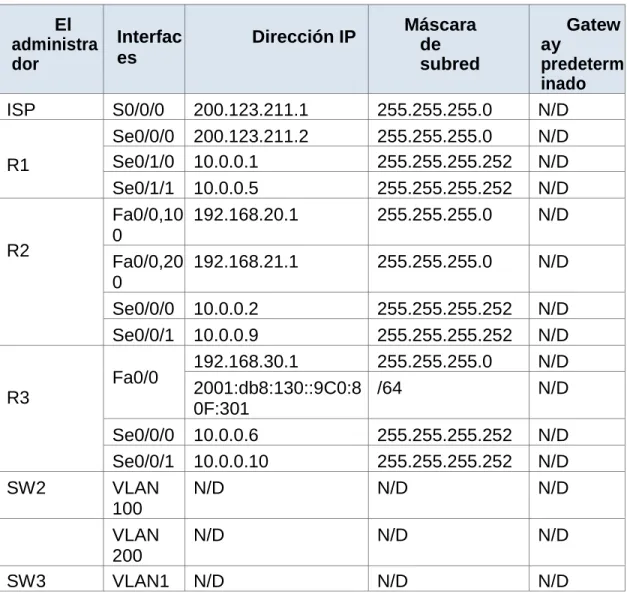
Tabla de direccionamiento El administra dor Interfac es
Dirección IP Máscara de subred
Gatew ay
predeterm inado ISP S0/0/0 200.123.211.1 255.255.255.0 N/D
R1
Se0/0/0 200.123.211.2 255.255.255.0 N/D Se0/1/0 10.0.0.1 255.255.255.252 N/D Se0/1/1 10.0.0.5 255.255.255.252 N/D
R2
Fa0/0,10 0
192.168.20.1 255.255.255.0 N/D
Fa0/0,20 0
192.168.21.1 255.255.255.0 N/D
Se0/0/0 10.0.0.2 255.255.255.252 N/D Se0/0/1 10.0.0.9 255.255.255.252 N/D
R3
Fa0/0 192.168.30.1 255.255.255.0 N/D 2001:db8:130::9C0:8
0F:301
/64 N/D
Se0/0/0 10.0.0.6 255.255.255.252 N/D Se0/0/1 10.0.0.10 255.255.255.252 N/D
SW2 VLAN
100
N/D N/D N/D
VLAN 200
N/D N/D N/D
Tabla de direccionamiento
PC20 NIC DHCP DHCP DHCP
PC21 NIC DHCP DHCP DHCP
PC30 NIC DHCP DHCP DHCP
PC31 NIC DHCP DHCP DHCP
Laptop20 NIC DHCP DHCP DHCP
Laptop21 NIC DHCP DHCP DHCP
Laptop30 NIC DHCP DHCP DHCP
Laptop31 NIC DHCP DHCP DHCP
Tabla de asignación de VLAN y de puertos
Dispositiv o
VLAN Nombre Interfa
z
SW2 100 LAPTOPS Fa0/2-3
SW2 200 DESTOPS Fa0/4-5
SW3 1 - Todas las interfaces
Tabla de enlaces troncales
Dispositivo local
Interfaz local
Dispositivo remoto
SW2 Fa0/2-3 100
Situación
• SW1 VLAN y las asignaciones de puertos de VLAN deben cumplir con la table
Configuramos el switch 2 S2>en
S2#conf t
Enter configuration commands, one per line. End with CNTL/Z. S2(config)#VLAN 100
S2(config-vlan) #name LAPTOPS S2(config-vlan) #EXIT
S2(config)#VLAN 200
S2(config-vlan) #name DESTOPS S2(config-vlan) #
S2(config-vlan) #EXIT S2(config)#int f0/2-3 ^
% Invalid input detected at '^' marker. S2(config)#int range f0/2-3
S2(config-if-range) #switchport mode access S2(config-if-range) #switchport access vlan 100 S2(config-if-range) #int range f0/4-5
S2(config-if-range) #switchport mode access S2(config-if-range) #switchport access vlan 200 S2(config-if-range) #
S2(config-if-range) #do copy r s Destination filename [startup-config]? Building configuration...
S2(config-if-range) #end S2#
%SYS-5-CONFIG_I: Configured from console by console wr
Building configuration... [OK]
S2#
• Los puertos de red que no se utilizan se deben deshabilitar.
Deshabilitamos S2#
S2#en S2#conf t
Enter configuration commands, one per line. End with CNTL/Z. S2(config)#int range f0/6-24
S2(config-if-range) #shutdown
%LINK-5-CHANGED: Interface FastEthernet0/6, changed state to administratively down
%LINK-5-CHANGED: Interface FastEthernet0/7, changed state to administratively down
%LINK-5-CHANGED: Interface FastEthernet0/8, changed state to administratively down
%LINK-5-CHANGED: Interface FastEthernet0/9, changed state to administratively down
%LINK-5-CHANGED: Interface FastEthernet0/10, changed state to administratively down
%LINK-5-CHANGED: Interface FastEthernet0/11, changed state to administratively down
%LINK-5-CHANGED: Interface FastEthernet0/13, changed state to administratively down
%LINK-5-CHANGED: Interface FastEthernet0/14, changed state to administratively down
%LINK-5-CHANGED: Interface FastEthernet0/15, changed state to administratively down
%LINK-5-CHANGED: Interface FastEthernet0/16, changed state to administratively down
%LINK-5-CHANGED: Interface FastEthernet0/17, changed state to administratively down
%LINK-5-CHANGED: Interface FastEthernet0/18, changed state to administratively down
%LINK-5-CHANGED: Interface FastEthernet0/19, changed state to administratively down
%LINK-5-CHANGED: Interface FastEthernet0/20, changed state to administratively down
%LINK-5-CHANGED: Interface FastEthernet0/21, changed state to administratively down
%LINK-5-CHANGED: Interface FastEthernet0/22, changed state to administratively down
%LINK-5-CHANGED: Interface FastEthernet0/23, changed state to administratively down
%LINK-5-CHANGED: Interface FastEthernet0/24, changed state to administratively down
S2(config-if-range) #
La información de dirección IP R1, R2 y R3 debe cumplir con la tabla 1.
Enter configuration commands, one per line. End with CNTL/Z. R1(config)#int s0/0/0
R1(config-if) #ip address 200.123.211.2 255.255.255.0 R1(config-if) #int s0/1/0
R1(config-if) #ip address 10.0.0.1 255.255.255.2 Bad mask 0xFFFFFF02 for address 10.0.0.1
R1(config-if) #ip address 10.0.0.1 255.255.255.252 R1(config-if) #int s0/1/1
R1(config-if) #ip address 10.0.0.5 255.255.255.252 R1(config-if) #no shu
R1(config-if) # R1#
Configuramos R2
R2>en R2#conf t
Enter configuration commands, one per line. End with CNTL/Z. R2(config)#int fa0/0.100
R2(config-subif) #encapsulation dot1Q 100
R2(config-subif) #ip address 192.168.20.1 255.255.255.0 R2(config-subif) #int fa0/0.200
R2(config-subif) #encapsulation dot1Q 200
R2(config-subif) #ip address 192.168.21.1 255.255.255.0 R2(config-subif) #int s0/0/0
R2(config-if) #ip address 10.0.0.2 255.255.255.252 R2(config-if) #int s0/0/1
R2(config-if) # R2(config-if) # R2(config-if) # R2(config-if) #exit R2(config)# Configuramos r3 R3>en
R3#conf t
Enter configuration commands, one per line. End with CNTL/Z. R3(config)#int fa0/0
R3(config-if) #ip address % Incomplete command. R3(config-if) #ip add % Incomplete command.
R3(config-if) #ip address 192.168.30.1 % Incomplete command.
R3(config-if) #exit R3(config)#int fa0/0
R3(config-if) #ip address 192.168.30.1 255.255.255.0 R3(config-if) #ipv6 address 2001:db8:130::9C0:80F:301/64 R3(config-if) #ipv6 no other-config-flag
R3(config-if) #
R3(config-if) #int serial 0/0/0
R3(config-if) #ip address 10.0.0.6 255.255.255.252 R3(config-if) #int serial 0/0/1
R3(config)#
• Laptop20, Laptop21, PC20, PC21, Laptop30, Laptop31, PC30 y PC31 deben obtener información IPv4 del servidor DHCP.
Pero primero asignamos la troncal Switch>en
Switch#conf t
Enter configuration commands, one per line. End with CNTL/Z. Switch(config)#hostname S3
S3(config)#int f0/1
S3(config-if) #switchport mode trunk
S3(config-if) #
%LINEPROTO-5-UPDOWN: Line protocol on Interface FastEthernet0/1, changed state to down
%LINEPROTO-5-UPDOWN: Line protocol on Interface FastEthernet0/1, changed state to up
S3(config-if) #
R2(config)#dhcp pool VLAN_200 ^
% Invalid input detected at '^' marker. R2(config)#IP dhcp pool VLAN_200
R2(dhcp-config) #network 192.168.21.0 255.255.255.0 R2(dhcp-config) #default-router 192.168.21.1
R2(dhcp-config) #network 192.168.20.0 255.255.255.0 R2(dhcp-config) #default-router 192.168.20.1
R2(dhcp-config) # R2(dhcp-config) #
R2(dhcp-config) #do copy r s
Destination filename [startup-config]? Building configuration...
[OK]
R2(dhcp-config) # R3>en
R3#conf t
Enter configuration commands, one per line. End with CNTL/Z. R3(config)#interface FastEthernet0/0
R3(config-if) #ip address 192.168.30.1 255.255.255.0 R3(config-if) #duplex auto
R3(config-if) #speed auto
R3(config-if) #ipv6 address FE80::1 link-local
R3(config-if) #ipv6 address 2001:db8:130::9C0:80F:301/64 R3(config-if) #
R3(config-if) #do copy r s
Destination filename [startup-config]? Building configuration...
[OK]
R3(config-if) # R3(config-if) #exit
R3(config)#ip dhcp pool VLAN_1
R3(dhcp-config) #network 192.168.30.0 255.255.255.0
R3(dhcp-config) #default-%DHCPD-4-PING_CONFLICT: DHCP address conflict: server pinged 192.16network 192.168.30.0 255.255.255.0
R3(dhcp-config) #network 192.168.30.0 255.255.255.0 R3(dhcp-config) #default-router 192.168.30.1
R3(dhcp-config) # R3(dhcp-config) # R3(dhcp-config) #exit
R3(config)#ipv6 dhcp pool VLAN_1
R3(config-dhcpv6) #dns-server 2001:DB8:130: R3(config-dhcpv6) #int f0/0
R3(config-if) #ipv6 address FE80::1 link-local
R3(config-if) #ipv6 nd other-config-flag R3(config-if) #ipv6 dhcp server vlan_1 R3(config-if) #
R3(config-if) #do copy r s
Destination filename [startup-config]? Building configuration...
[OK]
R3(config-if) #
R3(config-if) #%DHCPD-4-PING_CONFLICT: DHCP address conflict: server pinged 192.168.30.1.
• R1 debe realizar una NAT con sobrecarga sobre una dirección IPv4 pública. Asegúrese de que todos los terminales pueden comunicarse con Internet pública (haga ping a la dirección ISP) y la lista de acceso estándar se llama INSIDE-DEVS.
R1>en R1#conf t
Enter configuration commands, one per line. End with CNTL/Z. R1(config)#int s0/1/1
R1(config-if) #ip nat inside R1(config-if) #exit
R1(config)#int s0/1/0 R1(config-if) #ip nat inside R1(config-if) #exit
R1(config)#int s0/0/0
R1(config-if) #ip nat outside R1(config-if) #exit
R1(config)#ip nat pool INSIDE-DEVS 200.123.211.2 200.123.211.128 net % Incomplete command.
R1(config)#access-list 1 permit 192.168.0.0 0.0.255.255 R1(config)#access-list 1 permit 10.0.0.0 0.255.255.255
R1(config)#ip nat inside source list 1 interface s0/0/0 overload
R1(config)#ip nat inside source static tcp 192.168.30.6 80 200.123.211.1 80 R1(config)#
R1(config)#wr ^
% Invalid input detected at '^' marker. R1(config)#exit
R1#
%SYS-5-CONFIG_I: Configured from console by console
R1#wr
Building configuration... [OK]
R1#
R1#show ip nat translation
Pro Inside global Inside local Outside local Outside global tcp 200.123.211.1:80 192.168.30.6:80 --- ---
R1#show ip nat statistics
Total, translations: 1 (2 static, 4294967295 dynamic, 1 extended) Outside Interfaces: Serial0/0/0
Inside Interfaces: Serial0/1/0, Serial0/1/1 Hits: 0 Misses: 131
• R1 debe tener una ruta estática predeterminada al ISP que se configuró y que incluye esa ruta en el dominio RIPv2.
R1(config)#router rip
R1(config-router) #network 10.0.0.0 R1(config-router) #network 10.0.0.4
R1(config-router) #ip router 0.0.0.0 0.0.0.0 serial 0/0/0 ^
% Invalid input detected at '^' marker.
R1(config-router) #ip route 0.0.0.0 0.0.0.0 serial 0/0/0 R1(config)#defaul in
^
% Invalid input detected at '^' marker. R1(config)#default in
^
% Invalid input detected at '^' marker. R1(config)#default
^
% Invalid input detected at '^' marker. R1(config)#router rip
R1(config-router) #default-information originate R1(config-router) #
• R2 es un servidor de DHCP para los dispositivos conectados al puerto FastEthernet0/0.
Configuramos a router 2
R2(config)#ip dhcp pool INSIDE-DEVS R2(dhcp-config) #NETwork 192.168.20.1 % Incomplete command.
R2(dhcp-config) #NETwork 192.168.20.1 255.255.255.0 R2(dhcp-config) #NETwork 192.168.21.1 255.255.255.0 R2(dhcp-config) #default-router 192.168.1.1
R2(dhcp-config) #dns % Incomplete command.
R2(dhcp-config) #dns-server 0.0.0.0 R2(dhcp-config) #exit
R2(config)#
• R2 debe, además de enrutamiento a otras partes de la red, ruta entre las VLAN 100 y 200.
R2>en R2#conf t
Enter configuration commands, one per line. End with CNTL/Z. R2(config)#int vlan 100
R2(config-if) #ip address 192.168.20.1 255.255.255.0 % 192.168.20.0 overlaps with FastEthernet0/0.100 R2(config-if) #
R2(config)#int vlan 200
R2(config-if) #ip address 192.168.21.1 255.255.255.0 % 192.168.21.0 overlaps with FastEthernet0/0.200 R2(config-if) #end
R2#
wr
Building configuration... [OK]
R2#
• El Servidor0 es sólo un servidor IPv6 y solo debe ser accesibles para los dispositivos en R3 (ping).
simultáneas (dual-stack). Las direcciones se deben configurar mediante DHCP y DHCPv6.
• La interfaz FastEthernet 0/0 del R3 también deben tener direcciones IPv4 e IPv6 configuradas (dual- stack).
nterface FastEthernet0/0
ip address 192.168.30.1 255.255.255.0 duplex auto
speed auto
ipv6 address FE80::1 link-local
ipv6 address 2001:DB8:130::9C0:80F:301/64 ipv6 dhcp server vlan_1
• R1, R2 y R3 intercambian información de routing mediante RIP versión 2.
R1>en R1#conf t
Enter configuration commands, one per line. End with CNTL/Z. R1(config)#route rip
R1(config-router) #network 10.0.0.0 R1(config-router) #network 10.0.0.4 R1(config-router) #network 200.123.211.1 R1(config-router) #end
R1#
R2#EN R2#CONF T
R2(config-router) #VERSION 2
R2(config-router) #network 192.168.30.0 R2(config-router) #network 192.168.20.0 R2(config-router) #network 192.168.21.0 R2(config-router) #network 10.0.0.0 R2(config-router) #network 10.0.0.8
R2(config-router) # Configuramos el router 3
R3>en R3#conf t
Enter configuration commands, one per line. End with CNTL/Z. R3(config)#router rip
R3(config-router) #
R3(config-router) #passive-interface serial0/0/1 R3(config-router) #network 10.0.0.0
R3(config-router) #network 192.168.0.0 R3(config-router) #network 192.168.30.0 R3(config-router) #
R3(config-router) #do copy r s
Destination filename [startup-config]? Building configuration...
[OK]
• R1, R2 y R3 deben saber sobre las rutas de cada uno y la ruta predeterminada desde R1.
Cada router ya tiene su protocolo activo
PC 20
PC 21
Laptop 31-30
PC 31-30
ESCENARIO 2
Una empresa de Tecnología posee tres sucursales distribuidas en las ciudades de Miami, Bogotá y Buenos Aires, en donde el estudiante será el administrador de la red, el cual deberá configurar e interconectar entre sí cada uno de los dispositivos que forman parte del escenario, acorde con los lineamientos establecidos para el direccionamiento IP, protocolos de enrutamiento y demás aspectos que forman parte de la topología de red.
1. Configurar el direccionamiento IP acorde con la topología de red para cada uno de los dispositivos que forman parte del escenario
Router>en Router#conf t
Enter configuration commands, one per line. End with CNTL/Z. Router(config)#hostname R1
R1(config-if) #ip address 172.31.21.0 255.255.0.0 R1(config-if) #
R1(config-if) #no shutdown R1(config-if) #
Router>enable Router#conf t
Enter configuration commands, one per line. End with CNTL/Z. Router(config)#hostname R3
R3(config)#int g0/0
R3(config-if) #ip address 172.31.23.0 255.255.0.0 R3(config-if) #no shutdown
R3(config-if) #
%LINK-5-CHANGED: Interface GigabitEthernet0/0, changed state to up R3(config-if) #
2. Configurar el protocolo de enrutamiento OSPFv2 bajo los siguientes criterios:
OSPFv2 area 0
Configuration Item or Task Specification
Router ID R1 1.1.1.1
Router ID R2
5.5.5.5 Router ID R3
8.8.8.8 Configurar todas las interfaces LAN como
pasivas
Establecer el ancho de banda para enlaces
seriales en 256 Kb/s
Ajustar el costo en la métrica de S0/0 a 9500
Agregamos las direcciones IP para cada uno de los Routers y también en ella se agrega el ancho de banda de 128 Kb/s que es equivalente al comando clock rate 128000
R1(config-if) #ip address 1.1.1.1 255.255.255.252 R1(config-if) #clock rate 128000
R1(config-if) #no shutdown R1(config-if) #no shut R1(config-if) #
Configuramos r2
Router#conf t
Enter configuration commands, one per line. End with CNTL/Z. Router(config)#hostname R2
R2(config)#host R2 R2(config)#int g0/0/1
%Invalid interface type and number R2(config)#int s0/0/1
R2(config-if) #no shutdown R2(config-if) #
R2(config-if) #ip address % Incomplete command.
R2(config-if) #ip address 5.5.5.5 255.255.255.252 R2(config-if) #clock rate 128000
This command applies only to DCE interfaces R2(config-if) #no shutdown
R2(config-if) #exit R2(config)#int s0/0/0 R2(config-if) #no shutdown
% 5.5.5.4 overlaps with Serial0/0/1 R2(config-if) #clock rate 128000 R2(config-if) #no shutdown R2(config-if) #
R3(config)#int s0/0/1
R3(config-if) #ip address 8.8.8.8 255.255.255.252 bad mask /30 for address 8.8.8.8 ^
% Invalid input detected at '^' marker.
R3(config-if) #ip address 8.8.8.8 255.255.255.252 Bad mask /30 for address 8.8.8.8
R3(config-if) #ip address 8.8.8.8 255.255.255.0 R3(config-if) #clock rate 128000
This command applies only to DCE interfaces R3(config-if) #no shutdown
R3(config-if) # R3(config-if) #
Ahora realizamos la configuración del OSPF a cada uno de los Routers
R1(config)#router ospf 1
R1(config-router) #network 172.31.21.0 0.0.0.255 area 0 R1(config-router) #
R1(config-router) #
R2(config)#router ospf 1
R2(config-router) # R2(config-router) #
R3>en R3#conf t
Enter configuration commands, one per line. End with CNTL/Z. R3(config)#router ospf 1
R3(config-router) #network 172.31.23.0 0.0.0.255 % Incomplete command.
R3(config-router) #network 172.31.23.0 0.0.0.255 area 0 R3(config-router) #
Asignamos las direcciones IP a los Loopback
R2(config)#interface lo0
R2(config-if) #
%LINK-5-CHANGED: Interface Loopback0, changed state to up
%LINEPROTO-5-UPDOWN: Line protocol on Interface Loopback0, changed state to up
R2(config-if) #ip address 10.10.10.10 255.255.255.255 R2(config-if) #end
R2#
R2#
R3(config-router) #exit R3(config)#interface lo4 R3(config-if) #
%LINK-5-CHANGED: Interface Loopback4, changed state to up
%LINEPROTO-5-UPDOWN: Line protocol on Interface Loopback4, changed state to up
R3(config-if) #ip address 192.168.4.0 255.255.255.255 R3(config-if) #ip address 192.168.5.0 255.255.255.255 R3(config-if) #ip address 192.168.6.0 255.255.255.255 R3(config-if) #end
R3#
%SYS-5-CONFIG_I: Configured from console by console
R3#
Direccionamiento IP de los Switch Switch>en
Switch#conf t
Enter configuration commands, one per line. End with CNTL/Z. Switch(config)#host S1
S1(config)#int vlan 30
S1(config-if) #ip address 192.168.99.2 255.255.255.0 S1(config-if) #exit
S1(config)#ip default-gateway 192.168.1.1 S1(config)#
S1(config)#
S3 Switch>en Switch#conf t
Enter configuration commands, one per line. End with CNTL/Z. Switch(config)#hostname S3
S3(config-if) #ip address 192.168.99.3 255.255.255.0 S3(config-if) #exit
S3(config)#ip default-gateway 192.168.1.3 S3(config)#
S3(config)#
Configurar todas las interfaces LAN como pasivas
R1>en R1#conf t
Enter configuration commands, one per line. End with CNTL/Z. R1(config)#router ospf 10
R1(config-router) #passive-interface default R1(config-router) #end
R1#
%SYS-5-CONFIG_I: Configured from console by console
R1# R2>en R2#conf t
Enter configuration commands, one per line. End with CNTL/Z. R2(config)#router ospf 10
R2(config-router) #passive-interface default R2(config-router) #end
R2#
%SYS-5-CONFIG_I: Configured from console by console
R2#
R3>en R3#conf t
Enter configuration commands, one per line. End with CNTL/Z. R3(config)#router ospf 10
R3(config-router) #passive-interface default R3(config-router) #end
R3#
%SYS-5-CONFIG_I: Configured from console by console
Verificar información de OSPF
• Visualizar tablas de enrutamiento y routers conectados por OSPFv2
R1#
%SYS-5-CONFIG_I: Configured from console by console R1#show ip route
Codes: L - local, C - connected, S - static, R - RIP, M - mobile, B - BGP D - EIGRP, EX - EIGRP external, O - OSPF, IA - OSPF inter area N1 - OSPF NSSA external type 1, N2 - OSPF NSSA external type 2 E1 - OSPF external type 1, E2 - OSPF external type 2, E - EGP i - IS-IS, L1 - IS-IS level-1, L2 - IS-IS level-2, ia - IS-IS inter area * - candidate default, U - per-user static route, o - ODR
P - periodic downloaded static route Gateway of last resort is not set
1.0.0.0/8 is variably subnetted, 2 subnets, 2 masks C 1.1.1.0/30 is directly connected, Serial0/0/0 L 1.1.1.1/32 is directly connected, Serial0/0/0
172.31.0.0/16 is variably subnetted, 2 subnets, 2 masks C 172.31.0.0/16 is directly connected, GigabitEthernet0/0 L 172.31.21.0/32 is directly connected, GigabitEthernet0/0
R1# R2#
%SYS-5-CONFIG_I: Configured from console by console R2#show ip route
Codes: L - local, C - connected, S - static, R - RIP, M - mobile, B - BGP D - EIGRP, EX - EIGRP external, O - OSPF, IA - OSPF inter area N1 - OSPF NSSA external type 1, N2 - OSPF NSSA external type 2 E1 - OSPF external type 1, E2 - OSPF external type 2, E - EGP i - IS-IS, L1 - IS-IS level-1, L2 - IS-IS level-2, ia - IS-IS inter area * - candidate default, U - per-user static route, o - ODR
P - periodic downloaded static route Gateway of last resort is not set
5.0.0.0/8 is variably subnetted, 2 subnets, 2 masks C 5.5.5.4/30 is directly connected, Serial0/0/1 L 5.5.5.5/32 is directly connected, Serial0/0/1 10.0.0.0/32 is subnetted, 1 subnets
R2#
R3#show ip route
Codes: L - local, C - connected, S - static, R - RIP, M - mobile, B - BGP D - EIGRP, EX - EIGRP external, O - OSPF, IA - OSPF inter area N1 - OSPF NSSA external type 1, N2 - OSPF NSSA external type 2 E1 - OSPF external type 1, E2 - OSPF external type 2, E - EGP i - IS-IS, L1 - IS-IS level-1, L2 - IS-IS level-2, ia - IS-IS inter area * - candidate default, U - per-user static route, o - ODR
P - periodic downloaded static route Gateway of last resort is not set
8.0.0.0/8 is variably subnetted, 2 subnets, 2 masks C 8.8.8.0/24 is directly connected, Serial0/0/1 L 8.8.8.8/32 is directly connected, Serial0/0/1 192.168.6.0/32 is subnetted, 1 subnets
C 192.168.6.0/32 is directly connected, Loopback4 R3#
• Visualizar lista resumida de interfaces por OSPF en donde se ilustre el costo de cada interface
• El comando “show ip ospf interface brief” no se puede implementar en Packet Tracer. Se puede utilizar el comando “show ip ospf interface”
• Visualizar el OSPF Process ID, Router ID, Address summarizations, Routing Networks, and passive interfaces configuradas en cada router.
R1>show ip protocols Routing Protocol is "ospf 1"
Outgoing update filter list for all interfaces is not set Incoming update filter list for all interfaces is not set Router ID 172.31.21.0
Number of areas in this router is 1. 1 normal 0 stub 0 nssa Maximum path: 4
Routing for Networks:
172.31.21.0 110 00:19:35 Distance: (default is 110) Routing Protocol is "ospf 10"
Outgoing update filter list for all interfaces is not set Incoming update filter list for all interfaces is not set Router ID 1.1.1.1
Number of areas in this router is 0. 0 normal 0 stub 0 nssa Maximum path: 4
Routing for Networks: Passive Interface(s): Vlan1 GigabitEthernet0/0 GigabitEthernet0/1 Serial0/0/0 Serial0/0/1
Routing Information Sources: Gateway Distance Last Update Distance: (default is 110)
R1> R1>
R2>show ip protocols Routing Protocol is "ospf 1"
Outgoing update filter list for all interfaces is not set Incoming update filter list for all interfaces is not set Router ID 5.5.5.5
Number of areas in this router is 1. 1 normal 0 stub 0 nssa Maximum path: 4
Routing for Networks:
172.31.22.0 0.0.0.255 area 0 Routing Information Sources: Gateway Distance Last Update Distance: (default is 110)
Routing Protocol is "ospf 10"
Outgoing update filter list for all interfaces is not set Incoming update filter list for all interfaces is not set Router ID 10.10.10.10
Number of areas in this router is 0. 0 normal 0 stub 0 nssa Maximum path: 4
Vlan1 GigabitEthernet0/0 GigabitEthernet0/1 Serial0/0/0 Serial0/0/1 Loopback0
Routing Information Sources: Gateway Distance Last Update Distance: (default is 110)
R2>
R3#show ip protocols Routing Protocol is "ospf 1"
Outgoing update filter list for all interfaces is not set Incoming update filter list for all interfaces is not set Router ID 172.31.23.0
Number of areas in this router is 1. 1 normal 0 stub 0 nssa Maximum path: 4
Routing for Networks:
172.31.23.0 0.0.0.255 area 0 Routing Information Sources: Gateway Distance Last Update Distance: (default is 110)
Routing Protocol is "ospf 10"
Outgoing update filter list for all interfaces is not set Incoming update filter list for all interfaces is not set Router ID 192.168.6.0
Number of areas in this router is 0. 0 normal 0 stub 0 nssa Maximum path: 4
Routing for Networks: Passive Interface(s): Vlan1 GigabitEthernet0/0 GigabitEthernet0/1 Serial0/0/0 Serial0/0/1 Loopback4
R3#
3. Configurar VLANs, Puertos troncales, puertos de acceso,
encapsulamiento, Inter-VLAN Routing y Seguridad en los Switches acorde a la topología de red establecida.
S1>en S1#conf t
Enter configuration commands, one per line. End with CNTL/Z. S1(config)#vlan 30
S1(config-vlan) #
%LINK-5-CHANGED: Interface Vlan30, changed state to up S1(config-vlan) #name DHCP-A
S1(config-vlan) # S1(config-vlan) # S1>en
S1#conf t
Enter configuration commands, one per line. End with CNTL/Z. S1(config)#vlan 30
S1(config-vlan) #
%LINK-5-CHANGED: Interface Vlan30, changed state to up S1(config-vlan) #name DHCP-A
S1(config-vlan) # S1(config-vlan) #END S1#
%SYS-5-CONFIG_I: Configured from console by console S1#SHOW VLAN BRIEF
VLAN Name Status Ports
---- --- --- --- 1 default active Fa0/1, Fa0/2, Fa0/3, Fa0/4
Fa0/5, Fa0/6, Fa0/7, Fa0/8 Fa0/9, Fa0/10, Fa0/11, Fa0/12 Fa0/13, Fa0/14, Fa0/15, Fa0/16 Fa0/17, Fa0/18, Fa0/19, Fa0/20 Fa0/21, Fa0/22, Fa0/23, Fa0/24 Gig0/1, Gig0/2
30 DHCP-A active 1002 fddi-default active
1004 fddinet-default active 1005 trnet-default active
S1#
S3>EN S3#CONF T
Enter configuration commands, one per line. End with CNTL/Z. S3(config)#vlan 40
S3(config-vlan) #
%LINK-5-CHANGED: Interface Vlan40, changed state to up S3(config-vlan) #name DHCP-C
S3(config-vlan) #END S3#
%SYS-5-CONFIG_I: Configured from console by console S3#show vlan brief
VLAN Name Status Ports
---- --- --- --- 1 default active Fa0/1, Fa0/2, Fa0/3, Fa0/4
Fa0/5, Fa0/6, Fa0/7, Fa0/8 Fa0/9, Fa0/10, Fa0/11, Fa0/12 Fa0/13, Fa0/14, Fa0/15, Fa0/16 Fa0/17, Fa0/18, Fa0/19, Fa0/20 Fa0/21, Fa0/22, Fa0/23, Fa0/24 Gig0/1, Gig0/2
40 DHCP-C active 1002 fddi-default active
1003 token-ring-default active 1004 fddinet-default active 1005 trnet-default active
S3#
Puertos troncales S1#en
S1#conf t
Enter configuration commands, one per line. End with CNTL/Z. S1(config)#interface f0/1
S1(config-if) #switchport mode dynamic desirable S1(config-if) #
%LINEPROTO-5-UPDOWN: Line protocol on Interface FastEthernet0/1, changed state to up
S1(config-if) #end S1#
%SYS-5-CONFIG_I: Configured from console by console S1#en
S1#conf t
Enter configuration commands, one per line. End with CNTL/Z. S1(config)#int f0/3
S1(config-if) #
%LINEPROTO-5-UPDOWN: Line protocol on Interface FastEthernet0/3, changed state to up
%LINEPROTO-5-UPDOWN: Line protocol on Interface FastEthernet0/3, changed state to down
%LINEPROTO-5-UPDOWN: Line protocol on Interface FastEthernet0/3, changed state to up
%LINEPROTO-5-UPDOWN: Line protocol on Interface Vlan30, changed state to up S3#en
S3#conf t
Enter configuration commands, one per line. End with CNTL/Z. S3(config)#int f0/3
S3(config-if) #switchport mode dynamic desirabl S3(config-if) #
%LINEPROTO-5-UPDOWN: Line protocol on Interface FastEthernet0/3, changed state to up
S3(config-if) #int f0/1
S3(config-if) #switchport mode dynamic desirabl S3(config-if) #
%LINEPROTO-5-UPDOWN: Line protocol on Interface FastEthernet0/1, changed state to up
S1(config-if) #end S1#
%SYS-5-CONFIG_I: Configured from console by console S1#show interfaces trunk
Port Mode Encapsulation Status Native vlan Fa0/3 desirable n-802.1q trunking 1
Port Vlans allowed on trunk Fa0/3 1-1005
Port Vlans allowed and active in management domain Fa0/3 1,30
Fa0/3 1,30 S1#
S3#show interfaces trunk
Port Mode Encapsulation Status Native vlan Fa0/3 desirable n-802.1q trunking 1
Port Vlans allowed on trunk Fa0/3 1-1005
Port Vlans allowed and active in management domain Fa0/3 1,40
Port Vlans in spanning tree forwarding state and not pruned Fa0/3 1,40
S3#
Puertos de enlace
1#en S1#conf t
Enter configuration commands, one per line. End with CNTL/Z. S1(config)#interface f0/1
S1(config-if) #switchpot access vlan 30 ^
% Invalid input detected at '^' marker. S1(config-if) #switchport access vlan 30 S1(config-if) #interface f0/3
S1(config-if) #switchport access vlan 30 S1(config-if) #
S3#en S3#conf t
Enter configuration commands, one per line. End with CNTL/Z. S3(config)#interface f0/3
S3(config-if) #switchport access vlan 30
% Access VLAN does not exist. Creating vlan 30 S3(config-if) #switchport access vlan 40
S3(config-if) #interface f0/1
S1#show vlan brief VLAN Name Status Ports
---- --- --- --- 1 default active Fa0/2, Fa0/4, Fa0/5, Fa0/6
Fa0/7, Fa0/8, Fa0/9, Fa0/10 Fa0/11, Fa0/12, Fa0/13, Fa0/14 Fa0/15, Fa0/16, Fa0/17, Fa0/18 Fa0/19, Fa0/20, Fa0/21, Fa0/22 Fa0/23, Fa0/24, Gig0/1, Gig0/2 30 DHCP-A active Fa0/1
1002 fddi-default active
1003 token-ring-default active 1004 fddinet-default active 1005 trnet-default active S1#
S3#show vlan brief VLAN Name Status Ports
Fa0/7, Fa0/8, Fa0/9, Fa0/10 Fa0/11, Fa0/12, Fa0/13, Fa0/14 Fa0/15, Fa0/16, Fa0/17, Fa0/18 Fa0/19, Fa0/20, Fa0/21, Fa0/22 Fa0/23, Fa0/24, Gig0/1, Gig0/2 30 VLAN0030 active
40 DHCP-C active Fa0/1 1002 fddi-default active
1003 token-ring-default active 1004 fddinet-default active 1005 trnet-default active
S3#
Encapsulamiento e Inter-VLAN Routing
R1>en R1#conf t
Enter configuration commands, one per line. End with CNTL/Z. R1(config)#interface g0/1.1
R1(config-subif) #
R1(config-subif) #encapsulation dot1 Q 1 ^
R1(config-subif) #ip address 192.168.1.1 255.255.255.0 R1(config-subif) #
R1(config-subif) # Entramos a R2
R2>en R2#conf t
Enter configuration commands, one per line. End with CNTL/Z. R2(config)#interface g0/1.1
R2(config-subif) #encapsulation dot1Q 1
R2(config-subif) #ip address 192.168.1.2 255.255.255.0 R2(config-subif) #
R2#
Entramos a R3
R3>en R3#conf t
Enter configuration commands, one per line. End with CNTL/Z. R3(config)#interface g0/1.2
R3(config-subif) #encapsilation dot1Q 1 ^
% Invalid input detected at '^' marker. R3(config-subif) #encapsulation dot1Q 1
R3(config-subif) #ip address 192.168.1.3 255.255.255.0 R3(config-subif) #
Comprobamos R1
R1>show ip route
Codes: L - local, C - connected, S - static, R - RIP, M - mobile, B - BGP D - EIGRP, EX - EIGRP external, O - OSPF, IA - OSPF inter area N1 - OSPF NSSA external type 1, N2 - OSPF NSSA external type 2 E1 - OSPF external type 1, E2 - OSPF external type 2, E - EGP i - IS-IS, L1 - IS-IS level-1, L2 - IS-IS level-2, ia - IS-IS inter area * - candidate default, U - per-user static route, o - ODR
P - periodic downloaded static route Gateway of last resort is not set
1.0.0.0/8 is variably subnetted, 2 subnets, 2 masks C 1.1.1.0/30 is directly connected, Serial0/0/0 L 1.1.1.1/32 is directly connected, Serial0/0/0
C 172.31.0.0/16 is directly connected, GigabitEthernet0/0 L 172.31.21.0/32 is directly connected, GigabitEthernet0/0
R1>
Comprobamos R2 R2#show ip route
Codes: L - local, C - connected, S - static, R - RIP, M - mobile, B - BGP D - EIGRP, EX - EIGRP external, O - OSPF, IA - OSPF inter area N1 - OSPF NSSA external type 1, N2 - OSPF NSSA external type 2 E1 - OSPF external type 1, E2 - OSPF external type 2, E - EGP i - IS-IS, L1 - IS-IS level-1, L2 - IS-IS level-2, ia - IS-IS inter area * - candidate default, U - per-user static route, o - ODR
P - periodic downloaded static route Gateway of last resort is not set
5.0.0.0/8 is variably subnetted, 2 subnets, 2 masks C 5.5.5.4/30 is directly connected, Serial0/0/1 L 5.5.5.5/32 is directly connected, Serial0/0/1 10.0.0.0/32 is subnetted, 1 subnets
C 10.10.10.10/32 is directly connected, Loopback0 R2#
Comprobamos R3 R3#show ip route
Codes: L - local, C - connected, S - static, R - RIP, M - mobile, B - BGP D - EIGRP, EX - EIGRP external, O - OSPF, IA - OSPF inter area N1 - OSPF NSSA external type 1, N2 - OSPF NSSA external type 2 E1 - OSPF external type 1, E2 - OSPF external type 2, E - EGP i - IS-IS, L1 - IS-IS level-1, L2 - IS-IS level-2, ia - IS-IS inter area * - candidate default, U - per-user static route, o - ODR
P - periodic downloaded static route Gateway of last resort is not set
8.0.0.0/8 is variably subnetted, 2 subnets, 2 masks C 8.8.8.0/24 is directly connected, Serial0/0/1 L 8.8.8.8/32 is directly connected, Serial0/0/1 192.168.6.0/32 is subnetted, 1 subnets
R3#
R1>show ip int brief
¿Interface IP-Address OK? Method Status Protocol GigabitEthernet0/0 172.31.21.0 YES manual up up
GigabitEthernet0/1 unassigned YES unset administratively down down GigabitEthernet0/1.1 192.168.1.1 YES manual administratively down down Serial0/0/0 1.1.1.1 YES manual up up
Serial0/0/1 unassigned YES unset administratively down down Vlan1 unassigned YES unset administratively down down
R1>
R2#show ip int brief
¿Interface IP-Address OK? Method Status Protocol GigabitEthernet0/0 unassigned YES unset up up
GigabitEthernet0/1 unassigned YES unset administratively down down GigabitEthernet0/1.1 192.168.1.2 YES manual administratively down down Serial0/0/0 unassigned YES unset up up
Serial0/0/1 5.5.5.5 YES manual up up Loopback0 10.10.10.10 YES manual up up
Vlan1 unassigned YES unset administratively down down R2#
R3#show ip int brief
¿Interface IP-Address OK? Method Status Protocol GigabitEthernet0/0 172.31.23.0 YES manual up down
GigabitEthernet0/1 unassigned YES unset administratively down down GigabitEthernet0/1.2 192.168.1.3 YES manual administratively down down Serial0/0/0 unassigned YES unset administratively down down
Serial0/0/1 8.8.8.8 YES manual up up Loopback4 192.168.6.0 YES manual up up
Vlan1 unassigned YES unset administratively down down R3#
Seguridad en los Switches
S1>en S1#conf t
Enter configuration commands, one per line. End with CNTL/Z. S1(config)#ip domain-name CCNA-lab.com
S1(config)#line vty 0 15
S1(config-line) #transport input ssh S1(config-line) #login local
S1(config-line) #exit S1(config)#
S1(config)#crypto key generate rsa
The name for the keys will be: S1.CCNA-lab.com
Choose the size of the key modulus in the range of 360 to 2048 for your General Purpose Keys. Choosing a key modulus greater than 512 may take a few minutes.
How many bits in the modulus [512]: 1024
% Generating 1024 bit RSA keys, keys will be non-exportable... [OK]
S1(config)#
S3>en S3#conf t
Enter configuration commands, one per line. End with CNTL/Z. S3(config)#ip domain-name CCNA-Lab.com
S3(config)#username admin privilege 15 secret sshadmin S3(config)#line vty 0 15
S3(config-line) #transport input ssh S3(config-line) #login local
S3(config-line) #exit S3(config)#
The name for the keys will be: S3.CCNA-Lab.com
Choose the size of the key modulus in the range of 360 to 2048 for your General Purpose Keys. Choosing a key modulus greater than 512 may take a few minutes.
How many bits in the modulus [512]: 1024
% Generating 1024 bit RSA keys, keys will be non-exportable... [OK]
S3(config)#
4. En el Switch 3 deshabilitar DNS lookup
S3#en S3#conf t
Enter configuration commands, one per line. End with CNTL/Z. S3(config)#no ip domain-lookup
S3(config)#exit S3#
%SYS-5-CONFIG_I: Configured from console by console S3#
5. Asignar direcciones IP a los Switches acorde a los lineamientos.
S1>en S1#conf t
Enter configuration commands, one per line. End with CNTL/Z. S1(config)#host S1
S1(config)#int vlan 30
S1(config-if) #ip address 192.168.99.2 255.255.255.0 S1(config-if) #exit
S1(config)#ip default-gateway 192.168.1.1 S1(config)#
S3# S3#en S3#conf t
S3(config)#int vlan 40
S3(config-if) #ip address 192.168.99.3 255.255.255.0 S3(config-if) #exit
S3(config)#ip default-gateway 192.168.1.3 S3(config)#
S3(config)#
6. Desactivar todas las interfaces que no sean utilizadas en el esquema de red.
S1(config)#interface range f0/2 S1(config-if-range) #shutdown
%LINK-5-CHANGED: Interface FastEthernet0/2, changed state to administratively down
S1(config-if-range) #shutdown
S1(config-if-range) #interface range f0/4-23 S1(config-if-range) #shutdown
%LINK-5-CHANGED: Interface FastEthernet0/4, changed state to administratively down
%LINK-5-CHANGED: Interface FastEthernet0/5, changed state to administratively down
%LINK-5-CHANGED: Interface FastEthernet0/6, changed state to administratively down
%LINK-5-CHANGED: Interface FastEthernet0/7, changed state to administratively down
%LINK-5-CHANGED: Interface FastEthernet0/8, changed state to administratively down
%LINK-5-CHANGED: Interface FastEthernet0/9, changed state to administratively down
%LINK-5-CHANGED: Interface FastEthernet0/11, changed state to administratively down
%LINK-5-CHANGED: Interface FastEthernet0/12, changed state to administratively down
%LINK-5-CHANGED: Interface FastEthernet0/13, changed state to administratively down
%LINK-5-CHANGED: Interface FastEthernet0/14, changed state to administratively down
%LINK-5-CHANGED: Interface FastEthernet0/15, changed state to administratively down
%LINK-5-CHANGED: Interface FastEthernet0/16, changed state to administratively down
%LINK-5-CHANGED: Interface FastEthernet0/17, changed state to administratively down
%LINK-5-CHANGED: Interface FastEthernet0/18, changed state to administratively down
%LINK-5-CHANGED: Interface FastEthernet0/19, changed state to administratively down
%LINK-5-CHANGED: Interface FastEthernet0/20, changed state to administratively down
%LINK-5-CHANGED: Interface FastEthernet0/21, changed state to administratively down
%LINK-5-CHANGED: Interface FastEthernet0/22, changed state to administratively down
%LINK-5-CHANGED: Interface FastEthernet0/23, changed state to administratively down
S1(config-if-range) # S1#show run
Building configuration...
version 12.2
no service timestamps log datetime msec no service timestamps debug datetime msec no service password-encryption
!
hostname S1 !
! !
ip domain-name CCNA-lab.com !
username admin secret 5 $1$mERr$vReEy/CTmNb7D.2HfKA2E0 !
!
spanning-tree mode pvst !
interface FastEthernet0/1 switchport access vlan 30
switchport mode dynamic desirable !
interface FastEthernet0/2 shutdown
!
interface FastEthernet0/3 switchport access vlan 30
!
interface GigabitEthernet0/2 !
interface Vlan1 no ip address shutdown !
interface Vlan30
mac-address 0010.118e.9b01
ip address 192.168.99.2 255.255.255.0 !
ip default-gateway 192.168.1.1 !
! ! !
line con 0 !
line vty 0 4 login local
transport input ssh line vty 5 15
login local
transport input ssh ! ! ! end S1# S3#en S3#conf t
Enter configuration commands, one per line. End with CNTL/Z. S3(config)#interface range f0/2
S3(config-if-range) #shutdown
%LINK-5-CHANGED: Interface FastEthernet0/2, changed state to administratively down
%LINK-5-CHANGED: Interface FastEthernet0/4, changed state to administratively down
%LINK-5-CHANGED: Interface FastEthernet0/5, changed state to administratively down
%LINK-5-CHANGED: Interface FastEthernet0/6, changed state to administratively down
%LINK-5-CHANGED: Interface FastEthernet0/7, changed state to administratively down
%LINK-5-CHANGED: Interface FastEthernet0/8, changed state to administratively down
%LINK-5-CHANGED: Interface FastEthernet0/9, changed state to administratively down
%LINK-5-CHANGED: Interface FastEthernet0/10, changed state to administratively down
%LINK-5-CHANGED: Interface FastEthernet0/11, changed state to administratively down
%LINK-5-CHANGED: Interface FastEthernet0/12, changed state to administratively down
%LINK-5-CHANGED: Interface FastEthernet0/13, changed state to administratively down
%LINK-5-CHANGED: Interface FastEthernet0/14, changed state to administratively down
%LINK-5-CHANGED: Interface FastEthernet0/15, changed state to administratively down
%LINK-5-CHANGED: Interface FastEthernet0/16, changed state to administratively down
%LINK-5-CHANGED: Interface FastEthernet0/17, changed state to administratively down
%LINK-5-CHANGED: Interface FastEthernet0/19, changed state to administratively down
%LINK-5-CHANGED: Interface FastEthernet0/20, changed state to administratively down
%LINK-5-CHANGED: Interface FastEthernet0/21, changed state to administratively down
%LINK-5-CHANGED: Interface FastEthernet0/22, changed state to administratively down
%LINK-5-CHANGED: Interface FastEthernet0/23, changed state to administratively down
%LINK-5-CHANGED: Interface FastEthernet0/24, changed state to administratively down
S3(config-if-range) #
7. Implement DHCP and NAT for IPv4
Configuramos el EIGRP R1>en
R1#conf t
Enter configuration commands, one per line. End with CNTL/Z. R1(config)#igrp 1
^
% Invalid input detected at '^' marker. R1(config)#router igrp 1
^
% Invalid input detected at '^' marker. R1(config)#router eigrp 1
R1(config-router) #network 172.31.21.0 0.0.0.255 R1(config-router) #network 1.1.1.1 0.0.0.255 R1(config-router) #no auto-sumary
^
% Invalid input detected at '^' marker. R1(config-router) #no auto-summary
R1(config-router) #network 172.31.21.9 0.0.0.3 R1(config-router) #no auto-summary
R2>en R2#conf t
Enter configuration commands, one per line. End with CNTL/Z. R2(config)#router eigrp 1
R2(config-router) #network 172.31.21.9 0.0.0.3 R2(config-router) #
R2(config-router) #redistribute static R2(config-router) #exit
R2(config)#ip route 0.0.0.0 0.0.0.0 209.165.200.225 R2(config)#
R3>en R3#conf t
Enter configuration commands, one per line. End with CNTL/Z. R3(config)#ip route 172.31.0.0 255.255.252.0 209.165.200.226
R3(config)#
Para asignar automáticamente la información de dirección en la red, configure el R2 como servidor de DHCPv4 y el R1 como agente de retransmisión DHCP
R2#conf t
Enter configuration commands, one per line. End with CNTL/Z. R2(config)#ip dhcp excluded-address 172.31.21.0 192.168.0.9 R2(config)#ip dhcp excluded-address 192.168.1.1 192.168.1.9 R2(config)#ip dhcp pool R1G1
R2(dhcp-config) #network 192.168.1.0 255.255.255.0 R2(dhcp-config) #default-router 192.168.1.1
R2(dhcp-config) #dns-server 209.165.200.225 R2(dhcp-config) #domain-name ccna-lab.com ^
% Invalid input detected at '^' marker.
R2(dhcp-config) #domain-name ccna-lab.com ^
% Invalid input detected at '^' marker.
R2(dhcp-config) #domain-name ccna-lab.com ^
% Invalid input detected at '^' marker.
R2(dhcp-config) #domain-name CCNA-lab.com ^
R2(dhcp-config) #ip dhcp pool R1G1
R2(dhcp-config) #network 192.168.1.0 255.255.255.0 R2(dhcp-config) #default-router 192.168.1.1
R2(dhcp-config) #dns-server 209.165.200.225 R2(dhcp-config) #domain-name ccna-lab.com ^
% Invalid input detected at '^' marker.
R2(dhcp-config) #domain-name CCNA-Lab.com ^
% Invalid input detected at '^' marker.
R2(dhcp-config) #ip domain-name CCNA-lab.com R2(config)#ip dhcp pool R1G0
R2(dhcp-config) #network 192.168.0.0 255.255.255.0 R2(dhcp-config) #default-router 192.168.0.1
R2(dhcp-config) #dns-server 209.165.200.225 R2(dhcp-config) #domain-name ccna-lab.com ^
% Invalid input detected at '^' marker. R2(dhcp-config) #
8. Configurar R1 como servidor DHCP para las VLANs 30 y 40.
R1>en R1#conf t
Enter configuration commands, one per line. End with CNTL/Z. R1(config)#ip dhcp pool DHCP-AB
R1(dhcp-config) #?
default-router Default routers dns-server Set name server
exit Exit from DHCP pool configuration mode network Network number and mask
no Negate a command or set its defaults option Raw DHCP options
R1(dhcp-config) #network 192.168.0.0 255.255.255.0 R1(dhcp-config) #default
% Incomplete command.
R1(dhcp-config) #default-router 172.31.21.0 R1(dhcp-config) #dns-server 8.8.8.8
Building configuration... [OK]
R1(config)# R1(config)#
9. Reservar las primeras 30 direcciones IP de las VLAN 30 y 40 para configuraciones estáticas.
Configurar DHCP pool para VLAN 30
Name: ADMINISTRACION DNS-Server: 10.10.10.11 Domain-Name: ccna-unad.com Establecer default gateway.
Configurar DHCP pool para VLAN 40
Name: MERCADEO DNS-Server: 10.10.10.11 Domain-Name: ccna-unad.com Establecer default gateway.
R1#conf t
Enter configuration commands, one per line. End with CNTL/Z. R1(config)#ip dhcp pool administracion
R1(dhcp-config) #network 192.158.30.0 255.255.255.0 R1(dhcp-config) #dns-server 10.10.10.11
R1(dhcp-config) #domain-name ccna-unad.com ^
% Invalid input detected at '^' marker.
R1(dhcp-config) #default-router 172.31.21.0 R1(dhcp-config) #domain-name ccna-unad.com ^
% Invalid input detected at '^' marker.
R1(dhcp-config) #domain-name ccna-unad.com ^
% Invalid input detected at '^' marker. R1(dhcp-config) #
R1(dhcp-config) # R1(dhcp-config) #exit
R1(config)#ip dhcp pool mercadeo
R1(dhcp-config) #dns-server 10.10.10.11 R1(dhcp-config) #defaul-router 172.31.21.0 ^
% Invalid input detected at '^' marker. R1(dhcp-config) #defaul-router 192.168.1.1 ^
% Invalid input detected at '^' marker. R1(dhcp-config) #defaul-router 172.31.21.0 ^
% Invalid input detected at '^' marker. R1(dhcp-config) #defaul-router 172.31.21.0 ^
% Invalid input detected at '^' marker.
R1(dhcp-config) #default-router 172.31.21.0 R1(dhcp-config) #domain-name ccna-unad.com ^
10. Configurar NAT en R2 para permitir que los hosts puedan salir a internet
R2>en R2#conf t
Enter configuration commands, one per line. End with CNTL/Z. R2(config)#interface g0/0
R2(config-if) #ip nat inside R2(config-if) #interface s0/0
%Invalid interface type and number R2(config)#interface s0/0/1
R2(config-if) #ip nat outside R2(config-if) #interface s0/0/0 R2(config-if) #ip nat outside
R2(config-if) #
11. Configurar al menos dos listas de acceso de tipo estándar a su criterio en para restringir o permitir tráfico desde R1 o R3 hacia R2.
R1#en R1#conf t
Enter configuration commands, one per line. End with CNTL/Z. R1(config)#access-list 1 deny 172.31.21.0 0.0.0.255
R1(config)#access-list 1 permit any R1(config)#int g0/0
R1(config-if) #ip access-group 1 out R1(config-if) #
R1(config-if) #
R1#show access-list Standard IP access list 1 10 deny 172.31.21.0 0.0.0.255 20 permit any
R1# R2#en R2#conf t
Enter configuration commands, one per line. End with CNTL/Z. R2(config)#access-list 1 deny 192.168.1.2 0.0.0.255
R2(config)#access-list 1 permit any R2(config)#int g0/1.1
R2(config-subif) #ip access-group 1 out R2(config-subif) #
R2#en R2#conf t
Enter configuration commands, one per line. End with CNTL/Z. R2(config)#access-list 1 deny 192.168.1.2 0.0.0.255
R2(config)#access-list 1 permit any R2(config)#int g0/1.1
R2(config-subif) #ip access-group 1 out R2(config-subif) #
R2# R3>en R3#conf t
Enter configuration commands, one per line. End with CNTL/Z. R3(config)#access-list 1 deny 172.31.23.0 0.0.0.255
R3(config)#access-list 1 permit any R3(config)#int g0/0
R3(config-if) #ip access-group 1 out R3(config-if) #
R3#show access-list Standard IP access list 1 10 deny 172.31.23.0 0.0.0.255 20 permit any
R3#
12. Configurar al menos dos listas de acceso de tipo extendido o nombradas a su criterio en para restringir o permitir tráfico desde R1 o R3 hacia R2.
CONCLUCIONES
Durante el desarrollo y la ejecución del diplomado se identificó la importancia de cada una de las practicas que se han venido realizando en cada unidad, reforzando y manteniendo los conceptos básicos y avanzados de una red, los modelos y desarrollos que se han venido viendo uno tras otro como son las conexiones mediante IP públicas y asignaciones de puertos en los Switch y los ISP en la plataforma Cisco Packet Tracer, en el primer escenario identificamos la importancia de la Nat como configurar y observar el resultado en la simulación, pero también la configuración del S3 permitió un enlace con el servidor promedio de IPV4 y IPV6 entre los equipos de la red S3 lo cual dio como resultado que si se comunican los equipos 30-31 DESTOPD Y LAPTOS, por medio de IPV6 arrojo como resultado que al hacer ping desde el S2 no se puede conectar con el servidor si no solo por IPv4.
En la práctica final se manejó mucho RipV2, la cual permite enrutamiento interior más sencillos y utilizados. Esto es particularmente verdadero a partir de la versión 2 que introduce algunas mejoras críticas que la constituyeron en un recurso necesario para cualquier administrador de redes.
REFERENCIA BIBLIOGRAFÍA
- UNAD (2014). Principios de Enrutamiento [OVA]. Recuperado de
https://1drv.ms/u/s!AmIJYei-NT1IhgOyjWeh6timi_Tm
- Temática: OSPF de una sola área
CISCO. (2014). OSPF de una sola área. Principios de Enrutamiento y Conmutación. Recuperado de
https://static-course-assets.s3.amazonaws.com/RSE50ES/module8/index.html#8.0.1.1
- CISCO. (2014). Listas de control de acceso. Principios de Enrutamiento y Conmutación. Recuperado de: https://static-course-assets.s3.amazonaws.com/RSE50ES/module9/index.html#9.0.1.1
- CISCO. (2014). DHCP. Principios de Enrutamiento y Conmutación.
Recuperado de:
https://static-course-assets.s3.amazonaws.com/RSE50ES/module10/index.html#10.0.1.1
- CISCO. (2014). DHCP. Principios de Enrutamiento y Conmutación.
Recuperado de:
https://static-course-assets.s3.amazonaws.com/RSE50ES/module10/index.html#10.0.1.1
- CISCO. (2014). OSPF de una sola área. Principios de Enrutamiento y Conmutación. Recuperado de: https://static-course-assets.s3.amazonaws.com/RSE50ES/module8/index.html#8.0.1.1
- Obtention de canal YouTube del Autor:
- Star dub, L. M. (26 de septiembre de 2013). Configuración de routers y switches. Obtenido de Presentación en Prezzi de la autora.:
https://prezi.com/6h6xfzjymaos/configuracion-de-routers-y-switches/
- Universidad Nacional Abierta y a Distancia - UNAD-Escuela de Ciencias Básicas, Tecnología e Ingeniería-Diplomado de Profundización CISCO. (noviembre de 2017). Guía de actividades y rúbrica de evaluación - Paso 5
Actividad Colaborativa 3. Obtenido de