1
UNIVERSIDAD NACIONAL ABIERTA Y A DISTANCIA UNAD DIPLOMADO DE PROFUNDIZACIÓN CISCO CCNA
EVALUACIÓN – PRUEBA DE HABILIDADES PRÁCTICAS CCNA
PRESENTADO POR: HENRY JHOAN TORRES VILLARREAL
GRUPO:
203092_16
TUTOR
GERARDO GRANADOS
2
TABLA DE CONTENIDO
INTRODUCCION ... 3
ESCENARIO 1 ... 4
CONFIGURACIONES ESCENARIO 1 ... 5
ESCENARIO 2 ... 11
CONFIGURACIONES ESCENARIO 2 ... 12
CONCLUSIONES ... 42
3
INTRODUCCIÓN
El presente documento contiene las actividades prácticas propuestas en la fase final del diplomado CCNA 1 y CCNA 2 cursado a lo largo del periodo, este recopila los conocimientos adquiridos en cada una de las fases desarrolladas. La Certificación Cisco es un plan de capacitación en tecnología de redes informáticas que la empresa Cisco ofrece. Se divide en tres niveles, de menor a mayor complejidad: Cisco Certified Network Associate, Cisco Certified Network Professional y Cisco Certified Internetwork Expert, más conocidos por sus siglas: CCNA, CCNP y CCIE.
4
DESARROLLO DE LOS ESCENARIOS ESCENARIO 1
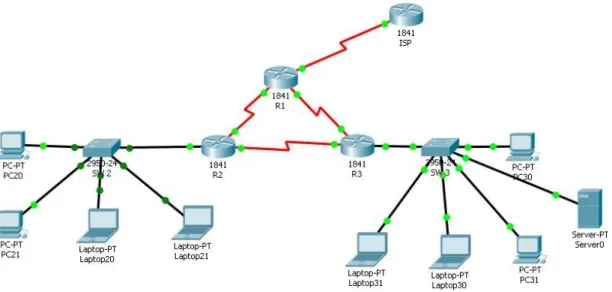
TABLA DE DIRECCIONAMIENTO
El
administrador Interfaces Dirección IP Máscara de subred predeterminado Gateway
ISP S0/0/0 200.123.211.1 255.255.255.0 N/D
R1
Se0/0/0 200.123.211.2 255.255.255.0 N/D
Se0/1/0 10.0.0.1 255.255.255.252 N/D
Se0/1/1 10.0.0.5 255.255.255.252 N/D
R2
Fa0/0,100 192.168.20.1 255.255.255.0 N/D
Fa0/0,200 192.168.21.1 255.255.255.0 N/D
Se0/0/0 10.0.0.2 255.255.255.252 N/D
Se0/0/1 10.0.0.9 255.255.255.252 N/D
R3 Fa0/0
192.168.30.1 255.255.255.0 N/D
2001:db8:130::9C0:80F:301 /64 N/D
Se0/0/0 10.0.0.6 255.255.255.252 N/D
Se0/0/1 10.0.0.10 255.255.255.252 N/D
SW2 VLAN 100 N/D N/D N/D
VLAN 200 N/D N/D N/D
5
CONFIGURACIONES ESCENARIO 1
CONFIGURACIÓN BÁSICA R1 Router>en
Router#conf t
Enter configuration commands, one per line. End with CNTL/Z. Router(config)#hostname R1
R1(config)#no ip domain-lookup R1(config)#enable secret class R1(config)#line con 0
R1(config-line)#password cisco R1(config-line)#login
R1(config-line)#exit
R1(config)#service password-encryption
R1(config)#banner motd $ Acceso no autorizado o prohibido! $ R1(config)#
CONFIGURACIÓN R2 Router>en
Router#conf t
Enter configuration commands, one per line. End with CNTL/Z. Router(config)#hostname R2
R2(config)#no ip domain-lookup R2(config)#enable secret class R2(config)#line con 0
R2(config-line)#password cisco R2(config-line)#login
R2(config-line)#exit
R2(config)#service password-encryption
R2(config)#banner motd $ Acceso no autorizado o prohibido! $ R2(config)#
CONFIGURACIÓN R3 Router>en
Router#conf t
Enter configuration commands, one per line. End with CNTL/Z. Router(config)#hostname R3
R3(config)#no ip domain-lookup R3(config)#enable secret class R3(config)#line con 0
6 R3(config-line)#login
R3(config-line)#exit
R3(config)#service password-encryption
R3(config)#banner motd $ Acceso no autorizado o prohibido! $ R3(config)#
CONFIGURACIÓN SW2 Switch>en
Switch#conf t
Enter configuration commands, one per line. End with CNTL/Z. Switch(config)#hostname SW2
SW2(config)#no ip domain-lookup SW2(config)#enable secret class SW2(config)#line con 0
SW2(config-line)#password cisco SW2(config-line)#login
SW2(config-line)#exit
SW2(config)#service password-encryption
SW2(config)#banner motd $ Solo personal autorizado! $ SW2(config)#
CONFIGURACIÓN SW3 Switch>en
Switch#conf t
Enter configuration commands, one per line. End with CNTL/Z. Switch(config)#hostname SW3
SW3(config)#no ip domain-lookup SW3(config)#enable secret class SW3(config)#line con 0
SW3(config-line)#password cisco SW3(config-line)#login
SW3(config-line)#exit
SW3(config)#service password-encryption
SW3(config)#banner motd $ Solo personal autorizado! $ SW3(config)#
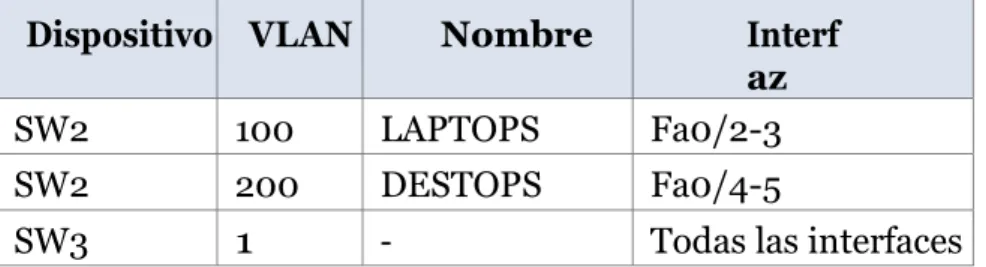
TABLA DE VLAN Y PUERTOS
Dispositivo VLAN Nombre Interf
az
SW2 100 LAPTOPS Fa0/2-3
SW2 200 DESTOPS Fa0/4-5
7 TABLA DE ENLACES TRONCALES
Dispositivo local Interfaz local Dispositivo remoto
SW2 Fa0/2-3 100
VLAN SW 2 SW2(config)#vlan 100
SW2(config-vlan)#name LAPTOPS SW2(config-vlan)#vlan 200
SW2(config-vlan)#name DESTOPS SW2(config-vlan)#
VLAN PUERTOS SW2 F0/2-3 Y F0/4-5 SW2(config)#int range f0/2-3
SW2(config-if-range)#switchport mode access SW2(config-if-range)#switchport access vlan 100 SW2(config-if-range)#exit
SW2(config)#int range f0/4-5
SW2(config-if-range)#switchport mode access SW2(config-if-range)#switchport access vlan 200 SW2(config-if-range)#exit
SW2(config)#
VLAN TRONCAL SW2 SW2(config)#int range f0/2-3
SW2(config-if-range)#switchport mode trunk
SW2(config-if-range)#
%LINEPROTO-5-UPDOWN: Line protocol on Interface FastEthernet0/2, changed state to down
%LINEPROTO-5-UPDOWN: Line protocol on Interface FastEthernet0/2, changed state to up
%LINEPROTO-5-UPDOWN: Line protocol on Interface FastEthernet0/3, changed state to down
8 SW2(config-if-range)#
INTERFACE S0/0/0 ISP Router(config)#int s0/0/0
Router(config-if)#ip address 200.123.211.1 255.255.255.0 Router(config-if)#no shutdown
%LINK-5-CHANGED: Interface Serial0/0/0, changed state to down Router(config-if)#
INTERFACE S0/0/0 –R1 R1(config)#int s0/0/0
R1(config-if)#ip address 200.123.211.2 255.255.255.0 R1(config-if)#no shutdown
R1(config-if)#
%LINK-5-CHANGED: Interface Serial0/0/0, changed state to up
R1(config-if)#
%LINEPROTO-5-UPDOWN: Line protocol on Interface Serial0/0/0, changed state to up
R1(config-if)#exit
INTERFACE S0/1/0 –R1 R1(config)#int s0/1/0
R1(config-if)#ip address 10.0.0.1 255.255.255.252 R1(config-if)#no shutdown
%LINK-5-CHANGED: Interface Serial0/1/0, changed state to down R1(config-if)#exit
INTERFACE S0/1/1 –R1 R1(config)#int s0/1/1
R1(config-if)#ip address 10.0.0.5 255.255.255.252 R1(config-if)#no shutdown
%LINK-5-CHANGED: Interface Serial0/1/1, changed state to down R1(config-if)#
9 R2(config)#int s0/0/0
R2(config-if)#ip address 10.0.0.2 255.255.255.252 R2(config-if)#no shutdown
R2(config-if)#
%LINK-5-CHANGED: Interface Serial0/0/0, changed state to up
R2(config-if)#exit
INTERFACE S0/0/1 –R2 R2(config)#int s0/0/1
R2(config-if)#ip address 10.0.0.9 255.255.255.252 R2(config-if)#no shutdown
%LINK-5-CHANGED: Interface Serial0/0/1, changed state to down R2(config-if)#exit
INTERFACE S0/0/0 –R3 R3(config)#int s0/0/0
R3(config-if)#ip address 10.0.0.6 255.255.255.252 R3(config-if)#no shutdown
R3(config-if)#
%LINK-5-CHANGED: Interface Serial0/0/0, changed state to up
R3(config-if)#exit
INTERFACE S0/0/1 –R3 R3(config)#int s0/0/1
R3(config-if)#ip address 10.0.0.10 255.255.255.252 R3(config-if)#no shutdown
R3(config-if)#
%LINK-5-CHANGED: Interface Serial0/0/1, changed state to up
R3(config-if)#exit
INTERFACE F0/0 –R3 R3(config)#int f0/0
R3(config-if)#ip address 192.168.30.1 255.255.255.0 R3(config-if)#no shutdown
R3(config-if)#
10
%LINEPROTO-5-UPDOWN: Line protocol on Interface FastEthernet0/0, changed state to up
R3(config-if)#ipv6 address 2001:db8:130::9C0:80F:301/64 R3(config-if)#no shutdown
R3(config-if)#
INTERFACE F0/0.100 –R2 R2(config)#int f0/0.100
R2(config-subif)#encap dot1q 100
R2(config-subif)#ip address 192.168.21.1 255.255.255.0 R2(config-subif)#no shutdown
R2(config-subif)#exit
INTERFACE F0/0.200 –R2 R2(config)#int f0/0.200
R2(config-subif)#encap dot1q 200
R2(config-subif)#ip address 192.168.20.1 255.255.255.0 R2(config-subif)#no shutdown
11 ESCENARIO 2
12
OSPFv2 area 0
Configuration Item or Task Specification
Router ID R1 1.1.1.1
Router ID R2 5.5.5.5
Router ID R3 8.8.8.8
Configurar todas las interfaces LAN como pasivas
Establecer el ancho de banda para enlaces seriales en 256 Kb/s
Ajustar el costo en la métrica de S0/0 a 9500
Verificar información de OSPF
Visualizar tablas de enrutamiento y routers conectados por OSPFv2
Visualizar lista resumida de interfaces por OSPF en donde se ilustre el costo de cada
interface
Visualizar el OSPF Process ID, Router ID, Address summarizations, Routing Networks,
and passive interfaces configuradas en cada router.
1. Configurar VLANs, Puertos troncales, puertos de acceso, encapsulamiento, Inter-VLAN
Routing y Seguridad en los Switches acorde a la topología de red establecida.
2. En el Switch 3 deshabilitar DNS lookup
3. Asignar direcciones IP a los Switches acorde a los lineamientos.
4. Desactivar todas las interfaces que no sean utilizadas en el esquema de red.
5. Implement DHCP and NAT for IPv4
6. Configurar R1 como servidor DHCP para las VLANs 30 y 40.
7. Reservar las primeras 30 direcciones IP de las VLAN 30 y 40 para configuraciones
estáticas.
Configurar DHCP pool para VLAN 30
Name: ADMINISTRACION DNS-Server: 10.10.10.11 Domain-Name: ccna-unad.com Establecer default gateway.
Configurar DHCP pool para VLAN 40
Name: MERCADEO DNS-Server: 10.10.10.11 Domain-Name: ccna-unad.com Establecer default gateway.
8. Configurar NAT en R2 para permitir que los host puedan salir a internet
9. Configurar al menos dos listas de acceso de tipo estándar a su criterio en para restringir
o permitir tráfico desde R1 o R3 hacia R2.
10.Configurar al menos dos listas de acceso de tipo extendido o nombradas a su criterio en
13
11.Verificar procesos de comunicación y redireccionamiento de tráfico en los routers
mediante el uso de Ping y Traceroute.
DESARROLLO ESCENARIO 2
Topología
Nota: es necesario adjuntar el servidor dado que no se soporta http
14
Configuración inicial en R1
Router>enable
Router#configure terminal
Enter configuration commands, one per line. End with CNTL/Z. Router(config)#no ip domain-lookup
Router(config)#hostname R1 R1(config)#line con 0
R1(config-line)#line vty 0 4 R1(config-line)#int s0/0/0
15 R1(config-if)#
R1(config-if)#clock rate 128000 R1(config-if)#no shutdown
Configuración inicial en R2
Router>enable
Router#configure terminal
Enter configuration commands, one per line. End with CNTL/Z. Router(config)#no ip domain-lookup
Router(config)#hostname R2 R2(config)#line console 0 R2(config-line)#line vty 0 4 R2(config-line)#int s0/0/0
R2(config-if)#ip address 172.31.21.2 255.255.255.252 R2(config-if)#no shutdown
%LINK-5-CHANGED: Interface Serial0/0/0, changed state to down R2(config-if)#int s0/0/1
R2(config-if)#ip address 172.31.23.1 255.255.255.252 R2(config-if)#clock rate 128000
This command applies only to DCE interfaces R2(config-if)#no shutdown
R2(config-if)#
16 R2(config)#int f0/0
R2(config-if)#description conection a ISP
17 Configuración de Web Server
Configuración en router 3
Router>enable
Router#configure terminal
Enter configuration commands, one per line. End with CNTL/Z. Router(config)#no ip domain-lookup
18 R3(config-line)#line vty 0 4
R3(config-line)#int s0/0/1
R3(config-if)#ip add 172.31.23.2 255.255.255.252 R3(config-if)#no shutdown
R3(config-if)#ip add 192.168.4.1 255.255.255.0 R3(config-if)#no shut
R3(config-if)#int lo5
R3(config-if)#
%LINK-5-CHANGED: Interface Loopback5, changed state to up
%LINEPROTO-5-UPDOWN: Line protocol on Interface Loopback5, changed state to up
R3(config-if)#ip add 192.168.5.1 255.255.255.0 R3(config-if)#no shut
R3(config-if)#int lo6
R3(config-if)#
19
%LINEPROTO-5-UPDOWN: Line protocol on Interface Loopback6, changed state to up R3(config-if)#ip add 192.168.6.1 255.255.255.0
R3(config-if)#no shut R3(config-if)#
Configuracion S1 Switch>enable
Switch#configure terminal
Enter configuration commands, one per line. End with CNTL/Z. Switch(config)#no ip domain-lookup
Switch(config)#hostname S1 S1(config)#line console 0 S1(config-line)#line vty o 4 ^
% Invalid input detected at '^' marker. S1(config-line)#line vty 0 4
S1(config-line)#exit S1#
%SYS-5-CONFIG_I: Configured from console by console
S1#copy running-config start
Destination filename [startup-config]? Building configuration...
20 Configuraciones en R1
R1#enable
R1#configure terminal
Enter configuration commands, one per line. End with CNTL/Z.
R1(config)#interface f0/0.30
R1(config-subif)#encapsulation dot1Q 30
R1(config-subif)#encapsulation dot1Q 30
R1(config-subif)#ip address 192.168.30.1 255.255.255.0
R1(config-subif)#exit
R1(config)#router ospf 1
R1(config-router)#router-id 1.1.1.1
R1(config-router)#network 172.31.21.0 0.0.0.3 area 0
R1(config-router)#network 192.168.30.0 0.0.0.3 area 0
R1(config-router)#network 192.168.40.0 0.0.0.3 area 0
R1(config-router)#network 192.168.30.0 0.0.0.255 area 0
R1(config-router)#network 192.168.40.0 0.0.0.255 area 0
R1(config-router)#network 192.168.200.0 0.0.0.255 area 0
R1(config-router)#passive-interface f0/0.30
R1(config-router)#passive-interface f0/0.40
R1(config-router)#passive-interface f0/0.200
%Invalid interface type and number
R1(config-router)#auto-cost reference-bandwidth 9500
% OSPF: Reference bandwidth is changed.
Please ensure reference bandwidth is consistent across all routers.
21 R1(config)#int s0/0/1
R1(config-if)#bandwidth 256
R1(config-if)#ip ospf cost 9500
R1(config-if)#
R1#
Configuraciones en R2
R2>enable
R2#configure terminal
Enter configuration commands, one per line. End with CNTL/Z. R2(config)#router ospf 1
R2(config-router)#router-id 5.5.5.5 R2(config-router)#network 172.31.21.0
R2(config-router)#network 172.31.21.0 0.0.0.3 area 0 R2(config-router)#network 172.31.23.0 0.0.0.3 area 0 R2(config-router)#network 10.10.10.0 0.0.0.255 area 0 R2(config-router)#passive-interface g0/1
22 R2(config-router)#passive-interface s0/1 %Invalid interface type and number R2(config-router)#passive-interface s0/0/1
R2(config-router)#auto-cost reference-bandwidth 9500 % OSPF: Reference bandwidth is changed.
Please ensure reference bandwidth is consistent across all routers. R2(config-router)#int s0/0/0
R2(config-if)#bandwidth 256 R2(config-if)#int s0/0/1 R2(config-if)#bandwidth 256 R2(config-if)#ip ospf cost 9500 R2(config-if)#exit
R2(config)#
Configuracion en R3
R3>enable
R3#configure terminal
Enter configuration commands, one per line. End with CNTL/Z. R3(config)#router ospf 1
R3(config-router)#router id 8.8.8.8 ^
23 R3(config-router)#router-id 8.8.8.8
R3(config-router)#network 172.31.23.0 0.0.0.3 area 0 R3(config-router)#network 192.168.4.0 0.0.3.255 area 0 R3(config-router)#passive-interface lo4
R3(config-router)#passive-interface lo5 R3(config-router)#passive-interface lo6
R3(config-router)#auto-cost reference-bandwidth 9500 % OSPF: Reference bandwidth is changed.
Please ensure reference bandwidth is consistent across all routers. R3(config-router)#exit
R3(config)#int s0/0/1
24
Visualizar la lista resumida de interfaces por ospf en donde se ilustre el costo de la interface
Configurar VLANs, Puertos troncales, puertos de acceso, encapsulamiento, Inter-VLAN Routing y Seguridad en los Switches acorde a la topología de red establecida.
S1>enable
S1#configure terminal
Enter configuration commands, one per line. End with CNTL/Z. S1(config)#vlan 30
S1(config-vlan)#name Administracion S1(config-vlan)#vlan 40
S1(config-vlan)#name Mercadeo S1(config-vlan)#vlan 200
25 S1(config-if)#ip add 192.168.99.2 255.255.255.0 S1(config-if)#no shut
S1(config-if)#exit
S1(config)#ip default-gateway 192.168.99.1 S1(config)#int f0/3
S1(config-if)#switchport mode trunk
S1(config-if)#
%LINEPROTO-5-UPDOWN: Line protocol on Interface FastEthernet0/3, changed state to down
%LINEPROTO-5-UPDOWN: Line protocol on Interface FastEthernet0/3, changed state to up
%LINEPROTO-5-UPDOWN: Line protocol on Interface Vlan200, changed state to up
S1(config-if)#switchport
S1(config-if)#switchport trunk native vlan 1 S1(config-if)#int f0/24
S1(config-if)#switchport mode trunk
26 S1(config-if)#switchport
S1(config-if)#switchport trunk native vlan 1 S1(config-if)#int f0/24
S1(config-if)#switchport mode trunk
S1(config-if)#switchport trunk native vlan 1 S1(config-if)#exit
S1(config)#int range fa0/2, fa0/4-23, g0/1-2 S1(config-if-range)#switch mode access S1(config-if-range)#int fa0/1
S1(config-if)#switch mode access S1(config-if)#switch acces vlan % Incomplete command.
S1(config-if)#switch access vlan % Incomplete command.
S1(config-if)#switch access vlan 30
S1(config-if)#int range fa0/2, fa0/4-23, g0/1-2 S1(config-if-range)#shutdown
%LINK-5-CHANGED: Interface FastEthernet0/2, changed state to administratively down
%LINK-5-CHANGED: Interface FastEthernet0/4, changed state to administratively down
%LINK-5-CHANGED: Interface FastEthernet0/5, changed state to administratively down
%LINK-5-CHANGED: Interface FastEthernet0/6, changed state to administratively down
27
%LINK-5-CHANGED: Interface FastEthernet0/8, changed state to administratively down
%LINK-5-CHANGED: Interface FastEthernet0/9, changed state to administratively down
%LINK-5-CHANGED: Interface FastEthernet0/10, changed state to administratively down
%LINK-5-CHANGED: Interface FastEthernet0/11, changed state to administratively down
%LINK-5-CHANGED: Interface FastEthernet0/12, changed state to administratively down
%LINK-5-CHANGED: Interface FastEthernet0/13, changed state to administratively down
%LINK-5-CHANGED: Interface FastEthernet0/14, changed state to administratively down
%LINK-5-CHANGED: Interface FastEthernet0/15, changed state to administratively down
%LINK-5-CHANGED: Interface FastEthernet0/16, changed state to administratively down
%LINK-5-CHANGED: Interface FastEthernet0/17, changed state to administratively down
%LINK-5-CHANGED: Interface FastEthernet0/18, changed state to administratively down
%LINK-5-CHANGED: Interface FastEthernet0/19, changed state to administratively down
%LINK-5-CHANGED: Interface FastEthernet0/20, changed state to administratively down
%LINK-5-CHANGED: Interface FastEthernet0/21, changed state to administratively down
%LINK-5-CHANGED: Interface FastEthernet0/22, changed state to administratively down
%LINK-5-CHANGED: Interface FastEthernet0/23, changed state to administratively down
%LINK-5-CHANGED: Interface GigabitEthernet0/1, changed state to administratively down
%LINK-5-CHANGED: Interface GigabitEthernet0/2, changed state to administratively down
28
Configuración en S3
Switch>enable
Switch#configure terminal
Enter configuration commands, one per line. End with CNTL/Z. Switch(config)#vlan 30
Switch(config-vlan)#name administracion Switch(config-vlan)#vlan 40
Switch(config-vlan)#name mercadeo Switch(config-vlan)#vlan 200
Switch(config-vlan)#name mantenimiento Switch(config-vlan)#exit
Switch(config)#int vlan 200 Switch(config-if)#
%LINK-5-CHANGED: Interface Vlan200, changed state to up
%LINEPROTO-5-UPDOWN: Line protocol on Interface Vlan200, changed state to up Switch(config-if)#ip add 192.168.99.3 255.255.255.0
29 Switch(config-if)#exit
Switch(config)#ip default-gateway 192.168.99.1
Configuraciones en r1
R1>enable
R1#configure terminal
Enter configuration commands, one per line. End with CNTL/Z. R1(config)#int f0/1.30
R1(config-subif)#encapsulation dotlq 30 ^
% Invalid input detected at '^' marker. R1(config-subif)#interface f0/0.30
R1(config-subif)#encapsulation dot1Q 30
R1(config-subif)#ip add 192.168.30.1 255.255.255.0 R1(config-subif)#int f0/0.40
R1(config-subif)#ip add 192.168.40.1 255.255.255.0 R1(config-subif)#encapsulation dot1Q 40
R1(config-subif)#ip add 192.168.40.1 255.255.255.0 R1(config-subif)#int f0/0.200
R1(config-subif)#encapsulation dot1Q 200
R1(config-subif)#ip add 192.168.200.1 255.255.255.0
30
31
Asignar direcciones IP a los Switches acorde a los lineamientos.
S1(config)#interface vlan 1
S1(config-if)#ip add 192.168.99.2 255.255.255.0
S1(config-if)#no shut
Switch>enable
Switch#configure terminal
Enter configuration commands, one per line. End with CNTL/Z. Switch(config)#int vlan 1
Switch(config-if)#ip add 192.168.99.3 255.255.255.0 Switch(config-if)#no shut
Switch(config-if)#
%LINK-5-CHANGED: Interface Vlan1, changed state to up
%LINEPROTO-5-UPDOWN: Line protocol on Interface Vlan1, changed state to up
Switch(config-if)#exit
Switch(config)#ip default-gateway 192.168.99.1 Switch(config)#exit
32
Desactivar todas las interfaces que no sean utilizadas en el esquema de red.
S1(config-if)#int range fa0/2, fa0/4-23, g0/1-2
S1(config-if-range)#shutdown
S3#configure terminal
Enter configuration commands, one per line. End with CNTL/Z. S3(config)#int range fa0/2, fa0/4-24, g0/1-2
S3(config-if-range)#shutdown
%LINK-5-CHANGED: Interface FastEthernet0/2, changed state to administratively down
%LINK-5-CHANGED: Interface FastEthernet0/4, changed state to administratively down
%LINK-5-CHANGED: Interface FastEthernet0/5, changed state to administratively down
%LINK-5-CHANGED: Interface FastEthernet0/6, changed state to administratively down
%LINK-5-CHANGED: Interface FastEthernet0/7, changed state to administratively down
%LINK-5-CHANGED: Interface FastEthernet0/8, changed state to administratively down
%LINK-5-CHANGED: Interface FastEthernet0/9, changed state to administratively down
%LINK-5-CHANGED: Interface FastEthernet0/10, changed state to administratively down
33
%LINK-5-CHANGED: Interface FastEthernet0/12, changed state to administratively down
%LINK-5-CHANGED: Interface FastEthernet0/13, changed state to administratively down
%LINK-5-CHANGED: Interface FastEthernet0/14, changed state to administratively down
%LINK-5-CHANGED: Interface FastEthernet0/15, changed state to administratively down
%LINK-5-CHANGED: Interface FastEthernet0/16, changed state to administratively down
%LINK-5-CHANGED: Interface FastEthernet0/17, changed state to administratively down
%LINK-5-CHANGED: Interface FastEthernet0/18, changed state to administratively down
%LINK-5-CHANGED: Interface FastEthernet0/19, changed state to administratively down
%LINK-5-CHANGED: Interface FastEthernet0/20, changed state to administratively down
%LINK-5-CHANGED: Interface FastEthernet0/21, changed state to administratively down
%LINK-5-CHANGED: Interface FastEthernet0/22, changed state to administratively down
%LINK-5-CHANGED: Interface FastEthernet0/23, changed state to administratively down
%LINK-5-CHANGED: Interface FastEthernet0/24, changed state to administratively down
%LINK-5-CHANGED: Interface GigabitEthernet0/1, changed state to administratively down
%LINK-5-CHANGED: Interface GigabitEthernet0/2, changed state to administratively down S3(config-if-range)#
S3#
34
Configuraciones finales en R1
R1#configure terminal
Enter configuration commands, one per line. End with CNTL/Z. R1(config)#ip dhcp excluded-address 192.168.30.1 192.168.30.30 R1(config)#ip dhcp excluded-address 192.168.40.1 192.168.40.30 R1(config)#ip dhcp pool admin
R1(dhcp-config)#dns-server 10.10.10.11 R1(dhcp-config)#default-router 192.168.30.1
R1(dhcp-config)#network 192.168.30.0 255.255.255.0 R1(dhcp-config)#ip dhcp pool merca
R1(dhcp-config)#dns-server 10.10.10.11 R1(dhcp-config)#default-router 192.168.40.1
R1(dhcp-config)#network 192.168.40.0 255.255.255.0
35
Configuraciones finales en R2
R2>enable
R2#configure terminal
Enter configuration commands, one per line. End with CNTL/Z. R2(config)#user webuser privilege 15 secret cisco12345
R2(config)#ip http server ^
% Invalid input detected at '^' marker.
36
Se debe tener en cuenta que se empleó un servidor dentro de la topología.
R2(config)#ip nat inside source static 10.10.10.10 209.165.200.229 R2(config)#int f0/0
R2(config-if)#ip nat out R2(config-if)#ip nat outside R2(config-if)#int f0/1 R2(config-if)#ip nat inside
37
R2(config-if)#access-list 1 permit 192.168.30.0 0.0.0.255 R2(config)#access-list 1 permit 192.168.40.0 0.0.0.255
R2(config)#ip nat pool INTERNET 209.165.200.225 209.165.200.228 netmask 255.255.255.248 R2(config)#ip nat inside source list 1 pool INTERNET
38 R2(config)#ip acces list
R2(config)#ip access-list standard ADMIN_S R2(config-std-nacl)#permit host 172.31.21.1 R2(config-std-nacl)#exit
R2(config)#line vty 0 4
39
R2(config)#access-list 101 permit tcp any host 209.165.200.229 eq www R2(config)#access-list 101 permit icmp any any echo-reply
R2(config)#access-list 101 permit icmp any any echo-reply R2(config)#int f0/0
R2(config-if)#ip access-group 101 in R2(config-if)#int f0/0/0
%Invalid interface type and number R2(config)#int s0/0/0
R2(config-if)#ip access-group 101 out R2(config-if)#int s0/0/1
R2(config-if)#ip access-group 101 out R2(config-if)#int f0/1
R2(config-if)#ip access-group 101 out
40
Procesos de ping
R2#show access-lists Standard IP access list 1
10 permit 192.168.30.0 0.0.0.255 20 permit 192.168.40.0 0.0.0.255 Standard IP access list ADMIN_S 10 permit host 172.31.21.1
Extended IP access list 101
10 permit tcp any host 209.165.200.229 eq www
42
CONCLUSIONES
La presente actividad, nos permitió poner en práctica los conocimientos adquiridos en Packet Tracer, para los módulos de CCNA 1 y CCNA 2, durante el desarrollo pudimos configurar diferentes dispositivos que integran una red, dentro de los cuales tenemos SW, Routers, PC, Servidores, y diferentes conectores para siempre establecer la mejor topología, también se practicaron temas relacionados con asignación de direcciones IPs a cada uno de los equipos de la red, Creacion de Vlans y pruebas de conectividad efectiva que se fueron realizando en cada uno de los escenarios.
43
BIBLIOGRAFÍA
Shaughnessy, T., Velte, T., & Sáchez García, J. I. (2000). Manual de CISCO. Ariganello, E., & Sevilla, B. (2011). Redes CISCO - guía de estudio para la certificación CCNP (No. 004.6 A73).
Benchimol, D. (2010). Redes Cisco-Instalacion y administracion de hardware y software.
CISCO. (s.f.). Principios básicos de routing y switching: Listas de Control de Acceso. (2017), Tomado de:
https://staticcourseassets.s3.amazonaws.com/RSE503/es/index.html#9 .0.1
Principios básicos de routing y switching: Traducción de direcciones de red para IPv4. (2017), Tomado de: